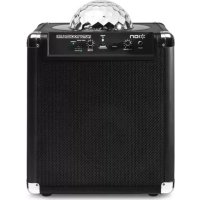
Party Rocker Live - Docking station ION - Free user manual and instructions
Find the device manual for free Party Rocker Live ION in PDF.



| Product Type | Docking station with speaker and motorized lighting |
| Brand | ION |
| Model | Party Rocker Live |
| Dimensions (approx.) | 35 x 35 x 45 cm |
| Weight (approx.) | 4.5 kg |
| Power supply | Mains via IEC power cable (included) |
| Connectivity | Bluetooth, 3.5 mm auxiliary input, 6.35 mm microphone input |
| Main functions | Audio playback, microphone, music-reactive motorized lighting (Auto, Beat Sync, App Control), Party Rocker mobile app |
| Box contents | Party Rocker Live, microphone with cable, 3.5 mm audio cable, power cable, quick start guide, safety booklet |
| Care and cleaning | Clean with a soft, dry cloth. Do not use abrasive products. Ensure free airflow around ventilation openings. |
| Safety | Do not expose to water or moisture. Do not look directly into the dome light. Do not sit or climb on the device. |
| Spare parts and repairability | Contact ION support for spare parts. The device is not designed for user repair. |
| Warranty | Visit ionaudio.com/warranty for warranty details. |
Frequently Asked Questions - Party Rocker Live ION
User questions about Party Rocker Live ION
0 question about this device. Answer the ones you know or ask your own.
Ask a new question about this device
Download the instructions for your Docking station in PDF format for free! Find your manual Party Rocker Live - ION and take your electronic device back in hand. On this page are published all the documents necessary for the use of your device. Party Rocker Live by ION.
USER MANUAL Party Rocker Live ION
For product registration, visit the ION website: ionaudio.com
For the latest information about this product, visit ionaudio.com/partyrockerlive
For additional product support, visit ionaudio.com/support
For safety/warranty information, visit ionaudio.com/warranty
WARNING: DO NOT splash or immerse in water or other liquids. Not for use in rain. Use only in dry locations.
WARNING: DO NOT look directly into the dome light. Do not sit, stand, or apply pressure on the dome light.
BOX CONTENTS
- Party Rocker Live
- Microphone with mic cable
- Audio Cable with 1/8" (3.5mm) connectors
■ Power Cable (standard IEC) - Quickstart Guide
■ Safety Instructions & Warranty Information Booklet
Quick Setup / Connection Diagram
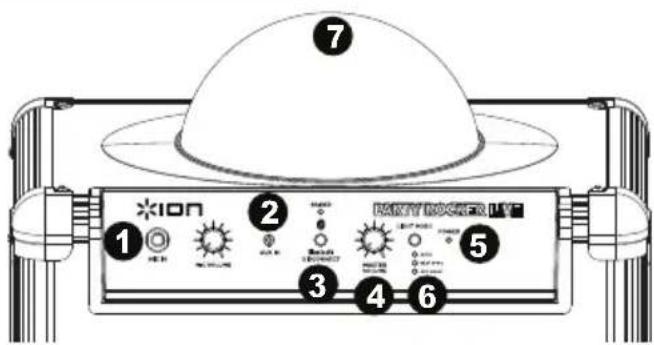
- Make sure all items listed in Box Contents at the beginning of this guide are included in the box.
- READ SAFETY INSTRUCTION BOOKLET BEFORE USING THE PRODUCT.
- For optimal performance, place Party Rocker Live in the center of the room so it is unobstructed by walls, furniture, etc.
- Move Light Mode switch to OFF.
- Turn down the Master Volume on the Party Rocker Live.
- Turn on Party Rocker Live.
- Connect your music player with an audio cable or Bluetooth. (see Connecting with a Bluetooth Device for more details on this)
- Adjust the volume on your music player and on Party Rocker Live as needed.
- Adjust the Light Mode switch on Party Rocker Live as needed.
- Turn off Party Rocker Live when not in use.
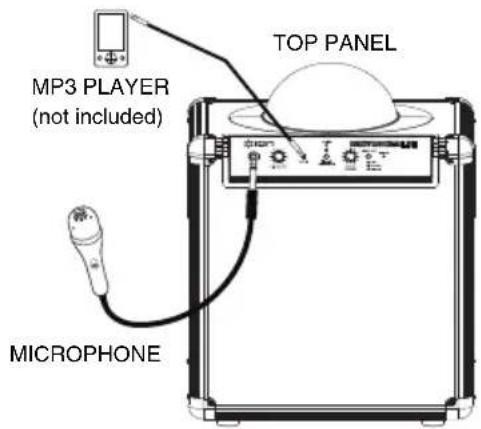

Diagram and Parts Description
- Microphone Input with Volume Control (1/4"): This mono input accepts a 1/4" input such as a microphone, guitar, or other musical instrument.
- Auxiliary input: This stereo 1/8" input can be used to connect a smartphone, MP3 player, or other audio source.
- Bluetooth: The Paired LED will be lit when a device is paired to Party Rocker Live. This LED will not be lit when Party Rocker Live is first powered on (unless it was previously paired with a device). Press the Disconnect button to disconnect a paired Bluetooth device.
- Master Volume Control: This adjusts the speaker's main mix volume, which includes Microphone Input, Auxiliary Input, and the audio of a paired Bluetooth device.
- Power LED: Indicates whether Party Rocker Live is on or off.
-
Light Mode: There are three modes to select from for how the dome lights react to the music.
-
Auto = the dome lights spin and change color with a predetermined pattern regardless of the beat of the music playing.
- Beat Sync = the dome lights spin and change color to the beat of the music playing.
-
App Mode = the dome lights are controlled using the mobile app (available for Android or iOS).
-
Dome: The dome light can spin and react to the music playing (depending on the Light Mode that is selected).
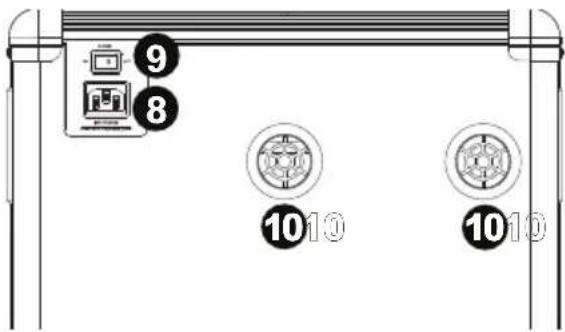
- Power Cable Input (IEC): Insert the included power cable here to power the unit.
- Power ON/OFF Switch: Turns Party Rocker Live on or off.
- Air Vents: These air intake and air outtake vents operate when Light Mode is turned on to ensure the light dome operates efficiently.
Note: Please ensure these vents do not get covered or blocked.
WARNING: Do not look directly into the dome light. Do not sit, stand, or apply pressure on the dome light.
Troubleshooting
If the sound is distorted: Try lowering the volume control of your sound source or musical instrument. Also, try to reduce the overall volume of Party Rocker Live.
If there is too much bass: Try adjusting the tone or EQ control on your sound source to lower the bass level. This will allow you to play the music louder before clipping (distortion) occurs.
If there is a high-pitched whistling noise when using microphones: This is probably feedback. Point the microphone away from the speaker.
If you can't hear the microphone over the music volume: Turn down the music volume from your source.
Connecting with a Bluetooth Device
- Turn on your Bluetooth device.
- Power on Party Rocker Live and it will automatically go into pairing mode to search for Bluetooth devices. You will know you are in pairing mode when the LED is off.
- If your Bluetooth device is not able to pair to the amp, press the disconnect button on the amp to break previous Bluetooth connections and reset the Bluetooth module.
- Navigate to your Bluetooth device's setup screen, find "Party Rocker Live" and connect. Note: If your Bluetooth device prompts for a pairing code, enter '0000'.
- Paired LED will light up solid when it is 'paired'. Note: If you experience trouble pairing or playing music, update your device's OS.
- To disconnect pairing, press the 'Disconnect' button on Party Rocker Live.
- To connect to another Bluetooth device, repeat steps 3-4.
Note: Maximum range will be achieved when using devices with Bluetooth 4.0.
Installing the Party Rocker App
IMPORTANT: To ensure the best possible experience with the app, use the most current Android OS or iOS on your iPad, iPhone, or iPod touch (not included).
Note: Ensure that your device has internet access via your service provider or wireless connection. You can also download the app on your computer, but remember to connect and sync your iPad, iPhone, or iPod touch to transfer the app to iPad, iPhone, or iPod touch.
Follow these steps below to download the free app on your Android device, iPad, iPhone, or iPod touch:
- On your device, go to the respective Apple App Store or Google Play Store.
- Search for the free Party Rocker app and download it. Follow the on-screen instructions to download and install the Party Rocker app.
- Once downloaded, the Party Rocker app will appear on your device's home screen.
- Launch the app.
The following parameters on Party Rocker Live can be controlled via the Party Rocker app:
- Motor speed control
• Individual colors on/off - Flashing "strobe" effect
- All lights on/off
- Beat Sync vs. Auto Mode
Assistance technique
Output Power: 50W Peak
Frequency Response: (±3dB): 77 Hz-20 kHz (Aux)
Microphone type: Dynamic microphone
Supported Bluetooth Profile: A2DP
Bluetooth Range: Up to 100 feet*
Specifications are subject to change without notice.
*Bluetooth range is affected by walls, obstructions, and movement. Best performance is achieved in a wide open area.
Trademarks and Licenses
ION Audio is a trademark of ION Audio, LLC, registered in the U.S. and other countries.
The Bluetooth word mark and logos are owned by the Bluetooth SIG, Inc. and any use of such marks by ION Audio is under license.
All other product or company names are trademarks or registered trademarks of their respective owners.
For the electrostatic discharge (ESD) test of EN301 489-1/17, it was found that manual operation is needed to resume normal operation as intended after the test.
ionaudio.com
Brand : ION
Model : Party Rocker Live
Category : Docking station