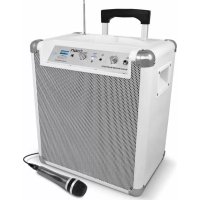
Block Rocker Bluetooth - Docking station ION - Free user manual and instructions
Find the device manual for free Block Rocker Bluetooth ION in PDF.



| Product Type | Docking Station / Portable Sound System |
| Brand | ION |
| Model | Block Rocker Bluetooth |
| Power Supply | Mains (IEC cable) and rechargeable lead-acid battery |
| Battery | Rechargeable lead-acid, full charge before first use |
| Battery Life | Approximately 4 to 6 hours depending on usage |
| Wireless Connectivity | Bluetooth (max range with Bluetooth 4.0) |
| Radio Tuner | AM/FM with telescopic antenna |
| Inputs | 1/4" instrument/microphone, 1/8" stereo auxiliary |
| Outputs | Built-in speakers |
| Docking Station | For iPad/iPod touch/iPhone/Android |
| USB Charging Port | Yes (charges devices) |
| Controls | Master volume, band selector, tuner |
| Indicators | Bluetooth pairing LED, power indicator, battery level indicator |
| Dimensions (approx.) | 30 x 20 x 40 cm |
| Weight (approx.) | 5 kg |
| Maintenance | Fully recharge after each use, avoid deep discharge, store away from heat and moisture |
| Safety | Follow voltage selector, do not expose to high temperatures or moisture |
| Box Contents | Speaker, microphone with cable, 1/8" to 1/8" cable, power cable, quick start guide, safety instructions booklet |
Frequently Asked Questions - Block Rocker Bluetooth ION
User questions about Block Rocker Bluetooth ION
0 question about this device. Answer the ones you know or ask your own.
Ask a new question about this device
Download the instructions for your Docking station in PDF format for free! Find your manual Block Rocker Bluetooth - ION and take your electronic device back in hand. On this page are published all the documents necessary for the use of your device. Block Rocker Bluetooth by ION.
USER MANUAL Block Rocker Bluetooth ION
-
Make sure all items listed on the front of this guide are included in the box.
-
READ SAFETY INSTRUCTION BOOKLET BEFORE USING THE PRODUCT.
-
MAKE SURE THAT YOU HAVE COMPLETELY CHARGED THE BATTERY PRIOR TO FIRST USE FOR MAXIMUM BATTERY LIFE.
-
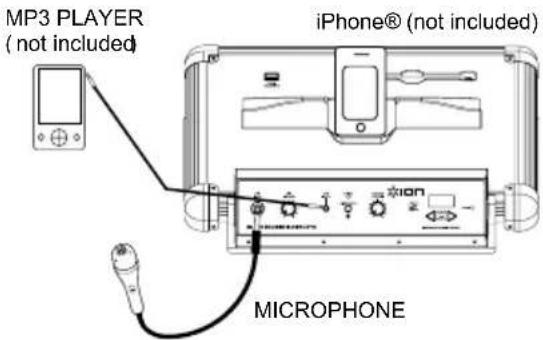
Study this setup diagram.
-
Make sure all input devices such as microphones, CD players, or mp3 players are turned off and volume settings are set at "zero."
-
Connect all devices as shown.
-
Switch everything on in the following order:
• audio input sources (i.e. microphones, instruments, CD/MP3 Players)
- When turning off, always reverse this operation:
■ Microphone with mic cable
- 1/8" to 1/8" cable
■ Power Cable (standard IEC)
- Quickstart Guide
■ Safety Instructions & Warranty Information Booklet
Go to http://www.ionaudio.com for product registration.
TOP PANEL
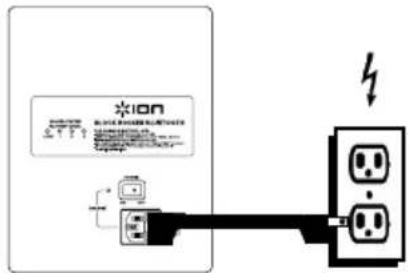
REAR PANEL POWER
RECHARGEABLE BATTERIES
Rechargeable lead-acid batteries are the same type used in automobiles. As with your car battery, how you use this battery has a significant impact on its lifespan. With proper use and treatment, a lead-acid battery can last for years. Here are some recommendations for getting the longest life from the internal battery.
GENERAL USAGE
• FULLY CHARGE THE BATTERY BEFORE USING IT.
- CHARGE THE BATTERY COMPLETELY AFTER EACH USE.
• AVOID COMPLETELY DRAINING THE BATTERY.
- You may leave the unit plugged in for up to two weeks.
- For maximum life, drain the battery 80% once a month.
STORAGE
- Avoid storing in high temperatures and moist places.
- For long-term storage, periodically recharge the battery.
• If you do not charge the battery for six months, it may not charge.
REPAIR
- As the battery nears the end of its life, it may lose its ability to recharge. If this occurs, contact ION Audio technical support at www.ionaudio.com/supporthome.
DISPOSAL
- Bring the unit to a recycling center or dispose of in accordance with local ordinances.
iPad is a trademark of Apple Inc., registered in the U.S. and other countries.
The Bluetooth word mark and logos are registered trademarks owned by Bluetooth SIG, Inc. and any use of such marks by ION Audio is under license. Other trademarks and trade names are those of their respective owners.
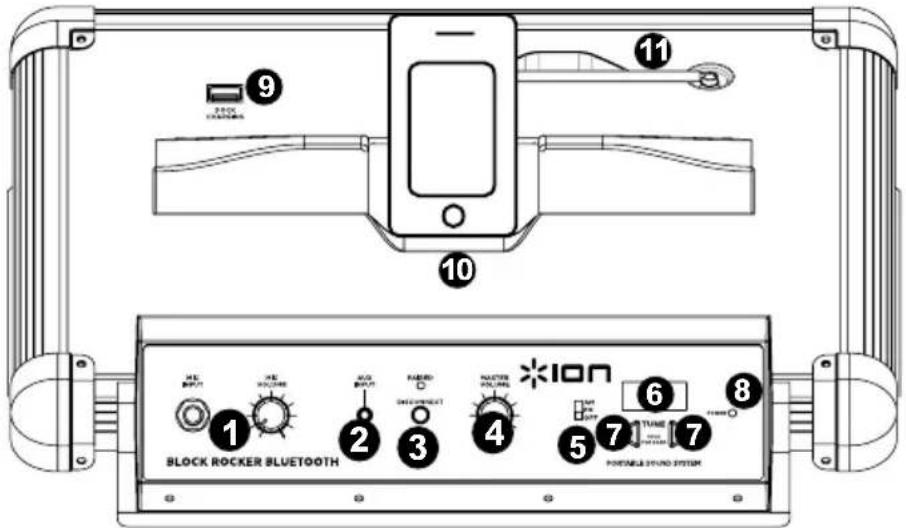
DIAGRAM AND PARTS DESCRIPTION
-
Instrument / Microphone Input with Volume Control (1/4"): This mono input accepts a 1/4" input such as a microphone, guitar, or other musical instrument.
-
Auxiliary input: This stereo 1/8" input can be used to connect a CD player, MP3 player, or other audio source.
-
Bluetooth: The Paired LED will be lit when a device is paired to BLOCK ROCKER BLUETOOTH. This LED will not be lit when BLOCK ROCKER BLUETOOTH is first powered on (unless it was previously paired with a device). Press the Disconnect button to disconnect a paired Bluetooth device.
-
Master Volume Control: This adjusts the speaker's main mix volume, which includes Instrument/Microphone Input, Auxiliary Input, Tuner, and the audio of a paired Bluetooth device.
-
Radio Selector: This switch sets the tuner to AM or FM or turns the tuner off. (Note: This switch does not turn the unit's power off – just the tuner.)
-
LCD: Displays the current radio station.
-
Tuner: Use these buttons to search for a radio station. To "scan" (jump to the next available station), hold this down for a few seconds until it starts to seek a station. Unit will remember the last station you were on when you power off and power back on.
-
Power LED: Indicates whether BLOCK ROCKER BLUETOOTH is on or off.
-
Dock Charge: Connect your device's charge cable here to charge it. USB charging only functions when the unit's power is turned on.
Note: Users with iPad ( 3^rd generation) may experience slower charging. We recommend charging with the screen locked when using iPad ( 3^rd generation).
-
Device Cradle: Place your iPad/iPod touch®/iPhone®, Android® or other device here to be held. These can be connected via Bluetooth or to aux input using the included 1/8" to 1/8" cable. Note: It is recommended to remove your iPad or other device from the cradle before transporting or traveling with BLOCK ROCKER.
-
Antenna: Adjust this telescoping FM antenna to get the best radio reception.
Note: To prevent accidental damage, we recommend rotating the antenna only when it is extended horizontally. Also, retract the antenna when the Tuner is not in use.
Note: When using AM radio if you have a Bluetooth device that is paired, this will cause poor AM reception. Unpair your Bluetooth device in order to listen to AM radio. To adjust AM reception, move entire unit.
-
Power Cable Input (IEC): Insert the included power cable here to charge the unit. Note that the BLOCK ROCKER BLUETOOTH can run off the power adapter while it simultaneously charges the battery. The charge indicator illuminates when the battery is charging.
-
Voltage Selector*: If your unit has a voltage selector switch, change its setting only when necessary (e.g., when traveling to a country or region with a different voltage). Selecting an improper voltage setting can damage the unit. To change its setting, only remove *one* screw of the cover and slide it aside to expose the selector.
-
Power ON/OFF Switch: Turns BLOCK ROCKER BLUETOOTH on or off. Please note that while BLOCK ROCKER BLUETOOTH is connected to a power source, it does not need to be powered on to charge the battery.
-
Battery Level Indicator: While the unit is powered ON and unit is not plugged in, these four lights indicate the power left in the battery. Battery life varies based on volume and usage.
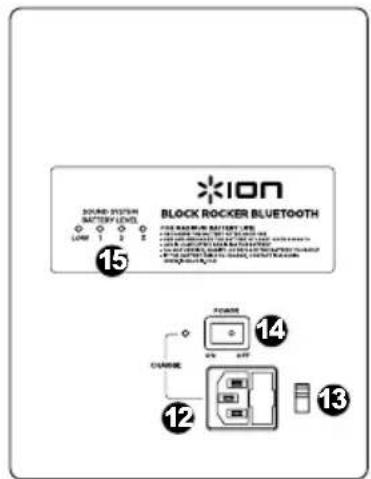
*WARNING: If your unit has a voltage selector switch, change its setting only when necessary (e.g., when traveling to a country or region with a different voltage). Selecting an improper voltage setting can damage the unit. To change its setting, only remove *one* screw of the cover and slide it aside to expose the selector.
iPhone and iPod touch are trademarks of Apple Inc., registered in the U.S. and other countries.
Android is a trademark of Google Inc.
TROUBLESHOOTING
If the sound is distorted: Try lowering the volume control of your sound source or musical instrument. Also, try to reduce the overall volume of BLOCK ROCKER BLUETOOTH.
If there is too much bass: Try adjusting the tone or EQ control on your sound source to lower the bass level. This will allow you to play the music louder before clipping (distortion) occurs.
If there is a high-pitched whistling noise when using microphones: This is probably feedback. Point the microphones away from the speaker.
If there is poor AM reception: When you have a Bluetooth device that is paired, unpair your Bluetooth device in order to listen to AM radio. To adjust AM reception, move entire unit.
If you can't hear the microphone over the music volume: Turn down the music volume from your source.
PAIRING A BLUETOOTH DEVICE
- Turn on your Bluetooth device.
- Power on BLOCK ROCKER BLUETOOTH and it will automatically go into pairing mode to search for Bluetooth devices. You will know you are in pairing mode when the LED is blank.
- If your Bluetooth device is not able to pair to the amp, press the disconnect button on the amp to break previous Bluetooth connections and reset the Bluetooth module.
- Navigate to your Bluetooth device's setup screen, find "ION Audio Speaker" and connect. Note: If your Bluetooth device prompts for a pairing code, enter '0000'.
- BLOCK ROCKER BLUETOOTH LED will light up solid when it is 'paired'. Note: Users should consider updating their OS if experiencing trouble with pairing or playing music.
- To disconnect pairing, press the 'Disconnect' button on BLOCK ROCKER BLUETOOTH.
- To connect to another Bluetooth device, repeat steps 3-4.
Note: Maximum range will be achieved when using devices with Bluetooth 4.0.
Frequency Response (±3dB): (Aux) 77Hz-20kHz
Microphone type: Dynamic microphone
Bottom pole mount specifications: Standard Pole Mount found at professional audio retailer:
Depth 80mm (3.15")
Diameter 35.5mm (1.40")
Time required to fully charge the BLOCK ROCKER BLUETOOTH: Approximately 6 hours
Battery life: Up to 12 hours* when fully charged.
Supported Bluetooth Profile: A2DP
*Note: Battery life may vary based on temperature, age, and volume usage of product.
Radio Frequency Range:
US:
AM 520 - 1710 KHZ
FM 87.5 - 108 MHZ
EUROPE:
AM 522 - 1629 KHZ
FM 87.5 - 108 MHZ
JAPAN:
AM 520 - 1710 KHZ
FM 75.5 - 90.5 MHZ
For the electrostatic discharge (ESD) test of EN301 489-1/17, it was found that manual operation is needed to resume normal operation as intended after the test.
www.ionaudio.com
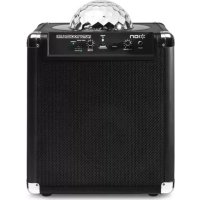
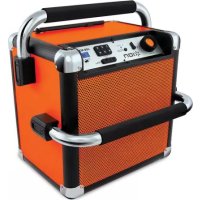
Brand : ION
Model : Block Rocker Bluetooth
Category : Docking station