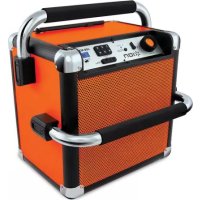
Job Rocker - Docking station ION - Free user manual and instructions
Find the device manual for free Job Rocker ION in PDF.



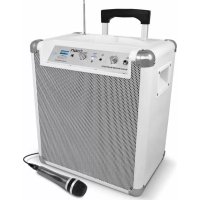
| Product Type | Amplified docking station with speaker and charger |
| Brand | ION |
| Model | Job Rocker |
| Power | Mains (100-240 V AC) via IEC cable and internal lead-acid rechargeable battery |
| Bluetooth | Version 4.0, maximum range with compatible devices, pairing name "ION Speaker" |
| Radio | AM/FM with telescopic FM antenna, 6 presets per band |
| Auxiliary input | 1/8 in (3.5 mm) stereo for MP3 player, phone, etc. |
| Mains sockets | 2 AC outlets (powered when unit is plugged into mains) |
| Fuse | 750 mA / 250 V (North American standards), 500 mA / 250 V (European standards) |
| Battery | Rechargeable lead-acid, lifespan extended by regular full charge |
| Dimensions (estimated) | Approximately 30 x 20 x 25 cm |
| Weight (estimated) | Approximately 5 kg |
| Box contents | Job Rocker, IEC power cable, 1/8 in audio cable, quick start guide, safety instructions |
| Main functions | Bluetooth playback, AM/FM radio, auxiliary input, AC outlets, battery charging |
| Maintenance and cleaning | Wipe with a soft, dry cloth. Do not expose to water or moisture. |
| Safety | Use only cables in good condition. Do not immerse. Unplug before maintenance. |
| Repairability | User-replaceable fuse. Battery not user-replaceable (contact customer service). |
| Warranty | Visit ionaudio.com/warranty |
Frequently Asked Questions - Job Rocker ION
User questions about Job Rocker ION
0 question about this device. Answer the ones you know or ask your own.
Ask a new question about this device
Download the instructions for your Docking station in PDF format for free! Find your manual Job Rocker - ION and take your electronic device back in hand. On this page are published all the documents necessary for the use of your device. Job Rocker by ION.
USER MANUAL Job Rocker ION
- Job Rocker
• Power Cable (standard IEC)
• Audio Cable with 1/8" (3.5mm) connectors - Quickstart Guide
• Safety & Warranty Manual
Support
For complete system requirements, compatibility information, and product registration, visit the ION website: ionaudio.com.
For the latest information about this product, visit ionaudio.com/jobrocker
For additional product support, visit ionaudio.com/support
For safety/warranty information, visit ionaudio.com/warranty

Important!
Extension Cord Warnings:
- Keep all electrical cords in good condition. Do not use worn, bare, or frayed cords, which can cause electrical shock when Job Rocker is connected to wall power.
- If you must use an extension cord, use only grounded extension cords that are rated for outdoor use and equipment with a third-wire ground.
- Avoid using excessively long extension cords, which can cause voltage drops, causing the cord to overheat.
- When using long extension cords with Job Rocker, use a heavier cord with a larger wire size to reduce the voltage drop (the longer or thinner the cord, the greater the voltage drop).
The AC outlets are a pass-through from the power cable receptacle. Job Rocker does not include surge absorption, an internal circuit breaker, or fuses for the outlets.
North America: Do not use Job Rocker with an IEC input cable rated for less than 15A.
EU: Do not use Job Rocker with an IEC input cable rated for less than 10A.
DO NOT splash or immerse in water or other liquids. Not for use in rain. Use only in dry locations.
Rechargeable Batteries
Rechargeable lead-acid batteries are the same type used in automobiles. As with your car battery, how you use this battery has a significant impact on its lifespan. With proper use and treatment, a lead-acid battery can last for years. Here are some recommendations for getting the longest life from the internal battery.
GENERAL USAGE
• FULLY CHARGE THE BATTERY BEFORE USING IT.
- CHARGE THE BATTERY COMPLETELY AFTER EACH USE.
- YOU MAY LEAVE THE UNIT PLUGGED IN.
STORAGE
- Avoid storing in high temperatures and moist places.
- For long-term storage, periodically recharge the battery.
- If you do not charge the battery for six months, it may not charge.
REPAIR
- As the battery nears the end of its life, it may lose its ability to recharge. Check your fuse in the power cable outlet to ensure it is in proper working order. If your fuse is in good condition, and your product still does not recharge, contact ION Audio technical support. at ionaudio.com/support.
DISPOSAL
- Bring the unit to a recycling center or dispose of in accordance with local ordinances.
Quick Setup / Connection Diagram
- Make sure all items listed in the Box Contents at the beginning of this guide are included in the box.
- READ SAFETY INSTRUCTION BOOKLET BEFORE USING THE PRODUCT.
- MAKE SURE THAT YOU HAVE COMPLETELY CHARGED THE BATTERY PRIOR TO FIRST USE FOR MAXIMUM BATTERY LIFE.
- Turn down the volume on the Job Rocker.
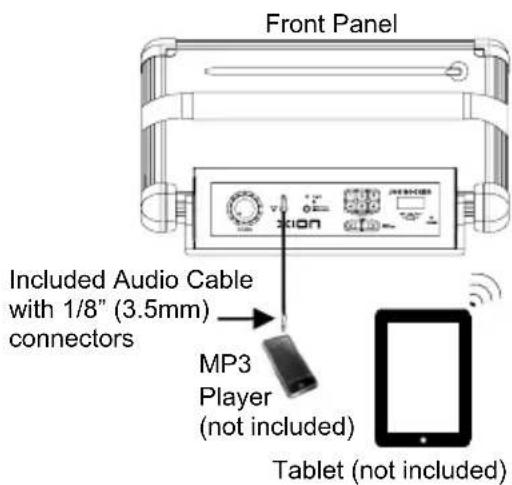
- Connect your music player with an audio cable or Bluetooth (see Connecting with a Bluetooth Device for more details on this).
- Adjust the volume on the music player and on Job Rocker as needed.
- Turn off Job Rocker when not in use.
Features
Front Panel
-
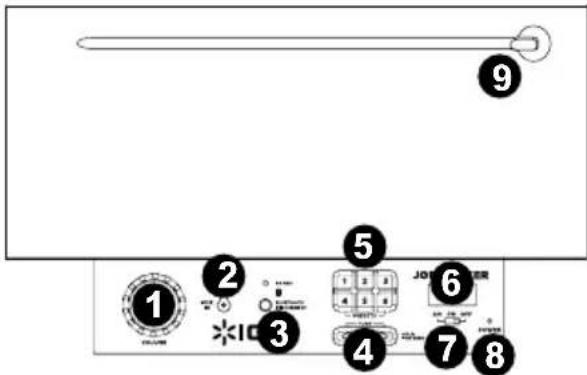
Master Volume Knob: Controls the overall volume for the Bluetooth® source, the AUX input, and the radio.
-
1/8 "Aux input: This stereo 1/8" input can be used to connect a smartphone, MP3 player, or other audio source.
-
Bluetooth: The Paired LED will be lit when a device is connected to Job Rocker. This LED will not be lit when Job Rocker is first powered on (unless it was previously connected with a device). Press the Bluetooth Disconnect button to disconnect a connected Bluetooth device.
-
Tuner: Use these buttons to search for a radio station. To "seek" (jump to the next available station), hold this down for a few seconds until it starts to seek a station. The unit will remember the last station you were on and start at that station when you power off and power on again.
-
Radio Preset Buttons: There are 6 storage locations for FM stations, and 6 storage locations for AM stations. When you move the am/fm/off switch to AM or FM, that action changes the bank of presets you are on.
-
LCD: Displays the current radio station.
-
Radio Selector: This switch sets the tuner to AM or FM or turns the tuner off.
(Note: This switch does not turn the unit's power off – just the tuner.)
-
Power LED: Indicates whether Job Rocker is powered on or off.
-
Antenna: Adjust this FM antenna to get the best radio reception. To improve AM reception, move the entire unit.
Note: To prevent accidental damage, we recommend rotating the antenna only when it is extended horizontally. Lay the antenna down in its holder when the Tuner is not in use.
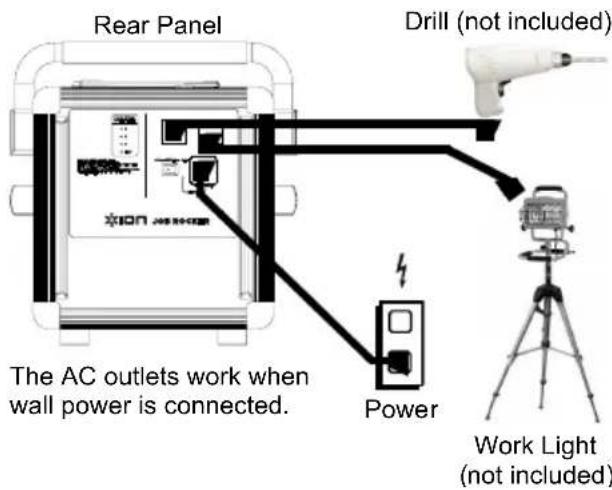
Rear Panel
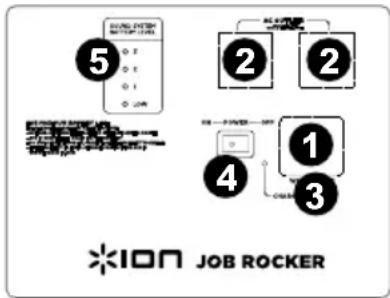
- Power Cable Input: Insert the included power cable here to charge the unit. Note that the Job Rocker can run off the power cable while it simultaneously charges the battery. The charge indicator illuminates when the battery is charging.
- AC Power Outlet: Flip open the rubber plugs and connect your devices here. The AC outlets work when wall power is connected.
- Fuse Cover: If the unit's fuse is broken use a screwdriver or other tool to lift this tab to replace the fuse. Replace it with a fuse with an appropriate rating.
Fuse model and type: US Units: 250V, 750 mA; EU/UK Units: 250V, 500 mA. Using a fuse with an incorrect rating can damage the unit and/or fuse.
-
Power ON/OFF Switch: Turns Job Rocker on or off. Please note that while Job Rocker is connected to a power source, it does not need to be powered on to charge the battery.
-
Battery Level Indicator: While the unit is powered ON and unit is not plugged in, these four lights indicate the power left in the battery. Battery life varies based on volume and usage.
Connecting with a Bluetooth Device
- Turn on Job Rocker using the power switch.
- Navigate to your Bluetooth device's setup screen, find "ION Speaker" and connect.
- If your device requires a passcode or PIN, enter "0000".
Note: The next time you approach Job Rocker with your Bluetooth device, it will automatically reconnect. - If your Bluetooth device is not able to connect to Job Rocker, press the Bluetooth Disconnect button on Job Rocker to break previous Bluetooth connections and reset the Bluetooth module.
Note: Maximum range will be achieved when using devices with Bluetooth 4.0. - Paired LED will light up solid when it is 'paired'.
- Start playback from your Bluetooth device.
- To connect to another Bluetooth device, press the Bluetooth Disconnect button. Repeat Step 2.
- To disconnect a connected Bluetooth device, press the Bluetooth Disconnect button.
Note: If you experience trouble connecting or playing music, update your device's OS.
Using the Radio
- Turn the radio on using the Radio Selector switch to select either AM or FM.
- Use the Tuner buttons to search for a radio station. To "Seek" (jump to the next available station), hold a Tuner button down for a few seconds until it starts to seek a station. The unit will remember the last station you were on and start at that station when you power off and power on again.
To add a preset:
A. Select either the AM or FM band and then use the Tuner buttons to select the desired radio station.
B. Press and hold a numeric Radio Preset button for a few seconds to assign the current station to that preset number. To use an added preset, tap a Radio Preset number once lightly to go to the stored radio station.
Using the Aux Input
Connect your iPod, iPod touch, iPhone, smartphone, MP3 player, or similar device to the Aux input. Adjust the output volume on your source device and then adjust the overall volume using the Volume knob on Job Rocker.
Troubleshooting
If the sound is distorted: Try lowering the volume control of your sound source or musical instrument. Also, try to reduce the overall volume of Job Rocker.
If there is too much bass: Try adjusting the tone or EQ control on your sound source to lower the bass level. This will allow you to play the music louder before clipping (distortion) occurs.
If there is poor AM reception: When you have a Bluetooth device that is connected, disconnect your Bluetooth device in order to listen to AM radio. To adjust AM reception, move the entire unit.
If the AC Outlet is not working: Make sure Job Rocker is connected to wall power.
If Job Rocker is not charging: Make sure the fuse is not blown. If it is, replace the fuse with one of the same rating.
Assistance technique
Pannello posteriore
Technical Specifications
Input Voltage: North America: 100V-120V AC, 60Hz; EU: 220-240V AC 50Hz
Output Power: 50W Peak
Woofer size: 6.5"
Tweeter size: 3/4"
Frequency Response: 77 Hz – 20 kHz (Aux)
Time required to fully charge Job Rocker: Approximately 10 hours
Battery life: Up to 50 hours when fully charged
Battery life may vary based on temperature, age, and volume usage of product.
Supported Bluetooth Profile: A2DP
Bluetooth Range: Up to 100 feet*
Fuse model and type: North America: 250V, 750 mA; EU/UK: 250V, 500 mA
Max load of AC outlets:
- North America: 120V, 10A (combined) (when you use the included 15A or equivalent power cable to power Job Rocker)
- EU: 240V, 5A (combined) (when you use the included 10A or equivalent power cable to power Job Rocker)
Radio Preset Memory: 6 AM presets, 6 FM presets
Radio Frequency Range:
US:
AM 520 - 1710 kHz
FM 87.5 - 108 MHz
EUROPE:
AM 522 - 1629 kHz
FM 87.5 - 108 MHz
JAPAN:
AM 522 - 1710 kHz
FM 75.5 – 90.5 MHz
Specifications are subject to change without notice.
* Bluetooth range is affected by walls, obstructions, and movement. Best performance is achieved in a wide open area.
For the electrostatic discharge (ESD) test of EN301 489-1/17, it was found that manual operation is needed to resume normal operation as intended after the test.
Trademarks and Licenses
iPad, iPhone, and iPod touch are trademarks or service marks of Apple Inc., registered in the U.S. and other countries.
The Bluetooth word mark and logos are owned by the Bluetooth SIG, Inc. and any use of such marks by ION Audio is under license.
All other product or company names are trademarks or registered trademarks of their respective owners.
ionaudio.com
- Support
- Important!
- Extension Cord Warnings:
- Rechargeable Batteries
- GENERAL USAGE
- STORAGE
- REPAIR
- DISPOSAL
- Quick Setup / Connection Diagram
- Features
- Front Panel
- Rear Panel
- Connecting with a Bluetooth Device
- Using the Radio
- To add a preset:
- Using the Aux Input
- Troubleshooting
- Assistance technique
- Pannello posteriore
- Technical Specifications
- Max load of AC outlets:
- US:
- EUROPE:
- JAPAN:
- Trademarks and Licenses
- ionaudio.com
Brand : ION
Model : Job Rocker
Category : Docking station