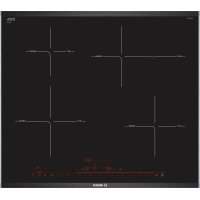
PIF675DE3E - Cooker BOSCH - Free user manual and instructions
Find the device manual for free PIF675DE3E BOSCH in PDF.



| Product type | Hob with wireless temperature sensor |
| Brand | Bosch |
| Model | PIF675DE3E |
| Wireless temperature sensor | Yes, with CR2032 battery |
| Silicone patch | Set of 5 patches (ref. 00577921) |
| Use | Domestic, supervised cooking |
| Safety | Minimum distance of 10 cm for electronic implants |
| Cleaning the sensor | Damp cloth, do not immerse in water, do not put in dishwasher |
| Cleaning the silicone patch | Dishwasher safe |
| Maintenance of sensor window | Clean with a soft cloth or cotton swab and glass cleaner |
| Battery replacement | CR2032 battery, remove silicone cover and unscrew |
| Spare parts | Silicone patch (00577921), sensor + patches (HEZ39050) |
| Repairability | User-replaceable battery |
| Declaration of conformity | Compliant with directive 1999/5/EC |
| Languages of the manual | Available in several languages (FR, EN, DE, etc.) |
Frequently Asked Questions - PIF675DE3E BOSCH
User questions about PIF675DE3E BOSCH
0 question about this device. Answer the ones you know or ask your own.
Ask a new question about this device
Download the instructions for your Cooker in PDF format for free! Find your manual PIF675DE3E - BOSCH and take your electronic device back in hand. On this page are published all the documents necessary for the use of your device. PIF675DE3E by BOSCH.
USER MANUAL PIF675DE3E BOSCH
Register your new Bosch now: www.bosch-home.com/welcome

Wireless Temperature Sensor HEZ39050

BOSCH
de Gebrauchsanleitung. 3
en Instruction manual 8
fr Mode d'emploi. 13
it Istruzioni per l'uso 18
nl Gebruiksaanwijzing 23
da Brugsanvisning. 28
no Bruksveiledning 33
svBruksanvisning. 38
fi Kayttoohje 43
es Instrucciones de uso 48
pt Instruções deServiço. 54
el O8nyiec xpnoc 59
tr Kullanma kilavuzu 64
cs Navod k použití 69
sk Navod na použivanie 74
hu Hasznalati utasítás 79
pl Instrukcja obslugi. 84
ro Instruetiuni de utiliser . 90
bg PbKOBOdCTBO 95
ru IpaBnla noJb3OBaHna. 100
uk IHcTpkyci3 BnKOpncTaHHa..106
sr Uputstva za upotrebu. 112
hr Upute za uporabuuredaja. . . . 117
sl Navodila za uporabo. 122
sq Udhezim per perdorim 127
mk YnataCTBO 3a ynoTpe6a. 132
zh 说明手册 137
zh-hk 說明手冊 140
Inhaltsverzeichnis

Important safety information. . .
9 Read these instructions carefully. Please keep the

Environmental protection . . .
9 instruction in a safe place for later use or for subsequent owners.
Environmentally-friendly disposal. 9

Wireless temperature sensor .
10 Check the appliance after removing it from the packaging. If it has suffered any damage in transport, do not use the appliance, contact the Technical Assistance Service and provide written notification of the damage caused, otherwise you will lose your right to any type of compensation.
Preparing and maintaining the wireless temperature sensor 10
Cleaning 12
Declaration of Conformity 12
Additional information on products, accessories, replacement parts and services can be found at www.bosch-home.com and in the online shop www.bosch-eshop.com
This appliance is intended for private domestic use and the household environment only. The appliance must only be used for the preparation of food and beverages. The cooking process must be supervised. A short cooking process must be supervised without interruption. Only use the appliance in enclosed spaces.
This appliance may be used by children over the age of 8 years old and by persons with reduced physical, sensory or mental capabilities or by persons with a lack of experience or knowledge if they are supervised or are instructed by a person responsible for
their safety how to use the appliance safely and have understood the associated hazards.
Children must not play with, on, or around the appliance.
Children must not clean the appliance or carry out general maintenance unless they are at least 8 years old and are being supervised.
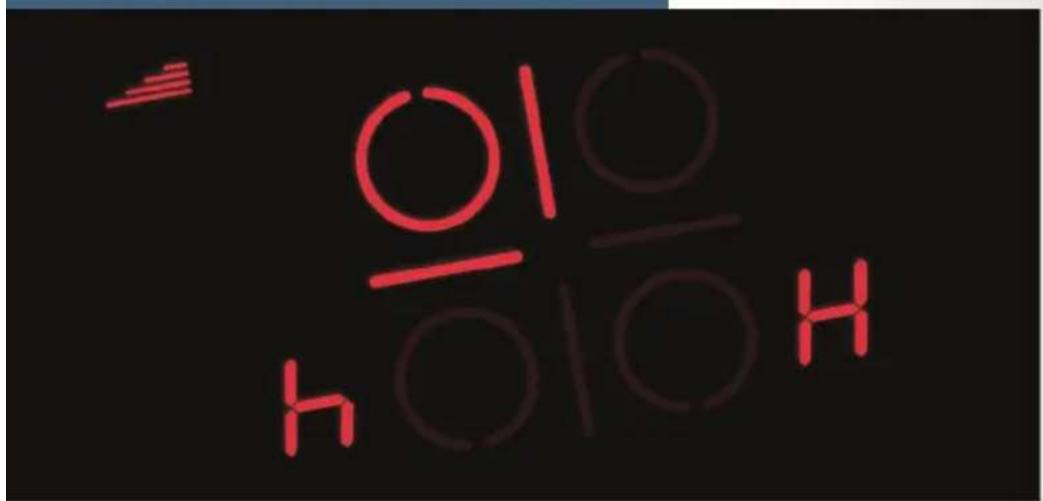
When using the cooking functions, set the hotplate on which you have placed the saucepan with the temperature sensor.

Important safety information
Warning
Hazard due to magnetism!
The wireless temperature sensor is magnetic. The magnetic elements in it may damage electronic implants, e.g. pacemakers or insulin pumps. People fitted with electronic implants should therefore not carry the temperature sensor in their pockets and always keep it at least 10 cm away from their pacemaker or similar medical device.
Warning
Risk of injury!
The battery in the wireless temperature sensor may become damaged or explode if it gets too hot. Remove the sensor from the hob after cooking and do not store it near sources of heat.
The temperature sensor may be very hot when removing it from the saucepan. Wear oven gloves or use a tea towel to remove it.

Environmental
protection
Environmentally-friendly disposal
Dispose of packaging in an environmentally-friendly manner.

This appliance is labelled in accordance with European Directive 2012/19/EU concerning used electrical and electronic appliances (waste electrical and electronic equipment - WEEE). The guideline determines the framework for the return and recycling of used appliances as applicable throughout the EU.
The wireless temperature sensor is battery-powered. Dispose of used batteries in an environmentally responsible manner.

Wireless temperature sensor
Additional information can be found in the detailed instruction manual for the hob in chapter "Cooking Assist Functions". Read it through carefully.
Preparing and maintaining the wireless temperature sensor
In this section, you will find the following information:
Adhering the silicone patch
Using the wireless temperature sensor
Changing the battery
You can obtain a temperature sensor and silicone patches from specialist retailers or through our technical after-sales service. Always quote the relevant reference number.
00577921 Set of 5 silicone patches
HEZ39050 Temperature sensor and set of 5 silicone patches
Adhering the silicone patch
The silicone patch attaches the temperature sensor to the cookware.
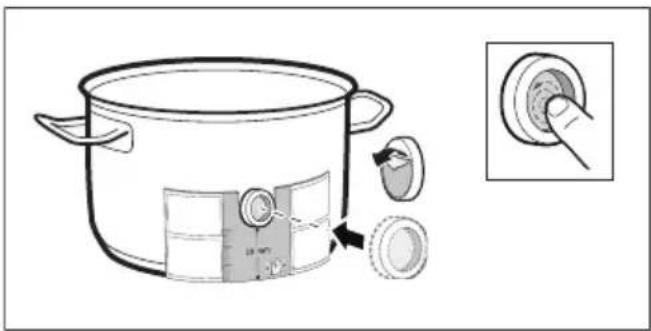
A silicone patch must be adhered when using a saucepan with the cooking functions for the first time.
Proceed as follows:
-
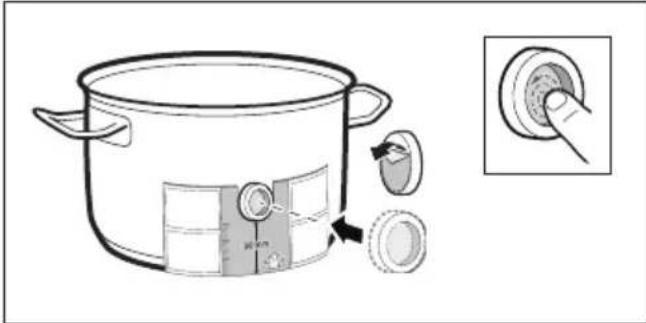
The adhesion point on the saucepan must be free of grease. Clean the saucepan, dry it thoroughly and wipe the adhesion point with a degreasing agent such as spirit.
-
Remove the protective film from the silicone patch. Adhere the silicone patch to the saucepan in the correct place using the the enclosed template as a guide.
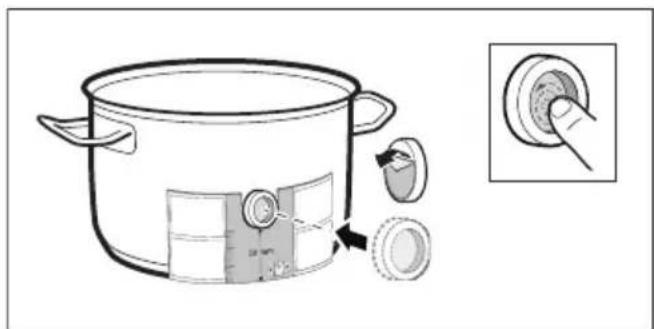
- Press the silicone patch down, including its inside surface.
The adhesive requires 1 hour to fully harden. The cookware must not be used or cleaned during this time.
Notes
Cookware with the silicone patch must not be left to soak for long periods in soapy water.
If the silicone patch comes off, attach a new one.
Using the wireless temperature sensor
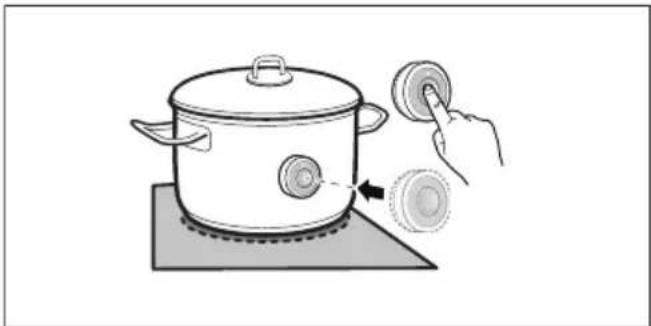
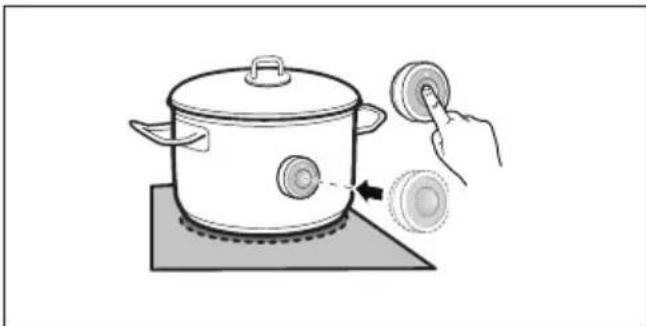
Attach the temperature sensor to the silicone patch and align it correctly.
Notes
Make sure that the silicone path is completely dry before attaching the temperature sensor.
Position the cookware in such a way that the temperature sensor is pointing towards the outer side of the hob.
To prevent overheating, the temperature sensor must not be pointed towards another item of cookware that is hot.
- Remove the temperature sensor from the saucepan after cooking. Store it in a clean, safe place away from sources of heat.
Changing the battery
If you press the wireless temperature sensor symbol and the LED does not light up, the battery is flat.
Changing the battery:
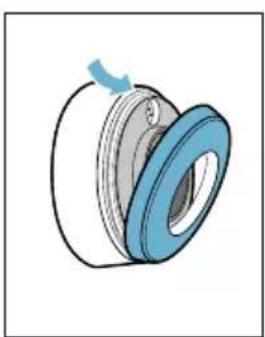
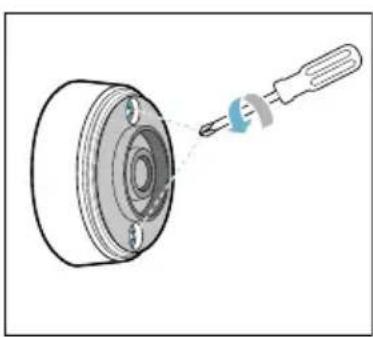
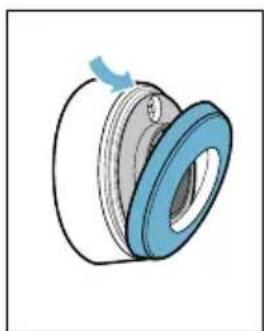
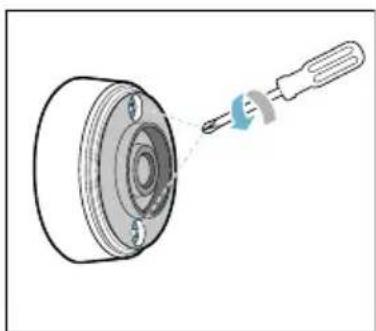
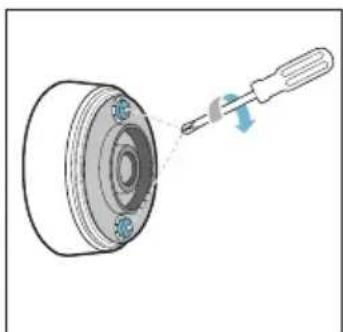
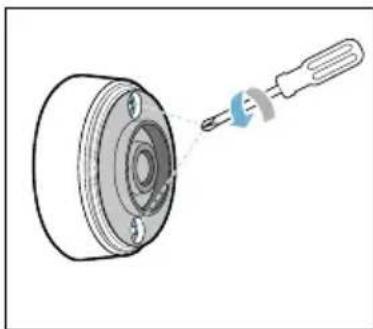
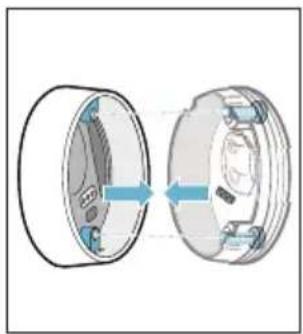
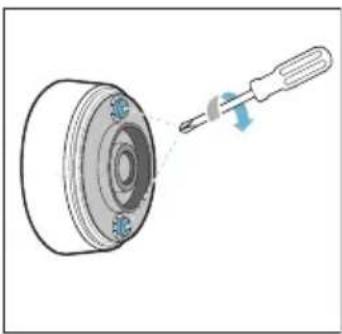
- Remove the silicone cover from the lower section of the casing. Unscrew the screws with a screwdriver.
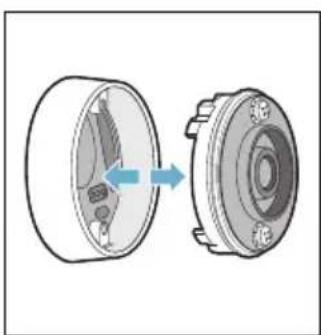
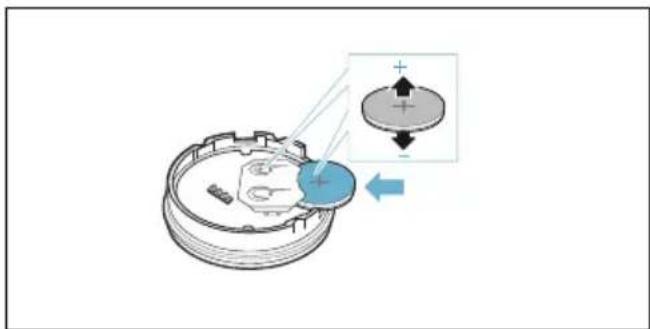
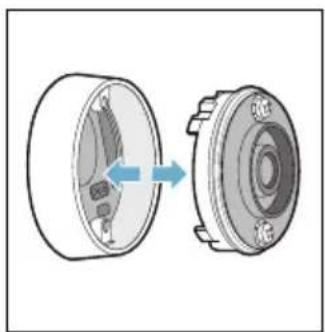
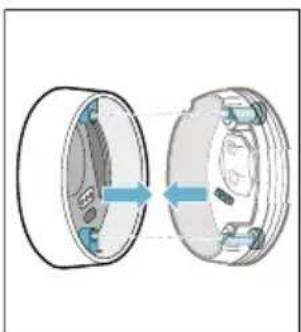
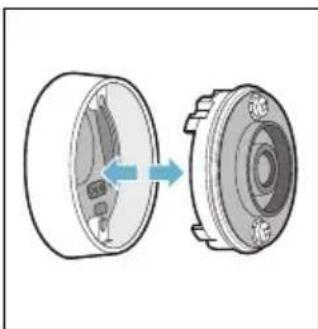
- Remove the upper section of the casing. Take the old batteries out. Put the new batteries in. Make sure that the polarity is correct.
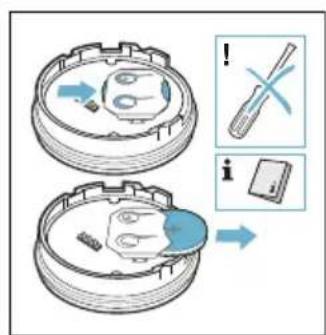
Caution!
Do not use metal objects to remove the battery. Do not touch the contacts.
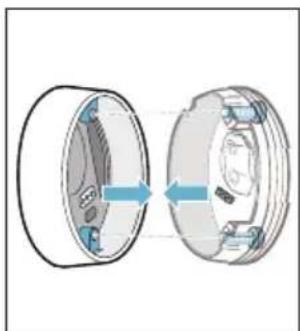
- Put the upper and lower sections of the casing back together. Make sure that the contact pins are aligned correctly.
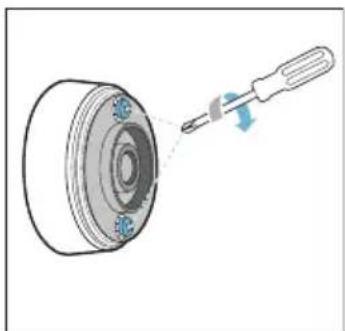
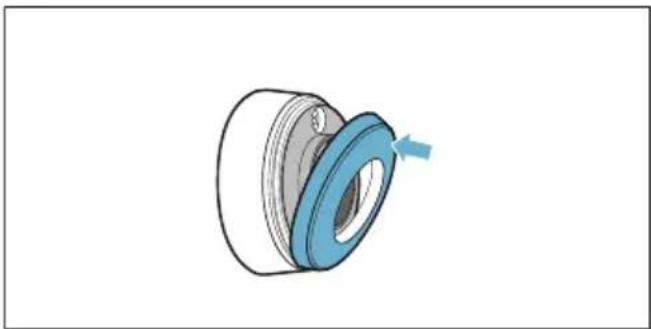
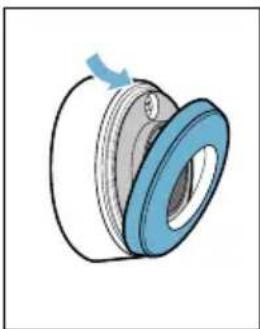
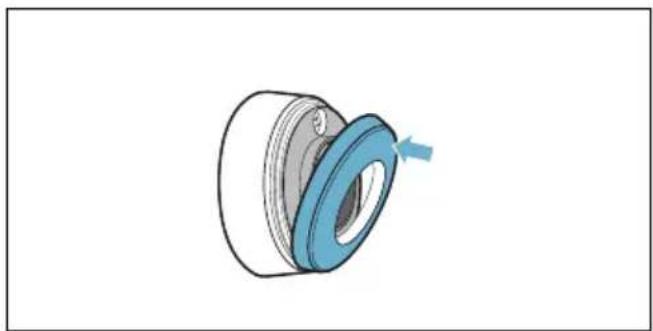
- Put the silicone cover back on the lower section of the temperature sensor casing.
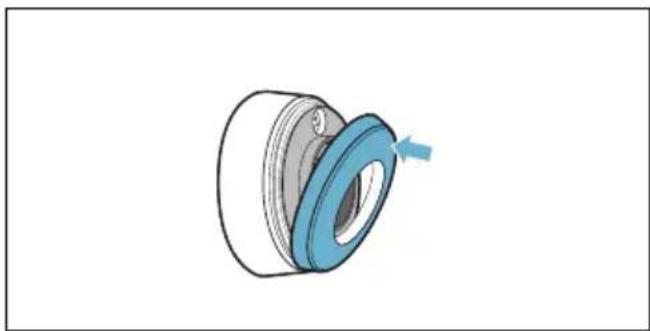
Note: Only use premium-quality CR2032 batteries. These have an especially long service life.
en
Cleaning
Temperature sensor
Clean the temperature sensor with a damp cloth. Never clean it in the dishwasher. Do not immerse it in water or clean it under running water.
Remove the temperature sensor from the saucepan after cooking. Store it in a clean, safe place (such as in its packaging) away from sources of heat.
Silicone patch
Clean and dry before attaching to the temperature sensor. Dishwasher safe.
Note: Cookware with the silicone patch must not be left to soak for long periods in soapy water.
Temperature sensor window
The sensor window must always be clean and dry. Proceed as follows:
- Remove dirt and oil splatters regularly.
Use a soft cloth or cotton buds and window cleaner for cleaning.
Notes
- Do not use abrasive cleaning agents such as scouring pads, scrubbing brushes or cream cleaners.
- Do not touch the sensor window with your fingers. This may make it dirty or scratch it.
Declaration of Conformity
Robert Bosch Hausgeräte GmbH hereby declares that the appliance with wireless temperature sensor function meets the basic requirements and other relevant provisions of the Directive 1999/5/EG.
A detailed R&TTE Declaration of Conformity can be found online at www.bosch-home.com on the product page for your appliance under "Additional documents".
The logos and the Bluetooth® brand are registered trademarks and property of Bluetooth SIG, Inc. These trademarks are used by Robert Bosch Hausgeräte GmbH under licence. All other trademarks and brand names are owned by the respective companies.
Table des matieres

Evacuati ambalajul in mod ecologic.

IpeDynpexKdEHne Onacnoct nopadn MarHeTn3bM!
БeЗкавелнгт сEH3Op 3a Temперatype e MaHNTeH.MaHNTHnTe eIeMeHTN MOrAT Da IOBpeJr T eIeKTPoHHte NmPlaHTN,HaNP. IeIcMeyKbpr Nll INHCyJIINHO BVOMn. Xopata, KOnTO HOCrT eIeKTPoHHN NmPlaHTN, He 6NBa Da HocrT cEH3Opa 3a Tempepatya BДжОвеTe Ha Dpexnte Cn N da Cna3BaT MInHMaJIHo pa3CTOJHne ot 10 CM OT PeIcMeyKbpa Nll NOdoBeH MeDnCUnHcKn Upei.
!Ппсдунрждени Опасноct OT Нараяван!
Батугия в безке Лигу сенистуа Тампегатура може за се поврешилда Гльмон, akо се наг peeТВьрдемно.Сваlete сенистуа След Говене OT Готварся пLOTи He Гсьхсанайтевлиstdo ИЗTOUHинHaToПИнha.
Cen3OpbT 3a Tempepa Tpa MoJKe Da e MHOrO rOpEi npu CBAJIaHe OT TeHJKePaTa. 3a CBAJIaHe N3IOJ3BaIte KUxHeHcKa pKabuca nIi KUxHeHcKa KbPna.

CnIKoHObata IeHka Kcnpa ceH3opa 3a Tempepatya Bbpxy FOBapCKn CbI.
Ako DaHeHa TeHJKepa Ce n3NoJ3Ba 3a PbPN T C yHKuNTe 3a RotBeHe, Tp6Ba Da Ce NoCTaBN CNIKOHOBA JepeHka.
PpoeepaTe no CneHnHaunH:
-
МястOTO на заливае вьрху Тенджерета Тразба дe oобзмаслоно. Почисту тенджерета, ИЗсчete Добpe и ИЗтbpkaite МястOTO на заливае нап. Сбс Спирт.
-
CbaleTe 3aunTHoTo foJno OT cnIKHOBAt aJepeHka.CnOMOHTa HaIOCTaBeHnI Wa6IoN 3aJepeTe cnIKHOBAt aJepeHka Ha CbOTBETHata BnCOUHa B TeHdxKePata.
3.ПиTNCHTe CINIKOHObAta JIeNEHka, BKJIIOHTeJIHO N BbTpEshHaTa IOBbPxHOCT.
JIeHnIto ce HxJdae ot 1 yac 3a do6po BTVbPdRABaHe. TOTBapCKnT CbD He 6nBa Da Ce N3NoJ3Ba INI NOUcTBA Ppe3 TOBa BpeMe.
Yka3aHne
CbIOBete Cbc CNIKHOBA JepeHka He 6nBa Da Ce OCTaBt 3a NO-ДьIro BpeMe B canyHeH pa3TBOp.
Ako cnlnKOHObata JeneHka ce OTleni, Tpa6Ba da ce n3nOJI3Ba HOBa.
H3noJ3BaHe Ha 6e3Ka6eHnIceH3Op 3a TempepaTypa
Noctabete ceH30pa 3a TemnepaTpa Taka Bbpx CyNlIKHObata IepeHka, ye da nacBa nepkeKTHO.
Yka3aHne
YBepTe ce, ye cnIkoHObata IepeHka e n3aNo cyxa npedn IOCTabHe Ha ceH3opa 3a Tempepatypa.
bg
I OCTaBete roTbapckn CbTaKa, ye ceH3OpbT 3a Tempepatya Da COuN KbM CTpaHnUHaTa BbHnHa YaCT Ha roTbapckn Pnot.
Cen30pBT 3a TemnepaTypa He 6nBa da e Hacoueh KbM npyT ropeu rOtBapcKn CbI, 3a Da ce n36eHne nperePBAhe.
CleI rotBeHe cBaIeTe ceH3opa 3a TemnepaTypa OT TeHJxepaTa. CbXpaHaBaIte Ro Ha YNCTO, 6e30NaCHO MAcTo, HApPIMep B ONaKOBkata N He B 6JIIN3OCT Do IN3TOUHNi Ha TOnNIHa.
CMHa Ha 6aTePNrTa
Ako CmBolbT Bbpxy 6e3Ka6eHnHcEH3Op 3a TempepaTypa ce HaTncHe nCBETODIOBT He CBtHe, 6aTepeYra e H3TOUeHa.
CmHa Ha 6aTepuIra:
- CbaIeTe CNIKHOBn KaNak OT DOnHaTa YacT Ha Kopnyca. 3aBnTe BInHTOBeTe C OTBeptKa.
- Ⅲterlete rohpata yact Ha Kopnyca. CbaIeTe cTapa 6aTePn. IbxHete HOBaTa 6aTePn. PpToBA BHMaBaIte 3a NOLOCITE.
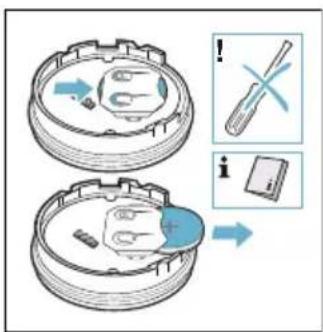
BHHMaHHe!
3a cBaJIHe Ha 6aTePnIa He n3NoJI3BaIe IpeDMeTn OT metaI. He DOKOCBaIte KOHTaKTInTe.
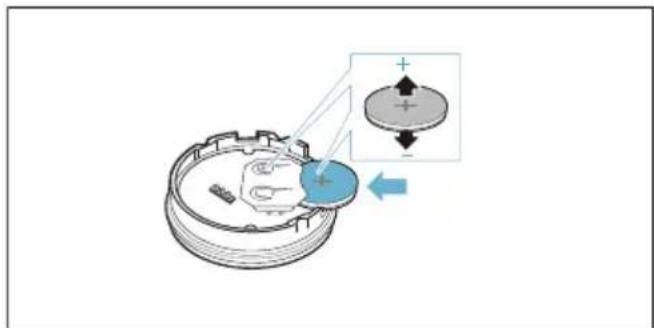
- OTHOBO cB6epete TropHata N DOJHaT a qact Ha Kopnyca. Ipn TOBa BHIMaBaIte 3a npabINHOTO HIBeJIpaHe Ha KOHTaKTHnte UnTOBE.
- NocTabete ObaTHO cnIKHOBn KaNaK Bbpxy DOHaT a cT Ha KOpnyCa Ha CEH30pa 3a TempePaTypa.
Yka3aHHe: N3noJ3BaIte caMo BnCOKokayecTBeHN 6aTeepuN OT Tnna CR2032. Te n3dbpxkAT Oco6eHo DblrO.
Почистванe
Cen3op 3a TemnepaTypa
NouchBaIte ceH3opa 3a TemnepaTypa C BlaJHa Kbpna. Hnkora He NouchBaIte BCbDOMNJIHa MaUNHa. He NotanTe BB BOda I He NouchBaIte NOD Teuasa BOda.
CbaIeTe ceH3opa 3a TemnepaTypa OT
rotBapcKaTa TeHJKepa CJIed BapeHeTo.
CbxpaHbAitE rO Ha YnCTo, 6e3OnaCHO
MACTO, HApnpMeB ONaKOBKaTa I He B
6IIN3OCT Do N3TOUHNiHa TOPInHa.
CnlnkoHOBa JIeNeHka
Ipei nocTaBHe Ha ceH3Opa 3a TeMnepaTypa nouchTeTe I NOcCyWeTe. IoXoJIo 3a CbDOMnHa MaunHa.
Yka3aHne: CbIOBeTe Cbc CNIKOHOBa IepeHa He 6nBa Da ce octaBt 3a NO-DbIro Bpeme B canyHeh pa3TBOp.
Прозорец сеньета за Temпература
Ipo3opeuT Ha ceH3opa Tpra6Ba da e BInaun uNCT n cyx. IpoueiupaTe no CLeHnHaunH:
OTCTpaHraBaItepeIOBHO 3aMbpcBaHnTaNpckTeMa3HnHa.
3a nouicTbaHe n3noJ3BaIte MeK napcaJ nn BaTa n npenapat 3a nouicTbaHe Ha np03OpcN.
Yka3aHne
He n3noJ3BaIte dpackaio NouchTbao CpeDCTBO KaTo HapnIpMep TboN YeTK Nll MIAKO 3a NouchTbaHe.
He doKocBaIte npO3OpueTo Ha ceH3opa c npbctn. To moKe da ce 3aMbpcn nll OndpaCkA.
3aBHeHne 3a CbOTBeTCTBHe
C HacoruTo Robert Bosch Hausgerate
GmbH deKnapupa, ye ypeTc
fynKunra 6e3KaabeHen cEH3Op 3a
TemnepaTypa OTROBapn Ha OCHOBHnTe
n3NCKBaHHn N OCTaHaJIte peJeBaHTn
pa3npoepbHa Na DnpeKtNa 1999/5/EO.
I3yepnataHnRa R&TTE deKnapaun 3a
cbOTBeTCTBnE ue OTKpneTe B IVHTePeENT Ha
www.bosch-home.com Ha npodykTObata
ctpaHnca Ha Bauny ypeB B
DOnblHnTeJHn DOKymEnTH.
IlorotaTaN Mapkata Bluetooth® ca peRnCTpnpaHn TbpROBcKN MapKn n co6CTBeHocT Ha Bluetooth SIG, Inc. n BcRAka yNoTpeBaHa Te3N MapKn ot Robert Bosch Hausgerate GmbH cTaba CnueH3. BcnuKn dpyrN MapKn n ImeHa Ha MapKn ca co6CTBeHocT Ha CbOTBEHTHnte fnpMn.
Ornablenne

PpimmeHHeNo Ha3HaueHnO ..100

BaKhIe npaBnla TexHnKn 6e3OpacHoCTn .101

OxpaHa OkpyKaIOUeN cpeIbl .102
PpabnIbHa yTnIu3auny ynaKOBKn..102

BecnpoBOJHOJ DaTUnK
Tempepatypbl 102
Iodrotobka n yxOd 3a 6ecnpoBOHbIM TemnepaTyphbIM ceHCOPOM .102 Ounchka .104 Dekapauia O COOTBETCTBUN .105
Bolee noDpo6Hyu INΦopMaζH O npOdyKzN, pInHaJleXHOCTx, 3aNaChbIX qactx N cIyXBe cepBnca MoXHo HaTn Ha oΦnauNbHOM caTe
www.bosch-home.com Ha caiTe
HHTepHeT-Mara3nHa
www.bosch-eshop.com

IpeDynpexKdEHne OnaCHocTb, CBa3aHHa C MaHHTbIM NOJeM!
BecnpoBOJHOI TempeatypHbI
ceHCOP O6laaet MaHHTHBIMCBOINCTBaMn.MaHNTbIe
3JIeMeHTbI MOyT HApUHTb
fYHKUOHNPOBAHne
3JIeKTPoHHbIX NmPnaHTaTOB,
Ha npimep,
KapdnoCTmmyJTopa nIi
nHcylnHOBoI NOMbl. B cBra3n C
3TtM Iuca, NMeIOUne
3JIeKTPOHHbIe NmPJIaHTaTbI, He
DOJIxHbI HOCNTb
TempepaTyPhbI CEHCOP B
KapMaHax OdeJdbI IN CTapaTbCRA
DepXaTbCRAOT HeFo Ha
pacSToHN He MeHee 10 cm,
yTO6bl N36eXaTb HApUSeHnA
fYHKcNoHnpOBaHN
KapdnoCTmMyJToPa nIi
aHaIoRnuHOrO MediuHCKOro
Iprbopa.
yTnIIN3aUIN 3JIeKTpnuYeCKnx IN 3JIeKTpOHHbIX npBOpOB (waste electrical and electronic equipment - WEEE).
ДаHHbIe HOpMbI OnPpeJELJIOT DeIcTBByIOUne Ha TeppnTOpN I EbpocOHO3a npaBnla BO3Bpata N yTININ3aQUIN CTapbIX npn6OpOB.
BecnpoBOHNo TEMnepaTyPhbI CeHCOp OcHaueH 6aTaapeKo. NcNoJb3OBaHHbE 6aTaapeKn DOJIxHbI yTINN3uPoBaTbcr EKOLOTNueeCKn 6e3ONaChbIM CNOOCOM.

Ecn npn HaxkTuHa CmB0J 6ecnpoBOHOro TempeaTyphoro ceHCopa CBeToIDNo He 3arOpaeTc8,3TO O3Naayet, yTo 6aTaPeiKa pa3pIInacb.
3aMeHa 6aTapeiKu
- CHIMITE CUNIKOHOByIO KpbIuKy B HIXHHeY qactN KopnyCa. BbBepHIne BnHTbIC NOMOsbIO OTBepTKN.
- CHIMITE BepxHIOU qactb KOpnyca. BbHbTe cTapyIO batapeyKy. BcTaBbTe HOByIO batapeyKy. PnI 3tOM o6paTnte BHImaHne Ha npaBnIbHOCTb paCNoJoxKeHHr NOIocOB.
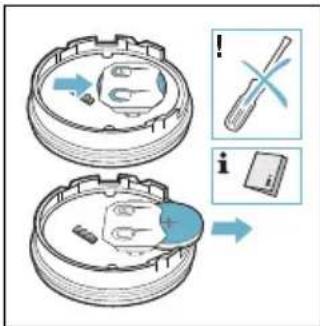
BHHMaHHe!
He nCnoJb3yIte MeTaJIInueCKne npEmdMeTbI DnA N3BLeueHn BaTapeKn. He npNKacaiTeCb K KOHTaKTam.
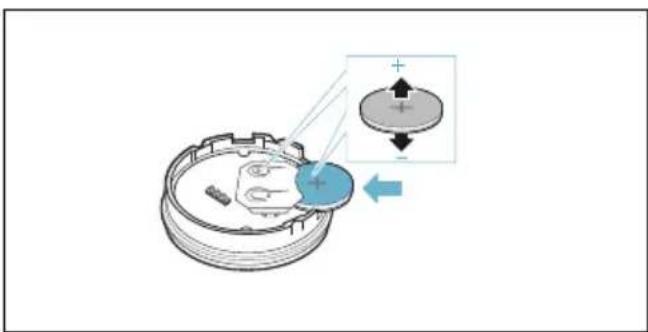
ru
- CoeINHnTe BepXHIOU HNXHIOU qactu Kopnyca. Pn 3Tom o6patnte BHIMaHne Ha npabNtBHOCTb NOLOXeHHa KOHTaKTHbIX UTbIPbKOB.
- YCTaHOBnTe CNIKKHOBYIO KpbIiKy O6paTHo Ha HIXHIOU qactb KopnyCa TEMpepatpHOrO ceHCopa.
Yka3aHHe: NcnoJIb3yIte TOnbKO BbICOKoKaueCTBeHHbIe 6aTapeNk Tnna CR2032. OHN IMeHOT Oco6eHHO 6OJIbWoJ pecypc.
OuHCTka
TemnepaTypbIcHcOp
IcnoJb3yIte dIa OUNCTKI TempeTpyHOrO ceHCopa BlaXHoe NOIOTeH. HkoRda He MoTe TEMpeTpyHbI CEHCOPB NocydOMoEuHO MaUNHe. HkoRda He NOrpykaTe eRO B BOdy I He MOITE NOCTpyEIN BObl.
IIO OKOHuaHn npiroTOBHeHn He 3a6yDbTe CHrTb TempeatypHbI CeHCOP C nocdyI. XpaHnte TempeatypHbI CeHCOP B cyXOM N 6e30nacHom MeCTe, HApPmep B yNaKOBKe, IN KaK MoXHO daJIbWe OT ICTOuHKnOB TeIIa.
CnIKHOBOHaNKlaJaKa
OuHCTHe nI npocuynte nepeyctaHOBkoHa DaTnKe TempepaTypbl. IoxoNT dIy OunCTKn B NocydomoeuHOMaHInHe.
Yka3aHne: He ocTabnIte nocydy C cnIKHOBOH HaKJaKDOK B MbIbHOM paCTBope Ha dInTeNbHoe Bpemr.
Okouko TemnepaTpyhoro cehcopa
OKOshko TemnepaTyphoro ceHCopa BCERda DOJXHO 6bITb YNCTbIM N CyXM. Iy3TOrO Heo6xOdmo CO6IoudaT b CLeNyUOuNe npaBnla:
Peynepno ydaanTe 3aqr3HeHn H6pbI3n Xnpa.
IcnoJb3yInTe InA OunCTK MmRkyIO TpAnKy INN BaTHBie NaOuCK N CpeDCTBO IIN OUnCTKN CTekOJI.
Yka3aHn
He nCnoJIb3yIte a6pa3nBHbIe
YnCTaIuIe CpeIcTBA,a TaKKe JxEcTKne
rVokn u TkN.
He npikacaiTecb K OKoWky Tempepatyporo ceHCopa naIbuaMn. 3TO MOKeT CTaTb npuHOn erO 3aqr3HeHn nn OcaapanbBaHn.
Декларачnia O COOTBETCTBNI
HactoIIM Robert Bosch Hausgerate
GmbH 3aBnEeT, uTo npio6op c yHKnei
becnpoBOHO TEmpepaTyphoro
ceHCopa COOTBeTCTByeT
OCHOBOIOJaRAUoUM TpeBOBaHNm I
dpyHM DeIcTByUoUM NIOJoxEHnM
DInpeKTINbbl 1999/5/EC.
Iopno6Hyo JeKlapaunO COOTBeTCTBnR&TTE BbI HauTe Ha caTe www.bosch-home.com Ha cTpaHnce c ONscaHneM BaUeRo npu6opa B pa3JeIe «DOnOpHnHTeNbHa JOKyMeHTaUnr.
Ilorotnbln Mapka Bluetooth® ABNIOCTCR 3apeHnCTpnpOBaHHbIMN TOPROBIMN 3HaKAMN n CO6CTBeHHocTbIO Bluetooth SIG, Inc., no3ToMy IIO6oe NcNoJIb3OBAHne 3TNX MapOK KOMPAnHeR Robert Bosch Hausgerate GmbH OcyuEcTBnEeTcBpaMKax IInueH3nn. Bce octaJIbHbIe MapKn iΦnMpMeHHbIe Ha3BaHnRA VBnIOTcR CO6CTBeHHOCtBIO COOTBETCTBYIOUx KOMPAnHn.
3mict

BnKOpncTaHnHa 3a npn3NaueHnram .. 106

BaxJIbI HAcTaHOBn 36e3neKn .107

3axnCT HABKOLHbOro cepeoBua 108
Ytuiiai BiiIOBIDHO Do npabn ekoloriuho6e3neKn. 108

BnKOpNcTaHnHa 3a npn3HaueHnA M
YBaJHo npOHTaIte NociBnK. 36epeXitb iHCTpyKuii 3 MOHTaJy Ta eKcPnyatauii IJa IOnaJIbWoTO KOpNCTyBaHHaBO nepeDaui ix iHsOMy KOpNCTyBaueBi.
Ipepeipte npilad nicna p03nakybaHHa. Kaio npnilad NookoJKeHO npi TpaHcnpTyBaHHi, Ioro 3abOpOHeHO BnKOpNCTOBvBaTH. NobIDomTe y TexHicHy cepBicHy clykby i nscbMOBO 3aikcynte NookoJKeHHaHaKwe 3aINT BiDkoDyBaHHa 3bNTkIB aHyIHOETbcra.
TiiBkDnnoBTOBOBVKOpNCtAHNBAKOpNCTOByTe cei npilaBVKJIIOUHO dIa PnIROTyBaHNAcPAB iHaNOiB.Heo6xIDNoCIIkyBatn 3a IPOUCECOMBapHH.3a KOPOTKOUacHMnpOeCOM BapINHNeO6XiIDHOCIIkyBatn 6e3pepePBHO.BNKOpNCTOByTe npilaJLlSeB 3aKpNTHX pIMiueHNX.1ITn Do 8 PokIB Ta Oco6n i3PCNXiUHMM,CEHCOPHMMuMeHTaJIbHMM Baadam, aO0RAKIo IM 6paKaye 3HaHb TaDOCBiPy,MOKytb KOpNCYBaTNCA npilaOM LlWePi HaIJaOMILOHN, 5O Hece
BIDIOBidaIbHicTb 3aixHIO 6e3neky, a6o JKIO BOHN npOuI nnIroTOBky 3 KOpNCtUBaHnI npIlaIOM Ta PO3yMIOTb MOJINBy He6e3neky.
He do3BOJnTe dITm rpaTnc 3 npilaom. OunuEHH Ta ekCnlyaTauciHne
OBCnyroBvBaHH MoKytb
BnKohyBatn dITN, NlIe RaKIO IM 8 pOKIB a6o bIbWe Ta RaKIo BOHNPiHaRJaDOM.
3aWHTHa Ha JKNBOTHa cpeDnHa .133
OTCTpaHyBaHe corglaacHo npoPncTe 3a XNBOTHa CpeDnHa 133

Be3KHeH ceH3Op 3a TempepaTypa. 134
Iodrotobka Hera Ha 6e3KnHnOT ceh3op 3a Tempepatya .134 UcTeHe .136 I3jaba 3a coo6pa3HoCT .136
OctaHaTn INΦopMauN 3a npOn3BODnTe,
onpemaTa, pe3epBnTe DeIobN n cepBnC
Ke HajdeTe Ha nHTepHeT:
www.bosch-home.com
Online-npoJax6a:
www.bosch-eshop.com

KopncTeHbe cnopei HameHaTa
BnmaTeJIHO da ce npouHtaynaTCTBOTO.YnatcBaTa 3aynotpeBa n MOntaKa yUbaJTe rN3a NODOnHeXHa yNtpeBa nn3a CLeHNOT CONCTBeHnK.OTkakoKe ro OTnakyBaTe,npOBepTe ro ypeIoT.YpeIoTHe Cmee Da ce KOpNCtN,DOKOLky Prn TpaHCnOpt eOuTeTeH.NHΦopMnpajTe jaCnyKbata 3a KOpNCnUIN OoTETyBaHbata DOkymentnpajTe Rn BO NnCMeHa φOpMa,BO CNpOTNBHO ce ry6n IpaBOTO 3a HaIOMecT Ha StTeTa.
Oboj ypeJe nOroJen cAmo 3a DomaShHa yNoTpeBa n 3a Bo 3aTBOpEn npocToP. YpeJoT KOpNCTeTe rO cAmo 3a NODrOTOBKa Ha XpaHa N NiJaLauN. PpoUecOT Ha RotBeHe Mopate Da rO HAdrIeDyBaTe. KpatKoTpaEH PpoUec Ha rotBeHe Mopa Da Ce HAdrIeDyBa HeIpKeHnATo. YpeJoT ypeJoT Da Ce KOpNCtN cAmo BO 3aTBOpEn npocToPn. OBoj ypeJ MoKe Da rO KOpNCtAt Deua HaI 8 rOdInn I IuCa Co HamaJIeHN Fm3nukn, Ceh3OpHn IIN MeHTaJIHn CNOCO6HOCTN IIN Iuca Be3 NCKyCTBO I 3HaEHe, DOKOLKy TOa rO npaBat PoJ HaI3Op, IINI m BnIe DaJeHN UNaTCTBA KaKO
6e36eIHO da ro KopnctatypeoT n pa3bnpaATOnaCHOCTnte NOBp3aHn Co Hero.
Deeta He Cmeat Da Cn nIgpaat Co ypeIoT. DeaTa He Cmeat Da To YnCTaT N OdpKyuBaat UpeIoT, OCBEN OHne, KOn IMaat Na8 rOdnHn Hn Ce Noctapn N Ce PoJn Ha3Op.
При Корисе На Функцип Te 3a Гове Мopa NOCTав�аТа ринлда COODBETCTBYBa CO pнглata, Ha KojaшTO ce HaoracanOT CO CEH3OpOT 3a Temперatype.

BaxHH cnrgpnochn
HaNoMeHn
IpeDynpeDyBaHbe OnachOCT nopadn marHeTHOTO nolE!
БeЗкунnot сензора TeMнература e MaГнелТиЕеMeHTNMOжdeЯгОштETaTe JELKTPOHCKNTe IMПlaHTN,Ha np.певсмій�ьпи ПуМпи 3a INHcUInH.ЛугКон HOCAT eJELKTPOHCKIIMПlaHTN He TpeBaДa ГIDOBeDyBaAT CEN3OPOT 3a TempepaTypa BO ueBOBITE Ha HINBHaTа ObleKa n DaДрЖИ MHNIMympacTojaHne od 10 cm Bo Odnoc Ha NejСmejkepot ИлсличeH MeDiuCHKn Upei.
NoctaneHaCJIeHNOT HauH:
- MecToTO 3a JIeIeHBe Ha caIoT Mopa Da e 6e3 macHTn. Icunctete Ro caIoT, Io6po NcyuWeTe Ro n IcTpniTe Ro MeCTOTO 3a JIeIeHBe Ha np. Co UINpITyc.
2.ИЗваде TE ja 3aштHTHaTа Фолиja od cnлнКOHcKaТа ЛелЕнka.Соnomош Ha nCnopaayAHte Wa6LoHи 3aIeNeTe ja cnlNKOHcKaТа ЛelEHka Ha COODBETHATA BNCInHa Ha caDToT.
H3jaba 3a coo6pa3HOCT
Co Oba Robert Bosch Hausgerate GmbH
ce H3jaChyBa, DeKa ypeIOT co 6e3KnueH
ceH3Op 3a TeMIIepaTpya COOIBeTCTByBa
Ha OCHOBHnTe 6apaBa n IpyH
peJIeBAHTHN OJpeIbN OJ INpeKTHBaTa
1999/5/EG.
IeTaJIHa R&TTE-H3jaBa 3a COo6pa3HocT Ke HajTe Ha HHTepHet Ha www.bosch-home.com Ha CtpaHaTa Ha IpoH3BOJOT 3a BaIHOT ypeI NOd DOIOJIHNTeJIHN DOKyMeHTN.
Jorata n MapkaT a Bluetooth® ce BheceHn 3Haun 3a Iobpa H COICTBEHNITBO Ha Bluetooth SIG, Inc. H cekoe KOpHcTeHe Ha OBHe MapKn Ce BPUnPipeky JInueHua OJ Robert Bosch Hausgerate GmbH. CHTe npTuH n MapKn H MMnBa Ha MapKn Ce COICTBEHNITBO Ha COOdBETHNTe KOMIIaHHN.
目录
主要用途 3
重要安全信息. 3
环境保护 3
环保型处理 3
无线烹饪传感器 4
准备和维护无线烹饪传感器 4
清洁 5
符合标准声明. 5