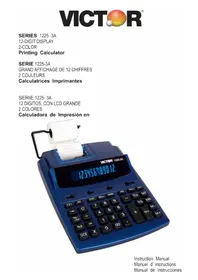
12253A - Calculator VICTOR - Free user manual and instructions
Find the device manual for free 12253A VICTOR in PDF.



| Product type | Electronic printing calculator |
| Brand | Victor |
| Model | 12253A |
| Display | 12-digit, fluorescent |
| Print speed | 2.7 lines/second |
| Print paper | Width 58 mm (2.25 inches) |
| Power supply | 120 V/60 Hz (USA/Canada) or 230 V/50 Hz (EU); power consumption 14.4 W / 11.5 W |
| Operating temperature | 0 °C to 40 °C (32 °F to 104 °F) |
| Dimensions (L × W × H) | 260 mm × 198 mm × 65 mm |
| Weight | 880 g |
| Ink roller | IR-40T, two-color (red printing for negatives) |
| Backup battery | Lithium CR2032 (for tax memory, date, time) |
| Main functions | 4 operations, grand total, automatic sum, percentage, percent difference, item count, memory (4 keys), programmable tax, date/time, rounding (▲/5/4▼), decimal selector (A/0/2/3/4/F), date print, cost/margin/sale key |
| Antimicrobial protection | Silver-based treatment to reduce growth of microbes and bacteria |
| Warranty | 2 years parts and labor (USA, under conditions) |
| General maintenance | Clean with a soft dry cloth; do not use solvents |
| Ink roller replacement | Disconnect power, open cover, remove old one, insert new IR-40T |
| Paper loading | Place paper holder, insert roll, feed end into slot, press paper feed key |
| Date and time setting | Use TIME/DATE and SET keys; format MM-DD-YYYY or DD-MM-YYYY or YYYY-MM-DD; 12/24 hr clock |
| Reset (restore) | Use a pointed object to press the RESET button on the back in case of malfunction |
Frequently Asked Questions - 12253A VICTOR
User questions about 12253A VICTOR
0 question about this device. Answer the ones you know or ask your own.
Ask a new question about this device
Download the instructions for your Calculator in PDF format for free! Find your manual 12253A - VICTOR and take your electronic device back in hand. On this page are published all the documents necessary for the use of your device. 12253A by VICTOR.
USER MANUAL 12253A VICTOR
Congratulations on your choice of a Victor electronic calculator. Careful design, quality materials, painstaking workmanship, and advanced research and productions facilities have given you a calculator that, with proper care, will provide years of trouble-free service. To assure future optimum performance, ask your Victor representative about lowcost protection offered by Victor's Extended Guarantee Protection Program.
This operating manual describes the features and operation of the Victor 1225-3A. This calculator also features the four basic arithmetic operations, grand total, sigma, percentage, percent of change, change sign, item count, non-date add functions, programmable tax rate, back space, cost, sell, margin, and four key memory functions.
NEWANITMICROBIALPROTECTION
Your Victor calculator is engineered with Antimicrobial agent to reduce the growth of microbes and bacteria that cause odors and discoloration.
Did you know that viruses can live for up to 72 hours on common surfaces, such as desks, phones, and calculators? How do you protect your calculator? Surprisingly, with silver. This precious metal is a natural germ-fighter, using its ions to attack microbes. This silver is so safe and effective that it has been EPA-approved for use in a wide range of applications. One of those applications is within your own Victor Antimicrobial calculators. Now you can recucemicrobes on your desktop environment while maximizing your calculating power
TABLEOFCONTENTS
Operations and General Maintenance
Replacing the ink roller
LoadingPaper
DisplaySymbols
KeyboardDiagrams
KeyboardLayout
SlideSwitchFeatures
KeyFeatures
DateandTimeFunctions
ApplicationExamples
Setting the Date and Time
Warranty
Extended Warranty
SPECIFICATION
- Display
: 12 digits, fluorescent.
- Printing Speed
: 2.7 lines/second
- Printing Paper
:Width58mm,(2.25inch)MAX
- PowerSources
:1) 120V/60Hz (USA, CANADA)
2) 230V / 50Hz (ECD)
- Ambient Temperature
: 0^ 40^ (32^ 104^)
- Power Consumption
: 120V / 0.12A / 14.4W
(230V / 0.05A / 11.5W)
- Dimension
: 260mm(L) x 198mm(W) x 65mm(H)
- Ink Roller
: Tow color IR- 40T
- Printing Color
: 2-Color (minus and negative in red)
Weight:880g
PREPARATION
A. Powersource
This unit receives its operating power from the AC power source. When power is in ON position, pressing [D/#] key will only print the digits displayed in the front panel.
B. Loadingpaper
1) Place paper holders into position (Fig. I).
2) Install the paper roll on the holders.
3) Insert the paper end into printer slot (Fig. II).
4) Press [ ] key to feed the paper to an adequate length.
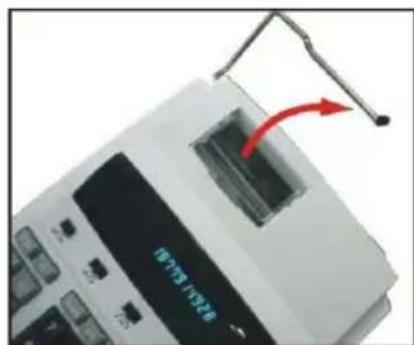
Fig.1
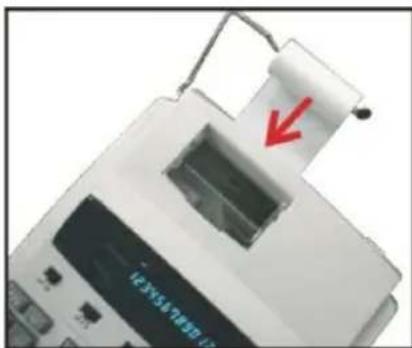
Fig.11
C. Replacing the ink roller
If the printing becomes faint, the ink roller may need to be replaced.
1) Turn the power off.
2) Open the printer cover (Fig. III).
3) Remove the old ink roller by pulling it up (Fig. IV).
4) Insert the new ink roller IR-40T in the compartment and gently press it down until it snaps into place.
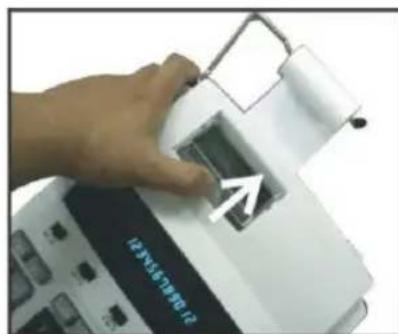
Fig. III
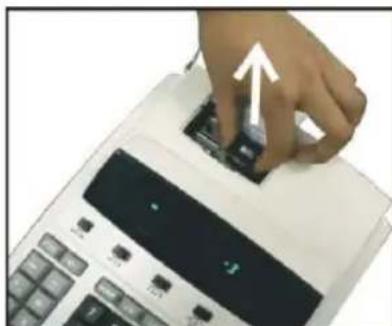
Fig. IV
CAUTION: Turn the power off before replacing ink roller.
KEYIDENTIFICATION
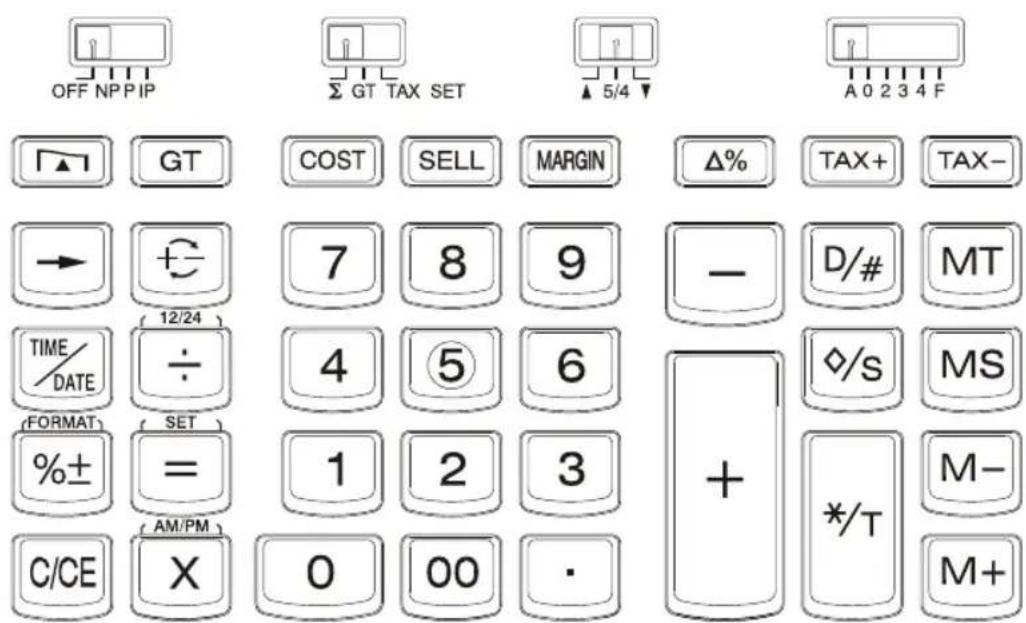
OFFNPPIP
(OFF)
(NPPIP)
Display OFF, while time/date memory will remain.
Switch to choose Printer OFF, Printer ON or Printer item count mode.
GTTAXSET
(∑)
The calculator automatically adds the result of multiplication/division to the Total register-no need to press ^+ key each time. Obtain the multiplication/division result by pressing = key.
(GT) (TAX SET)
Grand Total Memory selectable switch. Selects set mode for tax rate.
5/4
(▲)
An answer is rounded up.
(5/4)
An answer is rounded off.
(
An answer is rounded down.
A0234F
Decimalpoint
(A) accountant, Fixed (0,2,3,4),(F) floating
[0]~ [9] [00] :Numeral keys [.] :Decimal point key
[+]:Addkey [-]:Subtractkey
[× ] :Multiplicationkey
[ = ]: \text{Equalkey} ]
[MS] :Memory subtotal recallkey
[MT] :Memory total clear key
[M^+] :Memory plus key
[M-] :Memory minus key
[D/#] :Date/Number key print key
[ ] :Paper feed key
[ /S] :Subtotalkey
[C/CE] Clear last calculation/Clear last entry
[→] Back space key
[] :Inverts sign of the displayed number at Key entry
[TAX+] or [TAX-] : TAX+Calculates the amount, using the stored rate, and adds it to the original price before tax
TAX-Calculates the amount of tax to be deducted (using the stored tax displayed value to find the pre-tax salesamount
Prints TAX / Included TAX (TAX = 3)
A TAX+ = A(3 / 100)
$$ = A + (A (3 / 1 0 0)) $$
Prints TAX / excluded TAX (TAX = 3)
A TAX- = A - A(1 + 3 / 100)
$$ = A / (1 + 3 / 1 0 0) $$
[ %] :Prints difference (Computes the % of change between two values)
A % B = B - A
$$ = (B - A) / A $$
A % B + / - = -(B + A)
$$ = - (B + A) / A $$
[^* / T] : Total key
[COST] [MARGIN] [SELL]: Used for calculating the cost,
| selling price and profit margin amount. Enter the value of any 2 items to obtain the balance value item. (e.g. enter the value of the cost and the selling price to obtain the profit margin.) | |
| [GT] | :In Grand total mode, adds the total register to theGT register by The (*/T) key |
| [SET] | :Used to set the date and time in calendar & clock mode |
| [AM/PM] | :Used to switch between AM or PM at clock mode time setting |
| [12/24] | :Used to switch between 12 or 24 hour at clock mode time setting |
| [FORMAT] | :Used to select date format between“YYYY/MM/DD”, “DD/MM/YYYY” or “MM/DD/YYYY” atcalendarmode |
DISPLAYSYMBOL
M : A number has been stored in memory
E : Error or overflow of capacity
: The display value is negative
DATE AND TIME FUNCTION

The TIME/DATE key is used to display the Time or Date.
Depressing the TIME/DATE key once displays the dateMM-DD-YYYY.
Depressing the TIME/DATE key a second time displays the time, HH-MM-SS.
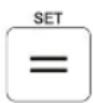
When displaying the Date or Time the = key becomes a to enter or exit the date or time set mode.

When displaying the Time the ÷ key becomes a key to toggle between the 12(AM/PM) or 24 hour clock mode.

When displaying the Time in the set mode the × key becomes a key to toggle between AM and PM when in the 12 hour time mode.
SetDateandTime
1) Press TIME/DATE and then SET. (The first digit of the month will flash.)
2)Enterth-monthMMusingthenumberkeys.(Thefirstdigitof thedatewillflash.)
3)EnterthedateDDusingthenumberkeys.(Thefirstdigitof theyearwillflash.)
4)EnterthereyearYYYY using thenumberkeys. (Thefirstdigitof themonthwillflash.)
5)PressSettoconfirmthedate.
6) Press TIME/DATE and then SET. Enter the time using the number keys and press 12/24 to switch between 12-hour or 24-hourclock.
7)PressAM/PMtotogglemorningorafternoonandpressSET Toconfirmthetime.
| ProblemOperation | Read-Out | |
| Howtosetdate:Oct.29,2001 | TIME/DATESET(Hold3seconds)10292001SET | MM-DD-YYYY“M”M-DD-YYYY10-“D”D-YYYY10-29-“2”YYY“1”0-29-200110-29-2001 |
| Howtosetime:a)3:45AMb)3:45PMc)15:45 | C/CE TIME/DATE TIME/DATESET(Hold3seconds)0345SETSET(Hold3seconds)AM/PMSET12/24 | HH-MM-SSA“H”H-MMA“0”3-45A03-45-00A“0”3-45A03-45-00P15-45-00 |
DATE FORMAT: While displaying the date, depressing the % ± keyallowschangingthedateformatmodefromMM-DD-YYYYto DD-MM-YYYY or YYYY-MM-DD. The default date format is MM-DD-YYYY.
REPLACING THE BACK-UP BATTERY:
1)Usingascrewdriverremovethethreescrewsonthebackcover ofthecalculator.
2)Toseparatethefrontandbackcoverhalves,carefullyinsertand twist a flat-blade screwdriver between them.
3)Useaflat-bladescrewdrivertogentlypryoutthebattery.
4) Position thenewbatterysothepositive(+)sideisup.Slideone edge of the battery under the tab on the battery holder, then pressthebatteryintoplace.
5)Snapthecoverhalvesbacktogether. Thenreinsertandtightentheshcrews.
NOTE: Memory backup battery retains the tax rate, calendar and clocksetting,
whenthepowerisofforevenwhentheACcordis disconnected.
Battery:1Lithiumbattery(Type:CR2032)
Batterylife:Backuptime1000 hours
RESET:
Electromagneticinterferenceelectrostaticdischarge maycause the displaytomalfunctionorthocontentsofthememorytobelostoraltered.Shouldthisoccur,usethetipofaballpointpen (orsimilarsharpobject)topressthe[RESET]buttononthebottom ofthecalculator. Afterresetting, besuretosetthetaxrate,time anddateagain.

PRÉFACE
:Touchesvirguled ecimale
[+]
:TouchesAjouter
[-]
:TouchesMultiplication
: TouchesDivision
[=]
:TouchesEgalité
:TouchesPourcent
[MS]
$$ = A + (A (3 / 1 0 0)) $$
:ImprimeTAX/TAXIncluse (TAX=3)
A _· = A - A(1+3/100)
$$ = A / (1 + 3 / 1 0 0) $$
[COCT][SELL][MARGIN]
$$ = - (B + A) / A $$
SYMBOOLED'SAFFICHAGE
$$ = A + (A (3 / 1 0 0)) $$
:ImprimeTAX/IncluidoTAX (TAX = 3)
$$ \begin{array}{l} A \quad T A X + = A - A (1 + 3 / 1 0 0) \ = A / (1 + 3 / 1 0 0) \ \end{array} $$
[COCT][SELL] [MARGIN]
[ \text{[OFF/NP/P/IP]} = P, [\Sigma /GT/TAX\text{SET}] = \Sigma [\Delta 5/4\triangledown] = \text{DONT CARE} ] [ [A/0/2/3/4/F] = F ]
A. Four fundamental arithmetic calculations
Quatre calculs arithmetiques fondamentaux
Cuatro calculos arithmeticosfundamentales
| Example Exemple Ejempio | Operation Opération Operaciones | Display Affichage Pantella | Printing-out Impression Impresión | |
| (24+36-75)x8÷(-9) =13.3333333333 | 24 | + | 24. | 24. + |
| 36 | + | 60. | 36. + | |
| 75 | - | -15. | 75. - | |
| x | -15. | -15. x | ||
| 8 | ÷ | -120. | 8. ÷ | |
| 9 | = | -9. | -9. = | |
| 13.3333333333 | 13.3333333333 + | |||
Your new VICTOR electronic calculator is guaranteed to the Original purchaser for two years for all parts and labor, providing repair work is performed at an authorized VICTOR Regional Service Center and the unit are sent by prepaid mail. For Service Centers outside the USA please consult your local office supply Dealer or Victor's Web Site. Warranty repair requires a copy of the original purchase invoice or receipt to be packed with the machine.
Any warranty, statutory or otherwise, does not include service and or replacement or repair of parts when damage or defect is a result of accident, abuse, or the elements.
Victor Technology
175 E. Crossroads Parkway Suite D
Bolingbrook, IL 60440
Phone: 630-754-4400
Fax:630-972-3902
Website: www.victortech.com
GARANTIE
175 E. Crossroads Parkway Suite D
Bolingbrook, IL 60440
Phone: 630-754-4400
Fax:630-972-3902
Website: www.victortech.com
LA GARANTÍA
175 E. Crossroads Parkway Suite D
Bolingbrook, IL 60440
Phone: 630-754-4400
Fax:630-972-3902
Website: www.victortech.com
Corporate Office and National Service Center:
Victor Technology
175 E. Crossroads Parkway
Suite D
Bolingbrook, IL 60440
Phone: 630-754-4400
Fax: 630-972-3902
Website: www.victortech.com