Mirror - Built-in kit HAMA - Free user manual and instructions
Find the device manual for free Mirror HAMA in PDF.


| Product type | Bluetooth hands-free kit with mirror for rearview mirror mounting |
| Brand | Hama |
| Model | Mirror |
| Reference | 00106628 |
| Dimensions (W x H x D) | approx. 280 x 75 x 10 mm |
| Net weight (without power adapter) | approx. 310 g |
| Display | LCD |
| Bluetooth | 2.0 + EDR |
| Range | 10 m max. |
| Talk time | up to 20 hours |
| Standby time | up to 230 hours |
| Pairing | up to 4 mobile phones |
| Main functions | Hands-free calling, voice dialing, last number redial, call list (20 entries), import phonebook, call waiting management, call forwarding |
| Power supply | Built-in battery, charging via 12 V adapter (USB) |
| Operating temperature | +5°C to +45°C |
| Care and cleaning | Clean the housing with a slightly damp cloth; do not use solvents or harsh cleaning agents |
| Safety | Install on rearview mirror without obstructing visibility; do not expose to moisture or direct sunlight; use only the supplied charger |
| Menu languages | German, English, Spanish, French, Italian |
Frequently Asked Questions - Mirror HAMA
User questions about Mirror HAMA
0 question about this device. Answer the ones you know or ask your own.
Ask a new question about this device
Download the instructions for your Built-in kit in PDF format for free! Find your manual Mirror - HAMA and take your electronic device back in hand. On this page are published all the documents necessary for the use of your device. Mirror by HAMA.
USER MANUAL Mirror HAMA
natural_image
Top-down view of a black rectangular object with a white rectangle on the side (no text or symbols visible)Inhaltsverzeichnis
Einführung 4
Vorwort 4
Information on this user manual . . . 27
Liability disclaimer 28
Warnings 28
Intended use 29
Copyright 29
Safety 30
Risk of accident due to obstructed view .... 30
Fundamental safety precautions . . . 31
Design and function ..... 32
General 32
Performance characteristics of the MIRROR handsfree vehicle kit .... 32
Front of the device 33
Rear side of the device .... 34 Underside of the device .... 3
Vehicle charging adapter ..... 35
Setting up 36
Safety precautions 36
Unpacking 36
Checking contents and packaging ..36
Disposal of the packaging ..... 37
Requirements for the place of operation .... 37
Mounting the handsfree vehicle kit . 37
Handsfree vehicle kit battery ..... 3 9
Charging the battery 39
Disposal of the battery ..... 4 0
Switching the device ON and OFF . 40
Switching on 40
Switching off 40
Pairing the handsfree vehicle kit
with the mobile phone 40
Initial pairing with the mobile telephone 40
Operation 42
Language selection ..... 42
Accept/terminate telephone call .42
Setting the volume 43
Redialling 43
Answering a second incoming call 43
Call forwarding 43
Voice dialling 44
Call list 44
Updating the telephone book . . . 4 5
Troubleshooting 46
Troubleshooting chart 46
Appendix 47
Storage 47
Support and contact information . . . 47
Technical data 48
Notes on
EC Declaration of Conformity ..... 48
Introduction
Foreword
Dear Customer,
By purchasing the MIRROR Bluetooth handsfree vehicle kit, you have decided in favour of a quality product from Hama that corresponds to the latest development standards with respect to engineering and functional performance.
The MIRROR Bluetooth handsfree vehicle kit is used for handsfree telephoning in vehicles.
Please read the information contained in this user manual to familiarise yourself quickly with the device and be able to make full use of its functions.
We wish you a lot of pleasure with the device.
Information on this user manual
This user manual forms an integral part of the MIRROR Bluetooth handsfree vehicle kit (hereinafter referred to as device) and contains important information on the intended use, safety, connection and operation of the device.
The user manual must be kept close to the system at all times. Its contents must be read and observed by all persons using the device or remedying faults in the device.
Keep this user manual in a safe place and pass it on with the device to any future owners.
Liability disclaimer
All technical information, data and instructions on installation, operation and maintenance of the device contained in this user manual represent the current status at the time of printing and are based on the best possible knowledge gained by experience and know-how.
The manufacturer assumes no liability for damage or injury resulting from failure to observe the user manual, use for other than the intended purpose, unprofessional repairs, unauthorised modifications or use of non-approved spare parts.
Warnings
The following warnings are used in this user manual:

DANGER
A warning of this category draws attention to an impending dangerous situation.
If the dangerous situation is not avoided, it may lead to serious injury or even death.
Follow the instructions in this warning to avoid the danger of serious injury or even death.

WARNING
A warning of this category draws attention to a potentially dangerous situation.
If the dangerous situation is not avoided, it may lead to injuries or damage to property.
Follow the instructions in the warning to prevent injuries to persons and property.
NOTE
▶ A note indicates additional information that simplifies the use of the device.
Intended use
The device is only intended to be used for handsfree telephoning in vehicles.
Any use other than previously stated is considered as improper use.
WARNING
Danger from use for other than the intended purpose!
If not used for its intended purpose and/or used in any other way, the device may be or become a source of danger.
Only use the device for its intended purpose.
Observe the procedures described in this user manual.
No claims of any kind will be accepted for damage or injury resulting from use of the device for other than its intended purpose. The risk has to be borne solely by the machine owner.
Copyright
This documentation is protected by copyright.
Any duplication or reprinting, in whole or in part, as well as reproduction of any illustrations even in modified form is only permitted with the written approval of the manufacturer.
Unless otherwise specifically indicated, all trademarks and logos mentioned are trademarks of Hama GmbH and are protected by law. Microsoft, Windows and the Windows logo are trademarks of Microsoft Corporation. All other product and company names are trademarks of their respective owners.
Safety
This appliance complies with the prescribed safety regulations. However, improper use can result in personal injury and/or damage to the device.
Risk of accident due to obstructed view
DANGER
Risk of accident due to obstructed view in the vehicle Risk of accident due to obstructed/restricted view if the device is not correctly installed in the vehicle!
Observe the following safety instructions to avoid risk of accident due obstructed/restricted view.
Install the device carefully and according to instructions.
Only use the device when the required rear view is not limited or restricted.
NOTE
The device is fixed to the existing rear-view mirror in the vehicle with the help of integrated retaining clips.
Fundamental safety precautions
Observe the following safety instructions to ensure safe handling of the device:
Inspect the device for visible signs of damage before use. Do not use a damaged device.
Do not allow children to play with the device. ■
Persons who due to their physical, mental or motor response abilities are unable to operate the device may only use it under supervision or instruction by a responsible person.
Do not open the device. Unauthorised opening and repairs can lead to considerable danger for the user and cause serious damage to the device. Only allow qualified persons to carry out repairs. Improper repairs will void the warranty.
Repairs to the device during the warranty period may only be carried out by service centres authorised by the manufacturer, otherwise the warranty will become void in the event of subsequent damage.
Defective parts may only be replaced with original spare parts. ■ Only these parts guarantee that the safety requirements are satisfied.
Protect the device against moisture and penetration by liquids. If the device comes into contact with liquids, disconnect it from the power supply immediately.
Clean the housing of the device with a slightly damp cloth. Do not use any aggressive or abrasive cleaning agents or solvents.
Electronic devices are delicate, so avoid knocks and blows.
Design and function
This section contains important information on design and function of the device. Please observe the instructions to prevent danger and damage.
General
The MIRROR is a handsfree vehicle kit that can be easily mounted on the rear-view mirror of a vehicle. The device establishes connection to a mobile telephone via Bluetooth. Telephone numbers stored in the mobile telephone can be transferred to the MIRROR handsfree vehicle kit.
Performance characteristics of the MIRROR handsfree vehicle kit
DSP (Digital Signal Processor) ■
Echo suppression ■
Automatic telephone number import (dependent on type of ■ mobile phone used)
Display of caller name or number ■
Menu can be set to five different languages (German, English, Spanish, French, Italian)
Supports voice dialling ■
Automatic connection to last paired mobile telephone ■
Call forwarding ■
Accepting a call ■
Redialling ■
Battery capacity indicator ■
The device can be paired with up to four mobile telephones (not simultaneously)
Talk time up to 20 hours ■
Standby time up to 230 hours ■
Front of the device

1 MIRROR handsfree vehicle kit:
Device with all function and operating elements as well as an integrated rear-view mirror.
② Accept call button:
Switches on the device when pressed. Accepts incoming calls when pressed. Terminates calls when pressed.
3 Display (LCD):
Caller number or caller name display, selected functions as well as battery capacity.
4 "Increase volume" button:
Increases the volume of the loudspeaker when pressed.
5 "Decrease volume" button:
Decreases the volume of the loudspeaker when pressed.
Rear side of the device
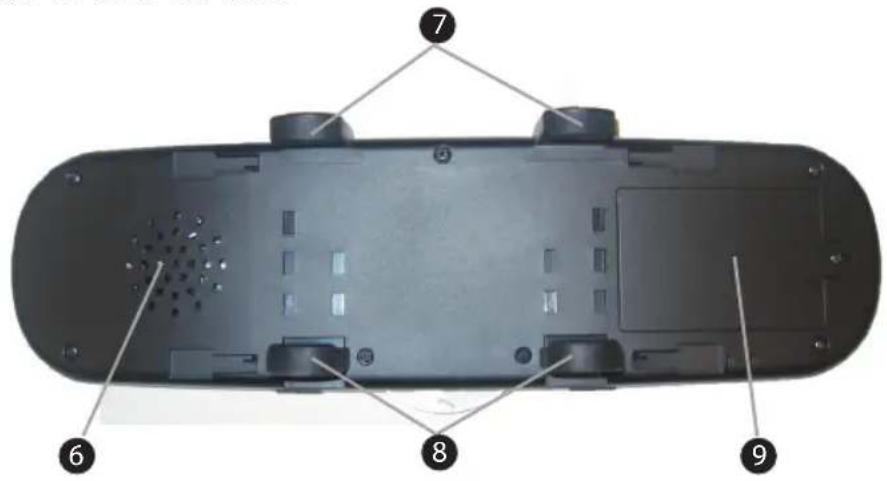
6 Loudspeaker
⑦ Retaining clip (fixed)
8 Retaining clip (moveable)
9 Battery compartment with cover
Underside of the device
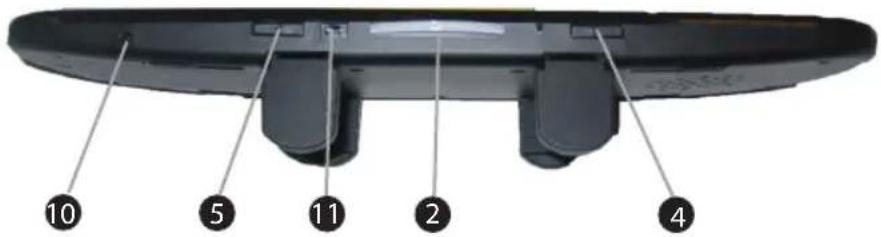
10 Microphone: Adopts the microphone function of the connected mobile telephone.
5 "Decrease volume" button
11 USB charging socket
② Accept call button:
Switches on the device when pressed. Accepts incoming calls when pressed. Terminates calls when pressed.
4 "Increase volume" button:
Vehicle charging adapter
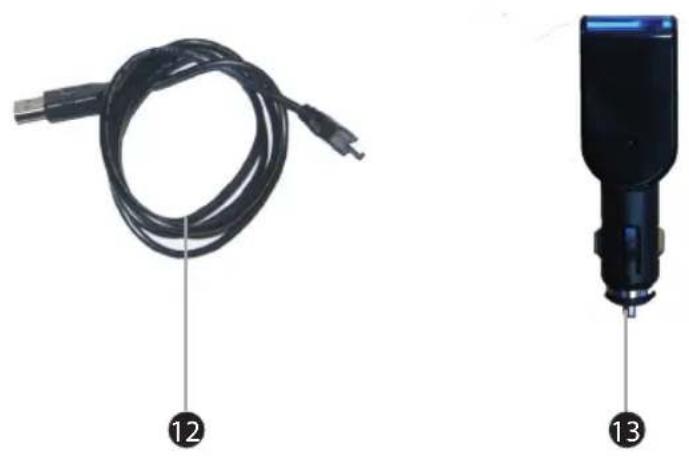
12 USB charging cable:
For connecting the handsfree vehicle kit with the loudspeaker (13) or USB connection of a computer.
13 12V vehicle charging adapter:
For connecting to a 12V vehicle socket or the cigarette lighter socket in the vehicle.
Setting up
Safety precautions
DANGER
Persons may be injured or material damage may be caused during startup!
Observe the following safety precautions to avoid danger:
Never play with packaging material. Risk of suffocation.
Observe all information on the requirements for the place of operation and the electrical connection of the device to avoid personal injury and damage to property.
Unpacking
Unpack all parts of the device including the user manual.
◆ Remove all packing materials from the device before using for the first time.
Checking contents and packaging
The device is supplied with the following components as standard:
MIRROR Bluetooth handsfree vehicle kit ●
12V vehicle charging adapter •
USB charging cable •
Integrated rechargeable battery ●
User manual •
NOTE
Check for visible signs of damage or missing items on delivery. Report an incomplete or damaged delivery to your supplier/re-tailer immediately.
Disposal of the packaging
The packaging protects the device against damage during transit. The packaging materials have been selected according to environmental and waste disposal aspects and can therefore be recycled.

Recycling the packaging material for further use saves raw materials and reduces the waste. When no longer required, dispose of the packaging materials in accordance with the local regulations.
NOTE
If possible, keep the original packaging during the warranty period in order to be able to pack the device properly in the event of a warranty claim.
Requirements for the place of operation
For safe and trouble-free operation of the device, the place of operation must satisfy the following requirements:
■ The device must be correctly fixed to the rear-view mirror of the vehicle with the retaining clip supplied.
Do not use the device in a hot, wet or very humid environment. ■
- Do not expose the device to direct sunlight, store it in a safe place such as the glove compartment when leaving the vehicle.
Mounting the handsfree vehicle kit
WARNING
Danger from incorrectly or carelessly mounted device!
An incorrectly or carelessly mounted device can impair driver safety!
Make sure that the device is correctly mounted and fixed! ▶
Only use the device when it is possible to see with the rear-view mirror!
NOTE
Before mounting the handsfree vehicle kit:
Switch off the vehicle engine.
Apply the handbrake.
◆ Hold the device (1) in front of the rear-view mirror of your vehicle.
Place the lower, moveable retaining clip (8) onto the lower edge of the rear-view mirror.
◆ Pull the device (1) upwards a little until the upper fixed retaining clip (7) can be pushed over the upper edge of the rear-view mirror.
Make sure that all four retaining clips clasp the edge of the vehicle mirror.
NOTE
Check that the device is firmly mounted on the rear-view mirror of the vehicle.

Handsfree vehicle kit battery
Charging the battery

WARNING
Risk of damage from incorrect charging device!
An incorrect charging device can destroy the device during charging.
Only use the charging adapter (13) and the USB charging cable (12) supplied with the device.
NOTE
Before using the device for the first time and to ensure a longer service life, charge the battery completely for at least 3 to 5 hours.
The battery must not remove from the device for charging.
Connect the USB charging cable (12) to the 12V vehicle charging adapter (13) and insert the charging adapter into the cigarette lighter socket in the vehicle.
Connect the USB charging cable (12) to the charging socket (11) ◆ on the device (1).
The charging procedure is indicated on the display (3) by a battery symbol and the Accept call button (2) lights up red.
NOTE
Charge the battery at regular intervals.
Pay attention to the battery charge indicator on the display.
Disposal of the battery
NOTE
Dispose of the battery either at community collection depots or via your specialist retailer. Never dispose of batteries in the normal household waste.
Switching the device ON and OFF
Switching on
Press the Accept call button (2) on the underside of the device for at least 2 seconds.

The device switches itself on and automatically starts searching for switched-on mobile telephones for pairing.
Switching off
Press the Accept call button (2) on the underside of the device for at least 2 seconds. The device switches itself off.

NOTE
If pairing of the device and mobile telephone does not take ▶ place after switching on, it will automatically switch itself off after approximately 30 minutes.
Pairing the handsfree vehicle kit with the mobile phone
Initial pairing with the mobile telephone
NOTE
The device can be paired with up to four mobile telephones ▶ (selectively, not simultaneously)
Activate the Bluetooth function of your mobile telephone.
NOTE
Information on the Bluetooth connection of your mobile tel- ephone can be obtained from the user manual of the telephone.
When pairing with your mobile telephone for the first time, press the Accept call button (2) for at least 5 seconds until the "Ready to connect" message appears in the display (3).
As soon as your mobile telephone has detected the device, the device name MIRROR appears on the display of your mobile telephone.

Select the MIRROR device with your mobile telephone and enter the corresponding PIN code when prompted.

NOTE
The PIN code for the handsfree vehicle kit is "0000"
The "Pairing successful / Connection to mobile telephone" message appears on the display (3) after successful pairing of both devices.
The name of the paired mobile telephone is also displayed.
The message "Importing telephone book - please wait" follows.
NOTE
The telephone book import starts automatically after initial pairing and takes a certain amount of time. The "Please wait" message appears every 30 seconds until importing is completed.
When pairing with another mobile telephone, its telephone book is also imported. Any previous entries in the device are then overwritten.
NOTE
▶ Not all mobile telephones support the "Import telephone book" function; you can obtain more information on this in the user manual of your mobile telephone.
After pairing for the first time, the device automatically connects with the previously paired mobile telephone each time it is switched on.
Operation
Language selection
You select from five different languages:

Press and hold the "Increase volume" button (4) ◆ for at least 2 seconds to display the SETUP menu.
◆ Press the "Increase volume" button (4) again to display the "Language selection" submenu.
Press The "Decrease volume" button (5) to confirm.
Subsequently press the "Increase volume" button (4) to select the desired language and confirm by pressing the "Decrease volume" button(5).
The device displays the selected language.
Accept/terminate telephone call
Switch on device. Press the Accept call button (2) for at least 2 seconds to do this.
- Briefly press the Accept call button (2) again to reconnect to the previously paired mobile telephone. The device is now ready for operation.
Press the Accept call button (2) to accept incoming telephone calls.
NOTE
The ringing tone sounds both in your mobile telephone and the device when a call comes in. The Accept call button (2) also lights up yellow.
Press the Accept call button (2) again to terminate the telephone call.
Setting the volume
◆ Press the "Increase volume" button (4) to increase the volume of the device.
◆ Press the "Decrease volume" button (5) to decrease the volume of the device.
NOTE
The volume of the device can be progressively increased or decreased (15 steps) in jog mode.
The maximum or minimum setting appears in the device display (3) ("max. volume" / "min. volume").
Redialling
Press the Accept call button twice (2) to redial the previous number.
Answering a second incoming call
If a second call comes in, press and hold the Accept call button ◆ (2) for at least 2 seconds. The first call is put on hold.
◆ To activate the first call again, repress and hold the Accept call button (2) for at least 2 seconds.
Call forwarding
- Press and hold the "Increase volume" button (5) for at least 2 seconds. The telephone call is no longer transmitted via the device and transferred back to the connected mobile telephone. This serves the purpose of preventing other people from listening to the telephone call.
Voice dialling
NOTE
Voice dialling only functions in combination with mobile telephones that support the function.
◆ Press the Accept call button (2) again to activate the "Voice dial-ling" function.
NOTE
In the case of conventional mobile telephones, voice recordings must be saved first.
Information on this can be obtained from the user manual of the telephone.
Call list
NOTE
The mobile telephone must be connected to the device for this function.
◆ Press and hold the "Decrease volume" button (5) for at least 2 seconds to display the call list. The last caller name or the caller number now appears on the display (3).
◆ Press the "Decrease volume" button (5) or "Increase volume" button (4). to display other caller names/number from the list.
After displaying the selected caller name, press the Accept call ◆ button (2) to dial the number.
NOTE
The caller list can only store a maximum of 20 caller names or numbers.
Updating the telephone book
When your mobile telephone is connected to the device, press and hold the "Increase volume" button (4) for at least 2 seconds to display the SETUP menu.
After the "Update telephone book" message has appeared on the display (3), press the "Decrease volume" (5) to select or press the (2) to exit the menu.
◆ Press the "Decrease volume" button (5) again to activate the "Update telephone book" function.
NOTE
The "Please wait" message appears every 30 seconds in the ▶ display (3) until updating is completed.
After completion, the "Telephone book update complete" appears in the display (3).
Press the Accept call button (2), to exit the SETUP menu.
Troubleshooting
Troubleshooting chart
Before sending the device to after-sales service, use the following table to check whether you can remedy the problem yourself.
| Fault Possible cause Remedy | ||
| Device cannot be switched on | Battery not charged | Charge the battery for at least 3 to 5 hours |
| Accept call button (2) not pressed long enough | Press the Accept call button (2) for at least 2 seconds | |
| Device is defective | Contact customer service. | |
| Mobile device cannot be paired with the device | Mobile telephone too far away | Keep within the maximum range of 10 m |
| Mobile telephone Bluetooth function not activated | Activate mobile telephone Bluetooth function | |
| Incorrect PIN code entered | Enter correct PIN code "0000" | |
| Accept call button (2) not pressed long enough during first pairing process | Press the Accept call button (2) for at least 5 seconds to do this during the first pairing process. | |
| No telephone functions on the device | Device and mobile telephone not paired / not connected | Pair and connect device and mobile telephone |
| No sound can be heard | Volume set too low Increase volume. | |
NOTE
If you cannot resolve the problem with the steps described ▶ above, please contact after-sales service.
Appendix
Storage
If you do not intend to use the device for a longer period of time, switch off the device and disconnect it from the charging device and keep it in a clean and dry location without direct exposure to sunlight.
Support and contact information
For faulty products:
In the event of product complaints, please contact your retailer or Hama product support.
Internet/World Wide Web:
Product support, new drivers or product information can be obtained from www.hama.com
Support hotline – Hama product support:
Tel. +49 (0) 9091 / 502-115
Fax +49 (0) 9091 / 502-272
| ModelModel no. | MIRROR Bluetooth handsfree vehicle kit00106628 |
| Description | Handsfree device with mirror for quick mounting on vehicle rear-view mirror |
| Display LCD display | |
| Bluetooth standard 2.0 + EDR | |
| Pairing | Pairing with up to four mobile telephones with Bluetooth function |
| Frequency 2.4 GHz | |
| Profile Handsfree and telephone book functions | |
| Range max. 10 m | |
| Talk time up to 10 hours | |
| Standby time up to 230 hours | |
| Special functions | Telephone book importVoice dialling |
| Operating temperature | +5 °C to +45 °C |
| Dimensions approx. 280 x 75 x 10 mm | |
| Net weight(without power adapter) | approx. 310 g |
Notes on EC Declaration of Conformity
Hama GmbH & Co. KG hereby declares that this device complies with the fundamental requirements and other relevant provisions of the 1999/5/EC directive. The Declaration of Conformity according to the R&TTE Directive 99/5/EC can be found at www.hama.com
CE
Table des matières
Introduction 51
Avant-propos 51
1 Kit mains libres MIRROR:
GB Note on environmental protection:
After the implementation of the European Directive 2002/96/EU and 2006/66/EU in the national legal system, the following applies:
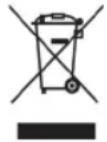
Electric and electronic devices as well as batteries must not be disposed of with household waste. Consumers are obliged by law to return electrical and electronic devices as well as batteries at the end of their service lives to the public collecting points set up for this purpose or point of sale.
Details to this are defined by the national law of the respective country. This symbol on the product, the instruction manual or the package indicates that a product is subject to these regulations. By recycling, reusing the materials or other forms of utilising old devices/Batteries, you are making an important contribution to protecting our environment.

- Inhaltsverzeichnis
- Einführung 4
- Safety 30
- Design and function ..... 32
- Vehicle charging adapter ..... 35
- Setting up 36
- Operation 42
- Troubleshooting 46
- Appendix 47
- Introduction
- Foreword
- Information on this user manual
- Liability disclaimer
- Warnings
- DANGER
- WARNING
- NOTE
- Intended use
- Danger from use for other than the intended purpose!
- Copyright
- Safety
- Risk of accident due to obstructed view
- Fundamental safety precautions
- Design and function
- General
- Performance characteristics of the MIRROR handsfree vehicle kit
- Front of the device
- Rear side of the device
- Underside of the device
- Vehicle charging adapter
- Setting up
- Safety precautions
- Unpacking
- Checking contents and packaging
- Disposal of the packaging
- Requirements for the place of operation
- Mounting the handsfree vehicle kit
- Handsfree vehicle kit battery
- Charging the battery
- Risk of damage from incorrect charging device!
- Disposal of the battery
- Switching the device ON and OFF
- Switching on
- Switching off
- Pairing the handsfree vehicle kit with the mobile phone
- Initial pairing with the mobile telephone
- Operation
- Language selection
- Accept/terminate telephone call
- Setting the volume
- Redialling
- Answering a second incoming call
- Call forwarding
- Voice dialling
- Call list
- Updating the telephone book
- Troubleshooting
- Troubleshooting chart
- Appendix
- Storage
- Support and contact information
- For faulty products:
- Internet/World Wide Web:
- Support hotline – Hama product support:
- Notes on EC Declaration of Conformity
- Table des matières
- Introduction 51
- GB Note on environmental protection:
Brand : HAMA
Model : Mirror
Category : Built-in kit