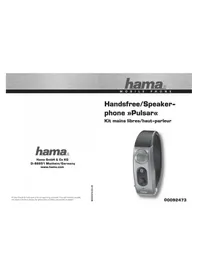
Pulsar 92473 - Built-in kit HAMA - Free user manual and instructions
Find the device manual for free Pulsar 92473 HAMA in PDF.


| Product type | Handsfree kit / Bluetooth speaker |
| Brand | Hama |
| Model | Pulsar 92473 |
| Technology | Bluetooth (A2DP profiles, handsfree) |
| Power supply | 230V power adapter |
| Range | Up to 10 meters |
| Main functions | Bluetooth stereo music playback, handsfree kit, TTS (Text-To-Speech), vibration, missed call reminder, teleconference |
| LED indicators | Red (charging), Blue/Red (pairing), Blue flashing 2x/5s (standby) |
| Controls | Call acceptance button, volume buttons |
| Certification | CE |
| Package contents | Bluetooth system, 230V power adapter |
| Care and cleaning | Wipe with a soft, dry cloth |
| Safety | Compliant with R&TTE directives 1999/5/EC |
| Charging indicator | Red LED on during charging, off when charging is complete |
| Pairing process | Press and hold the call acceptance button for 5 seconds (blue/red flashing LED); default password: 0000 |
Frequently Asked Questions - Pulsar 92473 HAMA
User questions about Pulsar 92473 HAMA
0 question about this device. Answer the ones you know or ask your own.
Ask a new question about this device
Download the instructions for your Built-in kit in PDF format for free! Find your manual Pulsar 92473 - HAMA and take your electronic device back in hand. On this page are published all the documents necessary for the use of your device. Pulsar 92473 by HAMA.
USER MANUAL Pulsar 92473 HAMA
All listed brands are trademarks of the corresponding companies. Errors and omissions excepted, and subject to technical changes. Our general terms of delivery and payment are applied.
natural_image
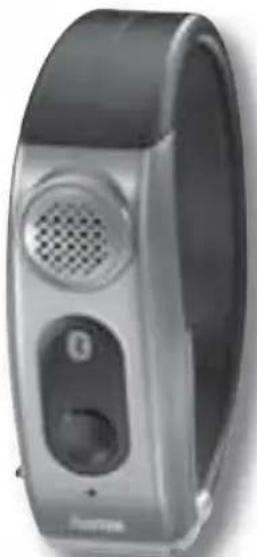
Close-up of a modern smartwatch with speaker grille and control buttons (no visible text or symbols)00092473
0092473/02.09
GB Operating Instruction
The "Pulsar" Bluetooth system is a loudspeaker system for mobile phones based on Bluetooth technology. Bluetooth technology is a standard for wireless data communication over a short distance. Compatible components (e.g. hands-free facilities, loudspeakers etc.) and Bluetooth-enabled mobile phones can establish a wireless connection and communicate over a distance of up to 10 metres. The Bluetooth system supports the "A2DP" Bluetooth profile and can therefore be used with compatible end devices (mobile phones, PDAs, etc.) for audio playback via stereo Bluetooth. That means that only end devices that support one of these two Bluetooth profiles guarantee compatibility with the loudspeaker system. In addition, the multi-speaker can be used together with Bluetooth for hands-free operation. The "Headset" and "Handsfree" Bluetooth profiles are supported for this function.
Extent of delivery
• "Pulsar" Bluetooth system
• 230 V power supply unit
Description
Call/Call-ending button
Volume control button
Charger cable socket
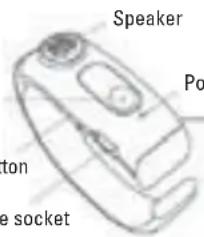
Power/Charger LED Microphone
Getting started
Plug in the power supply unit and connect it to the corresponding socket on the Bluetooth system. The LED on the loudspeaker lights up red during the charging process. This LED goes out after the charging process has fi nished.
Switching the system on/off
Press the call/call-ending button for 2 seconds to switch on the system. The LED now flashes blue. Press the call/call-ending button for 5 seconds to switch off the system.
Pairing the Bluetooth system with your end device (mobile phone, etc.)
The two components must "get to know" one another before the Bluetooth system can communicate with your telephone. This process is known as pairing and is the basis for using the system. Pairing only has to be carried out once, before the loudspeaker is used for the first time.
Make sure that your end device (mobile phone, PDA, etc.) supports the "A2DP" Bluetooth profile. The Bluetooth system cannot be used for music playback if it does not (see the operating instructions of the device).
Prepare your telephone for the pairing process. Follow the instructions in the operating instructions of your mobile phone to switch your telephone to Bluetooth mode and initiate and perform the pairing procedure.
- Make sure that the "Pulsar" Bluetooth system is switched off.
- Press and hold the call/call-ending button for 5 seconds or until the LED begins to flash blue and red alternately and an acoustic signal is heard. Then release the button. The Bluetooth system is now in pairing mode.
- Start pairing (the search for Bluetooth devices) with your mobile phone as described in the instructions for your telephone. Follow the instructions on your telephone's display.
- Your telephone searches for compatible devices in the Bluetooth environment.
- If your telephone has found the "Pulsar" Bluetooth system, this will be indicated in the telephone's display.
- Follow the remaining instructions on the telephone or in the operating instructions of the telephone.
- If you are asked for the passkey or PIN, enter "0000".
- Pairing is now complete. The blue LED now flashes blue twice every 5 seconds (standby mode). The Bluetooth system is now ready for use and can be used with your mobile phone, etc.
Music playback via stereo Bluetooth
Generally, the procedure for music playback via Bluetooth on your mobile phone is the same when Bluetooth is activated. However, a specific procedure may be required. For more information, see the operating instructions of your mobile phone.
| Mode Description | |
| Play/Pause Press the call/call-ending button and one of the volume control buttons simultaneously. | |
| Stop Press the call/call-ending button and one of the volume control buttons simultaneously and hold for 2 seconds. | |
| Go to previous song Press and hold the “Volume down” button for 2 seconds. | |
| Go to next song Press and hold the “Volume up” button for 2 seconds. | |
| Rewind Press and hold the “Volume down” button for more than 3 seconds. | |
| Fast forward Press and hold the “Volume up” button for more than 3 seconds. | |
| Volume control Use the volume control buttons. | |
Hands-free with Bluetooth
The Bluetooth system can also be used as a hands-free facility. Use of the system as a Bluetooth hands-free facility is described in the following section.
Accepting, ending and rejecting calls
- Incoming calls can be accepted using the Bluetooth system. Press the call/c all-ending button to accept the call.
- Press the call/call-ending button again to end the call.
- If you receive a call while playing music, the music playback is stopped. P layback is resumed after the call has been ended.
To reject incoming calls, press and hold the call/call-ending button for 2 seconds.
Call management
| Mode Description | |
| Accept/end/reject calls Press the call/call-ending button once. | |
| Switch between hands-free operation and music playback | Press and hold the call/call-ending button for 2 seconds. |
| Redial the last number Press the call/call-ending button briefly while in standby mode. | |
| Call back an accepted call | Press the “Volume up” button while in standby mode. |
| Voice dialling While in standby mode, press and hold the call/call-ending button for 2 seconds. | |
| Reject call | When receiving an incoming call, press and hold the call/call-ending button for 2 seconds. |
| Mute microphone | During a call, press and hold the “Volume up” button for 2 seconds. |
| Mute loudspeaker (during music playback) | During a call, press and hold the “Volume up” button for 2 seconds. |
| Switch microphone back on (after muting) | Press the “Volume up” button briefl y. |
| Switch loudspeaker back on (after muting) | Press the “Volume down” button briefl y. |
Conference telephony
Please note that this function is generally not supported. This depends on your provider. If this function is supported, the following features are available:
- Press the call/call-ending and "Volume up" buttons simultaneously to switch from the waiting call to the active call.
- Press the "Volume up" and "Volume down" buttons simultaneously to change the priority between the active call and the waiting call.
- Press the call/call-ending and "Volume down" buttons simultaneously to end a s tandby call.
TTS mode (Text to Speech)
The "Pulsar" Bluetooth system supports TTS mode (Text to Speech). During an incoming call, the number of the caller is signalled acoustically, e.g. the hands-free function of the system "speaks" the number of the caller digit for digit. To switch to TTS mode, during an incoming call or while in standby mode, press one of the two volume control buttons briefly. TTS mode is activated. To deactivate TTS mode, during an incoming call or while in standby mode, press one of the two volume control buttons briefly. TTS mode is deactivated.
Reminder function for missed calls
In the case of a missed call, you will receive a reminder signal every 20 seconds. If you would like to switch off the reminder function, press the call/call-ending button or one of the volume control buttons.
Behaviour mode
You can select either melodic or non-melodic message mode. To select "melodic", press and hold the "Volume up" button for 3 seconds during an incoming call. To switch to "non-melodic", press and hold the "Volume down" button for 3 seconds.
Volume control
You can control the volume of music playback and during hands-free operation independently using the volume control buttons.
Vibration function
Incoming calls are signalled discreetly by the vibration function. Three consecutive vibration signals indicate that a connection is unavailable.
Registration and safety certification/general information
This device bears the CE marking as specified by the provisions of Directive R&TTE (1999/5/EC). Hama GmbH & Co. KG hereby declares that this device is in compliance with the basic requirements and other relevant guidelines and regulations of the 1999/5/EC guideline. You will find the declaration of conformity in the Internet at http://www.hama.com.

Mode d'emploi
Accepter/conclure/refuser des appels
GB Operating Instruction
Operating Instruction
GB Operating Instruction


- GB Operating Instruction
- Extent of delivery
- Getting started
- Switching the system on/off
- Pairing the Bluetooth system with your end device (mobile phone, etc.)
- Music playback via stereo Bluetooth
- Hands-free with Bluetooth
- Accepting, ending and rejecting calls
- Conference telephony
- TTS mode (Text to Speech)
- Reminder function for missed calls
- Behaviour mode
- Volume control
- Vibration function
- Registration and safety certification/general information
- Mode d'emploi
- Accepter/conclure/refuser des appels
- Operating Instruction
Brand : HAMA
Model : Pulsar 92473
Category : Built-in kit