WG500.2 - Blower WORX - Free user manual and instructions
Find the device manual for free WG500.2 WORX in PDF.


| Product Type | Leaf Blower / Vacuum |
| Brand | Worx |
| Model | WG500.2 |
| Voltage | 120 V ~ 60 Hz |
| Rated Current | 12 A |
| No Load Speed | 15,000 rpm |
| Air Flow | 350 ft³/min (CFM) |
| Air Speed | 80 - 210 mph |
| Shredding Ratio | 10:1 |
| Collection Bag Capacity | 1.2 bushels |
| Weight | 4.3 kg (9.5 lb) |
| Double Insulation | Yes |
| Blowing Mode | Yes |
| Vacuum Mode | Yes |
| Shredding Function | Yes |
| Variable Speed Control | Yes (dial) |
| On/Off Switch | Yes |
| Included Accessories | Collection bag, blower/vacuum tube |
| Power Source | Electric (corded) |
| Bag Maintenance | Hand wash with soapy water |
Frequently Asked Questions - WG500.2 WORX
User questions about WG500.2 WORX
0 question about this device. Answer the ones you know or ask your own.
Ask a new question about this device
Download the instructions for your Blower in PDF format for free! Find your manual WG500.2 - WORX and take your electronic device back in hand. On this page are published all the documents necessary for the use of your device. WG500.2 by WORX.
USER MANUAL WG500.2 WORX
natural_image
Line drawing of a WORX electric shaver with attached components (no text or symbols)| 12 AMP All-in-One blower/vac/mulcher EN | P05 |
| 12 AMP Souffleur/aspirateur/broyeur tout en 1 F | P11 |
| 12 AMP Aspiradora/soplador/mulcher todo-en-uno ES | P18 |

natural_image
Completely black image with no visible content, text, or symbols.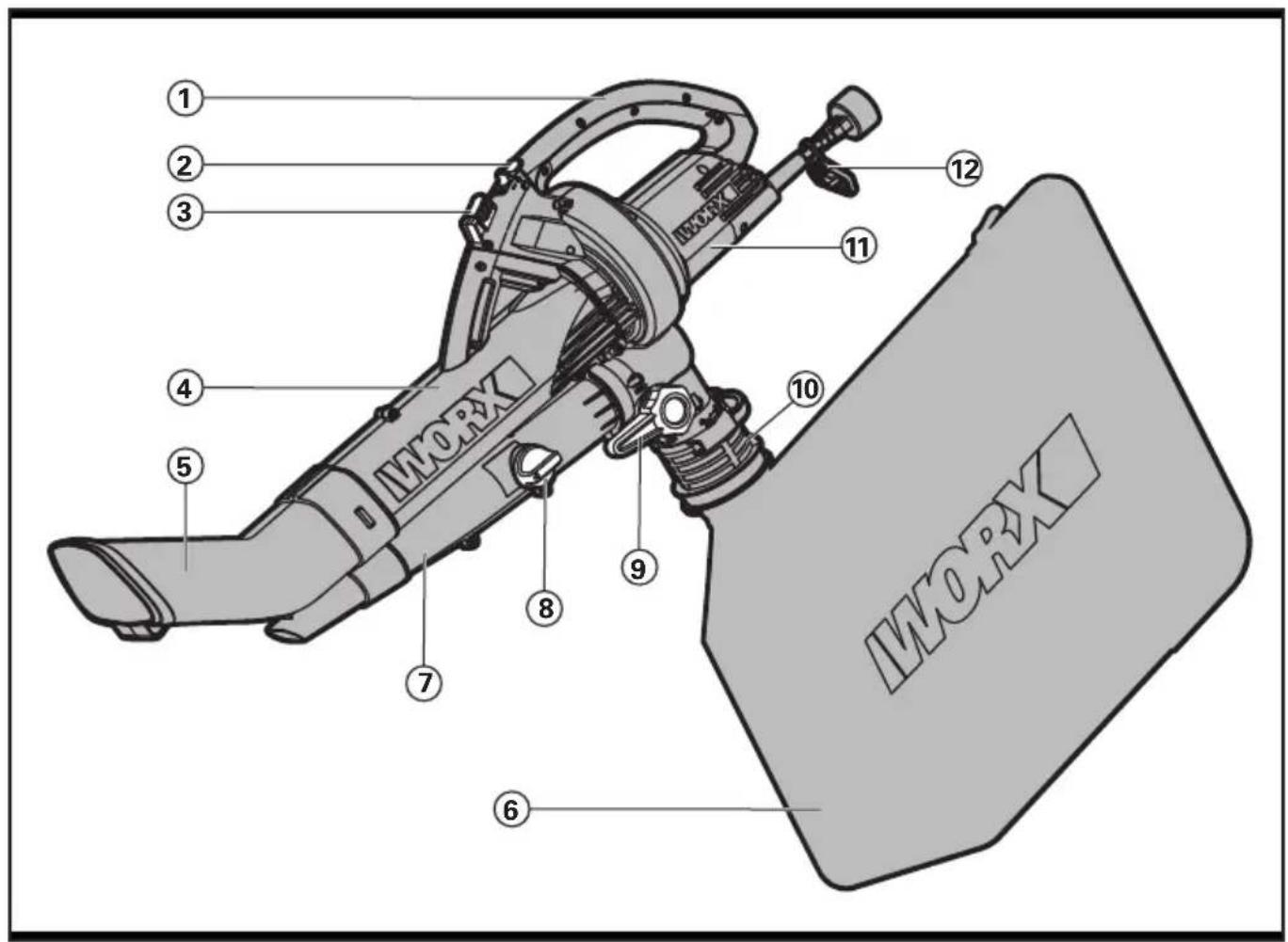
A
natural_image
Mechanical assembly diagram showing a turning mechanism with no visible text or symbolsB
natural_image
Mechanical assembly diagram showing a robotic arm interacting with a mechanical component (no text or symbols visible)C
D1
D2D3
natural_image
Line drawing of a car interior panel with handle, wheels, and control knob (no text or symbols)E
natural_image
Mechanical assembly diagram showing a rotating component with directional arrows (no text or symbols)F
natural_image
Silhouette of a person sweeping leaves with a bag, no text or symbols presentG
natural_image
Technical diagram of a mechanical component with no visible text or symbolsH
natural_image
Silhouette of a person walking away with a backpack and leaves, no text or symbols presentI
J
K
L
natural_image
Illustration of a hand operating a mechanical device with a circular component and shaft (no text or symbols visible)M
natural_image
Diagram of a cable or wire connection with a plug and connector (no text or symbols)N
| WG500.2 WG505 | ||
| Rated voltage 120V~60Hz | ||
| Rated power 12A | ||
| No load speed 15000 /min | ||
| Airflow 350cfm | ||
| Air speed 80-210mph | ||
| Mulching ratio 10:1 16:1 | ||
| Collection bag capacity 1.2 Bushel | ||
| Weight 9.5 lbs (4.3kg) 9.7 lbs (4.4kg) | ||
| Protection class | ☐/II | |
ACCESSORIES
Debris Collection Bag
1
Only use the appropriate accessories intended for this tool. Accessory information can be found on the product packaging, at a WORX retailer, on our website at www.worx.com or by calling 1-866-354-WORX (9679)

WARNING: Some dust created by power sanding, sawing, grinding,
drilling and other construction activities contains chemicals known to the state of California to cause cancer, birth defects or other reproductive harm. Some examples of these chemicals are:
- Lead from lead-based paints;
- Crystalline silica from bricks and cement and other masonry products and
- Arsenic and chromium from chemically-treated lumber.
Your risk from these exposures varies, depending on how often you do this type of work. To reduce your exposure to these chemicals: work in a well ventilated area, and work with approved safety equipment, such as those dust masks that are specially designed to filter out microscopic particles.

WARNING: This product maybe
contains lead, phthalate or other
chemicals known to the State of California to cause cancer, birth defects and other reproductive harm. Please wash your hands after use.
IMPORTANT SAFETY INSTRUCTIONS

WARNING: When using electric
gardening appliances, basic safety
precautions should always be followed to reduce the risk of fire, electric shock, and personal injury, including the following:

WARNING: READ ALL
INSTRUCTIONS
FOR ALL APPLIANCES
1) Avoid Dangerous Environment - Don't use appliances in damp or wet locations.
2) Don't Use In Rain.
3) Keep Children Away - All visitors should be kept at a distance from work area.
4) Dress Properly - Do not wear loose clothing or jewelry. They can be caught in moving parts. Use of rubber gloves and
substantial footwear is recommended when working outdoors. Wear protective hair covering to contain long hair.
5) Use Safety Glasses - Always use face or dust mask if operation is dusty.
6) Use Right Appliance - Do not use appliance for any job except that for which it is intended.
7) Ground Fault Circuit Interrupter (GFCI) protection should be provided on the circuit(s) or outlet(s) to be used for the gardening appliance.
Receptacles are available having built-in GFCI protection and may be used for this measure of safety.
8) WARNING -To reduce the risk of electric shock, use only with an extension cord intended for outdoor use, such as an extension cord of cord type SW-A, SOW-A, STW-A, STOW-A, SJW-A, SJOW-A, SJTW-A. or SJTOW-A.
9) Extension Cord - Make sure your extension cord is in good condition. When using an extension cord, be sure to use one heavy enough to carry the current your product will draw. An undersized extension cord will cause a drop in line voltage resulting in loss of power and overheating. Table 1 shows the correct size to use depending on cord length and nameplate ampere rating. If in doubt, use the next heavier gage. The smaller the gage number, the heavier the cord. To reduce the risk of disconnection of appliance cord from the extension cord during operating:
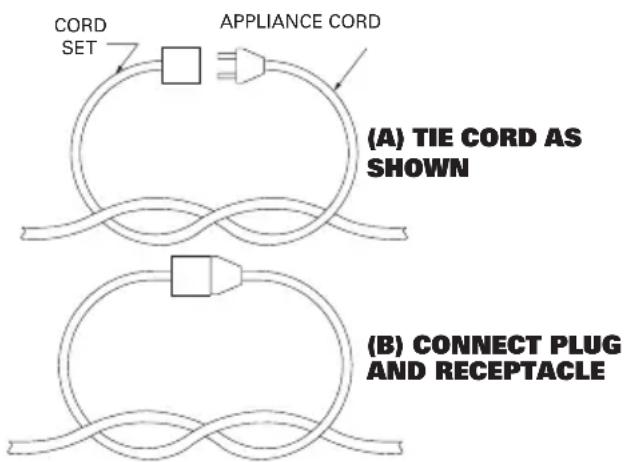
i) Make a knot as shown in Figure 1; or ii) Use one of the plug-receptacle retaining straps or connectors described in this manual.
10) Avoid Unintentional Starting - Don't carry plugged-in appliance with finger on switch. Be sure switch is off when plugging in.
11) Don't Abuse Cord - Never carry appliance by cord or yank it to disconnect from receptacle. Keep cord from heat, oil, and sharp edges.
12) Don't Force Appliance - It will do the job better and with less likelihood of a
risk of injury at the rate for which it was designed.
13) Don't Overreach - Keep proper footing and balance at all times.
14) Stay Alert - Watch what you are doing. Use common sense. Do not operate appliance when you are tired.
15) Disconnect Appliance - Disconnect the appliance from the power supply when not in use, before servicing, when changing accessories such as blades, and the like.
16) Store Idle Appliances Indoors - When not in use, appliances should be stored indoors in dry, and high or locked-up place - out of reach of children.
17) Maintain Appliance With Care - Keep cutting edge sharp and clean for best performance and to reduce the risk of injury. Follow instructions for lubricating and changing accessories. Inspect appliance cord periodically, and if damaged, have it repaired by an authorized service facility. Inspect extension cords periodically and replace if damaged. Keep handles dry, clean, and free from oil and grease.
18) Check Damaged Parts - Before further use of the appliance, a guard or other part that is damaged should be carefully checked to determine that it will operate properly and perform its intended function. Check for alignment of moving parts, binding of moving parts, breakage of parts, mounting, and any other condition that may affect its operation. A guard or other part that is damaged should be properly repaired or replaced by an authorized service center unless indicated elsewhere in this manual.
SAVE THESE INSTRUCTIONS
Table 1 Minimum gauge for extension cords
| Volts Total | length of cord in feet | |||
| 120V 25 50 | 100 150 | |||
| 240V 50 100 | 200 300 | |||
| Ampere rating more than not more than | AWG | |||
| 0-6 18 16 1 | 6 14 | |||
| 6-10 18 16 | 14 12 | |||
| 10-12 | 16 16 14 12 | |||
| 12-16 14 12 | Not recommended | |||
NOTE: Only the applicable parts of the Table need to be included. For instance, a 120-volt product need not include the 240-volt heading.
Figure 1
Method of securing extension cord
FOR ALL DOUBLE-INSULATED APPLIANCES
1) Replacement Parts
When servicing use only identical replacement parts.
2) Polarized Appliance Connections
To reduce the risk of electric shock, this appliance has a polarized plug (one blade is wider than the other) and will require the use of a polarized extension cord. The appliance plug will fit into a polarized extension cord only one way. If the plug does not fit fully
into the extension cord, reverse the plug. If the plug still does not fit, obtain a correct polarized extension cord. A polarized extension cord will require the use of a polarized wall outlet. This plug will fit into the polarized wall outlet only one way. If the plug does not fit fully into the wall outlet, reverse the plug. If the plug still does not fit, contact a qualified electrician to install the proper wall outlet. Do not change the equipment plug, extension cord receptacle, or extension cord plug in any way.
SAVE tHESE iNStRuCtioNS
SYMBOLS

Double insulation
ASSEMBLY
ASSEMBLING THE BLOWER/VACUUM TUBE (See Fig. A, B, C)
Before assembling the Blower/Vacuum Tube, be sure the on/off switch (2) is in position "O" and the tool is unplugged.
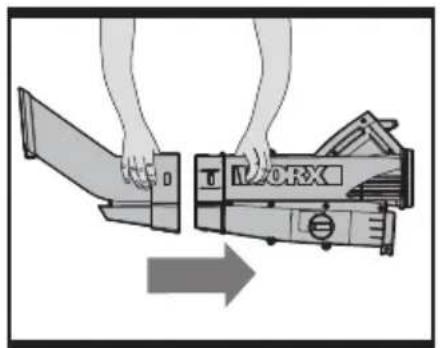
First align the upper and lower tubes as shown in Fig A. Make sure the notches engage the holes on both sides.
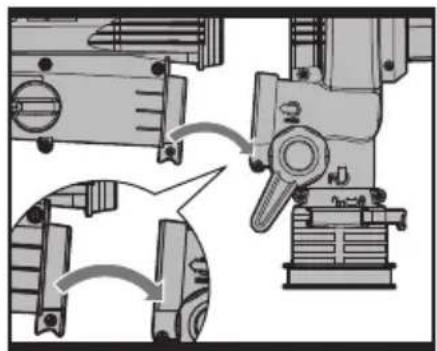
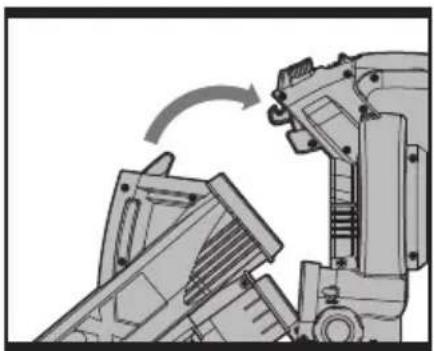
Then fit the Blower/Vacuum Tube to the motor housing as shown in Fig. B and C. Position the bottom of tube on the motor housing near the switch lever. (See Fig B). Then as seen in Fig C, swing the top of the Tube upward and lock into place. Check the Blower/Vacuum Tube is firmly secured.

WARNING! Do not attempt to operate or disable the on/off ch.
NOTE: After attaching the Blower/Vacuum Tube to the motor housing(11), you may later remove it by moving the On/Off switch to the off position. Then press the Release Button (3), in order to release the tube. Do not try to separate the tubes by force or by using tools, unplug the tool before separating the tube.
ATTACHING THE DEBRIS COLLECTION BAG (See Fig. D1-D3)
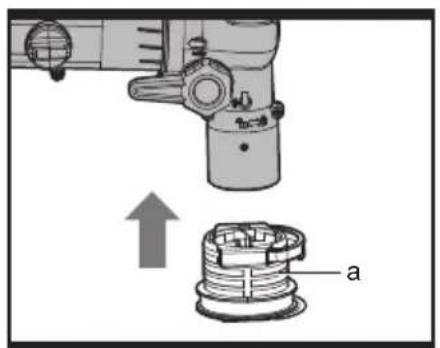
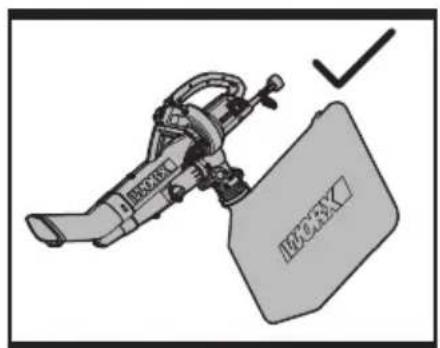
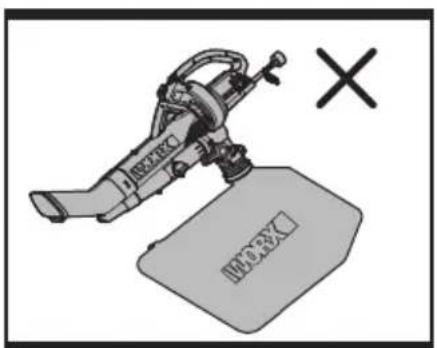
The TRIVAC is equipped with a Debris Collection Bag (6), which is designed for collecting leaves and debris. Attach the Debris Collection Bag as shown in Fig D1 –To install the Debris Collection Bag, just align Quick Release Bag Collar slots with the locking pins on the motor housing and push the collar up into position. To release, just depress the Quick Release Button (a) and pull the Debris Collection Bag down.
OPERATION
CONNECTING TO A POWER SOURCE
Use only a polarized (i.e., one blade is wider than the other), UL listed (CSA certified in Canada) extension cord recommended for outdoor use. A polarized plug will fit in a polarized cord only one way. If the plug does not fit fully in the cord, reverse the cord and try again. If it still does not fit then you are not using a proper extension cord and you should purchase a polarized extension cord. Never attempt to force fit an extension cord or change the cords design to make it fit better.
| Extension Cord Length | Minimum Wire Gage (A.W.G.) |
| 100 ft. 14 | |
| 150 ft 12 |
NOTE: Do not use an extension cord over 150 feet.
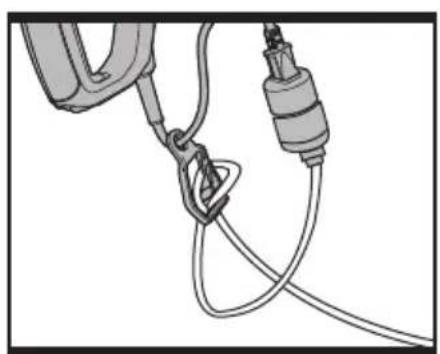
If you do not fully seat the extension cord on the inlet plug, the loose plug could lead to overheating and cause a fire, possibly burning you or others. Ensure that you fully seat the cord on the plug and use the cord lock feature to secure the cord.
IMPORTANT: Check the power cord frequently during use for holes in the insulation. Do not use a damaged cord. Do not run the cord through standing water or wet grass.
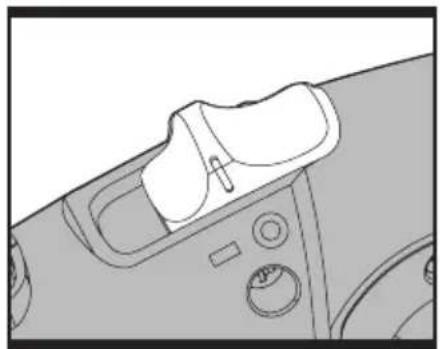
STARTING/STOPPING (See Fig. E) IMPORTANT: The TRIVAC will not run unless the Blower/Vacuum Tube is attached to the Motor Housing (11). STARTING
Connect the plug to the power outlet and switch ON. Move the On/Off switch (2) to position "I".
STOPPING
Move the On/Off switch (2) to position "O".

WARNING! The tool runs for a few seconds after it has been switched off.
Let the motor come to a complete standstill before setting the tool down or removing the debris collection bag.
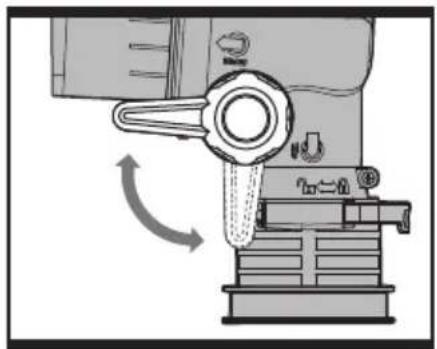
CONVERTING FROM BLOWER TO VACUUM (See Fig. F)
For selection of the operating mode, rotate the Blower/vacuum selector lever (9) to the required symbol (See Fig. F).
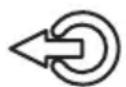
Blowing operating mode
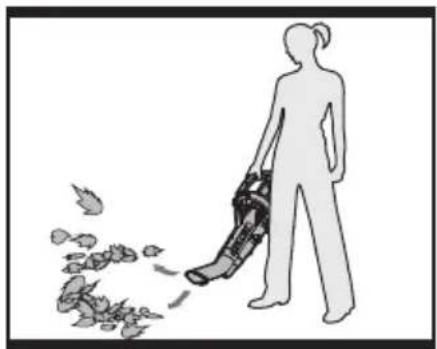
USING THE BLOWER (See Fig. G)
The blower is intended for residential use only. Use the blower outdoors to move or vacuum yard debris as needed.
CAUTION!
The blower can throw debris, possibly causing serious personal injury to the operator or bystanders.
- Do not blow hard objects such as nails, bolts, or rocks.
- Do not operate the blower near children, bystanders or pets.
- Use extra care when cleaning debris from stairs or other tight areas.
- Wear safety goggles or other suitable eye protection, long pants, and shoes.
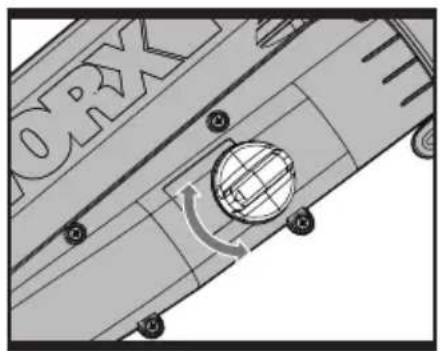
VARIABLE BLOWER SPEED CONTROL (See Fig. H)
The maximum speed of the blower can be altered by rotating the Variable Blower Speed Knob (8). Rotate upward to decrease speed and downward to increase speed.
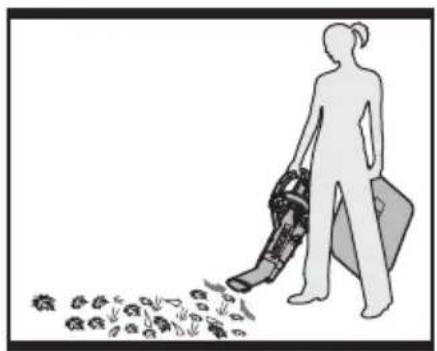
USING THE VACUUM (See Fig. I) CAUTION!
The vacuum can throw debris, possibly causing serious personal injury to the operator or bystanders.
- Do not operate the vacuum without the bag installed or with the bag zipper open.
- Do not vacuum sharp, pointed, or hard objects that could be thrown through the fabric of the bag, such as wires, staples, nails, or rocks.
IMPORTANT: Always keep the vacuum tube 1" above debris. Do not force the vacuum tube into a pile of debris or hold the tube upright while force feeding debris into the tube. Either action may clog and damage the Impeller and blade located inside the blower. If the vacuum starts to vibrate or make abnormal noise, stop it, unplug the cord, and check for the cause.
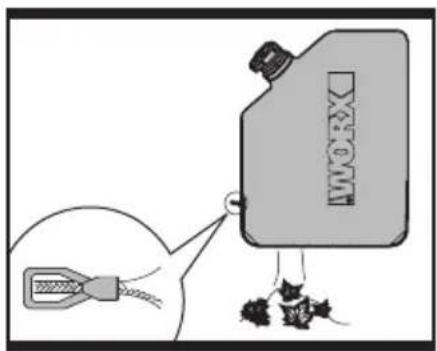
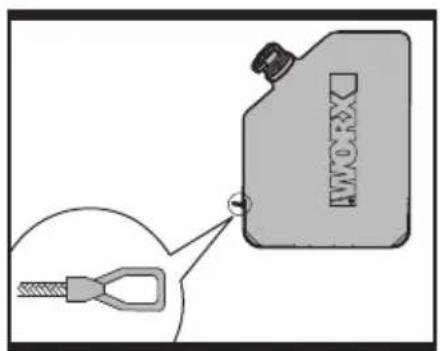
Turn off and unplug the vacuum from the power source. Empty the Bag as shown in Fig J-K.
Do not store debris inside the bag. To clean the bag, turn it inside out and shake out any excess debris. Once a year, hand wash the bag in soapy water and allow it to air dry.

WARNING: Normal usage of the Debris Collection bag causes it to wear and deteriorate over time. A worn or deteriorated bag allows small objects to be thrown through the bag, possibly injuring the operator or bystanders.
Check the bag frequently. If it is worn or deteriorated, replace it with a new WORX debris collection bag.
REMOVING CLOGGED DEBRIS FROM THE IMPELLER AND BLADE

WARNING: Wear protective glasses and gloves.
- Turn off and wait for all moving parts to stop.
- Unplug the tool.
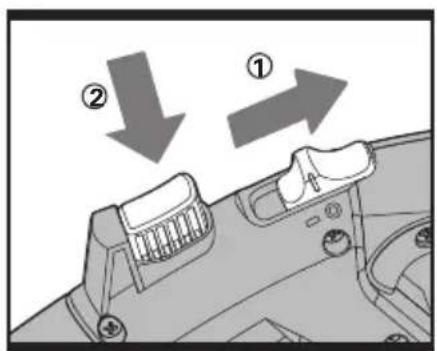
- Press the release button and separate the Blower/Vacuum tube from the motor housing.(See Fig. L)
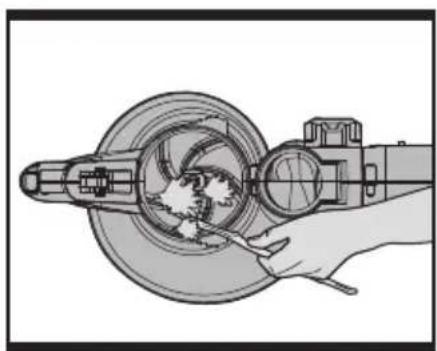
- Now you can remove the debris from the Impeller as shown in Fig M. Use an item that is long and sturdy. Be sure to be gentle to not damage any of the internal items.
- Check the Impeller and/or blade for any signs of damage. If it is damaged do not use and contact your Authorized WORX Dealer.
- Reassemble the Blower/Vacuum Tube by referring to the Assembly section of this manual.
STORAGE
Store the blower/vacuum and extension cord indoors, in a cool dry location, out of reach of children and animals.
- POIGNÉE
- COMMUTATEUR
- BOUTON DE LIBÉRATION
- TUBE SUPÉRIEUR D'ASPIRATION
- TUBE INFÉRIEUR D'ASPIRATION
- SAC DE RAMASSAGE DES FEUILLES
- TUBE DE SOUFFLAGE
- MANETTE DE RÉGLAGE DU DÉBIT D'AIR VARIABLE DU SOUFFLEUR
- LEVIER DU SÉLECTEUR DU SOUFFLEUR/ASPIRATEUR
- COLLIER DU SAC À VIDANGE RAPIDE
- LOGEMENT DU MOTEUR
- SUPPORT DE RALLONGE
DONNÉES TECHNIQUES
Copyright © 2014, Positec. all Rights Reserved.
2GbV01CPK11001a0