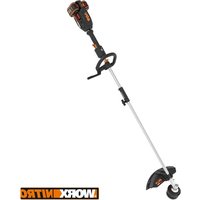
WG155 - Grass trimmer WORX - Free user manual and instructions
Find the device manual for free WG155 WORX in PDF.


Frequently Asked Questions - WG155 WORX
User questions about WG155 WORX
0 question about this device. Answer the ones you know or ask your own.
Ask a new question about this device
Download the instructions for your Grass trimmer in PDF format for free! Find your manual WG155 - WORX and take your electronic device back in hand. On this page are published all the documents necessary for the use of your device. WG155 by WORX.
USER MANUAL WG155 WORX
- Voltage measured without workload. Initial battery voltage reaches maximum of 20 volts. Nominal voltage is 18 volts.
ACCESSIONS
| WG155 WG155.5 | ||
| Safety guard | 1 | 1 |
| Charger | 1 (WA3732) | 1(WA3847) |
| Battery pack | 1(WA3520) | 1(WA3520) |
| Edger wheel | 1 | 1 |
| Wall mount 1 | 1 | |
| Spool | 3 | 3 |
TOOL REQUIRED FOR ASSEMBLY
Screwdriver
1
We recommend that you purchase your accessories from the same store that sold you the tool. Use good quality accessories marked with a well-known brand name. Choose the type according to the work you intend to undertake. Refer to the accessory packaging for further details. Store personnel can assist you and offer advice.
SAFETY INSTRUCTIONS
WARNING! Some dust created by power sanding, sawing, grinding, drilling and other construction activities contains chemicals known to the state of California to cause cancer, birth defects or other reproductive harm. Some examples of these chemicals are:
- Lead from lead-based paints,
- Crystalline silica from bricks and cement and other masonry products, and
- Arsenic and chromium from chemically-treated lumber.
Your risk from these exposures varies, depending on how often you do this type of work. To reduce your exposure to these chemical:
Work in a well ventilated area,
- Work with approved safety equipment, such as those dust masks that are specially designed to filter out microscopic particles.
WARNING! When using electric gardening appliances, basic safety precautions should always be followed to reduce the risk of fire, electric shock, and personal injury, including the following:
WARNING: Read all instructions.
FOR ALL APPLIANCES
1) Avoid Dangerous Environment - Don't use appliances in damp or wet locations.
2) Don't Use In Rain.
3) Keep Children Away - All visitors should be kept at a distance from work area.
4) Dress Properly - Do not wear loose clothing or jewelry. They can be caught in moving parts. Wear protective clothing; use of rubber gloves, long pants, long sleeved shirt and substantial footwear is recommended when working outdoors. Wear protective hair covering to contain long hair.
5) Use Safety Glasses - Always use face or dust mask if operation is dusty.
6) Use Right Appliance - Do not use appliance for any job except that for which it is intended.
7) Avoid Unintentional Starting - Don't carry
plugged-in appliance with finger on switch.
Be sure switch is off when plugging in.
8) Don't Force Appliance - It will do the job better and with less likelihood of a risk of injury at the rate for which it was designed.
9) Don't overreach - Keep proper footing and balance at all times.
10) Stay Alert - Watch what you are doing. Use common sense. Do not operate appliance when you are tired.
11) Store Idle Appliances Indoors - When not in use, appliances should be stored indoors in dry, and high or locked-up place - out of reach of children.
12) Maintain Appliance With Care - Keep cutting edge sharp and clean for best performance and to reduce the risk of injury. Follow instructions for lubricating and changing accessories. Inspect appliance cord periodically, and if damaged, have it repaired by an authorized service facility. Inspect extension cords periodically and replace if damaged. Keep handles dry, clean, and free from oil and grease.
13) Check Damaged Parts - Before further use of the appliance, a guard or other part that is damaged should be carefully checked to determine that it will operate properly and perform its intended function. Check for alignment of moving parts, binding of moving parts, breakage of parts, mounting, and any other condition that may affect its operation. A guard or other part that is damaged should be properly repaired or replaced by an authorized service center unless indicated elsewhere in this manual.
INSTRUCTION MANUAL FOR BATTERY - OPERATED GARDENING APPLIANCES
- The instruction manual for all battery-operated gardening appliances shall contain the following or equivalent instructions:
1) Do not charge appliance in rain, or in wet locations.
2) Do not use battery-operated appliance in rain.
3) When replacing batteries, all batteries should be replaced at the same time. Mixing fresh and discharged batteries
2 in I Grass Trimmer/Edger EN
could increase internal cell pressure and rupture the discharge battery(ies). (Applies to products employing more than one separately replaceable primary battery.)
4) When inserting batteries into this product, the proper polarity or direction must be observed. Reverse insertion of batteries can result in leakage or explosion. (Applies to product employing more than one separately replaceable primary battery.)
5) Avoid Unintentional Starting - Do not insert battery with finger on switch. Be sure switch is off when inserting battery.
6) Remove or disconnect battery before servicing, cleaning or removing material from the gardening appliance.
- The instruction manual for all battery-operated products employing a detachable or separable battery shall contain the following or equivalent instructions:
1) Use only the following type and size battery(ies): WA3520.
2) Do not dispose of the battery(ies) in a fire. The cell may explode. Check with local codes for possible special disposal instructions.
3) Do not open or mutilate the battery(ies). Released electrolyte is corrosive and may cause damage to the eyes or skin. It may be toxic if swallowed.
4) Exercise care in handling batteries in order not to short the battery with conducting materials such as rings, brackets, and keys. The battery or conductor may overheat and cause burns.
Save These iNSTRUcTioNS
SYMBOLS

Warning

Read the manual

Do not expose to rain or water

Do not burn

Always charge the battery pack between temperatures 40^ (4.5^) -105°F (40.5^)
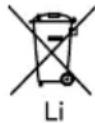
Do not dispose of batteries, Return exhausted batteries to your local collection or recycling point

BATTERY PACK REMOVAL AND PREPARATION FOR RECYCLING To preserve natural resources, please recycle or dispose of batteries properly. This product contains lithium-ion batteries. Local, state or federal laws may prohibit disposal of lithium-ion batteries in ordinary trash. Consult your local waste authority for information regarding available recycling and/or disposal options.
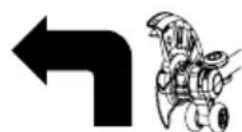
Edging
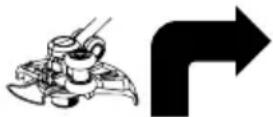
Trimming
2 in I Grass Trimmer/Edger EN
ASSEMBLY
1. ASSEMBLY OF THE SAFETY GUARD (See FIG.A1,A2)
Attach the safety guard to the trimmer head. Align the guard so it slides into the slots located on the trimmer head. Turn the tool over and secure the safety guard onto the trimmer head with the screw (a) provided.
2. ASSEMBLY OF THE EDGER WHEEL (See Fig.B1,B2))
With the tool rightside up, slide the edger wheel assembly onto the metal plate located on the side of the trimmer head. Make sure the groves of the edger wheel assembly locks onto the metal plate, you will hear it click into place.
To remove the wheel assembly, press the release button (b) on the wheel and pull the wheel assembly upward.
OPERATION INSTRUCTIONS
WARNING! The charger and battery pack are specially designed to work together so do not attempt to use any other devices. Never insert or allow metallic objects into your charger or battery pack connections because of an electrical failure and hazard will occur.
1. BEFORE USING YOUR CORDLESS GRASS TRIMMER
Your battery pack is UNCHARGED and it must be fully charged once before it is used. The battery charger supplied is matched to the Li-ion battery for use with this tool. Do not use another battery charger.
The Li-ion battery is protected against deep discharging. When the battery is empty, the trimmer will switch off by means of a protective circuit: The trimmer head will stop rotating. Note: In a warm environment or after heavy use, the battery pack may become too hot to permit charging. Allow time for the battery to cool down before recharging.
3. TO REMOVE OR INSTALL BATTERY PACK (See Fig. C)
Depress the battery release button to remove battery pack from your trimmer.
After recharging, insert the battery pack onto trimmer's battery bracket. A simple push and slight pressure will be sufficient.
4. SAFETY ON/OFF SWITCH (See Fig. D)
The safety switch is locked off to prevent accidental starting. Depress the lock off button (c) then depress the on/off switch (d) and release lock off button (c). Your trimmer is now on. To switch off, just release the on/off switch.
WARNING! The cutting head continues to rotate after the
trimmer has been switched off; wait until it has completely stopped then lay down the tool.
5. ADJUSTMENT OF THE TELESCOPIC SHAFT (See Fig. E)
Unscrew the locking collar (4) in the direction indicated to unlock, turn it clockwise.
Adjust the length of the telescopic shaft to the most comfortable length.
Tighten the locking collar (4) in the direction indicated to lock, turn it counterclockwise.
6. MAIN HANDLE ROTATION (See Fig. F1, F2)
While holding the trimmer head (14), pull upward on the upper shaft (19) and rotate it 90 degrees clockwise then allow it to drop back into the lower shaft coupling (18). When released back into the lower shaft coupling, the upper shaft will be locked into position automatically.
7. ADJUSTMENT OF AUXILIARY HANDLE
Pull up the auxiliary handle locking lever (5). Hold the locking lever and rotate the auxiliary handle to the most comfortable and balanced position (See Fig. G)
8. ADJUSTMENT OF THE TRIMMER HEAD ANGLE TO THE SHAFT
To adjust the upper shaft angle downwards or convert the tool from trimming mode to edging mode, put one foot on the motor housing portion of the trimmer head (20), then
grip the main handle/upper shaft and apply adequate force on the upper handle pushing it downwards, as shown in Fig. H1.
Adjust the upper shaft angle upwards, put one foot on the safety guard area of the trimmer head, then grip the main handle, apply
adequate force to adjust, as shown in Fig. H2.
9. SPACER GUARD
Push the flower guard in when edging and pull it before trimming, as shown in Figure 1. Before trimming or edging make sure the flower guard is locked firmly in position.
OPERATION
WARNING: Always wear the eye protection. Never lean over the trimmer head. Rocks or debris can ricochet or be thrown into eyes and face and cause blindness or other serious injury. When operating unit, check for the following:
Wear eye protection and heavy clothing. Hold front handle with one hand and auxiliary handle with the other hand. Keep unit below waist level. Work only from your right to your left to ensure debris is thrown away from you. Without bending over, keep line near and parallel to the ground (perpendicular when edging) and not crowded into material being cut.
WARNING: Make sure that line is fed out before operation. Make sure motor is up to full speed before trimming or edging.
WARNING: Use only 0.065''(1.65mm) cutting line, diameter line. Other sizes of line will not feed properly and will result in improper cutting head function or can cause serious injury. Do not use other material such as wire, string, rope, etc. Wire can break off during cutting and become a dangerous projectile that can cause serious injury.
TRIMMING
Hold the bottom of the trimmer head about just above the ground and at a slight angle.
Allow only the tip of line to make contact with the grass. Let the trimmer line work at its own pace. Do not force trimmer line into work area.
Edging (See Fig. J)
Change the tool from trimming to edging mode by putting one foot on the motor housing portion of the trimmer head (20) while gripping the main handle/upper shaft apply adequate force on the upper handle pushing it downwards, as shown in Fig H1.
Make sure to adjust trimmer head angle to be in the lowest horizontal setting. Then, holding the lower housing then pull upwards the upper shaft, then rotate 90 degree clockwise. (Fig. F1,)
Then position the wheel on the ground for edge mode. The guard has two white line guides to indicate the cutting line position.
Align these marks with the edge of your lawn.
While edging, only allow the tip of the line to make contact with area being worked. Do not force the line. The edging wheels help protect the unit and keep the unit from contacting the ground. Take extra caution while edging as objects can be thrown from the trimmer line.
AUTOMATIC LINE FEED SYSTEM
When initially switching on the trimmer, a small length of line is fed out. Each time the tools is started from rest it will advance about .25 inches of trimmer line.
A 'clattering' noise will be heard when the lines hit the line cutter. DO NOT BE ALARMED this is quit normal. After about 5 seconds the line will be cut to the correct length and the noise will reduce as the motor receives full speed.
If the noise of the line being cut can't be heard, more line will need to be fed out.
To feed more line, it is first necessary to allow the trimmer to stop completely; it must come to a complete rest, then restart, allowing the motor to reach full speed.
Repeat above until you hear the line hitting against the line cutter. (Do not repeat this procedure more than 6 times)
TO MANUALLY FEED THE LINE (See Fig. K1)
Turn off the trimmer and remove the battery If required, line can be feed out manually To operate, press and release manual line feed button (16), while gently pulling out the line
until it is long enough to reach the line cutter. If the line extends past the line cutter, too much line has been fed out.
If too much line is fed out, remove the spool cap and turn spool counter-clockwise until the line is at the desired length.
TO REMOVE THE CAP (See Fig. K2)
Press and hold in the two latches (12).
Pull spool cap cover away from the spool holder
When refitting the spool cap.
Keep all areas of the cap and spool holder clean.
Replace the cap, pressing firmly down towards the spool holder to ensure cap is fully located into position.
Check that the cap is correctly fitted by trying to remove it without depressing the two latches.
TO REPLACE THE TRIMMER LINE.
Turn off the trimmer and remove the battery. Remove spool cap cover.
For your convenience it is recommended you buy replacement spools with the trimmer line preinstalled.
TO FIT SPOOL AND LINE ASSEMBLY(See Fig. K3)
Remove old spool from spool holder. Clear any broken line or cutting debris from the spool area. Pull the line from the new replacement spool through the eyelet of the spool holder. Place new spool into holder with cut out areas of the spool facing inward or down. When installed into the spool holder, the smooth side of the spool should be visible.
Release line from cleat on the spool.
Refit the cap.
TO FIT NYLON LINE ONLY:
WARNING! Take approximately 10ft (3m) of line. Insert 5/8'' (15mm) of line into the spool holes and wind line in the direction of the arrows on the top of the spool.
Your Trimmer is designed to use only line with a maximum diameter of 0.065" / 1.65mm.
IMPORTANT: Leave approximately 4" (100mm) of line unwound and place into cleat.
Care should be taken to ensure that the line is neatly coiled on the spool. Failure to do so will impair the efficiency of the automatic line feed. Then fit spool as described in "To fit spool and line assembly".
STORING YOUR GRASS TRIMMER
a) ASSEMBLY OF THE WALL MOUNT BRACKET (See Fig. L)
Tighten all the screws securely. Carefully check the bracket after mounting to make sure that no movement can occur during use.
WARNING: Always make sure your wall-mount bracket is securely mounted to the wall. Failure to do so could result in an accident, resulting in possible serious personal injury.
b) STORING YOUR GRASS TRIMMER (See Fig. M)
Adjust the auxiliary handle position close to the main handle and lower it into the bracket, now the grass trimmer can be stored into the wall mount bracket as illustrated.
MAINTENANCE
After use, disconnect the battery from the tool and check for damage.
Your power tool requires no additional lubrication or maintenance. There are no user serviceable parts in your power tool. Never use water or chemical cleaners to clean your power tool. Wipe clean with a dry cloth. Always store your power tool in a dry room temperature location. Keep the motor ventilation slots clean. Keep all working controls free of dust.
TROUBLESHOOTING
The following table gives checks and actions that you can perform if your machine does not operate correctly. If these do not identify and correct the problem, contact your service agent.
WARNING: Switch the machine off and remove the battery prior to any troubleshooting.
| Problems Possible Causes Corrective Action | ||
| Trimmer fails to operate. | Battery discharged. | Recharge battery; also see “HOW TO CHARGE YOUR BATTERY “in charger manual. |
| Battery too hot/cold. | Allow to cool/warm. | |
| Motor is broken. | Contact Service Agent. | |
| Internal wiring of machine damaged. | Contact Service Agent. | |
| Trimmer runs intermittently. | Motor is broken. | Contact Service Agent. |
| Battery not fully charged. | Recharge battery. | |
| On/Off switch defective. | Contact Service Agent. | |
| Excessive vibrations/noise. | Machine defective. | Contact Service Agent. |
| Line spool is not wound well. | Rewind the line. See “” To fit spool and line assembly.” | |
| Cutting time per battery charge too low. | Battery has not been used for long period or only charged for short term. | Fully charge battery; also see “HOW TO CHARGE YOUR BATTERY “in charger manual. |
| Grass too high. | Cut in stages. | |
| Battery defective. | Replace the battery. | |
| Machine does not cut. | Line broken. | Replace the line. |
| Battery not fully charged. | Recharge battery; also see “HOW TO CHARGE YOUR BATTERY “in charger manual. | |
| Motor is broken (speed is too low). | Contact Service Agent. | |
| Grass entangled around cutting head. | Remove grass. | |
| Continuous lighting of the battery charge indicator No charging procedure possible. | Battery not (properly) inserted. | Properly insert battery into battery charger. |
| Battery contacts contaminated. | Clean the battery contacts (e.g. by inserting and removing the battery several times) or replace the battery. | |
| Battery defective. | Replace the battery. | |
| Battery charge indicator does not light up. | Plug of battery charger not plugged in (properly). | Insert mains plug (fully) into the socket outlet. |
| Socket outlet, mains cable or battery charger defective. | Check the mains voltage; have the battery charger checked by an authorized after-sales service agent. | |
| Auto feed does not work | Cutting line is not wound well. | Manually feed the line, if still can not feed out, remove the spool out and rewind the line. |
| The line is tangled. | Replace with a new line spool. | |
- POIGNEE ARRIÈRE
- GARDE DE SECURITE
- MANCHE TÉLESCOPIQUE
- BOUTON INFÉRIEUR D'AJUSTEMENT
- DÉGAGEMENT DE POIGNÉE
- GARDE DE SECURITE
- GARDE D'ESPACEMENT
- ROUE DE COUPE-BORDURES
- COUPEUR DE CORDON DE COUPE
- BLOC-PILES
- COUVERCLE DE LA Tête DE COUPE (Voir Fig. K2)
- MÉCANISME DE DÉVERROUILLAGE DU COUVERCLE (Voir Fig. K2)
- BOBINE (Voir Fig. K2)
- TÉTE DE COUPE (Voir Fig. K2)
- OEILLET (Voir Fig. K2)
- BOUTON D'ALIMENTATION DU CORDON DE COUPE (Voir Fig. K1)
- SUPPORT DE MONTAGE MURAL (Voir Fig. L)
- BOITIER INFÉRIEUR D'ENGRENAGE (Voir Fig. F1)
- POIGNÉE SUPÉRIEURE (Voir Fig. F1)
- HABITACLE DU MOTEUR DE LA Tête DU COUPE-HERBE (Voir Fig. H1)
DONNÉES TECHNIQUES
| wG155 wG155.5 | ||
| Tension nominale 20V Max* Lithium 20V Max* Lithium | ||
| Vitesse a vide nominale 8500/min 8500/min | ||
| Diamètre de coupe 25cm(10po) 25cm(10po) | ||
| Diamètre de cordon de coupe 1.65mm(0.065po) 1.65mm(0.065po) | ||
| Temps de recharge 3hr 45minutes | ||
| Poids de la machine 2.4kg(5.4lbs) 2.4kg(5.4lbs) | ||
Copyright © 2012, Positec. All Rights Reserved.