
Access Fresh Air EP7910 - Epilator ROWENTA - Free user manual and instructions
Find the device manual for free Access Fresh Air EP7910 ROWENTA in PDF.


| Product type | Epilator |
| Brand | Rowenta |
| Model | Access Fresh Air EP7910 |
| Power supply | Mains, power adapter EM2.A2 |
| Voltage | 220-240 V (check according to country) |
| Speeds | 2 speeds + stop |
| Main functions | Epilation, exfoliation, refreshing air flow, pivoting head |
| Included accessories | Epilation head, exfoliation head (2 rollers), cleaning brush, pouch, underarm attachment, bikini attachment |
| Pivoting head | Yes |
| Air flow | Yes, high-speed turbine to cool the skin |
| Exfoliation head | Yes, with replaceable exfoliating rollers |
| Cleaning | Epilation head washable under cold water; cleaning brush included |
| Weight | Approximately 200 g |
| Dimensions (approx.) | 16 x 5 x 5 cm |
| Safety | Do not use on face, damaged skin, sensitive areas; unplug before cleaning |
| Maintenance | Clean the head regularly; replace exfoliating roller every 3 sessions |
| Repairability | Contact an authorized service center |
Frequently Asked Questions - Access Fresh Air EP7910 ROWENTA
User questions about Access Fresh Air EP7910 ROWENTA
0 question about this device. Answer the ones you know or ask your own.
Ask a new question about this device
Download the instructions for your Epilator in PDF format for free! Find your manual Access Fresh Air EP7910 - ROWENTA and take your electronic device back in hand. On this page are published all the documents necessary for the use of your device. Access Fresh Air EP7910 by ROWENTA.
USER MANUAL Access Fresh Air EP7910 ROWENTA
natural_image
Line drawing of a handheld electric shaver with internal components and a central oval body (no text or symbols)EP7910 - EP7970
natural_image
Line drawing of a handheld electric shaver with a circular button and indicator lights (no text or symbols)EP8975
AR
-3 - manufacturers الbreeder
-4 التوصيل

natural_image
Illustration of a human leg with two arrows indicating movement or pressure direction (no text or symbols)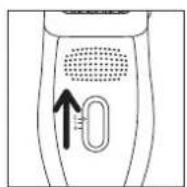
natural_image
Simple line drawing of a computer monitor with a downward arrow indicating compression or disassembly (no text or symbols)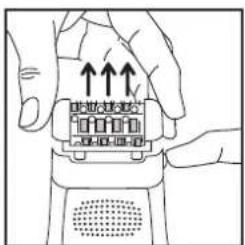
natural_image
Illustration of hands holding a mechanical component with arrows indicating motion (no text or symbols)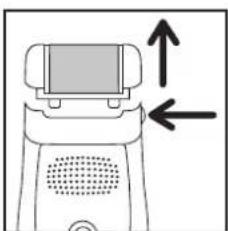
natural_image
Diagram of a device with an upward arrow and left-pointing arrows indicating motion or direction (no text or symbols)- إزالة شعر الساقين
natural_image
Simple line drawing of a car on a slope with motion arrows, no text or symbols presentnatural_image
Line drawing of a human leg with a curved cable and an arrow indicating a point of interest (no text or symbols present)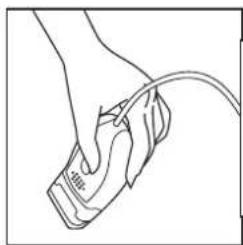
natural_image
Line drawing of a hand holding a medical device with a cable (no text or symbols)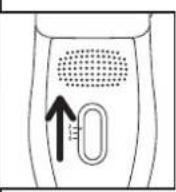
natural_image
Diagram showing a mouse being pulled down with motion arrows, no text or symbols present(1) نزع شعر الإبطين
natural_image
Illustration of a person receiving a medical or cosmetic procedure with an arrow indicating direction (no text or symbols present)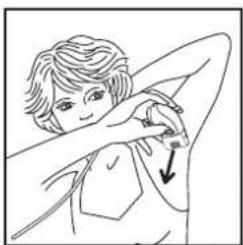
natural_image
Illustration of a person performing a neck massage or stretching exercise (no text or symbols)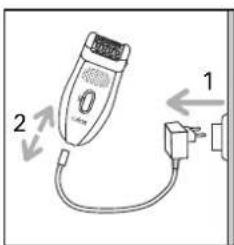
natural_image
Illustration of hands performing a massage or physical therapy technique on a surface, with arrows indicating direction (no text or symbols present)natural_image
Diagram showing a mechanical component with a downward arrow indicating a process or assembly (no text or symbols present)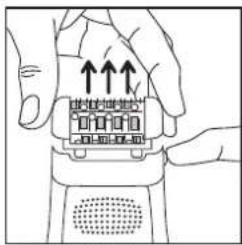
9- تنظيف المنتج
natural_image
Illustration of a hand using a tool to spray or spray onto a surface with a pipe and valve (no text or symbols)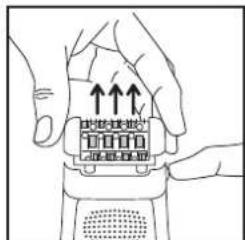
natural_image
Illustration of hands using a grater to adjust a textured object with an arrow indicating direction (no text or symbols)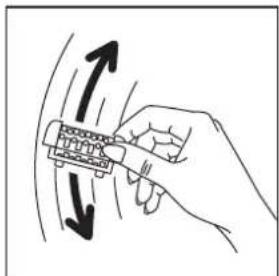
natural_image
Hand holding a mechanical component with directional arrows indicating motion (no text or symbols)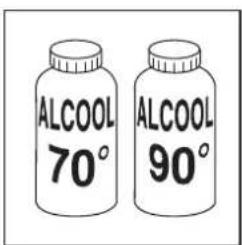
natural_image
Illustration of a hand using a tool to spray or spray onto a surface with a faucet (no text or symbols)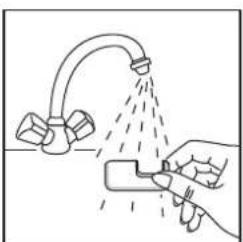
natural_image
Illustration of a hand using a spray gun to spray liquid from a curved pipe (no text or symbols)natural_image
Illustration of a hand cleaning a faucet with a diagonal line (no text or symbols)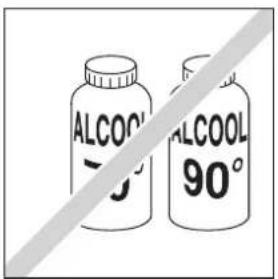
natural_image
Line drawing of a screwdriver inserted into a color filter device (no text or symbols)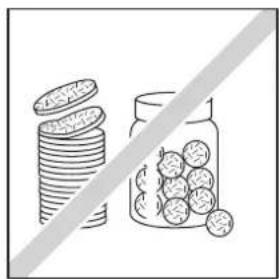
natural_image
Illustration of stacked coins next to a jar with scattered fruits, separated by a diagonal line (no text or symbols)
natural_image
Illustration of a hand using a tool to lift a surface with a curved pipe and spray bottle (no text or symbols)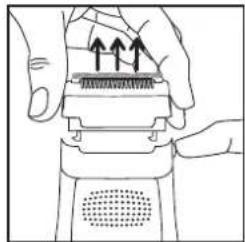
natural_image
Illustration of hands using a handheld device to press or install a component, with no visible text or symbols.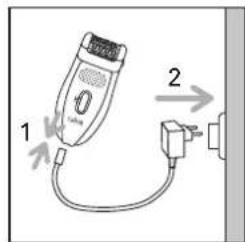
natural_image
Simple line drawing of a computer monitor with a downward arrow indicating compression (no text or symbols)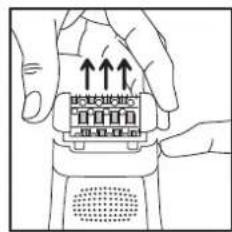
• روش:
natural_image
Illustration of a human leg with two arrows indicating movement or force direction (no text or symbols)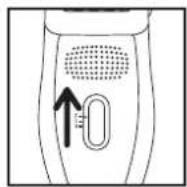
natural_image
Illustration of hands holding a mechanical component with directional arrows indicating movement (no text or symbols)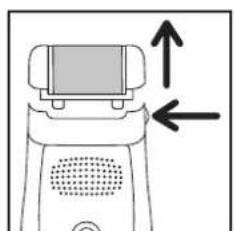
natural_image
Diagram of a device with an upward arrow and left-pointing arrows indicating motion or force (no text or symbols)7- چیدن موهای پا
natural_image
Simple line drawing of a car climbing a slope with an arrow indicating upward motion (no text or symbols)natural_image
Line drawing of a human leg with a curved cable and an arrow indicating motion (no text or symbols)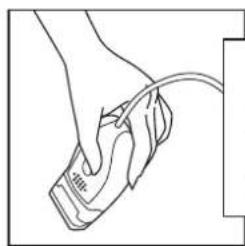
natural_image
Line drawing of a hand holding a medical device with a cable (no text or symbols)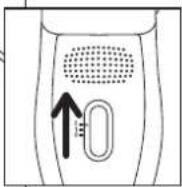
natural_image
Diagram showing a mouse being pulled down with motion arrows, no text or symbols present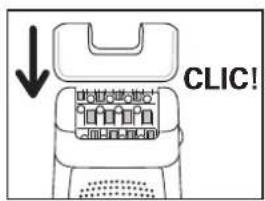
natural_image
Illustration of a person performing a neck stretch or massage (no text or symbols present)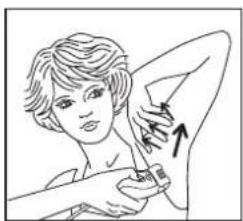
natural_image
Illustration of a person applying a product to their shoulder area, showing a hand and arm (no text or symbols)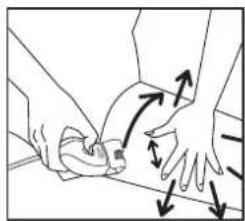
natural_image
Illustration of hands performing a medical or ergonomic procedure on a surface, with arrows indicating movement direction (no text or symbols)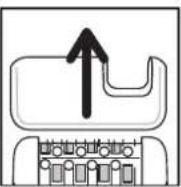
مهم
natural_image
Diagram showing a mechanical component with a downward arrow indicating a process or transformation (no text or symbols present)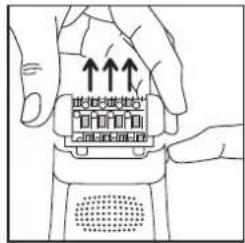
9- نظافت دستگاه
• نظافت سر اپيلاتور:
natural_image
Illustration of a hand spraying water onto a showerhead with a valve, no text or symbols present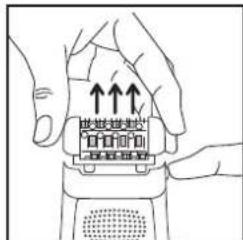
natural_image
Illustration of hands using a tool to adjust a component with an arrow indicating direction (no text or symbols present)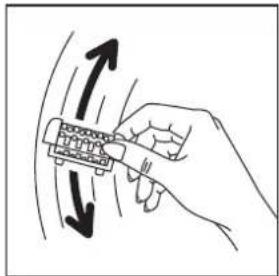
natural_image
Hand holding a mechanical component with directional arrows indicating motion (no text or symbols)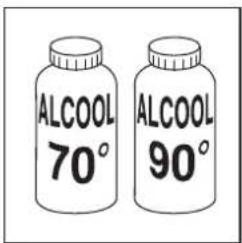
natural_image
Line drawing of a hand using a tool to spray or spray liquid onto a surface with a curved pipe (no text or symbols)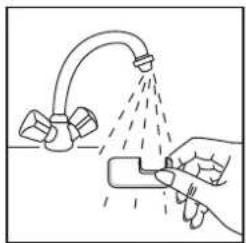
natural_image
Illustration of a hand using a spray gun to clean or spray liquid from a faucet (no text or symbols)natural_image
Illustration of a hand cleaning a faucet with a diagonal line (no text or symbols)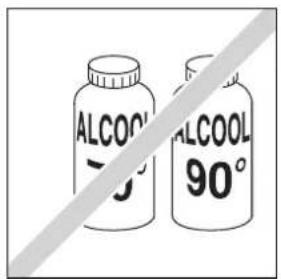
natural_image
Line drawing of a screwdriver inserted into a color filter device (no text or symbols)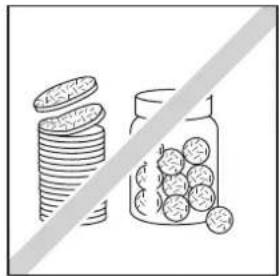
natural_image
Illustration of stacked coins and a jar with round fruits, separated by a diagonal line (no text or symbols)
natural_image
Illustration of a hand using a tool to clean or spray liquid from a curved pipe (no text or symbols)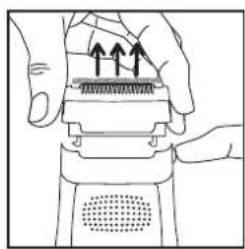
natural_image
Illustration of hands performing a mechanical press or press operation on a device (no text or symbols visible)-10 مراقبت از پوست
5- DESCONEXIÓN
natural_image
Simple line drawing of a computer monitor with a downward arrow indicating compression or download (no text or symbols)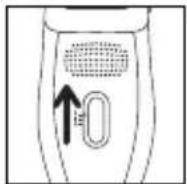
natural_image
Line drawing of a human leg with two arrows indicating movement or pressure direction (no text or symbols)natural_image
Diagram of a device with a screen and directional arrows indicating movement or force (no text or symbols)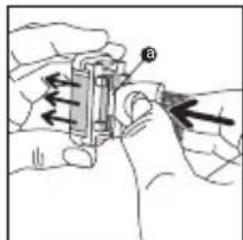
natural_image
Illustration of hands using a mechanical tool to adjust or install a component (no text or symbols visible)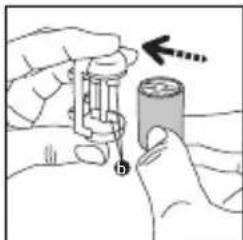
natural_image
Illustration of hands holding a battery and measuring a cylindrical component with an arrow indicating direction (no text or symbols)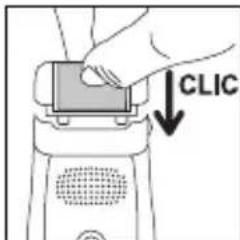
natural_image
Simple line drawing of a hanging object with an arrow indicating direction (no text or symbols)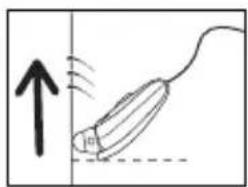
natural_image
Diagram of a mouse being pulled down with motion lines indicating movement (no text or symbols)natural_image
Line drawing of a person performing a neck massage or stretching exercise (no text or symbols)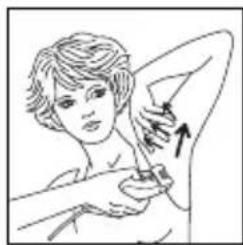
natural_image
Illustration of a person performing a medical or cosmetic procedure with an arrow indicating direction (no text or symbols present)natural_image
Illustration of hands performing a physical maneuver with directional arrows indicating motion (no text or symbols)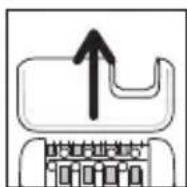
natural_image
Diagram showing a mechanical component with a downward arrow indicating motion or assembly (no text or symbols present)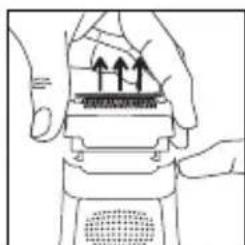
natural_image
Illustration of hands holding a mechanical component with arrows indicating upward motion (no text or symbols)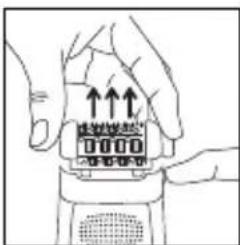

natural_image
Diagram of a hand holding a tool emitting a spray bottle into a container (no text or symbols present)
natural_image
Hand holding a mechanical component with bidirectional arrows indicating motion (no text or symbols)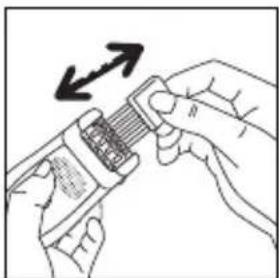
natural_image
Illustration of hands using a tool to adjust a component with an arrow indicating rotation (no text or symbols present)natural_image
Illustration of a hand using a spray gun to clean or spray liquid from a kitchen sink (no text or symbols)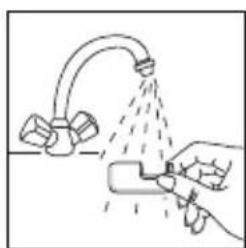
natural_image
Illustration of a hand using a spray gun to spray liquid from a faucet (no text or symbols)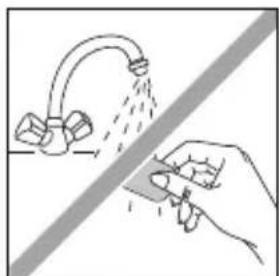
natural_image
Illustration of a hand spraying water from a faucet onto a surface, with no text or symbols present.natural_image
Simple line drawing of a device with a cable and a switch, no text or symbols present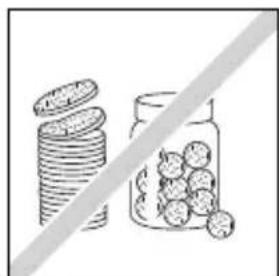
natural_image
Illustration of stacked coins and a jar filled with round fruits, separated by a diagonal line (no text or symbols)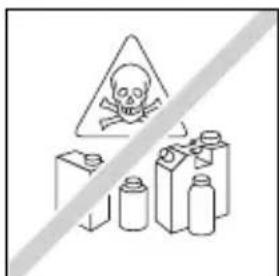
natural_image
Illustration of hands using a handheld device to press or install a component (no text or symbols visible)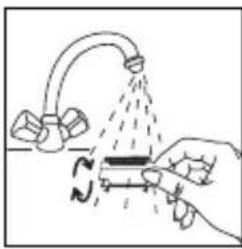
natural_image
Illustration of a hand using a tool to lift a submerged object with a curved pipe, no text or symbols present6- LIMPEZA DA PELE (EP8975)
natural_image
Simple line drawing of a computer monitor with a downward arrow indicating compression or reduction (no text or symbols)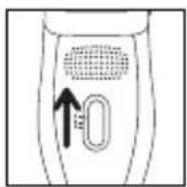
natural_image
Illustration of a person's leg and foot with two arrows indicating movement or pressure points (no text or symbols present)natural_image
Diagram of a robot with a screen and directional arrows indicating movement or force (no text or symbols)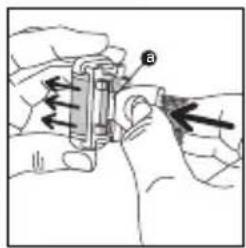
natural_image
Illustration of hands assembling a cylindrical component with a hand pointing to it (no text or symbols present)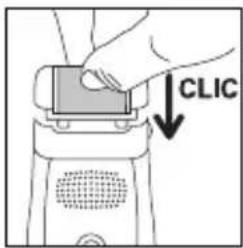
natural_image
Simple line drawing of a rope being pulled down at an angle, with no text or symbols present.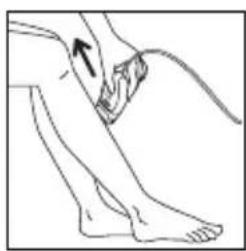
natural_image
Line drawing of a person's lower leg and foot with a curved line and arrow indicating movement (no text or symbols)natural_image
Diagram showing a hand holding a pen or tool with motion lines and an upward arrow, no text or symbols present.8- DEPILAÇÃO DAS ZONAS SENSÍVEIS
natural_image
Line drawing of a person performing a hand gesture with an arrow (no text or symbols)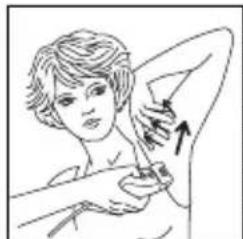
natural_image
Illustration of a person receiving a medical or surgical procedure with an arrow indicating direction (no text or symbols present)- Para depilar as axilas :
- Para depilar as virilhas :
natural_image
Illustration of hands performing a physical maneuver with directional arrows indicating motion (no text or symbols)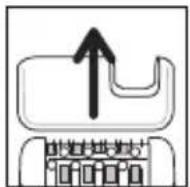
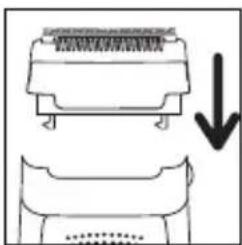
natural_image
Diagram showing a device with a top panel and a bottom panel, both with a downward arrow indicating a process or transformation (no text or symbols present)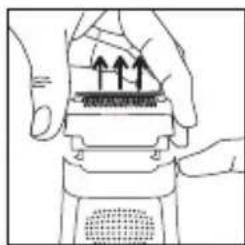
natural_image
Illustration of hands performing a mechanical press or press operation with arrows indicating motion (no text or symbols present)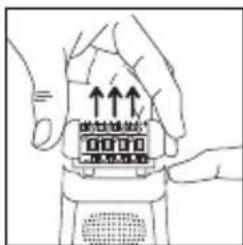
natural_image
Illustration of hands holding a digital device with upward arrows indicating motion (no text or symbols)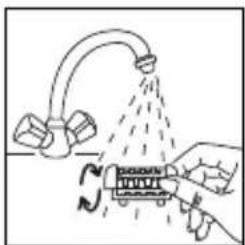
natural_image
Diagram showing a hand holding a device with a spray bottle spraying through it, no text or symbols present.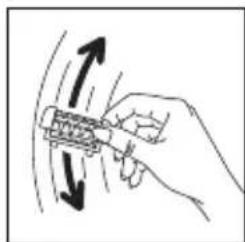
natural_image
Hand holding a tool with directional arrows indicating motion or movement (no text or symbols)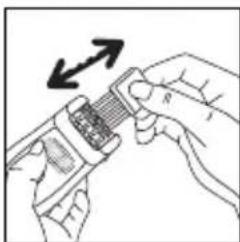
natural_image
Illustration of hands using a handheld device to interact with a grid of components (no text or symbols visible)natural_image
Illustration of a hand using a spray gun to clean or spray a faucet (no text or symbols)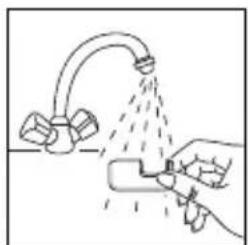
natural_image
Illustration of a hand spraying water from a faucet onto a surface (no text or symbols)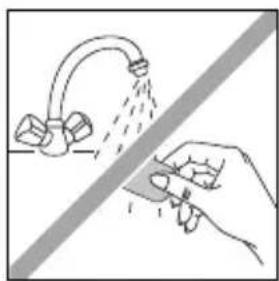
natural_image
Illustration of a hand spraying water from a faucet onto a surface, with no text or symbols present.natural_image
Simple line drawing of a tool interacting with a device (no text or symbols)
natural_image
Illustration of stacked coins and a jar with scattered round objects, separated by a diagonal line (no text or symbols)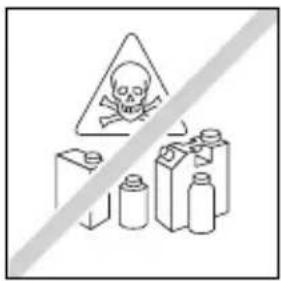

natural_image
Illustration of a hand pressing down on a mechanical component with upward arrows indicating motion (no text or symbols)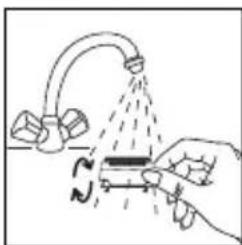
natural_image
Illustration of a hand pouring liquid into a tube with a curved pipe, no text or symbols present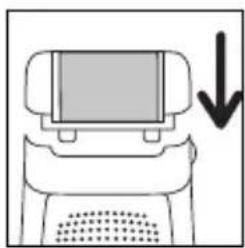
natural_image
Simple line drawing of a computer monitor with a downward arrow indicating compression or download (no text or symbols)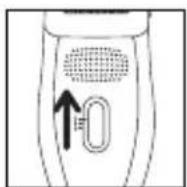
natural_image
Illustration of a human leg with two arrows indicating movement or pressure, no text or symbols presentnatural_image
Diagram of a device with an up/down arrow indicating direction (no text or symbols present)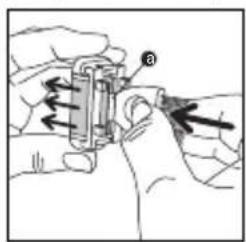
natural_image
Illustration of hands using a mechanical device to adjust or install a component (no text or symbols visible)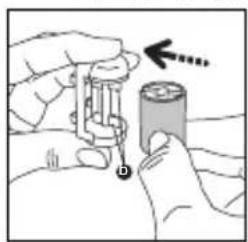
natural_image
Illustration of hands holding a battery with a hand pointing to it (no text or symbols present)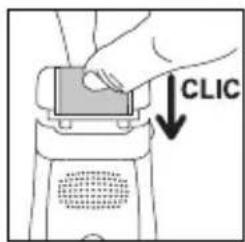
natural_image
Simple line drawing of a hanging object with an arrow indicating upward motion (no text or symbols)natural_image
Diagram showing a mouse being pulled with motion lines, no text or symbols presentnatural_image
Illustration of a person performing a hand gesture with an arrow indicating direction (no text or symbols)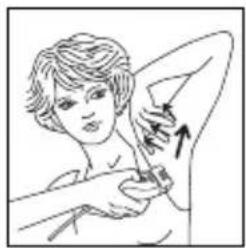
natural_image
Illustration of a person performing a medical or cosmetic procedure with an arrow indicating direction (no text or symbols present)natural_image
Illustration of hands performing a physical maneuver with directional arrows indicating motion (no text or symbols)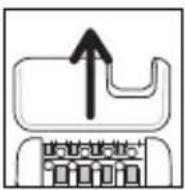
• Για το μπικίνι:
natural_image
Diagram showing a mechanical component with an arrow indicating downward motion (no text or symbols present)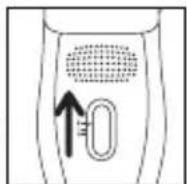
natural_image
Illustration of hands holding a device with upward arrows indicating motion (no text or symbols)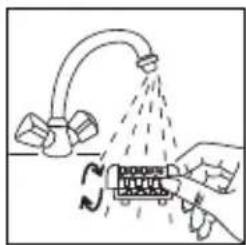
natural_image
Diagram showing a hand pouring liquid from a pipe onto a container with arrows indicating flow (no text or symbols)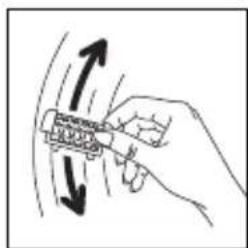
natural_image
Hand holding a mechanical component with directional arrows indicating motion (no text or symbols)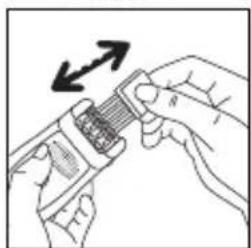
natural_image
Illustration of hands using a handheld device to interact with a grid of components (no text or symbols visible)natural_image
Line drawing of a hand using a tool to lift a showerhead into a sink (no text or symbols)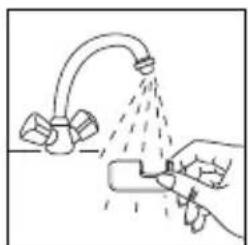
natural_image
Illustration of a hand spraying water from a faucet onto a surface (no text or symbols)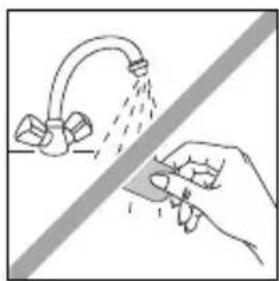
natural_image
Illustration of a hand spraying water from a curved pipe onto a surface, with no text or symbols present.natural_image
Simple line drawing of a handheld electronic device with a cable and indicator lights (no text or symbols)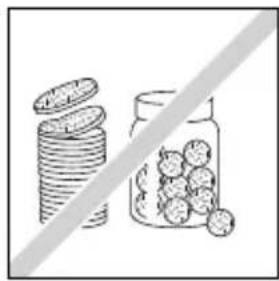
natural_image
Illustration of stacked coins and a jar with scattered fruits, separated by a diagonal line (no text or symbols)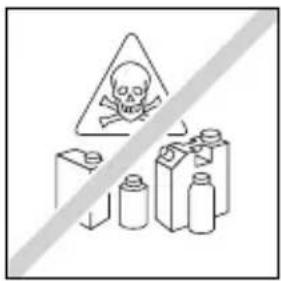
natural_image
Illustration of hands using a handheld device to interact with a surface (no text or symbols visible)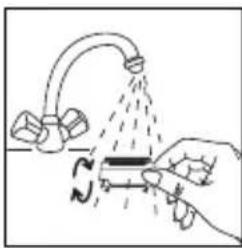
natural_image
Illustration of a hand using a tool to lift a submerged object with a curved pipe (no text or symbols)6. SÜRTÜNME
natural_image
Simple line drawing of a computer monitor with a downward arrow indicating compression or download (no text or symbols)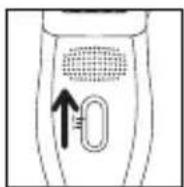
natural_image
Illustration of a human leg with two arrows indicating movement or pressure direction (no text or symbols)natural_image
Diagram of a robot with a screen and directional arrows indicating movement or force (no text or symbols)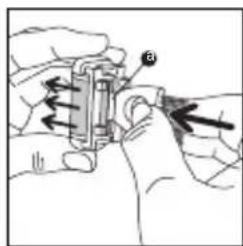
natural_image
Illustration of hands using a mechanical tool to adjust or install a component (no text or symbols visible)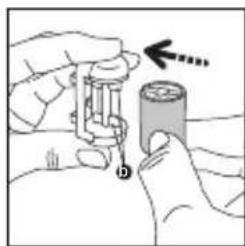
natural_image
Illustration of hands holding a cylindrical battery with an arrow indicating direction (no text or symbols)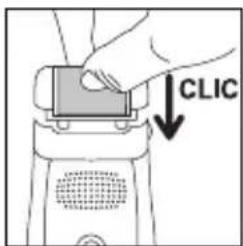
natural_image
Simple line drawing of a hanging object with an arrow indicating upward motion (no text or symbols)7. BACAKLARIN EPİLASYONU
natural_image
Simple line drawing of a mouse being pulled by a string, with an upward arrow and dashed line indicating motion (no text or symbols)8. EPİLASYON
natural_image
Illustration of a person performing a neck massage or stretching exercise (no text or symbols)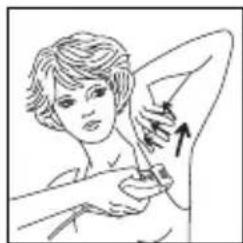
natural_image
Illustration of a person receiving a medical or surgical procedure with an arrow indicating direction (no text or symbols present)natural_image
Illustration of two hands performing a physical maneuver or massage motion (no text or symbols)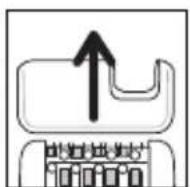
natural_image
Diagram showing a mechanical component with an arrow indicating downward motion (no text or symbols present)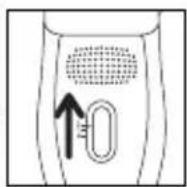
natural_image
Illustration of hands holding a device with upward arrows indicating motion (no text or symbols)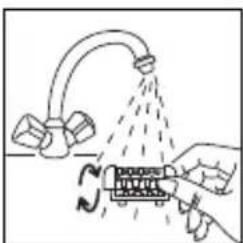
natural_image
Illustration of a hand spraying water onto a device with a curved pipe and spray bottle (no text or symbols)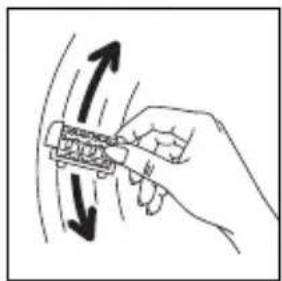
natural_image
Hand holding a mechanical component with directional arrows indicating motion (no text or symbols)
natural_image
Illustration of hands holding a device with an arrow indicating direction (no text or symbols present)natural_image
Illustration of a hand using a spray gun to lift a showerhead (no text or symbols)
natural_image
Illustration of a hand using a tool to spray liquid onto a surface with a pipe (no text or symbols)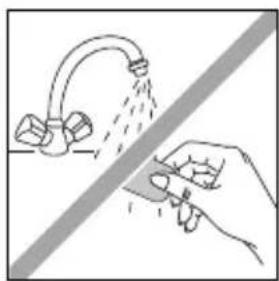
natural_image
Illustration of a hand spraying water from a pipe onto a surface, with no text or symbols present.natural_image
Simple line drawing of a tool interacting with a device (no text or symbols)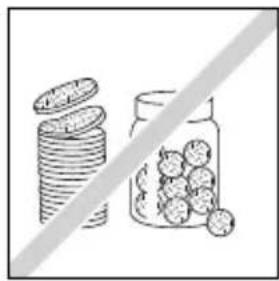
natural_image
Illustration of stacked coins and a jar filled with round fruits, separated by a diagonal line (no text or symbols)
natural_image
Illustration of hands using a device to press or install a component with upward arrows (no text or symbols)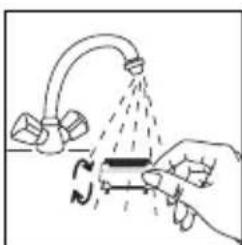
natural_image
Illustration of a hand using a tool to lift a pipe with a curved pipe, no text or symbols present6-각질 제거(Mod. EP8975)
natural_image
Simple line drawing of a device with a screen and arrow indicating downward motion (no text or symbols)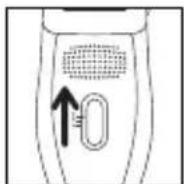
natural_image
Illustration of a person's lower leg and foot with two arrows indicating movement or pressure points (no text or symbols)natural_image
Diagram of a robot with a screen and directional arrows indicating movement or force (no text or symbols)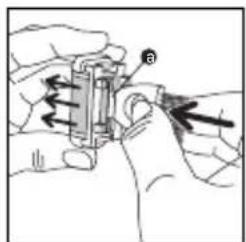
natural_image
Illustration of hands using a mechanical tool to adjust or install a component (no text or symbols visible)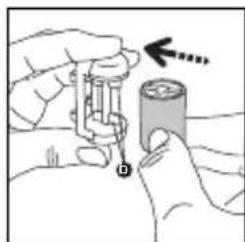
natural_image
Illustration of hands holding a battery with a hand pointing to it (no text or symbols present)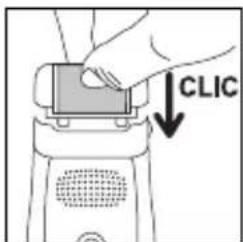
natural_image
Simple line drawing of a rope tied to a hook, with an arrow indicating upward motion (no text or symbols)7-다리 제모
natural_image
Simple line drawing of a mouse being pulled down with motion arrows (no text or symbols)8-민감한 부분 제모
natural_image
Illustration of a person performing a neck massage or stretching exercise (no text or symbols)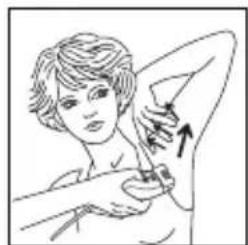
natural_image
Illustration of a person receiving a medical or cosmetic procedure with an arrow indicating direction (no text or symbols present)natural_image
Illustration of hands performing a physical maneuver with directional arrows indicating motion (no text or symbols)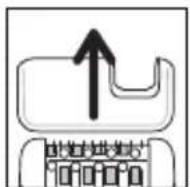
natural_image
Diagram showing a mechanical component with an arrow indicating downward motion (no text or symbols present)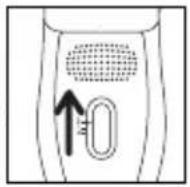
natural_image
Illustration of hands holding a device with upward arrows indicating motion or force (no text or symbols)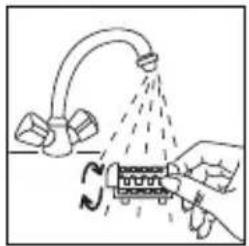
natural_image
Illustration of a hand using a tool to lift a water tap with a valve, showing fluid flow direction (no text or symbols)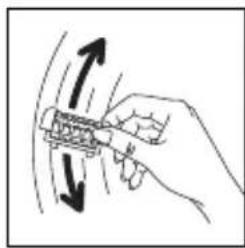
natural_image
Hand holding a tool with directional arrows indicating motion or movement (no text or symbols)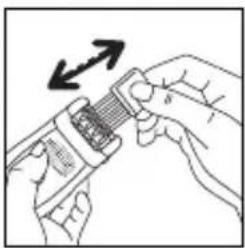
natural_image
Illustration of hands using a tool to adjust a textured object with an arrow indicating rotation (no text or symbols)natural_image
Illustration of a hand using a spray gun to spray liquid from a kitchen sink (no text or symbols)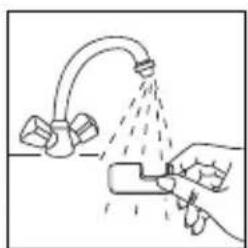
natural_image
Illustration of a hand using a tool to spray liquid onto a faucet (no text or symbols)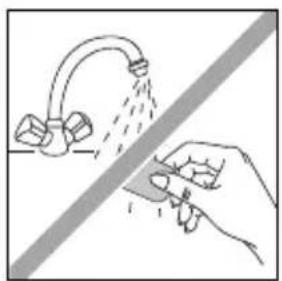
natural_image
Illustration of a hand using a tool to clean or spray water from a faucet (no text or symbols)natural_image
Simple line drawing of a connector with a cable and a switch, no text or symbols present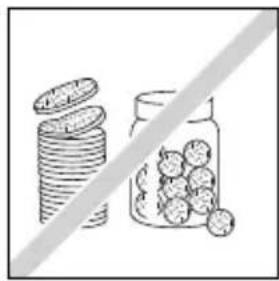
natural_image
Illustration of stacked coins and a jar with scattered round objects, separated by a diagonal line (no text or symbols)
natural_image
Illustration of hands using a handheld device to press or install a surface, with no visible text or symbols.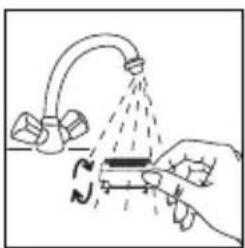
natural_image
Illustration of a hand using a tool to lift a submerged object with a curved pipe, no text or symbols present10-피부 관리
6-GOMMAGE (EP8975)
natural_image
Simple line drawing of a computer monitor with a downward arrow indicating compression or reduction (no text or symbols)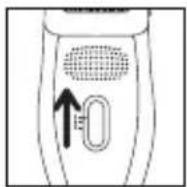
natural_image
Illustration of a person's leg and foot with two arrows indicating movement or pressure direction (no text or symbols)natural_image
Diagram of a robotic device with two arrows indicating upward and downward motion (no text or symbols)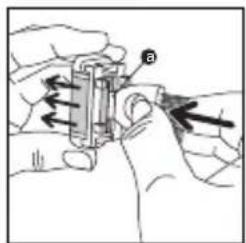
natural_image
Illustration of hands assembling a cylindrical battery with a hand holding it (no text or symbols)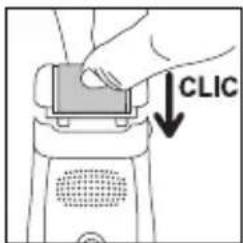
natural_image
Simple line drawing of a rope hanging from a vertical surface with an arrow indicating upward motion (no text or symbols)7-EPILATION DES JAMBES
natural_image
Line drawing of a human leg with a bandage and an arrow indicating a specific point (no text or symbols present)natural_image
Simple line drawing of a mouse with an upward arrow and motion lines, no text or symbols present8-EPILATION DES ZONES SENSIBLES
natural_image
Illustration of a person performing a hand massage or stretching exercise (no text or symbols present)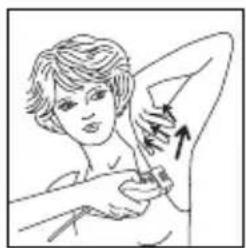
natural_image
Illustration of a person receiving a swab or bandage, with an arrow indicating direction (no text or symbols present)natural_image
Illustration of hands performing a physical maneuver with directional arrows indicating motion (no text or symbols)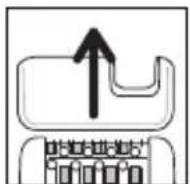
natural_image
Diagram showing a mechanical component with an arrow indicating downward motion (no text or symbols present)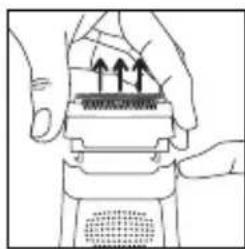
natural_image
Illustration of hands holding a mechanical component with three upward arrows indicating motion (no text or symbols)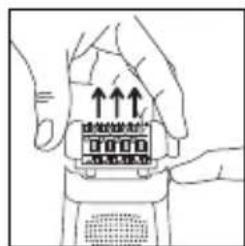
natural_image
Diagram showing a hand holding a water spray bottle with a curved pipe and droplets, no text or symbols present.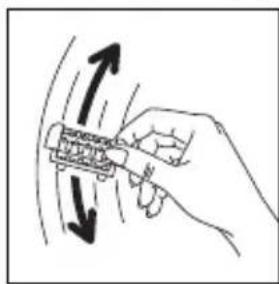
natural_image
Hand holding a tool with directional arrows indicating motion or movement (no text or symbols)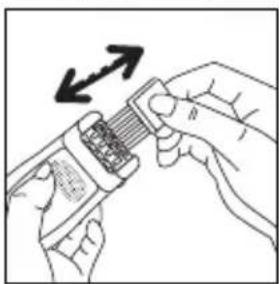
natural_image
Illustration of hands using a tool to interact with a device, showing a magnified view of the device (no text or symbols present)natural_image
Illustration of a hand using a tool to clean or spray liquid from a faucet (no text or symbols)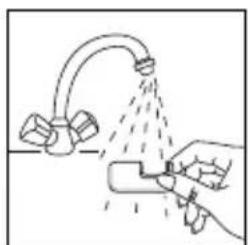
natural_image
Illustration of a hand spraying water from a pipe onto a surface, with no text or symbols present.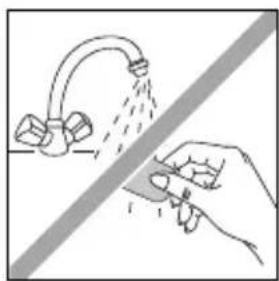
natural_image
Illustration of a hand using a tool to clean or spray liquid from a faucet (no text or symbols)natural_image
Simple line drawing of a handheld electronic device with a cable and connector (no text or symbols)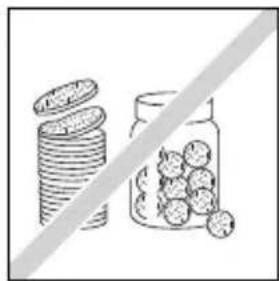
natural_image
Illustration of stacked coins and a jar with scattered round objects, separated by a diagonal line (no text or symbols)
natural_image
Illustration of a hand pressing down on a mechanical component with arrows indicating motion (no text or symbols)
natural_image
Illustration of a hand using a tool to interact with a device, showing motion lines and no text or symbols.Please read carefully before use

1-DESCRIPTION OF YOUR APPLIANCE
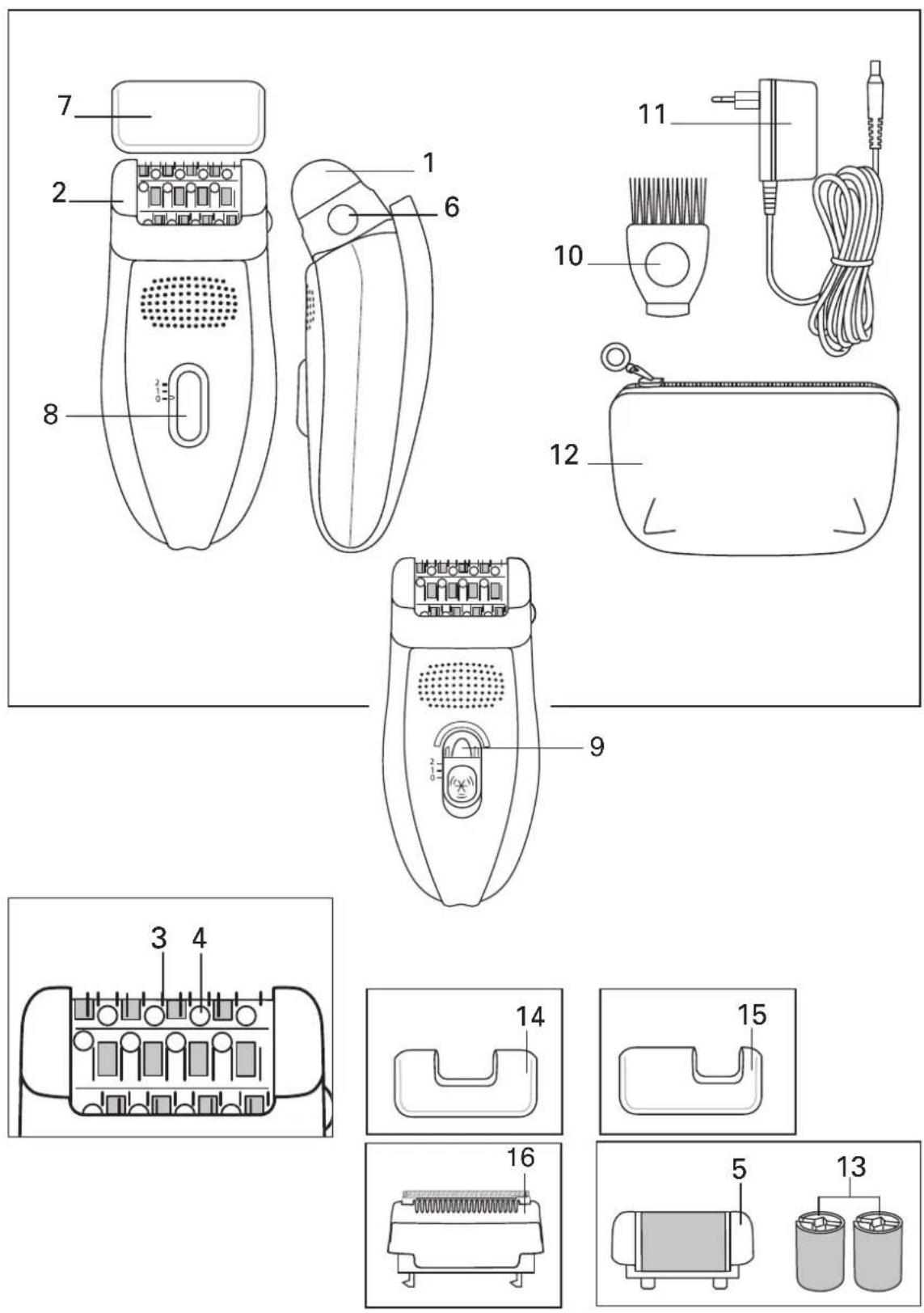
1- Pivoting head
2- Depilator head
3- Tweezers
4- Massaging beads
5- Exfoliator head
6- Release button for removable head
7- Cap
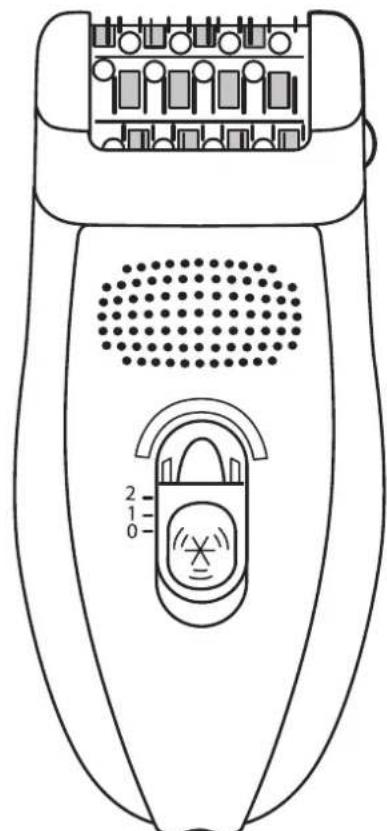
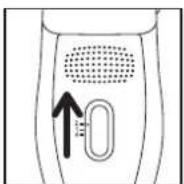
8-2-speed and stop switch
9- "Vision" (EP8975)
10- Cleaning brush
11- Adaptor EM2.A2
12- Travel pouch
13-2 exfoliating bands
14- Armpit accessory (EP7910-8975)
15- Bikini line accessory (EP7910-8975)
16- Additional shaver head (EP7970-8975)
• Vision function (EP8650) :
The Vision system installed in your device gives perfect epilation results first time. By diffusing an ultraluminous halo on the skin, this system makes all your hair – even the finest, shortest and fairest hairs – easier to see.
- Pivoting head function:
For comfort of use, your appliance is fitted with a pivoting head that adapts to every contour of the areas to be shaved (legs, armpits, bikini line) for a smooth, efficient result.
- Pain-relieving function:
Access Fresh Air is equipped with a high-speed turbine which blows air onto the skin and cools it. This helps to reduce the pain caused by epilation.
2-SAFETY
- This appliance complies with the technical rules and standards for safety currently in force (Electromagnetic Compatibility, Low Voltage, Environnement).
- Voltage: Ensure that this voltage corresponds to that of your mains supply. Incorrect connection may cause irreparable damage which is not covered by the guarantee.
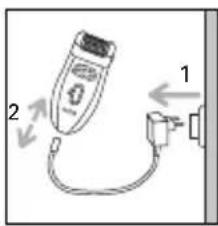
- This appliance is intended for personal domestic use only. It must only be used with the enclosed adaptor EM2A2.
- Never use if the appliance (depilator or adaptor) is damaged or in the event of any damage caused by dropping the appliance (invisible damage may be dangerous).
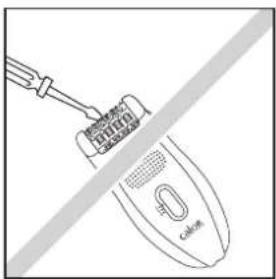
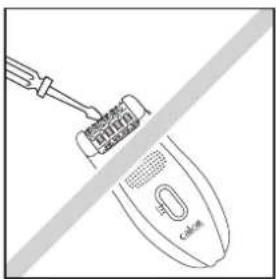
- This appliance can only be repaired using special tools. In the event of any after sales problem, please consult an approved service agent (see enclosed leaflet).
- We decline any responsibility for damage arising from incorrect use of the appliance or use of the appliance in any way other than that specified in these instructions.
- When the depilator is in use, it must not come into contact with eyelashes, hair, clothes or any other objects, in order to avoid any danger of injury or blockage.
- Keep a careful eye on the appliance if used on, or in the presence of children or invalids.
- Do not use the depilator:
- on your face
- on broken, burnt or sore skin
- on sensitive areas (varicose veins, moles, birthmarks, warts...)
- if you suffer from skin complaints, (eczema, inflam-mations, acne...).
For hygiene reasons, it is advised that you do not allow anyone else to use your appliance.
- When in use, the wall socket must be readily accessible.
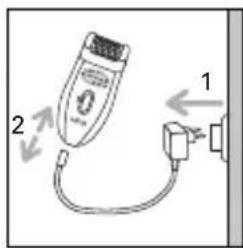
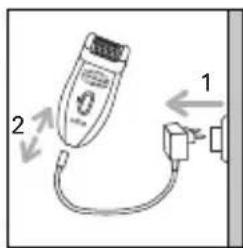
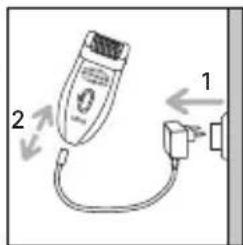
- Remove adapter from the wall outlet to disconnect from the supply.
- For use indoor only.
- Close supervision is necessary when the appliance is used on or in the presence of children or severely disabled people.
- Never leave the appliance within the reach of unsupervised children.
- Do not use an extension lead.
- Never use the appliance with damp hands.
- Do not leave the appliance in direct sunlight.
- Do not use the appliance at cold temperatures.
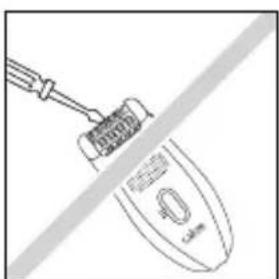
- Do not immerse or put under running water.
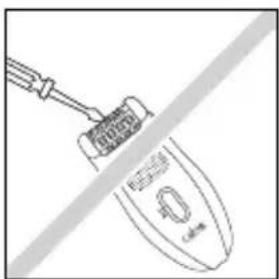
- Do not use aggressive products or solvents for cleaning.
GUARANTEE
Your appliance is designed for use in the home only. It should not be used for professional purposes. Any commercial use, inappropriate use or failure to comply with the instructions, the manufacturer accepts no responsibility and the guarantee will not apply. The guarantee becomes null and void in the case of improper usage.
3-PREPARATION OF THE SKIN
Your skin must be clean and dry.
- Do not apply either cream or hydrating milk before depilation.
• If you previously used a razor for depilation: - the first few times you use the depilator, your skin may feel more sensitive, as shaving has made your hair thicker and stronger. This sensation will lessen the more you use your depilator: the hair will grow back less quickly and become thinner.
- Your depilator will be much more effective and easier to use if you use it regularly. We advise you to use your depilator as soon as your hair starts to grow back.
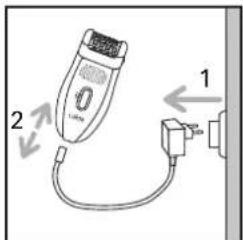
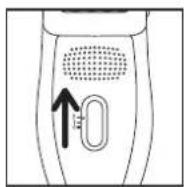
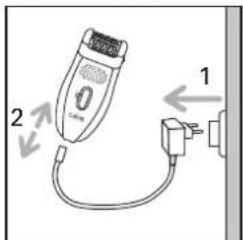
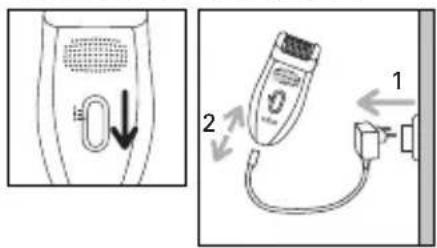
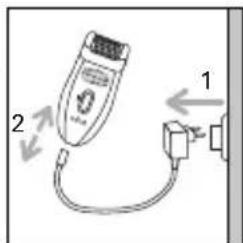
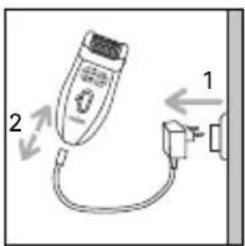
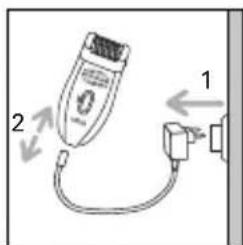
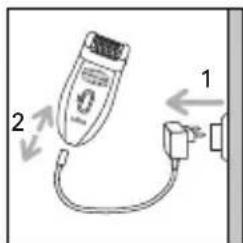
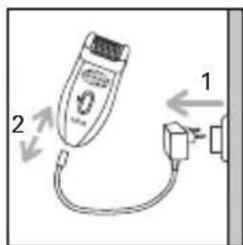
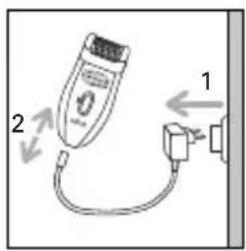
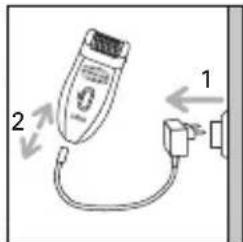
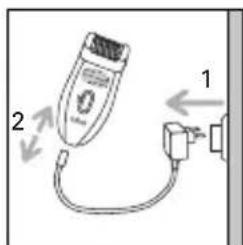
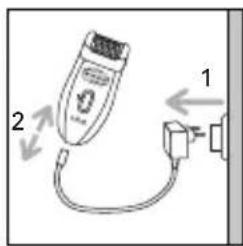
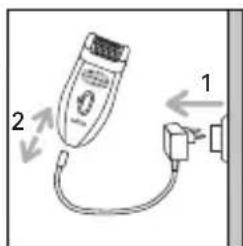
4-CONNECTION 5-STOPPING THE APPLIANCE
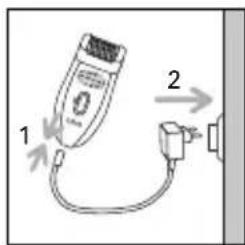
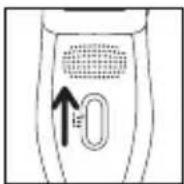
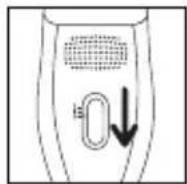
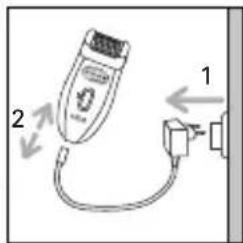
6-PEELING (EP 8975)
Peeling will enable you to limits growth of subcutaneous hair if practised regularly.
We strongly recommend that you use the Exfoliator Head 2 days before using your epilator to avoid irritating your skin.
• And not to use a peeling gel or cream at the same time.
- Never carry out peeling on sensitive areas (armpits / bikini line / face).
• After peeling, we advise you to wipe over the area with a moist flannel to remove any dead skin. Dry the skin thoroughly afterwards.
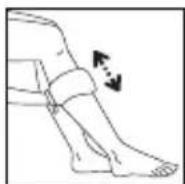
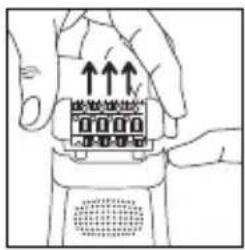
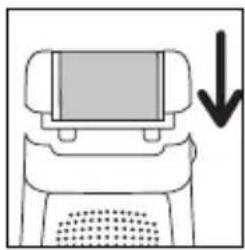
- Method :
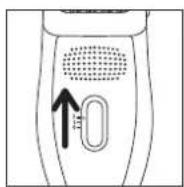
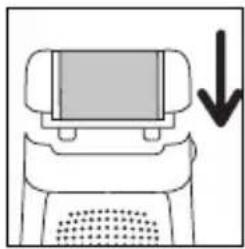
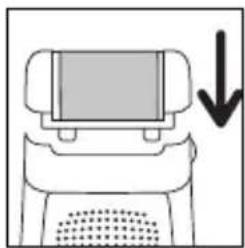
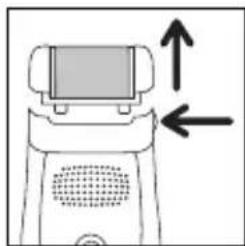
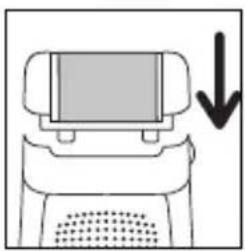
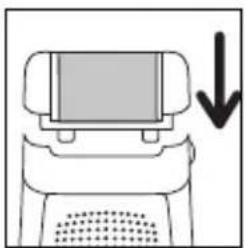
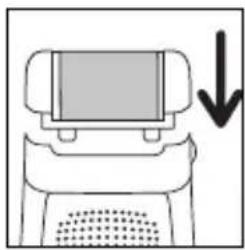
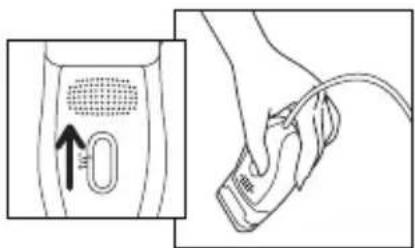
- Press the release button to remove the epilator head.
-
Clip the Exfoliator Head to the epilator.
-
Set the switch to "1".
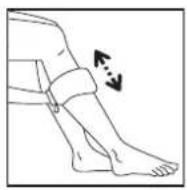
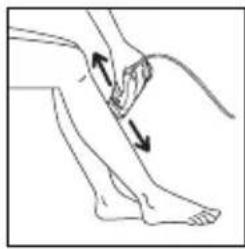
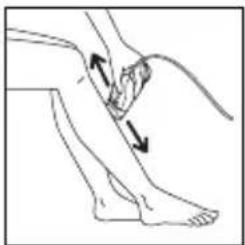
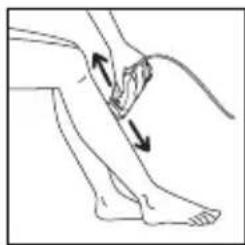
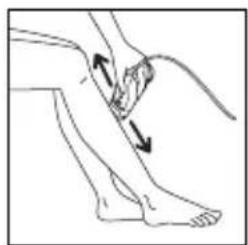
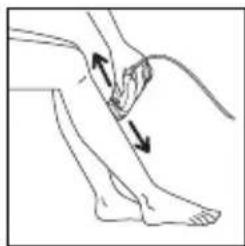
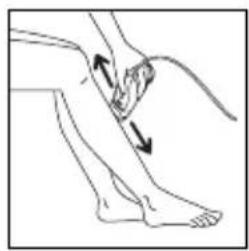
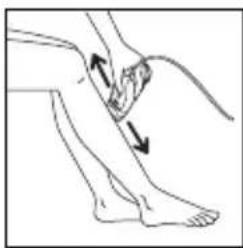
- Start exfoliating with a slow, gentle up and down movement.
natural_image
Simple line drawing of a computer monitor with a downward arrow indicating compression or download (no text or symbols)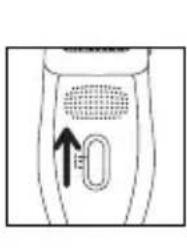
natural_image
Diagram of a handheld device with a circular vent and a U-shaped button, no text or symbols present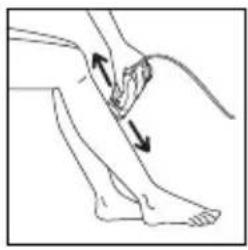
natural_image
Illustration of a human leg with two arrows indicating movement or pressure points (no text or symbols present)When using the Micro-Peeling function for the first time or if your skin is very delicate, we recommend:
- skin is wet before peeling, use cotton wool or a flannel to do this
- making slow and gentle rotating movements when using the appliance3. not to use the appliance more than twice on the same area.
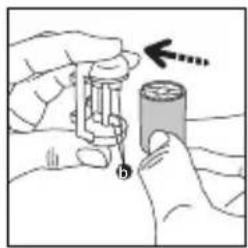
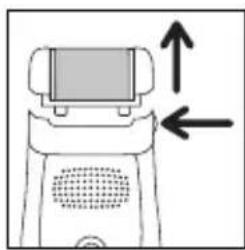
- Replacing the exfoliating band
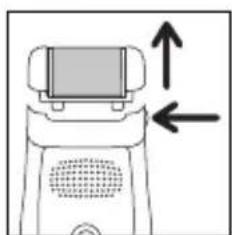
- Press the release button to remove the Exfoliator Head from the epilator.
-
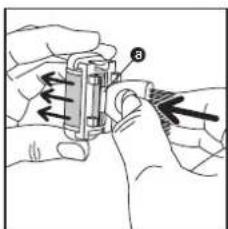
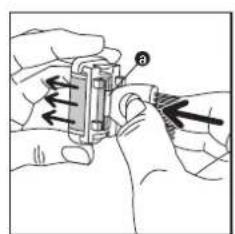
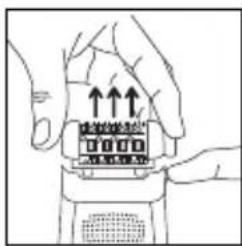
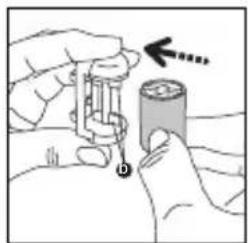
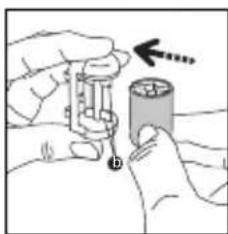
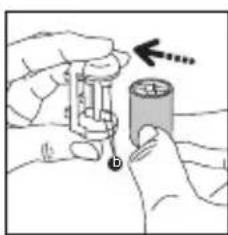
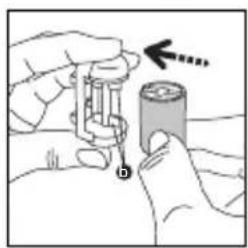
Using the plastic end of the cleaning brush unclip the band as follows:
-
Turn the Exfoliator Head over and hold it in place by gripping the edges between your thumb and forefinger.
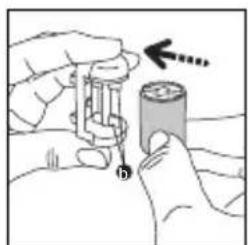
- Turn the band so that its groove comes round to the central position.
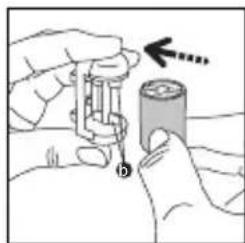
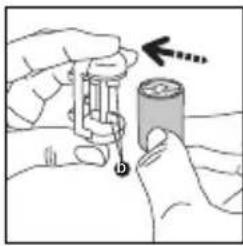
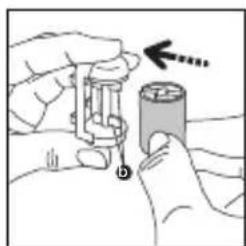
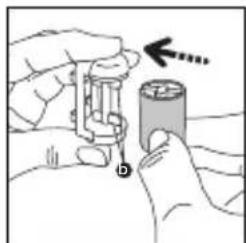
- Insert the end of the cleaning brush in the groove and push to eject the band.
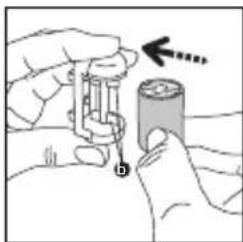
- Insert the new band by slotting the fins (b) of the exfoliator unit in the groove of the band and pushing until it clicks!
natural_image
Diagram of a robot with a screen and directional arrows indicating movement or force (no text or symbols)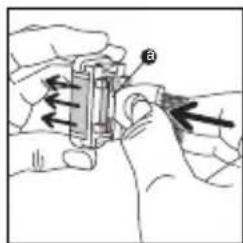
natural_image
Illustration of hands holding a battery and measuring a cylindrical component with an arrow indicating direction (no text or symbols)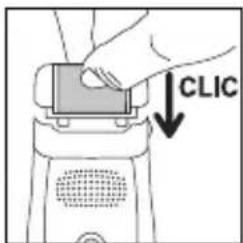
natural_image
Simple line drawing of a rope tied to a hanging object with an arrow indicating upward motion (no text or symbols)7-LEG HAIR REMOVAL
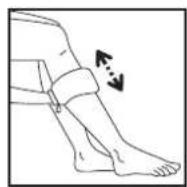
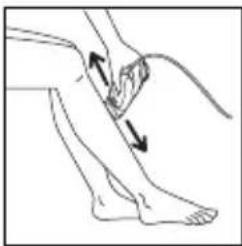
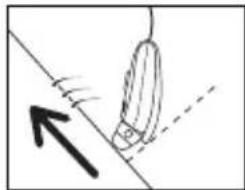
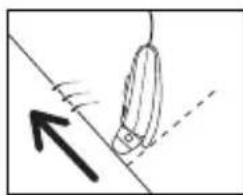
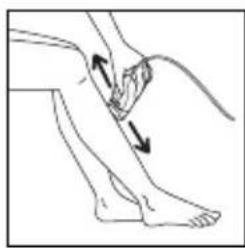
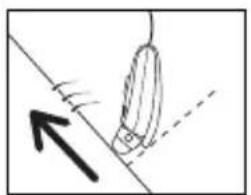
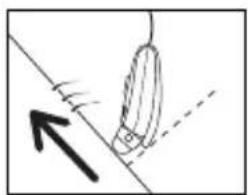
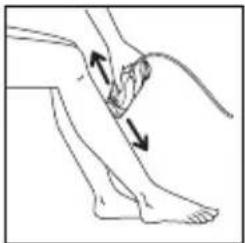
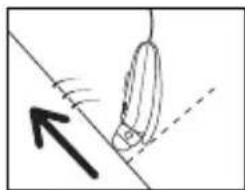
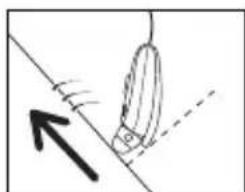
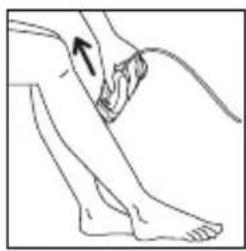
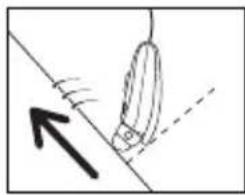
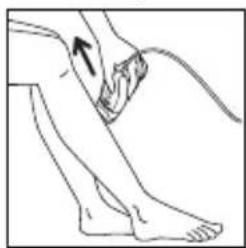
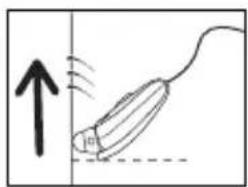
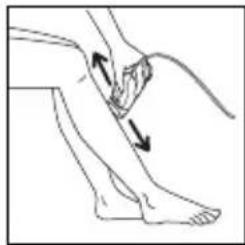
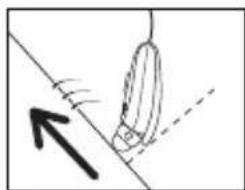
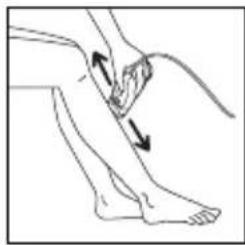
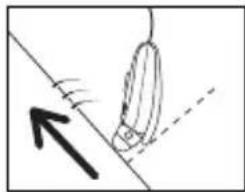
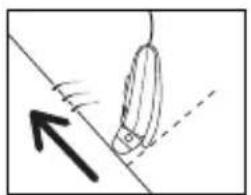
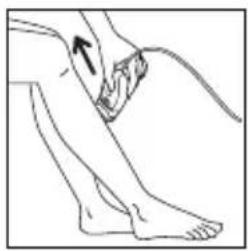
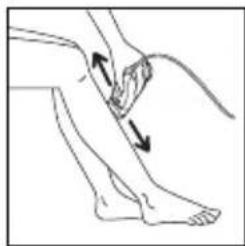
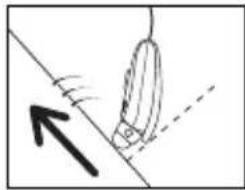
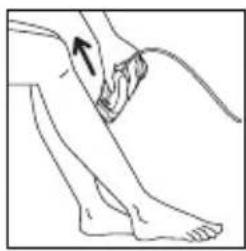
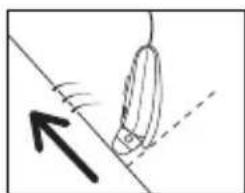
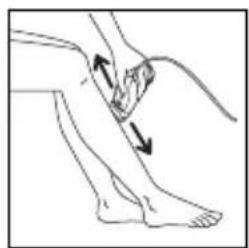
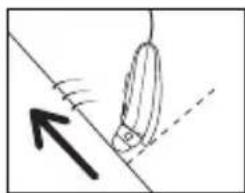
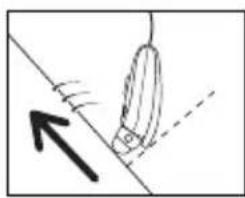
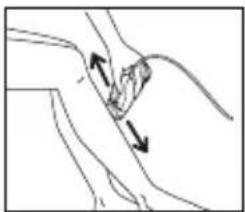
For optimum epilation, we recommend that you tilt the epilator slightly towards your skin in the direction of epilation, as shown in the diagram.
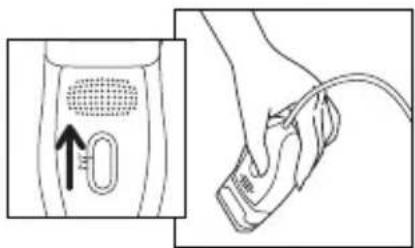
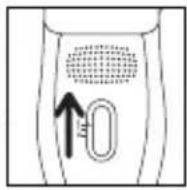
- Move the switch to the on position "2".
- The switch must always remain visible during use.
natural_image
Line drawing of a human leg with a bandage and arrow indicating movement (no text or symbols)- Shave against the lie of the hair, slowly and without pressing, with the shaver perpendicular to your skin.
natural_image
Simple line drawing of a pen-like object with an upward arrow and motion lines, no text or symbols present.8-HAIR REMOVAL FROM SENSITIVE AREAS
For optimum epilation, we recommend that you tilt the epilator slightly towards your skin in the direction of epilation, as shown in the diagram.
• Preparing the area where you want to remove hair:
- If the hairs are long trim to approximately 1cm.
- Dry the area thoroughly to ensure any trace of deodorant or perspiration are removed.
A- With the epilator
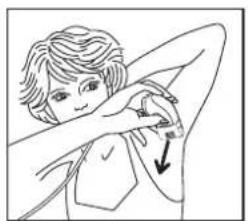
1) Armpit epilation:
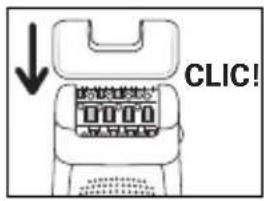
- Fit the armpit accessory (14) onto the epilator head and push in until you hear a click.
- Set the switch to position 1.
2) Bikini line epilation:
- Fit the bikini line accessory (15) onto the epilator head and push in until you hear a click.
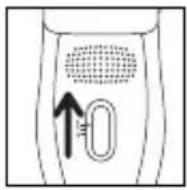
- Set the switch to position 1.
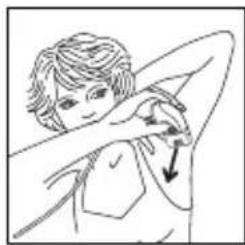
Shave against the lie of the hair, slowly and without pressing, with the shaver perpendicular to your skin.
natural_image
Line drawing of a person performing a neck massage or stretching exercise (no text or symbols)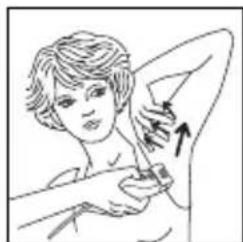
natural_image
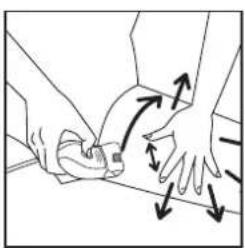
Illustration of a person receiving a medical or cosmetic procedure with an arrow indicating direction (no text or symbols present)For the armpits: First from bottom to top ... Then from top to bottom.
Important :
a) Keep your arm raised and stretched throughout the hair removal process.
b) Stretch the skin to make it easier.
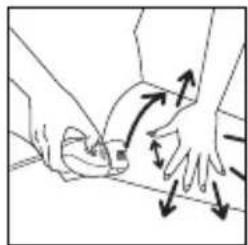
For the bikini line:
Important:
Make sure the skin is stretched properly.
natural_image
Illustration of two hands performing a physical maneuver with directional arrows indicating motion (no text or symbols)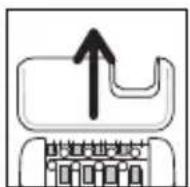
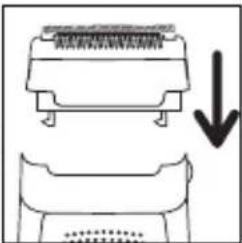
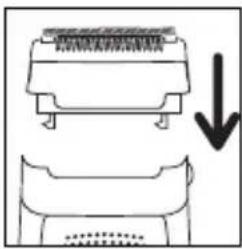
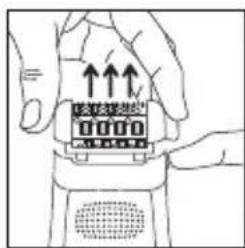
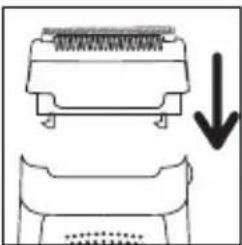
B-With the shaver head (mod. EP7970/EP8975):
- Operating instructions:
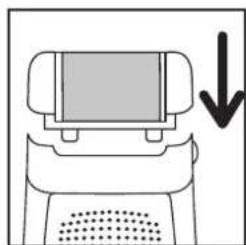
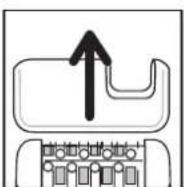
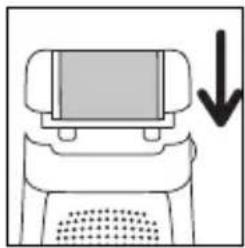
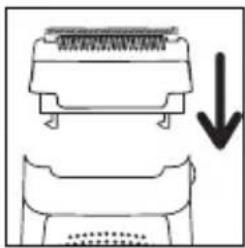
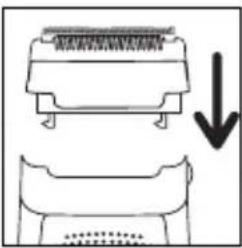
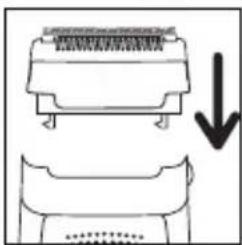
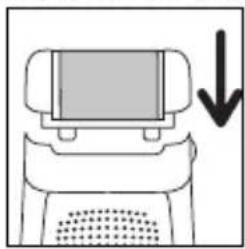
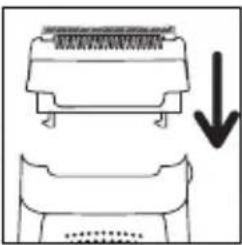
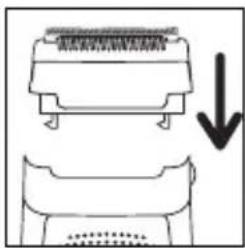
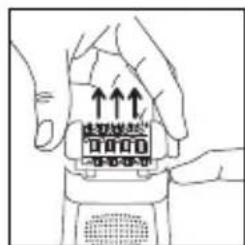
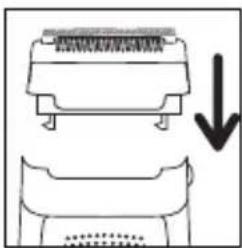
- Remove the epilator head by pressing the ejection button.
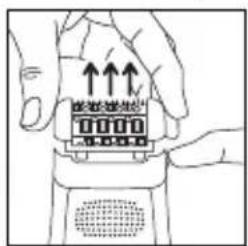
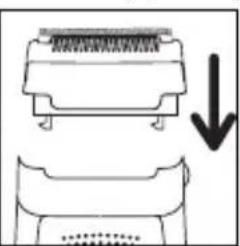
natural_image
Diagram showing a mechanical component with a downward arrow indicating compression or disassembly (no text or symbols present)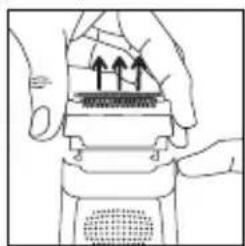
natural_image
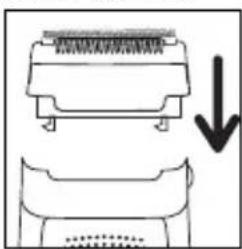
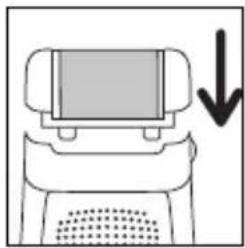
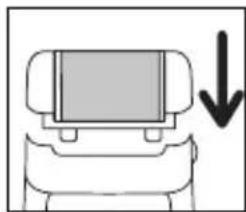
Illustration of hands performing a mechanical press or stamping operation on a device (no text or symbols visible)- Fit the shaver head (16) onto the appliance (fig..)
- Set the switch to position 2.
- After use, stop the appliance.
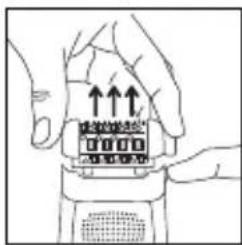
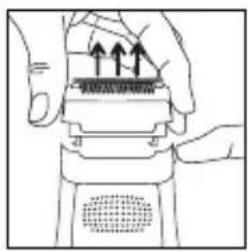
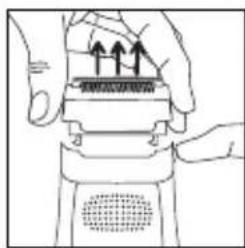
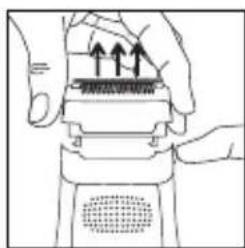
- Remove the shaver head by pressing the ejection button.
9-CLEANING THE APPLIANCE
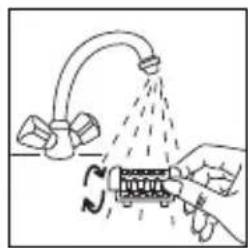
- Cleaning the epilator head:
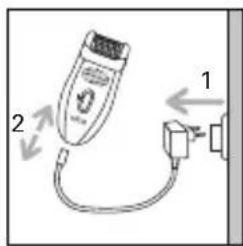
- Unplug the epilator.
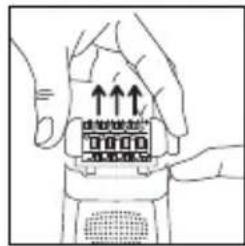
- Press the release button on the head and remove the epilator head.
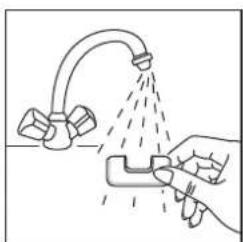
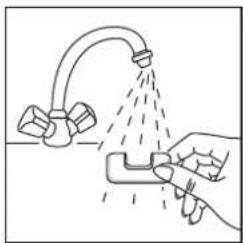
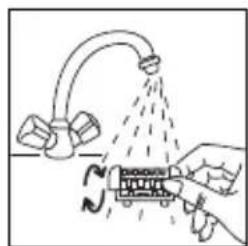
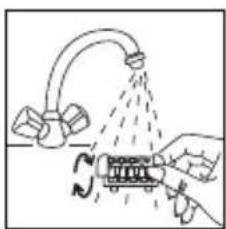
- Rinse the epilator head under cold running water by turning it for 5 to 10 seconds.
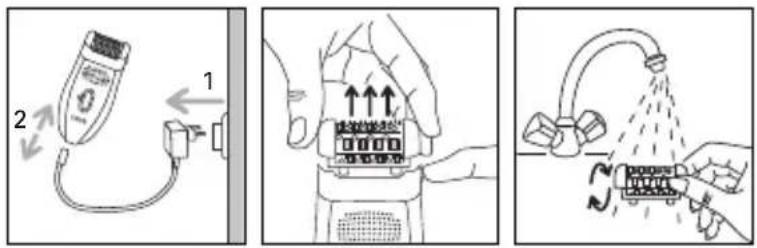
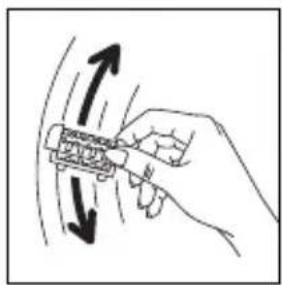
natural_image
Hand holding a tool with directional arrows indicating movement or force (no text or symbols)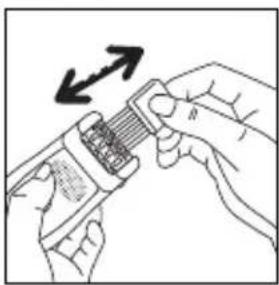
natural_image
Illustration of hands using a tool to adjust a component with an arrow indicating rotation (no text or symbols present)- Shake the epilator head vigorously and dry it with a towel before fitting it to the epilator again.
You can also use the small cleaning brush supplied.
- Cleaning sensitive area accessories (mod. EP7910 – EP9875)
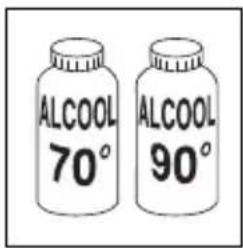
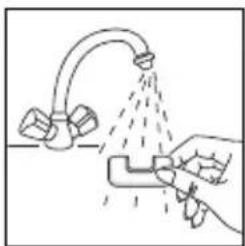
natural_image
Illustration of a hand spraying water from a faucet (no text or symbols)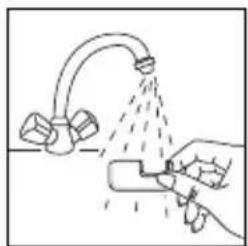
natural_image
Illustration of a hand using a tool to spray liquid onto a surface with a pipe (no text or symbols)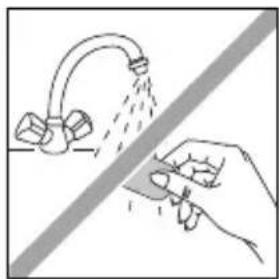
natural_image
Illustration of a hand using a tool to clean or spray water from a faucet (no text or symbols)- Cleaning the Exfoliator Head.
We recommend that you change the exfoliating band after three sessions of exfoliation or when it is worn out.
Do not clean the band under running water.
natural_image
Simple line drawing of a handheld device with a cable and a diagonal line (no text or symbols)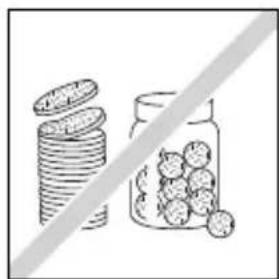
natural_image
Illustration of stacked coins and a jar with scattered fruits, separated by a diagonal line (no text or symbols)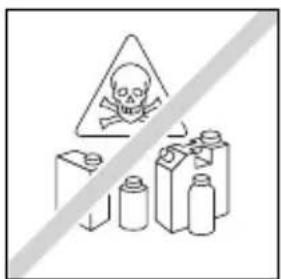
natural_image
Illustration of hands using a handheld device to press or install a component, with no visible text or symbols.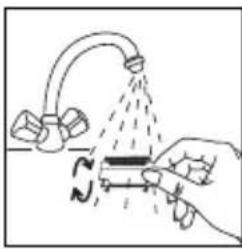
natural_image
Illustration of a hand using a tool to lift a submerged object with a curved pipe, no text or symbols present- Cleaning the shaver head
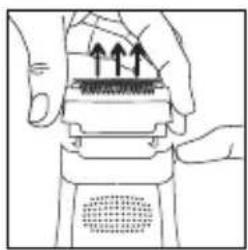
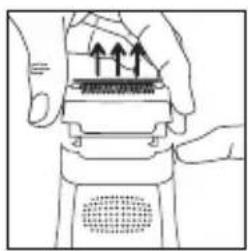
- Remove the shaver head by pressing the ejection button.
- Run the shaver head under a cold tap and dry it with a towel.
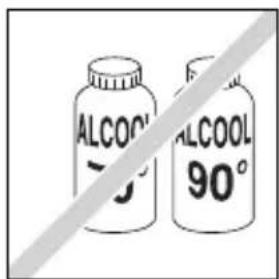
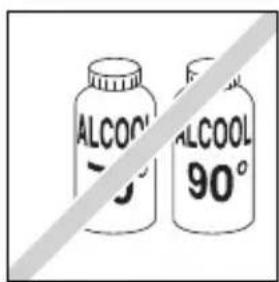
- Do not apply alcohol to the body of the appliance to avoid its colours changing.
10-SKIN CARE
Small red spots may appear. They will disappear quickly. For this reason it is preferable to use your depilator in the evening. If necessary, apply calming cream after depilation.
11-ENVIRONNEMENT PROTECTION FIRST
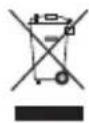
Your appliance contains valuable materials which can be recovered or recycled. Leave it at a collection point.

6-PEELING (EP8975)
natural_image
Simple line drawing of a computer monitor with a downward arrow indicating compression or download (no text or symbols)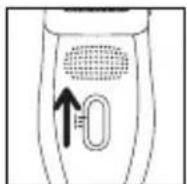
natural_image
Illustration of a person's lower leg and foot with two arrows indicating movement or pressure points (no text or symbols present)natural_image
Diagram of a device with a screen and directional arrows indicating movement or force (no text or symbols)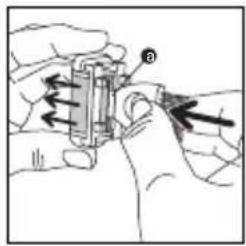
natural_image
Illustration of hands holding a battery and measuring a component (no text or symbols)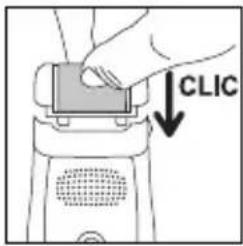
natural_image
Simple line drawing of a rope with an arrow indicating upward motion (no text or symbols)7-EPILATION DER BEINE

natural_image
Line drawing of a human leg with a bandage and arrow indicating a specific area (no text or symbols present)natural_image
Diagram of a mouse being pulled into a wire, with an upward arrow indicating motion (no text or symbols)8-EPILATION EMPFINDLICHER ZONEN
natural_image
Illustration of a person with short hair and a downward arrow, no text or symbols present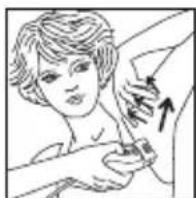
natural_image
Illustration of a person receiving a medical injection or injection, with arrows indicating direction (no text or symbols present)Achtung :
natural_image
Illustration of hands performing a physical maneuver with directional arrows indicating motion (no text or symbols)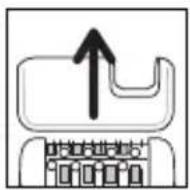
natural_image
Diagram showing a device with a top panel and a bottom panel, both with a downward arrow indicating a process or transformation (no text or symbols present)
natural_image
Illustration of hands performing a mechanical press or stamping operation on a device (no text or symbols visible)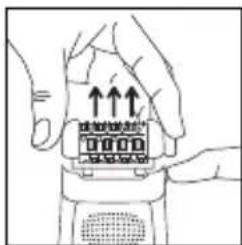
natural_image
Illustration of hands holding a device with upward arrows indicating motion (no text or symbols)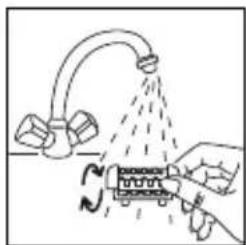
natural_image
Diagram showing a hand pouring liquid from a pipe into a container with rotating arrows (no text or symbols)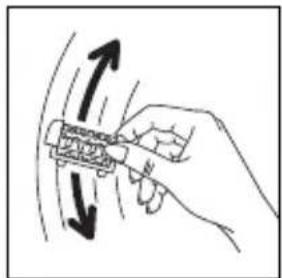
natural_image
Hand holding a tool with directional arrows indicating motion or movement (no text or symbols)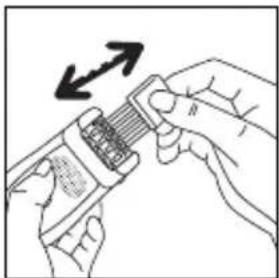
natural_image
Illustration of hands holding a device with an arrow indicating direction (no text or symbols present)natural_image
Illustration of a hand using a spray gun to prevent a showerhead spraying water from a sink (no text or symbols)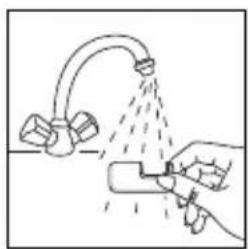
natural_image
Illustration of a hand using a tool to spray liquid onto a surface with a pipe (no text or symbols)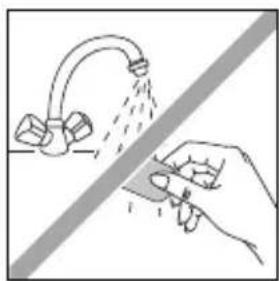
natural_image
Illustration of a hand holding a tool near a faucet, with no text or symbols present.natural_image
Simple line drawing of a handheld device with a cable and a diagonal line (no text or symbols)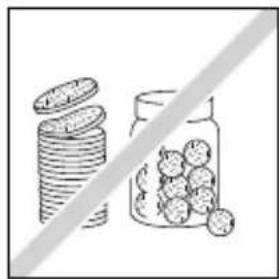
natural_image
Illustration of stacked coins and a jar with round fruits, separated by a diagonal line (no text or symbols)
natural_image
Illustration of hands using a handheld device to press or install a component (no text or symbols visible)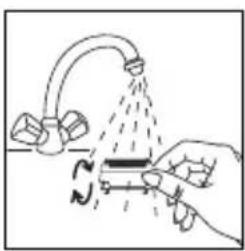
natural_image
Illustration of a hand using a tool to lift a pipe with a valve, showing fluid flow direction (no text or symbols)11-DENKEN SIE AN DEN SCHUTZ DER UMWELT!
6. PEELING (EP8975)
natural_image
Simple line drawing of a computer monitor with a downward arrow indicating compression (no text or symbols)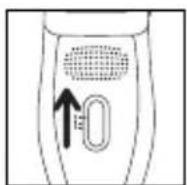
natural_image
Illustration of a human leg with two arrows indicating movement or pressure direction (no text or symbols)natural_image
Diagram of a robot with a screen and directional arrows indicating movement or force (no text or symbols)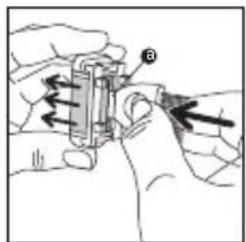
natural_image
Illustration of hands holding a battery and a cylindrical component with an arrow indicating direction (no text or symbols)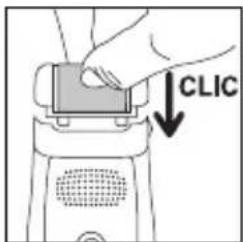
natural_image
Simple line drawing of a rope with a hanging object and an arrow indicating upward motion (no text or symbols)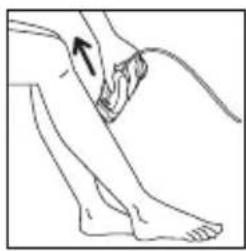
natural_image
Line drawing of a human leg with a bandage and an arrow indicating a specific point (no text or symbols present)natural_image
Simple line drawing of a mouse being pulled with motion lines, no text or symbols presentnatural_image
Line drawing of a person with hand near arm, no text or symbols present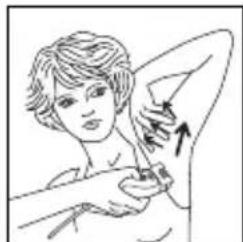
natural_image
Illustration of a person receiving a medical procedure with an arrow indicating direction (no text or symbols present)• Per le ascelle :
natural_image
Illustration of hands performing a physical maneuver with arrows indicating motion (no text or symbols)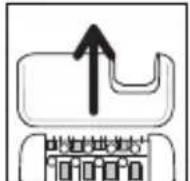
B- Con la testina di rasatura (mod. EP7970/EP8975):
natural_image
Diagram showing a mechanical component with an arrow indicating downward motion (no text or symbols present)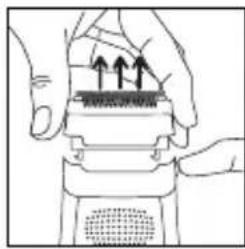
natural_image
Illustration of hands performing a mechanical press or press operation with upward arrows indicating motion (no text or symbols present)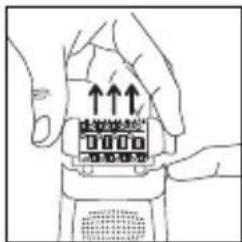
natural_image
Illustration of hands holding a device with upward arrows indicating motion or force (no text or symbols)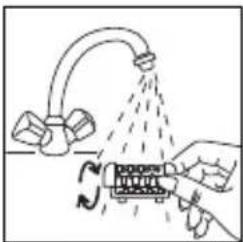
natural_image
Diagram showing a hand pouring liquid from a pipe onto a device with a rotating arrow (no text or symbols)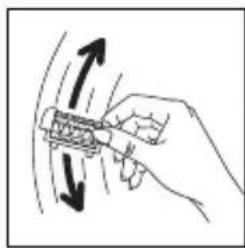
natural_image
Hand holding a tool with directional arrows indicating motion (no text or symbols)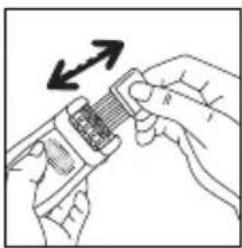
natural_image
Illustration of hands using a handheld device to interact with a grid of components (no text or symbols visible)natural_image
Illustration of a hand using a spray gun to clean or wash a showerhead (no text or symbols)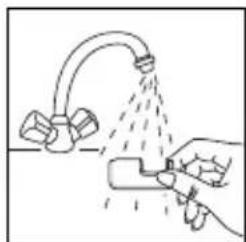
natural_image
Illustration of a hand spraying water from a faucet with spray bubbles (no text or symbols)
natural_image
Illustration of a hand using a tool to clean or spray water from a curved pipe (no text or symbols)natural_image
Simple line drawing of a tool interacting with a device (no text or symbols)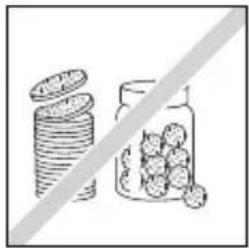
natural_image
Illustration of stacked coins and a jar with scattered fruits, separated by a diagonal line (no text or symbols)
natural_image
Illustration of a hand pressing down on a mechanical component with arrows indicating motion (no text or symbols)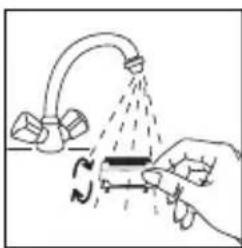
natural_image
Illustration of a hand holding a tool interacting with a device, no text or symbols present6. Peeling (EP8975)
natural_image
Simple line drawing of a computer monitor with a downward arrow indicating compression or download (no text or symbols)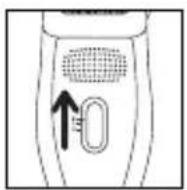
natural_image
Illustration of a human leg with two arrows indicating movement or pressure points (no text or symbols present)natural_image
Diagram of a robot with a screen and directional arrows indicating movement or force (no text or symbols)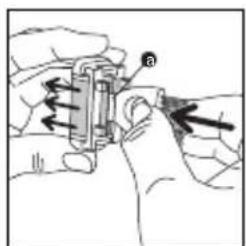
natural_image
Illustration of hands assembling a cylindrical battery with a hand holding the component (no text or symbols visible)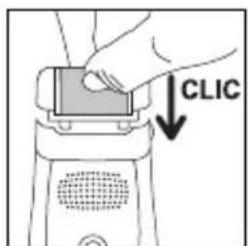
natural_image
Simple line drawing of a rope being pulled by a rope, with an arrow indicating direction (no text or symbols)7. Depilacja nóg
natural_image
Line drawing of a human leg with a foot and ankle, showing a finger pressing a knee joint (no text or symbols)natural_image
Diagram showing a pen tip interacting with a wire, with an upward arrow and dashed line indicating motion (no text or symbols)natural_image
Illustration of a person performing a hand gesture with an arrow indicating direction (no text or symbols)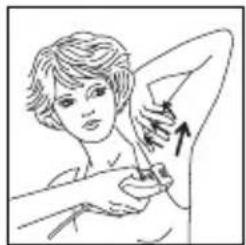
natural_image
Illustration of a person receiving a swab or bandage, with an arrow indicating direction (no text or symbols present)Pachy:
natural_image
Illustration of two hands performing a physical maneuver with directional arrows indicating motion (no text or symbols)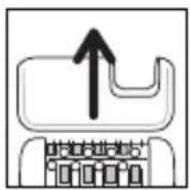
natural_image
Diagram showing a mechanical component with a downward arrow indicating compression or disassembly (no text or symbols present)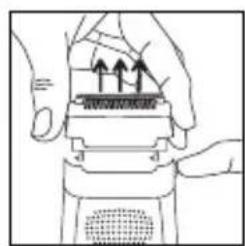
natural_image
Illustration of hands using a mechanical device to interact with a textured surface (no text or symbols visible)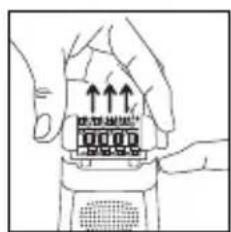
natural_image
Diagram of a hand pouring liquid into a showerhead with a submerged object (no text or symbols)natural_image
Hand holding a device with bidirectional arrows indicating motion (no text or symbols)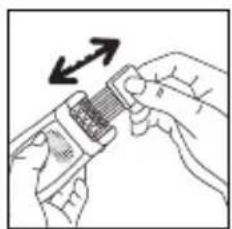
natural_image
Illustration of hands using a tool to adjust a mechanical component (no text or symbols visible)natural_image
Illustration of a hand using a spray gun to clean or wash a showerhead (no text or symbols present)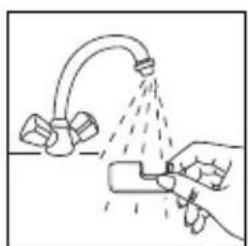
natural_image
Illustration of a hand using a spray gun to spray liquid onto a surface with two containers (no text or symbols)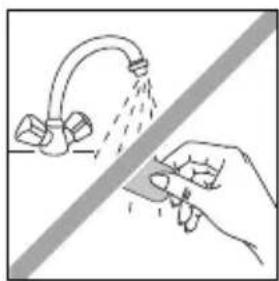
natural_image
Illustration of a hand spraying water from a pipe onto a surface, with no text or symbols present.natural_image
Simple line drawing of a tool interacting with a device (no text or symbols)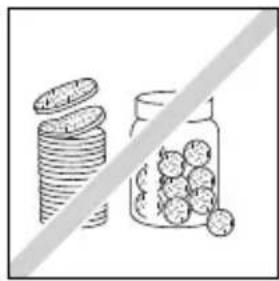
natural_image
Illustration of stacked coins and a jar filled with round fruits, separated by a diagonal line (no text or symbols)
natural_image
Illustration of hands using a handheld device to press or install a component with upward arrows (no text or symbols)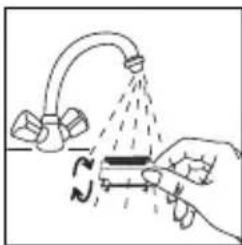
natural_image
Illustration of a hand using a tool to lift a submerged object with a curved pipe, no text or symbols present6. Peeling (EP8975)
natural_image
Simple line drawing of a computer monitor with a downward arrow indicating compression or download (no text or symbols)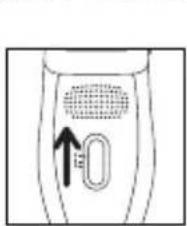
natural_image
Line drawing of a human leg with two arrows indicating movement or pressure points (no text or symbols)natural_image
Diagram of a robot with a screen and directional arrows indicating movement or force (no text or symbols)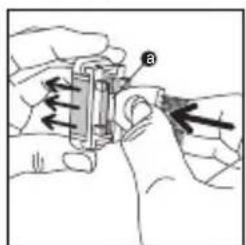
natural_image
Illustration of hands holding a battery with a hand pointing to it (no text or symbols present)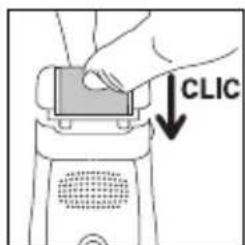
natural_image
Simple line drawing of a rope with an arrow indicating upward motion (no text or symbols)7. Epilace nohou
natural_image
Line drawing of a human leg with a bandage and an arrow indicating a specific point (no text or symbols present)natural_image
Simple line drawing of a fish being pulled by a rod, with an upward arrow indicating motion (no text or symbols)natural_image
Illustration of a person performing a neck massage or stretching exercise (no text or symbols)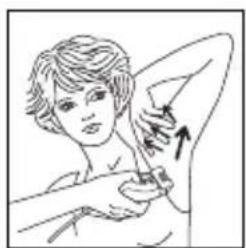
natural_image
Illustration of a person performing a medical or therapeutic procedure on another person's arm (no text or symbols present)V podpaží:
natural_image
Illustration of hands performing a physical maneuver with directional arrows indicating motion (no text or symbols)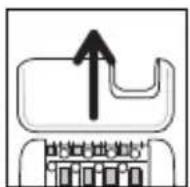
natural_image
Illustration of hands holding a device with an orange connector and upward arrows indicating movement (no text or symbols)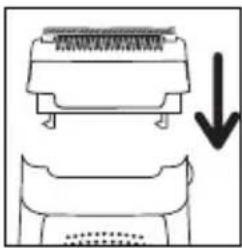
natural_image
Diagram showing a mechanical component with an arrow indicating downward motion (no text or symbols present)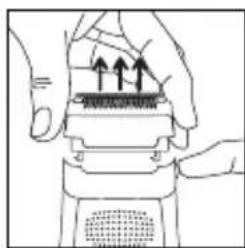
natural_image
Illustration of hands performing a mechanical press or stamping operation with arrows indicating motion (no text or symbols present)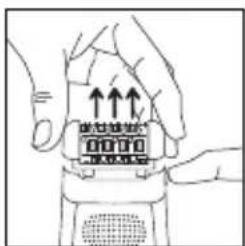
natural_image
Line drawing of hands holding a digital device with upward arrows indicating motion (no text or symbols)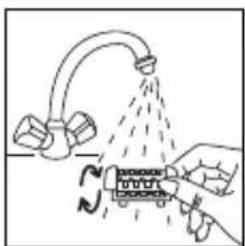
natural_image
Diagram showing a hand pouring liquid from a pipe onto a device with rotating arrows (no text or symbols)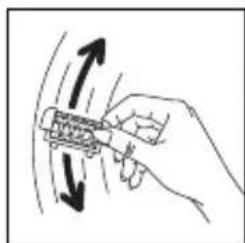
natural_image
Hand holding a mechanical component with directional arrows indicating motion (no text or symbols)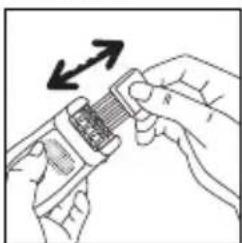
natural_image
Illustration of hands using a handheld device to interact with a grid-like object, no text or symbols presentnatural_image
Illustration of a hand using a spray gun to spray liquid from a kitchen sink (no text or symbols)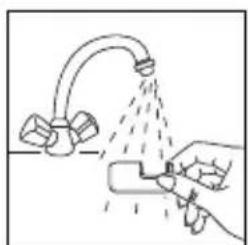
natural_image
Illustration of a hand spraying water from a faucet with spray bottle (no text or symbols)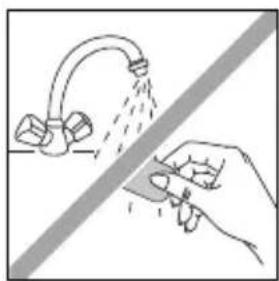
natural_image
Illustration of a hand spraying water from a pipe onto a surface, with no text or symbols present.natural_image
Simple line drawing of a handheld device with a cable and a diagonal line (no text or symbols)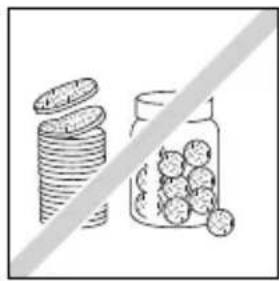
natural_image
Illustration of stacked coins next to a jar with scattered fruits, separated by a diagonal line (no text or symbols)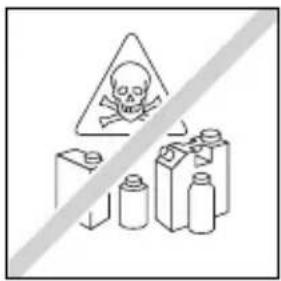
natural_image
Illustration of hands using a handheld device to press or install a component with upward arrows (no text or symbols)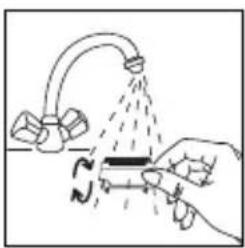
natural_image
Illustration of a hand using a tool to lift a submerged object with liquid, no text or symbols present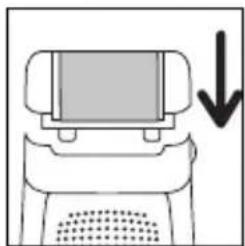
natural_image
Simple line drawing of a mechanical device with a downward arrow indicating force or motion (no text or symbols)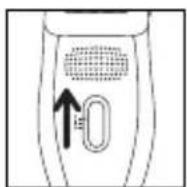
natural_image
Illustration of a person's lower leg and foot with two arrows indicating movement or pressure points (no text or symbols)natural_image
Diagram of a device with an upward arrow and two arrows indicating direction (no text or symbols)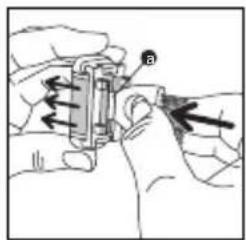
natural_image
Illustration of hands using a mechanical tool to adjust or install a component (no text or symbols visible)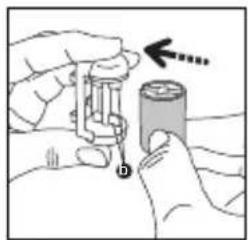
natural_image
Illustration of hands assembling a battery with a hand pointing to it (no text or symbols present)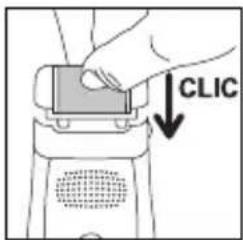
natural_image
Simple line drawing of a rope being pulled down by a rope, with an arrow indicating direction (no text or symbols)7. Epilacija nog
natural_image
Simple line drawing of a sperm cell with an upward arrow indicating movement (no text or symbols)natural_image
Illustration of a person performing a shoulder-bending exercise with an arrow indicating movement (no text or symbols)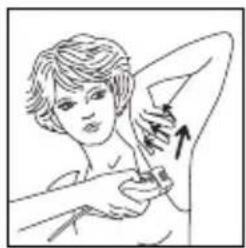
natural_image
Illustration of a person receiving a swab or pulse, with no visible text or symbolsZa pazduhe:
- Najprej od spodaj navzgor ... ... potem od zgoraj navzdol.
Pomembno:
natural_image
Illustration of hands performing a manual task with directional arrows indicating movement (no text or symbols)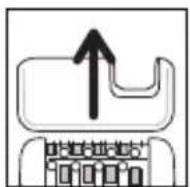
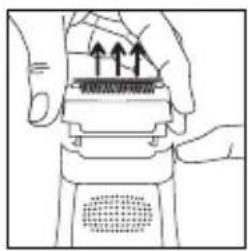
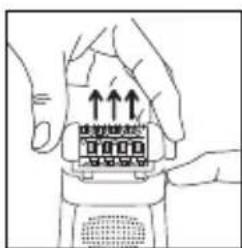
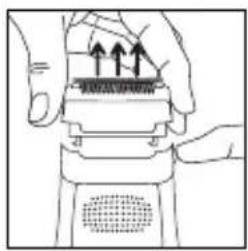
- Odstranitev nastavka za britje: nastavek primite z obeh strani in ga povlecite navzgor.
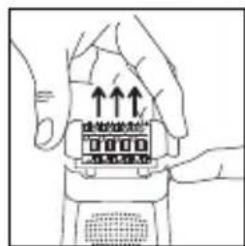
natural_image
Illustration of hands holding a device with arrows indicating upward movement (no text or symbols)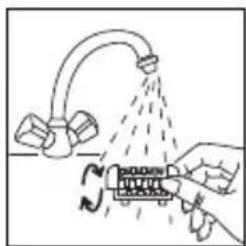
natural_image
Diagram showing a hand holding a tool interacting with a device, emitting spray from a curved pipe (no text or symbols present)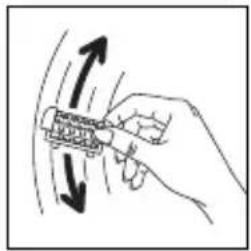
natural_image
Hand holding a tool with directional arrows indicating motion or movement (no text or symbols)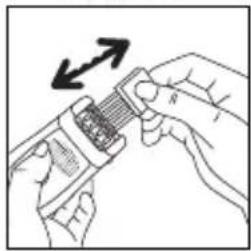
natural_image
Illustration of hands holding a connector with an arrow indicating rotation (no text or symbols)- Depilacijsko glavo dobro otresite in jo nato s pomočjo krpe dobro osušite, preden jo ponovno namestite na aparat.
natural_image
Illustration of a hand using a spray gun to clean or spray liquid from a faucet (no text or symbols)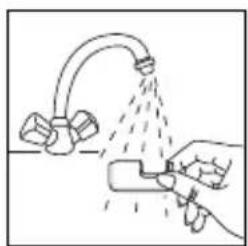
natural_image
Illustration of a hand spraying water from a pipe onto a surface, with no text or symbols present.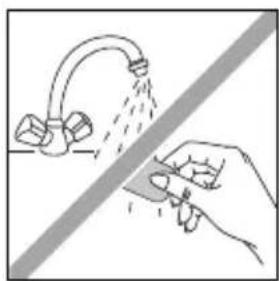
natural_image
Illustration of a hand spraying water from a pipe onto a surface, with no text or symbols present.natural_image
Simple line drawing of a cable being inserted into a device (no text or symbols)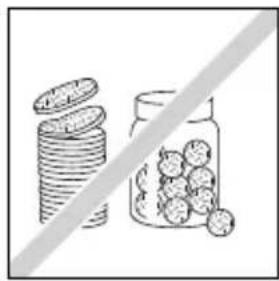
natural_image
Illustration of stacked coins next to a jar with scattered food items, separated by a diagonal line (no text or symbols)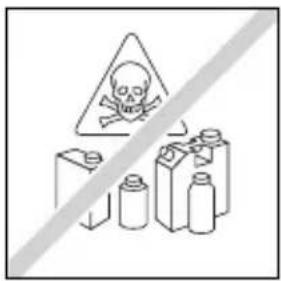
natural_image
Illustration of hands using a device to press or install a component with upward arrows (no text or symbols)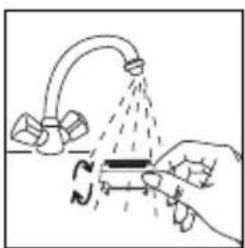
natural_image
Illustration of a hand using a tool to lift a surface with a curved pipe, no text or symbols present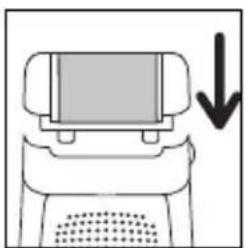
natural_image
Simple line drawing of a computer monitor with a downward arrow indicating compression (no text or symbols)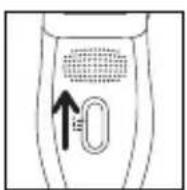
natural_image
Illustration of a human leg with two arrows indicating movement or pressure points (no text or symbols present)natural_image
Diagram of a device with an upward arrow and bidirectional arrows indicating motion or force (no text or symbols)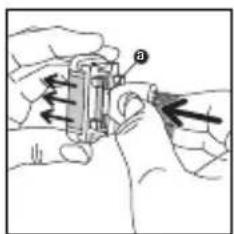
natural_image
Illustration of hands holding a battery and a cylindrical component with an arrow indicating direction (no text or symbols)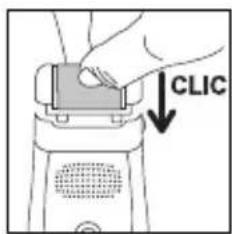
natural_image
Simple line drawing of a rope being pulled by a rope, with an arrow indicating direction (no text or symbols)8. Epilarea zonelor sensibile
natural_image
Illustration of a person performing a hand gesture with an arrow indicating direction (no text or symbols)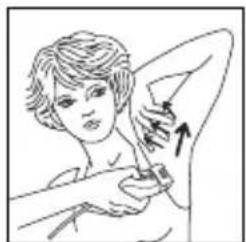
natural_image
Illustration of a person performing a breast swab treatment (no text or symbols present)Pentru axile:
natural_image
Illustration of hands performing a physical maneuver with directional arrows indicating motion (no text or symbols)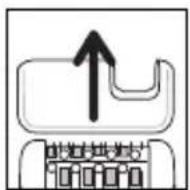
B- Cu capul de ras (modelele EP7970/EP8975):
Mod de functionare:
natural_image
Diagram showing a top-down view of a piano keyboard and its base with a downward arrow indicating compression (no text or symbols present)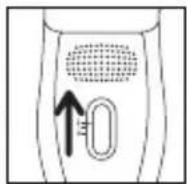
natural_image
Diagram showing a hand using a tool to lift a showerhead with a circular motion indicator (no text or symbols)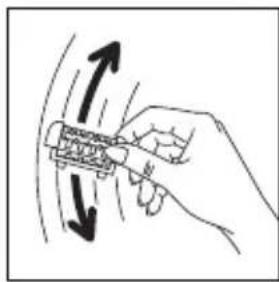
natural_image
Hand holding a mechanical component with directional arrows indicating motion (no text or symbols)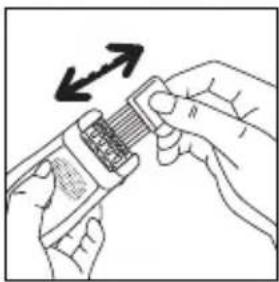
natural_image
Illustration of hands holding a smartphone with a resistor and directional arrows indicating motion (no text or symbols)natural_image
Illustration of a hand using a spray gun to spray liquid from a kitchen sink (no text or symbols)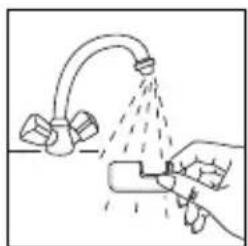
natural_image
Illustration of a hand using a tool to spray liquid onto a surface with a pipe (no text or symbols)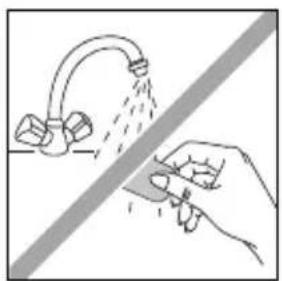
natural_image
Illustration of a hand using a tool to clean or spray water from a faucet (no text or symbols)natural_image
Simple line drawing of a connector with a cable and a switch, no text or symbols present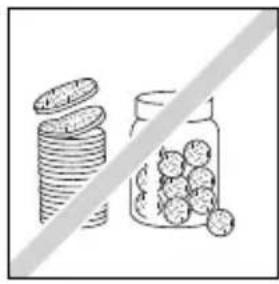
natural_image
Illustration of stacked coins and a jar with scattered food items, separated by a diagonal line (no text or symbols)
natural_image
Illustration of hands using a handheld device to press or install a component with upward arrows (no text or symbols)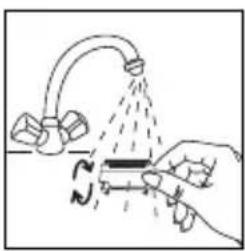
natural_image
Illustration of a hand using a tool to lift a surface with a curved pipe and spray bottle (no text or symbols)6. Piling epiderme (EP8975)
Piling vam omogućava Redovnom upotrebom ograničavate rast potkožnih dlačica.
natural_image
Simple line drawing of a computer monitor with a downward arrow indicating compression (no text or symbols)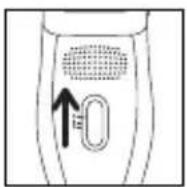
natural_image
Illustration of a human leg with two arrows indicating movement or pressure points (no text or symbols present)Za prvu upotrebu glave za piling epiderme, odnosno ako je vaša koža nežna, preporučujemo vam:
- da pre pilinga kožu navlažite vlažnom rukavicom ili vatom
- da primenjujete spore i nežne pokrete
- da aparatom ne vučete preko istog mjesta na koži više od dva puta.
natural_image
Diagram of a device with a screen and ventilation slots, showing directional arrows (no text or symbols)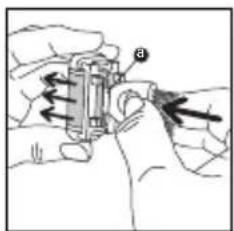
natural_image
Illustration of hands operating a mechanical device with directional arrows indicating motion (no text or symbols)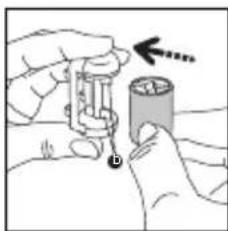
natural_image
Illustration of hands holding a cylindrical object with an arrow pointing to it, no text or symbols present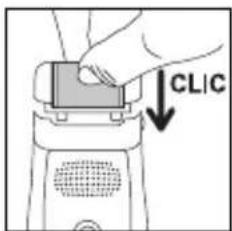

natural_image
Simple line drawing of a rope being pulled down at an angle, with no text or symbols present.7. Epilacija nogu
Za optimalne rezultate epilacije preporučujemo vam da epilator malo nagnete prema koži u smeru epilacije, kao što je prikazano na skici.
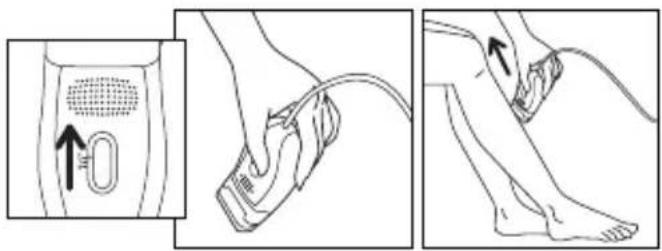
Prekidač postavite u položaj "2". Prekidač za vreme upotrebe mora da bude uočljiv.
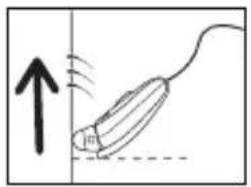
8. Epilacija osetljivih mjesta
Za optimalne rezultate epilacije preporučujemo vam da epilator malo magnete prema koži u smeru epilacije, kao što je prikazano na skici.
- Priprema mesta koje ćete da depilirate:
- skratite preduge dlačice, dakle dlačice duže od 1 cm.
- kožu potpuno osušite da biste uklonili sve tragove dezodoransa i znojenja.
A- S depilatorom
I) Depilacija pazuha:
natural_image
Illustration of a person performing a neck massage or stretching exercise (no text or symbols)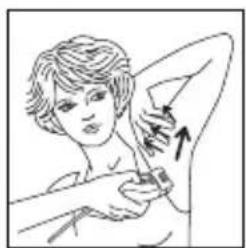
natural_image
Illustration of a person performing a medical or cosmetic procedure with an arrow indicating direction (no text or symbols present)Za pazuho
- Najpre spreda unazad...
...zatim odozgo nadole.
Važno
a) Sve dok traje epilacija, ruku držite dignuto i istegnuto.
b) Kožu zategnite da vam bude lakše.
- Za dekolte Važno
Dobro zategnite kožu.

natural_image
Illustration of hands performing a physical maneuver with arrows indicating motion (no text or symbols)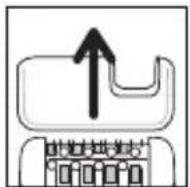
B- Sa glavom za brijanje (mod. EP7970/EP8975):
Način rada:
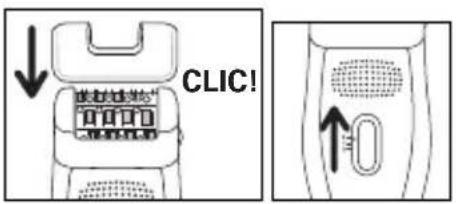
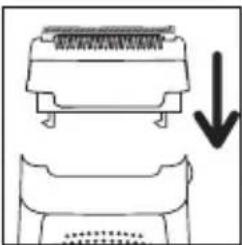
- Skinite glavu za depilaciju pritiskom na dugme za izbacivanje
- Uklopite glavu za brijanje (16) na aparat.
- Postavite prekidač na 2.
natural_image
Diagram showing a mechanical component with an arrow indicating downward motion (no text or symbols present)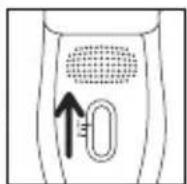
- Nakon upotrebe zaustavite aparat.
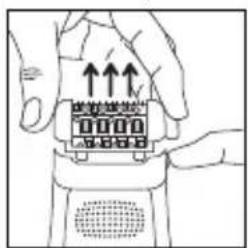
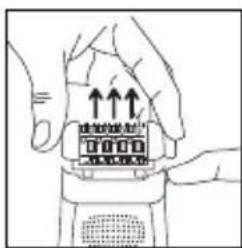
- Kod skidanja glave za brijanje: postavite prste sa strane glave i povucite prema gore.
9. Održavanje aparata
natural_image
Illustration of hands holding a device with upward arrows indicating motion or force (no text or symbols)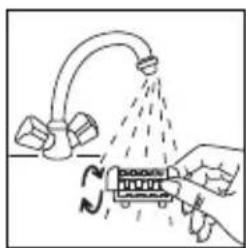
natural_image
Diagram showing a hand holding a device with a spray bottle emitting particles from a pipe (no text or symbols present)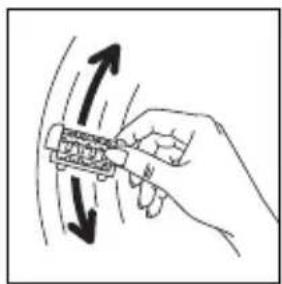
natural_image
Hand holding a mechanical component with directional arrows indicating motion (no text or symbols)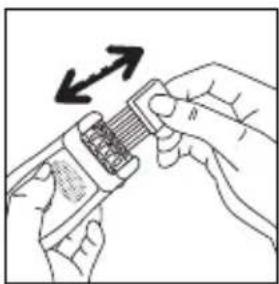
natural_image
Illustration of hands holding a device with an arrow indicating rotation (no text or symbols)natural_image
Illustration of a hand using a spray gun to spray liquid from a kitchen sink (no text or symbols)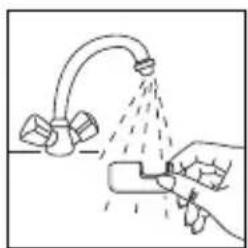
natural_image
Illustration of a hand using a tool to spray or spray liquid onto a surface with a pipe (no text or symbols)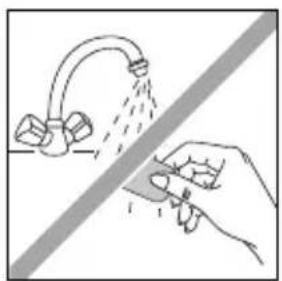
natural_image
Illustration of a hand using a tool to clean or disinfect water from a faucet (no text or symbols)- Čišćenje glave za piling epiderme
Preporučujemo vam da točkić za piling zamenite posle tri pilinga, odnosno kada se točkić istroši.

natural_image
Simple line drawing of a tool interacting with a device (no text or symbols)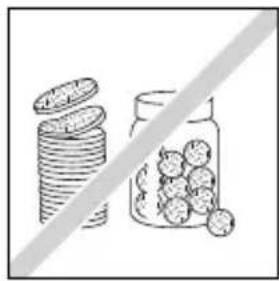
natural_image
Illustration of stacked coins and a jar with scattered round objects, separated by a diagonal line (no text or symbols)
- Čišćenje glave za brijanje
- Skinite glavu za brijanje sa depilatora.
- Provucite glavu za brijanje pod hladnom vodom iz slavine i osušite je uz pomoć peškira.
natural_image
Illustration of hands using a handheld device to press or install a component with arrows indicating upward motion (no text or symbols present)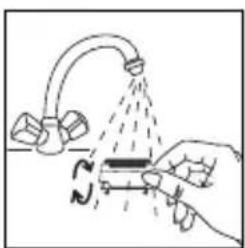
natural_image
Illustration of a hand using a tool to interact with a surface, showing spray and motion (no text or symbols)6. Piling epiderme (EP8975)
Piling vam omogućuje Redovitom uporabom ograničavate rast potkožnih dlačica.
natural_image
Simple line drawing of a computer monitor with a downward arrow indicating compression or download (no text or symbols)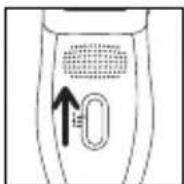
natural_image
Illustration of a human leg with two arrows indicating movement or force direction (no text or symbols)Za prvu uporabu glave za piling epiderme, odnosno ako je vaša koža nježna, preporučujemo vam:
- da prije pilinga kožu navlažite vlažnom rukavicom ili vatom
- da primjenjujete spore i nježne pokrete
- da aparatom ne vučete preko istog mjesta na koži više od dva puta.
• Mijenjanje kotačića za piling
- Pritiskom na dugme s aparata skinite glavu za piling epiderme.
-
Plastičnim dijelom četke (a) na ovaj način skinite kotačić:
-
Glavu za piling epiderme okrenite i zadržite, a palac i kažiprst položite na bočni dio.
- Kotačić okrenite tako da je urez kotačića u osrednjem položaju.
- Plastični dio četke umetnite u urez i potisnite da skinete kotačić.
- Novi kotačić namjestite tako što ćete umetnuti krikca nosača (b) u urez kotačića i potisnuti da se začuje »klik«!
natural_image
Diagram of a device with an upward arrow and left-pointing arrow, no text or symbols present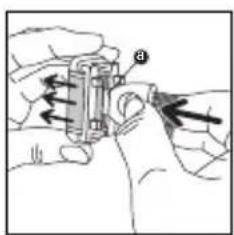
natural_image
Illustration of hands using a battery to adjust a component (no text or symbols visible)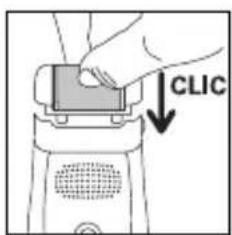
natural_image
Simple line drawing of a rope with an arrow indicating upward motion (no text or symbols)7. Epilacija nogu
Prekidač postavite
u položaj "2".
Prekidač za vrijeme
natural_image
Illustration of a person performing a neck massage or stretching exercise (no text or symbols)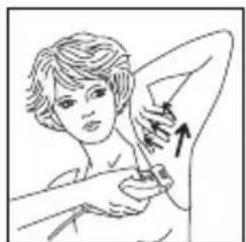
natural_image
Illustration of a person performing a breast swab, showing anatomical positioning with an arrow indicating the fiber (no text or symbols present)• Za pazuho
natural_image
Illustration of hands performing a physical maneuver with directional arrows indicating motion (no text or symbols)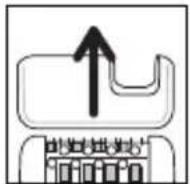
B- S glavom za brijanje (mod. EP7970/EP8975):
Način rada:
- Skinite glavu za depilaciju potiskom na gumb za izbacivanje
- Uklopite glavu za brijanje (16) na uredaj.
- Postavite sklopku na 2.
natural_image
Diagram showing a mechanical component with an arrow indicating downward motion (no text or symbols present)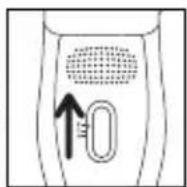
- Nakon uporabe zaustavite uredaj.
- Pri skidanju glave za brijanje: postavite prste sa strane glave i povucite prema gore.
9. Održavanje aparata
natural_image
Line drawing of hands holding a device with upward arrows indicating motion (no text or symbols)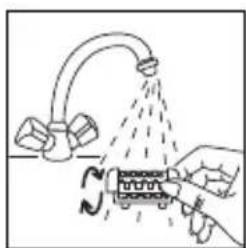
natural_image
Illustration of a hand pouring liquid from a pipe into a container with a coiled tube (no text or symbols)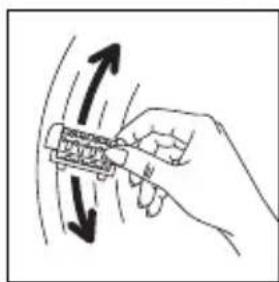
natural_image
Hand holding a tool with directional arrows indicating motion or movement (no text or symbols)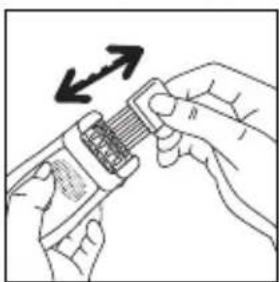
natural_image
Illustration of hands holding a device with an arrow indicating direction (no text or symbols)natural_image
Illustration of a hand using a tool to clean or spray liquid from a faucet (no text or symbols)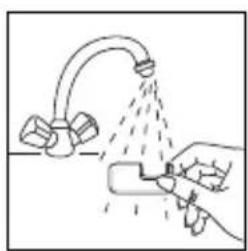
natural_image
Illustration of a hand spraying water from a faucet with spray bubbles (no text or symbols)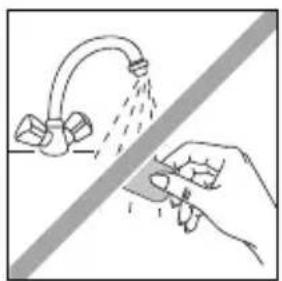
natural_image
Illustration of a hand using a tool to clean or spray water from a faucet (no text or symbols)- Čišćenje glave za piling epiderme
natural_image
Simple line drawing of a handheld device with a cable and a diagonal line (no text or symbols)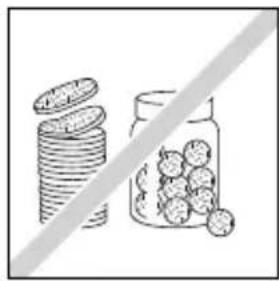
natural_image
Illustration of stacked coins and a jar with scattered fruits, separated by a diagonal line (no text or symbols)
- Čišćenje glave za brijanje
- Skinite glavu za brijanje s depilatora.
- Provucite glavu za brijanje pod hladnom vodom iz slavine i osušite ju uz pomoć ručnika.
natural_image
Illustration of hands using a handheld device to press or install a component with upward arrows (no text or symbols)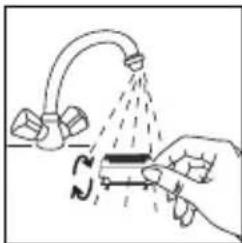
natural_image
Illustration of a hand pouring liquid from a pipe into a tank (no text or symbols)10. Njegovanje kože
Male crvene mrlje koje se nakon epilacije pojave na koži, ukazuju na to da ste dlake dobro uklonili; ubrzo će nestati. Zato vam preporučujemo da epilaciju obavljate navečer. Ako je potrebno, nanesite kremu za smirenje koje nakon epilacije.
Please read carefully before use

1-DESCRIPTION OF YOUR APPLIANCE
1- Pivoting head
2- Depilator head
3- Tweezers
4- Massaging beads
5- Exfoliator head
6- Release button for removable head
7- Cap
8-2-speed and stop switch
9- "Vision" (EP8975)
10- Cleaning brush
11- Adaptor EM2.A2
12- Travel pouch
13-2 exfoliating bands (EP8975)
14- Armpit accessory (EP7910-8975)
15- Bikini line accessory (EP7910-8975)
16- Additional shaver head (EP7970-8975)
• Vision function (EP8975) :
The Vision system installed in your device gives perfect epilation results first time. By diffusing an ultraluminous halo on the skin, this system makes all your hair – even the finest, shortest and fairest hairs – easier to see.
- Pivoting head function:
For comfort of use, your appliance is fitted with a pivoting head that adapts to every contour of the areas to be shaved (legs, armpits, bikini line) for a smooth, efficient result.
- Pain-relieving function:
Access Fresh Air is equipped with a high-speed turbine which blows air onto the skin and cools it. This helps to reduce the pain caused by epilation.
2-SAFETY
- This appliance complies with the technical rules and standards for safety currently in force (Electromagnetic Compatibility, Low Voltage, Environnement).
- Voltage: Ensure that this voltage corresponds to that of your mains supply. Incorrect connection may cause irreparable damage which is not covered by the guarantee.
- This appliance is intended for personal domestic use only. It must only be used with the enclosed adaptor EM2A2.
- Never use if the appliance (depilator or adaptor) is damaged or in the event of any damage caused by dropping the appliance (invisible damage may be dangerous).
- This appliance can only be repaired using special tools. In the event of any after sales problem, please consult an approved service agent (see enclosed leaflet).
- We decline any responsibility for damage arising from incorrect use of the appliance or use of the appliance in any way other than that specified in these instructions.
- When the depilator is in use, it must not come into contact with eyelashes, hair, clothes or any other objects, in order to avoid any danger of injury or blockage.
- Keep a careful eye on the appliance if used on, or in the presence of children or invalids.
- Do not use the depilator:
- on your face
- on broken, burnt or sore skin
- on sensitive areas (varicose veins, moles, birthmarks, warts...)
- if you suffer from skin complaints, (eczema, inflam-mations, acne...).
For hygiene reasons, it is advised that you do not allow anyone else to use your appliance.
- When in use, the wall socket must be readily accessible.
- Remove adapter from the wall outlet to disconnect from the supply.
- For use indoor only.
- Close supervision is necessary when the appliance is used on or in the presence of children or severely disabled people.
- Never leave the appliance within the reach of unsupervised children.
- Do not use an extension lead.
- Never use the appliance with damp hands.
- Do not leave the appliance in direct sunlight.
- Do not use the appliance at cold temperatures.
- Do not immerse or put under running water.
- Do not use aggressive products or solvents for cleaning.
GUARANTEE
Your appliance is designed for use in the home only. It should not be used for professional purposes. Any commercial use, inappropriate use or failure to comply with the instructions, the manufacturer accepts no responsibility and the guarantee will not apply. The guarantee becomes null and void in the case of improper usage.
3-PREPARATION OF THE SKIN
Your skin must be clean and dry.
- Do not apply either cream or hydrating milk before depilation.
- If you previously used a razor for depilation:
- the first few times you use the depilator, your skin may feel more sensitive, as shaving has made your hair thicker and stronger. This sensation will lessen the more you use your depilator: the hair will grow back less quickly and become thinner.
- Your depilator will be much more effective and easier to use if you use it regularly. We advise you to use your depilator as soon as your hair starts to grow back.
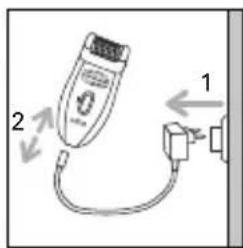
4-CONNECTION 5-STOPPING THE APPLIANCE
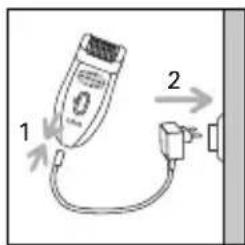
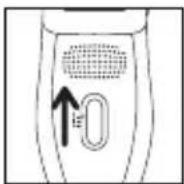
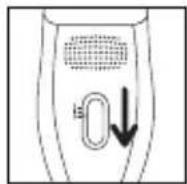
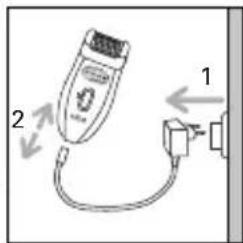
6-PEELING (EP 8975)
Peeling will enable you to limits growth of subcutaneous hair if practised regularly.
We strongly recommend that you use the Exfoliator Head 2 days before using your epilator to avoid irritating your skin.
• And not to use a peeling gel or cream at the same time.
- Never carry out peeling on sensitive areas (armpits / bikini line / face).
• After peeling, we advise you to wipe over the area with a moist flannel to remove any dead skin. Dry the skin thoroughly afterwards.
- Method :
- Press the release button to remove the epilator head.
- Clip the Exfoliator Head to the epilator.
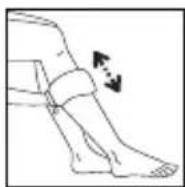
- Set the switch to "1".
- Start exfoliating with a slow, gentle up and down movement.
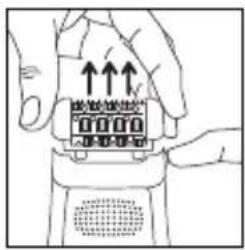
natural_image
Simple line drawing of a computer monitor with a downward arrow indicating compression (no text or symbols)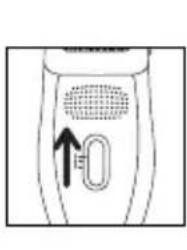
natural_image
Diagram of a handheld device with a circular vent and a U-shaped button, showing no text or symbols.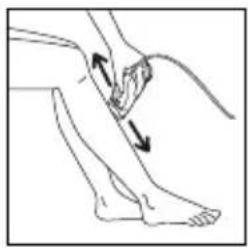
natural_image
Illustration of a person performing a physical therapy or massage technique on the lower leg, with arrows indicating movement direction (no text or symbols present)When using the Micro-Peeling function for the first time or if your skin is very delicate, we recommend:
- skin is wet before peeling, use cotton wool or a flannel to do this
- making slow and gentle rotating movements when using the appliance3. not to use the appliance more than twice on the same area.
- Replacing the exfoliating band
- Press the release button to remove the Exfoliator Head from the epilator.
-
Using the plastic end of the cleaning brush unclip the band as follows:
-
Turn the Exfoliator Head over and hold it in place by gripping the edges between your thumb and forefinger.
- Turn the band so that its groove comes round to the central position.
- Insert the end of the cleaning brush in the groove and push to eject the band.
- Insert the new band by slotting the fins (b) of the exfoliator unit in the groove of the band and pushing until it clicks!
natural_image
Diagram of a robotic device with directional arrows indicating movement or force (no text or symbols)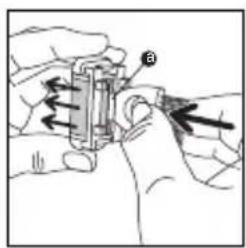
natural_image
Illustration of hands holding a battery and a cylindrical component with an arrow indicating direction (no text or symbols)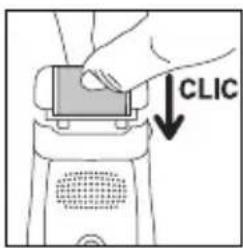
natural_image
Simple line drawing of a rope with a hanging object and an arrow indicating upward motion (no text or symbols)7-LEG HAIR REMOVAL
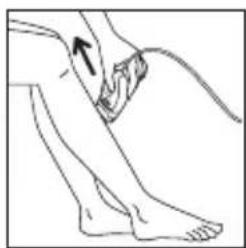
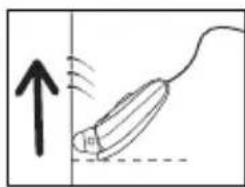
For optimum epilation, we recommend that you tilt the epilator slightly towards your skin in the direction of epilation, as shown in the diagram.
- Move the switch to the on position "2".
- The switch must always remain visible during use.
natural_image
Line drawing of a person's lower leg and foot with a curved bandage, no text or symbols present- Shave against the lie of the hair, slowly and without pressing, with the shaver perpendicular to your skin.
natural_image
Simple line drawing of a mouse being pulled down with motion arrows (no text or symbols)8-HAIR REMOVAL FROM SENSITIVE AREAS
For optimum epilation, we recommend that you tilt the epilator slightly towards your skin in the direction of epilation, as shown in the diagram.
• Preparing the area where you want to remove hair:
- If the hairs are long trim to approximately 1cm.
- Dry the area thoroughly to ensure any trace of deodorant or perspiration are removed.
A- With the epilator
1) Armpit epilation:
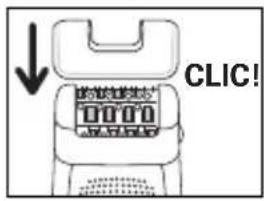
- Fit the armpit accessory (14) onto the epilator head and push in until you hear a click.
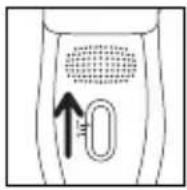
- Set the switch to position 1.
2) Bikini line epilation:
- Fit the bikini line accessory (15) onto the epilator head and push in until you hear a click.
- Set the switch to position 1.
Shave against the lie of the hair, slowly and without pressing, with the shaver perpendicular to your skin.
natural_image
Line drawing of a person performing a neck massage or stretching exercise (no text or symbols)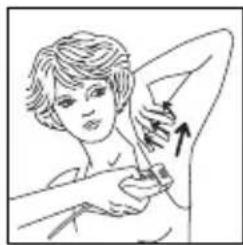
natural_image
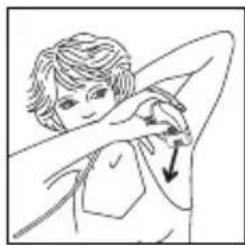
Illustration of a person performing a medical procedure with an arrow indicating direction (no text or symbols present)For the armpits: First from bottom to top ... Then from top to bottom.
Important :
a) Keep your arm raised and stretched throughout the hair removal process.
b) Stretch the skin to make it easier.
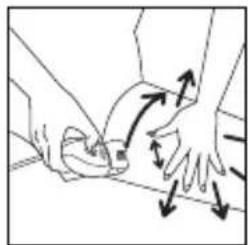
For the bikini line:
Important:
Make sure the skin is stretched properly.
natural_image
Illustration of hands performing a physical maneuver with directional arrows indicating motion (no text or symbols)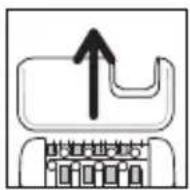
B-With the shaver head (mod. EP7970/EP8975):
- Operating instructions:
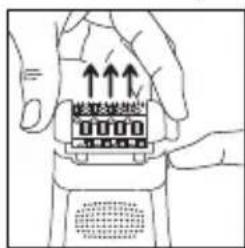
- Remove the epilator head by pressing the ejection button.
natural_image
Diagram showing a mechanical component with an arrow indicating downward motion (no text or symbols present)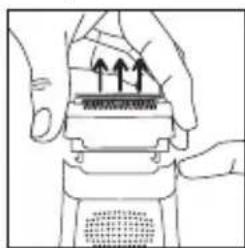
natural_image
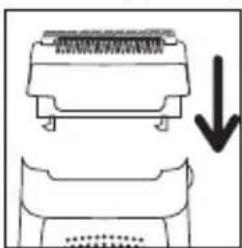
Illustration of hands performing a mechanical press or stamping operation with arrows indicating motion (no text or symbols present)- Fit the shaver head (16) onto the appliance
- Set the switch to position 2.
- After use, stop the appliance.
- Remove the shaver head by pressing the ejection button.
9-CLEANING THE APPLIANCE
- Cleaning the epilator head:
- Unplug the epilator.
- Press the release button on the head and remove the epilator head.
- Rinse the epilator head under cold running water by turning it for 5 to 10 seconds.
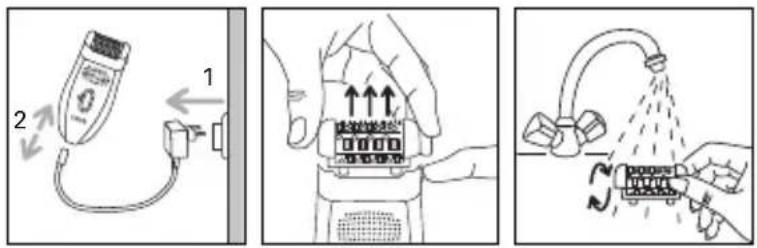
natural_image
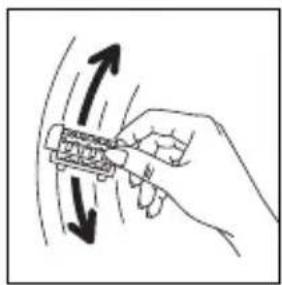
Hand holding a tool with directional arrows indicating motion or movement (no text or symbols)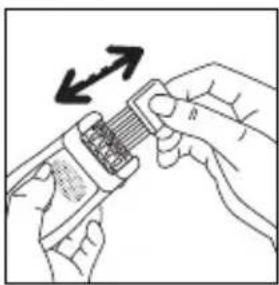
natural_image
Illustration of hands using a tool to adjust a component with an arrow indicating rotation (no text or symbols present)4. Shake the epilator head vigorously and dry it with a towel before fitting it to the epilator again.
You can also use the small cleaning brush supplied.
- Cleaning sensitive area accessories (mod. EP7910 – EP9875)
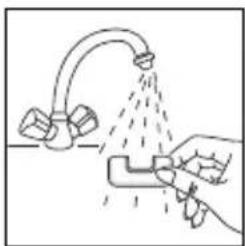
natural_image
Illustration of a hand using a spray gun to spray liquid onto a surface with a faucet (no text or symbols)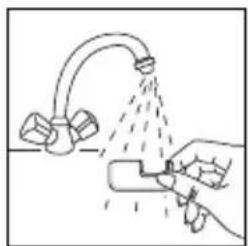
natural_image
Illustration of a hand using a tool to spray liquid onto a surface with a pipe (no text or symbols)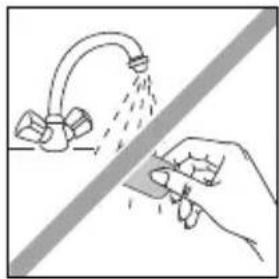
natural_image
Illustration of a hand using a tool to clean or spray water from a faucet, with no text or symbols present.- Cleaning the Exfoliator Head.
We recommend that you change the exfoliating band after three sessions of exfoliation or when it is worn out.
Do not clean the band under running water.
natural_image
Line drawing of a handheld electronic device with a cable inserted, no text or symbols present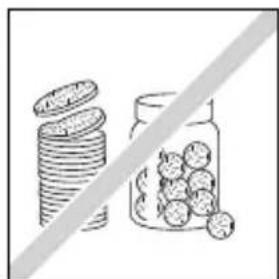
natural_image
Illustration of stacked coins and a jar with round fruits, separated by a diagonal line (no text or symbols)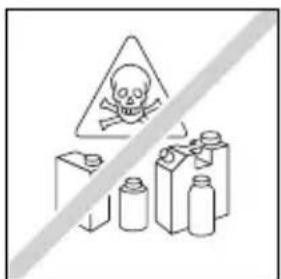
natural_image
Illustration of hands using a handheld device to press or install a component, with no visible text or symbols.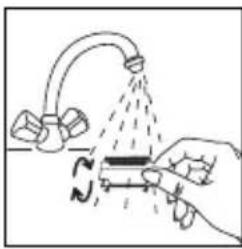
natural_image
Illustration of a hand using a tool to lift a valve with liquid, no text or symbols present- Cleaning the shaver head
- Remove the shaver head by pressing the ejection button.
- Run the shaver head under a cold tap and dry it with a towel.
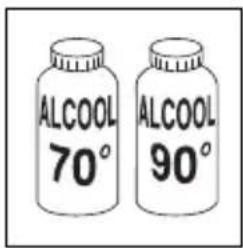
- Do not apply alcohol to the body of the appliance to avoid its colours changing.
10-SKIN CARE
Small red spots may appear. They will disappear quickly. For this reason it is preferable to use your depilator in the evening. If necessary, apply calming cream after depilation.
11-ENVIRONNEMENT PROTECTION FIRST
Your appliance contains valuable materials which can be recovered or recycled. Leave it at a collection point.
6. СКРАБ (EP8975)
natural_image
Simple line drawing of a monitor with a downward arrow indicating compression or disassembly (no text or symbols)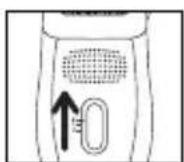
natural_image
Diagram of a hand holding a small object with directional arrows indicating movement or force (no text or symbols present)natural_image
Diagram of a robot with directional arrows indicating movement or force (no text or symbols)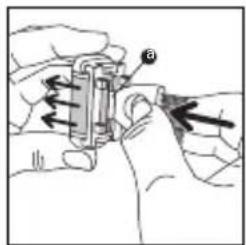
natural_image
Illustration of hands holding a battery and a cylindrical component with an arrow indicating direction (no text or symbols)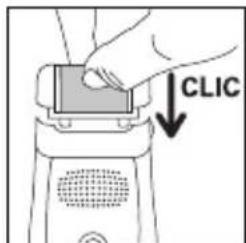
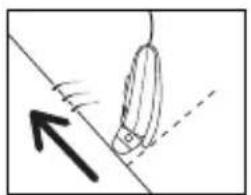
natural_image
Simple line drawing of a rope being pulled by a rope, with an arrow indicating direction (no text or symbols)7. ЭПИЛЯЦИЯ НОГ
natural_image
Simple line drawing of a pen-like object with an upward arrow and dashed line, no text or symbols present.natural_image
Illustration of a person holding a tool with a downward arrow (no text or symbols)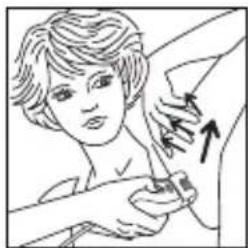
natural_image
Illustration of a person receiving a medical or cosmetic procedure with an arrow indicating direction (no text or symbols present)natural_image
Illustration of hands performing a medical or physical procedure with directional arrows indicating movement (no text or symbols)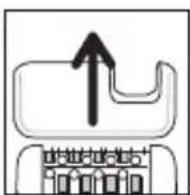
natural_image
Diagram showing a mechanical component with a downward arrow indicating compression or disassembly (no text or symbols present)
natural_image
Illustration of hands using a mechanical device to press or install a component (no text or symbols visible)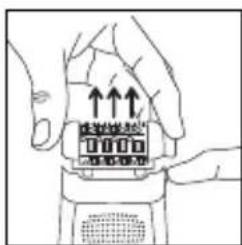
natural_image
Illustration of hands holding a device with upward arrows indicating motion (no text or symbols)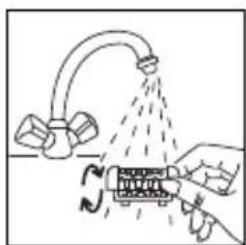
natural_image
Diagram showing a hand pouring liquid from a pipe onto a device with a rotating arrow (no text or symbols)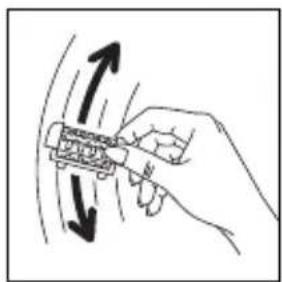
natural_image
Hand holding a mechanical component with directional arrows indicating motion (no text or symbols)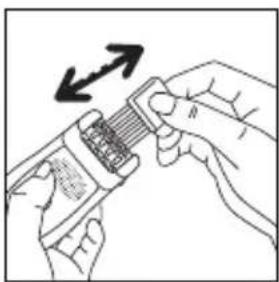
natural_image
Illustration of hands holding a device with a scroll and directional arrows indicating movement (no text or symbols)natural_image
Line drawing of a hand using a tool to clean or spray the surface of a faucet (no text or symbols)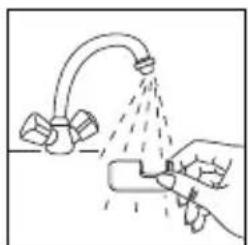
natural_image
Illustration of a hand spraying water from a pipe onto a surface with two blocks nearby (no text or symbols)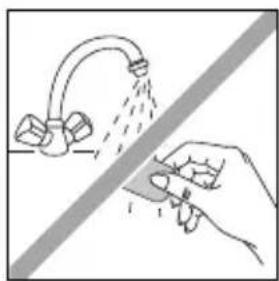
natural_image
Illustration of a hand spraying water from a faucet onto a surface, with no text or symbols present.natural_image
Simple line drawing of a handheld electronic device with a cable and connector (no text or symbols)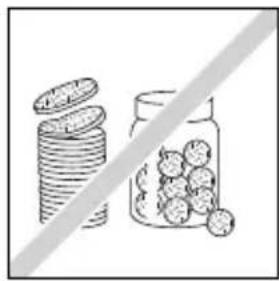
natural_image
Illustration of stacked coins and a jar filled with round fruits, separated by a diagonal line (no text or symbols)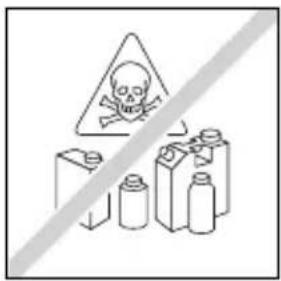
natural_image
Illustration of a hand pressing down on a device component with arrows indicating motion (no text or symbols)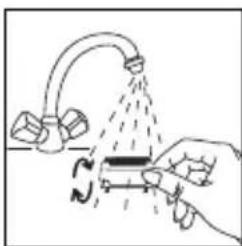
natural_image
Illustration of a hand holding a tool interacting with a pipe fitting and tubing (no text or symbols)natural_image
Simple line drawing of a computer monitor with a downward arrow indicating compression or download (no text or symbols)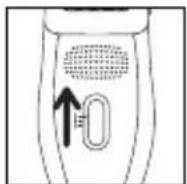
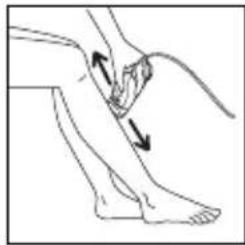
natural_image
Illustration of a person's lower leg and foot with two arrows indicating movement or pressure direction (no text or symbols)natural_image
Diagram of a robotic device with directional arrows indicating movement or force (no text or symbols)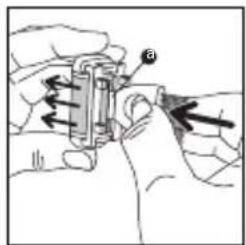
natural_image
Illustration of hands using a mechanical tool to adjust or install a component (no text or symbols visible)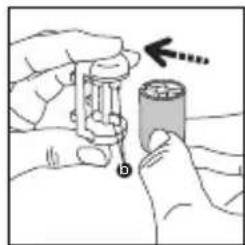
natural_image
Illustration of hands holding a battery with a hand pointing to it, no text or symbols present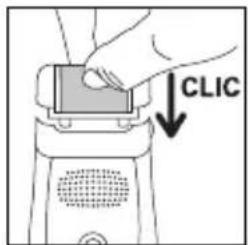
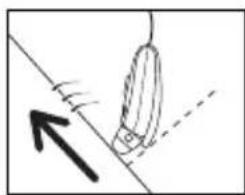
natural_image
Simple line drawing of a rope tied to a hanging object with an arrow indicating upward motion (no text or symbols)natural_image
Diagram showing a mouse being pulled with motion lines, no text or symbols presentnatural_image
Illustration of a person performing a shoulder massage or stretching exercise (no text or symbols present)natural_image
Illustration of hands performing a medical or ergonomic procedure with directional arrows indicating movement (no text or symbols)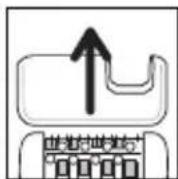
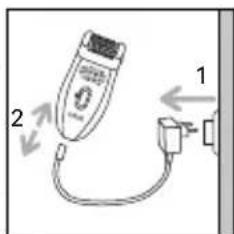

natural_image
Diagram showing a mechanical component with a downward arrow indicating compression or disassembly (no text or symbols present)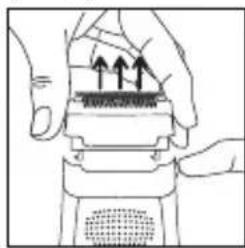
natural_image
Illustration of hands using a handheld device to press or install a textured surface (no text or symbols visible)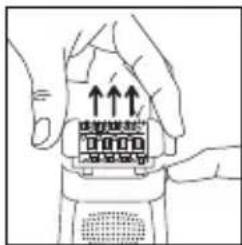
natural_image
Illustration of hands holding a device with upward arrows indicating motion (no text or symbols)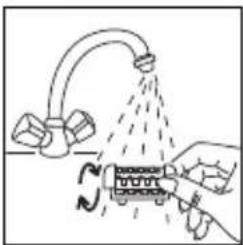
natural_image
Diagram showing a hand pouring liquid from a pipe into a container with rotating arrows (no text or symbols)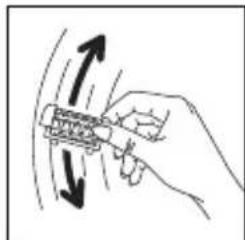
natural_image
Hand holding a mechanical component with directional arrows indicating motion (no text or symbols)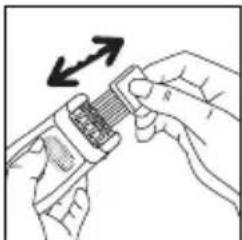
natural_image
Illustration of hands using a tool to adjust a grid-like component with an arrow indicating rotation (no text or symbols)natural_image
Illustration of a hand washing a showerhead with a spray bottle (no text or symbols)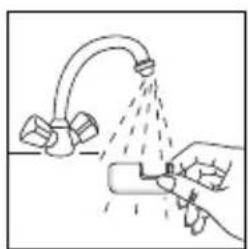
natural_image
Illustration of a hand spraying water from a faucet with spray bubbles (no text or symbols)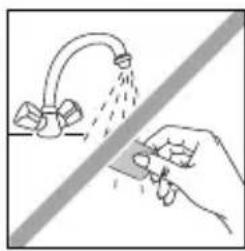
natural_image
Illustration of a hand using a tool to clean or disinfect water from a faucet (no text or symbols)natural_image
Simple line drawing of a tool interacting with a device (no text or symbols)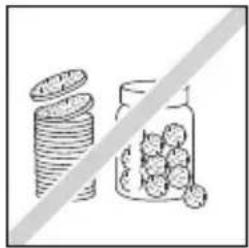
natural_image
Illustration of stacked coins and a jar with fruits, separated by a diagonal line (no text or symbols)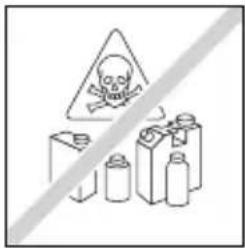
natural_image
Illustration of hands using a handheld device to press or install a component with upward arrows (no text or symbols)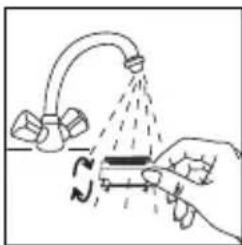
natural_image
Illustration of a hand using a tool to lift a pipe with a curved pipe, no text or symbols present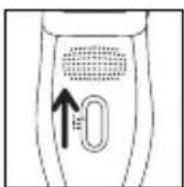
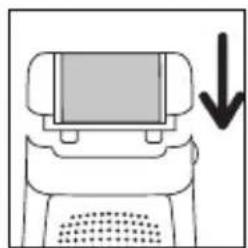
natural_image
Simple line drawing of a computer monitor with a downward arrow indicating compression or download (no text or symbols)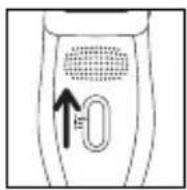
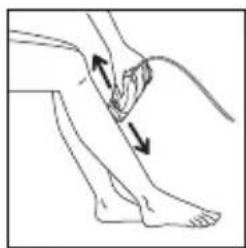
natural_image
Illustration of a human leg with two arrows indicating movement or pressure points (no text or symbols present)natural_image
Diagram of a device with a screen and ventilation slots, showing directional arrows (no text or symbols)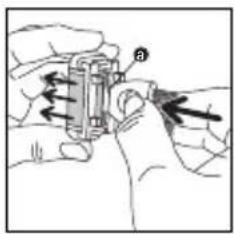
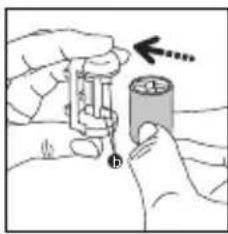
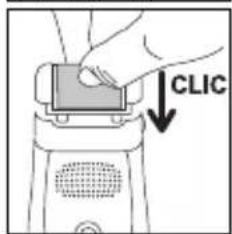
natural_image
Simple line drawing of a rope tied to a hanging object with an arrow indicating upward motion (no text or symbols)7. Depilácia nôh
natural_image
Diagram showing a mouse being pulled into a wire, with an upward arrow indicating motion (no text or symbols)natural_image
Illustration of a person performing a neck massage or stretching exercise (no text or symbols)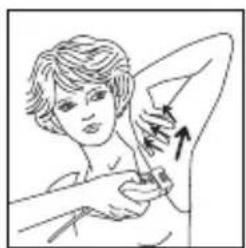
natural_image
Illustration of a person receiving a medical or cosmetic procedure with an arrow indicating direction (no text or symbols present)Pri podpazuši:
- Najskôr zospodu nahor ...
.. potom zhora dole.
Dôležité:
natural_image
Illustration of hands performing a physical maneuver with directional arrows indicating motion (no text or symbols)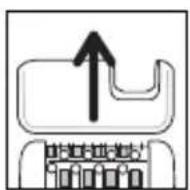
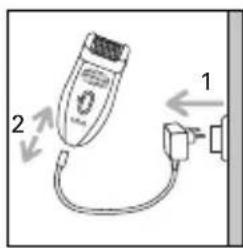
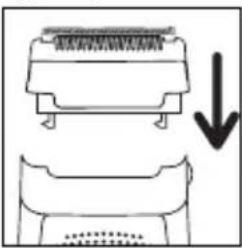
natural_image
Diagram showing a mechanical component with an arrow indicating downward motion (no text or symbols present)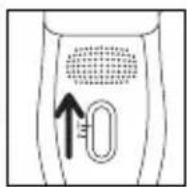
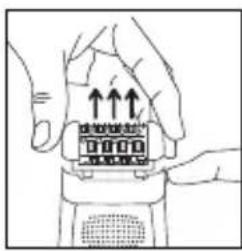
natural_image
Illustration of hands holding a device with upward arrows indicating motion (no text or symbols)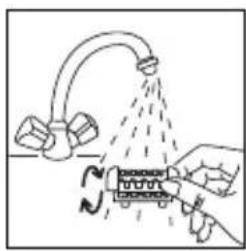
natural_image
Illustration of a hand spraying water onto a mechanical component with no visible text or symbols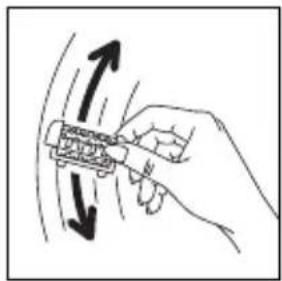
natural_image
Hand holding a mechanical component with directional arrows indicating motion (no text or symbols)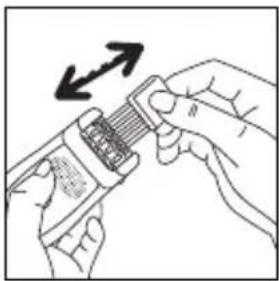
natural_image
Illustration of hands using a handheld device to interact with a device, showing a scroll and directional arrows (no text or symbols)natural_image
Illustration of a hand using a spray gun to spray liquid onto a surface with a faucet (no text or symbols)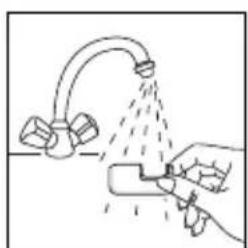
natural_image
Illustration of a hand spraying water from a faucet onto a surface (no text or symbols)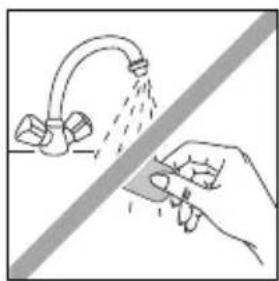
natural_image
Illustration of a hand spraying water from a pipe onto a surface, with no text or symbols present.natural_image
Simple line drawing of a tool interacting with a device (no text or symbols)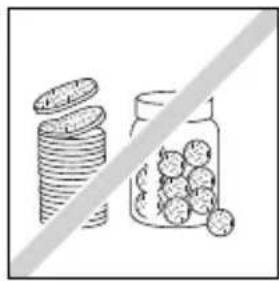
natural_image
Illustration of stacked coins next to a jar with scattered round objects, separated by a diagonal line (no text or symbols)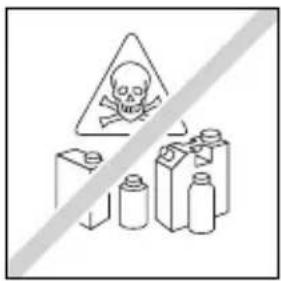
natural_image
Line drawing of hands using a handheld device to press or install a component with upward arrows (no text or symbols)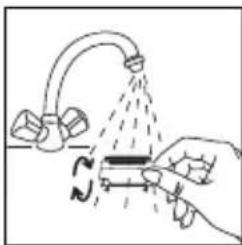
natural_image
Illustration of a hand using a tool to lift a submerged object with a curved pipe, no text or symbols present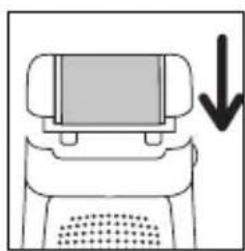
natural_image
Simple line drawing of a computer monitor with a downward arrow indicating compression (no text or symbols)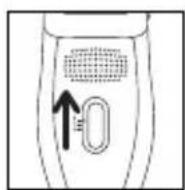
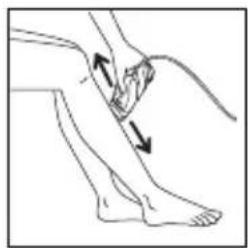
natural_image
Illustration of a person's lower leg with two arrows indicating movement or pressure direction (no text or symbols)natural_image
Diagram of a device with a screen and ventilation slots, showing directional arrows (no text or symbols)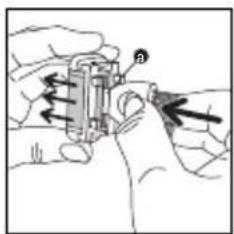
natural_image
Illustration of hands operating a mechanical device with directional arrows indicating motion (no text or symbols)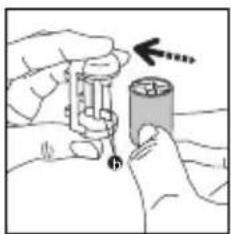
natural_image
Illustration of hands holding a battery and a cylindrical component with an arrow indicating direction (no text or symbols)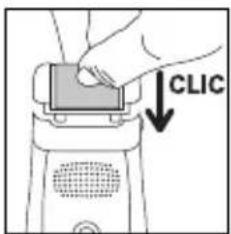
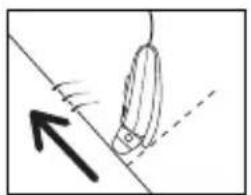
natural_image
Simple line drawing of a rope being pulled by a rope, with an arrow indicating direction (no text or symbols)natural_image
Line drawing of a person with hand near face, showing finger movement (no text or symbols)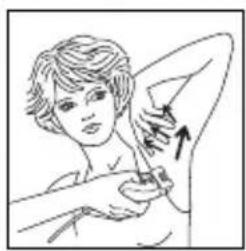
natural_image
Illustration of a person performing a breast swab massage (no text or symbols)natural_image
Illustration of two hands performing a circular motion or maneuver on a surface, with arrows indicating direction (no text or symbols)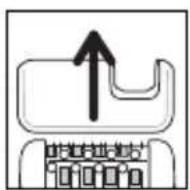
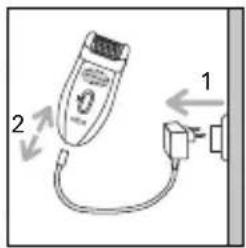
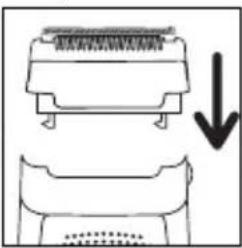
natural_image
Diagram showing a mechanical component with an arrow indicating downward motion (no text or symbols present)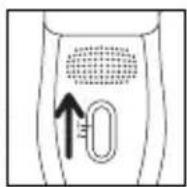
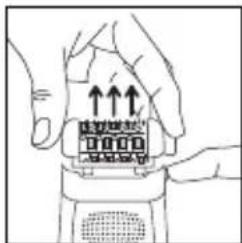
natural_image
Line drawing of hands holding a device with upward arrows indicating motion (no text or symbols)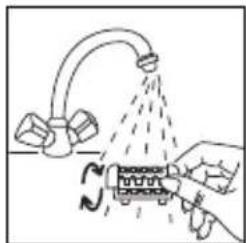
natural_image
Diagram showing a hand pouring liquid from a pipe onto a container with a curved pipe, no text or symbols present.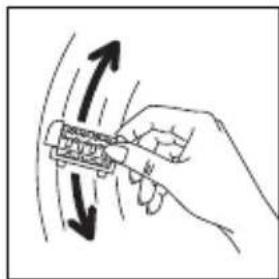
natural_image
Hand holding a tool with directional arrows indicating motion or movement (no text or symbols)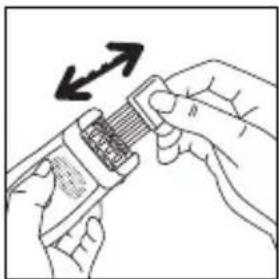
natural_image
Illustration of hands using a handheld device to interact with a resistor (no text or symbols visible)natural_image
Illustration of a hand using a spray gun to clean or wash a showerhead (no text or symbols)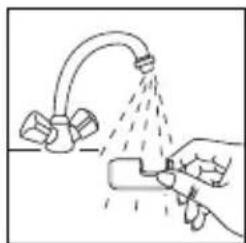
natural_image
Illustration of a hand using a spray gun to spray liquid from a pipe onto a surface (no text or symbols)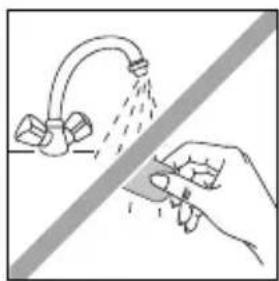
natural_image
Illustration of a hand using a tool to spray liquid onto a faucet (no text or symbols)natural_image
Simple line drawing of a tool interacting with a device (no text or symbols)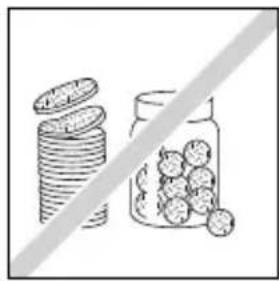
natural_image
Illustration of stacked coins and a jar with scattered round objects, separated by a diagonal line (no text or symbols)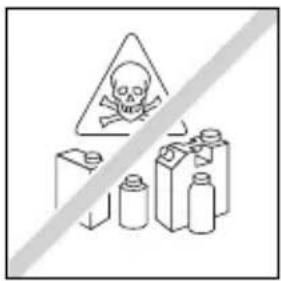
natural_image
Illustration of hands assembling a mechanical component with arrows indicating upward motion (no text or symbols)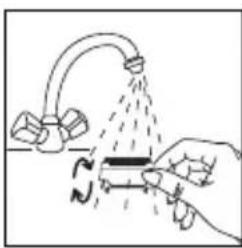
natural_image
Illustration of a hand pouring liquid from a pipe into a container with a curved tube (no text or symbols)6- ПИЛИНГ (EP8975)
natural_image
Simple line drawing of a computer monitor with a downward arrow indicating compression or download (no text or symbols)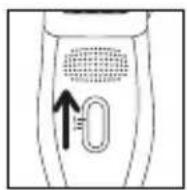
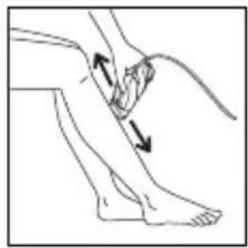
natural_image
Illustration of a human leg with two arrows indicating movement or pressure direction (no text or symbols)natural_image
Simple line drawing of a robot with arrows indicating motion or force (no text or symbols)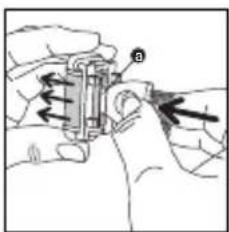
natural_image
Illustration of hands operating a mechanical device with arrows indicating motion (no text or symbols)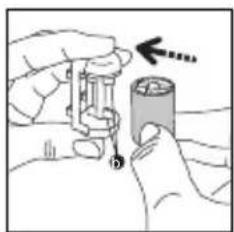
natural_image
Illustration of hands using a tool to adjust a cylindrical object with a pencil (no text or symbols visible)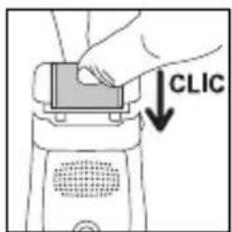
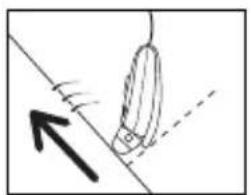
natural_image
Simple line drawing of a hanging object with an arrow indicating upward motion (no text or symbols)7- ЕПИЛАЦИЯ НА КРАКАТА
8- ЕПИЛАЦИЯ НА ЧУВСТВИТЕЛНИ УЧАСТЬЦИ
natural_image
Illustration of a person performing a hand gesture with an arrow indicating direction (no text or symbols)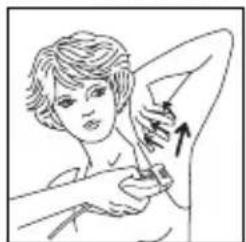
natural_image
Illustration of a person receiving a swab or bandage, with an arrow indicating direction (no text or symbols present)natural_image
Illustration of hands performing a physical maneuver with directional arrows indicating motion (no text or symbols)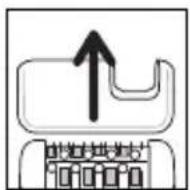
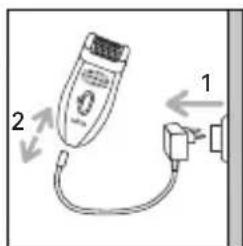
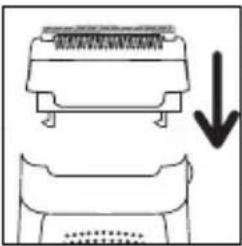
natural_image
Diagram showing a mechanical component with an arrow indicating downward motion (no text or symbols present)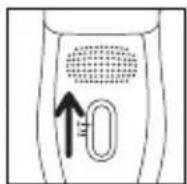
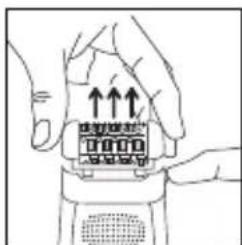
natural_image
Illustration of hands holding a device with upward arrows indicating motion (no text or symbols)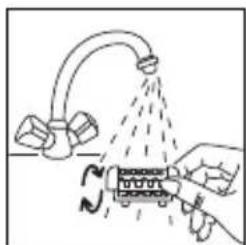
natural_image
Diagram showing a hand holding a device with a curved pipe and dashed lines indicating flow or movement (no text or symbols present)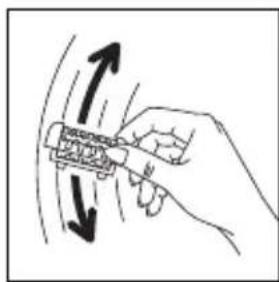
natural_image
Hand holding a tool with directional arrows indicating motion or movement (no text or symbols)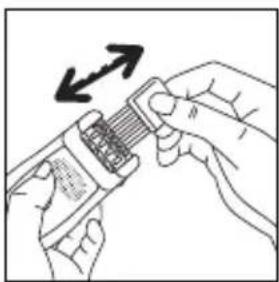
natural_image
Illustration of hands holding a device with an arrow indicating direction (no text or symbols)natural_image
Illustration of a hand using a spray gun to clean or wash a showerhead (no text or symbols)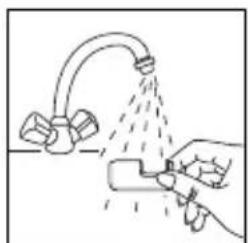
natural_image
Illustration of a hand using a tool to spray or spray onto a surface with a pipe and valve (no text or symbols)
natural_image
Illustration of a hand using a tool to clean or spray water from a faucet (no text or symbols)natural_image
Simple line drawing of a tool interacting with a device (no text or symbols)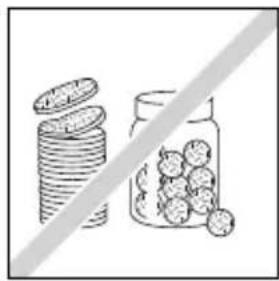
natural_image
Illustration of stacked coins next to a jar with scattered fruits, separated by a diagonal line (no text or symbols)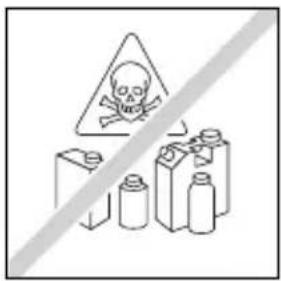
natural_image
Illustration of hands using a handheld device to press or install a component with upward arrows (no text or symbols)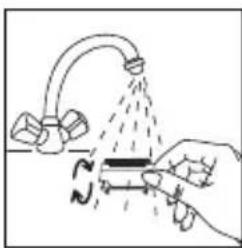
natural_image
Illustration of a hand pouring liquid from a pipe into a tank (no text or symbols)



- AR
- 7- چیدن موهای پا
- 5- DESCONEXIÓN
- 6- LIMPEZA DA PELE (EP8975)
- 8- DEPILAÇÃO DAS ZONAS SENSÍVEIS
- - Para depilar as axilas :
- - Para depilar as virilhas :
- SÜRTÜNME
- BACAKLARIN EPİLASYONU
- EPİLASYON
- 6-각질 제거(Mod. EP8975)
- 7-다리 제모
- 8-민감한 부분 제모
- 10-피부 관리
- 6-GOMMAGE (EP8975)
- 7-EPILATION DES JAMBES
- 8-EPILATION DES ZONES SENSIBLES
- 1-DESCRIPTION OF YOUR APPLIANCE
- • Vision function (EP8650) :
- - Pivoting head function:
- - Pain-relieving function:
- 2-SAFETY
- GUARANTEE
- 3-PREPARATION OF THE SKIN
- 4-CONNECTION 5-STOPPING THE APPLIANCE
- 6-PEELING (EP 8975)
- - Method :
- - Replacing the exfoliating band
- 7-LEG HAIR REMOVAL
- 8-HAIR REMOVAL FROM SENSITIVE AREAS
- • Preparing the area where you want to remove hair:
- A- With the epilator
- Important:
- B-With the shaver head (mod. EP7970/EP8975):
- 9-CLEANING THE APPLIANCE
- - Cleaning the epilator head:
- - Cleaning the shaver head
- 10-SKIN CARE
- 11-ENVIRONNEMENT PROTECTION FIRST
- 6-PEELING (EP8975)
- 7-EPILATION DER BEINE
- 8-EPILATION EMPFINDLICHER ZONEN
- Achtung :
- 11-DENKEN SIE AN DEN SCHUTZ DER UMWELT!
- PEELING (EP8975)
- • Per le ascelle :
- B- Con la testina di rasatura (mod. EP7970/EP8975):
- Depilacja nóg
- Pachy:
- Epilace nohou
- V podpaží:
- Epilacija nog
- Za pazduhe:
- Pomembno:
- Epilarea zonelor sensibile
- Pentru axile:
- B- Cu capul de ras (modelele EP7970/EP8975):
- Piling epiderme (EP8975)
- Epilacija nogu
- Epilacija osetljivih mjesta
- A- S depilatorom
- Za pazuho
- Važno
- B- Sa glavom za brijanje (mod. EP7970/EP8975):
- Održavanje aparata
- - Čišćenje glave za piling epiderme
- • Mijenjanje kotačića za piling
- • Za pazuho
- B- S glavom za brijanje (mod. EP7970/EP8975):
- Njegovanje kože
- • Vision function (EP8975) :
- Shake the epilator head vigorously and dry it with a towel before fitting it to the epilator again.
- - Cleaning the Exfoliator Head.
- СКРАБ (EP8975)
- ЭПИЛЯЦИЯ НОГ
- Depilácia nôh
- Pri podpazuši:
- Dôležité:
- 6- ПИЛИНГ (EP8975)
- 7- ЕПИЛАЦИЯ НА КРАКАТА
- 8- ЕПИЛАЦИЯ НА ЧУВСТВИТЕЛНИ УЧАСТЬЦИ
Brand : ROWENTA
Model : Access Fresh Air EP7910
Category : Epilator