VVK26I55C0 - Cooker VIVA - Free user manual and instructions
Find the device manual for free VVK26I55C0 VIVA in PDF.



| Product type | Built-in induction hob |
| Brand | VIVA |
| Model | VVK26I55C0 |
| Number of cooking zones | 4 zones (including 2 combinable) |
| Type of cooking zones | Induction |
| Special functions | CombiZone, PowerMove, PowerBoost, Timer, Child lock, Energy consumption display |
| Dimensions (W x D x H) | Approximately 56 x 49 x 5 cm (standard estimate) |
| Power levels | 9 levels + intermediate settings |
| Electrical supply | 230 V ~ 50 Hz (estimate) |
| Total power | Approximately 7.2 kW (standard estimate) |
| Residual heat indicator | Yes (H/h) |
| Child safety | Manual or automatic activation possible |
| Automatic shut-off | In the absence of cookware or after prolonged inactivity |
| Lock for cleaning | Yes (35 seconds) |
| Surface material | Ceramic glass |
| Cleaning | Use a glass scraper and specific induction hob cleaning products |
| Operating noise | Humming, whistling, crackling (normal) |
| Cooling fan | Yes, built-in |
| After-sales service | Contact customer service with numbers E and FD |
Frequently Asked Questions - VVK26I55C0 VIVA
User questions about VVK26I55C0 VIVA
0 question about this device. Answer the ones you know or ask your own.
Ask a new question about this device
Download the instructions for your Cooker in PDF format for free! Find your manual VVK26I55C0 - VIVA and take your electronic device back in hand. On this page are published all the documents necessary for the use of your device. VVK26I55C0 by VIVA.
USER MANUAL VVK26I55C0 VIVA
[en] Instruction manual 31
natural_image
Illustration of two open metal wafers with handles and a lid (no text or symbols)natural_image
Two identical diagrams showing a double-pole mechanical system with rotational arrows, no text or symbols present.Aktivieren
Grundeinstellungen
natural_image
Illustration of two open metal wafers with handles and a perforated lid (no text or symbols)De kookstand is ingesteld.
natural_image
Two identical diagrams showing a pulley system with two wheels and directional arrows, no text or symbols present.Activeren
Safety precautions ....31
Elements that may damage the appliance 32
Protecting the environment....33
Environmentally-friendly disposal.... 33
Energy-saving advice 33
Induction cooking ....33
Advantages of induction cooking ....33
Cookware 33
Getting to know your appliance....34
The control panel....34
The hotplates 34
Residual heat indicator.... 34
Programming the hob 35
Turning the hob on and off 35
Set the hotplate 35
Cooking guidelines table....35
Combi zone function....37
Notes regarding cookware 37
Activation.... 37
Deactivation 37
Move function ....37
Advice on using cookware.... 37
Activation.... 38
Deactivation 38
Childproof lock ....38
Activating and deactivating the childproof lock.... 38
Childproof lock.... 38
Powerboost function....38
Usage restrictions.... 38
To activate.... 38
To deactivate 38
Time programming function....39
A hotplate should switch off automatically 39
The timer.... 39
Cleaning lock function....39
Automatic time limitation....39
Displaying energy consumption....40
Basic settings ....40
Accessing the basic settings....41
Care and cleaning 41
Hob....41
Hob frame 41
Fixing malfunctions ....41
Normal noise while the appliance is working.... 42
After-sales service 42

Safety precautions
Please read this manual carefully. Please keep the instruction and installation manual as well as the appliance certificate in a safe place for later use or for subsequent owners.
Check the appliance after removing it from the packaging. If it has suffered any damage in transport, do not connect the appliance, contact the Technical Assistance Service and provide written notification of the damage caused, otherwise you will lose your right to any type of compensation.
This appliance must be installed according to the installation instructions included.
This appliance is intended for domestic use only. The appliance must only be used for the preparation of food and drink. The appliance must be supervised during operation. Only use this appliance indoors.
Do not use covers. These can cause accidents, due to overheating, catching fire or materials shattering, for example.
Do not use inappropriate child safety shields or hob guards. These can cause accidents.
This appliance is not intended for operation with an external clock timer or a remote control.
This appliance may be used by children over the age of 8 years old and by persons with reduced physical, sensory or mental capabilities or by persons with a lack of experience or knowledge if they are supervised or are instructed by a person responsible for their safety how to use the appliance safely and have understood the associated hazards.
Children must not play with, on, or around the appliance. Children must not clean the appliance or carry out general maintenance unless they are at least 8 years old and are being supervised.
Keep children below the age of 8 years old at a safe distance from the appliance and power cable.
We advise that you exercise caution using or standing near an induction hob while it is in operation, if you wear a pacemaker or a similar medical device. Consult your doctor or the device manufacturer concerning its conformity or any possible incompatibilities,
Risk of fire!
Hot oil and fat can ignite very quickly. Never leave hot fat or oil unattended. Never use water to put out burning oil or fat. Switch off the hotplate. Extinguish flames carefully using a lid, fire blanket or something similar.
■ The hotplates become very hot. Never place combustible items on the hob. Never place objects on the hob.
■ The appliance gets hot. Do not keep combustible objects or aerosol cans in drawers directly underneath the hob.
- The hob switches off automatically and can no longer be operated. It may switch on unintentionally at a later point. Switch off the circuit breaker in the fuse box. Contact the after-sales service.
Risk of burns!
■ The hotplates and surrounding area (particularly the hob surround, if fitted) become very hot. Never touch the hot surfaces. Keep children at a safe distance.
- The hotplate heats up but the display does not work. Switch off the circuit breaker in the fuse box. Contact the after-sales service.
■ Metal objects on the hob quickly become very hot. Never place metal objects (such as knives, forks, spoons and lids) on the hob.
■ After each use, always turn off the hob at the main switch. Do not wait until the hob turns off automatically after the pan is removed.
Risk of electric shock!
- Incorrect repairs are dangerous. Repairs may only be carried out and damaged power cables replaced by one of our trained after-sales technicians. If the appliance is defective, unplug the appliance from the mains or switch off the circuit breaker in the fuse box. Contact the after-sales service.
- Do not use any high-pressure cleaners or steam cleaners, which can result in an electric shock.
- A defective appliance may cause electric shock. Never switch on a defective appliance. Unplug the appliance from the mains or switch off the circuit breaker in the fuse box. Contact the after-sales service.
- Cracks or fractures in the glass ceramic may cause electric shocks. Switch off the circuit breaker in the fuse box. Contact the after-sales service.
Malfunction risk!
The hob is equipped with a fan in the lower section. If there is a drawer under the hob it should not be used to store small objects or paper, since they could damage the fan or interfere with the cooling if they are sucked into it.
There should be a minimum of 2 cm between the contents of the drawer and fan intake.
Risk of injury!
- When cooking in a bain marie, the hob and cooking container could shatter due to overheating. The cooking container in the bain marie must not directly touch the bottom of the water-filled pot. Only use heat-resistant cookware.
■ Saucepans may suddenly jump due to liquid between the pan base and the hotplate. Always keep the hotplate and saucepan bases dry.
Elements that may damage the appliance
Caution!
■ Rough pan bases may scratch the hob.
- Avoid leaving empty pots and pans on the hotplate. Doing so may cause damage.
- Do not place hot pans on the control panel, the indicator area, or the hob frame. Doing so may cause damage.
- Hard or pointed objects dropped on the hob may damage it.
- Aluminium foil and plastic containers will melt if placed on the hotplate while it is hot. The use of laminated sheeting is not recommended on the hob.
Overview
The following table presents the most common damage caused:
Damage Cause Measure
| Stains Food spillage Immediately remove spilt food using a glass scraper. | |
| Unsuitable cleaning products Only use cleaning products specifically designed for glass-ceramic hobs. | |
| Scratches Salt, sugar and sand Do not use the hob as a tray or working surface. | |
| Pans with rough bottoms may scratch Check pans.the glass ceramic | |
| Fading Unsuitable cleaning products Only use cleaning products specifically produced for glass-ceramic hobs. | |
| Contact with pans Lift pots and pans before moving them around. | |
| Chips Sugar, substances with a high sugar content | Immediately remove spilt food using a glass scraper. |
Protecting the environment
Environmentally-friendly disposal
Dispose of packaging in an environmentally-friendly manner.
This appliance is labelled in accordance with European Directive 2012/19/EU concerning used electrical and electronic appliances (waste electrical and electronic equipment - WEEE). The guideline determines the framework for the return and recycling of used appliances as applicable throughout the EU.
Energy-saving advice
■ Always use the correct lid for each pan. Cooking without a lid uses a lot more energy. Use a glass lid to provide visibility and avoid having to lift the lid.
■ Use pans with flat bases. Bases that are not flat use a lot more energy.
The diameter of the pan base must match the size of the hotplate. Please note: pan manufacturers usually provide the diameter for the top of the pan, which is usually larger than the diameter of the pan base.
■ Use a small pan for small amounts of food. A large pan which is not full uses a lot of energy.
■ Use little water when cooking. This saves energy and preserves all the vitamins and minerals in vegetables.
- Select the lowest power level to maintain cooking. If the power level is too high, energy is wasted.
Induction cooking
Advantages of induction cooking
Induction cooking represents a radical change from the traditional method of heating; the heat is generated directly in the pan. It therefore offers a number of advantages:
■ Time savings for cooking and frying; since the pan is heated directly.
■ Energy is saved.
■ Care and cleaning are simpler. Foods that have spilt do not burn as quickly.
■ Heat and safety control; the hob supplies or cuts off power as soon as the control knob is turned on. The induction hotplate stops supplying heat if the pan is removed without having previously switched it off.
Cookware
Only ferromagnetic pans are suitable for induction cooking; these may be made from:
■ enamelled steel
■ cast iron
■ special stainless steel induction pans.
To determine whether a pan is suitable, check to see if a magnet will stick to its base.
There are other types of cookware for induction whose base is not entirely ferromagnetic.
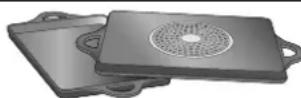
When using large cookware on a smaller ferromagnetic area, only the ferromagnetic zone heats up, so heat might not be uniformly distributed.
natural_image
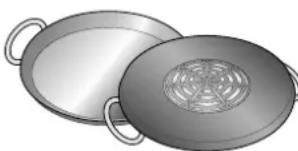
Illustration of two open cooking panes with handles and a perforated lid (no text or symbols)Pans with aluminium areas inserted in the base reduce the ferromagnetic area, so less heat may be supplied and the pan may be difficult to detect or not be detected at all.
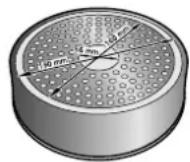
For good cooking results, the diameter of the cookware's ferromagnetic area should match the size of the hotplate. If cookware is not detected on a hotplate, try it on the next smaller hotplate down.
Unsuitable pans
Never use diffuser hobs or pans made from:
■ common thin steel
■ glass
- earthenware
copper
aluminium
Characteristics of the pan base
The characteristics of the pan base may affect the uniformity of the cooking results. Pans made from materials which help diffuse heat, such as stainless steel sandwich pans, distribute heat uniformly, saving time and energy.
Absence of pan or unsuitable size
If no pan is placed on the selected hotplate, or if it is made of unsuitable material or is not the correct size, the power level displayed on the hotplate indicator will flash. Place a suitable pan on the hotplate to stop the flashing. If this takes more than 90 seconds, the hotplate will switch off automatically.
Empty pans or those with a thin base
Do not heat empty pans, nor use pans with a thin base. The hob is equipped with an internal safety system. However, an empty pan may heat up so quickly that the "automatic switch off" function may not have time to react and the pan may reach very high temperatures. The base of the pan could melt and damage the glass on the hob. In this case, do not touch the pan and switch the hotplate off. If it fails to work after it has cooled down, please contact the Technical Assistance Service.
Pan detection
Each hotplate has a minimum limit for detecting pans, which varies depending on the material of the pan being used. You should therefore use the hotplate that is most suitable for the diameter of your pan.
Getting to know your appliance
On page 2, you will find information on the dimensions and power of the hotplates.
The control panel
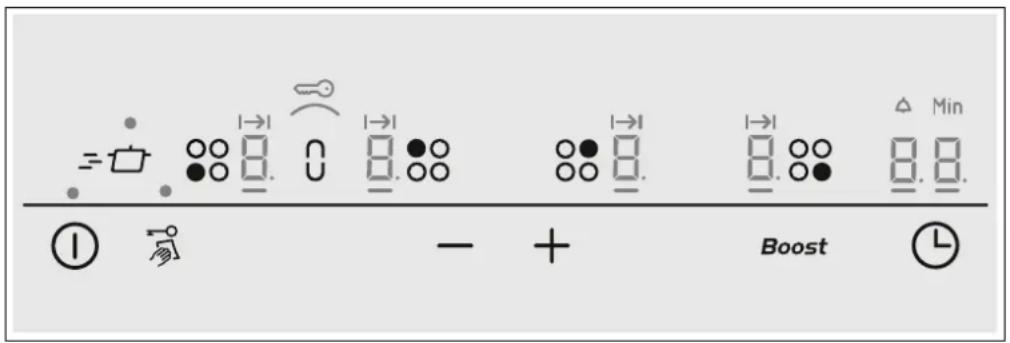
Controls
| 1 | Main switch |
| 20 | Hotplate |
| -/+ | Adjustment buttons |
| -0 | Wipe protection |
| Childproof lock | |
| Boost | Powerboost function |
| L | Timer |
| 0 | Combi zone function |
| =0 | powerMove function |
Displays
| 0 | Operating mode |
| 1-9 | Heat settings |
| b | Powerboost function |
| H/h | Residual heat |
| Childproof lock | |
| 00 | Timer |
| I→I | Automatic switch-off |
| Timer | |
| Combi zone function |
Control panels
Pressing a symbol activates its corresponding function.
Note: Always keep the control surfaces dry. Moisture can affect proper working.
The hotplates
Hotplate
| ○ | Single-circuit hotplate Use cookware that is a suitable size. | |
| 9 | Combined hotplate | See the Combi zone function or Move function section. |
| Only use cookware that is suitable for induction cooking; see the "Cookware" section. | ||
Residual heat indicator
The hob has a residual heat indicator for each hotplate to show those which are still hot. Avoid touching them when this indicator is lit.
Although the hob is switched off, the indicator h or H will remain on for as long as the hotplate is hot.
If the pan is removed before the hotplate is turned off, the indicator h or H and the selected power level will appear alternately.
Programming the hob
This section will show you how to program the hotplates. The table contains power levels and cooking times for several dishes.
Turning the hob on and off
The hob is turned on and off using the main switch.
To turn on: Press the Ⓐ symbol. A beep sounds. The indicator located next to the main switch and the ⏻ indicators of the hotplates light up. The hob is ready for use.
To turn off: press the ① symbol until the indicators go out. All hotplates are turned off. The residual heat indicator will remain lit until the hotplates have cooled down sufficiently.
Notes
■ The hob switches off automatically when all the hotplates are switched off for more than 20 seconds.
The settings are memorised for 4 seconds after the hob has been turned off. If the hotplate is switched back on within this time then the previous settings will be applied.
Set the hotplate
Select the required power level with the + and - symbols.
Power level 1 = minimum power.
Power level 9 = maximum power.
Each power level has an intermediate setting. This is marked with a dot.
Selecting a hotplate and heat setting
The hob must be switched on.
-
Select the hotplate using the ⚪ symbol.
-
Within the next 10 seconds, touch the + or - symbol. The basic setting appears:
-
symbol: Heat setting 9
- symbol: Heat setting 4
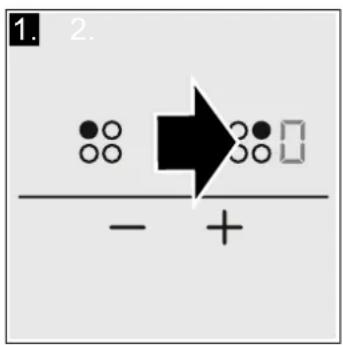
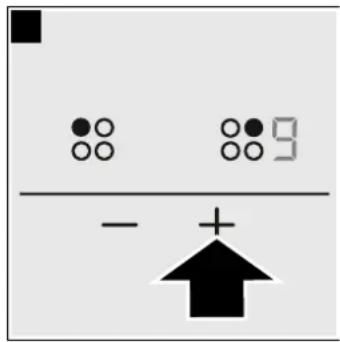
The heat setting is set.
Changing the power level
Select the hotplate and press the + or - symbol until the required power level comes on.
To switch off the hotplate
Select the hotplate and then press the + or - symbol until □ symbol appears.
The hotplate turns off and the residual heat indicator appears.
Notes
If no pan has been placed on the hotplate, the selected power level flashes. After a certain time has elapsed, the hotplate switches off.
If a pan has been placed on the hotplate before switching on the hob, it will be detected within 20 seconds of pressing the main switch and the hotplate will be selected automatically. Once detected, select the power level within the next 20 seconds or the hotplate will switch off.
If more than one pan is placed on the hob, only one will be detected when switching it on.
Cooking guidelines table
The table below contains some examples.
Cooking times depend on the power level, type, weight and quality of the food. As such they are approximate.
When heating purées, creams and thick sauces, stir occasionally.
Use power level 9 to begin cooking.
Power level Cooking time
| Melting | |
| Chocolate, chocolate coating 1-1. -Butter, honey, gelatin 1-2 - | |
| Heating and keeping warm | |
| Stew (e.g., lentils) 1.-2 -Milk** 1.-2. -Sausages heated in water** 3-4 - | |
| Defrosting and heating | |
| Frozen spinach 3-4 15-25 min. | |
| Frozen goulash | 3-4 30-40 min. |
* Uncovered cooking
** Uncovered
*** Turn frequently
| Power level | Cooking time | |
| Slow cooking, simmering | ||
| Potato dumplings* 4.-5. 20-30 min. | ||
| Fish* 4-5 10-15 min. | ||
| White sauces (e.g., bechamel) 1-2 3-6 min. | ||
| Whipped sauces (e.g., Bearnaise, Hollandaise) 3-4 8-12 min. | ||
| Boiling, steaming, sautéing | ||
| Rice (with a double amount of water) 2-3 15-30 min. | ||
| Rice pudding 2-3 30-40 min. | ||
| Unpeeled potatoes 4-5 25-30 min. | ||
| Peeled potatoes with salt 4-5 15-25 min. | ||
| Pasta* 6-7 6-10 min. | ||
| Soups 3.-4. 15-60 min. | ||
| Vegetables 2.-3. 10-20 min. | ||
| Greens, frozen foods 3.-4. 7-20 min. | ||
| Cooked in a pressure cooker 4.-5. - | ||
| Stewing | ||
| Meat roll 4-5 50-60 min. | ||
| Stew | 4-5 60-100 min. | |
| Goulash | 3-4 50-60 min. | |
| Bake / Fry with a little oil** | ||
| Steaks, plain or breaded | 6-7 6-10 min. | |
| Frozen steaks | 6-7 8-12 min. | |
| Chops, plain or breaded*** | 6-7 8-12 min. | |
| Beefsteak (3 cm thick) | 7-8 8-12 min. | |
| Chicken breast (2 cm thick)*** | 5-6 10-20 min. | |
| Frozen chicken breast*** | 5-6 10-30 min. | |
| Hamburgers, meatballs (3 cm thick)*** | 4.-5. 30-40 min. | |
| Plain fish and fish fillet | 5-6 8-20 min. | |
| Breaded fish and fish fillet | 6-7 8-20 min. | |
| Frozen breaded fish (e.g., fish fingers) | 6-7 8-12 min. | |
| Prawns and shrimps | 7-8 4-10 min. | |
| Frozen meals (e.g., stir-fries) | 6-7 6-10 min. | |
| Pancakes | 6-7 fry individually | |
| Omelette | 3.-4. fry individually | |
| Fried eggs | 5-6 3-6 min. | |
| Frying** (150-200 g per serving with 1-2 l of oil) | ||
| Frozen foods (e.g., French fries, chicken nuggets) | 8-9 fry one portion at a time | |
| Frozen croquettes | 7-8 | |
| Meat (e.g., chicken pieces) | 6-7 | |
| Fish, in breadcrumbs or batter 6-7 | ||
| Greens, mushrooms, in breadcrumbs or batter (e.g., baby mushrooms) | 6-7 | |
| Confectionery products (e.g., fritters, fruit in batter) | 4-5 | |
* Uncovered cooking
** Uncovered
*** Turn frequently
Combi zone function
Using this function, the two left hotplates of the same size can be linked together. When doing this, the same heat setting is set for both hotplates. This is especially suitable for cooking with oblong cookware.
Notes regarding cookware
To achieve the best results, use suitable, oval cookware in the area of both hotplates. Position the cookware in the middle of the hotplates.
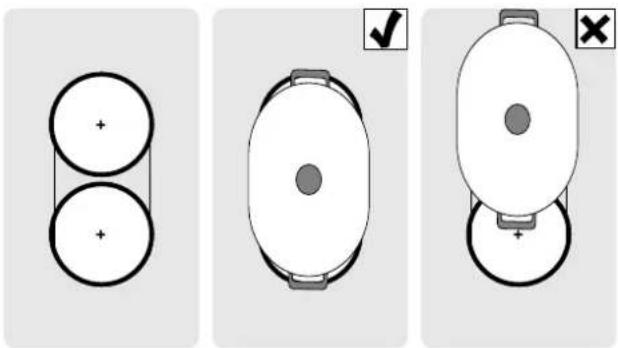
When you are using cookware on just one of the two hotplates, it can be moved to the second hotplate. In this case, the heat setting and the selected settings are transferred.
Activation
The hob must be switched on.
- Select one of the two hotplates which are included in the combi zone and set the heat setting.
- Touch the 0 symbol. The indicator lights up.
The heat setting lights up in the displays for the two hotplates.
The function is activated.
Changing the power level
Change the desired power level in the programming zone.
Deactivation
Select one of the two hotplates which are included in this function and select ☐ on the settings range.
The function is deactivated within approx. 3 seconds.
Move function
You can use this function to combine the two left hotplates of the same size and select a different heat setting for each hotplate. Preset heat settings:
Front hotplate = heat setting 9
Rear hotplate = heat setting 1.
The heat settings for each hotplate can be changed independently of each other.
Notes
■ Only place the cookware on one of the hotplates. The function will not be activated if there is cookware on both hotplates.
The heat setting lights up less brightly in the display for the hotplate with no cookware; however it is not activated until the cookware is moved onto and detected by this hotplate.
If the function has already been activated and a second piece of cookware is placed on the free hotplate, the display lights up less brightly, as before, but the hotplate is not active.
Advice on using cookware
To ensure that the cookware is detected and heat is distributed evenly, correctly centre the cookware:
Only use one piece of cookware which only covers one hotplate.
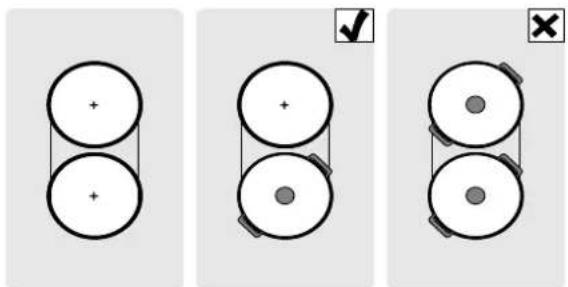
Moving the cookware from one hotplate to another:
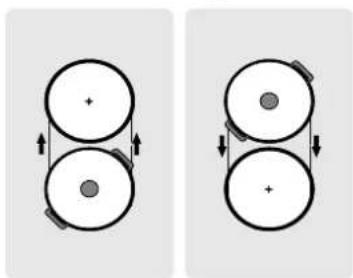
natural_image
Two identical diagrams showing a double-circle object with directional arrows, no text or symbols present.Activation
Combine the two hotplates with different heat settings.
- Select one of the two hotplates included in the Move function.
- Touch the = symbol. The display lights up.
The heat settings appear in the displays for the two hotplates.
The function is activated.
Notes
■ The display for the hotplate on which the cookware is placed lights up more brightly.
- The _ indicator lights up in the display for the hotplate which remains selected.
Changing the heat setting
Select one of the two hotplates which are included in the move function and change the heat setting in the settings range.
Note: If the function is deactivated, the heat settings return to the preset values
Deactivation
Touch the = symbol.
The function is deactivated.
Note: When one of the two hotplates is set to , the function is deactivated within approx. 3 seconds.
Childproof lock
The hob can be protected against being accidentally turned on, to ensure that children do not switch on the hotplates.
Activating and deactivating the childproof lock.
The hob must be turned off.
To activate: press and hold the symbol for approx.
4 seconds. The indicator lights up for 10 seconds. The hob is locked.
To deactivate: press and hold the 0 symbol for approx.
4 seconds. The lock is now deactivated.
Childproof lock
With this function, the childproof lock automatically activates when a hob is switched off.
Activating and deactivating
All of the relevant information on the automatic childproof lock connection can be found in the Basic settings chapter.
Powerboost function
The Powerboost function can be used to heat large amounts of water more quickly than the power level 9.
Usage restrictions
This function can always be activated for a hotplate, provided the other hotplate in the same group is not in use. (See illustration). Otherwise, b and 9 flash in the heat setting display; the 9 heat setting is then set automatically without activating the function.
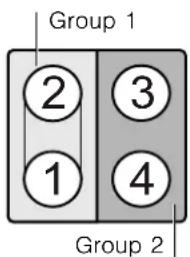
Note: In Group 1, the powerboost function can only be activated if the two hotplates are used independently of each other.
To activate
- Select a hotplate.
- Press the Boost symbol.
The b indicator lights up.
The function should be activated.
To deactivate
- Select a hotplate.
- Press the Boost symbol.
The 6 indicator will disappear and the hotplate will return to the power level 9.
The function will be deactivated.
Note: In certain circumstances, the Powerboost function may turn off automatically in order to protect the electronic components inside the hob.
Time programming function
This function may be used in two different ways:
■ to automatically switch off a hotplate.
■ as a timer.
A hotplate should switch off automatically
The hotplate switches off automatically after the time that is set has elapsed.
Set the cooking time.
The hob must be switched on.
- Select the hotplate and the required heat setting.
- Touch the ⏻ symbol. I→I lights up in the display for the hotplate. ☐ appears in the timer display.
- Touch the + or - symbol. The basic setting appears:
+ symbol: 30 minutes.
- symbol: 10 minutes.
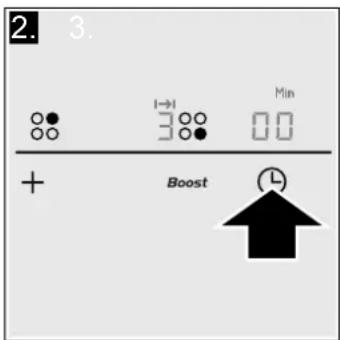
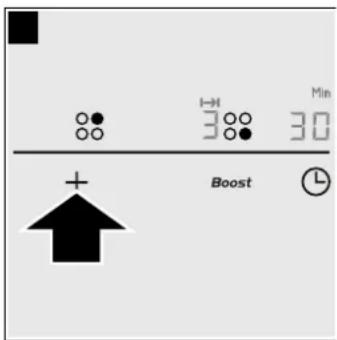
- Touch the + or - symbol until the required cooking time appears.
After a few seconds, the cooking time begins to elapse.
Notes
■ The same cooking time can be set automatically for all hotplates. The set time for each of the hotplates counts down independently.
The Basic settings section contains information on automatically programming the cooking time.
If the combi zone or move function is selected when the hotplates are combined, the set time is the same for both hotplates.
Cleaning lock function
Cleaning the control panel while the hob is switched on may change the settings.
In order to avoid this, the hob has a cleaning lock function. Press the symbol. A signal sounds and the indicator lights up. The control panel is locked for 35 seconds. The control
Automatic time limitation
If the hotplate remains in use for a long time and no changes are made in the settings, the automatic time limitation function is triggered.
The hotplate stops heating. The F, B symbol and the residual heat indicator h/R flash alternately in the display.
Changing or cancelling the time
Select the hotplate. Press the Ⓜ symbol and change the cooking time with the + or - symbols, or set to 00.
Once the time has elapsed
The hotplate switches off. A warning signal sounds and 00 appears for 10 seconds in the time program function display. The I→I indicator on the hotplate lights up. Pressing the ⏻ symbol turns off the indicators and stops the beeping.
Notes
If cooking times have been programmed for various hotplates, the time programming function always displays the time for the selected hotplate.
■ Any cooking time can be programmed for up to 99 minutes.
The timer
The timer can be set for periods of up to 99 minutes. It is independent of the other settings. This function does not automatically switch off a hotplate.
How to program
No hotplate should be selected.
- Press the ⏻ symbol. The time program function display shows ☐ and symbol ♠
- Press the + or - symbols. The basic setting appears.
+ symbol: 10 minutes.
- symbol: 5 minutes.
- Set the desired time using the + or - symbols.
After a few seconds, the time will start to elapse.
Changing or cancelling the time
Press the ⏻ symbol several times until the ⚠ indicator lights up. Change the time or set it to ⏱ with the + or - symbols.
Once the time has elapsed
A warning signal sounds. 00 is displayed on the time program function display. After 10 seconds the indicators turn off.
When the Ⓛ symbol is pressed, the indicators turn off and the beeping stops.
panel surface can now be cleaned without the risk of changing the settings.
Note: The lock does not affect the main switch. The hob may be turned off when desired.
The indicator goes out when any symbol is pressed. The hotplate can now be reset.
When the automatic time function is used, it is governed by the selected power level (from 1 to 10 hours).
Displaying energy consumption
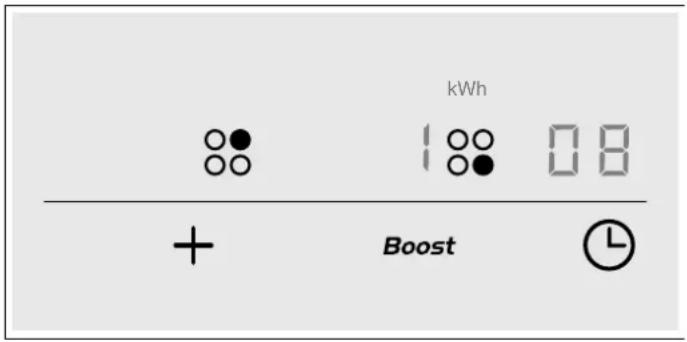
This function displays total energy consumption for the time the hob has been switched on.
After switching off the hob, the consumption in kWh is displayed for 10 seconds.
An example is shown in the image with a consumption of 1.08 kWh.
The Basic Settings chapter provides information on activating this function.
Basic settings
The device has several basic settings. These settings may be adapted to the user's individual needs.
| Indicator Function | |
| c1 | Childproof lock0 Deactivated.*1 Activated. |
| c2 | Audible signals0 Confirmation and error signals deactivated.1 Only error signal activated.2 Only confirmation signal activated.3 All signals activated.* |
| c3 | Display energy consumption0 Deactivated.*1 Activated. |
| c5 | Automatic programming of cooking time.0 Switched off.*1-99 Automatic shut-off time. |
| c6 | Duration of the time program function warning signal1 10 seconds*.2 30 seconds.3 1 minute. |
| c7 | Power-Management function0 = Deactivated.*1 = 1,000 W. minimum power.1= 1,500 W.2= 2,000 W.etc.9 or 9. = maximum power of the hob. |
| c9 | Hotplate time selection0 Unlimited: the last hotplate programmed remains selected.*1 Limited: The hotplate will only remain selected for 10 seconds. |
| c0 | Return to basic settings0 Personal settings.*1 Return to factory settings. |
| *Factory settings | |
Accessing the basic settings
The hob must be switched off.
- Switch on the hob.
- Within the next 10 seconds, touch and hold the —○ symbol for 4 seconds.
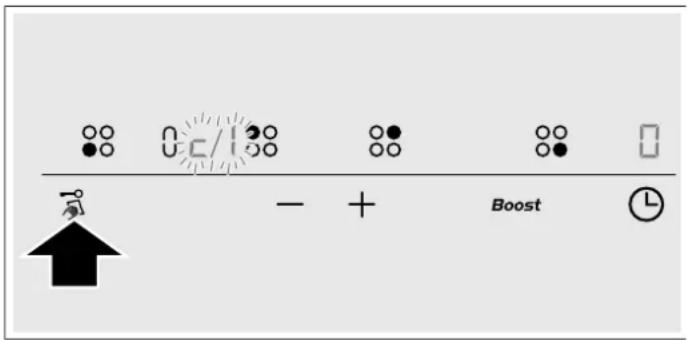
c and 1 flash alternately in the displays and 0 appears as a preset.
- Touch the 0 symbol repeatedly until the required function is displayed.
- Then select the required setting with the + and - symbols.
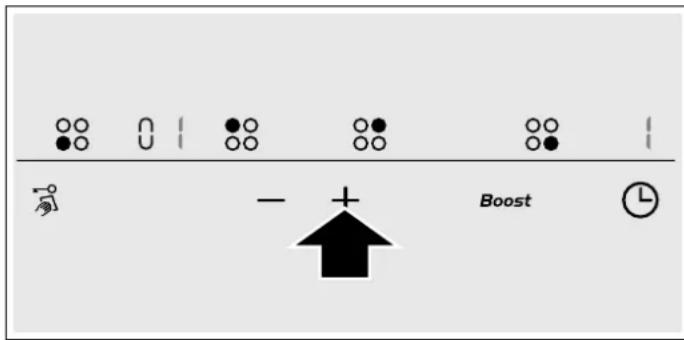
- Touch and hold the —O symbol for at least 4 seconds.
The settings have been saved.
Quit
To leave the basic settings, turn off the hob at the main switch.
Care and cleaning
The advice and warnings contained in this section aim to guide you in cleaning and maintaining the hob, so that it is kept in the best possible condition
Hob
Cleaning
Clean the hob after each use. This prevents food remains left on the surface from burning. Wait until the hob is cool enough before attempting to clean it.
Only use cleaning products specifically designed for hobs. Follow the instructions provided on the packaging.
Do not use:
■ Undiluted washing-up liquid
■ Dishwasher detergent
■ Abrasive products
■ Corrosive products such as oven sprays or stain removers
■ Sponges that may scratch
■ High-pressure or steam cleaners
The best way to remove stubborn stains is to use a glass scraper. Follow the manufacturer's instructions.
Suitable glass scrapers can be obtained through the Technical Assistance Service or from our online shop.
Hob frame
In order to avoid damage to the hob frame, follow the indications below:
■ Use only slightly soapy hot water
■ Do not use sharp or abrasive products
■ Do not use a glass scraper
Fixing malfunctions
Malfunctions are usually due to small details. Before calling the Technical Assistance Service you should bear in mind the following advice and warnings.
Indicator Malfunction Solution
| none The electric power supply has been cut off. Use other electrical appliances to check whether there has been a power cut. | ||
| The appliance has not been correctly connected following the connection diagram. | Check that the appliance has been connected correctly according to the connection diagram. | |
| Electronic system malfunction. If none of the above checks resolve the malfunction, contact the Technical Assistance Service. | ||
| The indicators flash The control panel is damp or an object is resting on it. | Dry the control panel area or remove the object. | |
| The indicator - flashes on the hotplate indicators | A fault has occurred in the electronic system. | Briefly cover the control panel with your hand to confirm the malfunction. |
* If the warning persists call the Technical Assistance Service.
Do not rest hot pans on the control panel.
Indicator Malfunction Solution
| Er + number / d + num-ber / E + number | Electronic system malfunction. Unplug the hob from the mains. Wait about 30 seconds before plugging it in again.* | |
| F0 / F9 | There is an internal operating error. Unplug the hob from the mains. Wait about 30 seconds before plugging it in again.* | |
| F2 | The electronic system has overheated and the corresponding hotplate has been switched off. | Wait until the electronic system has cooled down sufficiently. Then press any symbol on the hob. * |
| F4 | The electronic system has overheated and all hotplates have been switched off. | |
| F5 + power level and beep | There is a hot pan on the control panel. It is highly likely that the electronic system will overheat. | Remove that pan. The malfunction indicator will switch off shortly afterwards. You can carry on cooking. |
| F5 and beep | There is a hot pan on the control panel. The hotplate has switched off to protect the electronic system. | Remove that pan. Wait a few seconds. Press any control panel. When the malfunction indicator switches off, you can carry on cooking. |
| U1 | Incorrect supply voltage, outside normal operating limits. | Contact your electricity board. |
| U2 / U3 | The hotplate has overheated and has switched off in order to protect its hob. | Wait until the electronic system has cooled down sufficiently before switching it back on. |
* If the warning persists call the Technical Assistance Service.
Do not rest hot pans on the control panel.
Normal noise while the appliance is working
Induction heating technology is based on the creation of electromagnetic fields that generate heat directly at the base of the pan. Depending on how the pan has been manufactured, certain noises or vibrations may be produced such as those described below:
A deep humming sound as in a transformer
This noise is produced when cooking with a high power level. It is caused by the amount of energy transferred from the hob to the pan. The noise disappears or becomes faint when the power level is lowered.
A low whistling sound
This noise is produced when the pan is empty. The noise disappears when water or food is added to the pan.
A crackling sound
This noise occurs in pans which are made from different materials superimposed on one another. It is caused by the vibrations that occur in the adjoining surfaces of the different superimposed materials. The noise comes from the pan. The amount of food and cooking method can vary noise intensity.
A high-pitched whistling sound
This noise is produced mainly in pans made from different materials superimposed on one another, and it occurs when such pans are heated at maximum power on two hotplates at the same time. The whistling disappears or becomes fainter as soon as the power level is lowered.
Noise from the fan
For proper use of the electronic system, the temperature of the hob must be controlled. To do this, the hob has a fan which turns on when a high temperature is detected. The fan may also work by inertia after the hob has been switched off, if the temperature detected is still too high.
The noises described are normal, they are part of induction heating technology and not a sign of malfunction.
After-sales service
Our after-sales service is there for you if your appliance should need to be repaired. We are committed to find the best solution also in order to avoid an unnecessary call-out.
E number and FD number:
Please quote the E number (product number) and the FD number (production number) of your appliance when contacting the after-sales service. The rating plate bearing these numbers can be found on the appliance certificate.
Please note that a visit from an after-sales service engineer is not free of charge, even during the warranty period.
natural_image
Illustration of two open metal wafers with handles and a perforated lid (no text or symbols)natural_image
Two identical diagrams showing a double-circle object with directional arrows, no text or symbols present.Activer
- Aktivieren
- Grundeinstellungen
- Activeren
- Safety precautions
- Risk of fire!
- Risk of burns!
- Risk of electric shock!
- Malfunction risk!
- Risk of injury!
- Elements that may damage the appliance
- Caution!
- Overview
- Protecting the environment
- Environmentally-friendly disposal
- Energy-saving advice
- Induction cooking
- Advantages of induction cooking
- Cookware
- Unsuitable pans
- Characteristics of the pan base
- Absence of pan or unsuitable size
- Empty pans or those with a thin base
- Pan detection
- Getting to know your appliance
- The control panel
- Control panels
- The hotplates
- Residual heat indicator
- Programming the hob
- Turning the hob on and off
- Notes
- Set the hotplate
- Selecting a hotplate and heat setting
- Changing the power level
- To switch off the hotplate
- Cooking guidelines table
- Combi zone function
- Notes regarding cookware
- Activation
- Deactivation
- Move function
- Advice on using cookware
- Changing the heat setting
- Childproof lock
- Activating and deactivating the childproof lock.
- Activating and deactivating
- Powerboost function
- Usage restrictions
- To activate
- To deactivate
- Time programming function
- A hotplate should switch off automatically
- Set the cooking time.
- Cleaning lock function
- Automatic time limitation
- Changing or cancelling the time
- Once the time has elapsed
- The timer
- How to program
- Displaying energy consumption
- Basic settings
- Accessing the basic settings
- Quit
- Care and cleaning
- Hob
- Cleaning
- Hob frame
- Fixing malfunctions
- Normal noise while the appliance is working
- A deep humming sound as in a transformer
- A low whistling sound
- A crackling sound
- A high-pitched whistling sound
- Noise from the fan
- After-sales service
- E number and FD number:
- Activer
Brand : VIVA
Model : VVK26I55C0
Category : Cooker