VVK26R8250 - Cooker VIVA - Free user manual and instructions
Find the device manual for free VVK26R8250 VIVA in PDF.



| Product type | Ceramic hob |
| Brand | VIVA |
| Model | VVK26R8250 |
| Power supply | Electric (230 V) |
| Number of cooking zones | 4 (including 1 dual-zone and 1 fish zone) |
| Control type | Touch |
| Booster preheat | Yes |
| Child safety lock | Yes (manual and automatic lock) |
| Residual heat indicator | Yes (H/h display) |
| Automatic time limitation | Yes (1 to 10 hours depending on power) |
| Automatic shutoff | Yes (after 20 seconds if all zones off) |
| Cleaning | Ceramic: glass scraper, specific cleaner; frame: warm water and dish soap |
| Maintenance | Clean after each use, do not use abrasive products |
| Environmental protection | Compliant with WEEE (Directive 2002/96/EC) |
| After-sales service | Contact customer service with E and FD numbers |
| Basic settings | Automatic child lock, audible signal, surface activation |
| Zone types | Single, dual, and fish zones |
Frequently Asked Questions - VVK26R8250 VIVA
User questions about VVK26R8250 VIVA
0 question about this device. Answer the ones you know or ask your own.
Ask a new question about this device
Download the instructions for your Cooker in PDF format for free! Find your manual VVK26R8250 - VIVA and take your electronic device back in hand. On this page are published all the documents necessary for the use of your device. VVK26R8250 by VIVA.
USER MANUAL VVK26R8250 VIVA
Safety precautions. 20
Causes of damage 21
Environmental protection 21
Environmental protection. 21
Tips for saving energy 21
Getting to know your appliance. 22
The control panel. 22
The hotplates 22
Residual heat indicator 22
Setting the hob. 22
Switching the hob on and off 22
Setting a hotplate 23
Table of cooking times 23
Electronic boil start control 24
Setting the electronic boil start control. 24
Table of cooking times for electronic boil start control. 24
Tips for the electronic boil start control. 25
Childproof lock 25
Switching the childproof lock on and off 25
Automatic childproof lock 25
Automatic time limit 25
Basic settings 26
Changing the basic settings 26
Cleaning and care. 26
Ceramic 26
Hob surround 27
Rectifying faults 27
After-sales service. 27
Safety precautions
Please read this manual carefully. Please keep the instruction and installation manual as well as the appliance certificate in a safe place for later use or for subsequent owners.
This appliance is intended for domestic use only. The appliance must only be used for the preparation of food and drink. The appliance must be supervised during operation. Only use this appliance indoors.
This appliance may be used by children 8 years old and older and by persons with reduced physical, sensory or mental capacity or a lack of experience or knowledge if they are supervised or they have been instructed about the safe use of the appliance and have understood the associated dangers.
Never let children play with the appliance. Cleaning and user maintenance must not be carried out by unsupervised children.
Risk of fire!
Hot oil and fat can ignite very quickly. Never leave hot fat or oil unattended. Never use water to put out burning oil or fat. Switch off the hotplate. Extinguish flames carefully using a lid, fire blanket or something similar.
The hotplates become very hot. Never place combustible items on the hob. Never place objects on the hob.
-
The appliance gets hot. Do not keep combustible objects or aerosol cans in drawers directly underneath the hob.
-
The hob switches off automatically and can no longer be operated. It may switch on unintentionally at a later point. Switch off the circuit breaker in the fuse box. Contact the after-sales service.
Risk of burning!
- The hotplates and the area around them get very hot. Never touch the hot surfaces. Keep children away.
- The hotplate heats up but the display does not work. Switch off the circuit breaker in the fuse box. Contact the after-sales service.
Risk of electric shock!
- Cracks or fractures in the glass ceramic may cause electric shocks. Switch off the circuit breaker in the fuse box. Contact the after-sales service.
Causes of damage
Caution!
- Rough pot and pan bases scratch the ceramic.
- Avoid boiling pots dry. This may cause damage.
- Never place hot pots or pans on the control panel, the display area or the surround. This may cause damage.
Overview
The following table provides an overview of the most frequent kinds of damage:
Penetrating moisture may cause an electric shock. Do not use any high-pressure cleaners or steam cleaners.
- Incorrect repairs are dangerous. Repairs must only be carried out by a trained after-sales engineer. If the appliance is defective, switch off the circuit breaker in the fuse box.
Risk of injury!
Saucepans may suddenly jump due to liquid between the pan base and the hotplate. Always keep the hotplate and saucepan bases dry.
- Damage can occur if hard or pointed objects fall on the hob.
Aluminium foil and plastic containers melt on hot hotplates. Oven protective foil is not suitable for your hob.
| Damage Cause Action |
| Stains Food spills Remove spills immediately with a glass scraper. |
| Unsuitable cleaning agents Only use cleaning agents which are suitable for ceramic |
| Scratches Salt, sugar and sand Do not use the hob as a work surface or storage space. |
| Rough pot and pan bases scratch the Check your cookware. ceramic. |
| Discolouration Unsuitable cleaning agents Only use cleaning agents which are suitable for ceramic |
| Pan abrasion (e.g. aluminium) Lift the pots and pans when moving them. |
| Blisters Sugar, food with a high sugar content Remove spills immediately with a glass scraper. |
Environmental protection
Unpack the appliance and dispose of the packaging in an environmentally-responsible manner.
Environmental protection

This appliance is labelled in accordance with the European Directive 2002/96/EU concerning used electrical and electronic appliances (WEEE - waste electrical and electronic equipment). The guideline determines the framework for the return and recycling of used appliances as applicable.
Tips for saving energy
Always use a correctly fitting lid for the pan.Cooking without the lid requires four times as much energy. A glass lid allows you to observe the cooking without having to lift the lid off.
Use pots and pans with level bases. Using cookware with unlevel bases increases energy consumption.
The diameter of the base of your pot or pan should match the size of the hotplate. In particular, if pots that are too small are placed on a hotplate, energy is wasted. Please note: Cookware manufacturers often specify the diameter of the top of the pan. This is usually bigger than the diameter of the base of the pan.
Use a small pan for small quantities of food. A large saucepan containing little food requires more energy.
Use only a little water when cooking. This will save energy. It also preserves vitamins and minerals in vegetables.
- Switch to a lower heat setting as soon as possible.
Use the residual heat of the hob. For longer cooking times, you can switch the hotplate off as early as 5 - 10 minutes before the end of the cooking time.
Getting to know your appliance
The instruction manual is the same for various different hobs. An overview of the models with their dimensions is given on page 2.
The control panel
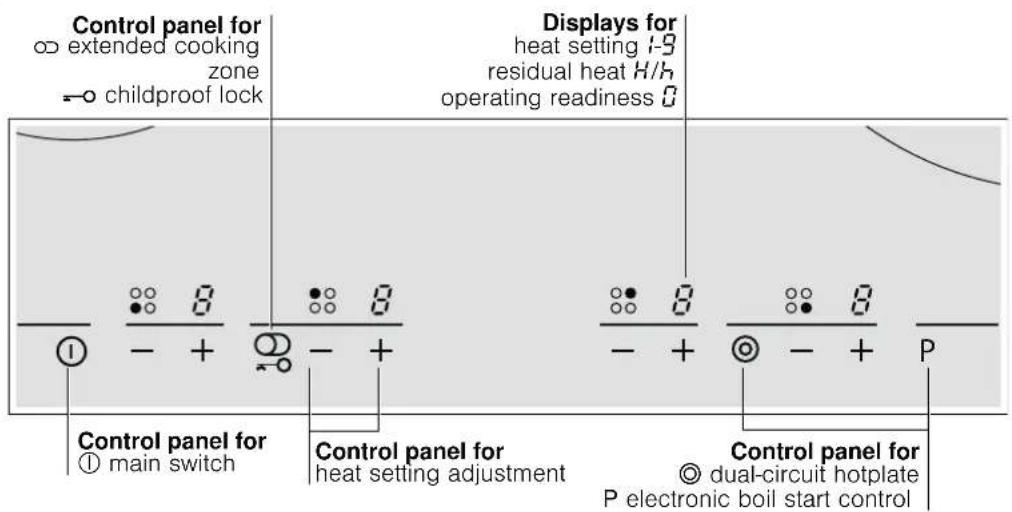
Controls
When you touch a symbol, the respective function is activated.
Notes
The settings will remain unchanged if you touch several symbols at once. This allows you to wipe up spills on the control panel.
Always keep the controls dry. Moisture reduces their effectiveness.
The hotplates
| Hotplate Activating and deactivating | |
| ○ Single-circuit hotplate | |
| ◎ Dual-circuit hotplate | Touch the ⊙ symbol |
| ∞ Extended cooking zone | Touch the ⊙ symbol |
| When the hotplate is activated: the corresponding indicator lights up. | |
| When the hotplate is switched on: the last selected size is automatically selected again | |
Residual heat indicator
The hob has a two-stage residual heat indicator for each hotplate.
If appears in the display the hob is still hot. It may be used, for example, to keep a small meal warm or to melt cooking chocolate. As the hotplate cools down further, the display changes to . The display remains lit until the hotplate has cooled sufficiently.
Setting the hob
This section informs you how to set the hotplates. The table shows heat settings and cooking times for various meals.
Switching the hob on and off
The main switch is used to switch the hob on and off.
To switch on: touch the ① symbol. A signal sounds. The indicator above the main switch lights up. The hob is ready for use.
To switch off: touch the ① symbol until the display above the main switch goes out. All hotplates are switched off. The residual heat indicator remains on until the hotplates have cooled down sufficiently.
Note: The hob switches off automatically if all hotplates have been switched off for more than 20 seconds.
Setting a hotplate
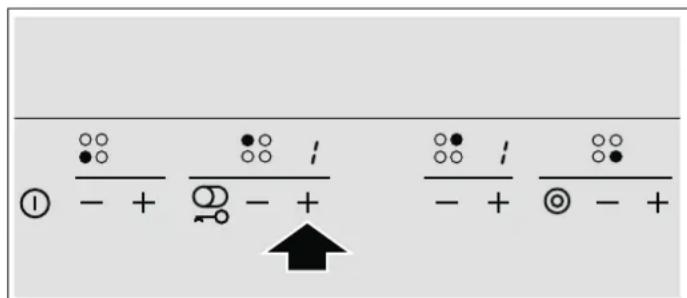
Use the + and - symbols to set the desired heat setting.
Heat setting 1 = lowest setting
Heat setting 9 = highest setting
There is an intermediate setting between each heat setting. This is identified by a dot.
Setting a heat setting:
The hob must be switched on.
- Touch the + or - symbol.
lights up in the display. - Touch the + or - symbol within the next 10 seconds. The basic setting appears.
- symbol: heat setting 9
symbol:heat setting 4
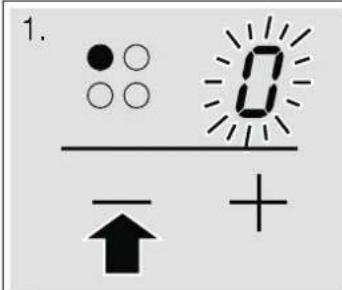
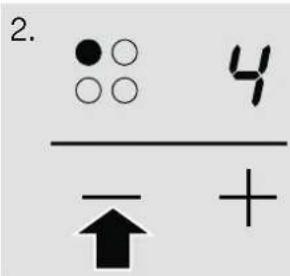
- To change the heat setting: touch the + or - symbol until the desired heat setting appears.
Note. Hotplate temperature is regulated by the heat switching on and off. The heat may also switch on and off at the highest setting.
Switching off the hotplate
Touch the + or - symbol until 0 appears. After about 10 seconds, the residual heat indicator appears.
Table of cooking times
The following table provides some examples.
Cooking times and heat settings may vary depending on the type of food, its weight and quality. Deviations are therefore possible.
When heating thick liquids, stir regularly.
For bringing liquids to the boil, use heat setting 9.
| Ongoing cooking setting | Ongoing cooking time in minutes | |
| Melting | ||
| Chocolate, cooking chocolate, butter, honey | 1-2 | - |
| Gelatine | 1-2 | - |
| Heating and keeping warm | ||
| Stew (e.g. lentil stew) | 1-2 | - |
| Milk** | 1-2. | - |
| Heating sausages in water** | 3-4 | - |
| Defrosting and heating | ||
| Frozen spinach | 2-.3. | 20-30 mins |
| Frozen goulash | 2-.3. | 10-15 mins |
| Poaching, simmering | ||
| Dumplings | 4-.5. | 20-30 mins |
| Fish | 4-5* | 10-15 mins |
| White sauces, e.g. béchamel sauce | 1-2 | 3-6 mins |
| Emulsified sauces, e.g. béarnaise sauce, hollandise sauce | 3-4 | 8-12 mins |
| Boiling, steaming, stewing | ||
| Rice (with double the quantity of water) | 2-3 | 15-30 mins |
| Rice pudding | 1-.2. | 25-35 mins |
| Unpeeled boiled potatoes | 4-5 | 25-30 mins |
| Boiled potatoes | 4-5 | 15-25 mins |
| Pasta, noodles | 6-7* | 6-10 mins |
| Stew, soups | 3-.4. | 15-60 mins |
| Vegetables | 2-.3. | 10-20 mins |
| Vegetables, frozen | 3-.4. | 10-20 mins |
| Cooking in a pressure cooker | 4-5 | - |
| Braising | ||
| Roulades | 4-5 | 50-60 mins |
| Pot roasts | 4-5 | 60-100 mins |
| Goulash | 2-.3. | 50-60 mins |
- Continue cooking without a lid
** Without lid
| Ongoing cooking setting | Ongoing cooking time in minutes | |
| Frying** | ||
| Escalope, plain orbreaded | 6-7 | 6-10 mins |
| Escalope,frozen | 6-7 | 8-12 mins |
| Cutlet,plain orbreaded | 6-7 | 8-12 mins |
| Steak (3 cm thick) | 7-8 | 8-12 mins |
| Poultry breast (2 cm thick) | 5-6 | 10-20 mins |
| Chicken breast,frozen | 5-6 | 10-30 mins |
| Fish and fish fillet,plain | 5-6 | 8-20 mins |
| Fish and fish fillet,breaded | 6-7 | 8-20 mins |
| Fish and fish fillet,breaded and frozen,e.g.fish fingers | 6-7 | 8-12 mins |
| Scampi and prawns | 7-8 | 4-10 mins |
| Stir fry,frozen | 6-7 | 6-10 mins |
| Pancakes | 6-7 | continuous |
| Omelette | 3.-4. | continuous |
| Fried eggs | 5-6 | 3-6 mins |
| Deep-fat frying(fry 150-200g per portion continuously in 1-2 litres oil**) | ||
| Frozen products,e.g.chips,chicken nuggets | 8-9 | - |
| Croquettes | 7-8 | - |
| Meat balls | 7-8 | - |
| Meat,e.g.chicken portions | 6-7 | - |
| Fish,breaded or battered | 5-6 | - |
| Vegetables,mushrooms,breaded or battered | 5-6 | - |
| Small items,e.g.doughnuts,fruit in batter | 4-5 | - |
- Continue cooking without a lid
** Without lid
Electronic boil start control
The electronic boil start control heats the hotplate using the highest heat setting and then switches down to the simmer setting you have selected.
The time taken for the hotplate to heat up depends on the simmer setting selected.
Setting the electronic boil start control
The electronic boil start control can only be activated in the first 30 seconds after you have switched on the hotplate:
1.Set the desired simmer setting for the hotplate.
2. Touch the P symbol.
The electronic boil start control is activated. and the ongoing cooking setting flash alternately.
After the food has been brought to the boil, only the simmer setting remains lit in the display.
Table of cooking times for electronic boil start control
The table below shows which dishes electronic boil start control can be used for.
The smaller quantities specified are for the smaller hotplates and the larger quantities are for the larger hotplates. The values given are guidelines.
| Dish with electronic boil start control Quantity Heat setting Total cooking time | |||
| in minutes | |||
| Heating | |||
| Stock | 500 ml-1 litre | A 7-8 | 4-7 mins |
| Thick soups | 500 ml-1 litre | A 2-3 | 3-6 mins |
| Milk** | 200-400 ml | A 1-2 | 4-7 mins |
Heating and keeping warm
Stew (e.g. lentil stew) 400-800 g A 1-2 -
- Continue cooking without a lid
** Without lid
| Dish with electronic boil start control Quantity Heat setting Total cooking time | |||
| in minutes | |||
| Defrosting and heating | |||
| Frozen spinach | 300-600 g | A 2.-3. | 10-20 mins |
| Frozen goulash | 500g-1 kg | A 2.-3. | 20-30 mins |
| Poaching | |||
| Fish 300-600 g A 4-5* 20-25 mins | |||
| Boiling | |||
| Rice (with double the quantity of water) | 125-250 g | A 2-3 | 20-25 mins |
| Unpeeled boiled potatoes with 1-3 cups of water | 750 g-1.5 kg | A 4-5 | 30-40 mins |
| Boiled potatoes with 1-3 cups of water | 750 g-1.5 kg | A 4-5 | 20-30 mins |
| Vegetables with 1-3 cups of water | 500g-1 kg | A 2.-3. | 15-20 mins |
| Frozen vegetables with 1-3 cups of water | 500g-1 kg | A 4.-5. | 15-20 mins |
| Braising | |||
| Roulades | 4 pieces | A 4-5 | 50-60 mins |
| Pot roasts | 1 kg | A 4-5 | 80-100 mins |
| Frying** | |||
| Escalope, plain orbreaded | 1-2 | A 6-7 | 8-12 mins |
| Cutlet,plain orbreaded | 1-2 | A 6-7 | 8-12 mins |
| Steak (3 cm thick) | 1-2 | A 7-8 | 8-12 mins |
| Fish and fish fillet, breaded | 1-2 | A 6-7 | 8-12 mins |
| Fish and fish fillet,breaded and frozen,e.g.fish fingers | 200-300 g | A 6-7 | 8-12 mins |
| Pancakes | A 6-7 | continuous frying | |
- Continue cooking without a lid
** Without lid
Tips for the electronic boil start control
Electronic boil start control is designed to conserve food's nutritional value while using little water for cooking.
- Add only approximately 3 cups of water to the food for large hotplates and approximately 2 cups of water for small hotplates.
Place a lid on the saucepan.
Electronic boil start control is not suitable for food that is cooked in a large volume of water (e.g. pasta).
Childproof lock
You can use the childproof lock to prevent children from switching on the hotplates.
Switching the childproof lock on and off
The hob must be switched off.
To switch on: touch the symbol for approx. 4 seconds. The symbol lights up for 10 seconds. The hob is locked.
To switch off: touch the symbol for approx. 4 seconds. The hob is unlocked.
Automatic childproof lock
This function automatically activates the childproof lock every time you switch the hob off.
Switching on and off
You can find out how to switch the automatic childproof lock on and off in the Basic settings section.
Automatic time limit
If a hotplate is in use for a long time without the setting being changed, the automatic time limit is activated.
The hotplate stops heating. F and ±bB flash alternately in the hotplate indicator.
The display goes out when you touch any control. You can make new settings.
When the time limit is activated depends on the heat setting selected (1 to 10 hours).
Basic settings
Your appliance has various basic settings. You can adapt these settings to your needs.
| Indicator Function | |
| c1 | Automatic childproof lock |
| Switched off.* | |
| Switched on. | |
| c2 | Audible signal |
| Confirmation signal and operation error signal switched off. | |
| Only operation error signal switched on. | |
| Confirmation signal and operation error signal switched on.* | |
| c7 | Activation of the filament circuits |
| Switched off. | |
| Switched on. | |
| Last setting before the hotplate was switched off.* | |
| c0 | Reset to basic setting |
| Switched off. | |
| Switched on. | |
| *Basic setting | |
Changing the basic settings
The hob must be switched off.
- Switch on the hob.
- Within the next 10 seconds, touch the symbol for 4 seconds

and flash alternately in the left-hand display and 0 lights up in the right-hand display.
- Touch the symbol repeatedly until the desired indicator appears in the left-hand display.
- Touch the ^+ symbol repeatedly until the desired setting appears in the right-hand display.
- Touch the x = 0 symbol for 4 seconds.
The setting is activated.
Switching off
To exit the basic setting, switch off the hob with the main switch and make new settings.
Cleaning and care
The information in this section provides help on how best to care for your hob.
Suitable maintenance and cleaning products can be purchased from the after-sales service or in our e-Shop.
Ceramic
Clean the hob after each use. This will prevent spills from burning onto the ceramic.
Only clean the hob when it has cooled down sufficiently.
Use only cleaning agents which are suitable for ceramic. Follow the cleaning instructions on the packaging.
Never use:
Undiluted washing-up liquid
Detergent intended for dishwashers
Scouring agents
Harsh cleaning agents such as oven spray or stain remover
Abrasive sponges
High-pressure cleaners or steam jet cleaners
Ground-in dirt can be best removed with a glass scraper, available from retailers. Please note the manufacturer's instructions.
You can also obtain a suitable glass scraper from our after-sales service or from the e-Shop.
Hob surround
To prevent damage to the hob surround, please observe the following instructions:
Use only warm, soapy water.
Do not use harsh or abrasive agents.
Do not use the glass scraper.
Rectifying faults
Malfunctions often have simple explanations. Please read the following notes before calling the after-sales service.
Indicator Fault Action
| Blank There is no power supply. Check the household fuse for the appliance. Check whether there is a power cut by trying other electronic appliances. | ||
| E is flash- ing | The controls are damp or an object is resting on them. | Dry the controls or remove the object. |
| Er+ number | Electronic fault. Switch the appliance off and back on again after about 30 seconds using either the household fuse or the circuit breaker in the fuse box. Contact the after-sales service if this appears in the display again. | |
| F2 | The electronics have overheated and have switched off the corresponding hotplate. | Wait until the electronics have cooled down sufficiently. Then touch a control for the hotplate.* |
| F4 | The electronics have overheated and have switched off all hotplates. | Wait until the electronics have cooled down sufficiently. Then touch any con- trol.* |
| F8 | The hotplate was in operation for too long and has switched itself off. | You can switch the hotplate back on again immediately. |
- Do not place hot pans close to or on the control panel
After-sales service
Our after-sales service is there for you if your appliance should need to be repaired. We are committed to find the best solution also in order to avoid an unnecessary call-out.
E number and FD number:
Please quote the E number (product number) and the FD number (production number) of your appliance when contacting the after-sales service. The rating plate bearing these numbers can be found on the appliance certificate.
Please note that a visit from an after-sales service engineer is not free of charge, even during the warranty period.
- Safety precautions
- Risk of fire!
- Risk of burning!
- Risk of electric shock!
- Causes of damage
- Caution!
- Overview
- Risk of injury!
- Environmental protection
- Tips for saving energy
- Getting to know your appliance
- The control panel
- Controls
- Notes
- The hotplates
- Residual heat indicator
- Setting the hob
- Switching the hob on and off
- Setting a hotplate
- Setting a heat setting:
- Switching off the hotplate
- Table of cooking times
- Electronic boil start control
- Setting the electronic boil start control
- Table of cooking times for electronic boil start control
- Heating and keeping warm
- Tips for the electronic boil start control
- Childproof lock
- Switching the childproof lock on and off
- Automatic childproof lock
- Switching on and off
- Automatic time limit
- Basic settings
- Changing the basic settings
- Switching off
- Cleaning and care
- Ceramic
- Hob surround
- Rectifying faults
- After-sales service
- E number and FD number:
Brand : VIVA
Model : VVK26R8250
Category : Cooker