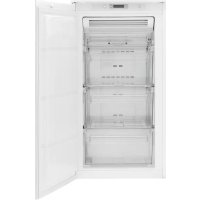
PVS3102N - Freezer Pelgrim - Free user manual and instructions
Find the device manual for free PVS3102N Pelgrim in PDF.


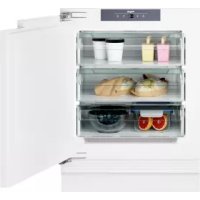
| Product Type | Freezer |
| Brand | Pelgrim |
| Model | PVS3102N |
| Dimensions (H x W x D) | 1030 x 560 x 550 mm |
| Power Supply | 230 V, 50 Hz |
| Climate Class | SN, N, ST, T (from +10°C to +43°C) |
| Fast Freeze Function | Yes (activation via Functions button, automatic shutdown after 52 hours) |
| Defrost | Automatic (No Frost) |
| Temperature Display | Yes, with positive or negative temperature indicator |
| Open Door Alarm | Yes (triggers after 1 minute) |
| Excessive Temperature Alarm | Yes (flashing, red background, audible alarm) |
| Door Reversibility | Yes (right or left opening) |
| Periodic Maintenance | Clean interior with warm soapy water; clean condenser and compressor with brush or vacuum cleaner |
| Child Safety | Magnetic closure; door removal recommended when disposing |
| After-Sales Service | Pelgrim S.A. Belgium, tel. (053) 80 62 08 |
| Spare Parts | Only original, via authorized after-sales service |
Frequently Asked Questions - PVS3102N Pelgrim
User questions about PVS3102N Pelgrim
0 question about this device. Answer the ones you know or ask your own.
Ask a new question about this device
Download the instructions for your Freezer in PDF format for free! Find your manual PVS3102N - Pelgrim and take your electronic device back in hand. On this page are published all the documents necessary for the use of your device. PVS3102N by Pelgrim.
USER MANUAL PVS3102N Pelgrim
natural_image
Diagram showing a tool interacting with a mechanical component, with an arrow indicating direction (no text or symbols present)natural_image
Technical diagram showing mechanical assembly with two views of a bolted component (no text or symbols)Ventilatievereisten
natural_image
Diagram showing a curved pipe or duct with an arrow indicating direction, alongside a magnified inset of the pipe's tip (no text or symbols present)natural_image
3D diagram of a rectangular block with a curved arrow pointing downward, no text or symbols presentnatural_image
Technical diagram of a mechanical assembly with two vertical components and a labeled section Hb (no text or symbols beyond label)Helpful Hints and Tips 18
Care and cleaning 18
What to do if... 19
Technical data 20
Installation 21
Environmental concerns 24

Subject to change without notice

Safety information
In the interest of your safety and to ensure the correct use, before installing and first using the appliance, read this user manual carefully, including its hints and warnings. To avoid unnecessary mistakes and accidents, it is important to ensure that all people using the appliance are thoroughly familiar with its operation and safety features. Save these instructions and make sure that they remain with the appliance if it is moved or sold, so that everyone using it through its life will be properly informed on appliance use and safety.
For the safety of life and property keep the precautions of these user's instructions as the manufacturer is not responsible for damages caused by omission.
Children and vulnerable people safety
- This appliance is not intended for use by persons (including children) with reduced physical, sensory or mental capabilities, or lack of experience and knowledge, unless they have been given supervision or instruction concerning use of the appliance by a person responsible for their safety. Children should be supervised to ensure that they do not play with the appliance.
- Keep all packaging well away from children. There is risk of suffocation.
- If you are discarding the appliance pull the plug out of the socket, cut the connection cable (as close to the appliance as you can) and remove the door to prevent playing children to suffer electric shock or to close themselves into it.
- If this appliance featuring magnetic door seals is to replace an older appliance having a spring lock (latch) on the door or lid, be sure to make that spring lock unusable before you discard the old appliance. This
will prevent it from becoming a death trap for a child.
General safety

Caution! Keep ventilation openings clear of obstruction.
- The appliance is intended for keeping foodstuff and/or beverages in a normal household as explained in this instruction booklet.
- Do not use a mechanical device or any artificial means to speed up the thawing process.
- Do not use other electrical appliances (such as ice cream makers) inside of refrigerating appliances, unless they are approved for this purpose by the manufacturer.
- Do not damage the refrigerant circuit.
- The refrigerant isobutane (R600a) is contained within the refrigerant circuit of the appliance, a natural gas with a high level of environmental compatibility, which is nevertheless flammable.
During transportation and installation of the appliance, be certain that none of the components of the refrigerant circuit become damaged.
If the refrigerant circuit should become damaged:
- avoid open flames and sources of ignition
– thoroughly ventilate the room in which the appliance is situated
- It is dangerous to alter the specifications or modify this product in any way. Any damage to the cord may cause a short-circuit, fire and/or electric shock.
Warning! Any electrical component (power cord, plug, compressor) must be replaced by a certified service agent or qualified service personnel.
- Power cord must not be lengthened.
- Make sure that the power plug is not squashed or damaged by the back of the appliance. A squashed or damaged power plug may overheat and cause a fire.
- Make sure that you can come to the mains plug of the appliance.
- Do not pull the mains cable.
- If the power plug socket is loose, do not insert the power plug. There is a risk of electric shock or fire.
- You must not operate the appliance without the lamp cover ^5) of interior lighting.
- This appliance is heavy. Care should be taken when moving it.
- Do not remove nor touch items from the freezer compartment if your hands are damp/wet, as this could cause skin abrasions or frost/freezer burns.
- Avoid prolonged exposure of the appliance to direct sunlight.
Daily Use
- Do not put hot pot on the plastic parts in the appliance.
- Do not store flammable gas and liquid in the appliance, because they may explode.
- Do not place food products directly against the air outlet on the rear wall. ^6)
- Frozen food must not be re-frozen once it has been thawed out.
- Store pre-packed frozen food in accordance with the frozen food manufacturer's instructions.
- Appliance's manufacturers storage recommendations should be strictly adhered to. Refer to relevant instructions.
- Do not place carbonated or fizzy drinks in the freezer compartment as it creates pressure on the container, which may
5) If the lamp cover is foreseen
6) If the appliance is Frost Free
7) If a water connection is foreseen
cause it to explode, resulting in damage to the appliance.
- Ice lollies can cause frost burns if consumed straight from the appliance.
Care and cleaning
- Before maintenance, switch off the appliance and disconnect the mains plug from the mains socket. If you cannot come to the mains socket, interrupt the power supply.
- Do not clean the appliance with metal objects.
- Do not use sharp objects to remove frost from the appliance. Use a plastic scraper.
Installation
Important! For electrical connection carefully follow the instructions given in specific paragraphs.
- Unpack the appliance and check if there are damages on it. Do not connect the appliance if it is damaged. Report possible damages immediately to the place you bought it. In that case retain packing.
- It is advisable to wait at least four hours before connecting the appliance to allow the oil to flow back in the compressor.
- Adequate air circulation should be around the appliance, lacking this leads to overheating. To achieve sufficient ventilation follow the instructions relevant to installation.
- Wherever possible the back of the product should be against a wall to avoid touching or catching warm parts (compressor, condenser) to prevent possible burn.
- The appliance must not be located close to radiators or cookers.
- Make sure that the mains plug is accessible after the installation of the appliance.
- Connect to potable water supply only. ^7)
Service
- Any electrical work required to do the servicing of the appliance should be carried out by a qualified electrician or competent person.
- This product must be serviced by an authorized Service Centre, and only genuine spare parts must be used.
Environment Protection

This appliance does not contain gasses which could damage the ozone layer, in either its refrigerant circuit or insulation materials. The appliance shall not be discarded together with the urban refuse and rubbish. The insulation foam contains flammable gases: the appliance
shall be disposed according to the applicable regulations to obtain from your local authorities. Avoid damaging the cooling unit, especially at the rear near the heat exchanger. The materials used on this appliance marked by the symbol are recyclable.
Control panel

- ON/OFF switch
- Display
-
Function button
-
Temperature regulator
Display
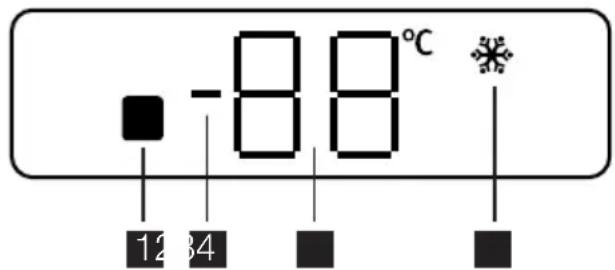
- Door open alarm indicator
- Positive or negative temperature indicator
- Temperature indicator
- Fast Freeze indicator
Switching on
After plugging the plug into the power outlet, if the display is not illuminated, press ON/OFF switch, appliance on.
As soon as the appliance is turned on, the following signals will appear on the control panel:
- Positive or negative temperature indicator will be positive, indicating that the temperature is positive
- the Temperature indicator flashes, the background of the display is red and you will hear a buzzer.
Press Function button and the buzzer will go off (also see "Excessive temperature alarm"). Place the Temperature regulator in a middle position, and the appliance will be set up to provide the following temperature:
roughly -18^ in the freezer.
Functions Menu
Each time Function button is pressed, the following functions are activated in a clockwise direction:
- Fast Freeze function
- no symbol: normal operation.
Switching off
The appliance is shut off by pressing ON/OFF switch for more than 1 second.
After this, a countdown of the temperature from -3 -2 -1 will be shown.
When the appliance is switched off, Display also goes off.
Temperature regulation
The temperature within the appliance is controlled by the Temperature regulator situated at the top of the cabinet.
To operate the appliance, proceed as follows:
- turn the knob clockwise to obtain the maximum coldness
- turn the knob counter- clockwise to obtain the minimum coldness.
The intermediate position is usually the most suitable.
However, the exact setting should be chosen keeping in mind that the temperature inside the appliance depends on:
- room temperature
• how often the door is opened
• the quantity of food stored - the location of the appliance.
Fast Freeze Function
To freeze fresh foods, you will need to activate the Fast Freeze function.
Press Function button (several times if necessary) until the corresponding icon appears. This function stops automatically after 52 hours.
It is possible to deactivate the function at any time by pressing Function button (refer to "Functions Menu").
Excessive temperature alarm
An increase in the temperature in the freezer compartment (for example due to a power failure) is indicated by:
- flashing temperature
- freezer compartment flashing (Door open alarm indicator)
• red illumination of display
- sounding of buzzer
- alarms symbol.
When normal conditions are restored:
• the acoustic signal shuts off
- the temperature value continues to flash
- the display illumination remains red.
When you press Function button to deactivate the alarm, the highest temperature reached in the compartment appears on indicator 88 for some seconds.
At this point the flashing stops and the display illumination changes over from red to white.
Door open alarm
An acoustic alarm will sound when the door is left open for more than 1 minute.
The door open alarm conditions are indicated by:
- flashing Door open alarm indicator
- red display illumination
- beeping sound.
Press the Function button to deactivate the acoustic alarm.
When normal conditions are restored (door closed), the acoustic alarm will stop.
First use
Cleaning the interior
Before using the appliance for the first time, wash the interior and all internal accessories with lukewarm water and some neutral soap so as to remove the typical smell of a brand-new product, then dry thoroughly.
Daily use
Freezing fresh food
The freezer compartment is suitable for freezing fresh food and storing frozen and deep-frozen food for a long time.
To freeze fresh food activate the Fast Freeze function at least 24 hours before placing the food to be frozen in the freezer compartment.
Place the fresh food to be frozen in the third compartment.
The maximum amount of food that can be frozen in 24 hours is specified on the rating plate, a label located on the inside of the appliance.
Important! Do not use detergents or abrasive powders, as these will damage the finish.
The freezing process lasts 24 hours: during this period do not add other food to be frozen.
After 24 hours, when the freezing process is completed, return to the required temperature (see "Temperature regulation").
Storage of frozen food
When first starting-up or after a period out of use, before putting the products in the compartment let the appliance run at least 2 hours on the higher settings.
Important! In the event of accidental defrosting, for example due to a power failure, if the power has been off for longer than the value shown in the technical characteristics chart under "rising time", the defrosted food must be consumed quickly or cooked immediately and then re-frozen (after cooling).
Freezing Calendar

The symbols show different types of frozen goods.
The numbers indicate storage times in months for the appropriate types of frozen goods. Whether the upper or lower value of the indicated storage time is valid depends
Helpful Hints and Tips
Hints for freezing
To help you make the most of the freezing process, here are some important hints:
- the maximum quantity of food which can be frozen in 24 hrs. is shown on the rating plate;
- the freezing process takes 24 hours. No further food to be frozen should be added during this period;
- only freeze top quality, fresh and thoroughly cleaned, foodstuffs;
- prepare food in small portions to enable it to be rapidly and completely frozen and to make it possible subsequently to thaw only the quantity required;
- wrap up the food in aluminium foil or polythene and make sure that the packages are airtight;
- do not allow fresh, unfrozen food to touch food which is already frozen, thus avoiding a rise in temperature of the latter;
- lean foods store better and longer than fatty ones; salt reduces the storage life of food;
Care and cleaning

Caution! Unplug the appliance before carrying out any maintenance operation.

This appliance contains hydrocarbons in its cooling unit; maintenance and re-
on the quality of the foods and treating before freezing.
Thawing
Deep-frozen or frozen food, prior to being used, can be thawed in the refrigerator compartment or at room temperature, depending on the time available for this operation.
Small pieces may even be cooked still frozen, directly from the freezer: in this case, cooking will take longer.
Ice-cube production
This appliance is equipped with one or more trays for the production of ice-cubes. Fill these trays with water, then put them in the freezer compartment.
Important! Do not use metallic instruments to remove the trays from the freezer.
- water ices, if consumed immediately after removal from the freezer compartment, can possibly cause the skin to be freeze burnt;
- it is advisable to show the freezing in date on each individual pack to enable you to keep tab of the storage time.
Hints for storage of frozen food
To obtain the best performance from this appliance, you should:
- make sure that the commercially frozen foodstuffs were adequately stored by the retailer;
- be sure that frozen foodstuffs are transferred from the foodstore to the freezer in the shortest possible time;
- not open the door frequently or leave it open longer than absolutely necessary.
- Once defrosted, food deteriorates rapidly and cannot be refrozen.
- Do not exceed the storage period indicated by the food manufacturer.
charging must therefore only be carried out by authorized technicians.
Periodic cleaning
The equipment has to be cleaned regularly:
- clean the inside and accessories with lukewarm water and some neutral soap.
- regularly check the door seals and wipe clean to ensure they are clean and free from debris.
- rinse and dry thoroughly.
Important! Do not pull, move or damage any pipes and/or cables inside the cabinet. Never use detergents, abrasive powders, highly perfumed cleaning products or wax polishes to clean the interior as this will damage the surface and leave a strong odour.
Clean the condenser (black grill) and the compressor at the back of the appliance with a brush or a vacuum cleaner. This operation will improve the performance of the appliance and save electricity consumption.
Important! Take care of not to damage the cooling system.
Many proprietary kitchen surface cleaners contain chemicals that can attack/damage the plastics used in this appliance. For this reason it is recommended that the outer casing of this appliance is only cleaned with warm water with a little washing-up liquid added.
After cleaning, reconnect the equipment to the mains supply.
Defrosting of the freezer
The freezer compartment of this model, on the other hand, is a "no frost" type. This means that there is no buildup of frost when it is in operation, neither on the internal walls nor on the foods.
The absence of frost is due to the continuous circulation of cold air inside the compartment, driven by an automatically controlled fan.
Periods of non-operation
When the appliance is not in use for long periods, take the following precautions:
- disconnect the appliance from electricity supply
- remove all food
- defrost ^8) and clean the appliance and all accessories
- leave the door/doors ajar to prevent unpleasant smells.
If the cabinet will be kept on, ask somebody to check it once in a while to prevent the food inside from spoiling in case of a power failure.
What to do if...

Warning! Before troubleshooting, disconnect the mains plug from the mains socket.
Only a qualified electrician or competent person must do the troubleshooting that is not in this manual.
Important! There are some sounds during normal use (compressor, refrigerant circulation).
| Problem Possible cause Solution | ||
| The appliance does not operate. The Pilot light does not flash. | The appliance is switched off. Switch on the appliance. | |
| The mains plug is not connected to the mains socket correctly. | Connect the mains plug to the mains socket correctly. | |
| The appliance has no power. | There is no voltage in the mains socket. | Connect a different electrical appli-ance to the mains socket.Contact a qualified electrician. |
| The Pilot light flashes. The appliance is not working properly. | Contact a qualified electrician. | |
| The Alarm light flashes. The temperature in the freezer is too high. | Refer to "Excessive Temperature Alarm" | |
| Problem Possible cause Solution | ||
| The compressor operates continually. | The temperature is not set correctly. | Set a higher temperature. |
| The door is not closed correctly. | Refer to "Closing the door". | |
| The door has been opened too frequently. | Do not keep the door open longer than necessary. | |
| The product temperature is too high. | Let the product temperature decrease to room temperature before storage. | |
| The room temperature is too high. | Decrease the room temperature. | |
| TheFast Freeze function is switched on. | Refer to "Fast Freeze function". | |
| The temperature in the freezer is too low. | The temperature regulator is not set correctly. | Set a higher temperature. |
| TheFast Freeze function is switched on. | Refer to" Fast Freeze function". | |
| The temperature in the freezer is too high. | The temperature regulator is not set correctly. | Set a lower temperature. |
| The door is not closed correctly. | Refer to "Closing the door". | |
| The product temperature is too high. | Let the product temperature decrease to room temperature before storage. | |
| Many products are stored at the same time. | Store less products at the same time. | |
| Products are too near to each other. | Store products so that there is cold air circulation. | |
| There is too much frost. | Food is not wrapped correctly. Wrap the food correctly. | |
| The door is not closed correctly. | Refer to "Closing the door". | |
| The temperature regulator is not set correctly. | Set a higher temperature. | |
Closing the door
- Clean the door gaskets.
- If necessary, adjust the door. Refer to "Installation".
Technical data
| Dimension of the recess | ||
| Height 1030 mm | ||
| Width 560 mm | ||
| Depth 550 mm | ||
| Rising Time 19 h |
The technical information are situated in the rating plate on the internal left side of the appliance and in the energy label.
- If necessary, replace the defective door gaskets. Contact the Service Force Center.
Installation

Read the "Safety Information" carefully for your safety and correct operation of the appliance before installing the appliance.
Positioning
Install this appliance at a location where the ambient temperature corresponds to the climate class indicated on the rating plate of the appliance:
| Climate class | Ambient temperature |
| SN +10°C to + 32°C | |
| N +16°C to + 32°C | |
| ST +16°C to + 38°C | |
| T +16°C to + 43°C | |
Electrical connection
Before plugging in, ensure that the voltage and frequency shown on the rating plate correspond to your domestic power supply.
The appliance must be earthed. The power supply cable plug is provided with a contact for this purpose. If the domestic power supply socket is not earthed, connect the appliance to a separate earth in compliance with current regulations, consulting a qualified electrician.
The manufacturer declines all responsibility if the above safety precautions are not ob-served.
This appliance complies with the E.E.C. Directives.
Door reversibility
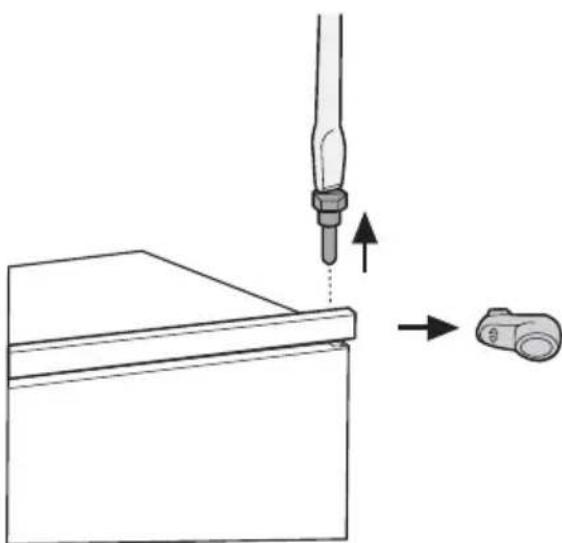
The door of the appliance opens to the right. If you want to open the door to the left, follow these steps before you install the appliance:
- Loosen and remove the upper pin.
- Remove the door.
- Remove the spacer.
- With a key, loosen the lower pin.
natural_image
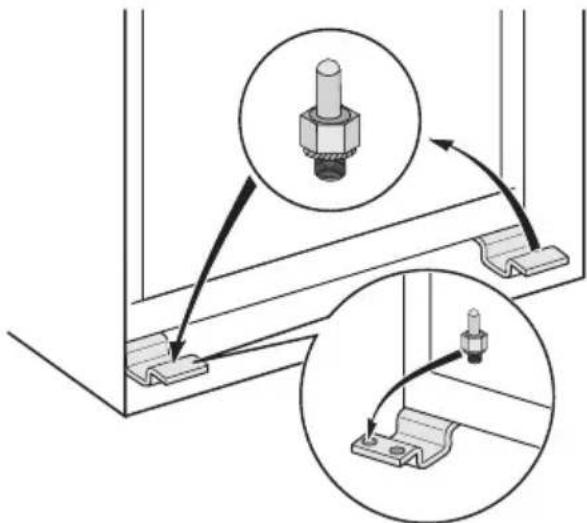
Diagram showing a tool interacting with a mechanical component, with arrows indicating direction (no text or symbols present)On the opposite side:
- Tighten the lower pin.
- Install the spacer.
- Install the door.
- Tighten the upper pin.
natural_image
Technical diagram showing mechanical assembly with two views of a bolted component (no text or symbols present)Ventilation requirements
The airflow behind the appliance must be sufficient.
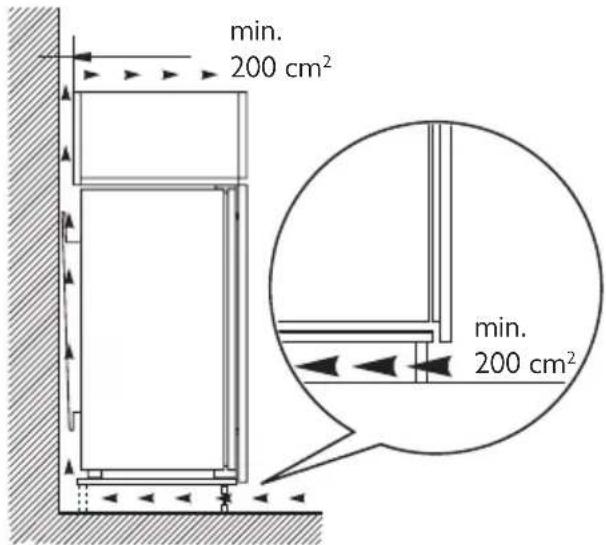
Installing the appliance

Caution! Make sure that the mains cable can move freely.
Do the following steps:
- Install the appliance in the niche.
Push the appliance in the direction of the arrows (1) until the upper gap cover stops against the kitchen furniture. Make sure that the distance between the appliance and the cupboard front-edge is 44 mm.
Push the appliance in the direction of the arrows (2) against the cupboard on the opposite side of the hinge. Make sure that the clearance between the appliance and the cupboard is 4 mm.
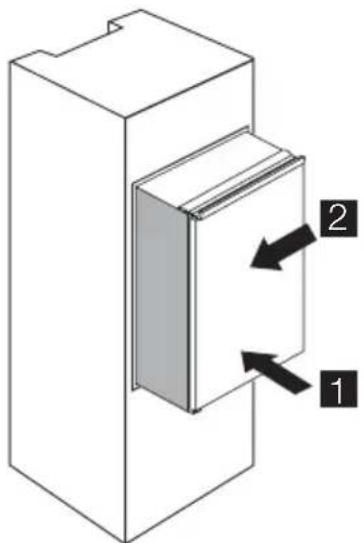
- Adjust the appliance in the niche.
The lower hinge cover (in the accessories bag) makes sure that the distance
between the appliance and the kitchen furniture is correct.
Open the door. Put the lower hinge cover in position.
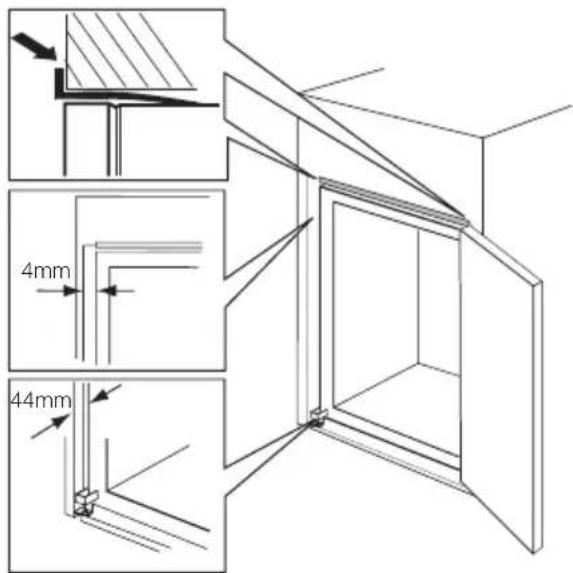
- Attach the appliance to the niche with 4 screws.
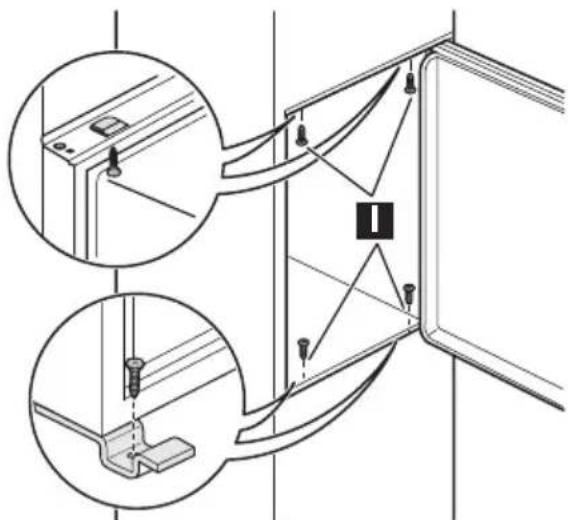
- Push the sealing strip between the appliance and the adjacent cabinet.
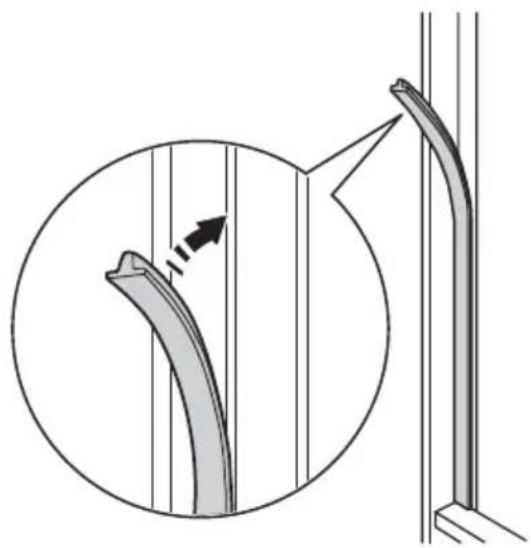
natural_image
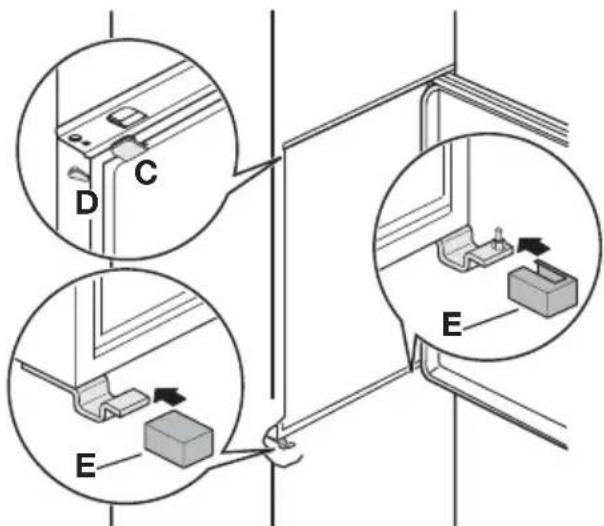
Diagram showing a curved pipe or duct with an arrow indicating direction, alongside a magnified inset of the pipe's tip (no text or symbols present)- Remove the correct part from the hinge cover (E). Make sure to remove the part DX, in the case of right hinge, SX in opposite case.
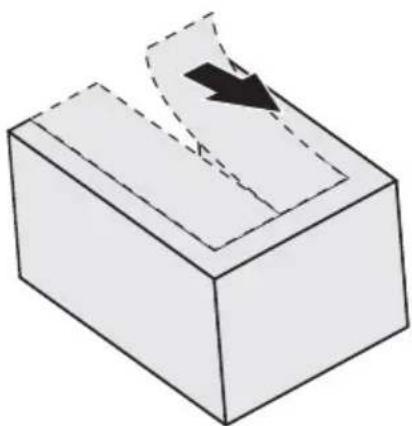
natural_image
3D diagram of a block with a curved arrow indicating direction, no text or symbols present- Attach the covers (C, D) to the lugs and the hinge holes. Attach the hinge covers (E) to the hinge.
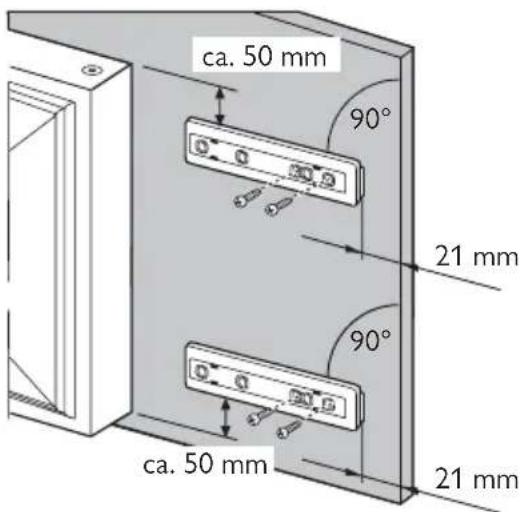
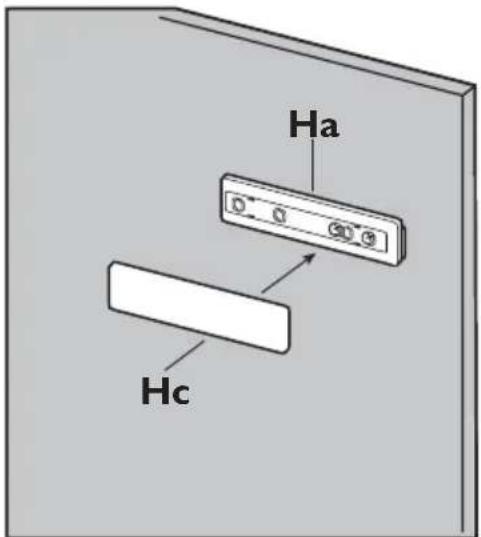
- Disconnect the parts (Ha), (Hb), (Hc) and (Hd).
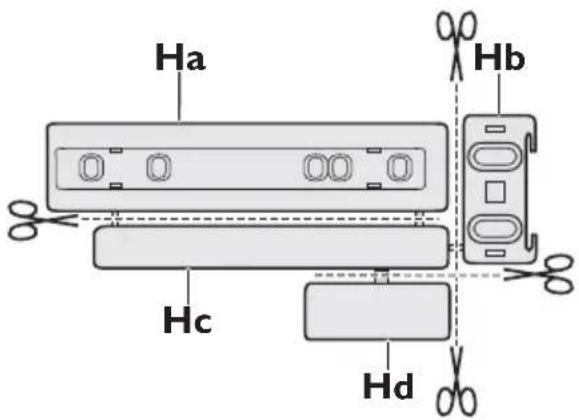
- Install the part (Ha) on the inner side of the kitchen furniture.
- Push the part (Hc) on the part (Ha).
- Open the appliance door and the kitchen furniture door at an angle of 90^ . Insert the small square (Hb) into guide (Ha).
Put together the appliance door and the furniture door and mark the holes.
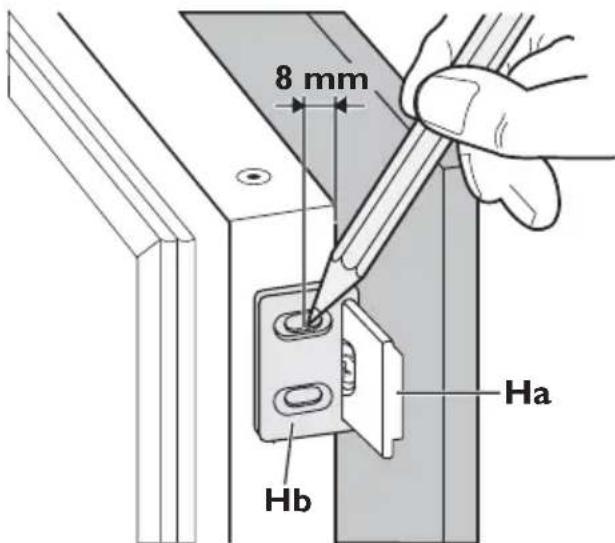
- Remove the brackets and mark a distance of 8 mm from the outer edge of the door where the nail must be fitted (K).
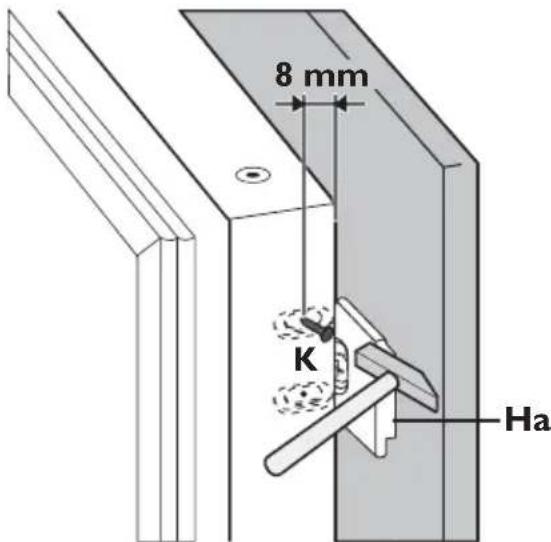
- Place the small square on the guide again and fix it with the screws supplied. Align the kitchen furniture door and the appliance door by adjusting the part Hb.
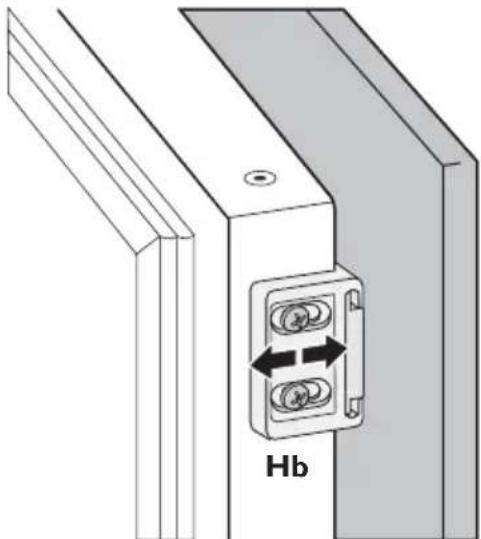
natural_image
Technical diagram of a mechanical or electrical component with two circular components and a labeled section Hb (no text or symbols beyond label)- Press the part (Hd) on the part (Hb).
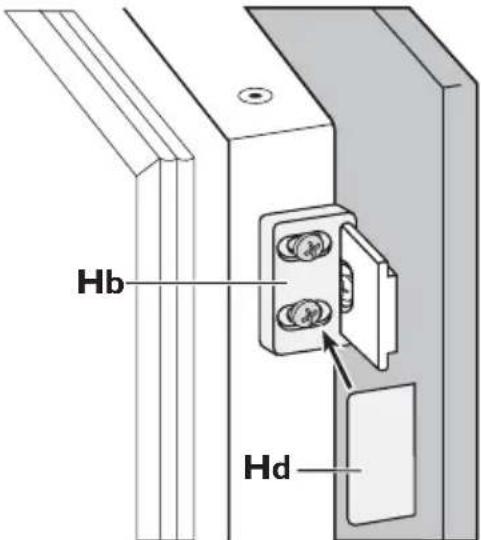
Do a final check to make sure that:
- All screws are tightened.
- The magnetic sealing strip is attached tightly to the cabinet.
Important! If the ambient temperature is low (for example, in the Winter), the size of the gasket decreases. The size of the gasket increases when the ambient temperature increases. You can also use a hairdryer to increase the size of the gasket.
Environmental concerns
The symbol ☒ on the product or on its packaging indicates that this product may not be treated as household waste. Instead it should be taken to the appropriate collection point for the recycling of electrical and electronic equipment. By ensuring this product is disposed of correctly, you will help prevent potential negative consequences for the environment and human health, which
could otherwise be caused by inappropriate waste handling of this product. For more detailed information about recycling of this product, please contact your local council, your household waste disposal service or the shop where you purchased the product.
Sommaire
natural_image
Diagram showing a tool interacting with a mechanical component, with arrows indicating movement (no text or symbols present)Du côté opposé :
Ventilation
natural_image
Diagram showing a curved pipe or duct with an arrow indicating direction, alongside a magnified inset of the pipe's tip (no text or symbols present)natural_image
3D diagram of a block with a curved arrow indicating direction, no text or symbols presentnatural_image
Technical diagram of a mechanical assembly with two vertical components and a labeled section Hb (no text or symbols beyond label)natural_image
Diagram showing a tool interacting with a mechanical component, with an arrow indicating direction (no text or symbols present)natural_image
Technical diagram showing mechanical assembly with two views of a bolted component (no text or symbols)natural_image
Diagram showing a curved pipe or duct with an arrow indicating direction, alongside a magnified inset of the pipe's tip (no text or symbols present)natural_image
3D diagram of a rectangular block with a curved arrow indicating direction, no text or symbols presentnatural_image
Technical diagram of a mechanical assembly with two circular components and a labeled section Hb (no text or symbols beyond label)


- Ventilatievereisten
- Safety information
- Children and vulnerable people safety
- General safety
- Daily Use
- Care and cleaning
- Installation
- Service
- Environment Protection
- Control panel
- Switching on
- Functions Menu
- Switching off
- Temperature regulation
- Fast Freeze Function
- Excessive temperature alarm
- Door open alarm
- First use
- Cleaning the interior
- Freezing fresh food
- Storage of frozen food
- Freezing Calendar
- Helpful Hints and Tips
- Hints for freezing
- Thawing
- Ice-cube production
- Hints for storage of frozen food
- Periodic cleaning
- Defrosting of the freezer
- Periods of non-operation
- What to do if...
- Closing the door
- Positioning
- Electrical connection
- Door reversibility
- Ventilation requirements
- Installing the appliance
- Environmental concerns
- Sommaire
- Ventilation
Brand : Pelgrim
Model : PVS3102N
Category : Freezer