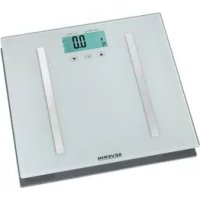
PW 7010 - Kitchen scale SEVERIN - Free user manual and instructions
Find the device manual for free PW 7010 SEVERIN in PDF.


| Product type | Kitchen scale / bathroom scale |
| Brand | Severin |
| Model | PW 7010 |
| Maximum capacity | 180 kg (396 lb / 28 st) |
| Accuracy | 0.1 kg (estimated) |
| Display | Digital screen |
| Available units | kg, lb, st |
| Power supply | 2 CR2032 3V lithium button cells |
| Number of users | Up to 10 with personal data storage |
| Main functions | Simple weighing, body fat percentage measurement, water content, muscle mass, bone mass, basal metabolic rate (BMR), BMI |
| Bioelectrical impedance measurement | Yes, via metal contacts |
| Operating temperature | 0 °C to 40 °C |
| Maximum humidity | 85% RH |
| Surface material | Glass (estimated) |
| Dimensions (estimated) | Approximately 30 x 30 cm |
| Weight (estimated) | Approximately 1.5 kg |
| Cleaning | Slightly damp soft cloth or glass cleaner |
| Warranty | 2 years against material and manufacturing defects |
| Safety | Consult a doctor if you have a pacemaker; do not exceed maximum load; use on a flat, hard surface |
| Automatic shut-off | Yes, after a few seconds |
Frequently Asked Questions - PW 7010 SEVERIN
User questions about PW 7010 SEVERIN
0 question about this device. Answer the ones you know or ask your own.
Ask a new question about this device
Download the instructions for your Kitchen scale in PDF format for free! Find your manual PW 7010 - SEVERIN and take your electronic device back in hand. On this page are published all the documents necessary for the use of your device. PW 7010 by SEVERIN.
USER MANUAL PW 7010 SEVERIN
GB Instructions for use
Before using the appliance, please read the following instructions carefully and keep this manual for future reference. The appliance must only be used by persons familiar with these instructions.
Important safety instructions
- Warning: People fitted with pacemakers should consult their doctors before using the appliance, as the pacemaker's function may be affected.
- Do not expose the unit to rough handling or jolting.
- Do not exceed the maximum load capacity of 180kg / 396 lb / 28 st. If it is exceeded, the symbol 'Err' will appear in the display.
These bathroom scales are designed for household use and are not suitable for medical or commercial applications; the unit is not officially calibrated.
Before using this unit for the first time
Open the battery compartment and remove the protective strip between the battery terminals and connectors inside the unit.
Scales adjustment
- Before the scales are used for the first time, and also every time the unit has been moved or placed on a different surface, the scales need to be re-adjusted:
- Briefly step onto the scales to activate them, and then step off again.
The display shows 0.0; the scales are ready for use once the display
disappears.
Changing the display format
- The display format can be selected in 'kg', 'lb' or 'st'. The switch for changing the display format is located underneath the unit.
To change the display format, use the key to switch the scales on, wait until the display stops flashing and then use the arrow keys (and) to select the desired format.
Display range:
5kg - 180kg
11 lb - 396 lb
0.79 - 28 st
General information
In order to get a clear indication of a particular trend development, it is essential to provide comparable measuring data. Any measurements should therefore be performed at the same time of the day, and under similar conditions.
Operation
- Position the scales on a firm and level surface. Using them on a soft, unstable or uneven surface may result in unreliable readings.
The scales are designed to produce correct readings only when the ambient temperature is between 0 and 40^ and the relative humidity below 85% .
Storing personal data
- To show correct measuring data for the body fat analysis, the data for height, weight and gender must be selected each time before any such analysis is
performed.
The scales can store the data for up to 10 persons.
Use the SET key to switch the scales on and, while the display is still flashing, select the desired person (0-9). Press the SET key to access the body data.
The gender information flashes on the display and can be selected with the arrow keys. Press the set key to confirm the input.
- The body height information flashes and can be selected with the arrow keys. Press the key to confirm the input.
The age information flashes and can be selected with the arrow keys. Press the key to confirm the input.
Measuring the level of body fat
Use the SET key to switch the scales on and, while the display is still flashing, select the desired person (0-9) and wait a moment.
- As soon as the display shows 0.0, step barefoot onto the scales. Ensure that your feet are parallel and refrain from moving. Each foot must touch one of the two metal contacts.
- Once the weight information is flashing on the display, the symbol appears, indicating that the body fat measuring is in progress. Do not step off while the process continues.
- When measuring is complete, the following data will be shown in sequential order:
weight
level of body fat
water content
- muscle content
- bone mass
- basic metabolic rate
BMI (body mass index)
If the measuring is incorrect, the indicator 'Err2' appears. If this occurs, repeat the measuring process.
Information on the evaluation of the data shown is available in the public media (internet etc).
Measuring the weight
For simple weight measuring, it is not necessary to switch on the scales via the key.
- Step onto the scales with your feet parallel. Remain standing without moving. The display will flash twice to indicate that the correct weight is displayed.
- If the weight has been measured with bare feet, certain body fat data will also be displayed after the weight information, but this may not be correct. For measuring it correctly, follow the instructions in the section Measuring the level of body fat.
The unit will switch off automatically after a few seconds.
Batteries
- If the 'Lo' symbol appears on the display, the batteries must be replaced.
- To insert or replace the batteries, open the compartment underneath the unit. When replacing the batteries, always observe the correct polarity. The symbol (+) must face upwards. Ensure that the batteries are properly seated.
- Use only 3V lithium button-cell batteries type CR2032.
During extended periods of non-use, always remove the batteries from their compartment.
Remember to protect the environment. Never dispose of old batteries in domestic garbage. Old batteries must be disposed of through the proper local special garbage collection points.
Cleaning and care
- The weighing surface may be wiped with a soft, slightly damp cloth. Special, commercially available cleaning agents for glass may also be used.
- Do not immerse the scales in water.
- Do not use any abrasives, harsh cleaning solutions or aggressive solvents for cleaning.
Disposal
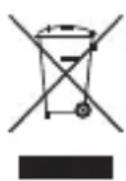
Devices marked with this symbol must be disposed of separately from your household waste, as they contain valuable materials
which can be recycled. Proper disposal protects the environment and human health. Your local authority or retailer can provide information on the matter.
Guarantee
This product is guaranteed against defects in materials and workmanship for a period of two years from the date of purchase. Under this guarantee the manufacturer undertakes to repair or replace any parts found to be defective, providing the product is returned to one of our authorised service centres. This guarantee is only valid if the appliance has been used in accordance with the instructions, and provided that it has not been modified, repaired or interfered with by any unauthorised person, or damaged through misuse.
This guarantee naturally does not cover wear and tear, nor breakables such as glass and ceramic items, bulbs etc. This guarantee does not affect your statutory rights, nor any legal rights you may have as a consumer under applicable national legislation governing the purchase of goods. If the product fails to operate and needs to be returned, pack it carefully, enclosing your name and address and the reason for return. If within the guarantee period, please also provide the guarantee card and proof of purchase.
Pèse-personne
Chere cliente, Cher client,
Kuressaare: Toomas Teder FIE, Pikk 1B,
tel: 45 55 978
Kaina: Ilmar Pauk Elektroonika FIE, Mae2S,
tel:4636379,5187444
Espana
Severin Electrodom. España S.L.
Plaza de la Almazara Portal 4, 1^ E.
45200 ILLESCAS(Toledo)
Tel: 925 51 34 05
Fax: 925 54 19 40
eMail: severin@severin.es
http://www.severin.es
France
SEVERIN France Sarl
4, rue de Thal
B.P.38
67211 OBERNAI CEDEX
Tel.: 03 88 47 62 08
Fax: 03 88 47 62 09
Greece
BERSON
C. Sarafi dis Bros. S.A.
Agamemnonos 47
176 75 Kallithea, Athens
Tel.: 0030-210 9478700
Philippines Business Center
Agias Anastasias & Laertou, Pilea
Service Post of Thermi
570 01 Thessaloniki, Greece
Tel.: 0030-2310954020
Iran
IRAN-SEVERIN KISH CO. LTD.
No.668,7th.Floor
Bahar Tower
Ave. South Bahar
TEHRAN - IRAN
Tel.: 009821-77616767
Fax:009821-77616534
Info@iranseverin.com
www.iranseverin.com
Israel
Eatay Agencies
109 Herzel St.
Haifa
Phone: 050-5358648
Email: service@severin.co.il
Italia
via Dino Col 52r-54r-56r,
I-16149 Genova
Green Number: 800240279
Tel.: 010/6451102-010418609
Fax: 010/6425009
e-mail: videoelettronica@panet.it
Jordan
F.A. Kettaneh
P.O.Box 485
Amman, 11118, Jordan
Tel: 00962-6-4398642
e-mail: app@kettaneh.com.jo
Korea
Jung Shin Electronics co., Ltd.
501, Megaventuretower 77-9,
Moonrae-Dong 3ga, Yongdeungpo-Gu
Seoul, Korea
Tel: +82-22-637 3245~7
Fax: +82-22-637 3244
Service Hotline: 080-001-0190
Latvia
SERVO Ltd.
Mr. Janis Pivovarenoks
Tel: +371 7279892
servo@apollo.lv
Lebanon
Khoury Home
7th Floor, Cité Dora 3 Building, Dora
P.O.Box 70611
Antelias, Lebanon
Telephone 01 244200, Fax 01 253535
eMail: info@khouryhome.com
Internet: www.khouryhome.com
Luxembourg
Ser-Tec
Serbia and Montenegro
tel: +381-21-524-638
tel: +381-21-553-594
fax: +381-21-522-096
Slowak Republic
PREMT,s.r.o.
Skladova 1
917 01 Trmava
Tel:033/5447177
Finland
Oy Harry Marcell Ab
Rässitie 6, PL 63
01511 Vantaa
Tel.: 00358 / 207599860
Fax: 00358 / 207599803
Svenska
Rakspecialisten HS
Mollevangsgatan 34
214 20 Malmö
Tel.: 040/12 07 70
Fax: 040/6110335
Slovenia
SEVTIS d.o.o.
Smartinska 130
1000 Ljubljana
Tel: 00386 1542 1927
Fax: 00386 1542 1926
Stand: 03.2012

- Important safety instructions
- Before using this unit for the first time
- Scales adjustment
- Changing the display format
- Display range:
- General information
- Operation
- Storing personal data
- Measuring the level of body fat
- Measuring the weight
- Batteries
- Cleaning and care
- Disposal
- Guarantee
- Pèse-personne
- Chere cliente, Cher client,
- Korea
- Latvia
- Lebanon
- Luxembourg
- Slowak Republic
- Finland
- Svenska
- Slovenia
Brand : SEVERIN
Model : PW 7010
Category : Kitchen scale