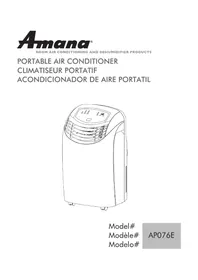
AP076E - Air Conditioning AMANA - Free user manual and instructions
Find the device manual for free AP076E AMANA in PDF.



| Product Type | Portable Air Conditioner |
| Brand | Amana |
| Model | AP076E |
| Cooling Capacity | 7,000 BTU |
| Voltage / Frequency | 115 V / 60 Hz |
| Rated Power | 850 W |
| Dimensions (L x D x H) | 435 mm x 400 mm x 770 mm |
| Net Weight | 29 kg |
| Refrigerant | R22 |
| Integrated Timer | 1 to 12 hours |
| Operating Modes | Cooling, Dehumidifier, Fan |
| Fan Speeds | High, Medium, Low |
| Air Exhaust Hose | Length 1.5 m |
| Operating Temperature Range | 16°C to 38°C |
| Dehumidification Capacity | 60 pints/day (≈ 28 L/day) |
| Filter | Washable, weekly cleaning recommended |
| Directional Casters | Yes |
| Power Supply | Wall outlet 15 A, dedicated circuit recommended |
| Safety | Grounding required, do not use extension cord |
| Warranty | 12 months parts and labor, 5 years compressor (parts) |
| User Manual | Included, 32 pages in French |
| Included Accessories | Window panel kit, exhaust hose, adapters, screws |
| Installation | In sliding window, kit included |
| Mandatory Rest Period | 3 minutes before restart after stop |
| Storage | Drain condensate water, clean filter, cover |
Frequently Asked Questions - AP076E AMANA
User questions about AP076E AMANA
0 question about this device. Answer the ones you know or ask your own.
Ask a new question about this device
Download the instructions for your Air Conditioning in PDF format for free! Find your manual AP076E - AMANA and take your electronic device back in hand. On this page are published all the documents necessary for the use of your device. AP076E by AMANA.
USER MANUAL AP076E AMANA
PORTABLE AIR CONDITIONER
CLIMATISEUR PORTATIF
Thank You for buying a dependable, energy saving and easy to operate AMANA air conditioner. This manual contains useful information for you to maintain, operate, install and safely use your air conditioner. Your air conditioner cleans, cools and dehumidifies the air in your room to provide you with the ultimate level of comfort.
Please read instructions carefully before using the product. Also, do not forget to fill out and mail the Product Registration Card.
Product Registration
Record Your Model and Serial Number.
Attach the sales receipt to this guide and keep for future reference. Model and serial number can be obtained from the serial label, which is on your air conditioner. For all your service calls during the warranty period the following information will be needed:
Model Number:
Serial Number:
Date of Purchase:
Dealer's Name:
Dealer's Address:
Dealer's Phone Number:
| TABLE | |||||
| RECEPTACLE AND FUSE TYPES | |||||
| RATED VOLTS | 125/60 250/60 | ||||
| AMPS | 15 20 15 20 | 30 | |||
| WALL OUTLET | |||||
| FUSE SIZE | 15 20*15 20° | 30 | |||
| TIME DELAY FUSE(or circuit braker) | Plug | Plug | Plug | ||
SAFETY PRECAUTIONS
WARNING: Following these basic precautions will reduce the risk of fire, electrical

shock, injury or death when using your air conditioner.
1) Air conditioner must be connected to proper electrical outlet with the correct electrical supply. (see table previous page)
2) Proper grounding must be ensured to reduce the risk of shock and fire. DO NOT CUT OR REMOVE THE GROUNDING PRONG. If you do not have a three-prong electric receptacle outlet in the wall, have a certified electrician install the proper receptacle. The wall receptacle MUST be properly grounded.
3) Do not operate air conditioner if power cord is frayed or otherwise damaged. Also avoid using it if there are cracks or abrasion damage along the length, plug connector or if the unit malfunctions or is damaged in any manner. Contact an authorized service for examination, repairs or adjustments.
4) DO NOT USE AN ADAPTER OR AN EXTENSION CORD.
5) Do not block airflow around the air conditioner. Also the exhaust hose should be free of any obstructions.
6) Always unplug the air conditioner before servicing it or moving it.
7) Do not install or use the air conditioner in any area where the atmosphere contains combustible gases or where the atmosphere is oily or sulphurous. Avoid any chemicals coming in contact with your air conditioner.
8) Do not place any object on the top of the unit.
9) Never operate the air conditioner without the filters in place.
10) Do not use the air conditioners near a bathtub, shower or wash basin.
SAVE THESE INSTRUCTIONS
Table Of Contents
Page
A Word From Amana 1
Product Registration 1
Safety Precautions 2
Advantages 3
Parts and Features 4
Assembly and Installation 5
Operation 6-7
Product Specification 8
Care and Cleaning 8
Storage 8
Trouble Shooting 9
Warranty Information 10
Advantages of this Model
- This model is easy to operate. The electronic control panel has a timer, thermostat, three cooling speeds, three fan speeds and one speed dehumidification function (dry).
- The unit has a unique design which evaporates the water. Therefore no condensation tank is necessary, thus avoiding you to have to wake up in the middle of the night to empty the bucket and turn on the unit.
- Easy to install window kit is included, which consists of the exhaust hose, 2 hose adapters, the window panel kit and window panel adapter.
- Full directional casters are included to help the unit to be moved in almost any area.
- The filter screen is designed for easy accessibility of the filter.
- Portable air conditioners are easy to store when not in use.
Parts and Features
- Control Panel
- Air Deflector (Left-Right)
- Front Panel
- Handle Hole
- Castor
- Screen Filter
- Air Intake (Evaporator)
- Air Outlet (Heat Exchange)
- Air Intake (Condenser)
- Power Supply Cord
- Water Drain
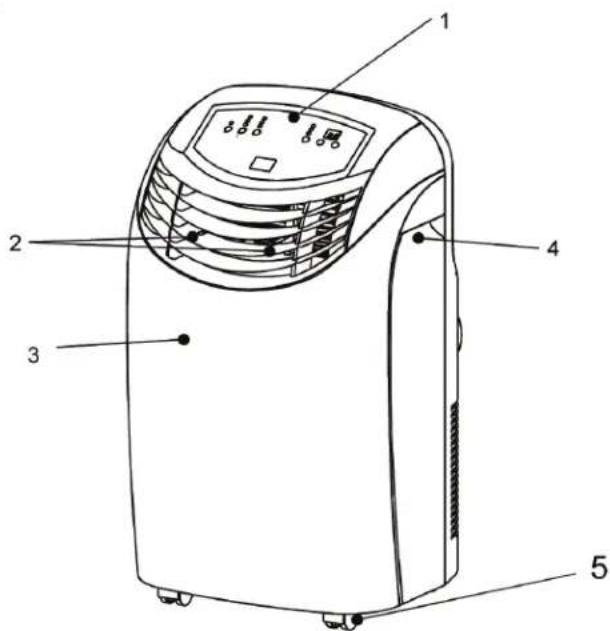
Front
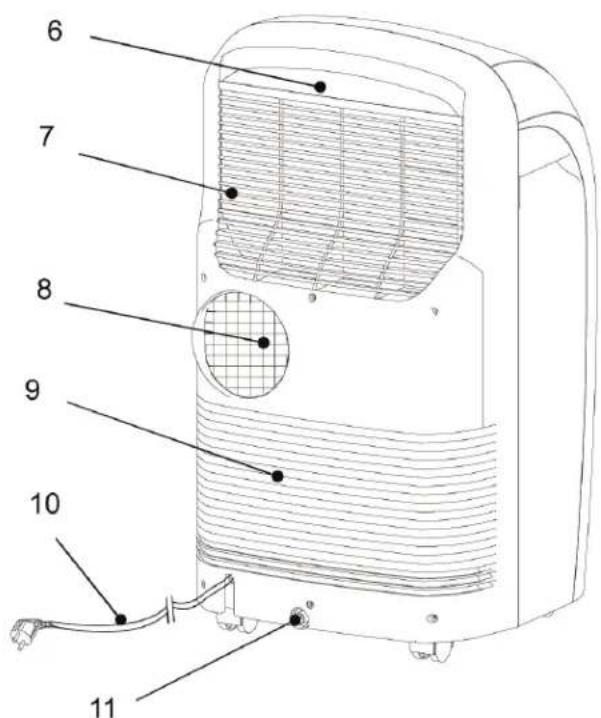
Rear
Assembly and Installation
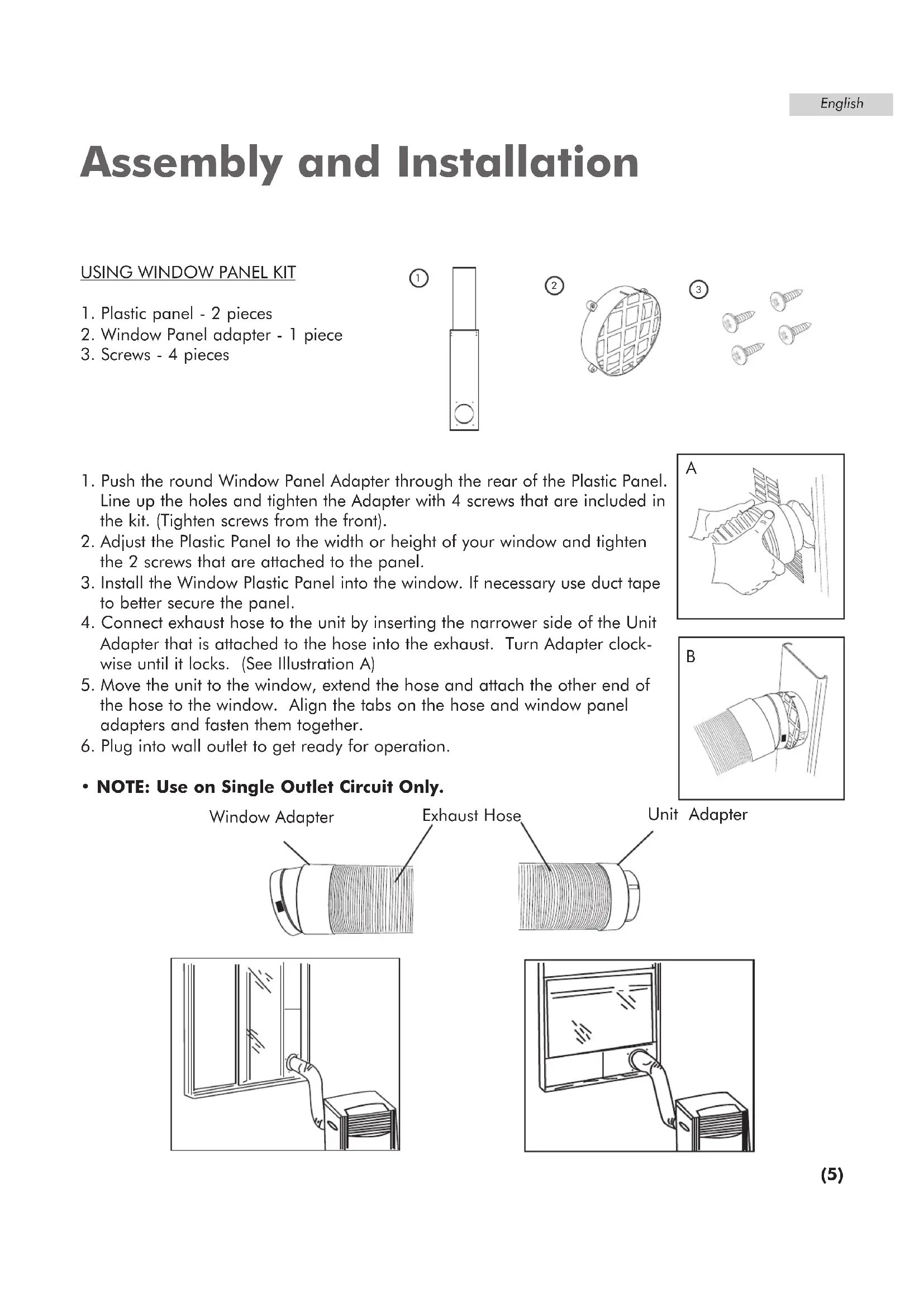
USING WINDOW PANEL KIT
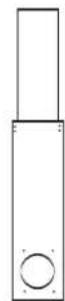
- Plastic panel - 2 pieces
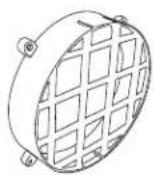
- Window Panel adapter - 1 piece
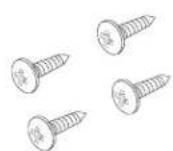
- Screws - 4 pieces
①
2
3
- Push the round Window Panel Adapter through the rear of the Plastic Panel. Line up the holes and tighten the Adapter with 4 screws that are included in the kit. (Tighten screws from the front).
- Adjust the Plastic Panel to the width or height of your window and tighten the 2 screws that are attached to the panel.
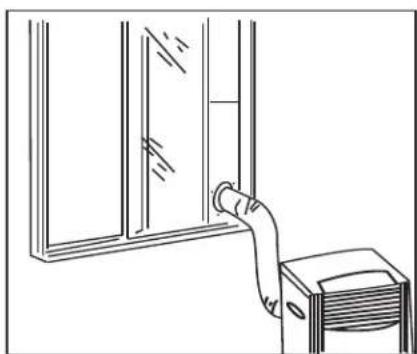
- Install the Window Plastic Panel into the window. If necessary use duct tape to better secure the panel.
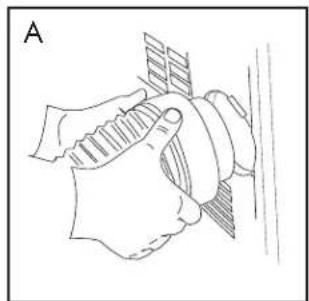
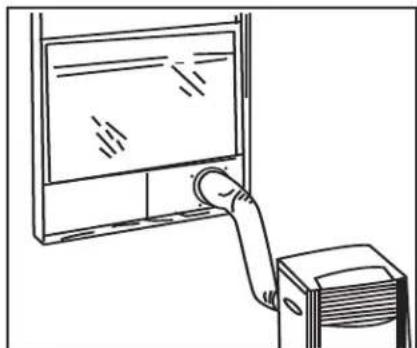
- Connect exhaust hose to the unit by inserting the narrower side of the Unit Adapter that is attached to the hose into the exhaust. Turn Adapter clockwise until it locks. (See Illustration A)
- Move the unit to the window, extend the hose and attach the other end of the hose to the window. Align the tabs on the hose and window panel adapters and fasten them together.
- Plug into wall outlet to get ready for operation.
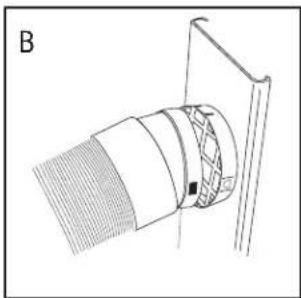
- NOTE: Use on Single Outlet Circuit Only.
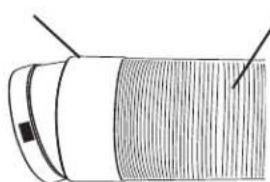
Window Adapter
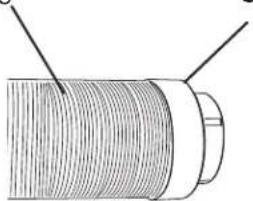
Exhaust Hose
Unit Adapter
Operation Control Panel
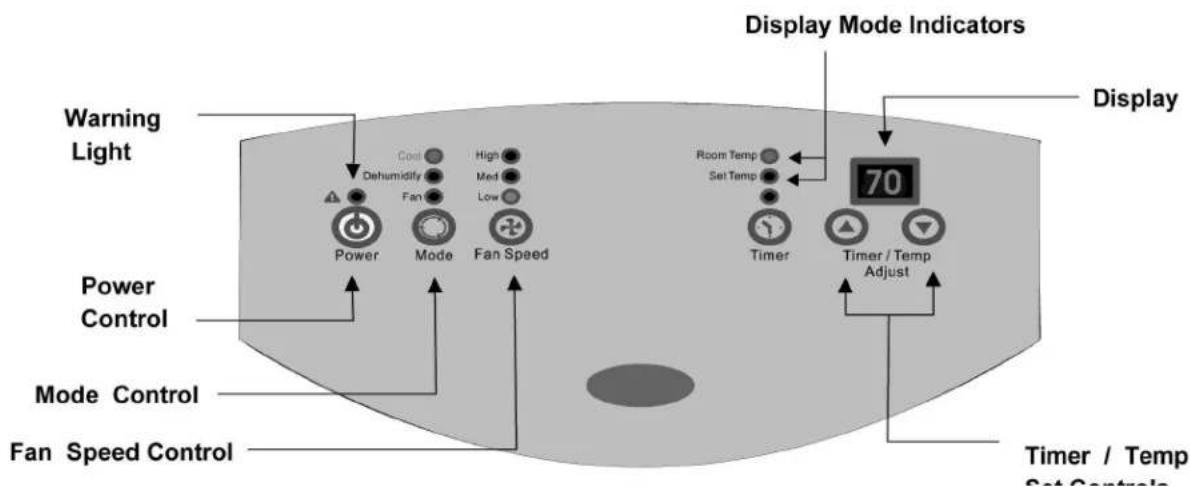
Power Control
The power control turns the unit on and off.
Warning Light
Condensed water may accumulate in the unit. If the internal tank becomes full, the Warring Light will shine and the unit will not operate until the unit has been drained.
Mode Control
The Mode Control has three settings:
Cool Dehumidify Fan
The settings are adjusted with Mode Control button. A light will indicate which setting is currently being used.
Cool Mode
When cool mode is selected, the indicator light will shine green. During the cooling mode the air is cooled and hod air is exhausted to the outside air through the exhaust tube. Adjust fan speed air through the temperature to suit your desired comfort level.
Note: The air exchange hoses must vent outside the room when using cool Mode.
Dehumidify Mode
When Dehumidify mode is selected, the indicator light will shine orange. Air is dehumidified as it passes through the unit, without being in full cooling mode. The fan will operate in Medium speed. Fan speed is not adjustable in Dehumidify mode.
Fan Mode
When Fan mode is selected the indicator light will shine yellow. Air is circulated throughout the room with no cooling.
Note: unit does not need to be vented in Fan mode.
Fan Speed Control
The Fan Speed Control has 3 settings:
High Medium Low
Timer Control
Auto turn off : With machine in fan mode, press timer button to select number of hours you would like the unit to run in air conditioning mode until it automatically shuts off.
Auto turn on : With machine powered off, press timer button to select number of hours until you would like the unit to automatically start running in air conditioning mode
Timer / Timer set Controls
Used for adjusting the timer and thermostat. The default display is room temperature. In cooling mode, When "A" or "Y" button is pressed, the set temperature is displayed and may be adjusted. After 15 seconds the display will revert back to room temperature. Temperature is only adjustable in Cool and Heat mode. The time is adjustable between 1 and 12 hours.
Note: By pressing both Temp/Timer Set buttons at the same time, the display will toggle between Celsius and Fahrenheit.
Operation
NOTE: Wait for 24 hours to turn on air conditioner if the unit has been tilted for any reason. This is for the oils and the coolants to settle and level off.
- After a normal shut down wait for 3 minutes before restarting the unit so as to complete the compressor cycle.
- Use an 115v/15 amp outlet for the air conditioner. Do not use any other electrical appliances on this line or you may trip the fuse. Use a dedicated line for this air conditioner.
- Do not place the air conditioner in direct sunlight or close to any heating appliances (eg. baseboard heaters, stoves, etc).
- Operate on a flat surface only.
- Keep the unit free of any obstructions such as drapes, curtains, blinds, etc.
- Keep unit at least 1 foot away from the wall.
- Check and clean the filter once every week for highest efficiency.
NOTE: Do not use unit without filter.
- If the unit is not being used for a long period of time, remove the plug from the water drain pipe and drain out any condensed water.
When turning on the unit for the first time after plugging it into an electrical outlet, the unit will start in a low fan cool mode. The temperature reading out on the LED will be the current room temperature. When turning on the unit during regular usage, it will remember the last shut off setting. If you want to operate the air conditioner as a dehumidifier, then adjust to dry mode.
Setting The Temperature
To set the temperature, press the + or the - key to raise or lower the temperature. The temperature can be raised or lowered in the cool or dry mode. The temperature cannot be adjusted in the fan mode.
Fan Speeds
There are 3 adjustable speeds in the cool and fan mode: Low, Medium & High. In the dry or dehumidification mode the fan will only operate at low speed.
On/Off Time Set
The air conditioner has a 1-12 hour on/off built-in timer. To delay the start time for 1-12 hours at 1 hour intervals, simply press the time/set key and then press the + or - key to adjust the start time. Note that the unit has to be plugged in to an electrical outlet for the timer to operate.
To automatically shut-off the unit, press the time/set key while the unit is running and then press the + or - key to adjust the shut-off time. The auto shut-off switch operates in all 3 modes: Cool, Dry & Fan.
NOTE: The temperature can be set between 60^ to 89^ .
Product Specification
| Voltage and Frequency 115V / 60Hz | |
| Input Power 850 W | |
| Cooling Capacity 7000 BTU | |
| Moisture Removal (pints/day) 60 | |
| Coolant R22 | |
| Timer 12 Hours | |
| Operating Temperature Range 64°F | - 100°F |
| Unit Dimensions (WxDxH) (inches) 1 | 3/32 x 15 3/4 x 30 5/16 |
| Net Weight lbs. approximate 66 lbs. | |
| Exhaust Hose 5 Feet | |
Care and Cleaning Guide
- Always unplug your air conditioner before cleaning.
- Air filter needs to be cleaned at least once a week for your unit to operate at optimum efficiency. Slide out the filter from the back by pulling on the tab. The filter may be washed or vacuumed. Remove the excess water from the filter by gently shaking the filter. This will remove dust and particles trapped in the filter. After cleaning, reinstall the filter. DO NOT use your air conditioner without the air filter in place.
- To clean the cabinet, DO NOT use harsh chemicals, abrasives, ammonia, chlorine, bleach, concentrated detergents, solvents or metal scouring pads. Some of these chemicals may dissolve, damage and/or discolor your air conditioner.
- Always use a soft cloth dampened with water or a mild soap and water solution to wipe the front of the cabinet. Wipe dry with a soft cloth.
Storage
- To store your air conditioner when not being used for a long period of time, drain condensed water using the drain pipe. Remove exhaust hose, clean the filters, cover with plastic bag and store away.
Trouble-Shooting
If air conditioner does not operate:
- Check if unit is plugged in. The plug may have come loose.
- Check if the electrical wall receptacle is of proper voltage.
- Check if the circuit breaker needs to be reset or if the fuse needs to be replaced.
- Check if the unit is in "Off" mode.
- If the warning light is on, drain the water drain pipe by removing the plug.
Air conditioner working but room not cooling:
- Room may have appliances that produce heat. Use an exhaust fan to remove excess heat.
- Check exhaust hose for proper installation.
- Redirect the airflow. Remove any obstacles.
- All doors and windows need to be closed so that cool air does not escape the room.
Air filter may be blocked or may need cleaning. - Unit BTU may be too low for the required cooling area.
- On extremely hot & humid days, air conditioners may take a little longer to cool.
- Drain the water drain pipe by removing the plug.
- Unit may be in fan or dry mode. Put air conditioner in cool mode.
This warranty covers all defects in workmanship or material for:
- The mechanical and electrical parts (including labor costs) contained in this Amana product, for a period of 12 months from the date of purchase. (For commercial or rental application the warranty is 90 days.)
- The sealed system and compressor contained in this Amana product is for a period of 5 years, from the date of purchase (excluding labor costs after the initial 12 month period). In commercial or rental use, the additional limited compressor warranty is for 1 year and 9 months, (excluding labor costs after the initial 90 days period).
You must keep and be able to provide your original sales receipt as proof of the date of purchase.
Who is covered?
The original retail purchaser of this Amana product.
What will be done?
Amana will repair or replace any mechanical, electrical part or the compressor, which proves defective in normal household, use for a period of 12 months. Amana will repair or replace (excluding labor costs) the sealed system and compressor (parts only) for an additional 4 year period.
How can you get service?
- Contact your nearest manufacturer authorized Service Depot. For the name of the Service Depot nearest you, contact Amana Room Air Conditioners at 1-888-842-2440
- All service must be performed by a manufacturer authorized Amana Service Depot.
THIS WARRANTY COVERS UNITS WITHIN THE CONTINENTAL UNITED STATES, CANADA AND PUERTO RICO.
THIS WARRANTY DOES NOT COVER:
Damages from improper installation.
Damages in shipping.
Damages from misuse, abuse, accident, alteration, lack of proper care and maintenance.
Damages from service by other than an authorized dealer or service center.
Labor, service, transportation and shipping charges for the removal of defective parts and installation of replacement parts beyond the initial 12-month period.
THIS LIMITED WARRANTY IS GIVEN IN LIEU OF ALL OTHER WARRANTYES, EXPRESS OR IMPLIED, INCLUDING THE WARRANTYES OF MERCHANTABILITY AND FITNESS FOR A PARTICULAR PURPOSE.
The remedy provided in this warranty is exclusive and is granted in lieu of all other remedies. This warranty does not cover incidental or consequential damages. Some states do not allow the exclusion of incidental or consequential damages, so this limitation may not apply to you. Some states do not allow limitations on how long an implied warranty lasts, so this limitation may not apply to you. This warranty gives you specific legal rights and you may also have other rights, which vary from state to state.
For more information on this and other Amana products, call Customer Affairs Department at: 1-888-842-2440
CONSUMER INFORMATION LINE Amana Toll-Free
1-888-842-2440
Un mot de Amana
Addressed u negotiant:
Numeros de telephone du negotiant:
Comment receivevoir le service?
CETTE GARANTIE NE COUVRE PAS:
For more information on this and other Amana products, call Customer Affairs Department at: 1-888-842-2440
CONSUMER INFORMATION LINE Amana Toll-Free
1-888-842-2440
Palabras de Amana
For more information on this and other Amana products, call Customer Affairs Department at: 1-888-842-2440
CONSUMER INFORMATION LINE Amana Toll-Free
1-888-842-2440
IMPORTANT
Do Not Return This Product To The Store
If you have a problem with this product, please contact the
"Customer Information Line" at 1-888-842-2440.
DATED PROOF OF PURCHASE, MODEL # AND SERIAL # REQUIRED FOR WARRANTY SERVICE
IMPORTANT
Amana is a registered trademark
of the Maytag Corporation
and is used under license to Haier America.
Made in China
Fabrique en China
Hecho en China
Amana®
ROOM AIR CONDITIONING AND DEHUMIDIFIER PRODUCTS