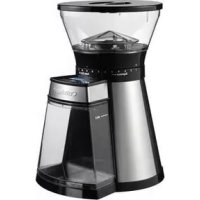
DBM18E - Coffee grinder CUISINART - Free user manual and instructions
Find the device manual for free DBM18E CUISINART in PDF.



| Product type | Programmable coffee grinder |
| Brand | Cuisinart |
| Model | DBM18E |
| Power supply | 220-240 V ~ 50 Hz |
| Bean hopper capacity | 250 g |
| Programmable cup count | 1 to 14 cups |
| Grind settings | 18 settings, from 1 (fine) to 18 (coarse) |
| Burr type | Conical burr |
| Display | LCD with settings display |
| Functions | Cup count programming, manual cycle, pause/cancel |
| Safety | Safety lock if hoppers are mispositioned |
| Motor protection | Automatic shutdown in case of overheating (HHH display) |
| Cleaning | Removable parts dishwasher safe (top rack) |
| Cord storage | Yes, under the base |
| Use | Household use only |
Frequently Asked Questions - DBM18E CUISINART
User questions about DBM18E CUISINART
0 question about this device. Answer the ones you know or ask your own.
Ask a new question about this device
Download the instructions for your Coffee grinder in PDF format for free! Find your manual DBM18E - CUISINART and take your electronic device back in hand. On this page are published all the documents necessary for the use of your device. DBM18E by CUISINART.
USER MANUAL DBM18E CUISINART
natural_image
Top-down view of a modern kitchen grater with digital display and control buttons (no visible text or symbols)Cuisinart®
natural_image
Exterior view of a modern glass coffee maker with black and silver casing (no text or symbols visible)natural_image
Black and white photo of a Guissilmon brand coffee maker with open lid and scattered beans nearby (no visible text or symbols on the device itself)SOMMAIRE
A. Assembling the appliance 12
B. Dismantling....12
C. Using the product....12
D. Pause or cancel grinding 13
E. Manual grind....13
- Cleaning and maintenance....14
INHALTSVERZEICHNIS
Use this appliance to grind roasted coffee beans only and according to the instructions in this manual.

- CAUTION: The polythene bags around the product or packaging may be dangerous. To avoid the risk of suffocation, keep away from babies and children. These bags are not toys.
- Use this appliance with Cuisinart® accessories only.
- Do not immerse the appliance base in water or any other liquid.
- Never place the appliance on or near a heat source.
- Never touch the moving parts when using the appliance.
- Before using, check that there are no foreign bodies in the bean hopper.
- Only use the unit to grind roasted coffee beans. Grinding other foods like hazelnuts, spices or beans that have not been roasted may damage the burrs and cause damage to or reduce the efficiency of the appliance.
- Unplug the appliance after using, before assembling or dismantling, before removing food and before cleaning. Never leave the appliance unattended when plugged in. To unplug, pull on the plug, never the lead.
- Never let the lead hang over the edge of your work surface, and never let it come in contact with hot surfaces.
- Do not use the appliance if the lead is damaged or if the appliance has fallen or appears damaged.
- If the power cable is damaged, it should be replaced by the manufacturer, its after-sales service or a similarly qualified professional to avoid danger.
- Do not attempt to repair the appliance yourself.
- The appliance shall not be used by children. Keep the appliance and its cord out of reach of children.
- Appliances can be used by persons with reduced physical, sensory or mental
capabilities or lack of experience and knowledge if they have been given supervision or instruction concerning use of the appliance in a safe way and understand the hazards involved.
• Children shall not play with the appliance.
- Not for use outdoors.
- For household use only.
Electrical and electronic equipment at the end of life.
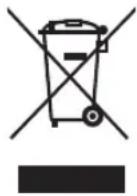
In everybody's interest and to participate actively in protecting the environment:
- Do not discard these products with your household waste.
- Use return and collection systems available in your country.
Some materials can in this way be recycled or recovered.
1. INTRODUCTION
Congratulations on your purchase!
For over 30 years, Cuisinart ^® has been developing a full range of kitchen appliances that lets both passionate amateurs and great chefs express their creativity to the fullest.
All Cuisinart® appliances are the result of close collaboration between engineers and great names in Cookery like Paul Bocuse, the brand's charismatic ambassador. Every product combines sturdiness, innovation, performance and ergonomics.
Made with professional materials like brushed stainless steel, our products will easily fit into any kitchen thanks to their simple and elegant design.
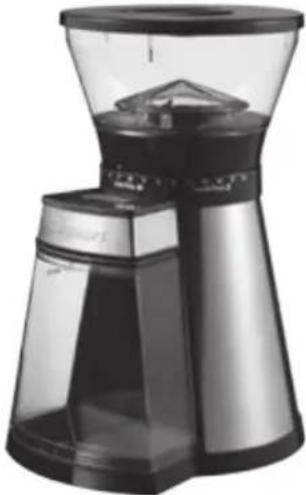
2. PRODUCT FEATURES
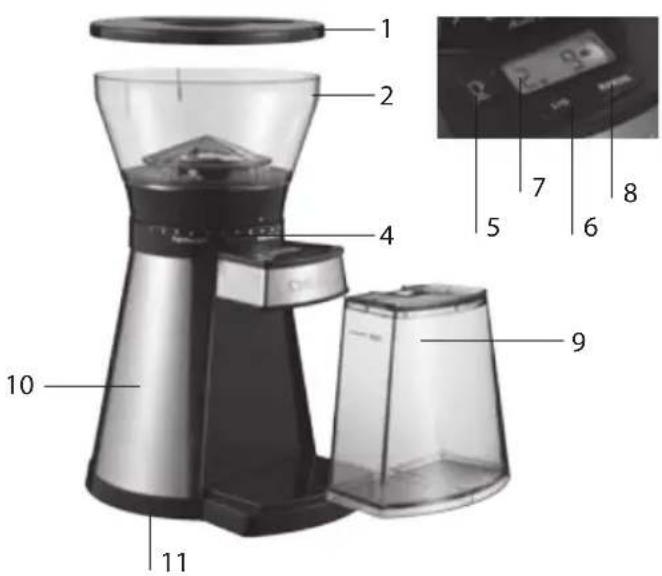
-
Lid
-
Bean hopper
-
Conical burr grinder (not shown)
-
18-setting grind selector
-
Cup selector
-
Start/Stop button
-
LCD screen
-
Manual button
-
Grind chamber with lid
-
Motor base
-
Lead storage
3. USE
A. ASSEMBLING THE APPLIANCE
- Install the bean hopper onto the appliance base by aligning the two notches then turning it clockwise to lock in place.
- Place the lid on the hopper.
- Place the lid on the grind chamber then insert the chamber its position in the base of the appliance.
B. DISMANTLING
- Make sure the bean hopper is empty. Pull it out by turning counter-clockwise. Align the notches and lift.
- Remove the grind chamber by pulling it towards you.
C. USING THE PRODUCT
- Remove the lid from the bean hopper.
- Fill this hopper ensuring that the lid can close securely without forcing. The maximum capacity is 250 g. Nevertheless, make sure you add enough beans to obtain the desired amount of coffee.
- Plug the lead into the mains.
- Select the grind setting by turning the hopper to the desired setting. The higher the number, the coarser the grind. Use 1-6 for espresso, 7-12 for a classic filter coffee machine and 13-18 for a French press. Your selection will be displayed on the LCD screen.
- Select the cup setting: Press the cup selector repeatedly until the desired number appears on the LCD screen. You can choose between 1 and 14 cups. Keep the button pressed to scroll through the numbers more quickly.
- Press the "Start/Stop" button to start grinding.
Notes:
- A safety locking system prevents the appliance from starting when the hopper and grind chamber are not properly secured.
- If the grind chamber is too full, the grind might block the chute. If this is the case, the unit will not work and the LCD screen will flash. To clear the chute, clean it using a brush specifically designed for this purpose.
- If the grinder stops during a cycle and “HHH” appears on the LCD screen, it is likely that the motor has overheated. Allow the unit to cool for 30 minutes. Check that “HHH” is no longer displayed on the LCD screen and start the unit again.
-
The grinder will stop automatically when the amount of coffee beans selected is ground.
-
Pull the grind chamber toward you to remove from the unit.
D. PAUSE OR CANCEL GRINDING
a. To pause the grinding, press "Start/Stop". The grinder will stop and the countdown timer will start to flash. Press "Start/Stop" again to resume.
Note: The unit will stay in pause for up to 5 minutes before cancelling the grind.
b. To cancel the grind, hold "Start/Stop" for 2 to 3 seconds.
E. MANUAL GRIND
After selecting your grind setting, you can also opt to control how much coffee the unit will grind. To do so, follow steps 1 to 4 in section 3C, then press and hold the manual button until the desired amount of coffee has been ground. The LCD screen will display "M".
NOTE: To prevent overflow when using the manual feature, the grinder will automatically stop grinding when the maximum capacity has been reached.
4. CLEANING AND MAINTENANCE
You can leave your appliance on the worktop of your kitchen. Disconnect it when not in use. All removable parts are dishwasher safe on the top rack. Do not put parts on bottom shelf.
To clean the motor base, use a sponge soaked in soft detergent. Do not use abrasive sponges. Use a brush specifically designed for this purpose to clean grind release area.
SICHERHEITSHINWEISE




Brand : CUISINART
Model : DBM18E
Category : Coffee grinder