
DBM-T10 - Coffee grinder CUISINART - Free user manual and instructions
Find the device manual for free DBM-T10 CUISINART in PDF.


| Product Type | Coffee Grinder |
| Brand | Cuisinart |
| Model | DBM-T10 |
| Dimensions (L x W x H) | 11.2 x 7.6 x 7.2 inches (28.4 x 19.3 x 18.3 cm) |
| Weight | 5.8 lbs (2.63 kg) |
| Power Supply | 120 V ~ 60 Hz, 150 W |
| Grinding Method | Conical Burr Grinder |
| Grind Settings | 18 settings (from fine to coarse) |
| Bean Hopper Capacity | 8 oz (227 g) |
| Ground Coffee Container Capacity | 4 oz (113 g) |
| Number of Cups Capacity | Up to 32 cups (based on 2 tbsp per cup) |
| Automatic Shutoff | Yes, grinder stops when container is full |
| Removable Hopper | Yes, for easy cleaning |
| Burr Material | Stainless steel conical burrs |
| Housing Material | Brushed stainless steel and plastic |
| Cleaning Brush Included | Yes |
| Dishwasher Safe Parts | Removable hopper and ground coffee container (top rack) |
| Safety Features | Motor overload protection; safety interlock if hopper is not properly attached |
| Spare Parts Availability | Burr set, hopper, and container available from Cuisinart |
| Repairability | Burr replacement possible; other repairs by qualified technician recommended |
Frequently Asked Questions - DBM-T10 CUISINART
User questions about DBM-T10 CUISINART
0 question about this device. Answer the ones you know or ask your own.
Ask a new question about this device
Download the instructions for your Coffee grinder in PDF format for free! Find your manual DBM-T10 - CUISINART and take your electronic device back in hand. On this page are published all the documents necessary for the use of your device. DBM-T10 by CUISINART.
USER MANUAL DBM-T10 CUISINART
For your safety and continued enjoyment of this product, always read the instruction book carefully before using.
IMPORTANT SAFEGUARDS
When using electrical appliances, basic safety precautions should always be followed, including the following:
-
Read all instructions.
-
Unplug from the outlet when not in use, before assembling or disassembling parts and before cleaning. To unplug, grasp the plug and pull from the outlet. Never pull from the power cord.
-
To protect against risk of electric shock, do not immerse cord, plug or grinder in water or other liquids.
-
This appliance is not intended for use by persons (including children) with reduced physical, sensory, or mental capabilities, or lack of experience and knowledge, unless they are closely supervised and instructed concerning use of the appliance by a person responsible for their safety. Close supervision is necessary when any appliance is used by or near children. Children should be supervised to ensure that they do not play with the appliance.
-
Avoid contact with moving parts.
-
Do not operate any appliance with a damaged cord or plug or after the appliance malfunctions, or is dropped or damaged in any manner. Contact the manufacturer at their customer service telephone number for information on examination, repair, or adjustment.
-
The use of attachments not recommended or sold by Cuisinart may cause fire, electric shock, or risk of injury.
-
Do not use outdoors.
-
Do not let cord hang over edge of table or counter, or touch hot surfaces.
-
Before using, check hopper for presence of foreign objects.
-
Use this appliance to grind roasted coffee beans only. Grinding other substances, such as nuts, spices or unroasted beans, may dull the blade and cause poor grinding or injury.
-
Do not use appliance for other than it's intended use.
-
Do not place this appliance on or near a hot gas or electric burner, or in a heated oven.
-
Do not operate your appliance in an appliance garage or under a wall cabinet. When storing in an appliance garage, always unplug the unit from the electrical outlet. Not doing so could create a risk of fire, especially if the appliance touches the walls of the garage or the door touches the unit as it closes.
SAVE THESE INSTRUCTIONS FOR HOUSEHOLD USE ONLY
NOTICE
This appliance has a polarized plug (one blade is wider than the other). To reduce the risk of electric shock, this plug will fit in a polarized outlet only one way. If the plug does not fit fully in the outlet, reverse the plug. If it still does not fit, contact a qualified electrician. Do not modify the plug in any way.
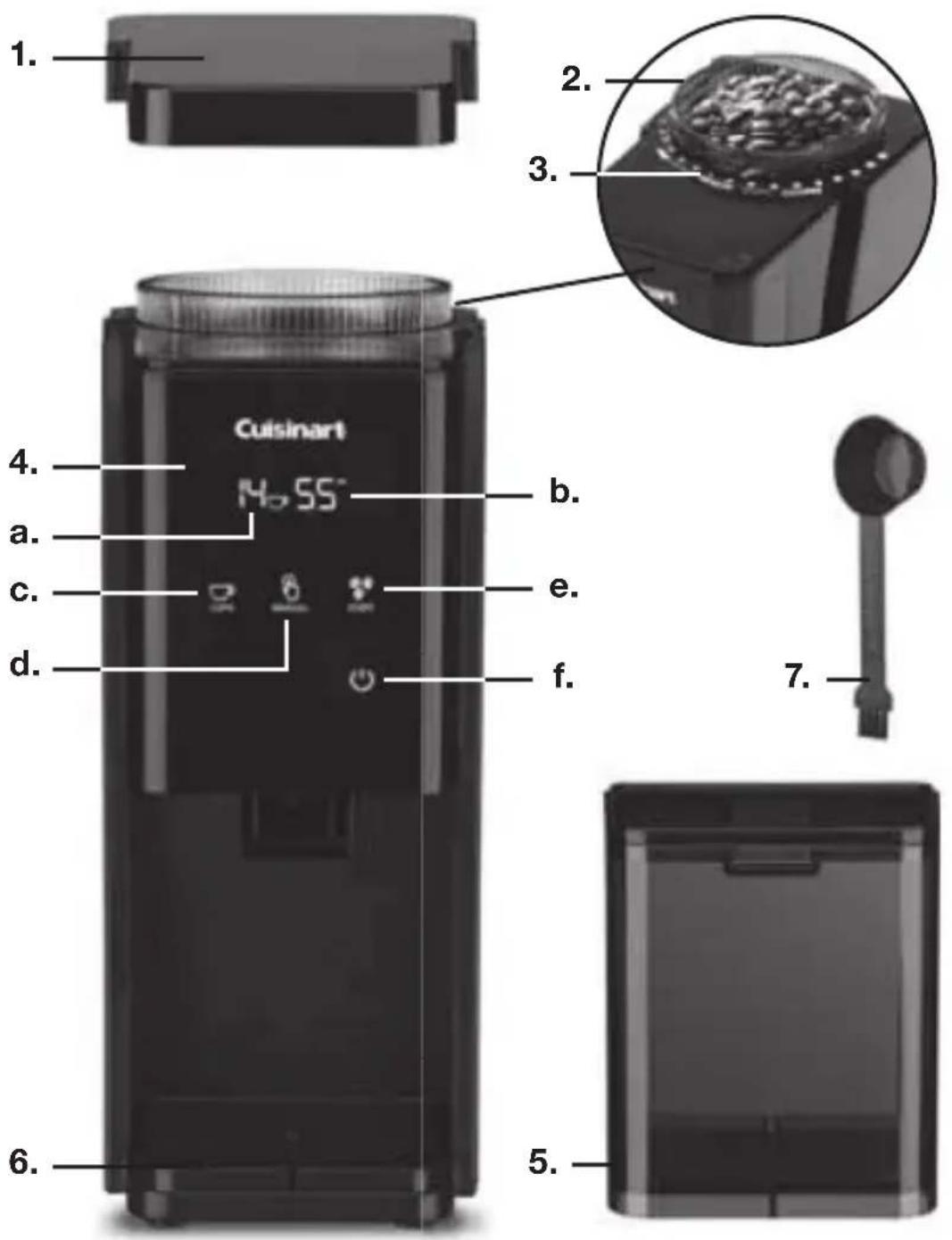
- Hopper Lid
- Bean Hopper
a. with Burr Grinder Attached (not shown)
- Grind Selector
- Control Panel with LCD Display
a. Number of Cups
b. Countdown Timer
c. Cup Selector
d. Manual Icon
e. Start Icon
f. Power Icon
- Grind Chamber with Lid
- Cord Storage (not shown)
- Scoop Brush
INTRODUCTION
The next generation of coffee grinders has arrived to deliver the new standard in home-ground coffee! The burr grinds the beans with precise uniformity while maintaining the full flavor of the coffee bean. Whether you're using a French Press, Auto Drip or Espresso machine, you'll always start with the best, most precise ingredients. This grinder is fully automated – just choose your grind setting and number of cups, touch Start, and the LCD with countdown timer lets you know how soon you'll have your perfectly ground coffee!
OPERATING INSTRUCTIONS
- Remove bean hopper lid.
- Fill bean hopper, making sure that the lid closes securely. Maximum bean capacity is 8 oz. Be sure you have enough beans to grind your desired amount of coffee.
- Select grind setting – turn the hopper to the desired setting. The higher the number, the coarser the grind. Use 1–6 for Espresso, 7–12 for Auto Drip, 13–18 for French Press.
- Plug cord into outlet. Touch the power icon to illuminate the touchscreen.
- Select cup setting – press the cup selector icon repeatedly until your desired number of cups is displayed on the LCD, from 1 to 14 cups. Press and hold the icon to scroll through the numbers quickly.
- Touch the Start icon to begin grinding. A safety interlock system prevents the unit from operating unless the hopper and grind chamber are properly in place.
- Grinding will automatically stop upon completion.
NOTE: To cancel operation during use, touch the Start or Power icon. The grinder will stop and the display will return to the selection screen.
- Pull the grind chamber toward you to remove from unit.
NOTE: If the grind chamber is overfilled, the chute can get clogged and the unit will not work. To unclog, use the scoop brush to clear out the chute of excess grounds. Should the grinder stop at any point, the motor has likely overheated. Wait for your grinder to cool off (up to 30 minutes), then resume use.
MANUAL GRIND
If you prefer, after selecting your grind setting, you have the option of manually controlling how much coffee the unit will grind. To do so, follow steps 1–4 on previous page. Then press and hold the manual icon until the desired amount of coffee has been ground. The LCD will display the number of cups dispensed.
NOTE: To avoid overflow when using the manual feature, the grinder will automatically stop grinding when the maximum capacity has been reached.
CLEANING/MAINTENANCE INSTRUCTIONS
- Be sure plug has been removed from outlet.
- Beans can be removed from the hopper by lifting off the lid and pouring excess beans out. Hold down the Manual icon to clean out any remaining beans.
3 The bean hopper lid, grind chamber, and grind chamber lid can be washed by hand with hot, soapy water or placed in the top shelf of a dishwasher. Dry thoroughly. - To remove the bean hopper for easy cleaning, simply remove beans, then turn the hopper counterclockwise to unscrew and lift out.
- Use the brush to remove grinds or wash by hand. Replace the burr grinder onto the unit and rotate until the piece is fully inserted.
NOTE: The hopper will not attach to the unit if the grinder has not been fully inserted.
- Wipe body of grinder with a damp cloth.
WARNING: Never immerse unit in water.
Maintenance
Any other servicing or maintenance should be performed by an authorized service representative.
WARRANTY
Limited 18-Month Warranty (U.S. and Canada only)
This warranty is available to U.S. consumers only. You are a consumer if you own a Cuisinart ^® Touchscreen Burr Grinder that was purchased at retail for personal, family or household use. Except as otherwise required under applicable law, this warranty is not available to retailers or other commercial purchasers or owners. We warrant that your Cuisinart ^® Touchscreen Burr Grinder will be free of defects in materials and workmanship under normal home use for 18 months from the date of original purchase.
We recommend that you visit our website, www.cuisinart.com for a fast, efficient way to complete your product registration. However, product registration does not eliminate the need for the consumer to maintain the original proof of purchase in order to obtain the warranty benefits. In the event that you do not have proof of purchase date, the purchase date for purposes of this warranty will be the date of manufacture.
CALIFORNIA RESIDENTS ONLY
California law provides that for In-Warranty Service, California residents have the option of returning a nonconforming product (A) to the store where it was purchased or (B) to another retail store that sells Cuisinart products of the same type. The retail store shall then, according to its preference, either repair the product, refer the consumer to an independent repair facility, replace the product, or refund the purchase price less the amount directly attributable to the consumer's prior usage of the product. If neither of the above two options results in the appropriate relief to the consumer, the consumer may then take the product to an independent repair facility, if service or repair can be economically accomplished. Cuisinart and not the consumer will be responsible for the reasonable cost of such service, repair, replacement, or refund for nonconforming products under warranty. California residents may also, according to their preference, return nonconforming products directly to Cuisinart for repair or, if necessary, replacement by calling our Consumer Service Center toll-free at 800-726-0190. Cuisinart will be responsible for the cost of the repair, replacement,
and shipping and handling for such nonconforming products under warranty.
HASSLE-FREE REPLACEMENT WARRANTY
Your ultimate satisfaction in Cuisinart products is our goal, so if your Cuisinart ^® Touchscreen Burr Grinder should fail within the generous warranty period, we will repair it or, if necessary, replace it at no cost to you. To obtain a return shipping label, email us
at https://www.cuisinart.com/customer-care/product-return. Or call our toll-free customer service department at 1-800-726-0190 to speak with a representative.
Your Cuisinart ^® Touchscreen Burr Grinder has been manufactured to the strictest specifications and has been designed for use only in 120-volt outlets and only with authorized accessories and replacement parts. This warranty expressly excludes any defects or damages caused by attempted use of this unit with a converter, as well as use with accessories, replacement parts or repair service other than those authorized by Cuisinart. This warranty does not cover any damage caused by accident, misuse, shipment or other than ordinary household use. This warranty excludes all incidental or consequential damages. Some states do not allow the exclusion or limitation of these damages, so these exclusions may not apply to you. You may also have other rights, which vary from state to state.
Important: If the nonconforming product is to be serviced by someone other than Cuisinart's Authorized Service Center, please remind the servicer to call our Consumer Service Center at 1-800-726-0190 to ensure that the problem is properly diagnosed, the product is serviced with the correct parts, and to ensure that the product is still under warranty.
NOTES
Cuisinart®

East Windsor, NJ 08520
Impreso en China
19CE062897
IB-16414-ESP



- IMPORTANT SAFEGUARDS
- SAVE THESE INSTRUCTIONS FOR HOUSEHOLD USE ONLY
- NOTICE
- INTRODUCTION
- OPERATING INSTRUCTIONS
- MANUAL GRIND
- CLEANING/MAINTENANCE INSTRUCTIONS
- Maintenance
- WARRANTY
- Limited 18-Month Warranty (U.S. and Canada only)
- CALIFORNIA RESIDENTS ONLY
- HASSLE-FREE REPLACEMENT WARRANTY
- NOTES
- Cuisinart®
Brand : CUISINART
Model : DBM-T10
Category : Coffee grinder