Noblesse - Fridge V-ZUG - Free user manual and instructions
Find the device manual for free Noblesse V-ZUG in PDF.



User questions about Noblesse V-ZUG
0 question about this device. Answer the ones you know or ask your own.
Ask a new question about this device
Download the instructions for your Fridge in PDF format for free! Find your manual Noblesse - V-ZUG and take your electronic device back in hand. On this page are published all the documents necessary for the use of your device. Noblesse by V-ZUG.
USER MANUAL Noblesse V-ZUG
Thank you for choosing to buy one of our products. Your appliance is made to high standards and is easy to use. Nevertheless, please take the time to read these operating instructions in order to familiarize yourself with the appliance and get the best use out of it.
Please follow the safety precautions.
Gültigkeitsbereich
These operating instructions apply to the following model
| Model | Type | Model no. |
| Noblesse | 51028 | SMS 55/Euro 60 |
The model number corresponds to the first three digits on the identification plate
Inhaltsverzeichnis
Operating instructions
37 Introduction
37 Safe ty information and warnings
38 Operating and Control Panel
40 Refrigerator
40 Freezing
41 Variable inner doors
41 Defrosting
42 Cleaning
42 Informations for energy-saving use
43 Tips
44 Replacing LED
44 Malfunctions
45 Guarantee
46 Operating noises
47 Installation / dimensions
text_image
Diagram showing a vertical toolbar with icons and numbered labels, likely representing a menu or control panel.10
⑨
⑧
⑦
④
③
②
①
natural_image
Hand holding a cylindrical device with an arrow pointing to it, against a plain background (no text or symbols visible)②a
natural_image
Hand holding a white cylindrical object with an arrow indicating rotation (no text or symbols visible)②b
Einfrieren
natural_image
Hand installing or adjusting a transparent plastic door panel on a wall (no text or symbols visible)③
natural_image
Interior view of a refrigerator with a hand holding a white plastic tray and a metal rack (no visible text or symbols)④
natural_image
Interior view of a room with white partitioned shelves and a vertical pipe (no text or symbols visible)⑤
natural_image
Close-up of a white wall corner with a curved black line and dotted floor, no text or symbols visible.⑥
Abtauen
natural_image
Close-up of a hand holding an electrical socket (no visible text or symbols)⑦
natural_image
Close-up of hands installing or adjusting a white electrical socket with wires (no visible text or symbols)⑧
Störungen
text_image
Diagram showing a vertical toolbar with icons and numbered labels, likely representing a menu or control panel.10
⑨
⑧
⑦
④
③
②
①
natural_image
Hand holding a cylindrical device with an arrow pointing to it, against a plain background (no text or symbols visible)②a
natural_image
Hand holding a white cylindrical object with an arrow indicating rotation (no text or symbols visible)②b
Congélation
natural_image
Close-up of a hand adjusting a transparent plastic door panel (no text or symbols visible)③
natural_image
Interior view of a refrigerator with a hand holding a white plastic tray (no visible text or symbols)④
natural_image
Interior view of a large industrial or warehouse space with white structural framework and two small objects on the floor (no visible text or symbols)⑤
Dégivrage
natural_image
Close-up of a white wall corner with a curved black line and a small circular mark, next to a textured floor (no text or symbols visible)⑥
Nettoyage
natural_image
Close-up of a hand holding an electrical socket (no visible text or symbols)⑦
natural_image
Close-up of hands installing or repairing a white electrical socket with wires (no visible text or symbols)⑧
Pannes
text_image
Diagram showing a vertical panel with labeled icons and numbered sections, likely representing a control or measurement system.10
⑨
⑧
⑦
④
③
②
①
natural_image
Hand holding a white cylindrical object with an arrow pointing to it, against a plain background (no text or symbols visible)②a
natural_image
Hand holding a white cylindrical object with an arrow indicating rotation (no text or symbols visible)②b
Congelamento
natural_image
Hand placing a transparent plastic tray into a wall corner (no text or symbols visible)③
natural_image
Interior view of a refrigerator with a hand holding a white plastic tray and metal rack (no visible text or symbols)④
natural_image
Interior view of a room with white metal shelving units and two small objects on the floor (no visible text or symbols)⑤
Sbrinamento
natural_image
Interior corner of a room with a curved floor and a small wall-mounted fixture (no text or symbols visible)⑥
Pulizia
natural_image
Close-up of a hand holding a small electronic component (no visible text or symbols)⑦
natural_image
Close-up of hands installing or adjusting a white electrical socket with wires (no visible text or symbols)⑧
Guasti
You are the owner of a modern and thus energy-saving refrigerator. Congratulations on your new appliance!
This refrigerator has been designed and manufactured to the latest European directives and in accordance with the latest national and international standards. By affixing the CE mark subsequent to inspection of the product by authorised testing agencies, the manufacturer confirms compliance with the relevant directives and standards for household refrigerator appliances and household refrigerator/freezer appliances.
Disposal of the old appliance
Old appliance should be rendered unserviceable immediately (e.g. cut off the power cable). Please ensure that the piping of your appliance is not damaged before it is transported to the proper environmentally-friendly disposal facility. For disposal of your old appliance, please contact the appropriate facilities of your local authorities. (Unfasten the hinges and remove the doors so that children playing cannot lock themselves in and be in mortal danger).
Disposal of the packing material
All packing materials used are environmentally compatible and recyclable.
Safety information and warnings
Before putting the appliance into service, please read carefully the information given in the operating instructions and keep them carefully for use by a later owner.
■ Electrical safety must be ensured (contact safety) by the installation.
■ This appliance is only for household use as described in the operating instructions.
■ This appliance is not to be used by persons with reduced physical, sensory or mental capacity, or limited experience
and understanding, other than when they are supervised or instructed in how to use this appliance by a person responsible for their safety. Children should be supervised to ensure that they do not play with the appliance.
■ If you have been supplied with a damaged appliance please contact your supplier immediately.
■ Do not use an extension cable.
■ Repairs and other service work must only be carried out by a service technician.
■ When cleaning switch off the power supply; pull out the power supply plug or deactivate the fuse. Never pull the plug out of the socket by pulling on the cable or with wet hands. Always grip the plug itself and pull it straight out of the power supply socket.
■ High proof alcohol must only be stored well sealed and upright; further, do not store explosive materials in the appliance.
Explosion danger!
■ This appliance is CFC and FC-free and contains small quantities of isobutane (R600a), an environmentally-friendly coolant.
■ When operating the appliance, care must be taken that the cooling circuit does not get damaged. Should the cooling circuit get damaged then keep it clear of open fires and any type of ignition source. The room in which the appliance is located should be ventilated for afew minutes.
■ Appliance with a damaged cooling circuit must not be put into operation.
■ When the appliance is in operation care must be taken that the ventilation vents are not covered over or closed.
■ No mechanical devices or synthetic materials other than those recommended must be used to accelerate defrosting.
■ No liability will be accepted for any possible damage if the appliance is used for any other purpose, incorrectly operated, or not repaired by a professional technician. In such cases the guarantee and other liabilities are rendered null and void.
If the connection cable of the appliance is damaged it must be replaced by the manufacturer or by his customer service or by a similarly qualified person to avoid any liability.
■ Warning: do not operate any electrically-driven devices inside the foodstuff compartment.
Controls
Child safety lock
The buttons must be pressed for at least 3 seconds.
Alarm acknowledgement
Any button can be used to acknowledge the alarm function.
①Main ON/OFF button
②Holiday function:
The refrigerator is swiched off and the freezer remains in operation. OF is shown on the refrigerator temperature display (5).
③Increase refrigerator temperature (up to max. 12 °C):
After 3 seconds the temperature display starts to flash and shows the selected temperature value. Each time you now press the button, the temperature value is increased by 1 °C. If you hold down the button, the value increases automatically until you release the button or the maximum value is reached. Approx. 5 seconds after releasing the button, the display stops flashing and the current average temperature is displayed again.

text_image
Diagram showing a vertical control panel with labeled buttons and icons, including symbols like '⑥', '+', and '⑤'.10
⑨
⑧
⑦
④
③
②
①
④Decrease refrigerator temperature (down to min. 2 °C):
After 3 seconds the temperature display starts to flash and shows the selected temperature value. Each time you now press the button, the temperature value is decreased by 1 °C. If you hold down the button, the value decreases automatically until you release the button or the minimum value is reached. Approx. 5 seconds after releasing the button, the display stops flashing and the current average temperature is displayed again.
⑤Refrigerator temperature display:
A temperature value averaged over 2 hours is displayed, which may be different from the set value. This can be the case particularly after defrosting or if the door has been open for a while. If the temperature is lower than -5 °C, «LO» is displayed; if it is higher than 20 °C, «HI» is displayed.
⑥Freezer temperature display
An actual value averaged over 2 hours is displayed, which may be different from the set value. This can be the case particularly if the door has been open for a while or if a large amount of warm food-stuffs have just been stored. If the temperature is lower than -30°C, «LO» is displayed; if it is higher than -5 °C, «HI» is displayed.
⑦ Increase freezer temperature
(up to max. -14°C):
After 3 seconds the temperature display starts to flash and shows the selected temperature value. Each time you now press the button, the temperature value is increased by 1°C. If you hold down the button, the value increases automatically until you release the button or the maximum value is reached. Approx. 5
seconds after releasing the button, the display stops flashing and the current average temperature is displayed again.
⑧Decrease freezer temperature (down to min. -24 °C):
After 3 seconds the temperature display starts to flash and shows the selected temperature value. Each time you now press the button, the temperature value is decreased by 1 °C. If you hold down the button, the value decreases automatically until you release the button or the minimum value is reached. Approx. 5 seconds after releasing the button, the display stops flashing and the current average temperature is displayed again.
⑨Fast freeze button
This activates maximum chilling performance for the freezer. A snowflake appears on the display. After 24 hours the system is reset to the original setting and the snowflake disappears. The fast freeze function can also be disabled before this time by pressing the button manually again.
⑩Fast cool button
This activates maximum chilling performance for the refrigerator. A fan icon appears on the display. After 24 hours the system is reset to the original setting and the fan disappears. The fast cool function can also be disabled before this time by pressing the button manually again. Once the fast cool function is finished, the refrigerator automatically defrosts.
Refrigerator door alarm
After 2 minutes the LED flashes at 15-second intervals. Reset by pressing any button.
After 3 minutes the LED flashes at 5-second intervals. Reset by pressing any button.
After 4 minutes the LED flashes rhythmically once a second. Reset by pressing any button.
After 10 minutes: Audible alarm. Reset by pressing Acknowledge Alarm button. Lasts for 3 minutes - repeated every 30 minutes. If the freezer door is left open for longer than 10 minutes, an audible alarm sounds until the freezer door is closed or the alarm is stopped by pressing any button.
Temperature alarm
An audible alarm sounds if the temperature in the refrigerator rises 10^ C above the selected temperature value or the average temperature in the freezer is warmer than -9^ C. The temperature alarm can be stopped by pressing any button.
Cold room
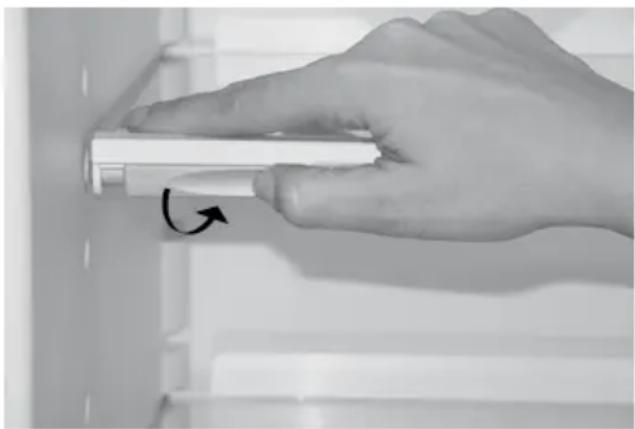
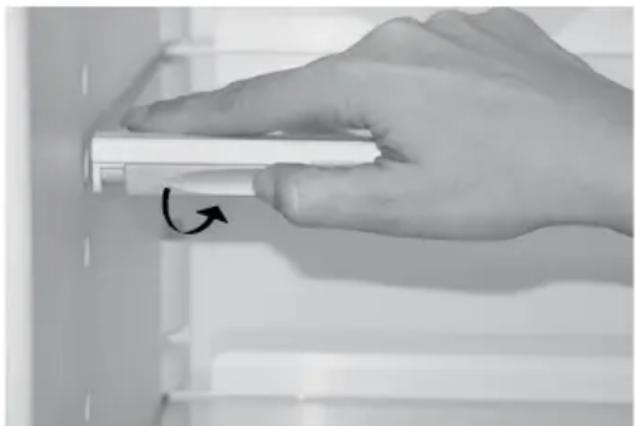
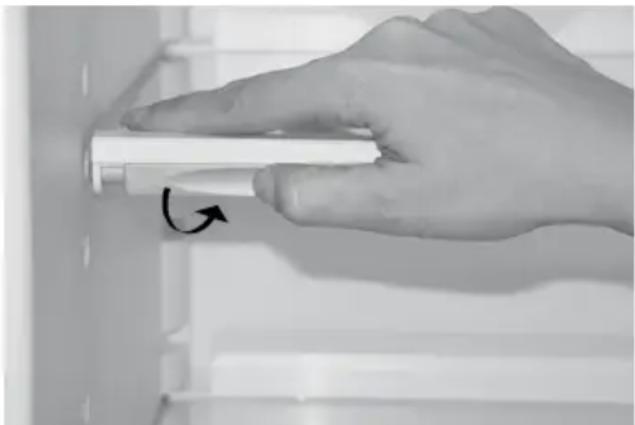
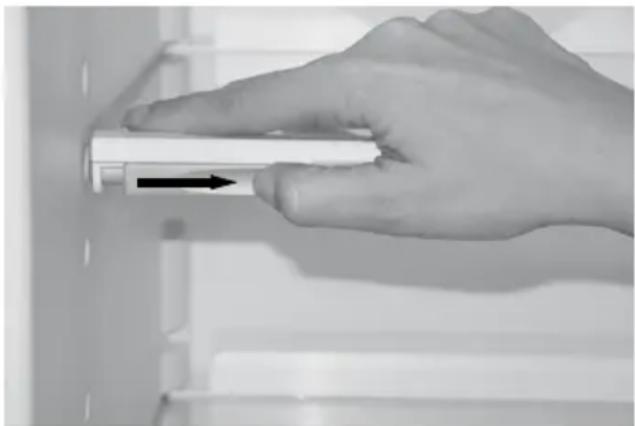
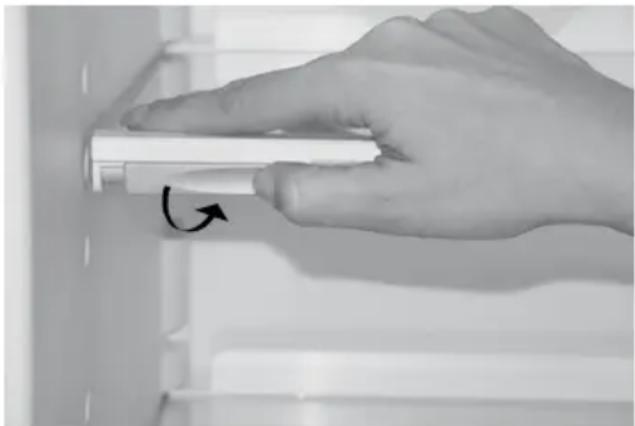
The height of the glass shelves can be adjusted individually. Pulling both holders sideways inwardly (Figure ②a) and for fixation turn them down and backwards (Figure ②b). Pull the glass shelf out of the guidance and replace it in reversed order at the desired position.
natural_image
Hand holding a white cylindrical object with an arrow pointing to it, against a plain background (no text or symbols visible)②a
natural_image
Hand holding a white cylindrical object with an arrow indicating rotation (no text or symbols visible)②b
Freezing
■ Only fresh produce is suitable for freezing.
■ Only small quantities should be frozen at one time and the rapid freezing button should be activated (see operating and controll panel) so that the temperature in the freezer does not increase too much. The maximum quantity (2 kg) should be frozen on the grid. For freezing the maximum quantity please activate the rapid freezing button 12 hours before put in produce to be frozen. Leave the temperature in the normal operating position, about 5°C. it is the best to prepack small portions only.
■ Products for freezing should not be brought into contact with products which are already frozen. Products which have been thawed out must not be re-frozen because foodstuffs can spoil.
Variable inner doors
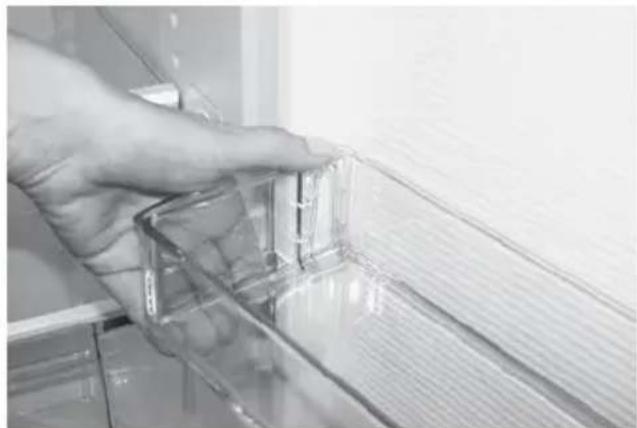
The cover inserts (Figure ③) in the inner doors can be adjusted somewhat and offer the option of a customized setting. To change the location of the inserts and bottle holder: first lift upwards and lift out, then set the required height and replace in the reverse sequence. Please note that the location of the cover of the uppermost cover cannot be adjusted.
natural_image
Close-up of a hand adjusting a transparent plastic door panel (no text or symbols visible)③
Bottle drawer
In this third zone which has an about 4-5°C higher temperature than the refrigeration space the drinks are retained at the correct, safe drinking temperature of approx. 10°C.
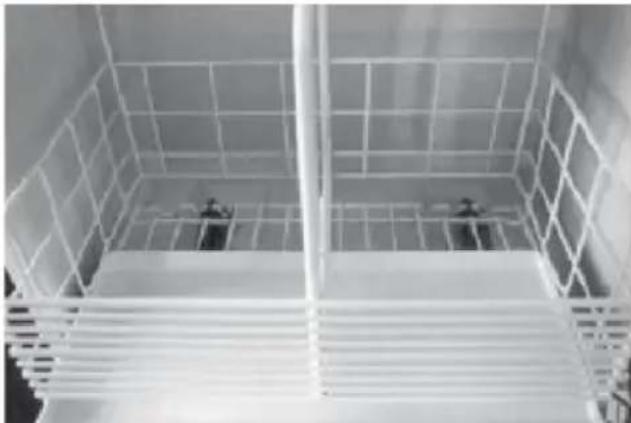
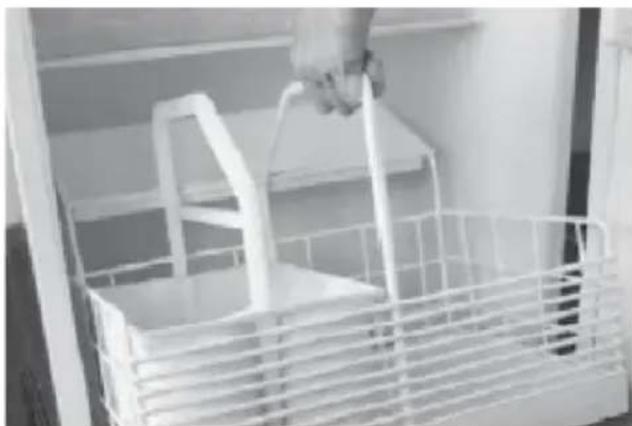
Pull out the basket: (Figure ④)
– Pull out the drawer as far as it will go.
- Use the strap on the basket to inch it to the top.
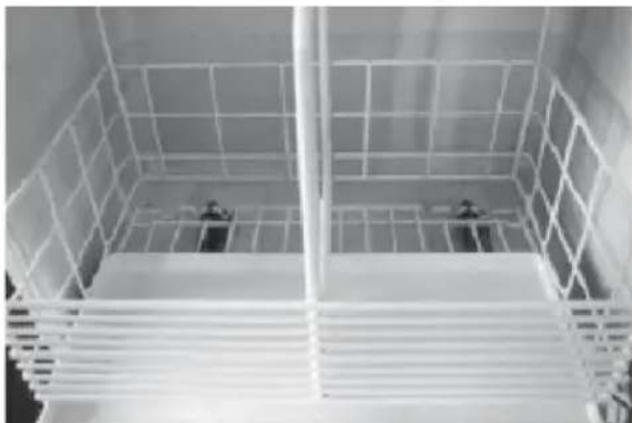
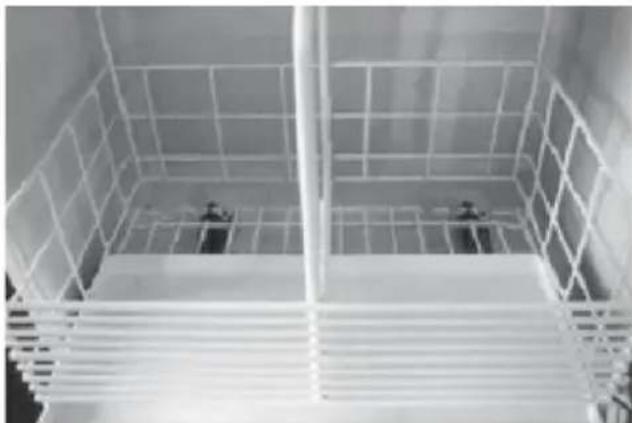
Insert the basket: (Figure ⑤)
- Hold the basket against the inside wall opposite the hinges, raising the basket slightly forward.
- Position basket with the rear edge on the rails and push together inwards as far as they will go.
– Lock front basket in position by pressing on the operating strap.
natural_image
Interior view of a refrigerator with a hand holding a white plastic tray (no visible text or symbols)④

natural_image
Interior view of a large industrial or warehouse space with white structural framework and two small objects on the floor (no visible text or symbols)⑤
Defrosting
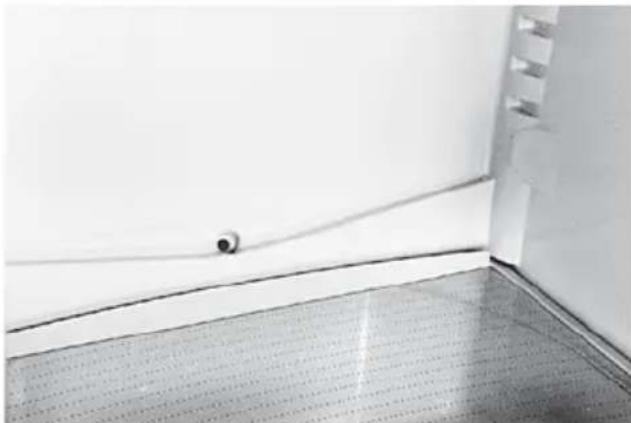
The refrigerator defrosts completely automatically, thus melting any ice that has built up on the back panel. This happens approx. twice a day depending on how often and for how long the door is opened. During the defrosting procedure the temperature in the refrigerator rises so that the ice on the back panel defrosts comple-
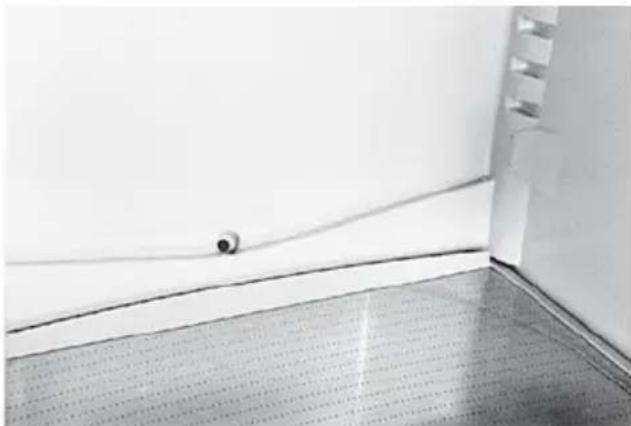
tely. After defrosting, the temperature drops back to the original setting. The water flows out through a drain hole (Figure ⑥) and evaporates in the collecting tray outside the device.
Be sure to keep the collection channel and the drainage channel clean, so that the melted water can flow out easily. Clean out the drainage channel with the green cleaner provided using an up-and-down and turning motion.
Defrost the freezer compartment if the ice formation becomes excessive. A thick coating of ice reduces the effectiveness of the cold transfer to the frozen products.
Keep the frozen products as cold as possible and well insulated during the defrosting time, e.g. pack them in newspaper.
- Turn off the appliance by using the main switch (3 sec.)
- Leave the doors open.
Defrosting can be accelerated significantly if you place a bowl of hot water in the freezer compartment. Attention: do not use sharp implements to remove ice or anything hard frozen. Do not use an electrical heater or an open flame for defrosting.
- After defrosting clean the interior and dry it thoroughly.
- Turn on the appliance by using the main switch (3 sec.)
natural_image
Interior corner of a room with a curved floor and a small object near the wall (no text or symbols visible)⑥
Cleaning
The appliance is to be kept clean for the hygienic storage of foodstuffs. It should be washed out from time to time with a mild soapy solution and then dried. An occasional wiping with a vinegar solution suppresses odours and is recommended. Keeping the door seals clean stops them from sticking and thus avoids them being damaged.
No scouring cleaners or scratching cloths are to be used. Clean the door seals with a soft brush. If the appliance has not been used for some time, turn off by using the main switch (3 sec.). Empty the appliance, defrost it, clean, and then leave the cold room as well as the freezer compartment open.
- For cleaning the control element please use only a humid flannel.
- Be careful that as little cleaning water as possible goes though the drainage channel into the collection dish.
- Before being put back in use, the appliance and the seals of the cold room and the freezer must all be completely dry.
Informations for energy-saving use
As far as possible, use the cooling unit in its as-delivered state. The arrangement of drawers, shelves and trays ensures the best possible temperature distribution.
■ Do not install the unit near radiators, radiator pipes or smoke extractors and protect it as far as possible from direct sunlight
■ Make sure the unit doors are kept open for as short a time as possible. The quicker the doors are closed again, the less cold is lost.
■ Make sure that the doors are closed fully and correctly. The door seal must be flush against the frame of the fridge.
■ Leave warm or even hot items to cool down outside the unit.
■ The storage of moisture-releasing food-stuffs leads to increased build-up of ice on the rear of the fridge and a reduction in cooling power.
Tips
The following points should be noted when using the new appliance:
■ A appliance which has just been put into use needs approx. 15 hours (with products) until it has reached its normal operating temperatures.
If the doors are open for longer than 2 minutes then the lamp starts to flash. Make sure after closing that the doors are fully sealed. The self-closing hinges assist this.
■ The cooling time for beverages and other products can take up to 6 hours from room temperature down to the cold room temperature. The warmer they are when put in, the longer this time will be.
■ Re-setting the temperature control has no effect on the cooling rate, only on the temperature reached.
■ Condensation can form on the glass shelves if products are stored which emit water vapour.
■ As the electronic control in the cold room only defrosts about once per day, the ice formation on the rear wall in the cold room itself can be more marked than is usual in previous refrigerators.
■ Be careful that products do not come into contact with the rear wall of the cold room so that they do not freeze to it and that, during defrosting, water does not get diverted into the cold room.
■ When filling be careful that:
- Oil and fats do not come into contact with the polymer parts and the door seals.
- The coldest locations in the c old room for any setting of the temperature controller are at the back wall and above the lowest shelf. Sensitive products should therefore be put on the lowest shelf.
■ Example of how to use:
- Freeze and store foodstuffs and make ice in the freezer compartment.
- On the shelves from top to bottom: baked products, ready-made meals, dairy products, meat and sausages.
- In the suspended trays from top to bottom: butter and cheese, tubes, small cans and eggs, large bottles.
– In the vegetable compartment: vegetables, fruit and salad.
Changing the LED lighting
Switch off the power supply: pull out the power supply plug or deactivate the fuse.
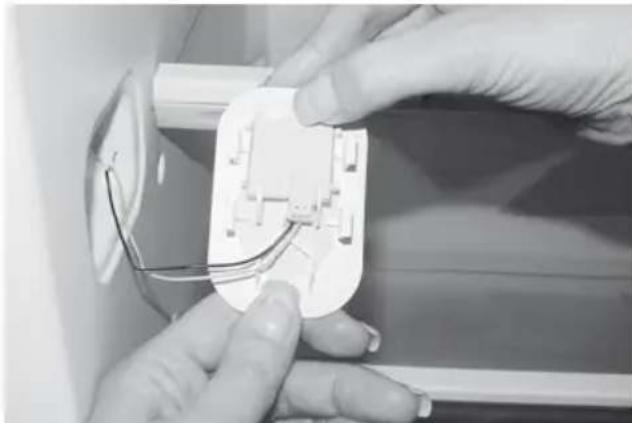
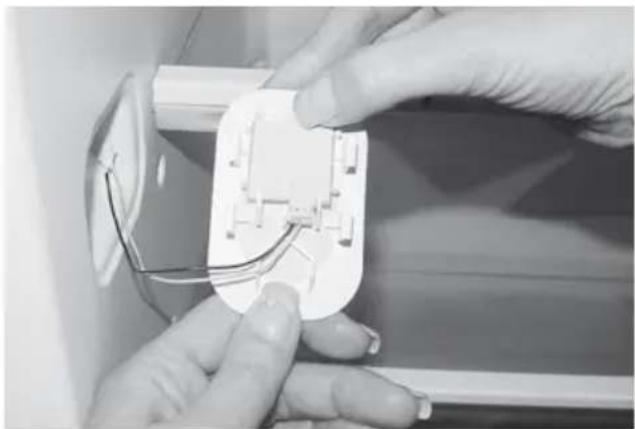
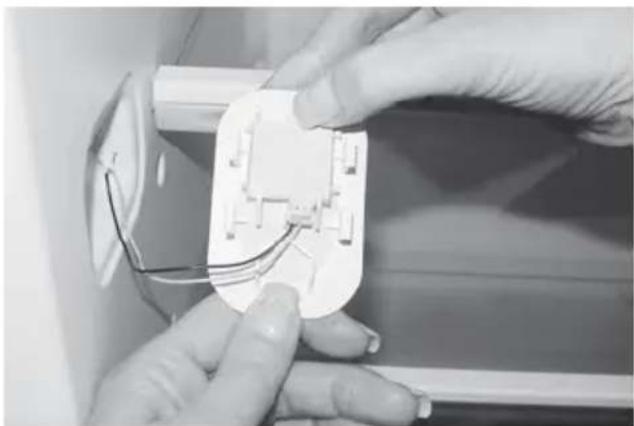
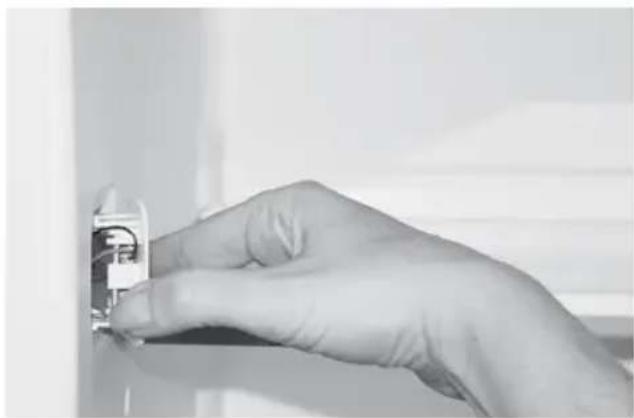
Click off the LED lighting (Figure ⑦). Disconnect the plug to the LED lighting (Figure ⑧). Please insert the new LED lighting in the reverse sequence.
N.B.: Please only use original LED lighting from the manufacturer.
natural_image
Close-up of a hand holding a small electronic component (no visible text or symbols)⑦

natural_image
Close-up of hands installing or adjusting a white electrical socket with wires (no visible text or symbols)⑧
Malfunctions
The appliance is checked for trouble-free operation before being supplied. Should you have any problems please contact your nearest service facility, advising them of the model number and the details of the problem.
A malfunction can occur if the electrical fuse is tripped. This problem can be solved easily if the fuse mechanism is re-activated.
Display following power failure
An interruption to the power supply is only displayed if the freezer temperature is warmer than -9°C after restart. In this case the two temperature displays flash and show the temperature values that were measured after restart. You can stop the temperature displays flashing by pressing any button. The current average temperature values are then displayed.
Sensor error functions:
- Sensor error F1 on the left-hand side of temperature display = temperature sensor in the cold room is defective
- Error message F4 on the right-hand temperature display (freezer temperature) = temperature sensor in the freezer defective.
- Sensor error F7 on the right-hand side of temperature display = surrounding room temperature sensor defective
Emergency mode
If a sensor error (F1 or F4) is displayed, the entire unit continues to operate in a time-controlled emergency mode independently of the defective sensors.
Guarantee
We warrant the guarantee as of the delivery date of the appliance to the end user.
Any malfunctions which might occur during this time despite correct operation and which are caused by material or construction errors will be corrected under this guarantee by our customer service.
Not covered by the guarantee:
- LED defects
- Breakage of the glass shelves or polymer parts
- Defects resulting from not following the operating instructions or incorrect usage
– Damage claims beyond the guarantee
– Appliance which have been repaired by third parties.
Operating Noises
Noises which are entirely normal
The chill cabinet is cooled by a compressor (refrigeration aggregate). The compressor pumps coolant through the cooling system, producing operating noises. Even when the compressor cuts out, noises caused by changes in temperature and pressure are unavoidable.
This appliance is fitted with a quiet compressor and a low-noise cooling circuit designed in line with the latest technical developments.
However, a certain level of noise, dependent on the size of the appliance, is inevitable. Operating noise will be most audible immediately after the compressor cuts in. It becomes quieter as the operating period continues.
Noises which are not normal
Unusual noise is normally the result of improper installation. The appliance must be installed or built-in so that it is level and stable. Under no circumstances must tubing come into contact with a wall, other furniture or with another tubing.
Where the appliances are installed in open-plan kitchens or in partition walls, the level of operating noise will be heard more acutely. However, this is due to the surrounding architecture and not to a fault with the appliance.
Description Cause Notes
| Droning Cooling aggregate | Normal operating noise of the cooling aggregate.The level is dependent on the size of appliance and on the load-dependent speed of the compressor motor | |
| Humming | Fan | Normal operating noise of the fan. |
| Gurgling BabblingMurmuring | Cooling circuit | Normal operating noise as coolant flows through the circuit. |
| Hissing | Cooling circuit | Normal operating noise as coolant is injected into the condenser. |
| Rattle | Shelves, contents | Arrange the shelves and contents so that they are fixed and not touching one another. |
| Cracking | Housing | Normal as materials expand and contract caused by temperature variations (e.g. plastics, insulation). |
| Hissing | valve | normal operating noise of the valve |
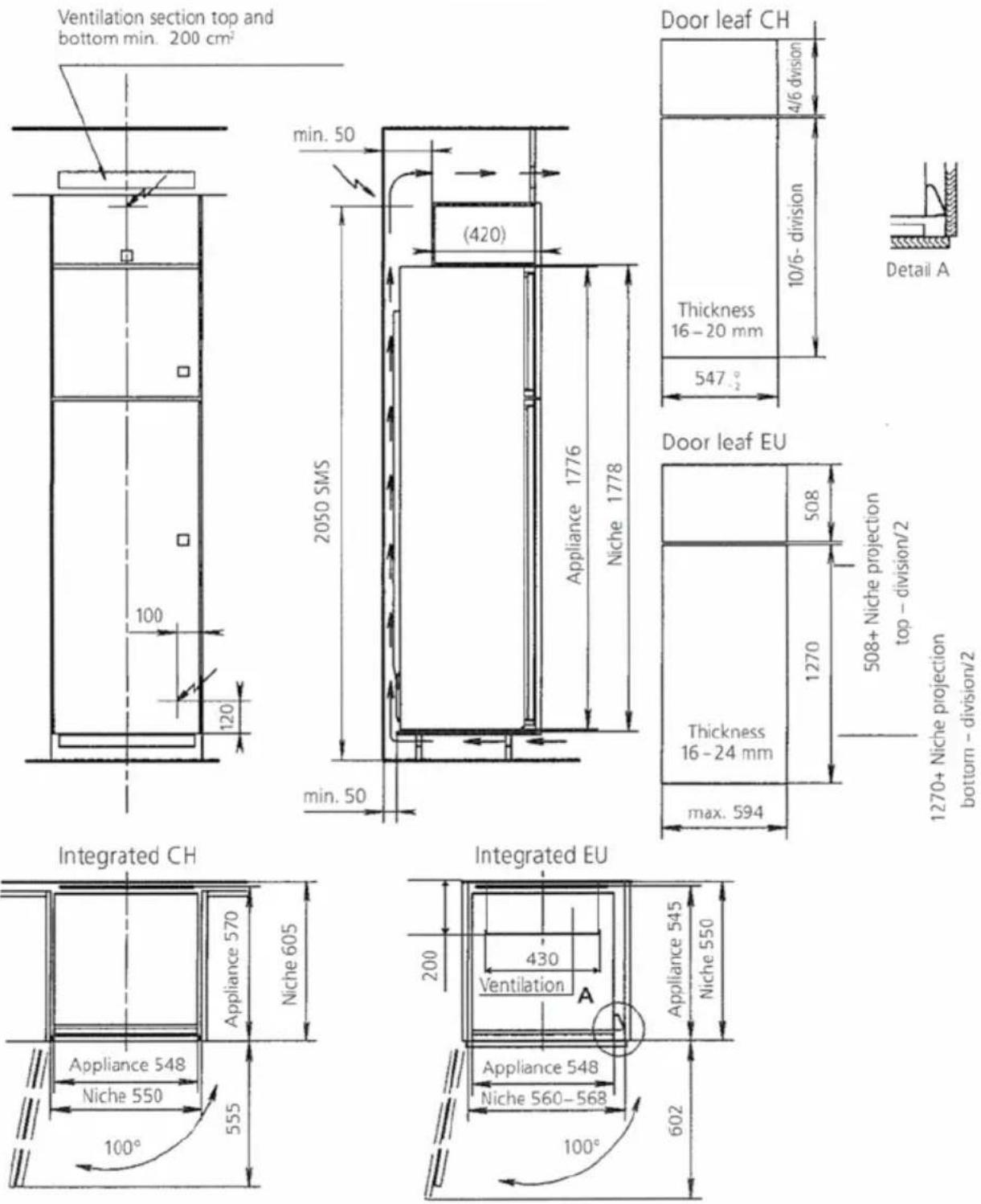
Built-in Refrigerator Niche SMS 14/6 (1778 mm)
Where the appliance space measures 550 mm the output data of the appliance are also guaranteed.
Electrical safety (shock-hazard protection) must be effected as part of the installation procedure. If the power point is no longer accessible once the appliance is in place, a current breaker must be provided on installation. Current breakers are switches with a contact opening of at least 3 mm, including LS switches and fuses as well as contactors.
1270+ Niche projection
bottom - division/2
Reparatur-Service
Whether you contact us for repairs or orders, please always state the serial number (FN) and the name of the appliance. Enter these details below and also on the service sticker which comes with the appliance.
Stick it in a cospicuous place or in your telephone agenda.
Appliance NF
You will also find said details on the certificate of guarantee, the original sales invoice and the identification plate of the appliance
Open the appliance door.
- The identification plate is located on the right-hand inside.
If the appliance is not working properly, contact your nearest V-ZUG LTD service centre using freephone 0800 850 850 and stand in close proximity to the appliance.
Queries, orders, service agreements
For administrative or technical queries or problems, as well as for ordering spare parts and accessories, please contact our head office in Zug on tel. 041 767 67 67.
As regards the maintenance of all our products, when the warranty expires you have the option of taking out a service agreement. We will be happy to send you the necessary forms.
V-ZUG AG
Industriestrasse 66, 6301 Zug
Tel. +41 (0)41 767 67 67, Fax +41 (0)41 767 61 61