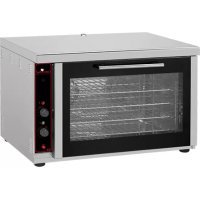
680.015 - Oven CaterChef - Free user manual and instructions
Find the device manual for free 680.015 CaterChef in PDF.


User questions about 680.015 CaterChef
0 question about this device. Answer the ones you know or ask your own.
Ask a new question about this device
Download the instructions for your Oven in PDF format for free! Find your manual 680.015 - CaterChef and take your electronic device back in hand. On this page are published all the documents necessary for the use of your device. 680.015 by CaterChef.
USER MANUAL 680.015 CaterChef
Before connecting and operating the unit for the first time read this manual carefully and follow its instructions.
Installation, servicing, starting of the appliance and electrical connections must be done by qualified personnel according to the legal requirements.
INSTALLATION
Positioning: the appliance shall be installed in well ventilated space and it can be positioned next to the walls with a good heat resistance; if not possible please observe a distance from wall of at least 10 cm. all around the unit.
Remove the protection foil completely from the entire unit, before connecting and operating the unit.
TECHNICAL DATA
The data plate is on the back of the fryer and lists all the data deed for connecting up to the mains.
ELECTRICAL CONNECTION
The rated voltage is 230V. Kw.3.4 for model FC4/M and V.400/2+N Kw.5.2 for model FC4/T, but check that voltage provided corresponds to oven requirements.
If you want a direct connection to an electrical line it is necessary to have an onnipolar switch with a contact opening of at least 3mm , according to the load and to legal requirements.
The yellow/green earth wire must not be cut off.
The supply wire must not come into contact with places exceeding by more than 50^
Before carrying out the electrical connection, make sure that:
1) the fuses and the system are suitable for the power requirements of the appliance (see data label).
2) The electric system has a right plate complying with the regulations in force.
3) It must be easy to access to the plug or the omnipolar switch when the appliance is installed.
Before using the oven, we suggest to heat the oven to the max. temperature for about 30 minutes so as to eliminate any residual factory grease that might impart unpleasant smells to the meals being cooked.
Our company declines any liability in case the anti-accident regulation will not be observed.
CONNECTION TO WATER SUPPLY
To use humidifier you must connect valve located on the back of the oven to water supply with a 3/4 G fitting.
MANTEINANCE
As a safety measure, before you start using the oven, be sure to disconnect it from the electric system.
No special maintenance is required: you only need to check the condition of the electric wires, control panel as well as the heating elements.
To replace some parts of the units, please follow these instructions:
Oven Lamp: just unscrew the glass protection and make sure that the new lamp has identical specifications.
Heating element: replace the unit towards, unscrew the screws that are fixing on the back panel and then accede to the parts to be replaced.
Oven fan: Once you have taken off the back panel, take off the fan protection from the inside, unscrewing the two screws.
INSTRUCTION FOR USE
To get work the oven, just turn the knob to the wished position like:
100 heating elements switched on under thermostatic control
- safety thermostat
ATTENTION: On the bottom side of the control panel there is a manually resettable safety thermostat that causes the oven to be switched Off in case of further failures. To restore unscrew the red cap and press button.
END OF COOKING TIMER
The timer works on the whole oven circuit, breaking any function when the time set is over. The time of max programming is about 120'. Switch on the oven and select the required time. When time is spent the unit will switch off automatically and a buzzer sound.
IMPORTANT: with the timer in position "0" no one operation is possible.
ASSEMBLY AND ACCESSORIES
Oven is equipped with 2 grids
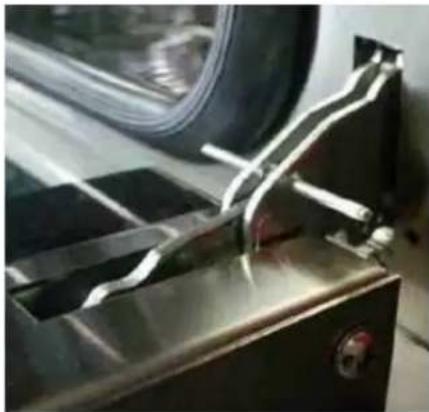
Assembly and disassembly Oven door : To facilitate cleaning of Oven the door can be take off doing as follow :
open the door and insert into the holes two screws M3 or two similar pieces that keep disconnected springs of the hinges ;
- half-open the door and with two hands pull the door and at the same time unthread upwards.
- To assembly the door again repeat the operation on the contrary taking care at the right introduction of hinges in their own position, and keep off the screws.
MAINTEINANCE AND GENERAL CLEANING
IMPORTANT: As a safety measure, before you start cleaning the oven, be sure to switch off the electrical supply.
For a long life of the unit it is necessary to clean it often following the present instructions:
- The stainless steel parts should be cleaned with a suitable abrasive less product normally to be found on the market.
Avoid chlorine, acid or abrasive cleaning products.
- The chromed surfaces and the door glass should be cleaned with a wet and soaped cloth or with water and not with corrosive liquid cleaning containing corroding substances or abrasive.
The door glass must be cold.
HUMIDIFIER (only for mod.FC4/T):
To start humidifier push black button placed on the superior side of control panel.
IMPORTANT: If the oven will not work, it is necessary to call the qualified personnel.
The manufacturer reserve the right to modify the appliance presented in this publication without notice, but without changing the main characteristics.
The manufacturer will accept no liability if the instructions in this booklet are not followed or if tampering by unqualified personnel is discovered.