TO 26 - Toaster TEAM - Free user manual and instructions
Find the device manual for free TO 26 TEAM in PDF.


| Brand | Team |
| Model | TO 26 |
| Product type | Toaster |
| Power supply | Mains voltage, compatible with the network voltage (check before use) |
| Main functions | Toasting, defrosting (DEFROST button), reheating (REHEAT button), emergency stop (CANCEL button) |
| Cooking adjustment | Thermostat on the side to adjust toasting level |
| Activation mechanism | Lever to push down to start the cycle |
| Automatic shut-off | Yes, the bread pops up automatically at the end of the cycle |
| Crumb tray | Yes, located at the bottom on the side, pull out to empty |
| Exterior material | Plastic or metal (not specified, check on the appliance) |
| Maintenance and cleaning | Unplug before cleaning, clean the exterior with a dry cloth, empty the crumb tray regularly. Do not immerse in water or put in dishwasher |
| Safety | Do not use near water, do not touch hot surfaces, do not use with spread foods, keep at least 1 meter away from flammable materials |
| Power cord | If damaged, have it replaced by a qualified service (or by yourself if the cord is removable) |
| Spare parts | No information in the manual. Use only accessories recommended by the manufacturer |
| Repairability | Any repair must be carried out by a qualified service |
Frequently Asked Questions - TO 26 TEAM
User questions about TO 26 TEAM
0 question about this device. Answer the ones you know or ask your own.
Ask a new question about this device
Download the instructions for your Toaster in PDF format for free! Find your manual TO 26 - TEAM and take your electronic device back in hand. On this page are published all the documents necessary for the use of your device. TO 26 by TEAM.
USER MANUAL TO 26 TEAM
Generated by Unregistered Batch DOC TO PDF Converter 2011.3.804.1511, please register!
Copies of the I/B. Please reproduce them without any changes except under special instruction from Team International BELGIUM. The page must reproduced and folded in order to obtain a mini booklet B5 (+/- 150 mm width x 210 mm height). The page must be folded in order to keep the good numbering when you turn the page of the I/B. Don't change the page numbering. Keep the languages integrity.


Toaster
Toaster
Grille-Pain
Broodrooster
Tostador
Toraddeira
Tostapane
CE
I/B Version
010622
TEAM TO 26
230 V ~ 800 W

Fax +32 23599550
Generated by Unregistered Batch DOC TO PDF Converter 2011.3.804.1511, please register!
Copies of the I/B. Please reproduce them without any changes except under special instruction from Team International BELGIUM. The page must reproduced and folded in order to obtain a mini booklet B5 (+/- 150 mm width x 210 mm height). The page must be folded in order to keep the good numbering when you turn the page of the I/B. Don't change the page numbering. Keep the languages integrity.
D
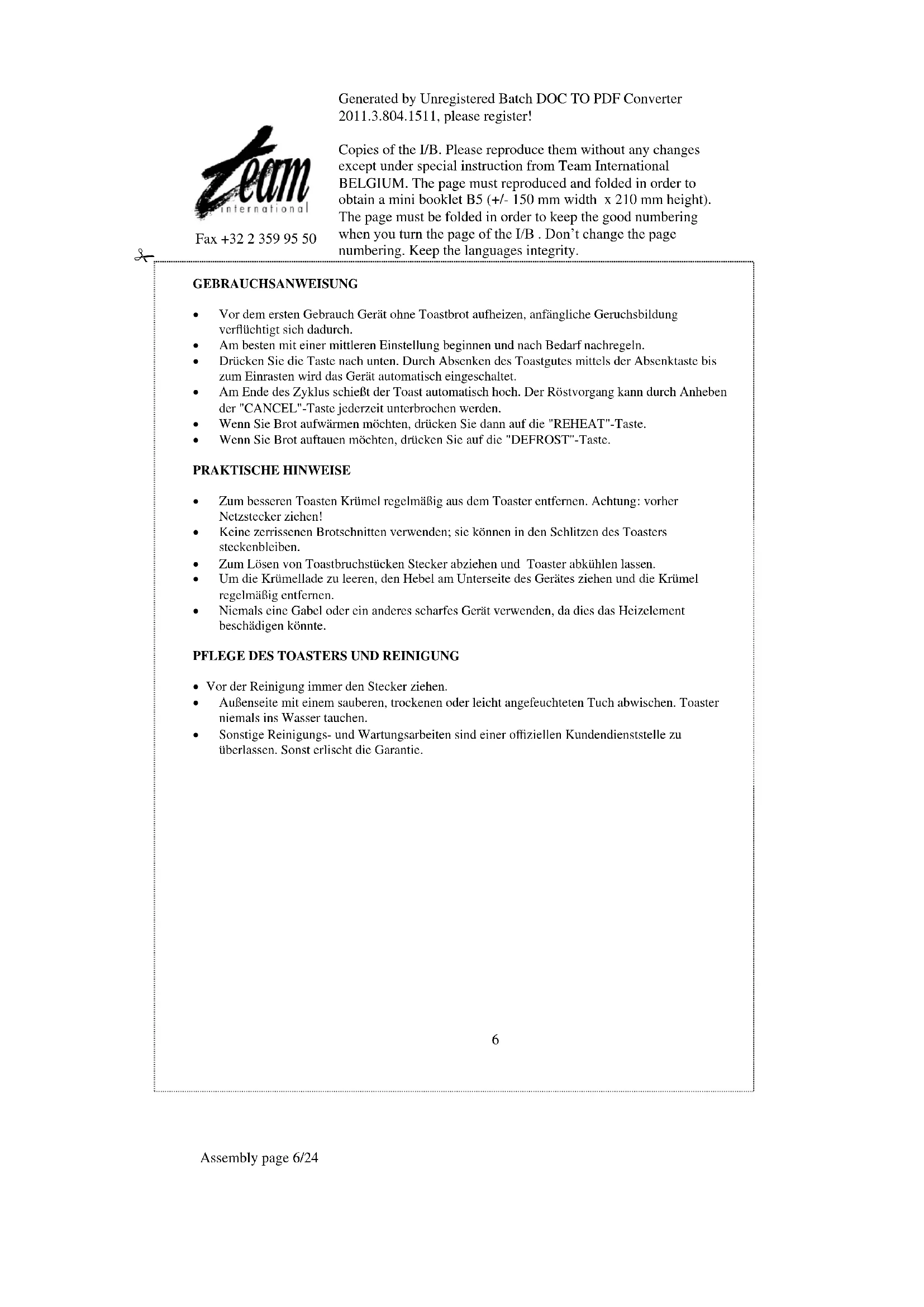
- Crumb tray
- Bread carriage handle
- Browning control selector
- CANCEL button
- Browning control with reheat button
- Defrost function
F
Generated by Unregistered Batch DOC TO PDF Converter 2011.3.804.1511, please register!
Copies of the I/B. Please reproduce them without any changes except under special instruction from Team International BELGIUM. The page must reproduced and folded in order to obtain a mini booklet B5 (+/- 150 mm width x 210 mm height). The page must be folded in order to keep the good numbering when you turn the page of the I/B. Don't change the page numbering. Keep the languages integrity.
GEBRAUCHSANWEISUNG
Please read these instructions carefully before using the appliance.
Check that your mains voltage corresponds to that stated on the appliance.
Never leave the appliance unsupervised when in use. Keep out of reach of children or incompetent persons.
From time to time check the cord for damages. Never use the appliance if cord or appliance show any signs of damage.
Only use the appliance for domestic purposes and in the way indicated in these instructions.
Never immerse the appliance in water or any other liquid for any reason whatsoever. Never place it into the dishwasher.
Never use the appliance near hot surfaces.
Should the cord be damaged, it must be replaced by a competent qualified electrician (e).
Before cleaning, always unplug the appliance from the power supply.
All repairs should be made by a competent qualified electrician (8).
Never use the appliance outside and always place it in a dry environment.
- Never use accessories which are not recommended by the producer. They could constitute a danger to the user and risk to damage the appliance.
Never move the appliance by pulling the cord. Make sure the cord cannot get caught in any way. Do not wind the cord around the appliance and do not bend it.
Stand the appliance on a table or flat surface.
Make sure the appliance has cooled down before cleaning and storing it.
Make sure the cord never comes into contact with the hot parts of the appliance. Never touch the hot parts of the appliance.
Make sure the appliance never comes into contact with inflammable materials, such as curtains, cloth, etc... when it is in use, as a fire might occur. Keep a distance of at least 1 metre between the appliance and the curtains.
Do not use the appliance for defrosting food and only insert unbuttoned slices of bread of which the thickness does not risk to prevent the bread from coming up. Be extremely strict about this as toasters are the cause of many fires when these elementary safety precautions are not observed.
Empty the appliance frequently of bread crumbs. Make sure the appliance is always unplugged before emptying it. Check the « Cleaning » section
When cleaning the appliance, do not use metallic scourers in order to avoid any future risk of electric short-circuit.
UK STYLE PLUG WIRING INSTRUCTIONS (IN THE UK ONLY)
This product must only be used from a 13 amp power socket. If a BS1363 approved 13 amp plug is used, it should be fitted with a 13 amp fuse. The wires on the power cord are colour coded: blue = neutral, brown = live, green or green & yellow = earth.
The blue wire must be connected to the terminal marked N or coloured in black.
The brown wire must be connected to the terminal marked L or coloured in red.

Fax +32 23599550
Generated by Unregistered Batch DOC TO PDF Converter 2011.3.804.1511, please register!
Copies of the I/B. Please reproduce them without any changes except under special instruction from Team International BELGIUM. The page must reproduced and folded in order to obtain a mini booklet B5 (+/- 150 mm width x 210 mm height). The page must be folded in order to keep the good numbering when you turn the page of the I/B. Don't change the page numbering. Keep the languages integrity.
The green (& yellow) wire must be connected to the terminal marked E or coloured in green (& yellow).
HOW TO OPERATE
- Plug into the supply socket.
Before use, operate the toaster without bread; this will help to disperse residues from the manufacturing processes. - Set the browning control selector to the desired degree of browning required.
- Press down the bread carriage handle.
- When the cycle is completed, the carriage will pop up and the toaster will automatically switch off.
- By pressing the button "CANCEL" the toasting cycle will also be terminated.
- If you want to reheat bread, push the "REHEAT" button.
- If you want to defrost bread, push the "DEFROST" button.
MAINTENANCE AND CLEANING
- Before attempting any cleaning operation make sure the toaster is unplugged from the supply socket and fully cooled down.
To remove bread crumbs open the crumb tray situated on the side of the appliance. - Never use sharp objects to clean. Doing so could damage the appliance.
To clean the exterior surfaces, simply wipe over with a soft damp cloth.
All other maintenance and repair should be performed by a qualified technician.

MODE D'EMPLOI
POUR VOTRE SECURITE
Generated by Unregistered Batch DOC TO PDF Converter 2011.3.804.1511, please register!
Copies of the I/B. Please reproduce them without any changes except under special instruction from Team International BELGIUM. The page must reproduced and folded in order to obtain a mini booklet B5 (+/- 150 mm width x 210 mm height). The page must be folded in order to keep the good numbering when you turn the page of the I/B. Don't change the page numbering. Keep the languages integrity.

Fax +32 23599550
Generated by Unregistered Batch DOC TO PDF Converter 2011.3.804.1511, please register!
Copies of the I/B. Please reproduce them without any changes except under special instruction from Team International BELGIUM. The page must reproduced and folded in order to obtain a mini booklet B5 (+ / - 150mm width x 210~mm height). The page must be folded in order to keep the good numbering when you turn the page of the I/B. Don't change the page numbering. Keep the languages integrity.
MODE D'EMPLOI
Generated by Unregistered Batch DOC TO PDF Converter 2011.3.804.1511, please register!
Copies of the I/B. Please reproduce them without any changes except under special instruction from Team International BELGIUM. The page must reproduced and folded in order to obtain a mini booklet B5 (+/- 150 mm width x 210 mm height). The page must be folded in order to keep the good numbering when you turn the page of the I/B. Don't change the page numbering. Keep the languages integrity.

Fax +32 23599550
Generated by Unregistered Batch DOC TO PDF Converter 2011.3.804.1511, please register!
Copies of the I/B. Please reproduce them without any changes except under special instruction from Team International BELGIUM. The page must reproduced and folded in order to obtain a mini booklet B5 (+/- 150 mm width x 210 mm height). The page must be folded in order to keep the good numbering when you turn the page of the I/B. Don't change the page numbering. Keep the languages integrity.
GEBRUKSAANWIJZING
Generated by Unregistered Batch DOC TO PDF Converter 2011.3.804.1511, please register!
Copies of the I/B. Please reproduce them without any changes except under special instruction from Team International BELGIUM. The page must reproduced and folded in order to obtain a mini booklet B5 (+/- 150 mm width x 210 mm height). The page must be folded in order to keep the good numbering when you turn the page of the I/B. Don't change the page numbering. Keep the languages integrity.

Fax +32 23599550
Generated by Unregistered Batch DOC TO PDF Converter 2011.3.804.1511, please register!
Copies of the I/B. Please reproduce them without any changes except under special instruction from Team International BELGIUM. The page must reproduced and folded in order to obtain a mini booklet B5 (+/- 150 mm width x 210 mm height). The page must be folded in order to keep the good numbering when you turn the page of the I/B. Don't change the page numbering. Keep the languages integrity.
TEAM TO 26
| Deutsch | 4 |
| English | 6 |
| Français | 8 |
| Nederlands | 10 |
| Espanol | 12 |
| Portugues | 14 |
| Italiano | 16 |

Brand : TEAM
Model : TO 26
Category : Toaster