USB 7327 - DJ Equipment US Blaster - Free user manual and instructions
Find the device manual for free USB 7327 US Blaster in PDF.



| Product type | Professional DJ CD player |
| Brand | US Blaster |
| Model | USB 7327 |
| Power supply | AC (mains cable included) |
| Audio outputs | LINE OUT (RCA), DIGITAL OUTPUT |
| Connectivity | Remote connector (Fader Start), Relay connector |
| Display | Backlit LCD screen |
| Pitch adjustment range | ±8%, ±16%, ±50% |
| Pitch Bend function | +/- 16% by pressing dedicated buttons |
| Seamless Loop | Yes, with adjustable A and B points |
| Hot Cue points | 3 memorizable cue points |
| Auto Cue function | Yes, with Single/Continue/Outro modes |
| Relay function | Yes, allows chained playback of two players |
| BPM function | Automatic detection and manual adjustment of beats per minute |
| Key function | Maintain or change key (Key On/Off) |
| Sleep function | Automatic shutdown after 30 minutes of inactivity |
| Standby | Automatic after 30 minutes (Sleep) |
| Maintenance and cleaning | Clean discs with a soft, dry cloth; avoid moisture and dust |
| Safety | Do not open the device, avoid shocks and moisture |
| Spare parts and repairability | Contact US Blaster after-sales service for parts and repairs |
Frequently Asked Questions - USB 7327 US Blaster
User questions about USB 7327 US Blaster
0 question about this device. Answer the ones you know or ask your own.
Ask a new question about this device
Download the instructions for your DJ Equipment in PDF format for free! Find your manual USB 7327 - US Blaster and take your electronic device back in hand. On this page are published all the documents necessary for the use of your device. USB 7327 by US Blaster.
USER MANUAL USB 7327 US Blaster
DESCRIPTION OF THE FUNCTIONS
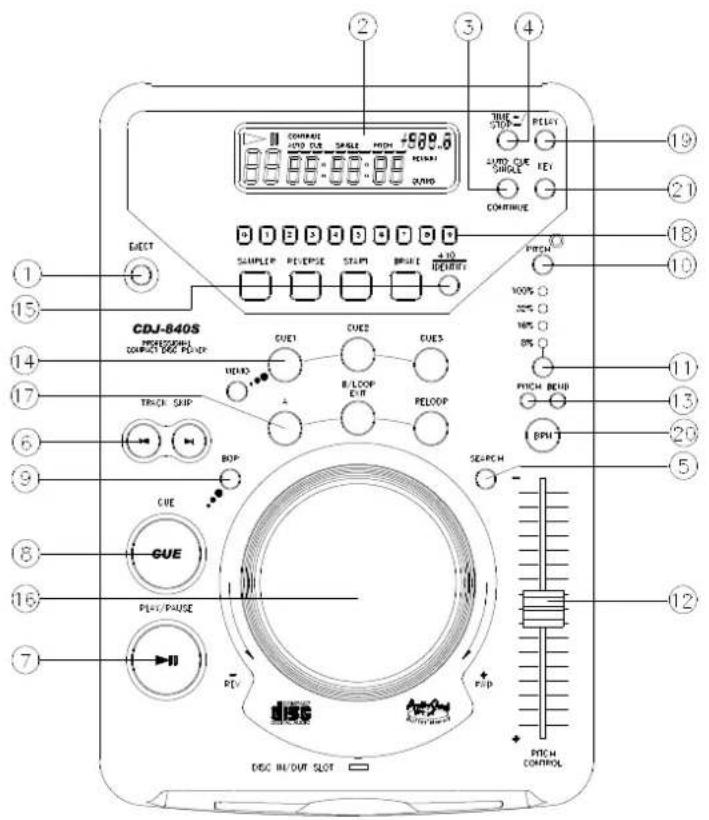
Top View:
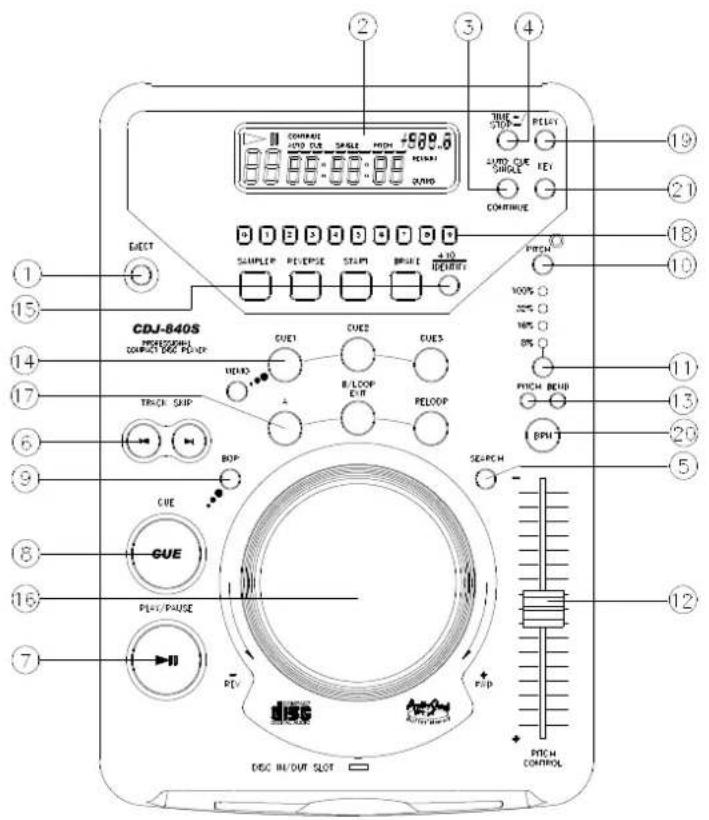
1. EJECT BUTTON
Press to eject the disc.
Note: Disc can't be ejected unless the stop or pause button has been pushed first.
2. L.C.D.
These liquid crystal displays (L.C.D.) indicate the track numbers, time (minutes, seconds, frames), pitch range, and relative playback information.
3. AUTO CUE SINGLE / CONTINUE Button
To press this button it can switch between auto cue single and continue. The selected mode is indicated on the display.
*AUTO CUE SINGLE - After each track, the unit pauses at the beginning of next track. The playback starts from audible point.
*CONTINUE -To play all tracks continually.
*OUTRO - The unit will play the last 30 seconds of each track. Press the button for 3 seconds to switch OUTRO function.
4. TIME / STOP BUTTON
This button switches the time display between total remaining time, remaining time of the current song, elapsed playing time. The unit will be in the "stop" mode if you continue pressing the button for 3 seconds.
5.SEARCH BUTTON
Press the button to switch the function of the Jog Dial between SEARCH and PITCH BEND.
When the indicator LED is lit, turn the jog dial for quick search forward and backward. When the indicator LED is off, turn the jog dial for pitch bend function. If the jog dial is not moved for 8 seconds, the indicator light will turn off.
6. TRACK BUTTON
These buttons select the track to be played.
7. PLAY/PAUSE BUTTON
Each press of this button toggles between PLAY and PAUSE modes.
8. CUE BUTTON
The cue function allows the CD to return to the memorized point. In PAUSE mode, pressing the CUE button sets the cue point, and the CUE button blinks; in PLAY mode, press this button to pause the unit at the memorized point.
9. BOP BUTTON
Playback will automatically start from the CUE point when this button is pressed.
10. PITCH ON/OFF BUTTON
Press the button to enter PITCH ON mode; press it again to exit PITCH ON mode, and the unit blinks in PITCH OFF mode.
11. PITCH % SELECT BUTTON
Select the pitch change range from ±8%, ±16%, ±32%, ±100%. The playback speed will change when you move the pitch control slider.
12. PITCH CONTROL SLIDER
To match the choices of playback speed (8%, 16%, 32%, 100%), you can choose the range you want between minimum (up side) and maximum (bottom side) by moving the pitch control slider.
13. PITCH BEND + / - BUTTON
When each of the two CD players is playing, the pitch bend function allows the position of the bass beat to be matched after the pitch has been adjusted. The pitch will automatically rise up to +16% from the current setting while pressing the "+" button. While pressing the "-" button, the pitch will automatically drop to -16% from the current setting. By changing the pitch, the position of the beats can be matched.
14.3 HOT-CUE
This unit will allow you to play from 3 cue points instantly.
a. Set Cue memory: Press the MEMO button first, and then press the CUE button to complete the CUE setting, then this CUE button will light up.
b. Play "CUE" memory: Upon pressing a specific CUE button, it will flash for about 5 seconds.
Note: This function is not available during the REVERSE sound effect.
15. +10 BUTTON/IDENTIFY
Press the button to forward 10 tracks. If you forward 10 tracks and the tracks exceed the total number of tracks, the unit will jump to track 1...
Identify function (MEMO):
CD setting information can be stored in the non-volatile memory. The stored information can be called out of the memory at a later time.
A. Disc identify function is workable only in Pause Mode.
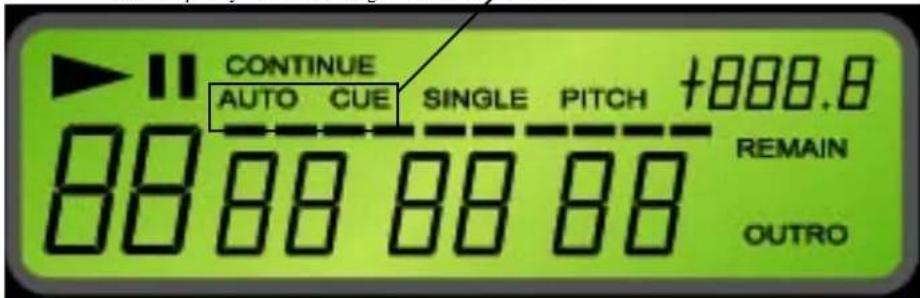
B. Press the Disc identify button for 2 seconds in Pause mode. When the MEMO is saving into EEPROM, the LCD Display "AUTO CUE" will blink at
2Hz frequency. The LCD Display "AUTO CUE" will blink at 1Hz frequency after the saving procedure is completed.
2Hz frequency blinking, MEMO is saving into the EEPROM
1Hz frequency blinking, save completed.
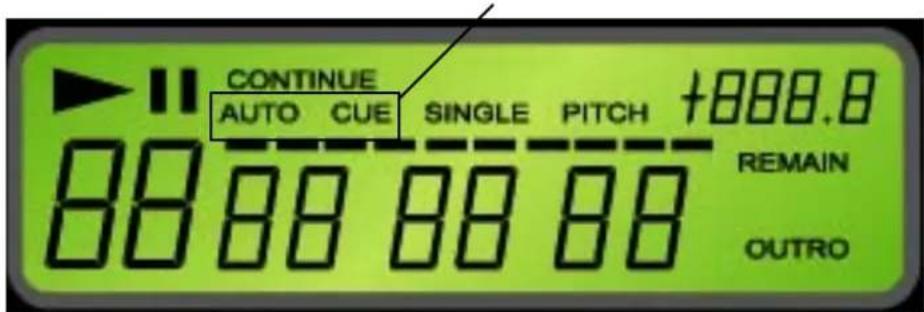
C. When the CD includes tracks that CDJ840 has MEMO is inserted, the LCD Display "AUTO CUE" will ON. D. When the CD includes tracks that CDJ840 has MEMO CUE Point is inserted, the LCD Display "AUTO CUE" blinks at 1Hz frequency. E. Press the “+10/LOAD” button for 2 seconds, the recorded CUE TIME will load to the Micon Main Cue and the LCD Display “AUTO CUE” blinks. F. The Cue Point will shows on the LCD Display for 2.5 seconds after complete loading, and back to the previous display time before loading.
"Auto Cue" On: the CD includes MEMO tracks
1Hz frequency blinks: the song includes MEMO Cue Point
2Hz frequency blinks: Loading to the Micon Main Cue
16. JOG WHEEL
*Speed Control (SEARCH indicator off)
Rotating the wheel, in play mode, will change the playback speed accordingly. While rotating clockwise, the player speed increase; rotating
counterclockwise, the speed decrease.
*Search (SEARCH indicator lights)
Rotating the wheel, the player will forward or backward quickly. The searching speed changed according to the dialing speed. To perform frame search, first pause the CD then rotate the jog wheel while search indictor is off..
17. Seamless Loop
There is A, B/LOOP/ EXIT, RELOOP buttons.
i. A BUTTON---"start point" (A point. Also, Cue 1 could be A point) After setting up the A point, the red Led light up ii. .B/LOOP EXIT BUTTON: --"End point"(B point). Press the B /LOOP button to set up the B point and start the loop playback automatically. Loop lights on the display and the 3 LEDs flash. Press this button again to exit the LOOP playback. iii. Return to the loop playback by pressing the RELOOP while in performance. iv. . Change " START POINT" and " END POINT" by pressing the A& B/ LOOP EXIT button again v. The interval between A and B point must be more than 20 frames; otherwise, the B point will be canceled, then LOOP function disappear and LOOP fades on the display
18. Direct Access Key (0~9)
To select the number of the track you would like to play.
19. RELAY
Press the "RELAY" button to activate. When one unit is in play mode, and the other unit is in "pause" mode; pause the playing unit, the other unit will automatically start to play (the button will blink).
20. BPM BUTTON
You can get the BPM number automatically or manually. Pressing the BPM BUTTON for 3 seconds to switch between auto and manual control. The BEAT will be shown on the display! Under the manual mode, tapping this button to get the beat value.
21. KEY ON/OFF SWITCH
Press the button to switch KEY mode on or off.
- KEY OFF: The display shows the "KEY" in blinking, and the key changed according to the pitch change. The key parameter adjustment is not in effect.
- KEY ON: The "KEY" lights on the display, turning the SCOPE knob to adjust the key. Slide the pitch slider will also change the key.
22. SLEEP:
Leave the unit unused for 30 minutes; the machine will shut off automatically.
DESCRIPTION OF THE FUNCTIONS Front View
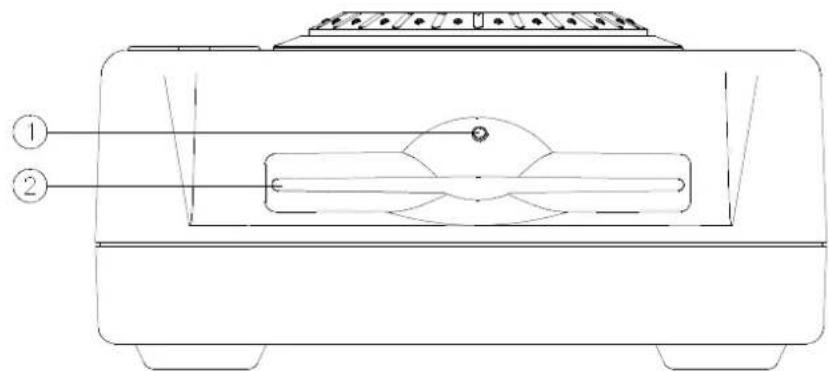
- Drive in use light
Light will blink when the disc drive is in use.
2. DISC SLOT
Insert and remove the CDDA disc.
Rear View
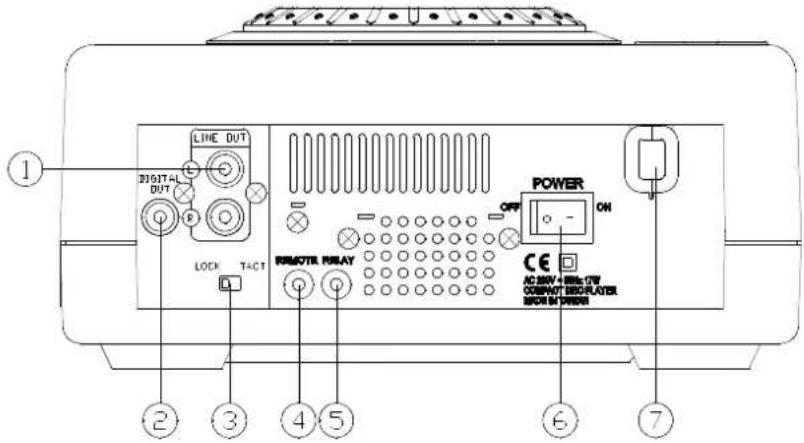
- LINE OUT (RCA Jacks)
The audio from each CD player is output from these jacks. Connect to the line input of the mixer.
2. DIGITAL OUT
The digital audio from each CD player is output from these jacks. Connect to the line input of the D/A amplifier.
- TACT-LOCK option
Select the type of switch in the mixer for FADERSTART wire remote control.
- Remote
This connector is used for connecting to the FADERSTART wire remote control unit.
- Relay Connector
This connector is used for connecting to another CD player to allow the Relay function to work.
- POWER (Power Switch)
Press the power switch to turn the unit on, and the LED indicator will light. To switch the POWER off, press the POWER switch again.
- AC Power Cord
Connecting this power cord into an AC wall outlet with the proper AC voltage.
BASIC OPERATION
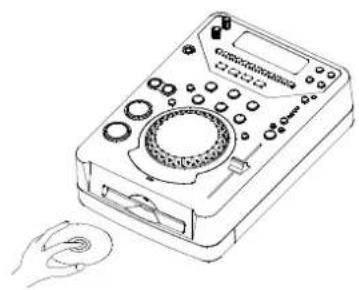
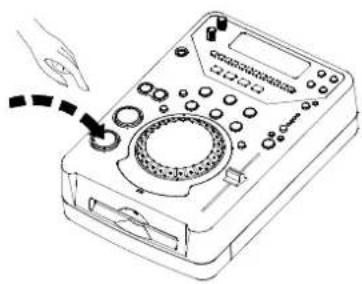
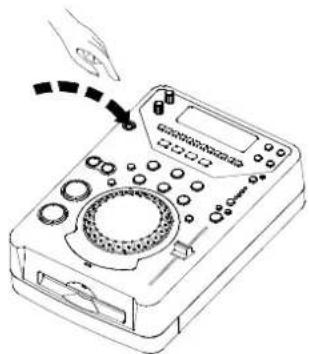
1. Loading and ejecting the disc
- Place a disc in the loader compartment with the label side up.
- Push the disc into the loader.
*Press the PLAY/PAUSE button to start the playback.
- Press the EJECT button to eject the disc.
2. Track skip
Use the TRACK SKIP control to advance ( ) or reverse ( ) to a desired track.
3. SEARCH CONTROL
- JOG DIAL
In pause mode, dial the jog, the playback will move by frame or frames depending on the speed you dial.
*SEARCH BUTTON
Press the SEARCH button in play mode to move by minute. While, in pause mode, the SEARCH button activated, the search control moves by minute.
4. PITCH CONTROL KNOB
- JOG DIAL In play mode rotate the jog clockwise to speed up; rotate counterclockwise to slow down. *PITCH CONTROL KNOB
Move the knob toward +16 direction, the playback becomes fast; move it toward -16 direction, the playback becomes slow.
TROUBLESHOOTING
| Symptom | Cause | Remedy |
| When playback is started, stops or pauses immediately. | * Disc is loaded upside down. * Dust or dirt on the disc. | * Load the disc with label side up. * Clean the disc and load it again. |
| No sound | * Output cables connected improperly. * Audio mixer operated improperly. * Pin plugs or amplifier terminals are dirty. * Player is in pause mode. | * Connect the cable properly. * Check the setting of audio mixer. * Press the PLAY/PAUSE button. |
| Sound is distorted | * Incorrect connection. * Pin plugs or amplifier terminals are dirty | * Connection with audio mixer to the LINE INPUT terminals. * Clean away the dirt. |
| Hum | Cable connected improperly. | * Firmly connect all audio plugs. |
DESCRIPTION OF INDIVIDUAL FUNCTIONS
Top view:
1. EJECT button
2. L.C.D. (LCD Display)

- DESCRIPTION OF THE FUNCTIONS
- TOP VIEW
- EJECT BUTTON
- L.C.D
- AUTO CUE SINGLE / CONTINUE BUTTON
- TIME / STOP BUTTON
- 5.SEARCH BUTTON
- TRACK BUTTON
- PLAY/PAUSE BUTTON
- CUE BUTTON
- BOP BUTTON
- PITCH ON/OFF BUTTON
- PITCH % SELECT BUTTON
- PITCH CONTROL SLIDER
- PITCH BEND + / - BUTTON
- 14.3 HOT-CUE
- 10 BUTTON/IDENTIFY
- JOG WHEEL
- SEARCH (SEARCH INDICATOR LIGHTS)
- SEAMLESS LOOP
- DIRECT ACCESS KEY (0~9)
- RELAY
- BPM BUTTON
- KEY ON/OFF SWITCH
- SLEEP
- DESCRIPTION OF THE FUNCTIONS FRONT VIEW
- REAR VIEW
- BASIC OPERATION
- LOADING AND EJECTING THE DISC
- TRACK SKIP
- SEARCH CONTROL
- PITCH CONTROL KNOB
- TROUBLESHOOTING
- DESCRIPTION OF INDIVIDUAL FUNCTIONS
- L.C.D. (LCD DISPLAY)
Brand : US Blaster
Model : USB 7327
Category : DJ Equipment