DIT901102 - Tablet Difrnce - Free user manual and instructions
Find the device manual for free DIT901102 Difrnce in PDF.



User questions about DIT901102 Difrnce
0 question about this device. Answer the ones you know or ask your own.
Ask a new question about this device
Download the instructions for your Tablet in PDF format for free! Find your manual DIT901102 - Difrnce and take your electronic device back in hand. On this page are published all the documents necessary for the use of your device. DIT901102 by Difrnce.
USER MANUAL DIT901102 Difrnce
natural_image
Blank tablet device with rounded corners and a blank screen (no text or symbols)USER'S MANUAL DIT901102
*ANY PROBLEM OR QUESTIONS, CALL SUPPORT DESK 0900-3437623 (NL)
*VRAGEN OF PROBLEMEN, BEL ONZE SUPPORT DESK 0900-3437623 (NL)
*BEI FRAGEN ODER PROBLEMEN WENDEN SIE SICH BITTE AN
UNSEREN SERVICE: 00-31-348 409 371 (DU)
*VRAGEN OF PROBLEMEN, BEL ONZE SUPPORT DESK 0900-88020 (BE)
*SI VOUS AVEZ DES QUESTIONS SOIR DES PROBLEMES, CONTACTEZ-
NOUS AU NUMERO DE SAV SUIVANTE: 0900-88020 (BE)
www.difrnce.com
Table of Contents
Table of Contents.....P1
Features.....P2
Unit at a Glance ......P3
Getting Started.....P4-P5
About Applications.....P5-P6
Preinstalled Applications.....P6
Connect to a Wi-Fi network.....P7-P8
Optional Connections.....P9
Specifications.....P10
Features
Browse the Web.
Visit your favorite websites
Check your e-mail
Keep in touch with friends and family
Watch YouTube™ videos
Browse the world's most popular video-sharing community
Read your favorite books
Download thousands of books with the included E-book reader *
Discover thousands of apps for Android ^TM
Games, applications, and more with marketplace(need for customer installed)
Connect to the Internet wirelessly
High-speed Wi-Fi 802.11 b/g/n networking
Enjoy your media library anywhere
Portable powerhouse plays popular music, video, and photo formats
microSD memory card reader
Increase your storage capacity (up to 32 GB supported)
Built-in camera
Convenient front-facing camera
Automatic orientation detection
Read any way you want; the display adjusts automatically!
Reading books in the ePub format requires the included E-book reader application.
Android ^TM is a trademark of Google Inc
The software bundled with this product includes software files subject to certain open source license requirements. Such open source software files are subject solely to the terms of the relevant open source software license. The open source software on this device is provided to you on an "AS IS" basis to the maximum extent permitted by applicable law. The preferred license for the Android Open Source Project is the Apache Software License, 2.0 ("Apache 2.0" of which you may obtain a copy via this link:
http://www.apache.org/licenses/LICENSE-2.0. The Linux kernel patches are under the GPLv2 license of which you may obtain a copy viahttp://www.kernel.org/pub/linux/kernel/COPYING.
You may also obtain a copy of GNU General Public License, Version 3 at
http://www.gnu.org/licenses/gpl.html For the relevant copyright and licensing terms of the open source files contained on the device, please access the "Open source license" section located at: Settings => About Tablet => Legalinformation and then "Open Source Licenses".
Until three (3) years after our last shipment of this product, you may obtain a copy of the source code corresponding to the binaries for any GPL-Licensed file by contacting us and you will be send a link to the desired source code or we can provide the source code on a physical medium (like DVD) at a minimal service charge. We offer this source code and service to everyone receiving this information.
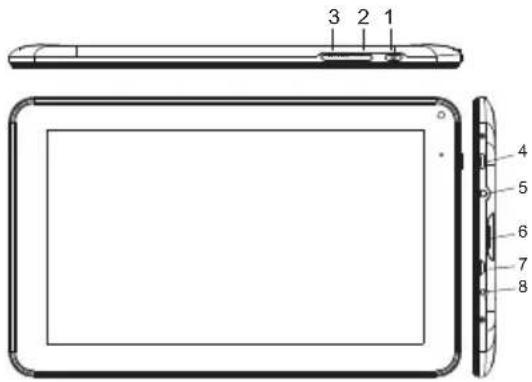
Unit at a Glance
text_image
3 2 1 4 5 6 7 81.ESC
Press this button to return to a previous screen.
2/3. VOL+/VOL-
Press VOL+ to increase the volume level.
Press VOL- to decrease the volume level.
4. POWER
Press to turn the unit on, or to turn the screen on or off.
Press and hold to access the Power Off menu.
5. Headphone
Audio output connection for headphones.
6. TF CARD
Load external microSD memory cards here.
7. micro USB OTG
Connect to a USB device.
8.DC IN 5V
Change and power the tablet with the included power adapter.
Getting Started
Turning the Tablet on or off
To turn the tablet on:
Press and hold the Power key until the LCD screen turns on. Wait until the Home screen appears; the tablet is now ready for use.
To turn the tablet off:
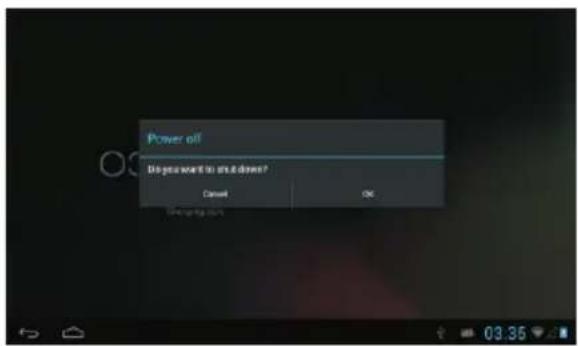
- Press and hold the Power key until the Device Options menu appears.
text_image
Power oil Do you want to ask it down? Cancel OK- Touch ok the screen to turn off the tablet.
Turning the Screen On or off (Standby)
When the tablet is on, you can turn off the screen to conserve battery power. Simply press the Power key once to turn the screen off. Press the Power key again to turn the screen back on.
To conserve battery power, the screen can be set to turn off automatically when the tablet is not in use (between 1 minute and 30 minutes). This Screen timeout option can be found in the Display menu.
Getting Started Unlocking the Screen
When the screen turns off, you will have to unlock the screen
when you turn it back on.
To unlock the screen, drag the lock icon across the screen towards the lock icon.
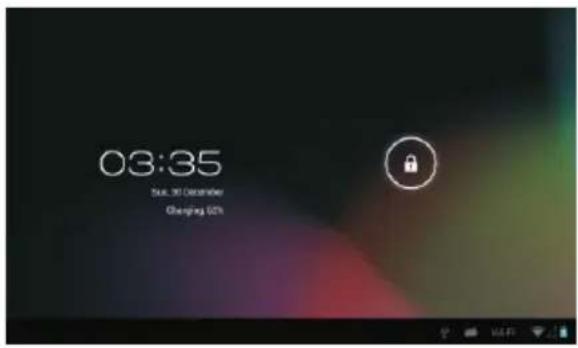
text_image
03:35 Sub. 30 December Changing 02%About Applications
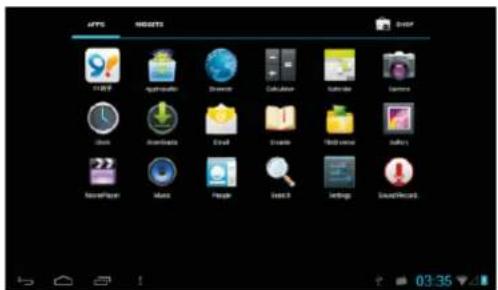
To open an application, touch the application icon on the home screen or in the Launcher where you can tap the icon right up on the home screen to get in..
Launcher screen:
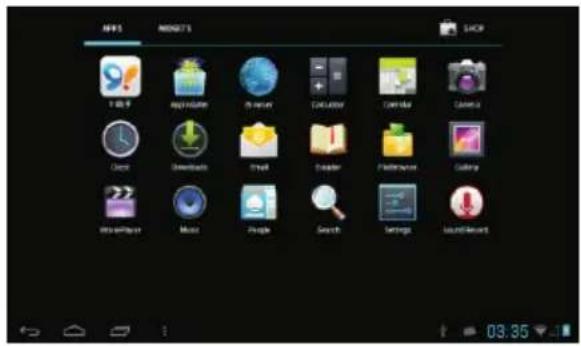
text_image
AHRS MAGNETS SACR 100.9 Apple Store My Store Calculator Calendar Calendar Clock Downloads Smart Explorer Performance Gallery Mouse Music Google Search Settings Sound/RecordThe screen shown above is for illustrative purposes only. Reserves the right to modify and improve the final list of applications available on the tablet.
About Applications
Preinstalled Applications
Some applications have been installed on your tablet for your convenience.
These applications include:

Browse the web.

Perform simple mathematical operations.

Take pictures or videos with the frontfacing camera.

Check your e-mail.

Play music.

Access the Settings menu to adjust the tablet's options.
Preinstalled Applications Installing Applications
You can also download an install additional applications from the device's applications marketplace, the web browser, or other sources.
The tablet must be set to allow installation of applications from non-Market sources. The Unknown sources option can be set in the Application settings menu.
Connect to a Wi-Fi network
The Notification bar displays icons that indicate your tablet's Wi-Fi status.

Notification that an open Wi-Fi network is in range.

Connected to a Wi-Fi network (waves indicate connection strength).
[no icon] There are no Wi-Fi networks in range, or the Wi-Fi radio is off.
- Turn on the Wi-Fi radio if it is not already on. To turn on Wi-Fi:
a.Go to the Home screen: Press the Home key.
b.Open the Settings menu: tap the icon right up on the home screen to get into the launcher, then touch Settings icon.
c.Open the Wireless & networks menu: Slide the icon to ON status.
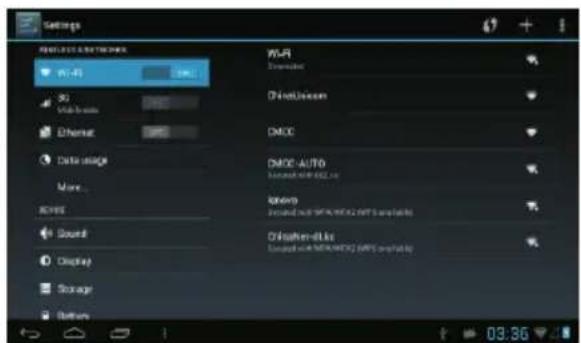
text_image
Settings W-Fi Wi-Fi S2 Mobile home Ethernet Data image More... Sound Display Storage Bottom CMDC-AUTO CMDC-AUTO Siemens Chikshen-8.8k Chikshen-8.8k 03:36When Wi-Fi is on, the tablet will look for and display a list of available Wi-Fi networks.

If a network that you have connected to previously is found, the tablet will connect to it. If you don't see your network in the list, you can force the tablet to re-scan. To scan for networks, tap the Menu key, and then touch Scan.
Connect to a Wi-Fi network
2. Select an available Wi-Fi network to connect to:
In the same Wi-Fi settings menu above, touch a network in the list.
If the network is open, the tablet will prompt you to confirm connection to the network. Touch Connect to confirm.
If the network is secured (as indicated by a Lock icon), the tablet will prompt you to enter a password or other credentials. Touch the Wireless password box to show the on-screen keyboard and then use it to enter the password. Touch Connect to confirm.
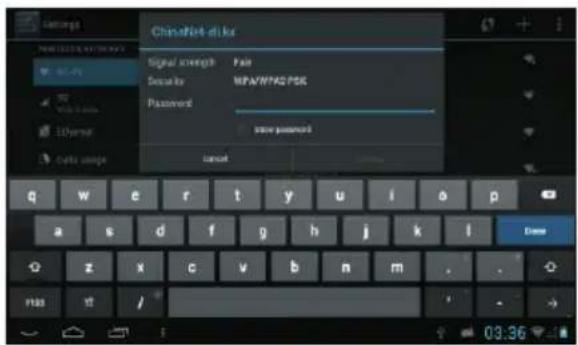
text_image
Settings ChinaNet disks Signal strength Pain Descartar MFA/WMAD PSE Password Show password Cancel q w e r t y u i o p a s d f g h j k l Done z x c v b n m . . . F103 /When you have successfully connected to a Wi-Fi network, the Notifications bar at the low of the screen will show a Wi-Fi signal indicator.


To learn about how to add a Wi-Fi network when it is not in range or when the router is set to obscure the network name (SSID); or to configure advanced Wi-Fi options, please refer to the manual.
Optional Connections
Connecting to a Computer
Connect the tablet to a computer to transfer files.
1. Connect your tablet to the computer.
With the included USB cable: Plug the small end of the cable into the USB 2.0 high speed connector of the tablet. Plug the large end of the cable into an available USB 2.0 high speed port on the computer.
- When your tablet is connected, slide up the USB icon right down on the screen and then touch icon USB connected.
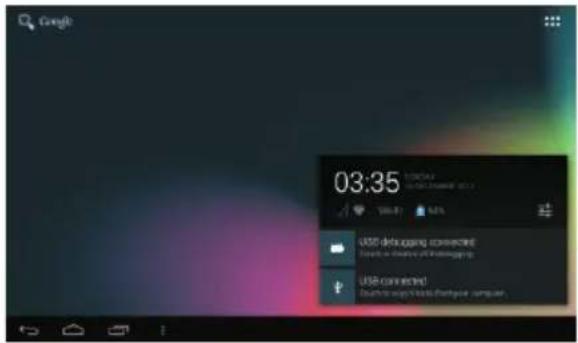
text_image
Google 03:35 USB debugging connected! USB connected! Dustri to ways to access a server, computer.3. Mount the storage.
Touch button Turn on USB storage to mount the tablet's built-in storage. When it is mounted, you can copy files to or from your tablet.
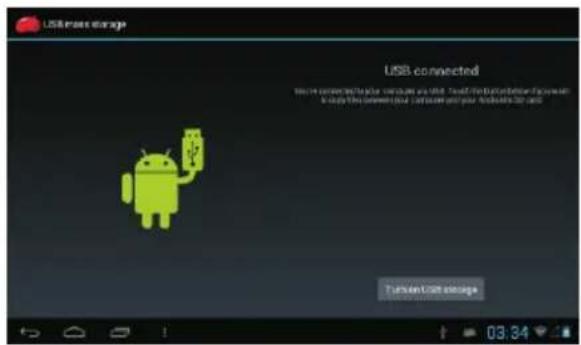
text_image
USB access storage USB connected You can connect to the other user via USB. You can access to the next user via Android 2018. You can access to the next user via Android 2018. You can access to the next user via Android 2018. You can access to the next user via Android 2018. You can access to the next user via Android 2018. You can access to the next user via Android 2018. You can access to the next user via Android 2018. You can access to the next user via Hyundai 2018. You can access to the next user via Hyundai 2018. You can access to the next user via Hyundai 2018. You can access to the next user via Hyundai 2018. You can access to the next user via Hyundai 2018. You can access to the next user via Hyundai 2018. You can access to the next user via Hyundai 2018. You can access your connection with Android 2018. You can access your connection with Android 2018. You can access your connection with Android 2018. You can access your connection with Android 2018. You can access your connection with Android 2018. You can access your connection with Android 2018. You can access your connection with Android 2018. You can access your connection with Android 2018. You can use your connection with Android 2018. You can use your connection with Android 2018. You can use your connection with Android 2018. You can use your connection with Android 2018. You can use your connection with Android 2018. You can use your connection with Android 2018. You can use your connection with Android 2018. You can use your connection with Android 2016. You can use your connection with Android 2016. You can use your connection with Android 2016. You can use your connection with Android 2016. You can use your connection with Android 2016. You can use your connection with Android 2016. You can use your connection with Android 2016. You can use your connection with Android 2016. You can use your connection with Android-2016. You can use your connection with Android-2016. You can use your connection with Android-2016. You can use your connection with Android-2016. You can use your connection with Android-2016. You can use your connection with Android-2016. You can use your connection with Android-2016. You can use your connection with Android-2016. You can use you connection with Android-2016, but you can use you connection with Android-2016, but you can use you connection with Android-2016, but you can use you connection with Android-2016, but you can use you connection with Android-2016, but you can use you connection with Android-2016, but you can use you connection with Android-2016, but you can use you connection with Android-2016, but you can also use you connection with Android-2016, but you can also use you connection with Android-2016, but you can also use you connection with Android-2016, but you can also use you connection with Android-2016, but you can also use you connection with Android-2016, but you can also use you connection with Android-2016, but you can also use you connection with Android-2015, but you can also use you connection with Android-2015, but you can also use you connection with Android-2015, but you can also use you connection with Android-2015, but you can also use you connection with Android-2015, but you can also use you connection with Android-2015, but you can also use you connection with Android-2015, but you can also use you connection withAndroid-2015, but you can also use you connection withAndroid-2015, but you can also use you connection withAndroid-2015, but you can also use you connection withAndroid-2015, but you can also use you connection withAndroid-2015, but you can also use you connection withAndroid-2015, but you can also use you connection withAndroid-2015, but you can only use you connection withAndroid-2015, but you can only use you connection withAndroid-2015, but you can only use you connection withAndroid-2015, but you can only use you connection withAndroid-2015, but you can only use you connection withAndroid-2015, but you can only use you connection withAndroid-2015, but you can only use you connection withAndroid-2014, but you can only use you connection withAndroid-2014, but you can only use you connection withAndroid-2014, but you can only use you connection withAndroid-2014, but you can only use you connection withAndroid-2014, but you can only use you connection withAndroid-2014, but you can only use you connection withAndroid-2014, but you can only use you connection with Hyundai-2014, but you can only use you connection with Hyundai-2014, but you can only use you connection with Hyundai-2014, but you can only use you connection with Hyundai-2014, but you can only use you connection with Hyundai-2014, but you can only use you connection with Hyundai-2014, but you can only use you connection with Hyundai-2014, but you can also use you connection with Hyundai-2014, but you can only use you connection with Hyundai-2014, but you can only use you connection with Hyundai-2014, but you can only use you connection with Hyundai-2014, but you can only use you connection with Hyundai-2014, but you can only use you connection with Hyundai-2014, but you can only use you connection with Hyundai-2013, but you can only use you connection with Hyundai-2013, but you can only use you connection with Hyundai-2013, but you can only use you connection with Hyundai-2013, but you can only use you connection with Hyundai-2013, but you can only use you connection with Hyundai-2013, but you can only use you connection with Hyundai-2013, but you can only useyou connections between iOS and Android platforms.Specifications
| Processor | Allwinner A13 1GHz(Cortex A8) |
| RAM | 512MB DDR3 |
| Storage | 4 (option) flash built-in; micro SD card slot (max.32GB supported) |
| Display | 9.0" TFT LCD(800x480), Capacitive touchscreen |
| Wi-Fi Networking | IEEE 802.11 b/g/n |
| Audio Output | 3.5mm headphone |
| PC Interface | USB 2.0 high speed |
| Additional Features | Built-in microphoneFront facing camera(0.3MP)1W speaker |
| Operating System | Android^TM 4.1 |
| Power | Rechargeable Li-poly battery power Adapter(DC 5V,2A) |
| Playback Time (hours) | Up to 8 hours music,4 hours video,3.5 hours web browsing |
Music was tested with a 128 kbps MP3 file; video was tested with a 1920x1080 MPEG-4/AVC file; browsing was tested with the screen brightness set to default. Actual playback results may vary.
DIFRNCE®
natural_image
Blank tablet device outline with rounded corners and a small screen on top (no text or symbols)HANDLEIDINGDIT901102
*ANYPROBLEMORQUESTIONS, CALLSUPPORTDESK0900-3437623(NL)
*VRAGENOFPROBLEMEN,BELONZESUPPORTDESK0900-3437623(NL)
*BEIFRAGENODERPROBLEMENWENDENSIESICHBITTEANUNSEREN SERVICE:00-31-348409371(DU)
*VRAGENOFPROBLEMEN,BELONZESUPPORTDESK0900-88020(BE)
*SIVOUSA VEZDESQUESTIONSSOIRDESPROBLEMES, CONTACTEZ-NOUS AUNUMERODESAVSUIVANTE:0900-88020(BE)
www.difrnce.com
Inhoudsopgave
Inhoudsopgave....P1
Kenmerken....P2
video-sharingcommunity
SnelleWi-Fi802,11b/g/nnetworkverbinding
text_image
Technical diagram of a tablet device with labeled parts numbered 1 to 81.ESC
text_image
Power off! Do you want to shut down? Cancel OK Cancel to:- Drukopokophetschermomdetabletuittezetten.
Hetschermaan-ofuitzetten(stand-by)
Alsdetabletaanstaat,kuntuhetschermuitschakelenomdebatterijente sparen.Drukeenvoudigéénmaalopdeaan-/uitknopomhetschermuitte zetten.Drukdeaan-/uitknopnogmaalsinomhetschermweeraantezetten.

Omdebatterijentesparenkanhetschermz ingesteldwordendathetautomatischuitgaatal de tabletnietgebruiktwordt(tussen1minuure 30minuten).
Dezetime-outoptievoorhetschermkunt u vindeninhetdisplaymenu
Beginnen
Hetschermontgrendelen
text_image
03:35 Sun, 30 December Charging SunOvertoepassingen
Omeentoepassingteopenenraaktuhettoepassingspictogramaanophet beginschermofinhetstartmenuwaaruophetpictogramkuntklikkenomhet testartenofophetbeginschermtezetten.
Startmenu:
text_image
APPS REGIST3 AVOC Windows Apache Windows Callback Chrome iTunes Airbus Downloads Email Trainee Help menu Battery Newspaper Music People Search Settings Sound/Recordtext_image
Settings WIFI NETS NETWORKS Wi-Fi 3G Ethernet Data usage More... DHCE Sound Display Storage Partner Wi-Fi Extracted Chinasatcom CMCC CMCC AUTO Extracted with WiFi TX Intwo Extracted with WiFi (WiFi available) Chinasat eBio Extracted with WiFi (WiFi available) 03:36text_image
03:35 ADDRESS 21-22 C:\WINDOWS\ST 2017 UNITS 63% USD debugging connected Touch to displace USD debugging USD connected Touch to copy Note to Touch your accounttext_image
USB mass storage USB connected You are connected by your computer to USB. Touch the button below if you want to copy this device your computer and your Android's iPhone. Turn on USB storageSpecifications
natural_image
Front view of a blank tablet device with rounded corners and a small screen (no text or symbols)GUIDED'UTILISATIONDIT901102
*ANYPROBLEMORQUESTIONS, CALLSUPPORTDESK0900-3437623(NL)
*VRAGENOFPROBLEMEN, BELONZESUPPORTDESK0900-3437623(NL)
*BEIFRAGENODERPROBLEMENWENDENSIESICHBITTEANUNSEREN SERVICE:00-31-348409371(DU)
*VRAGENOFPROBLEMEN,BELONZESUPPORTDESK0900-88020(BE)
*SIVOUSAVEZDESQUESTIONSSOIRDESPROBLEMES,CONTACTEZ-NOUS AUNUMERODESAVSUIVANTE:0900-88020(BE)
www.difrnce.com
Sommaire
Sommaire....P1
text_image
Diagram of a tablet device with labeled parts including front panel, screen, and side panels1. Échap.
text_image
Power off! Do you want to shut down? Cancel OK Display to:text_image
03:35 Sun, 31 December Charging Si'sAproposdesapplications
text_image
IMPORT IMPORT IMPORT IMPORT IMPORT IMPORT IMPORT IMPORT IMPORT IMPORT IMPORT IMPORT IMPORT IMPORT IMPORT IMPORT IMPORT IMPORT IMPORT IMPORT IMPORT IMPORT IMPORT IMPORT IMPORT IMPORT IMPORT IMPORT IMPORT IMPORT IMPORT IMPORT IMPORT IMPORT IMPORT IMPORT IMPORT IMPORT IMPORT IMPORT IMPORT IMPORT IMPORT IMPORT IMPORT IMPORT IMPORT IMPORT IMPORT IMPORT IMPORTtext_image
Settings WIFI NETRIMES 3D Fi Wireless Ethernet Cuts image Mars... SPEED Sound Display Manage Runtime Wi-Fi External Chromotion CMCC CMCC-AUTO Connected with WiFi 16 Illumina Connected with WiFi 2002 (WiFi seconds) Chipsat-eLus Connected with WiFi 2002 (WiFi seconds) 03:36text_image
Chipsheet-like Signal strength: 1x4 Security: WAA/WA2 PSE Password: Password Casp q w e r t y u i o p a s d f g h j k l z x e v b n m 703 4 / 1 03:36text_image
Google 03:35 CURRENTLY SAMS 100% LGD teleapping connected! To be installed on LGD teleapping LGD connected! To be installed on LGD teleapping- Connectezlestockage.
text_image
USB connection UserRecommended by your smartphone on iOS. Recall the better follows if you want to log the next user's computer and just Android's USB. Tamed/USB storageCaractéristiques
natural_image
Front view of a blank tablet device with rounded corners and no visible text or symbolstext_image
Diagram of a tablet device with labeled parts including front panel, screen, and side panels1.ESC
text_image
Power off! Do you want to shut down? Cancel Hold Display to:text_image
03:35 Sun, 30 December Changgng St'sÜberAnwendungen
text_image
APPLE MASCETIS SHOP iTunes Applicates iTunes Calculation Cartoon iTunes Users Downloads Email Driver Help menu Gallery Non-Internet Music People Search... Settings DuckWorks
text_image
Settings WALFOS NETWORKS Wi-Fi 3D Ethernet Data usage Mens... SERVICE Sound Display Storage Runtime Wi-Fi Connected ChINAISCOM CMCC GNCO-ALOG Energetable: 100% CI Imsch Connected with IPIA (RPG) (IPTs commands) ChINAISAT-XLS Connected with IPIA (RPG) (IPTs commands) 03:36text_image
Settings Signal strength Security Password Password Q S T B C D E F G H I J K L M N O P Q R S T B C E F G H I J K L M N O P Q R S T B C E F G H I J K L M N O P Q R S T B C E F G H I J K L M N O P Q S T B C E F G H I J K L M N O P Q R S T B C E F G H I J K L M N O P Q R S T B C E F G H I J Ktext_image
03:35 CURRENT AT 12/01/2012 USB Status 60% USB debugging connected Touch to desktop X2.4898 USB connected Touch to log file or network support3.InstallierenSiedenSpeicher.
text_image
USB notes about USB connected Your connected by your computer will be used. You should follow if you want to copy the next product or next Android's logo. Send in USB notesSpezifikationen