TKG BBA 2 - Bread maker KALORIK - Free user manual and instructions
Find the device manual for free TKG BBA 2 KALORIK in PDF.


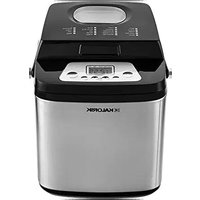
| Product type | Bread machine and multifunction oven |
| Brand | Kalorik |
| Model | TKG BBA 2 |
| Power supply | 220-240 V~, 50-60 Hz |
| Power | Approximately 600 W |
| Water tank capacity | 200 ml |
| Mold capacity | Up to 1 kg of bread |
| Number of bread machine programs | 4 types: BASIC, FRENCH, SWEET, WHOLE WHEAT |
| Number of oven programs | 12 types: frozen croissant, frozen pizza, soup, potato, jam, defrost, pizza, small cakes, baguette, country bread, croissant, brioche |
| Cooking functions | Toast, TOP, BOTTOM, TOP+BOTTOM, TOP+BOTTOM+STEAM |
| Delayed timer | Up to 13 hours |
| Keep warm | 60 minutes automatic |
| Display | LCD with program and process indicators |
| Non-stick coating | Yes (mold and kneader) |
| Included accessories | Non-stick mold, kneader, measuring cup, measuring spoon, pizza tray, tray for 3 baguettes, rack, drip tray |
| Care and cleaning | Clean with a damp cloth; mold and kneader are dishwasher safe |
| Safety | Automatic shut-off, overheating protection, hot surface indicator |
| Dimensions (L x W x H) | Approximately 35 x 25 x 30 cm |
| Weight | Approximately 5 kg |
Frequently Asked Questions - TKG BBA 2 KALORIK
User questions about TKG BBA 2 KALORIK
0 question about this device. Answer the ones you know or ask your own.
Ask a new question about this device
Download the instructions for your Bread maker in PDF format for free! Find your manual TKG BBA 2 - KALORIK and take your electronic device back in hand. On this page are published all the documents necessary for the use of your device. TKG BBA 2 by KALORIK.
USER MANUAL TKG BBA 2 KALORIK
Generated by Unregistered Batch DOC TO PDF Converter 2011.3.804.1511, please register!
Copies of the I/B. Please reproduce them without any changes except under special instruction from Team International BELGIUM. The pages must be reproduced and folded in order to obtain a booklet A5 (+/- 148.5 mm width x 210 mm height). When folding, make sure you keep the good numbering when you turn the pages of the I/B. Don't change the page numbering. Keep the language integrity.
TEAM

KALORIK
Bread maker
Machine à pain

I/B Version 080514
TKG BBA 2
220-240V~50Hz 1100-1300W

KALORIK
Fox +32 2 359 95 50
Copies of the I/B. Please reproduce them without any changes except under special instruction from Team International BELGIUM. The pages must be reproduced and folded in order to obtain a booklet A5 (+/- 148.5 mm width x 210 mm height). When folding, make sure you keep the good numbering when you turn the pages of the I/B. Don't change the page numbering. Keep the language integrity.

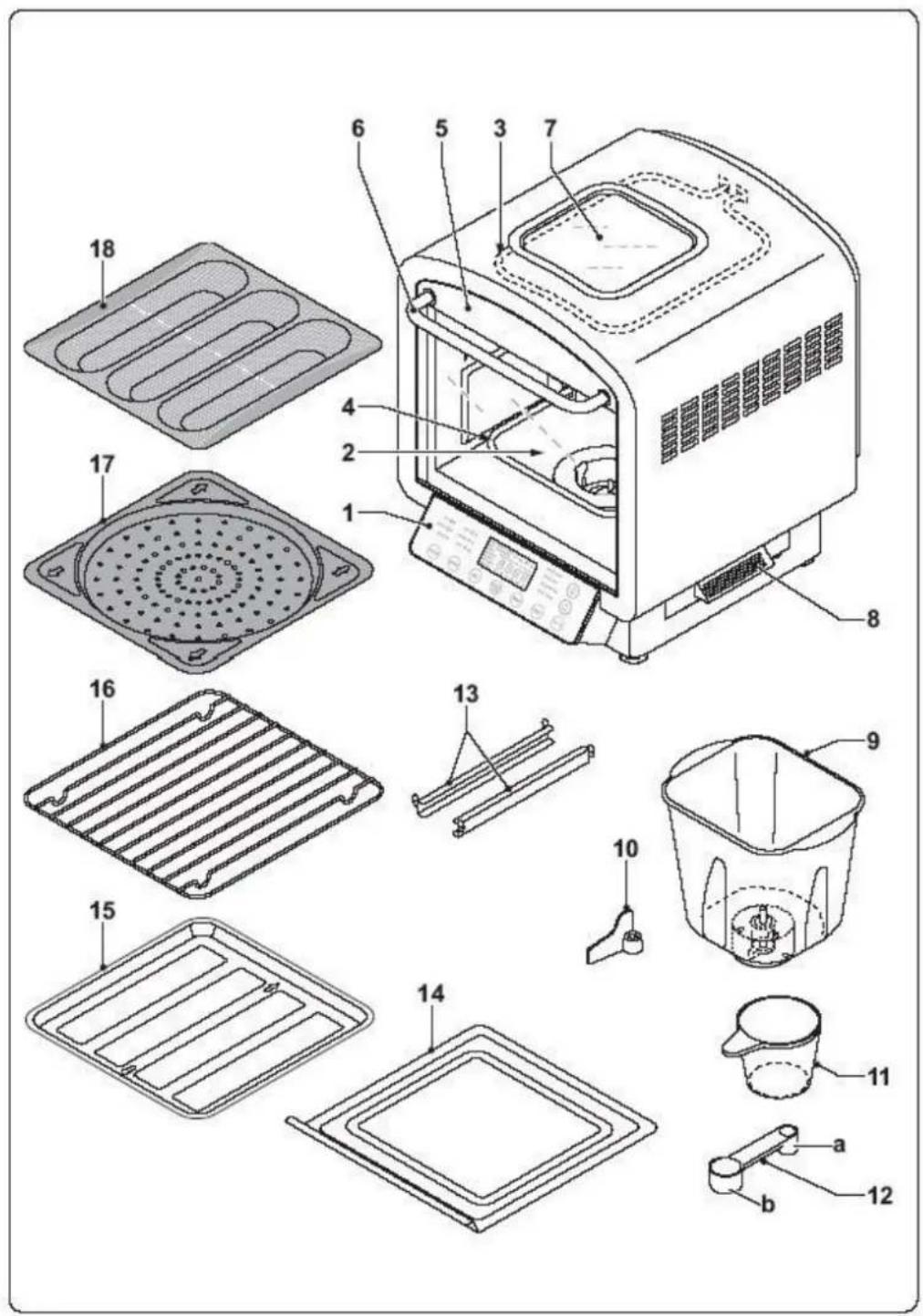
GB
- Control panel
- Cooking compartment
- Upper heating element
- Lower heating element
- Door
- Handle
- Viewing window
- Water tank
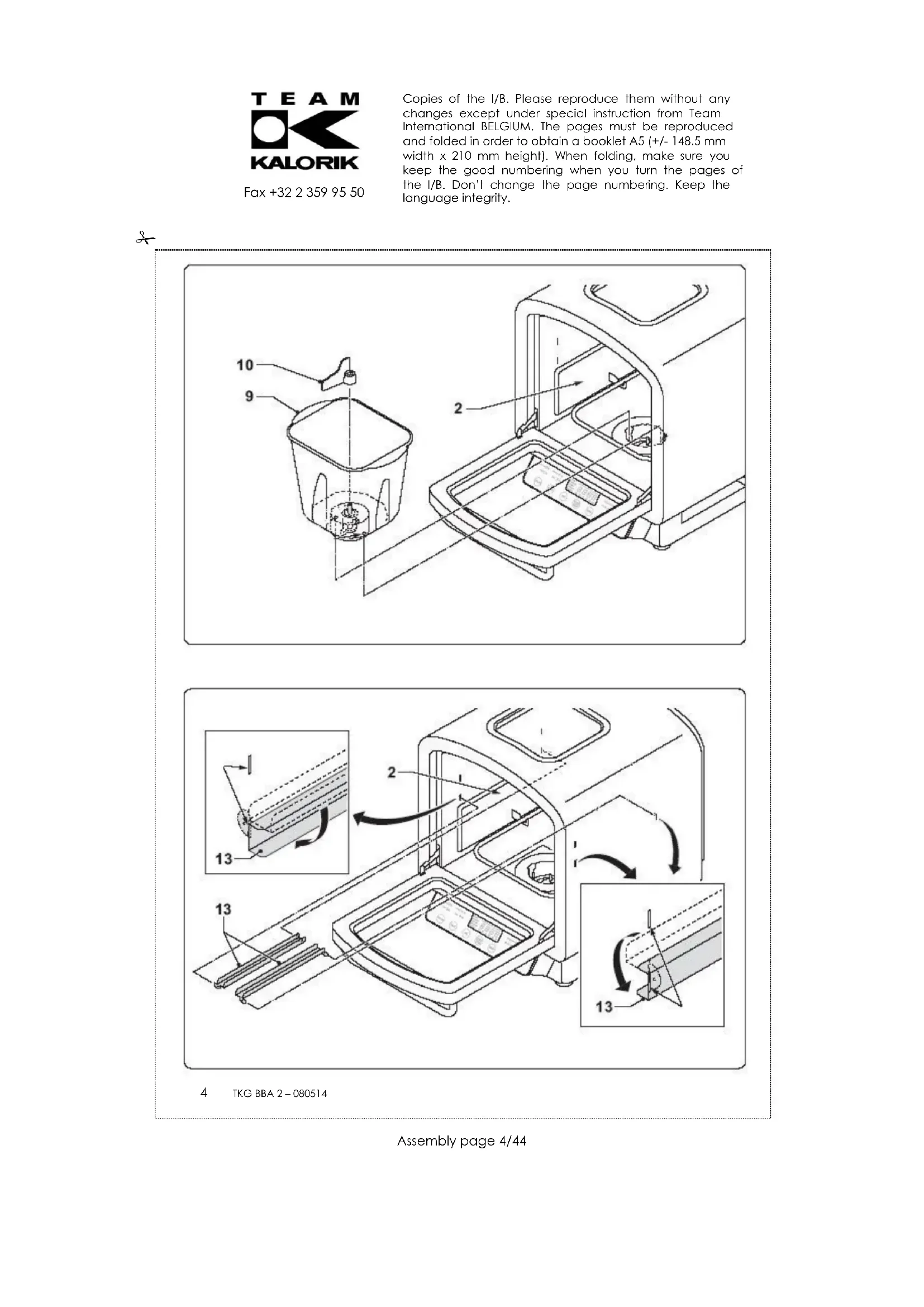
- Baking tin
- Kneading blade
- Measuring cup
- Measuring spoon (a:teaspoon / b:tablespoon)
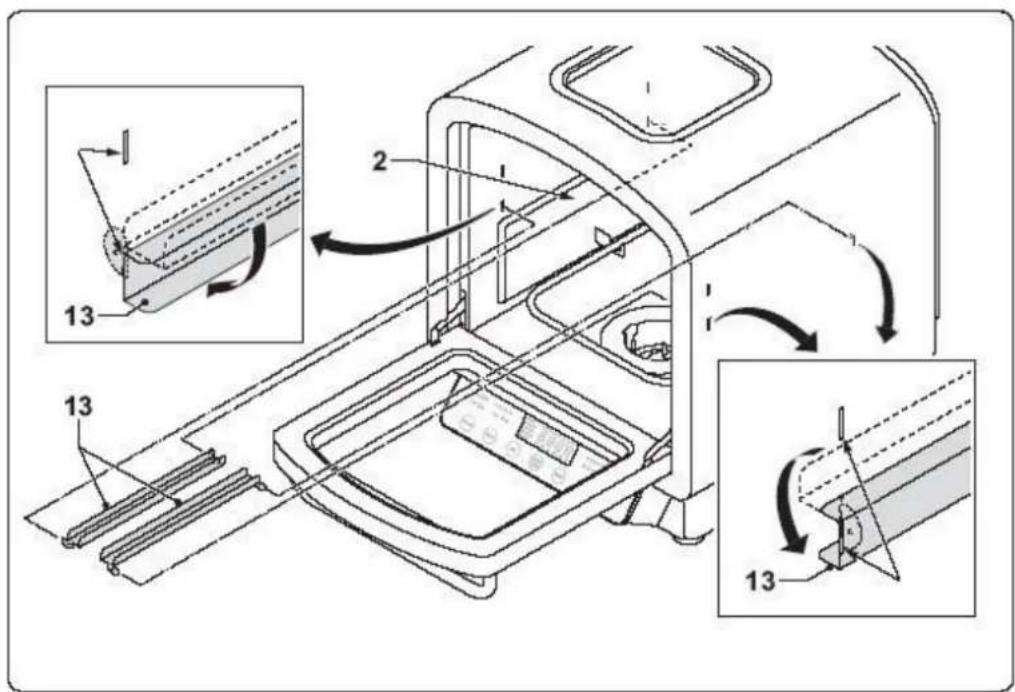
- Support rail
- Drip tray
- Baking plate
- Grill rack
- Pizza plate
- Plate for 3 baguettes
FR
Copies of the I/B. Please reproduce them without any changes except under special instruction from Team International BELGIUM. The pages must be reproduced and folded in order to obtain a booklet A5 (+/- 148.5 mm width x 210 mm height). When folding, make sure you keep the good numbering when you turn the pages of the I/B. Don't change the page numbering. Keep the language integrity.


GB OPERATING INSTRUCTIONS
IMPORTANT SAFEGUARDS
Please read these instructions carefully before using the appliance, and always follow the safety and operating instructions.
Important: People (including children) who are not able to use the appliance in a safe way, due to their physical, sensorial or mental capacity or their lack of experience or knowledge, must never use the appliance except if they are supervised by a person responsible for their safety or if they previously received instructions concerning the safe use of the appliance. Close supervision is necessary to prevent children from using the appliance as a toy.
Check that your mains voltage corresponds to that stated on the appliance.
Never leave the appliance unsupervised when in use.
From time to time check the appliance and its cord for damages. Never use the appliance if cord or appliance shows any signs of damage. All repairs should be made by a competent qualified electrician ^1) .
Only use the appliance for domestic purposes and in the way indicated in these instructions.
Never immerse the appliance in water or any other liquid for any reason whatsoever. Never place it into the dishwasher.
Be very careful right after the baking process, as the appliance is very hot. Let it cool down completely before storing or cleaning it.
Never use the appliance near hot surfaces.
Before cleaning or storing, always unplug the appliance from the power supply.
Never use the appliance outside and always place it in a dry environment.
Never use accessories, which are not recommended by the producer. They could constitute a danger to the user and risk to damage the appliance.
Never move the appliance by pulling the cord. Make sure the cord cannot get caught in any way. Do not wind the cord around the appliance and do not bend it.
Stand the appliance on a table or flat surface to prevent it from falling.
Make sure the cord never comes into contact with the hot parts of the appliance. Never touch the hot parts of the appliance in order to avoid injuries.
Make sure the appliance never comes into contact with inflammable materials, such as curtains, cloth, etc... when it is in use, as a fire might occur.
The temperature of the accessible surfaces may be very high when the appliance is in use. Never touch those surfaces during use. Use oven mitts to handle the baking tin after
the baking process in order to avoid injuries. Should the symbol be indicated on a certain surface, you need to be careful when handling the product. This symbol means CAUTION, this surface may get very hot during use.
Be careful not to scratch the special coating of the baking tin and kneading blade, as this would damage the non-stick coating.
Never exceed the amounts of flour and yeast that are recommended in recipes. Otherwise, the dough might flow over the baking tin.
Never cover the appliance (e.g. with a cloth), as this would hinder the steam outlet.
Never put any object in the baking tin, as this could cause electric shocks or damage the non-stick coating of the tin.
Your appliance must never be switched on through an external timer or any kind of separate remote control system.

Fox +32 2 359 95 50
Copies of the I/B. Please reproduce them without any changes except under special instruction from Team International BELGIUM. The pages must be reproduced and folded in order to obtain a booklet A5 (+/- 148.5 mm width x 210 mm height). When folding, make sure you keep the good numbering when you turn the pages of the I/B. Don't change the page numbering. Keep the language integrity.
SHORT CORD INSTRUCTIONS
A relatively short power supply cable is provided to reduce the risk resulting from becoming entangled in, or tripping over a longer cord. Extension cords may be used if care is exercised in their use.
The electrical rating of the extension cord should be at least that of the appliance. If the electrical rating of the extension cord is too low, it could overheat and burn.
The longer cord should be arranged so that it will not drape over the counter top or tabletop where it can be pulled on by children or tripped over.
BEFORE THE FIRST OPERATION
Unpack the appliance and remove all packaging material. Clean the door, the accessories and the baking tin with a soft damp cloth and dry these parts thoroughly. Assemble the parts and let the appliance work empty for about 10 minutes. Plug in the appliance (00 will appear on the LCD display) and press the "FUNC" key 4 times, so that the TOP & BOTTOM pilot lamps are on (220°C blinks on the LCD display). Press the Timer/TEMP button once (30:00 blinks on the LCD display), press the (一) key until 10:00 appears on the display, then press the START/STOP button. The oven will start to preheat. When the oven reaches the right temperature, 3 BEEPS will sound and the oven will heat during 10 minutes (the time displayed on the LCD display will count down). When the requested time has elapsed, 3 BEEPS will sound and the oven will switch off automatically (00 will appear on the LCD display). Let the appliance cool down, clean and dry all parts and assemble them again. Your bread maker is now ready for use. The quality of the bread can depend on many factors. Therefore, it is very important to know all ingredients and their interaction. This will allow you to obtain satisfactory results.
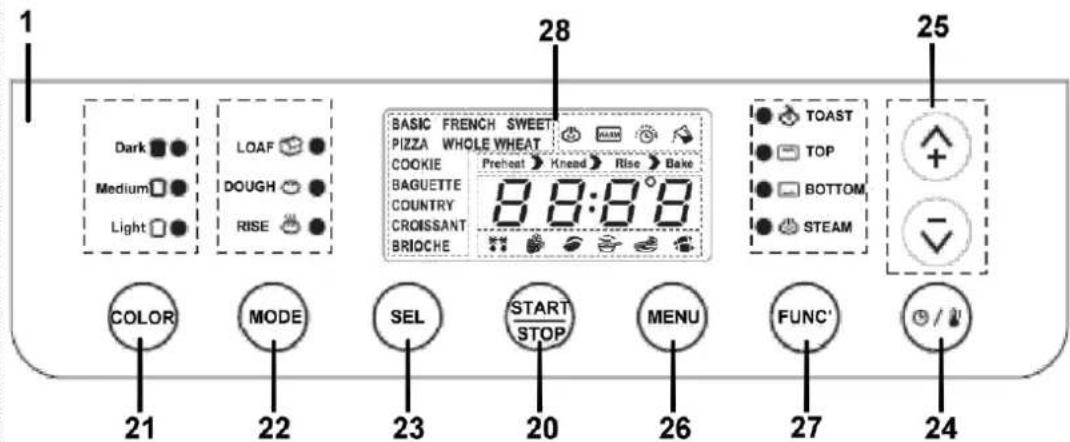
CONTROL PANEL (1)
"START/STOP"key (20):
To start a programme, press this key.
Press and hold for about 3 seconds until you hear a beep to stop operation or cancel a timer setting. (Note: it is not necessary to press the stop key when you open the door to check the progress of your bread.)
BREADMAKER
"COLOR" key (21):
Press this key to select the crust colour between medium, light and dark respectively (only in LOAF mode).
"MODE" key (22):
Press this key to select the baking mode: LOAF, DOUGH + RISE, DOUGH, RISE.
LOAF: to bake a loaf of bread
DOUGH + RISE: to knead & rise the dough
DOUGH: to knead the dough
RISE: to rise the dough
"SEL" (selection) key (23):
Press this key to choose the type of bread.
On LOAF position, you can choose between 4 types: BASIC, FRENCH, SWEET or WHOLE WHEAT.
On DOUGH & RISE position, you can choose between 10 types: BASIC, FRENCH, SWEET, WHOLE
WHEAT, PIZZA, COOKIE, BAGUETTE, COUNTRY, CROISSANT & BRIOCHE.
Preset key/ TIME/TEMP switch key (24):
Allows you to preset the baking of bread.
Up (+) & Down (-) key (25):
Press "+" to increase the baking time or temperature.
Press " - " to decrease the baking time or temperature.
OVEN
"MENU" key (26):
Press this key to select the baking type. You can choose between 12 types: frozen snacks, frozen pizzas, soup, potato, jam, defrost, bake pizza, bake cookies, bake baguettes, bake country bread, bake croissants and bake brioches. The first six (frozen snacks, frozen pizzas, soup, potato, jam, defrost) are represented in reverse order by the symbols under the cooking time on the display.
"FUNC" (function) key (27):
Press this key to select the TOAST feature, the TOP feature, the BOTTOM feature, the
TOP+BOTTOM feature or the TOP+BOTTOM+STEAM feature.
PRESET KEY / TIME/TEMP switch key (24):
You can also use this key to switch from temperature setting to time setting for the TOP feature and the BOTTOM feature.
Up (+) & Down (-) key (25):
Press "+" to increase the baking lime or temperature.
Press " - " to decrease the baking time or temperature.
Display window (28):
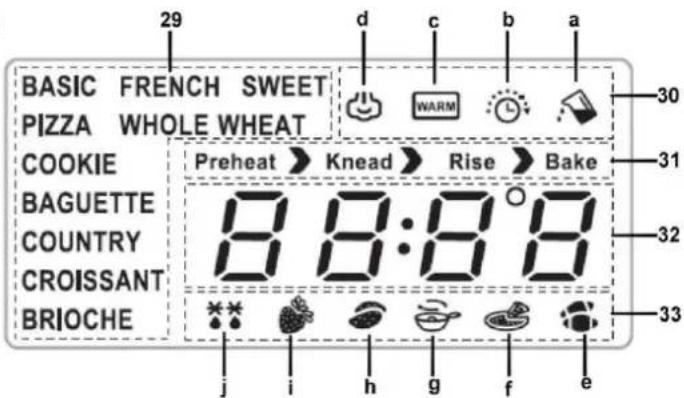
Bread type indicator & Cooking Programme indicator (29)
BASIC: to bake normal bread
FRENCH: to bake French bread
SWEET: to bake sweet bread
WHOLE WHEAT: to bake wholewheat bread
PIZZA: to bake pizzas
COOKIE: to bake cookies
BAGUETTE: to bake baguettes
COUNTRY: to bake country bread
CROISSANT: to bake croissants
BRIOCHE: to bake brioches
Cooking function indicator (30)
a. Water tank must be filled with water
b. Delayed finish time function active
c. Heat preservation function active
d. Steam function active
Cooking process indicator (31)
Preheat : appliance is preheating
Knead: appliance is kneading dough
Rise : appliance is rising dough
Bake : appliance is baking bread
LCD display (32)
Displays time countdown
Displays the temperature.
Displays an error (error warning codes "Err1", "Err2" and "Err3")
Cooking Programme indicator (33)
e. to prepare frozen snacks
f. to prepare frozen pizzas
g. to WARM UP soup
h. to prepare potatoes
i. to prepare jam
j. to defrost food
WATER TANK (8)
Your appliance is equipped with a water tank of 200ml on the right-hand side. To fill the water tank, pull it out of the appliance and unscrew its cap. Fill it with water but do not exceed the maximum level indicated on the water tank ("FULL"). Screw the cap back on and put the water tank back in the appliance.
You can only use the steam feature if there is a sufficient amount of water in the water tank.
USE AS A BREADMAKER
Temperature
All ingredients that you pour in the bread maker should be at an ambient temperature. The room where you use the appliance should be at a temperature between 15^ and 34^ , and ideally between 20 and 23^ . The room temperature has an influence on the loaf size.
Measuring the ingredients
- Your appliance is equipped with a combined graduated spoon (small and large).
- When talking about "cup" in this instruction manual, it refers to one measuring cup supplied (250 ml).
On the combined graduated spoon, you'll see the following marks: Tablespoon (tbs) = 15ml Teaspoon () = 5
To measure liquid ingredients, fill the measuring cup and place it on a flat surface. The liquid level line must be aligned to the mark of measurement. An approximate measurement is not sufficient and could have a bad influence on the balance of the recipe.
To measure the flour lightly spoon it into the measuring cup and once filled, level off with a straight-edged utensil. Scooping or tapping a measuring cup will pack the flour and you will end up with more than is required. This extra amount could affect the balance of the recipe. Do not sift the flour. To measure small amounts, use the graduated spoon and make sure it is level, not heaped. For some dry ingredients such as raisins or chocolate chips, we advise you to use a kitchen scale.
Geographic situation
At altitude above 3,000 feet, flour tends to be drier and absorbs less liquid. Slightly more liquid or less flour may be required. Dough rises faster at higher altitude. Either sugar, yeast or liquid should be adjusted slightly to prevent over-rising. See table below for guidelines.
| ALTITUDE | |||
| Adjustment | 3,000 ft | 5,000 ft | 7,000 ft |
| Reduce yeast: For each tsp in the recipe, decrease by | 1/8 tsp | 1/8 – 1/4 tsp | + 1/4 tsp |
| Reduce sugar: For each tbs in the recipe, decrease by | 0-1 tsp | 0-2 tsp | 1- 2 tsp |
| Increase liquid: For each cup in the recipe, add | 1 -2 tbs | 2-4 tbs | 3-4 tbs |
Ingredients
One of the most important factors involved when making bread is the quality and freshness of the ingredients. Moreover, it is absolutely necessary to follow the amounts prescribed accurately.
Water
It is recommended to use lukewarm drinking water. This gives the best results.
All-purpose flour
All-purpose flour is a blend of refined hard and soft wheat flours especially suited for making breads and cakes. While this type of flour may give acceptable results from your bread maker, we recommend using bread flour.
Bread flour
Bread flour is high gluten/protein flour that has been treated with conditioners that give dough a greater tolerance during kneading. Bread flour typically has a higher gluten concentration than all-purpose flour, however, depending on different milling practices this may vary. Bread flour is recommended for use with this bread maker, but all-purpose flour will give acceptable results.
Whole-wheat flour
Whole wheat flour is milled from the entire wheat kernel, which contains the bran and germ and makes it heavier and richer in nutrients than all-purpose flour. Bread made with this flour is usually smaller and heavier than white loaves. To overcome this, whole-wheat flour is usually mixed with all-purpose flour, bread flour or gluten to produce taller, light-textured bread.
Rye flour
Rye flour is a high fibre flour similar to whole-wheat flour. Rye flour must always be mixed with a high proportion of all-purpose flour, bread flour or gluten, as it does not contain enough gluten to develop the structure for a tall, even-grained loaf.
Gluten
Gluten is the protein in the wheat that makes the dough elastic. Gluten is usually available at most health food and bulk stores and is sometimes used in small portions with dense, low gluten flours such as a whole-wheat to increase volume and lighten texture.
Cake flour
Cake flour is low gluten/protein flour and is specially designed for use in cake recipes. It is not recommended for bread recipes.
Self-rising flour
Self-rising flours contain unnecessary leavening ingredients that will interfere with bread and cake making. It is not recommended for use in your bread maker.
Bran
Bran (unprocessed) and wheat germ are the coarse outer portions of the wheat or rye grains separated from the flour. They are often added in small quantities to bread for nutritional enrichment, heartiness and flavour. They are also used to enhance the texture of bread.
Cornmeal and oatmeal
Cornmeal and oatmeal come from the coarsely ground white or yellow corn and from rolled or steel-cut oats. They are used primarily to enhance the flavour and texture of bread.
Cracked wheat
Cracked wheat is very coarse in texture. It comes from wheat kernels cut into angular fragments. It gives whole grain bread a nutty flavour and crunchy texture.
Seven-grain cereal blend
Seven-grain cereal blend is a blend of cracked wheat, oats, bran, rye, cornmeal, flax seeds and hulled millet.

Yeast
Yeast, through a fermentation process produces gas (carbon dioxide) necessary to make bread rise. Yeast must be able to feed on sugar and flour carbohydrates in order to produce this gas. Active dry granular yeast is used in all recipes that call for yeast. There are basically four different types of yeast available; fresh, dry, quick-rising and bread machine. It is recommended that traditional dry yeast be used, however, quick-rising yeast can also be used in lesser amounts. Fresh or compressed cake yeast should never be used, as they will produce poor results.
Yeast must always be stored in a refrigerator to keep it fresh. Too much heat will kill it. Ensure that your yeast is opened, it is important that the remaining contents be immediately resealed and refrigerated as soon as possible for future use. Often bread or dough, which fails to rise, is due to stale yeast being used. The following test can be done to determine whether your yeast is stale and inactive:
- Place 12 cup of lukewarm water into a small bowl or cup.
Stir 1 tsp of sugar into the water then sprinkle 2 tsp of yeast over the surface. - Place the cup in a warm area and allow sitting for 10 minutes undisturbed.
The mixture should foam and produce a strong yeast aroma. If this does not occur, fresh yeast should be purchased.
Sugar
Sugar is important for the colour and flavour of breads. It is also food for yeast as it supports the fermentation process. Recipes that call for sugar require granulated sugar. Do not substitute powdered sugar or brown sugar unless indicated. Artificial sweeteners cannot be used as a substitute for sugar as yeast will not react properly with them.
Salt
Salt is necessary to balance the flavour of breads and cakes, as well as for the crust colour that develops during baking. For dietary reasons, it may even be eliminated entirely, however, your bread may over-proof and rise higher than normal.
Liquids/milk
Liquid such as milk or a combination of powdered milk and water can be used when making bread. Milk will improve flavour, provide a velvety texture and soften the crust, while water alone will produce a crispier crust. Use only powdered milk when using the delay timer. Some recipes call for juice (orange, apple, etc.) to be added as a flavour enhancer.
Eggs
Eggs add richness and velvety texture to bread dough and cakes. Use only large-size eggs in these recipes.
Butter, oil and margarine
Butter, oil and margarine shorten or tenderise the texture of yeast breads. However, breads that call for butter stay fresh longer. If butter or margarine is used directly from the refrigerator, it should be cut into small pieces for easier blending during the kneading cycle.
Baking powder
Baking powder is a leavening agent used in quick breads and cakes. This type of leavening agent does not require rising time before baking as the chemical reaction works during baking process.
Baking soda
Baking soda is another leavening agent not to be confused with nor substituted for baking powder. It also does not require rising time before baking as the chemical reaction works during baking process.
Special glazes for yeast breads
Select one of the following glazes to enhance your bread:
Egg glaze: Beat 1 large egg and 1 tsp of water together, brush generously. Apply to dough only, before baking in your regular oven.
Melted Butter Crust: Brush melted butter over just-baked bread for a softer, tender crust.
Milk Glaze: For a softer, shiny crust, brush just-baked bread with milk or cream.
Sweet icing glaze: Mix 1 cup sifted icing sugar with 1 to 2 tsp of milk to make a consistent glaze. Drizzle over sweet breads.
Poppy/sesame/caraway seed/cornmeal/oatmeal:
Sprinkle your choice of these seeds generously over just-glazed bread.
BAKING BREAD
When you are going to use the appliance as a bread maker, always check that the water tank is completely empty.
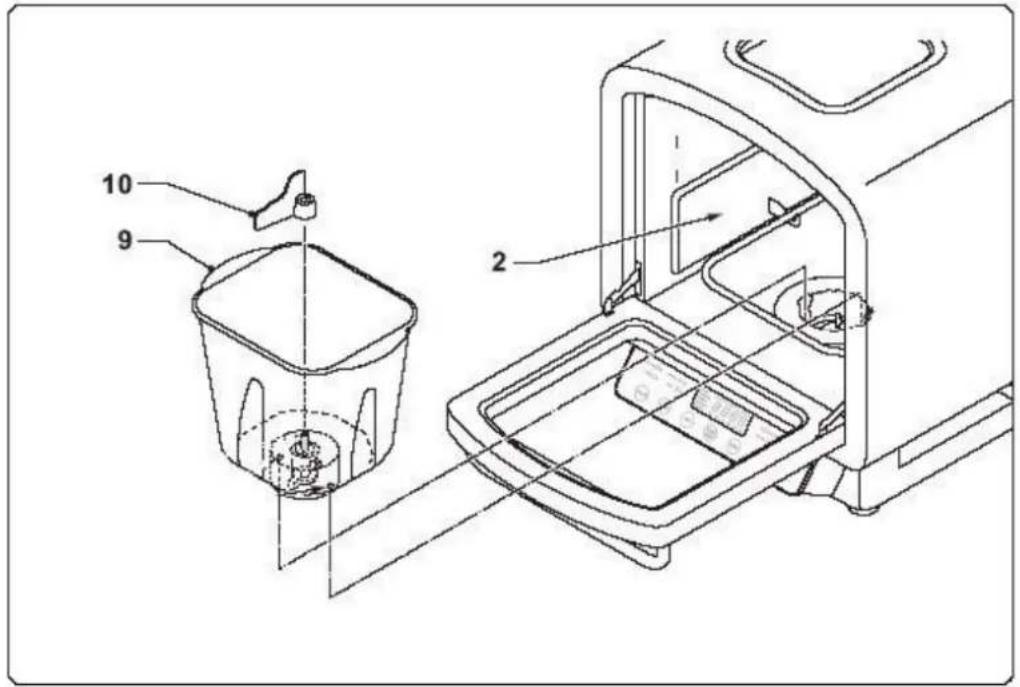
- Open the door and remove the baking pan (make it turn lightly in an anticlockwise direction, then lift it up). It is important to remove the baking pan from the unit. Do not add ingredients to the baking pan while it is in the unit to avoid the risk of spilling ingredients into the inner case.
Place your bread maker where it is level, stable and secure. - Attach the kneading blade onto the shaft inside the baking pan by lining up the flat side of the blade with the flat side of the shaft. Push the blade firmly onto the shaft. Important: Be sure to set the kneading blade firmly into place, otherwise the blade may come off during operation. This will affect the kneading or mixing. Be sure the shaft is clean of any particles to ensure the kneading blade will fully seat into place. It is recommended to fill the hole of the kneading blade with heat-resistant margarine to prevent the dough from sticking to the kneading blade.
- Select a recipe. When following the recipe:
Measure the ingredients carefully and accurately. Refer to the section "Measuring the ingredients".
Always add ingredients into the baking tin in the order they are listed.
- Yeast is always added last. Be sure that the yeast does not touch the liquid ingredients.
Usually, water or another liquid has to be put in first, then add sugar, salt and flour. Finally, add yeast or baking powder. To add the yeast, use your finger to make a small hole in the top of the flour. Put the yeast in the hole and make sure it does not touch the liquid or salt.
- Return the baking tin to the unit. Turn it lightly in a clockwise direction.
- Close the door and connect the plug to the power outlet. A beep will sound and "0" will appear on the display.
- Press the MODE key once. The LOAF indicator will light up, "BASIC" and "Knead" will be displayed, the default total cooking time "4:00" (4 hours) will start flashing on the display and the indicator of the default crust colour "Medium" will light up.
- If you want to change the colour, select the appropriate colour setting for your bread crust by pressing the crust button (COLOR). Each time you press this key, the indication on the display changes (LIGHT, MEDIUM or DARK).

- Press the SEL key to select the type of bread. You can choose between 4 types: BASIC, FRENCH, SWEET or WHOLE WHEAT. Note: you can also select the type of bread first and then choose the colour of the crust.
- Press the START/STOP key to start the operation. The baking time in hours and minutes will appear on the LCD display and the countdown will begin. When the time has counted down to zero, the bread will be done. Note: if you want to stop the operation before the end of the cooking time, press the START/STOP key for 3 seconds.
- When the programme is completed, 3 beeps will sound and "0:00" will start flashing. If you do not want to use the keep warm function, stop the appliance by pressing the START/STOP button.
- If you do not press the START/STOP key and leave the loaf inside the baking tin, the "keep warm" function begins automatically when the baking time is done. The "WARM" indicator (c) will light up for up to 60 minutes after baking is completed and the appliance will keep the bread warm during that time. The display will show how long the bread has been kept warm. At the end of the hour, the appliance will stop automatically and : 0" will appear on the display. You may remove the baking tin any time during the "keep warm" cycle. To turn off the "keep warm" feature before the 60 minutes are up, simply press the START/STOP key and hold it for 3 seconds. Unplug the unit when finished.
- This bread maker has convenient viewing windows so that you may watch the progress of the bread as it is mixed, kneaded and baked. Occasionally, some moisture may form on the windows during processing. You may open the door to look inside during the mixing and kneading stages, however, DO NOT OPEN THE DOOR DURING THE BAKING CYCLE (approximately the last hour) as this may cause the bread to collapse.
- Before taking out the baking pan with the bread, let them cool down for a while as they are very hot. To remove the bread from the baking pan, use potholders or oven mitts and take the pan. Turn the pan upside down and shake the bread out onto a wire cooling rack or a clean cooking surface. The baking pan has a non-stick coated finish so that the bread should come out easily. Do not use metal utensils to remove the bread as they may scratch the non-stick coating. If needed, slide a flat rubber or plastic spatula along the sides of the pan to loosen the loaf. If the kneading paddle remains in the bottom of your loaf, use the end of a plastic spoon or other non-metal utensil to remove it. Do not use a knife or other sharp metal object, as this will scratch the non-stick coating on the kneading blade. Always check to see where the kneading blade is when removing a baked loaf of bread. If it remains stuck to the bread, you may accidentally damage it by cutting into it while slicing.
- To avoid damaging the bread maker surface, do not put any object or the hot baking tin on top of the unit.
- Allow the bread to cool on a rack for at least 20 minutes before slicing, to release steam. Use a good serrated bread knife or electric knife.
- The bread or parts of the bread can be stored in a sealed plastic bag or receptacle for about 3 days at room temperature, or up to 10 days if you put it in a refrigerator.
Use the timer when you wish to delay the completion of your bread. This feature allows you to delay the baking time for up to 13 hours. For example, you can set the timer at 7 p.m. and wake up to fresh bread by 8 a.m. the following morning.
To set the timer, follow the instructions below:
Note: Do not use the timer and delay function with recipes that call for fresh ingredients that might spoil such as fruits, eggs, fresh milk, sour cream or cheese.
To set the timer, determine when you would like your bread to be ready and count the number of hours until then. For example, if it is 8 p.m. when you place all your ingredients in the baking tin and you would like to wake up to the aroma of fresh bread at 8 a.m. the next morning, you need a total of 12 hours before your bread is complete. Once you have
chosen the appropriate settings (menu, colour, loaf size) for your recipe, simply set the timer for the total number of hours – in this case, 12 hours.
- When you have pressed the MODE key once and chosen the colour of the crust with the COLOR key and the type of bread with the SEL key, press the PRESET KEY on the control panel and the time of delay will show in the display window. Press the up and down keys (+ and -) to adjust the time. The preset indicator (clock symbol) will light up. You do not need to mathematically calculate the difference between the setting time and the total hours you want (12:00). The bread maker will automatically adjust to include the setting time. Simply set the timer for your total hours (12).
- Once you have set the time, press START/STOP. The timer will count down in one-minute increments. When the display reaches 0:00, your bread is complete and 3 beeps will sound.
If you make a mistake while setting the timer, press and hold the START/STOP key for 3 seconds. This will clear the display and you can set the timer again.
MAKING DOUGH AND LETTING IT RISE
You can use this programme to make dough and to let it rise automatically.
Plug in the appliance. "0" will appear on the display.
Press the MODE key twice. The DOUGH and RISE indicators will light up.
Press the SEL key to choose the type of dough. You can choose between 10 types: BASIC, FRENCH, SWEET, PIZZA, WHOLE WHEAT, COOKIE, BAGUETTE, COUNTRY, CROISSANT and BRIOCHE.
Press the START/STOP key to activate the operation. The countdown begins.
- When the time has been counted down to zero, 3 beeps will sound and the unit will stop working automatically. " : 0" will appear on the display.
- You can use the risen dough to shape the bread of your desire.
Unplug the unit.
KNEADING DOUGH
You can use this programme to knead dough without letting it rise.
Plug in the appliance. 0" will appear on the display.
- Press the MODE key three times. The DOUGH indicator will light up.
- Adjust the kneading time by pressing the + and - keys. The maximum kneading time is 30 minutes. Please note that if the kneading time is too long, the rising stage will fail later.
- Press the START/STOP key to activate the operation. The countdown begins.
- When the time has been counted down to zero, 3 beeps will sound and the unit will stop working automatically. " : 0" will appear on the display.
Unplug the unit.
LETTING THE DOUGH RISE
You can use this programme to let the dough rise.
Plug in the appliance. "0" will appear on the display.
- Press the MODE key four times. The RISE indicator will light up. The default temperature is 35^ and this temperature cannot be adjusted.
Press the temperature-time switch key next to the FUNC' key to turn to the time setting.
Adjust the rising time by pressing the + and - keys. The maximum rising time is 2 hours.
- Press the START/STOP key to activate the operation. The countdown begins.
- When the time has been counted down to zero, 3 beeps will sound and the unit will stop working automatically. " : 0" will appear on the display.
Unplug the unit.
RECIPES
1 cup of flour = 250ml = 165g / 1 teaspoon = 5ml / 1 tablespoon = 15ml
STANDARD BREAD (BASIC)
320 ml of water
2 tablespoons of margarine or butter
1.5 teaspoon of salt
1.5 tablespoons of powdered milk
2.5 tablespoons of sugar
450g of all-purpose flour or bread flour
1 teaspoon of quick-rise yeast
FRENCH BREAD
330 ml of water
1 tablespoon of margarine or butter
1.5 teaspoon of salt
395g of all-purpose flour or bread flour
55g of gluten-free flour
1 teaspoon of quick-rise yeast
SWEET BREAD
160 ml of water
1.75 tablespoons of butter or margarine
2 eggs
1 teaspoon of salt
1.5 tablespoon of powdered milk
5 tablespoons of sugar
400g of all-purpose flour or bread flour
1 teaspoon of quick-rise yeast
WHOLEWHEAT BREAD
340 ml of water
1.25 tablespoons of margarine or butter
1.5 teaspoon of salt
1.5 tablespoons of powdered milk
2.5 tablespoons of sugar
225g of all-purpose flour or bread flour
225g of wholewheat flour
1.5 teaspoon of quick-rise yeast
BAGUETTE
150 ml of water
1 teaspoon of salt
250g of all-purpose flour or bread flour
1.5 teaspoon of quick-rise yeast
CROISSANT
120 ml of water
4 tablespoons of margarine or butter
1 egg
0.5 teaspoon of salt
250g of all-purpose flour or bread flour
1.25 teaspoon of quick-rise yeast
COUNTRY BREAD
150 ml of water
10 tablespoons of margarine or butter
280g of multi-grain flour
1 teaspoon of quick-rise yeast
BRIOCHE
100 ml of water
4 tablespoons of margarine or butter
1 egg
1.5 teaspoon of salt
3 tablespoons of powdered milk
5 tablespoons of sugar
250g of all-purpose flour or bread flour
50g of gluten-free flour
1.25 teaspoon of quick-rise yeast
MENUFUNCTIONS
You can use this programme to cook several kinds of preparation.
Plug in the appliance. "0" will appear on the display.
Press the MENU key to select the type of preparation. You can choose between 12 types: frozen croissant, frozen pizza, soup, potato, jam, defrost, pizza dough, cookie, baguette, country, croissant and brioche. The corresponding indicator will light up (for the first six in the form of a symbol).
For some preparations (not for all) you can adjust the cooking time by pressing the + and keys but not the temperature.
-
Press the START/STOP key to activate the operation. The "Preheat" indicator will start flashing.
-
When the preheating stage has ended, the "Preheat" indicator will no longer be illuminated and the countdown begins.
-
When the time has been counted down to zero, 3 beeps will sound and the unit will stop working automatically. " : 0" will appear on the display.
Unplug the unit.
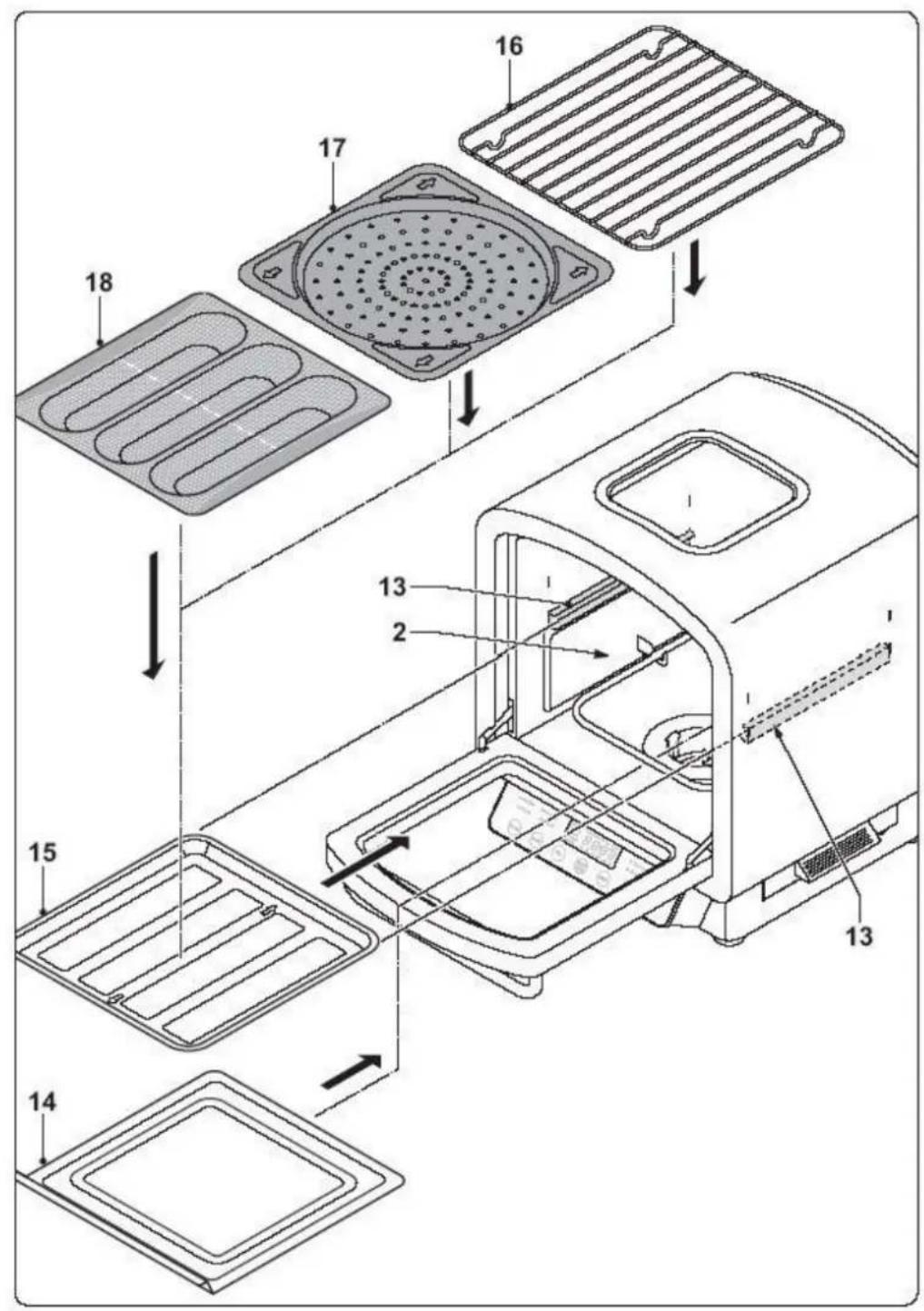
Note: according to the type of preparation, you can use the pizza plate, the plate for baguettes, the baking plate or the rack.
TOAST FEATURE
You can use this programme to toast bread.
Plug in the appliance. "0" will appear on the display.
Press the FUNC' key once. The TOAST indicator will light up.
The default time is 5'10'' . If you wish to set a different time, press the + and - keys. You can choose between 5 levels: 2'30'' , 3'10'' , 4'30'' , 5'10'' and 6'30'' .
-
Press the START/STOP key to activate the operation. The "Preheat" indicator will start flashing. Note: the preheating time cannot be adjusted.
-
When the preheating stage has ended, the "Preheat" indicator will no longer be illuminated and the countdown begins.
-
When the time has been counted down to zero, 3 beeps will sound and the unit will stop working automatically. " : 0" will appear on the display.
Unplug the unit.
Note: you can use the rack.
TOP FEATURE
You can use this programme to bake with the top heating element only.
Plug in the appliance. "0" will appear on the display.
- Press the FUNC' key twice. The TOP indicator will light up and the temperature will start flashing on the display.
The default temperature is 130^ . If you wish to set a different temperature, press the + and - keys. The minimum temperature is 100^ & the maximum temperature is 150^ .
Press the temperature-time switch key next to the FUNC' key to turn to the time setting.
The default time is 30 minutes. If you wish to set a different time, press the + and - keys. The minimum time is 5 minutes & the maximum time is 90 minutes.
- Press the START/STOP key to activate the operation. The "Preheat" indicator will start flashing.
- When the cavity has reached the set temperature, the "Preheat" indicator will no longer be illuminated and the countdown begins.
- When the time has been counted down to zero, 3 beeps will sound and the unit will stop working automatically. " : 0" will appear on the display.
Unplug the unit.
BOTTOM FEATURE
You can use this programme to bake with the bottom heating element only.
Plug in the appliance.": 0" will appear on the display.
- Press the FUNC' key three times. The BOTTOM indicator will light up and the temperature will start flashing on the display.
The default temperature is 150^ . If you wish to set a different temperature, press the + and - keys. The minimum temperature is 100^ & the maximum temperature is 160^ .
Press the temperature-time switch key next to the FUNC' key to turn to the time setting.
The default time is 30 minutes. If you wish to set a different time, press the + and - keys. The minimum time is 5 minutes & the maximum time is 90 minutes.
- Press the START/STOP key to activate the operation. The "Preheat" indicator will start flashing.
- When the cavity has reached the set temperature, the "Preheat" indicator will no longer be illuminated and the countdown begins.
- When the time has been counted down to zero, 3 beeps will sound and the unit will stop working automatically. " : 0" will appear on the display.
Unplug the unit.
TOP + BOTTOM FEATURE
You can use this programme to bake with both the top and the bottom heating element.
Plug in the appliance. "0" will appear on the display.
Press the FUNC' key four times. The TOP and BOTTOM indicators will light up.
The default temperature is 220^ . You can change it if necessary (min 150^/ MAX 220^ ).
Press the temperature-time switch key next to the FUNC' key to turn to the time setting.
The default time is 30 minutes. If you wish to set a different time, press the + and - keys. The minimum time is time is 5 minutes & the maximum time is 90 minutes.
- Press the START/STOP key to activate the operation. The "Preheat" indicator will start flashing.
- When the cavity has reached the set temperature, the "Preheat" indicator will no longer be illuminated and the countdown begins.
- When the time has been counted down to zero, 3 beeps will sound and the unit will stop working automatically. " : 0" will appear on the display.
Unplug the unit.
TOP + BOTTOM + STEAM FEATURE
You can use this programme to bake with both the top and the bottom heating element while using steam at the beginning and at the end of the operation.
Plug in the appliance.": 0" will appear on the display.
- Press the FUNC' key five times. The TOP, BOTTOM and STEAM indicators will light up. The default temperature is 220^ and cannot be changed.
Press the temperature-time switch key next to the FUNC' key to turn to the time setting.
The default time is 30 minutes. If you wish to set a different time, press the + and - keys. The minimum time is 5 minutes & the maximum time is 90 minutes.
- Press the START/STOP key to activate the operation. The countdown begins.
- When the time has been counted down to zero, 3 beeps will sound and the unit will stop working automatically. " : 0" will appear on the display.
Unplug the unit.
Note: steam is being produced during the first 2-3 minutes and during the last 2-3 minutes of the baking process. Make sure there is a sufficient amount of water in the water tank before you use this programme (see section "WATER TANK"), otherwise the operation will not start and "Err2" will appear on the display.
TROUBLESHOOTING GUIDE - OPERATION PROBLEMS
| Problem | Solution |
| Smoke comes out of the side vents during the baking process | This can be due to some oil on the heating element. Unplug the appliance, remove the baking tin and clean the heating element with a dry cloth. Be careful not to get burned. |
| Flour spilled out of the bread tin into the inner case | Unplug the unit and allow to cool, wipe out inner case with a clean cloth. Be careful when cleaning around the heating element. |
| The lower crust is too thick | This can happen if you leave the bread for a long time in the baking tin. Try to remove the loaf earlier. |
| Bread did not bake properly | Ensure the kneading blades are properly seated on the mounting shaft. Avoid opening the appliance too frequently during the programme. |
| You can hear the motor but the dough is not being mixed | Check that the baking tin is locked properly and that the kneading blades are properly installed. |
| "Err1" appears in the display window | The temperature inside the oven cavity is more than 35°C so that the rise feature cannot work. |
| "Err2" appears in the display window | There is not enough water in the water tank. Fill the water tank. |
| "Err3" appears in the display window | The water tank is not inserted correctly or is missing. |
| The bread is too large and pushes the cover | Reduce the amount of water, flour or yeast or lower the temperature. |
| The bread is too small | There is not enough yeast or the water temperature is too high, or the ambient temperature is too low. Add yeast or increase the ambient temperature. |
| The dough overflows the baking tin | Reduce the amount of liquids or yeast. |
| The middle part of the bread collapses | The temperature of the yeast is too high or you have used too much water; use yeast at room temperature or reduce the amount of water. |

| The bread is too dense and weighs too much | Too much flour or fruits or too little water or yeast. Reduce the amount of flour or fruits or increase the amount of water or yeast. |
| The middle part is hollow | Reduce the amount of water or yeast, reduce the water temperature or add salt. |
| Dry powder on surface of the bread | Reduce the amount of sticky ingredients such as butter or bananas, or add enough water. |
| The crust of cakes (or other preparations with lots of sugar) is too thick and the colour is too dark | Too much sugar causes the dark colour. Press START/STOP 5 to 10 minutes before the end of the baking time and keep the bread or cake in the baking tin for about 20 minutes with the cover closed before taking it out. |
If the bread result is not satisfactory, please check the following points:
Caution: Try one solution at a time per loaf.
A) Measurement problems
Loaf rises then falls
Decrease the amount of water/milk by 2 tbs.
- Increase the amount of salt by 1/4 tsp.
Decrease the amount of yeast by 1/4 tsp.
Loaf rises too much
Decrease the amount of flour by 2 tbs.
Decrease the amount of water/milk by 2 tbs.
- Increase the amount of salt by 1/4 tsp.
Decrease the amount of sugar/honey by 1 tsp.
Decrease the amount of yeast by 1/4 tsp.
Loaf does not rise enough
- Increase the amount of water/milk by 2 tbs.
Decrease the amount of salt by/4 tsp. - Increase the amount of sugar/honey by 1 tsp.
- Increase the amount of yeast by 1/4 tsp.
Crust is too dark
Decrease the amount of sugar/honey by 1 tsp.
Loaf partially cooked
Decrease the amount of water/milk by 2 tbs.
Top of the loaf is not smooth
Decrease the amount of flour by 2 tbs.
- Increase the amount of water/milk by 2 tbs.
Texture of the loaf is heavy or dense
Decrease the amount of flour by 2 tbs.
- Increase the amount of sugar by 1 tsp.
- Increase the amount of yeast by 1/4 tsp.
B) Ingredient problems
If the poor result is not due to measurement problems, it can also be due to the ingredients themselves:
Loaf rises then falls
The flour is too fine.
Loaf rises too much
- You used a wrong type of yeast.
- You forgot to add salt.
Loaf does not rise enough.
The flour is too old.
The flour does not contain enough gluten.
The flour is too fine.
You used a wrong type of yeast.
You put too much salt.
Flat loaf, little to no rising
The liquid is too hot/cold.
The flour is too old
The flour does not contain enough gluten.
The flour is too fine.
You forgot the yeast.
The yeast is too old.
You used a wrong type of yeast.
You put too much salt.
- You forgot to add salt.
If the ingredients are only partially mixed
The flour is too fine.
If the loaf texture is heavy or dense
You used a wrong type of yeast.
CLEANING AND CARE
Unplug the appliance and let it cool down before cleaning.
-
Take the baking tin out of the appliance. Clean the inside and outside with a damp cloth. If necessary, use soapy water to clean the inside of the baking tin. Never use scratching or abrasive objects, as they would damage the non-stick coating of the baking tin. No guarantee claims will be accepted in case the non-stick coating of the baking tin is scratched or damaged. The baking tin can also be put in the dishwasher. After a while, the appearance of the non-stick coating might change because of the steam and humidity. This is normal and does not affect the features and quality of the coating. Make sure that the baking tin is completely dry before putting it back in the appliance. Press it down and turn it lightly in a clockwise direction until it locks into place.
-
Kneading blade
Clean the kneading blade with a damp cotton cloth. If the kneading blade is difficult to detach, you can pour some hot water in the baking tin and wait for a few minutes. Hot water will release the connection of the kneading blade. If the hole of the kneading blade is obstructed, clean it with a toothpick, making sure not to scratch the blade. The kneading blade can also be put in the dishwasher.
- Door and viewing windows
Clean it with a damp cloth.
- Inner case
If necessary, you can also clean the inner case. There too, only use a damp cloth. Make sure the inner case has totally cooled down before cleaning it. Make sure it is totally dry before switching on the appliance.
- Housing
Clean the housing of the appliance with a damp cloth. Do not use abrasive cleaners. Never immerse the appliance in water or any other liquid. If you want to store the
21
TKG BBA 2-080514
appliance, make sure that it has cooled down, that it is clean and dry and that the door is closed.
MEMORY
If there is a supply interruption during the course of bread making, the process of bread making will be continued automatically if the supply is restored within 5 minutes, without having to press the START/STOP key. If the supply interruption time exceeds 5 minutes, the memory cannot be kept and the bread maker must be restarted.
PROTECTION OF THE ENVIRONMENT - DIRECTIVE 2002/96/EC
In order to preserve our environment and protect human health, the waste electrical and electronic equipment should be disposed of in accordance with specific rules with the
implication of both suppliers and users. For this reason, as indicated by the symbol on the rating label or on the packaging, your appliance should not be disposed of as unsorted municipal waste. The user has the right to bring it to a municipal collection point performing waste recovery by means of reuse, recycling or use for other applications in accordance with the directive.
FR MODE D'EMPLOI
POUR VOTRE SECURITE
Touche "SEL" (selection) (23):
Appuyez sur cette touche pourCHOISER le type de pain. En position LOAF, vous pouvezCHOISER entre 4 types: BASIC (standard), FRENCH (pain francais), SWEET (pain brioche) ou WHOLE WHEAT (pain de ble complet). En position DOUGH & RISE, vous pouvezCHOISER entre 10 types: BASIC (standard), FRENCH (pain français), SWEET (pain brioche), WHOLE WHEAT (pain de ble complet), PIZZA, COOKIE (petit gateau), BAGUETTE, COUNTRY (pain de campagne), CROISSANT & BrioCHE.
Copies of the I/B. Please reproduce them without any changes except under special instruction from Team International BELGIUM. The pages must be reproduced and folded in order to obtain a booklet A5 (+/- 148.5 mm width x 210 mm height). When folding, make sure you keep the good numbering when you turn the pages of the I/B. Don't change the page numbering. Keep the language integrity.

Fax +32 23599550
Copies of the I/B. Please reproduce them without any changes except under special instruction from Team International BELGIUM. The pages must be reproduced and folded in order to obtain a booklet A5 (+/- 148.5 mm width x 210 mm height). When folding, make sure you keep the good numbering when you turn the pages of the I/B. Don't change the page numbering. Keep the language integrity.

Fax +32 23599550
Copies of the I/B. Please reproduce them without any changes except under special instruction from Team International BELGIUM. The pages must be reproduced and folded in order to obtain a booklet A5 (+/- 148.5 mm width x 210 mm height). When folding, make sure you keep the good numbering when you turn the pages of the I/B. Don't change the page numbering. Keep the language integrity.
TKG BBA 2

English
6
Français
23