KS250GR - Kitchen scales ROADSTAR - Free user manual and instructions
Find the device manual for free KS250GR ROADSTAR in PDF.


| Product Type | Kitchen Scale |
| Brand | Roadstar |
| Model | KS250GR |
| Power Supply | 1 CR2032 lithium battery (included) |
| Maximum Capacity | 5 kg (estimated) |
| Accuracy | 1 g (estimated) |
| Weight Units | g, lb/oz |
| Volume Units | ml, fl/oz (for water and milk) |
| Functions | Tare, unit conversion, auto shut-off, low battery indicator, overload indicator |
| Approximate Dimensions | 20 x 15 x 2 cm |
| Approximate Weight | 0.3 kg |
| Material | Plastic |
| Display Type | LCD |
| Care and Cleaning | Wipe with a slightly damp cloth; do not immerse in water; avoid chemicals |
| Safety | Use on a hard, flat surface; do not hit, shake, or drop; avoid humid environments |
| Replaceable Batteries | Yes, by user |
| Usage | Household only |
Frequently Asked Questions - KS250GR ROADSTAR
User questions about KS250GR ROADSTAR
0 question about this device. Answer the ones you know or ask your own.
Ask a new question about this device
Download the instructions for your Kitchen scales in PDF format for free! Find your manual KS250GR - ROADSTAR and take your electronic device back in hand. On this page are published all the documents necessary for the use of your device. KS250GR by ROADSTAR.
USER MANUAL KS250GR ROADSTAR
DIGITAL KITCHEN SCALE.
KS-250/GR
Instruction manual
Bedienungsanleitung
Electronic Kitchen Scale
Your new scale has been designed to accurately indicate your weight gain or loss over a period of time and should give many years of service under normal use.
Before Use
Carefully remove your new appliance from its packaging.
You may wish to store the packaging for future use. Otherwise dispose the packaging according to the local rules on recycling.
Please read this instruction manual carefully and familiarize yourself with your new appliance before using it for the first time. Please retain this manual for future reference.
BOX CONTENTS
Electronic Kitchen Scale KS-250/GR
- Instruction manual
Warranty card
FEATURES
- Indicate volume of water and milk
- Two weight unit systems g lb:oz convertible
- Two volume unit systems ml fl'oz convertible
- Low battery power/Overload indication
- With high precision strain gauge sensor
- With tare function
7.Auto off
POWER SUPPLY
- 1 pcs of lithium battery included (CR 2032). Please remove the insulation sheet from the battery contacts before use.
Replace the batteries when the scale shows "Lo".
A. Take out the used battery with the aid of a sharp object, as shown in picture.
B. Install new battery by putting one side of the battery beneath the battery baffle and then pressing down the other side.
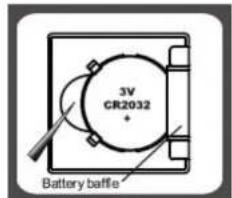
PIC1

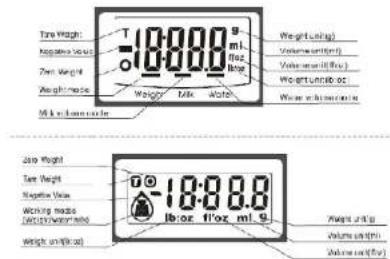
LCD DISPLAY
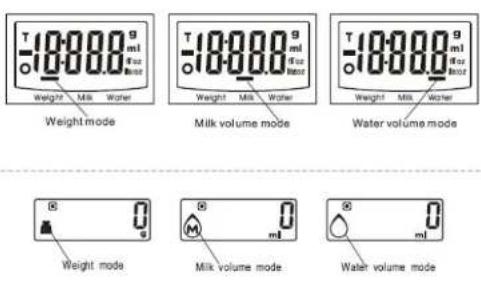
WORKING MODES
UNITCONVERSIONBUTTON
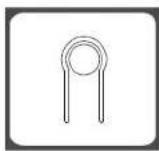
At the bottom of scale, you can find a unit conversion button as shown in picture.
- TO CONVERT WEIGHT UNIT
If the scale is with both unit systems of Metric (g, ml) or Imperial (lb.oz, ft.oz), press MODE button to choose working mode (weight, milk volume).
(weight, link volume, water volume), then press Unit conversion button to convert between two systems. Take the conversion of weight unit for example:
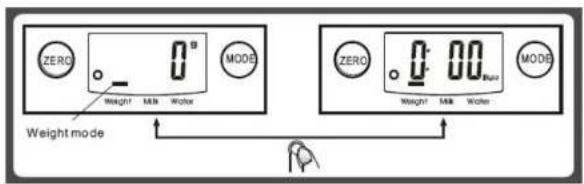
When setting g as weight unit, the default volume unit is ml:
^ When setting lb:oz as weight unit, the default volume unit is ft'oz.
Remark: The unit system of scale depends on sales destination or the requirement of distributor.
TO START WEIGHING
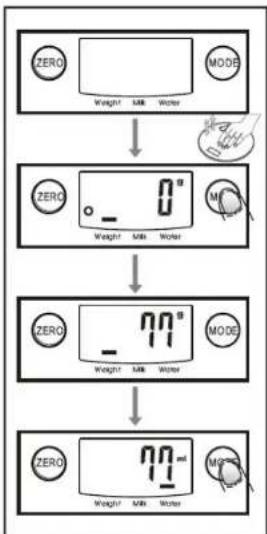
1. Weighing mode
A. Place the scale on a solid and flat surface.
B. Place bowl (if used) on the scale before turning on the scale.
C. Gently press on the scale by hand to turn on
D. Wait until LCD shows all information.
E. Load weighing object on to start weighing,LCD will show the weight reading.
F If the weighing object is water or milk, press MODE button to choose volume mode and view the volume of weighing object.
4
EnglishEn
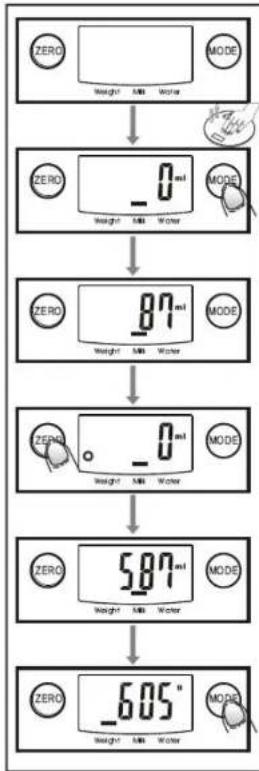
2. Volume indication mode
A. Place the scale on a solid and flat surface. B. Gently press on the scale by hand to turn
C. Wait until LCD shows "0", and press MODE button to choose "Water" or "Milk" mode.
D. Put a liquid container onto the scale platform.
E. Press ZERO button to reset LCD to "0".
F. Pour liquid (water or milk) into the container, LCD shows the volume of the liquid.
G. Press MODE button to choose "Weight" mode and view the weight of liquid.
"ZERO" OR "TARE" FUNCTION
To weigh different loads consecutively without removing loads from the scale.
Put first Load on the scale, get weight reading. Press ZERO button to reset the
LCD reading to "0" before adding next load. You can repeat this operation.
Condition 1: "ZERO" function
When total sum of all loads on scale ≤ 4% of scale's max.weight capacity.
4% = 80g when capacity is 2000g
200g when capacity is 5000g
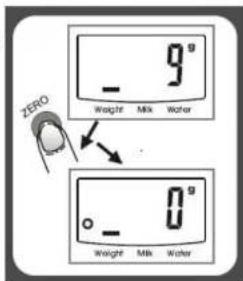
LCD will show "——" or "0g" each time ZERO is perssed. "——" means not stable, please wait for a moment. "0g" and meanwhile an icon "o" on lower left corner of LCD mean "ZERO" function is active. Max weight capacity remains unchanged.
Condition 2: "TARE" function
When total sum of all loads on scale >4%
of scale's max weight capacity.
4% = 80g when capacity is 2000g
200g when capacity is 5000g)
LCD will show "or 0g" each time ZERO is pressed "means not stable, please wait for a moment. "og" and meanwhile an icon TARE" on upper left corner of LCD mean TARE" function is active. Max. Weight capacity is reduced by total weight of all loads. *Under this condition:
By pressing ZERO, you can see the total weight of all loads on the scale. If you want to weigh more load ds, just press ZERO to reset LCD reading to '0' again.
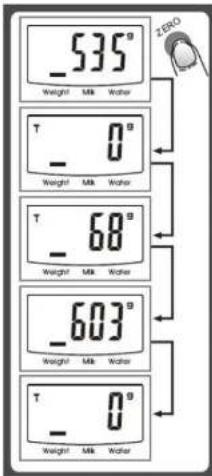
6
EnglishEn
BATTERY-CHANGE INDICATOR
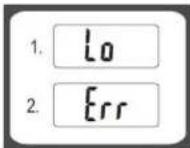
When the battery need replacing, the "Lo" will appear on the screen.
OVER LOAD INDICATOR
When the scale is overloaded the symbol "Err" will appear on the screen.
AUTOMATIC SWITCH OFF
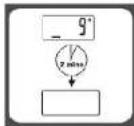
When you step off the scale, it will automatically switch off. (If no weighing is carried out while the zero is being displayed, the scale switches itself off automatically after approximate 2 minutes)
BATTERY REPLACEMENT
Please open the back board of scale, then take batteries carefully out of the battery compartment by drawing them sideways out from under the contacts. Do not bend the contacts back while you do this or they might break. Dispense of the old batteries at the appropriate collection points.
ADVICE FOR USE & CARE
- Clean the scale with a slightly damp cloth. DO NOT immerse the scale in water or use chemical / abrasive cleaning agents.
- All plastic parts should be cleaned immediately after contact with fats, spices, vinegar and strongly flavored / colored foods. Avoid contact with acids citrus juices.
- Always use the scale on a hard, flat surface. DO NOT use on carpet. 4. DO NOT strike.shake or drop the scale.
- The scale is high precision device.Please take care of it.
- Please keep it dry
- Please check whether battery is installed or in high level if scale can not be turned on.
- The scale is for family use only, not for commercial purpose.
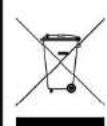
Correct Disposal of This Product (Waste Electrical & Electronic Eq
This marking shown on the product or its literature, indicates that it should not be disposed with other household wastes at the end of its working life. To prevent possible harm to the environment or human health from uncontrolled waste disposal, please separate this from other types of wastes and recycle it responsibly to promote the sustainable reuse of material resources.
Household users should contact either the retailer where they purchased this product, or their local government office, for details of where and how they can take this item for environmentally safe recycling.
Business users should contact their supplier and check the terms and conditions of the product. This product should not be mixed with other commercial wastes for disposal.
Specifications and design are subject to possible modifications without notice due to improvement.
KS-250/GR
ELEKTRONISCHE KUCHENWAAGE
Vor dem Gebrauch
Your new scale has been designed to accurately indicate your weight gain or loss over a period of time and should give many years of service under normal use.
Avant l'utilisation
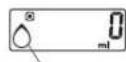
MODALITE POIDS MODALITE VOLUME LIT
MODALITE VOLUME EAU
^A BOUTON DE CONVERSION DES UNITS DE MESURE

- KS-250/GR
- Electronic Kitchen Scale
- Before Use
- BOX CONTENTS
- FEATURES
- POWER SUPPLY
- LCD DISPLAY
- WORKING MODES
- UNITCONVERSIONBUTTON
- TO START WEIGHING
- Weighing mode
- EnglishEn
- Volume indication mode
- "ZERO" OR "TARE" FUNCTION
- BATTERY-CHANGE INDICATOR
- OVER LOAD INDICATOR
- AUTOMATIC SWITCH OFF
- BATTERY REPLACEMENT
- ADVICE FOR USE & CARE
- Correct Disposal of This Product (Waste Electrical & Electronic Eq
- ELEKTRONISCHE KUCHENWAAGE
- Vor dem Gebrauch
- Avant l'utilisation
- A BOUTON DE CONVERSION DES UNITS DE MESURE
Brand : ROADSTAR
Model : KS250GR
Category : Kitchen scales