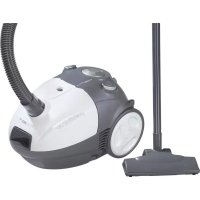
BS 1264 - Vacuum Cleaner CLATRONIC - Free user manual and instructions
Find the device manual for free BS 1264 CLATRONIC in PDF.



| Product type | Canister vacuum cleaner |
| Brand | Clatronic |
| Model | BS 1264 |
| Power supply | 220-240 V ~ 50/60 Hz |
| Nominal power | 1000 W |
| Maximum power | 1400 W |
| Protection class | II |
| Filters | Motor protection filter (washable) and exhaust filter (washable) |
| Included nozzles | Floor nozzle, 2-in-1 nozzle (crevice tool and brush) |
| Functions | Air regulator, full bag indicator, automatic cord storage, parking position |
| Safety | Do not vacuum liquids, hot ashes, or sharp objects; use only with filter; keep away from heat sources |
| Maintenance | Regular dust bag replacement; clean filters with warm water without detergent |
| Warranty | 24 months |
| Additional accessories | Suction hose, suction tube (2 parts), hook on tube |
| Full bag indicator | Yes, red indicator on dust compartment |
| Cable storage | Automatic rewinding button |
Frequently Asked Questions - BS 1264 CLATRONIC
User questions about BS 1264 CLATRONIC
0 question about this device. Answer the ones you know or ask your own.
Ask a new question about this device
Download the instructions for your Vacuum Cleaner in PDF format for free! Find your manual BS 1264 - CLATRONIC and take your electronic device back in hand. On this page are published all the documents necessary for the use of your device. BS 1264 by CLATRONIC.
USER MANUAL BS 1264 CLATRONIC
natural_image
Black and white photo of a vacuum cleaner with attached hose, next to a vertical pole (no visible text or symbols)CE
BODENSTAUBSAUGER
Stofzuiger • Aspirateur-traîneau • Aspiradora • Aspirador • Aspirapolvere a carrello • Gulvstøvsuger Floor-type vacuum cleaner • Odkurzacz • Porszívó • Vysavač koberců • Пынекос
BS 1264
DEUTSCH
NORSK
Inhalt
Overview of the Components ...... Page 3
7 Instruction Manual...... Page 25
Technical Data Page 27
9 Guarantee Page
FRANÇAIS
JEZYK POLSKI
Sommaire
natural_image
Technical line drawing of a mechanical device with gears and housing (no text or symbols)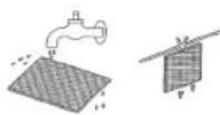
D-47906 Kempen/Germany
natural_image
Line drawing of a mechanical device with gears and wheels (no text or symbols)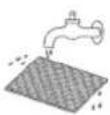

natural_image
Technical line drawing of a mechanical device with gears and housing (no text or symbols)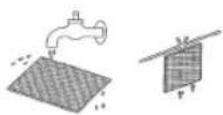
natural_image
Line drawing of a mechanical device with gears and wheels (no text or symbols)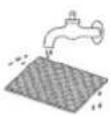

natural_image
Line drawing of a mechanical device with gears and housing (no text or symbols)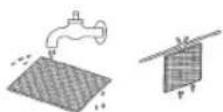
natural_image
Technical line drawing of a mechanical device with gears and housing (no text or symbols)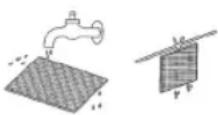
natural_image
Line drawing of a mechanical device with gears and a housing (no text or symbols)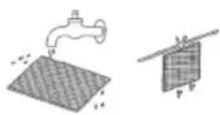
General Safety Instructions
Read the operating instructions carefully before putting the appliance into operation and keep the instructions including the warranty, the receipt and, if possible, the box with the internal packing. If you give this device to other people, please also pass on the operating instructions.
- The appliance is designed exclusively for private use and for the envisaged purpose. This appliance is not fit for commercial use. Do not use it outdoors (except if it is designed to be used outdoors). Keep it away from sources of heat, direct sunlight, humidity (never dip it into any liquid) and sharp edges. Do not use the appliance with wet hands. If the appliance is humid or wet, unplug it immediately.
- When cleaning or putting it away, switch off the appliance and always pull out the plug from the socket (pull on the plug, not the cable) if the appliance is not being used and remove the attached accessories.
- Do not operate the machine without supervision. If you should leave the workplace, always switch the machine off or remove the plug from the socket (pull the plug itself, not the lead).
- Check the appliance and the cable for damage on a regular basis. Do not use the appliance if it is damaged.
- Do not try to repair the appliance on your own. Always contact an authorized technician. To avoid the exposure to danger, always have a faulty cable be replaced only by the manufacturer, by our customer service or by a qualified person and with a cable of the same type.
- Use only original spare parts.
- Pay careful attention to the following "Special Safety Instructions".
Children and Frail Individuals
- In order to ensure your children's safety, please keep all packaging (plastic bags, boxes, polystyrene etc.) out of their reach.
Caution! Do not allow small children to play with the foil as there is a danger of suffocation!
- In order to protect children or frail individuals from the hazards of electrical equipment, please ensure that this device is only used under supervision. This device is not a toy. Do not allow small children to play with it.
Special Safety Instructions
- Do not suck up liquids!
- Do not suck up hot ashes or pointed or sharp objects!
- Do not use the appliance in humid rooms!
- Never use without the filter. Check that the filter is inserted correctly!
- Hair, clothing and body parts away from the vacuum nozzle during use!
- Keep the vacuum cleaner away from sources of heat like radiators, ovens, etc.!
Overview of the Components
1 Vacuum power regulator
| 2 | On/off | switch |
| 3 | Carrying | handle |
| 4 | Cable-winding | key |
5 Dust bag compartment
6 Dust bag fi lling display
7 Handle for opening the dust bag compartment
8 Filter cover - Outlet fi Iter
| 9 | Hose | connection |
| 10 | Vacuum | hose |
11 Suction tube
12 Floor nozzle
13 „2-in-1“ nozzle
(groove and brush nozzle)
14 Parking assistance
Hook on the suction tube (not shown)
Start-up
- Insert the connection head of the suction hose (10) into the hose connector (9) until it locks in place. To do so, please press the buttons simultaneously. In order to release the hose again, please press the buttons once more on the connection head.
- Keep the buttons pressed down and then pull out the hose.
- Please insert the sections of the 2-part suction tube (11) into one another and then attach them to the handle section.
- Then assemble the floor nozzle (12) and/or the accessories.
Using the Appliance
- Unwind the length of cable you require.
- Insert the mains plug into a correctly installed 230 V, 50 Hz power socket. Turn the vacuum cleaner on by pressing the on/off switch (2) down with your foot.
- Vacuum at a steady speed. There is no need to exert pressure.
Attention: pay attention to the range that can be covered with the cable length.
Cable winding device
Pull out the cable up to the maximum length indicated with the yellow mark. Never pull the cable out up to the red mark as the cable winding can be damaged. Said damages are not covered by the warranty.
Winding
Press the cable (4) winding button and guide the cable. Hold the cable to avoid wrapping.
Nozzle Attachment
| Crevice and jointed nozzle: | For vacuuming upholstery, curtains and in corners and crevices etc.„2-in-1“ nozzle: When they are joined together you can use them as a brush nozzle. If you would like to use the crevice nozzle, pull the brush section off. |
| Floor nozzle: To clean | carpets or smooth surfaces. |
| Releasing the nozzles: | Pull these off while turning slightly. |
Air Slide (1)
Open the air slide on the hose handle in order to regulate the airflow or to clear any particles sticking to the nozzle.
Dust bag replacement display (6)
Hold the hose up into air. If the display is red the bag is full. Please replace it.
Changing the dust bag
• Pull the plug out of the socket.
- Open the lid of the dust bag compartment by the handle (7) (the cover must click into place).
- Remove the bag by carefully pulling the clamp towards the front so that the bag becomes more accessible. Then remove the dust bag by pulling it upwards.
- Insert a new bag. Please ensure that the bag is located correctly in the guide mechanism. Then reinsert the retainer. Close the cover so that it snaps into place.
Filter
Your appliance has two filters.
Motor protection fi Iter (inlet fi Iter)
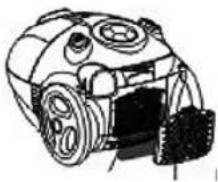
The inlet filter is located in the dust bag compartment. The filter is located vertically in the rear section of the dust housing.
- Remove the grille by pulling it upwards and then take out the motor protection filter.
- Clean the engine protection fi liter after 10 dust bag changes. If necessary, the fi liter can also be washed in warm water without any additives.
- Place it back into place only once it is completely dry!
- Please push the grille back down into the guide mechanism until it locks into place.
Outlet fi Iter
The appliance is also equipped with an outlet fi liter. This fi liter is to be found under the fi liter cover (8).
natural_image
Line drawing of a mechanical device with gears and wheels (no text or symbols)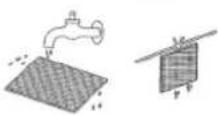
- Press the lever above the ventilation grille downwards in order to open it.
- Then pull the grille out towards the front.
- Remove the filter and clean as described above.
- Please re-insert the filter correctly and close the ventilation grille (until it clicks in place).
Cleaning and storage
Cleaning
- Pull the plug out of the socket before cleaning!
- Clean the casing with a dry cloth.
Storage
- Let the iron cool down completely.
• Wind the cable completely. - If you position the device horizontally: Please insert the hook of the floor nozzle into the parking assistant on the rear of the device.
Troubleshooting
• The Device Does Not Work.
Remedy: Check the connection to the mains. Check the position of the switch.
• The device does not suck up anything.
Possible Cause:
The dust bag is full.
Remedy: Renew the dust bag.
or
Possible Cause: The fi Iters are dirty.
Remedy: Clean the components.
Possible Cause: There is a foreign body in the suction tube or the nozzle.
Remedy: Check the accessories for foreign bodies.
Noise development
The sound pressure level in the ear of an operator (LpA) was measured according to DIN EN ISO 3744.
Sound pressure level detected: 82.0 dB(A) (no limit)
Technical Data
Model: BS 1264
Power supply: 220-240 V, 50/60 Hz
Power consumption:
P_nom. 1000 W
P_max : 1400 W
Protection class:....II
This device has been tested according to all relevant current CE guidelines, such as electromagnetic compatibility and low voltage directives, and has been constructed in accordance with the latest safety regulations.
Subject to technical changes without prior notice!
Guarantee
The device supplied by our Company is covered by a 24 month guarantee starting on the date of purchase (receipt).
During the life of the guarantee any fault of the device or its accessories ascribable to material or manufacturing defects will be eliminated free of charge by repairing or, at our discretion, by replacing it. The guarantee services do not entail an extension of the life of the guarantee nor do they give rise to any right to a new guarantee!
Proof of the guarantee is provided by the proof of purchase. Without proof of purchase no free replacement or repair will be carried out.
If you wish to make a claim under the guarantee please return the entire machine in the original packaging to your dealer together with the receipt.
Defects to consumables or parts subject to wearing as well as cleaning, maintenance or the replacement of said parts are not covered by the guarantee and hence are to be paid!
The guarantee lapses in case of unauthorized tampering.
After the expiry of the guarantee
After the expiry of the guarantee repairs can be carried by the competent dealer or repair service against the payment of the ensuing costs.

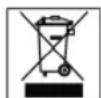
Meaning of the "Dustbin" Symbol
Protect our environment: do not dispose of electrical equipment in the domestic waste.
Please return any electrical equipment that you will no longer use to the collection points provided for their disposal.
This helps avoid the potential effects of incorrect disposal on the environment and human health.
This will contribute to the recycling and other forms of reutilisation of electrical and electronic equipment.
Information concerning where the equipment can be disposed of can be obtained from your local authority.
natural_image
Technical line drawing of a mechanical device with gears and housing (no text or symbols)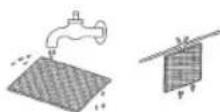
natural_image
Line drawing of a mechanical device with gears and housing (no text or symbols)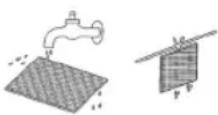
natural_image
Line drawing of a mechanical device with gears and wheels (no text or symbols)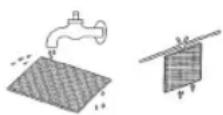
natural_image
Illustration of a robotic device with water tank and sensor array (no text or symbols)
- DEUTSCH
- NORSK
- Inhalt
- FRANÇAIS
- JEZYK POLSKI
- Sommaire
- General Safety Instructions
- Children and Frail Individuals
- Special Safety Instructions
- Overview of the Components
- Start-up
- Using the Appliance
- Cable winding device
- Winding
- Air Slide (1)
- Dust bag replacement display (6)
- Changing the dust bag
- Filter
- Motor protection fi Iter (inlet fi Iter)
- Outlet fi Iter
- Cleaning and storage
- Cleaning
- Storage
- Troubleshooting
- • The Device Does Not Work.
- • The device does not suck up anything.
- Noise development
- Technical Data
- Guarantee
- After the expiry of the guarantee
- Meaning of the "Dustbin" Symbol
Brand : CLATRONIC
Model : BS 1264
Category : Vacuum Cleaner