40c Titanium - Smartphone ARCHOS - Free user manual and instructions
Find the device manual for free 40c Titanium ARCHOS in PDF.
User questions about 40c Titanium ARCHOS
0 question about this device. Answer the ones you know or ask your own.
Ask a new question about this device
Download the instructions for your Smartphone in PDF format for free! Find your manual 40c Titanium - ARCHOS and take your electronic device back in hand. On this page are published all the documents necessary for the use of your device. 40c Titanium by ARCHOS.
USER MANUAL 40c Titanium ARCHOS
natural_image
Two horizontal color swatches: black and white with gradient shading, each containing a solid square (no text or symbols)
EN
Table of contents
Package contents....2
Description of the phone....3
Assembling....6
Getting started....8
3G & WiFi connection....10
Google account & Contacts....12
Hints & tips for Android™ 14
Troubleshooting....16
For more information, please consult the FAQs on www.archos.com.
Make sure to read them before considering any product return. As we are often updating and improving our products, your device's software may have a slightly different appearance or modified functionality than presented in this Quick Start Guide.
Consult the declaration of conformity on http://www.archos.com/products/declaration_conformity.html
1


natural_image
Two horizontal color swatches: one grayscale from black to white, the other solid-colored from yellow to pink (no text or symbols)
Package Contents
Check your product box for the following items:
-ARCHOS 40c Titanium
-Battery
-Headset
-Micro SIM adaptor
-USB cable
-Charger
-Quick start guide
-Warranty Legal & Safety notices
The items supplied with your device and available accessories may vary depending on your region or service provider.
The supplied items are designed only for your device and may not be compatible with other devices.
Unapproved accessories may cause your device to malfunction.
2




natural_image
Gradient color bar transitioning from black to white (no text or symbols)
natural_image
Color swatch bar with eight distinct squares in yellow, magenta, cyan, blue, green, red, black, and yellow (no text or symbols)
Description of the phone
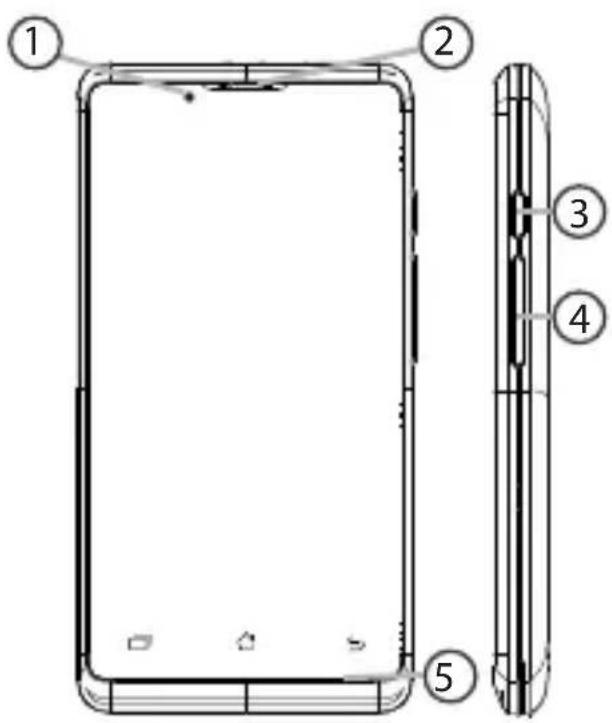
① Loudspeaker
② Webcam
③ ON/OFF button
④ Volume buttons
⑤ Microphone
text_image
Technical diagram of a smartphone showing front and side views with numbered labelsEN

3


natural_image
Two horizontal color swatches: black and white with various shades of gray, transitioning to solid colors in yellow, magenta, cyan, blue, green, red, and yellow (no text or symbols)
Description of the phone
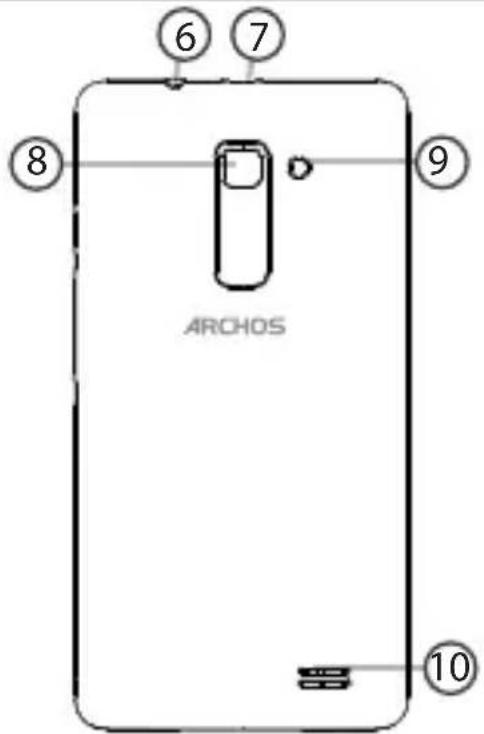
⑥ Headset jack
⑦ Micro-USB port
⑧ Camera
⑨ Flash
10 Loudspeaker
text_image
ARCHOS ⑥ ⑦ ⑧ ⑨ ⑩
4


natural_image
Two horizontal color swatches: black and white with various shades of gray, transitioning to solid colors in yellow, magenta, cyan, blue, green, red, and yellow (no text or symbols)
EN
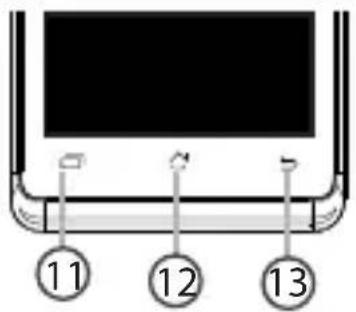
11 Multi-task
12 Home/Recent apps/Google NOW
13 Back

text_image
11 12 13

Multi-task: open the list of recent applications;
Home/Google NOW: short press to return to the Home screen; long press to access Google Now.
Back: return to the previous screen.
5


natural_image
Two horizontal color swatches: black and white with various shades of gray, transitioning to solid colors in yellow, magenta, cyan, blue, green, red, and yellow (no text or symbols)
Assembling
Opening
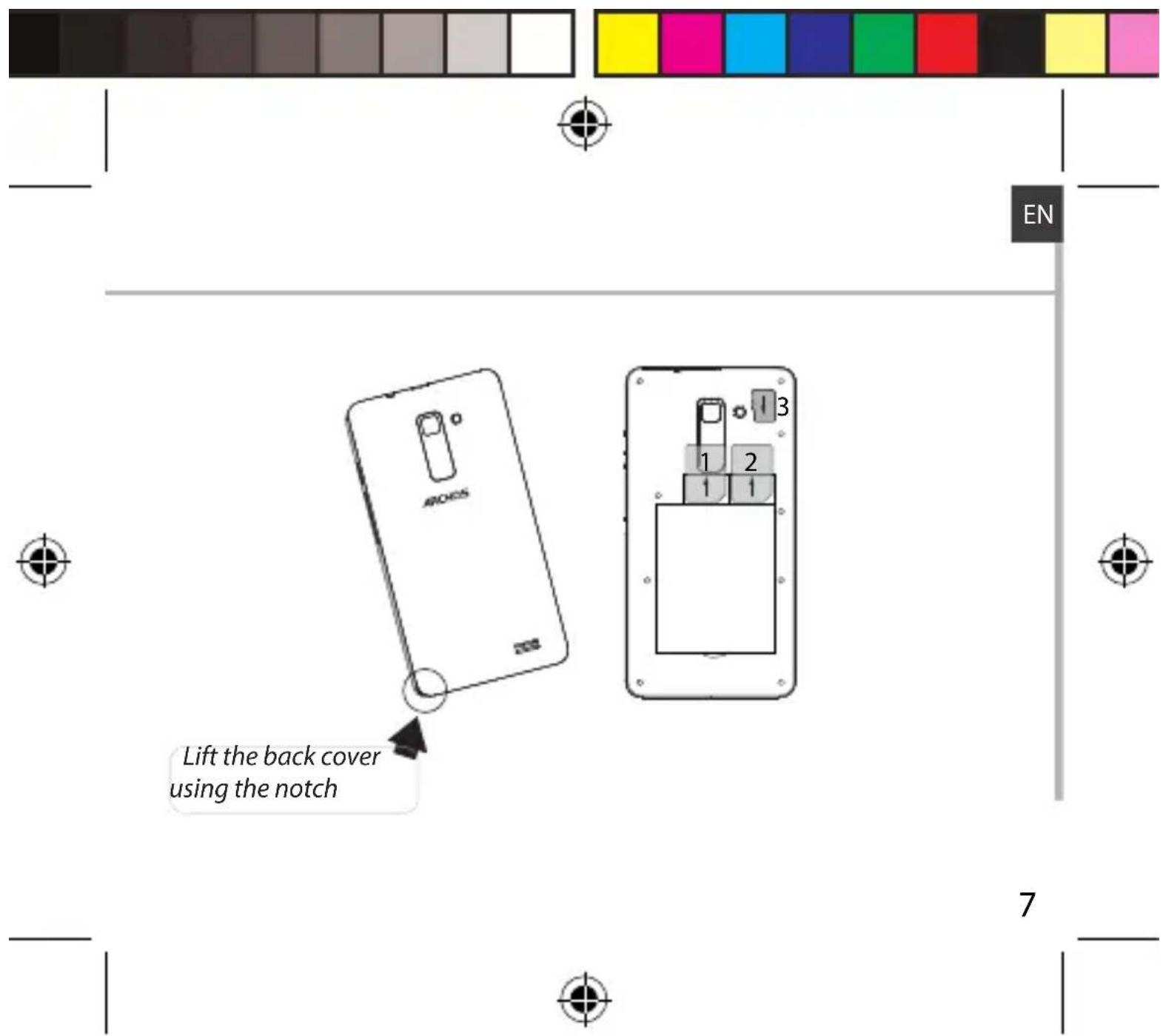
- Use the notch to remove the back cover.
Do not bend or twist the back cover excessively. Doing so may damage the cover.
- Remove the battery.
Inserting a SIM card
For your SIM card, slide it facing downwards in the slot 1 or 2.
Inserting a Memory card
For your Memory card, slide it facing downwards in the slot 3.
Closing
- Align the battery's 4 contact points with those of the phone and gently press the battery down into place.
- Replace the back cover clicking it back into position.


Tip: Before using your device for the first time, charge completely its battery.
6


text_image
Lift the back cover using the notchARCHOS_40c_Titanium_book.indd 7 03/09/2014 17:56:52

natural_image
Two horizontal color swatches: black and white with gradient shading, and solid color blocks in yellow, magenta, cyan, blue, green, red, and yellow (no text or symbols)
Getting started
Turn ON
- Press and hold the ON/OFF button to turn on the device. When you turn on your device, a PIN code may be requested.
- Type the PIN code supplied with your SIM card.
Beware of typing a wrong PIN code. - Select 'OK'.
Through the wizard
The first time you start up your ARCHOS, the installation wizard will help you set up your device:
-Language
-Date & time
-WiFi connection
- Location service options
Turn OFF
To turn off your device, press and hold the ON/OFF button, and then select Power off > OK.
8




natural_image
Gradient color bar transitioning from black to white (no text or symbols)
natural_image
Color swatch bar with eight distinct squares in yellow, magenta, cyan, blue, green, red, black, and yellow (no text or symbols)
EN
Sound & Notification profiles
- When the device is turned on, press and hold the ON/OFF button.
- Select an option.
Silent Vibrate Sound

natural_image
Three circular icons with abstract shapes on dark background (no text or symbols)Touch screen actions:
Tap: touch once to select or launch a menu, option, or application. Tap and hold: tap an item and hold it for more than 2 seconds.
Drag: tap an item and move it to a new location.
Double-tap: tap an item twice quickly.
Flick: briskly scroll up, down, left, or right to move through lists or screens. Pinch in/out: place two of your fingers far apart, and then pinch them together.
Tip:
Your device goes in standby mode when you do not use it for a specified period of time. To wake up your device, press the ON/OFF button. To set the duration, go to Settings > Display > Sleep.




natural_image
Gradient color bar transitioning from black to white (no text or symbols)
natural_image
Color swatch bar with eight distinct squares in yellow, magenta, cyan, blue, green, red, black, and yellow (no text or symbols)
3G & WiFi connection
3G connection
With your SIM card, you should be connected to the Internet without any further setup. The ARCHOS will only have signal if you are in an area covered by your provider's 3G network. When connected to the 3G network, the 3G icon is displayed in the status bar.
Activating the mobile data
To be able to access Internet, the mobile data icon must be activated.
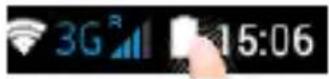
- Touch and hold the time & battery icons to reveal the status bar.
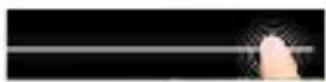
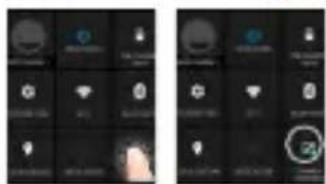
- Pull the white line down to display the status dashboard.
- Touch the status dashboard icon
- Touch the mobile data icon to activate it.
text_image
Mobile app interface screenshots showing status bar, navigation icons, and a highlighted circular icon with '24' in the bottom-right panel.Tip:
If you encounter connection problem's, see the FAQs on www.archos.com or contact your 3G network connection provider.


natural_image
Gradient color bar transitioning from black to white (no text or symbols)
natural_image
Color test bar with eight distinct color swatches (yellow, magenta, cyan, blue, green, red, black, white) arranged horizontally.
EN
WiFi connection
WARNING: Make sure that you are in a WiFi zone. You can access the WiFi settings quickly from the status bar.
- Touch and hold the time & battery icons to reveal the status bar.
- Pull the blue line down to display the status dashboard.
- Touch the status dashboard icon
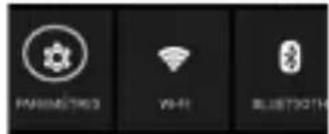
- Touch the "Settings" icon 🧑 open the settings menu.
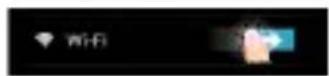
- In the "Wireless & networks" section, if the WiFi is off, slide the WiFi switch to the "ON" position. Once the WiFi is on, the ARCHOS will scan for WiFi networks in range.
- Touch "WiFi" to display available networks.
- Touch the name of network you want to connect to.
Private networks are shown with a lock icon and will require you to enter your password.
text_image
PARAMETER WiFi BLUETR0TH


natural_image
Two vertical color swatches: one black with gradient squares, the other a row of solid color boxes (no text or symbols)
Google & Contacts
Adding a Google account
A Google account lets you take full advantage of any Google apps and services that you may want to use.
- Go to "Settings" > "Accounts" > "Add account".
- Select the account type "Google" to add.
- Follow the onscreen instructions to enter information about the account. Once the account is created, you can access Play Store, Gmail, Hangouts, Maps and many other apps.
Synchronizing info
Information must be sync to be saved. Your data is backed up on Google servers.
- Go to "Settings" > "Accounts" > "Google".
- Select your account.
The list of information that can be sync are displayed.
Automatic sync should be activated. To launch the sync, press the Menu button, then Sync now. You can get them back in case of loss of your device or SIM card. When your Google account is added to a new device, all your saved information is transferred.
12


natural_image
Gradient color bar transitioning from black to white (no text or symbols)
natural_image
Color swatch bar with eight distinct squares in yellow, magenta, cyan, blue, green, red, black, and light pink (no text or symbols)
EN
Saving your contacts
When your contacts are saved, they are always available on the web and can be synced to any Android phone that's set up with your Google account.
- Install the SIM card with your contacts in your phone.
- From a Home or All Apps screen, select the People app
- Touch the Menu button > "Import/Export".
- In Import/export contacts, select "Import from SIM card".
- Select your Google account.
- Check contacts to be imported and validate.
- Once the contacts are imported in the Google account, go to "Settings" > "Accounts" > "Google".
- Select you Google account.
- Select the Menu button, then "Sync now".
Your contacts are saved to via your Google account.


natural_image
Two horizontal color swatches: black and white with a row of solid color blocks (no text or symbols)
Hints & tips for Android™
The extended home screen:
You have by default one home screen. You can create as many home screens you want. Select an app icon and slide it right. A new home screen will be created. Select another app icon and slide it right to create a third home screen.
Moving a home screen item:
Touch and hold your finger onto it until the positioning gridlines appear, then slide it to the desired location, and release your finger.
Removing a home screen item:
Touch and hold it, slide your finger towards the top of the screen and drop it over the "Remove" icon.
Uninstalling an item:
From the "All apps" screens, touch and hold it, slide your finger towards the top of the screen and drop it over "Uninstall" bin.




natural_image
Gradient color bar transitioning from black to white (no text or symbols)
natural_image
Color swatch bar with eight distinct squares in yellow, magenta, cyan, blue, green, red, black, and yellow (no text or symbols)
EN
Creating application folders:
Drop one app icon over another on a home screen and the two icons will be combined.
Widgets:
Touch and hold your finger on your home screen. Touch "Widgets".
Changing your wallpaper:
Hold your finger on a home screen at an empty location, then choose from the list.
Locking the touchscreen:
From the quick settings dashboard in the status bar, touch "Settings". In "Settings", scroll down and touch "Security". Touch "Screen lock". Touch the type of lock you would like to use. After you set a lock, a lock screen is displayed whenever your screen wakes up, requesting the pattern, pin or other specified key.



natural_image
Two horizontal color swatches: black and white with a row of solid-colored squares (no text or symbols)
Troubleshooting
My phone is frozen or cannot switch on
Check the battery contacts, remove and reinstall your battery, then turn your phone on. Check the battery power level, charge for at least 20 minutes.
My phone cannot connect to a network or "No service" is displayed
Try connecting in another location. Verify the network coverage with your operator.
Unable to make outgoing calls
Make sure your phone is connected to a network, and the network is not overloaded or unavailable.
Unable to receive incoming calls
Make sure your phone is switched on and connected to a network (check for overloaded or unavailable network).
SIM card PIN locked
Contact your network operator to obtain the PUK code (Personal Unblocking Key).
To configure a new 3G network:
On your device, tap Settings.
Select Wireless & networks > More... > Mobile networks.
Select Network settings. In Network operators, select your operator.
In Access Point Names, select the correct access point name and enter the exact connection parameters provided by your 3G provider.



natural_image
Two horizontal color swatches: black and white with various shades of gray, transitioning to solid colors in yellow, magenta, cyan, blue, green, red, and yellow (no text or symbols)
Table des matières
FR
natural_image
Two horizontal color swatches: black and white with a row of solid color blocks (no text or symbols)
Contenu de la boîte
natural_image
Color swatch bar with grayscale gradient from black to white (no text or symbols)
text_image
Technical diagram of a smartphone showing front and side views with numbered labels19


natural_image
Two horizontal color swatches: black and yellow squares with no text or symbols, arranged horizontally.
natural_image
Two horizontal color swatches: black and white with various shades of gray, transitioning to solid colors in yellow, magenta, cyan, blue, green, and red (no text or symbols)
FR
natural_image
Gradient color bar transitioning from black to white (no text or symbols)
natural_image
Color swatch bar with eight distinct squares in yellow, magenta, cyan, blue, green, red, black, and light pink (no text or symbols)
Assemblage
Ouvrir
natural_image
Gradient color bar transitioning from black to white (no text or symbols)
natural_image
Color swatch bar with eight distinct squares in yellow, magenta, cyan, blue, green, red, black, and yellow (no text or symbols)
Mise en route
Allumer
natural_image
Gradient color bar transitioning from black to white (no text or symbols)
natural_image
Color swatch bar with eight distinct color blocks (yellow, magenta, cyan, blue, green, red, black, yellow, pink) arranged horizontally.
FR
Profil sonore & notification
natural_image
Three icons: a pen, a smartphone, and a speaker on dark background (no text or symbols)


natural_image
Gradient color bar transitioning from black to white (no text or symbols)
natural_image
Color swatch bar with eight distinct color blocks (yellow, magenta, cyan, blue, green, red, black, yellow, pink) on white background
Connexions 3G & WiFi
Connexion 3G
text_image
Screenshot of a mobile app interface showing two panels with icons and text labels, likely for app settings or status.Astuce :
natural_image
Gradient color bar transitioning from black to white (no text or symbols)
natural_image
Color swatch bar with eight distinct color blocks (yellow, magenta, cyan, blue, green, red, black, white) on a white background.
FR
Connexion WiFi
natural_image
Gradient color bar transitioning from black to white (no text or symbols)
natural_image
Color swatch bar with eight distinct squares in yellow, magenta, cyan, blue, green, red, black, and yellow (no text or symbols)
Compte Google & Contacts
natural_image
Two horizontal color swatches: black and white with gradient shading, each containing a distinct color block (no text or symbols)
FR
Sauvegarder vos contacts
natural_image
Two horizontal color swatches: black and white with a row of solid color blocks (no text or symbols)
natural_image
Two horizontal color swatches: one grayscale from black to white, the other solid-colored from yellow to pink (no text or symbols)
FR
natural_image
Two horizontal color swatches: black and white with a row of solid color blocks (no text or symbols)
Dépannage
natural_image
Two horizontal color swatches: black and white with gradient shading, each containing a solid square (no text or symbols)
Inhaltsverzeichnis
products/declaration_conformity.html


natural_image
Two horizontal color swatches: black and white with gradient shading, each containing a distinct color block (no text or symbols)
Verpackungsinhalt
natural_image
Gradient color bar transitioning from black to white (no text or symbols)
natural_image
Color palette bar with eight distinct squares in yellow, magenta, cyan, blue, green, red, black, and yellow (no text or symbols)
text_image
Technical diagram of a smartphone showing front and side views with numbered labelsDE

35


natural_image
Two horizontal color swatches: black and yellow squares with no text or symbols, arranged horizontally.
natural_image
Gradient color bar transitioning from black to white (no text or symbols)
natural_image
Color swatch bar with eight distinct squares in yellow, magenta, cyan, blue, green, red, black, and light pink (no text or symbols)
Montage
Öffnen
natural_image
Two vertical color swatches: one grayscale from black to white, the other solid-colored from yellow to pink (no text or symbols)
Erste Schritte
Einschalten
natural_image
Gradient color bar transitioning from black to white (no text or symbols)
natural_image
Color palette bar with eight distinct squares in yellow, magenta, cyan, blue, green, red, black, and yellow (no text or symbols)
natural_image
Three icons: a pen, a smartphone, and a speaker on a dark background (no text or symbols)natural_image
Gradient color bar transitioning from black to white (no text or symbols)
natural_image
Color swatch bar with eight distinct squares in yellow, magenta, cyan, blue, green, red, black, and light pink (no text or symbols)
text_image
Mobile app interface screenshot showing two panels with icons and status bar, likely for a weather or weather management app.Tipp:
natural_image
Gradient color bar transitioning from black to white (no text or symbols)
natural_image
Color swatch bar with eight distinct color blocks (yellow, magenta, cyan, blue, green, red, black, white) on a white background.
WLAN
natural_image
Gradient color bar transitioning from black to white (no text or symbols)
natural_image
Color swatch bar with eight distinct squares in yellow, magenta, cyan, blue, green, red, black, and light pink (no text or symbols)
natural_image
Gradient color bar transitioning from black to white (no text or symbols)
natural_image
Color swatch bar with eight distinct squares in yellow, magenta, cyan, blue, green, red, black, and yellow (no text or symbols)
natural_image
Gradient color bar transitioning from black to white (no text or symbols)
natural_image
Color swatch bar with eight distinct squares in yellow, magenta, cyan, blue, green, red, black, and yellow (no text or symbols)
natural_image
Gradient color bar transitioning from black to white (no text or symbols)
natural_image
Color swatch bar with eight distinct squares in yellow, magenta, cyan, blue, green, red, black, and light pink (no text or symbols)
dem «Deinstallieren»-Papierkorb loslassen.
natural_image
Two horizontal color swatches: one grayscale from black to white, the other solid-colored from yellow to pink (no text or symbols)
Fehlerbehebung
natural_image
Two horizontal color swatches: black and white with gradient shading, each containing a solid square (no text or symbols)
Índice
natural_image
Gradient color bar transitioning from black to white (no text or symbols)
natural_image
Color swatch bar with eight distinct squares in yellow, magenta, cyan, blue, green, red, black, and yellow (no text or symbols)
natural_image
Color swatch bar with grayscale gradient from black to white (no text or symbols)
text_image
Technical diagram of a smartphone showing front and side views with numbered labelsES

51


natural_image
Gradient color bar transitioning from black to white (no text or symbols)
natural_image
Color swatch bar with eight distinct squares in yellow, magenta, cyan, blue, green, red, black, and yellow (no text or symbols)
natural_image
Gradient color bar transitioning from black to white (no text or symbols)
natural_image
Color swatch bar with eight distinct squares in yellow, magenta, cyan, blue, green, red, black, and light pink (no text or symbols)
Ensamblado
Abrir
natural_image
Two horizontal color swatches: black and white with gradient shading, each containing a distinct color block (no text or symbols)
natural_image
Gradient color bar transitioning from black to white (no text or symbols)
natural_image
Color swatch bar with eight distinct color blocks (yellow, magenta, cyan, blue, green, red, black, yellow, pink) on white background
natural_image
Three circular icons with abstract shapes on dark background, no text or symbols presentnatural_image
Gradient color bar transitioning from black to white (no text or symbols)
natural_image
Color swatch bar with eight distinct squares in yellow, magenta, cyan, blue, green, red, black, and light pink (no text or symbols)
Conexión 3G & WiFi
Conexión 3G
text_image
Mobile app interface screenshot showing two panels with icons and status bar, likely for a weather or smart system application.Consejo:
natural_image
Gradient color bar transitioning from black to white (no text or symbols)
natural_image
Color test bar with eight distinct color swatches (yellow, magenta, cyan, blue, green, red, black, white) arranged horizontally.
Conexión WiFi
natural_image
Gradient color bar transitioning from black to white (no text or symbols)
natural_image
Color swatch bar with eight distinct squares in yellow, magenta, cyan, blue, green, red, black, and yellow (no text or symbols)
natural_image
Gradient color bar transitioning from black to white (no text or symbols)
natural_image
Color swatch bar with eight distinct squares in yellow, magenta, cyan, blue, green, red, black, and light pink (no text or symbols)
natural_image
Two horizontal color swatches: black and white with a row of solid color blocks (no text or symbols)
natural_image
Gradient color bar transitioning from black to white (no text or symbols)
natural_image
Color swatch bar with eight distinct squares in yellow, magenta, cyan, blue, green, red, black, and yellow (no text or symbols)
natural_image
Two horizontal color swatches: black and white with a row of solid color blocks (no text or symbols)
natural_image
Two horizontal color swatches: black and white with gradient shading, each containing a distinct color block (no text or symbols)
Sommario
natural_image
Two horizontal color swatches: black and white with gradient shading, each containing a distinct color block (no text or symbols)
natural_image
Gradient color bar transitioning from black to white (no text or symbols)
natural_image
Color swatch bar with eight distinct squares in yellow, magenta, cyan, blue, green, red, black, and yellow (no text or symbols)
text_image
Technical diagram of a smartphone showing front and side views with numbered labels67


natural_image
Two horizontal color swatches: black and yellow squares with no text or symbols, arranged horizontally.
natural_image
Gradient color bar transitioning from black to white (no text or symbols)
natural_image
Color swatch bar with eight distinct squares in yellow, magenta, cyan, blue, green, red, black, and light pink (no text or symbols)
Assemblaggio
Apertura
natural_image
Two horizontal color swatches: black and white with a row of solid-colored squares (no text or symbols)
Introduzione
Accensione
natural_image
Gradient color bar transitioning from black to white (no text or symbols)
natural_image
Color swatch bar with eight distinct squares in yellow, magenta, cyan, blue, green, red, black, and yellow (no text or symbols)
natural_image
Gradient color bar transitioning from black to white (no text or symbols)
natural_image
Color swatch bar with eight distinct squares in yellow, magenta, cyan, blue, green, red, black, and light pink (no text or symbols)
natural_image
Gradient color bar transitioning from black to white (no text or symbols)
natural_image
Color test bar with eight distinct color swatches (yellow, magenta, cyan, blue, green, red, black, white) arranged horizontally.
Connessione WiFi
natural_image
Gradient color bar transitioning from black to white (no text or symbols)
natural_image
Color swatch bar with eight distinct squares in yellow, magenta, cyan, blue, green, red, black, and yellow (no text or symbols)
Account Google e contatti
natural_image
Gradient color bar transitioning from black to white (no text or symbols)
natural_image
Color swatch bar with eight distinct squares in yellow, magenta, cyan, blue, green, red, black, and yellow (no text or symbols)
natural_image
Two horizontal color swatches: black and white with a row of solid color blocks (no text or symbols)
Conoscere Android™
natural_image
Gradient color bar transitioning from black to white (no text or symbols)
natural_image
Color swatch bar with eight distinct squares in yellow, magenta, cyan, blue, green, red, black, and light pink (no text or symbols)
natural_image
Two horizontal color swatches: one grayscale from black to white, the other solid-colored from yellow to pink (no text or symbols)
natural_image
Two horizontal color swatches: black and white with gradient shading, each containing a distinct color block (no text or symbols)
Inhoudsopgave
natural_image
Two horizontal color swatches: black and white with gradient shading, each containing a solid color block (no text or symbols)
natural_image
Color swatch bar with grayscale gradient from black to white (no text or symbols)
natural_image
Gradient color bar transitioning from black to white (no text or symbols)
natural_image
Color swatch bar with eight distinct squares in yellow, magenta, cyan, blue, green, red, black, and yellow (no text or symbols)
natural_image
Gradient color bar transitioning from black to white (no text or symbols)
natural_image
Color swatch bar with eight distinct squares in yellow, magenta, cyan, blue, green, red, black, and yellow (no text or symbols)
Montage
Openen
natural_image
Two horizontal color swatches: black and white with gradient shading, each containing a distinct color block (no text or symbols)
Aan de slag
Inschakelen
natural_image
Gradient color bar transitioning from black to white (no text or symbols)
natural_image
Color palette bar with eight distinct squares in yellow, magenta, cyan, blue, green, red, black, and yellow (no text or symbols)
Geluid & meldingen
natural_image
Three icons on dark background: a pen, a smartphone, and a speaker (no text or symbols)

natural_image
Gradient color bar transitioning from black to white (no text or symbols)
natural_image
Color swatch bar with eight distinct squares in yellow, magenta, cyan, blue, green, red, black, and yellow (no text or symbols)
3G- & WiFi-verbinding
3G-verbinding
text_image
Mobile app interface screenshots showing status bar, navigation icons, and a hand gesture with a circular icon labeled '24'
Tip:
natural_image
Gradient color bar transitioning from black to white (no text or symbols)
natural_image
Color swatch bar with eight distinct color blocks (yellow, magenta, cyan, blue, green, red, black, white, pink) in a horizontal row (no text or symbols)
WiFi-verbindung
natural_image
Gradient color bar transitioning from black to white (no text or symbols)
natural_image
Color swatch bar with eight distinct squares in yellow, magenta, cyan, blue, green, red, black, and yellow (no text or symbols)
Google account & Contacten
natural_image
Two horizontal color swatches: black and white with gradient shading, each containing a solid square (no text or symbols)
Contacten opslaan
natural_image
Two horizontal color swatches: black and white with a row of solid color blocks (no text or symbols)
natural_image
Two horizontal color swatches: black and white with gradient shading, each containing a distinct color block (no text or symbols)
natural_image
Gradient color bar transitioning from black to white (no text or symbols)
natural_image
Color swatch bar with eight distinct squares in yellow, magenta, cyan, blue, green, red, black, and yellow (no text or symbols)
Probleemoplossing
natural_image
Two horizontal color swatches: black and white with gradient shading, each containing a distinct color block (no text or symbols)
Índice
natural_image
Gradient color bar transitioning from black to white (no text or symbols)
natural_image
Color swatch bar with eight distinct squares in yellow, magenta, cyan, blue, green, red, black, and yellow (no text or symbols)
natural_image
Color swatch bar with grayscale gradient from black to white (no text or symbols)
text_image
Technical diagram of a smartphone showing front and side views with numbered labelsPT

99


natural_image
Two horizontal color swatches: one grayscale from black to white, the other solid-colored from yellow to pink (no text or symbols)
natural_image
Gradient color bar transitioning from black to white (no text or symbols)
natural_image
Color swatch bar with eight distinct squares in yellow, magenta, cyan, blue, green, red, black, and light pink (no text or symbols)
Montagem
Abrir
natural_image
Two vertical color swatches: one grayscale from black to white, the other solid-colored from yellow to pink (no text or symbols)
Preparação
Ligar
natural_image
Gradient color bar transitioning from black to white (no text or symbols)
natural_image
Color palette bar with eight distinct squares in yellow, magenta, cyan, blue, green, red, black, and yellow (no text or symbols)
natural_image
Three circular icons with white and red outlines on dark background, no text or symbols presentnatural_image
Gradient color bar transitioning from black to white (no text or symbols)
natural_image
Color swatch bar with eight distinct color blocks (yellow, magenta, cyan, blue, green, red, black, yellow, pink) on white background
Ligação 3G & WiFi
Ligação 3G
text_image
Mobile app interface screenshots showing status bar, navigation icons, and a highlighted location with a hand icon
Dica:
natural_image
Gradient color bar transitioning from black to white (no text or symbols)
natural_image
Color test bar with eight distinct color swatches (yellow, magenta, cyan, blue, green, red, black, white) arranged horizontally.
Ligação WiFi
natural_image
Gradient color bar transitioning from black to white (no text or symbols)
natural_image
Color swatch bar with eight distinct squares in yellow, magenta, cyan, blue, green, red, black, and yellow (no text or symbols)
natural_image
Gradient color bar transitioning from black to white (no text or symbols)
natural_image
Color swatch bar with eight distinct squares in yellow, magenta, cyan, blue, green, red, black, and light pink (no text or symbols)
natural_image
Gradient color bar transitioning from black to white (no text or symbols)
natural_image
Color swatch bar with eight distinct squares in yellow, magenta, cyan, blue, green, red, black, and yellow (no text or symbols)
natural_image
Two horizontal color swatches: black and white with a row of solid-colored squares (no text or symbols)
natural_image
Two horizontal color swatches: black and white with a row of solid color blocks (no text or symbols)
Содержание
natural_image
Gradient color bar transitioning from black to white (no text or symbols)
natural_image
Color swatch bar with eight distinct squares in yellow, magenta, cyan, blue, green, red, black, and yellow (no text or symbols)
Содержимое упаковки
natural_image
Gradient color bar transitioning from black to white (no text or symbols)
natural_image
Color swatch bar with eight distinct squares in yellow, magenta, cyan, blue, green, red, black, and yellow (no text or symbols)
Описание устройства
natural_image
Gradient color bar transitioning from black to white (no text or symbols)
natural_image
Color swatch bar with eight distinct squares in yellow, magenta, cyan, blue, green, red, black, and light pink (no text or symbols)
Сборка
Открытие
natural_image
Two horizontal color swatches: black and white with various shades of gray, transitioning to solid colors in yellow, magenta, cyan, blue, green, red, and yellow (no text or symbols)
Начало работы
Включение
natural_image
Gradient color bar transitioning from black to white (no text or symbols)
natural_image
Color palette bar with eight distinct squares in yellow, magenta, cyan, blue, green, red, black, and yellow (no text or symbols)
natural_image
Three circular icons with different shapes on a dark background: a pen, a smartphone, and a speaker (no text or symbols)natural_image
Gradient color bar transitioning from black to white (no text or symbols)
natural_image
Color swatch bar with eight distinct color blocks (yellow, magenta, cyan, blue, green, red, black, yellow, pink) arranged horizontally.
text_image
Mobile app interface screenshots showing status bar, navigation icons, and a highlighted location with a hand iconСовет:
natural_image
Gradient color bar transitioning from black to white (no text or symbols)
natural_image
Color swatch bar with eight distinct color blocks (yellow, magenta, cyan, blue, green, red, black, white) on a white background.
Wi-Fi
natural_image
Gradient color bar transitioning from black to white (no text or symbols)
natural_image
Color swatch bar with eight distinct squares in yellow, magenta, cyan, blue, green, red, black, and yellow (no text or symbols)
natural_image
Gradient color bar transitioning from black to white (no text or symbols)
natural_image
Color swatch bar with eight distinct squares in yellow, magenta, cyan, blue, green, red, black, and light pink (no text or symbols)
natural_image
Gradient color bar transitioning from black to white (no text or symbols)
natural_image
Color swatch bar with eight distinct squares in yellow, magenta, cyan, blue, green, red, black, and yellow (no text or symbols)
natural_image
Two horizontal color swatches: black and white with a row of solid-colored squares (no text or symbols)
natural_image
Two horizontal color swatches: one grayscale from black to white, the other solid-colored from yellow to pink (no text or symbols)
natural_image
Two horizontal color swatches: black and white with gradient shading, each containing a distinct color block (no text or symbols)
Spis treści
natural_image
Two horizontal color swatches: black and white with a row of solid color blocks (no text or symbols)
natural_image
Two horizontal color swatches: one black with gradient squares, the other yellow-red-blue-white squares (no text or symbols)
Opis telefonu
natural_image
Two horizontal color swatches: one grayscale from black to white, the other solid-colored from yellow to pink (no text or symbols)
Montaż
natural_image
Two horizontal color swatches: black and white with various shades of gray, transitioning to solid colors in yellow, magenta, cyan, blue, green, red, and yellow (no text or symbols)
natural_image
Gradient color bar transitioning from black to white (no text or symbols)
natural_image
Color palette bar with eight distinct squares in yellow, magenta, cyan, blue, green, red, black, and yellow (no text or symbols)
natural_image
Three circular icons with different shapes on a dark background: a pen, a microphone, and a speaker (no text or symbols)Ekran dotykowy:
natural_image
Gradient color bar transitioning from black to white (no text or symbols)
natural_image
Color swatch bar with eight distinct squares in yellow, magenta, cyan, blue, green, red, black, and yellow (no text or symbols)
Łączność 3G i Wi-Fi
Łączność 3G
text_image
Screenshot of a smartphone home screen showing app icons and status bar with Chinese textWskazówka:
natural_image
Gradient color bar transitioning from black to white (no text or symbols)
natural_image
Color swatch bar with eight distinct color blocks (yellow, magenta, cyan, blue, green, red, black, white) on a white background.
Połączenie Wi-Fi
natural_image
Two horizontal color swatches: black and white with various shades of gray, transitioning to solid colors in yellow, magenta, cyan, blue, green, red, and yellow (no text or symbols)
natural_image
Two horizontal color swatches: black and white with gradient shading, each containing a solid color bar (no text or symbols)
natural_image
Two horizontal color swatches: black and white with a row of solid color blocks (no text or symbols)
natural_image
Two horizontal color swatches: black and white with a row of solid-colored squares (no text or symbols)
natural_image
Two horizontal color swatches: black and white with a row of solid color blocks (no text or symbols)
natural_image
Two horizontal color swatches: black and white with gradient shading, each containing a solid square (no text or symbols)
Tartalomjegyzék
natural_image
Two horizontal color swatches: black and white with gradient shading, each containing a solid color block (no text or symbols)
A csomag tartalma
natural_image
Gradient color bar transitioning from black to white (no text or symbols)
natural_image
Color swatch bar with eight distinct squares in yellow, magenta, cyan, blue, green, red, black, and yellow (no text or symbols)
text_image
① ② ③ ④ ⑤ HU147


natural_image
Two horizontal color swatches: one black with gradient squares, the other yellow-red-blue-white squares (no text or symbols)
natural_image
Gradient color bar transitioning from black to white (no text or symbols)
natural_image
Color swatch bar with eight distinct squares in yellow, magenta, cyan, blue, green, red, black, and light pink (no text or symbols)
Összeszerelés
Nyitás
natural_image
Two horizontal color swatches: black and white with various shades of gray, transitioning to solid colors in yellow, magenta, cyan, blue, green, red, and yellow (no text or symbols)
Első lépések
Bekapcsolás
natural_image
Gradient color bar transitioning from black to white (no text or symbols)
natural_image
Color palette bar with eight distinct squares in yellow, magenta, cyan, blue, green, red, black, and yellow (no text or symbols)
natural_image
Gradient color bar transitioning from black to white (no text or symbols)
natural_image
Color swatch bar with eight distinct squares in yellow, magenta, cyan, blue, green, red, black, and light pink (no text or symbols)
text_image
Mobile app interface screenshots showing status bar, navigation icons, and a highlighted circular icon with '24' in the center.Tipp:
natural_image
Gradient color bar transitioning from black to white (no text or symbols)
natural_image
Color swatch bar with eight distinct color blocks (yellow, magenta, cyan, blue, green, red, black, white) on a white background.
Wi-Fi kapcsolat
natural_image
Gradient color bar transitioning from black to white (no text or symbols)
natural_image
Color swatch bar with eight distinct squares in yellow, magenta, cyan, blue, green, red, black, and yellow (no text or symbols)
natural_image
Two horizontal color swatches: black and white with a row of solid-colored squares (no text or symbols)
Névjegyek mentése
natural_image
Two horizontal color swatches: black and white with a row of solid color blocks (no text or symbols)
natural_image
Two horizontal color swatches: black and white with a row of solid-colored squares (no text or symbols)
natural_image
Two horizontal color swatches: one grayscale from black to white, the other solid-colored from yellow to pink (no text or symbols)
Hibaelhárítás
natural_image
Two horizontal color swatches: black and white with gradient shading, each containing a distinct color block (no text or symbols)
جدول المحتويات
natural_image
Gradient color bar transitioning from black to white (no text or symbols)
natural_image
Color swatch bar with eight distinct squares in yellow, magenta, cyan, blue, green, red, black, and yellow (no text or symbols)
المحتوى
natural_image
Two horizontal color swatches: black, gray, white with no text or symbols, and magenta, blue, green, red, yellow, pink.
natural_image
Gradient color bar transitioning from black to white (no text or symbols)
natural_image
Color palette bar with eight solid color blocks (yellow, magenta, cyan, blue, green, red, black, yellow, pink) in a horizontal row (no text or symbols)
وصف الهاتف
القائمة


text_image
11 12 13natural_image
Gradient color bar transitioning from black to white (no text or symbols)
natural_image
Color swatch bar with eight distinct squares in yellow, magenta, cyan, blue, green, red, black, and light pink (no text or symbols)
تهيئة الاستخدام
فتح الهاتف
natural_image
Gradient color bar transitioning from black to white (no text or symbols)
natural_image
Color swatch bar with eight distinct squares in yellow, magenta, cyan, blue, green, red, black, and yellow (no text or symbols)
Silent Vibrate Sound

natural_image
Three isolated icons on dark background: a pen, a magnifying glass, and a speaker (no text or symbols)الصوت و ال Constraint
natural_image
Gradient color bar transitioning from black to white (no text or symbols)
natural_image
Color test bar with eight solid color blocks (yellow, magenta, cyan, blue, green, red, black, yellow, pink) on white background
بدء الاستخدام
التشغيل
-allet & documentary
الشبكة اللا سلكية -
natural_image
Gradient color bar transitioning from black to white (no text or symbols)
natural_image
Color swatch bar with eight distinct squares in yellow, magenta, cyan, blue, green, red, black, and yellow (no text or symbols)
3G شكة
text_image
Mobile app interface screenshot showing status bar, navigation icons, and a highlighted location with a hand iconملاحظة:
natural_image
Gradient color bar transitioning from black to white (no text or symbols)
natural_image
Color swatch bar with eight distinct squares in yellow, magenta, cyan, blue, green, red, black, and yellow (no text or symbols)
natural_image
Gradient color bar transitioning from black to white (no text or symbols)
natural_image
Color swatch bar with eight distinct squares in yellow, magenta, cyan, blue, green, red, black, and yellow (no text or symbols)
Google اضافة حساب
natural_image
Gradient color bar transitioning from black to white (no text or symbols)
natural_image
Color swatch bar with eight distinct squares in yellow, magenta, cyan, blue, green, red, black, and yellow (no text or symbols)
الاسماء &Google حسب
حفظ الاسماء
natural_image
Gradient color bar transitioning from black to white (no text or symbols)
natural_image
Color swatch bar with eight distinct squares in yellow, magenta, cyan, blue, green, red, black, and yellow (no text or symbols)
natural_image
Gradient color bar transitioning from black to white (no text or symbols)
natural_image
Color test bar with eight solid color blocks (yellow, magenta, cyan, blue, green, red, black, yellow, pink) on white background
تعليمات الاستخدام
natural_image
Gradient color bar transitioning from black to white (no text or symbols)
natural_image
Color swatch bar with eight distinct squares in yellow, magenta, cyan, blue, green, red, black, and yellow (no text or symbols)
natural_image
Gradient color bar transitioning from black to white (no text or symbols)
natural_image
Color swatch bar with eight distinct squares in black, red, green, blue, cyan, magenta, yellow, and pink (no text or symbols)
text_image
Vermilion's Wholesale Company (Vermilion's Wholesale Company) Uni-Groupnatural_image
Gradient color bar transitioning from black to white (no text or symbols)
natural_image
Color swatch bar with eight solid color blocks (yellow, magenta, cyan, blue, green, red, black, yellow, pink) in a horizontal row (no text or symbols)
شهادة ضمان
- / / : تاريخ الشراء
موديل الجهاز:
إسم الموزع:
رقم المسلسل:

natural_image
Gradient color bar transitioning from dark to white (no text or symbols)
natural_image
Color swatch bar with eight distinct squares in yellow, magenta, cyan, blue, green, red, black, and light pink (no text or symbols)
natural_image
Two horizontal color swatches: black and white with gradient shading, each containing a distinct color block (no text or symbols)
Open Source Software Offer
The software bundled with this product includes software files subject to certain open source license requirements. Such open source software files are subject solely to the terms of the relevant open source software license. Such open source software is provided on an "AS IS" basis to the maximum extent permitted by applicable law.
For the open source files contained herein, please access "Open source license" section located at: Settings\About phone\Legal information on the device for the relevant copyright and licensing terms. You may obtain a copy of Apache License, Version 2.0 at http://www.apache.org/licenses/LICENSE-2.0. You may also obtain a copy of GNU General Public License, Version 2 at the Free Software Foundation, INC, 51 Franklin Street, Fifth Floor, Boston, MA 02110-1301, USA.
Until the date that is three years after our last shipment of this product, you may obtain a copy of the source code corresponding to the binaries for any GPL-Licensed file by contacting ARCHOS customer service at http://www.archos.com and ARCHOS will send you a link to such source code or will provide instructions to get the source on a physical medium.
This offer is valid to anyone in receipt of this information.




natural_image
Gradient color bar transitioning from black to white (no text or symbols)
natural_image
Color swatch bar with eight distinct squares in yellow, magenta, cyan, blue, green, red, black, and light pink (no text or symbols)
National restrictions
This device is intended for home and office use in all EU countries (and other countries following the EU directive 1999/5/EC) without any limitation except for the countries mentioned below:
Country Restriction Reason/remark
Bulgaria None General authorization required for outdoor use and public service

France Outdoor use
limited to 10
mW e.i.r.p.
within the
band 2454-
2483.5 MHz
Military Radiolocation use. Refarming of the
2.4 GHz band has been ongoing in recent years to allow current relaxed regulation. Full implementation planned 2012
Italy None If used outside of own premises, general
authorization is required.
Luxembourg None General authorization required for network and service supply (not for spectrum)
182




natural_image
Gradient color bar transitioning from black to white (no text or symbols)
natural_image
Color swatch bar with eight distinct squares in yellow, magenta, cyan, blue, green, red, black, and light pink (no text or symbols)
Norway Implemented This subsection does not apply for the geographical aera within a radius of 20 km from the centre of Ny-Alesund
Russian Federation None Only for indoor applications
Note: Frequency 2454-2483.5MHZ are restricted to indoor use in France.
Consult the declaration of conformity on http://www.archos.com/products/declaration_conformity.html

SAR
After the laboratory measurement, this mobile phone SAR value is:
Archos company declares that this device is in compliance with the essential requirements and other relevant provisions of Directive 1999/5/EC
C€0700
183

ARCHOS_40c_Titanium_book.indd 183 03/09/2014 17:57:24