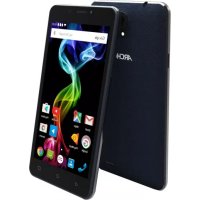
55b Platinum - Smartphone ARCHOS - Free user manual and instructions
Find the device manual for free 55b Platinum ARCHOS in PDF.



| Product type | Smartphone |
| Brand | ARCHOS |
| Model | 55b Platinum |
| Dimensions (approx.) | 152 x 76 x 8 mm |
| Weight (approx.) | 180 g |
| Power supply | Rechargeable lithium-ion battery, capacity ~2500 mAh, charging via micro-USB |
| Main functions | Dual SIM (Micro-SIM + Mini-SIM), 3G, Wi-Fi, Bluetooth, GPS, camera, microSD reader |
| Care and cleaning | Clean with a soft, dry cloth. Do not use abrasive products |
| Safety | Do not expose to water or humidity. Use only the provided charger |
| Spare parts and repairability | Removable battery, interchangeable back cover. Repair possible by a professional |
| General information | Android operating system (version depends on update). 5.5 inch screen |
Frequently Asked Questions - 55b Platinum ARCHOS
User questions about 55b Platinum ARCHOS
0 question about this device. Answer the ones you know or ask your own.
Ask a new question about this device
Download the instructions for your Smartphone in PDF format for free! Find your manual 55b Platinum - ARCHOS and take your electronic device back in hand. On this page are published all the documents necessary for the use of your device. 55b Platinum by ARCHOS.
USER MANUAL 55b Platinum ARCHOS
Congratulations for the purchase of an ARCHOS device! This quick start guide helps you to start using your device properly. If you have more questions concerning the use of your device, visit us at:

twitter.com/archos

www.facebook.com/archos
Blog
https://blog.archos.com/

http://faq.archos.com/

www.archos.com, click Support > After-sales support

www.archos.com, click Support > Downloads > Declaration of conformity
As we are often updating and improving our products, your device's software may have a slightly different appearance or modified functionality than presented in this quick start guide.

Unboxing


Quick start guide
ARCHOS 55b Platinum

Charger adapter

Charging cable
Describing your device


Assembling
After you have unpacked your mobile phone box:
- Remove the device's back cover using the notch.
- Insert your SIM card or Memory card in the corresponding slot.
- Insert the device's battery.
- Replace the back cover.
| 3G/2G slot 1 Micro-SIM | |
| 3G/2G slot 2 Mini SIM | |
| Micro-SD card slot 3 |
When inserting your SIM card or micro-SD card, make sure to follow the illustration, otherwise you may damage the slot or the card.
THE MINI SIM SLOT IS BELOW THE MICRO-SIM SLOT.


Starting up

Charging your battery completely
Plug the charging cable in the Micro-USB port and the adapter in a power outlet. Leave the device until the battery is fully charged.
Turning ON
- Press and hold the ON/OFF button to turn on the device.
- Follow the instructions to set up your device.
Activating mobile date connection (3G)
- Touch and pull down the status bar to display it.
- Touch again the bar to reveal the quick settings.
- Select the Settings icon.
- In Wireless & networks, select Data usage, then the SIM card tab.
- Slide the Mobile data switch to turn on/off.

Activating WiFi connection
- Touch and pull down the status bar to display it.
- Touch again the bar to reveal the quick settings.
- Select the WiFi icon to activate the WiFi connection
- Select "WiFi" below the WiFi icon.
- Touch the name of network you want to connect to.
Private networks are shown with a lock icon and will require you to enter your password.

Troubleshooting
- My device is frozen: press the ON/OFF button for more than 10 seconds or remove and replace the battery, then turn on the device.
- My device encounters dysfunctions: go to Settings > About phone > Check for update system to check for updates. If your device is up-to-date, try to reset the device from Settings > Factory data reset > Backup & restore. We recommend to save your files before resetting.
- My WiFi reception is too low: make sure you are not far from the WiFi hotspot. Update the firmware of the device: http://www.archos.com/support. Reset and redefine your connection parameters. Contact your WiFi connection provider.
- My device bootlogo is playing in a loop: you need to completely reset your device. Go to faq.archos.com and select your device. In Backup & Recovery, select How to reinitialize my ARCHOS.
FOR MORE ANSWERS ABOUT YOUR TECHNICAL DIFFICULTIES, DO NOT HESITATE TO VISIT: FAQ.ARCHOS. COM
Contactez-nous

www.archos.com, click Support > After-sales support

Activating mobile date connection (3G)
Activating WiFi connection

TapaHTnN nHCTpyKcNnNo 6e3oNaCHOCTN
KpaTkoe pyKOBOdCTBO

AanTep 3apHOrO yCTpoIcTba

Ka6eIb 3apArdHoro yCTpOiCTBa
Oncanhe yctpoiCTBa


C6opka
IocJIe n3BleueHnMo6nIbHOro TeJefoHa n3 Kopo6Kn:
- CHIMITE 3aHIOU KpbIUKy yCTpoJCTBa c NOMOuI Na3a.
- BCTaBbTe SIM-KapTy B COOTBeTCTByIOuee rHe3do.
- BCTaBbTe aKKymyIaTOp bYcTpoIcTBO.
- YcTaHOBInTe Ha MeCTO 3aHIOIO KpbIiKy.
| 3G/2G 1 Micro-SIM | ||
| 3G/2G 2 Mini SIM | ||
| Каръ micro-SD 3 |
Ipn yctaHOBKe SIM-KapTbI nnN KapTbI microSD cneNyET TOUHO CBeprTb CBOI DeiCTBnC n3o6paXeHNEm, B IpOTNBOM Cnyae MOxHO NOBpeNTb THe3Do nnN KapTy.
CLOT MINI SIM HIXKE CLOT MICRO-SIM


Hauano pa60tbi

3apaika
BcTaBbTe 3apAHynKab6JIb B nopt Micro-USB, noCne yero npucoeHnIte Ka6eJb K 3apAHyomUyCTpOInCTBy.
Ipeedepbbim nCnoJIb3ObaHneymycTpoINCTBaNOHOCbIO 3apAInTe aKKyMylrTop.
BkJIIOUeHnE
- Haxmnte u ydepkunBaIte KhONky BKl./BblKl, yTO6bl BKNIOHTb ycTpoNCTBO.
- Cnéduynte nHcτpykünmaM.
IopKIOueHne IJI MO6NbHbIX daHHbIX
- Kochntecb CTPOKU COCTOHN I NOTAHNTe ee BHN3, YTO6bl OTO6pa3NtB CTPOKY.
- NOBTOPHO KOCHTecb CTPOK COCTOHN, YTO6bl OTKpbITb 6bICTpbIE HAcTPOKN.
- Bb6epnte nKtorpammy Hactpoek.
- Bb6epTe IcnoIb3OBAHnE daHHbIX B pa3dene BeCnpoBOHbIe n npoBoHbIe cTn. Pocne 3TOr BO b6epTe BknaIky SIM-kapTbl.
- NepetHnTe nepeKIOuATEJIb MoIbHbIe daHHbIe IaB KIOUeHn IIN BbIKIOUeHn DaHHoN OOnuN.

ПоdkлоченWeWiFi
- KocHTecb CTPOKn COCTOHN I NOTAHNTE ee BHN3, YTO6bl OTO6pa3NTb CTPOKy.
- NOBTOPHO KOCHTecb CTPOK COCTOHH, YTO6bl OTKpbITb 6bICTpbIE HAcTPOKN.
- Bb6epnte nKToPamMy WiFi , yTo6bl aKTnBupoBaTb noKnIoueHne WiFi
- Bb6epuTe WiFi noq nuktorpammoWiFi.
- KocHTecb IMeHn cETn, K KOtOpO Heo6xOdmo NOdkNIOuHTbcra.
Yacthble cetn oTo6paKaIOTcra C NIKTORpAMMO 3aMKa; Iy nOdkNIOUeHnK Hm CneNyET BBecTn napoJIb.

Поньи устраенье неспразвhoeТeн
- Moe yctpojCTBO 3amopoxeH: HaxMnte KHOJky BKIOUeyHn / BbIKIOUeyHn B TeueHne 6oee 10 cekynd n nn ydaIITb n 3aMeHNTb 6aTapeio, a 3aTeM BKIOUHTe yCTPOJCTBO.
- Moe yctpoiCTBO CTaIKNBAeTcA DnCfYHKcH: nepeiDnte B pa3dE HAcTpoiKu> O TeIefoHe> IpOBepNTb HAIInue o6HOBLeHn CnCTEmbl, YTO6bl IpOBepNTb HAIInue 6HOBLeHn. Ecn yctpoiCTBO He pa6oTaET Do COBpeMeHHbIX, Nonpo6yIte BblIOHNtB c6poc yctpoiCTBa B MeHIO HaCTpoiKn> C6poc DaHHbIX> Pe3epBHOe KOnIpobAHne & BOCCTaHOBLeHne.Mbl peKOMeHdyem, YTO6bl COXpaHNTb faJIbI nepei c6pocom.
- Ecni ckopocb pa60tbi Wi-Fi Ha npnem cInskom MaHa, y6eINTecb B TOM, YTO Bbl HaxoItecb Ha doJxHOM pacCTOHN OT TOKN DOCTyna Wi-Fi. O6HOBnte MnkponporpaMMy ycTpoiCTBa: http://www.archos.com/support. C6pocbTe n 3aJaTe 3aHOBo napametpbI NOKluoyenra. CBjXtecb c npobaiepom Wi-Fi-nOdkluoyenra.
- Moe yctpoiCTBO bootlogo nIgpaET B cIkJIe: Bam Heo6xOIMO nONHOCTbIO nepe3arpy3NTb KOMMyHnKaTOp. NpeeITN K faq.archos.com IN Bbl6epnte yCTPOJcTBO. B Pe3epBHOe KOnnpOBaHne IN BOCCTaHOBJIeHne Bbl6epnte KaK nepenHHnuaJIu3npOBaTb MON ARCHOS.
ДлЯ ПОЛУЕня OTBETOB HA ДPyгпЕ BONPOСы, KACAOUINECR TPyДHOCTeI
TEXHNUECKOFO XAPAKTEPA, IOCETITE BEБ-CTPAHNUZy:
FAO.ARCHOS.COM
Dolaczdo nas

Nobhicto3apdItb6atapeio
-
BCTaBTe Ka6eB 3apAHHoro npnctpoIO do Micro-USB npOpy Ta nID'cHnIte HOro Do 3apAHHoro npnctpoIO.
-
He yinaite npictpii do nobhoi 3aprki 6atapei BbimKHeHHa
-
Hatncitb Ta ytpmyte KnaBiuy BBIMKHeHHa Ta BUMKHeHHa XNBHeHHa dIra TORO, 0o6 BBIMKHyTu npncTpii.
2.ДotpmyTeCb IHCTpyKciu,IO6 HanaWtYBaTu BaU npctpiAKnBaucia Mo6IbHoI nepeaui daHx (3G)
-
DiTopKHiTbcraINotarHItbBn3 pAnOK cTahy IJRA NOrO BiIO6paXeHHA.
-
DToTOPKHiTbcra ige pa3 Do pAdka, 0o6 BiDkPunu Bwnki HanaTuBaHHa
3.Bn6epiTb 3NaOHaJaWtBuHn.
-
Y MeHIO Be3IpoTOBn 3B'3OK Ta MepeKi, Bn6epiTb BnKOpNCtAHNHaHnx, dani - BKnaDky SIM-kapTu.
-
NocyhbTe nepemkau Mo6ilbHi daHI, 0o6 BBIMKHyTN a6O BUMKHTN Mo6ilbHy nepedauy daHx. Aktubazia WiFi 3'edHaHHa
-
DiTopKHiTbC i NotaHItb Bn3 pAnok cTaHy dny Ioro BiO6paXeHHa.
-
DToTOPKHiTbcra ige pa3 do p4nk, 06 BiDkPunu WbNdki HanaTuBaHHa
3.Bn6epitb3aoukWiFi,io6akTnBvBaTuWiFi 3B'ra3ok.
-
Bn6epitb "WiFi mepexy" nI3nauchkom WiFi.
-
DiTopKHitbcra do Ha3Bn Mepexki, do koi BN xOueTe nID'edHaTncr.
Iprnbathi mepexi Biio6paXaIOb8c8 3i 3Hauchom 3amka Ta notpe6yIOb BBedeHnnapoJ.


IouykiucyuHeHHn HeCnpaBHOCTe
-Mi Tepeoh "3aBnC" a6o He BMkAeTbca: HaTncHi b i yTpmyTe KlaBiuy BBIMKHeHH Ta BmKHeHH JxNBleHH npotarom 10 cekynd a6o BNtargHItb Ta 3HOBy BCTaHOBITb 6aTapeoi i 3HOBy yBMKHITb npunctpi.
-Mi npictpi Buae nomnkn nac po6t: nepeiditb B po3di HanaTuBaHH> Pto Telefoh > Ipeebipntu HaBnictb OHOBHe b CnCTemN, 0o6 nepeBipNTu HaBnictb OHOBHe. RaKuo npictpi OHOBHeO do octaHbOi BepciI PI3, cnpo6yute BVKOHaTn cKnDaHH npncTpOu B MeHIO HanaTuBaHH> Pe3epBHe KOnIOBaHH Ta cKnDaHH> CKnDaHH HanaTuBaHb. Mn peKOMeHdyEmo 3pO6HTu pe3epBHe KOnIOBaHH DaHnx nepeD cKnDaHHM, 0o6 36epertu BaWi faiinn.
- Pibehb cnHany Wi-Fi 3aHaTo Hn3bKn: nepekoHaITeC, 10 Bn 3haoiTeCb He 3aHaTdo daLeko BiD Tockn Doctyno WiFi. OHObitb npOuWbky npicToPO: http://www.archos. com/ua/support. 3KnHbTe i 3HOBy nepeBn3HaUte napaMeTpN 3'EDHaHHa. 3BepHiTbcrdo noCTaaybHnka nocnyri nnkIIOueHHa do WiFi.
-Mi npncptpi uKniuho nepe3aBaHTaJyEbC: Bam Heo6xIHO NOBHCIO nepe3aBaHTaXHTn CmaptfoH. Nepeiditb do faq.archos.com i o6epitb moelb BaWoRo npncptpoU. Y "Pe3epBHe KOnIOBaHHra Ta BiHOBlenHra" o6epitb "AKe nepeiniciJIzYbaTn mi ARCHOS.
IIOB OTPIMATN BILBE BIDNOBIEN CTOCOBHO TEXHICHNX IINTAHb, BIDBIADAE FAQ. ARCHOS.COM
Open Source Software Offer
The software bundled with this product includes software files subject to certain open source license requirements. Such open source software files are subject solely to the terms of the relevant open source software license. Such open source software is provided on an "AS IS" basis to the maximum extent permitted by applicable law.
For the open source files contained herein, please access "Open source license" section located at: Settings\About phone\Legal information on the device for the relevant copyright and licensing terms. You may obtain a copy of Apache License, Version 2.0 at http://www.apache.org/licenses/LICENSE-2.0. You may also obtain a copy of GNU General Public License, Version 2 at the Free Software Foundation, INC, 51 Franklin Street, Fifth Floor, Boston, MA 02110-1301, USA.
Until the date that is three years after our last shipment of this product, you may obtain a copy of the source code corresponding to the binaries for any GPL-Licensed file by contacting ARCHOS customer service at http://www.archos.com and ARCHOS will send you a link to such source code or will provide instructions to get the source on a physical medium.
This offer is valid to anyone in receipt of this information.
National restrictions
This device is intended for home and office use in all EU countries (and other countries following the EU directive 1999/5/EC) without any limitation except for the countries mentioned below:
Country Restriction ReasonRemark
Bulgaria None General authorization required for outdoor use and public service
France Outdoor use limited to Military Radiolocation use. Refarming of the 2.4 GHz band 10 mW e.i.r.p. within the has been ongoing in recent years to allow current relaxed band 2454-2483.5 MHz regulation. Full implementation planned 2012
Italy None If used outside of own premises, general authorization is required.
Luxembourg None General authorization required for network and service supply (not for spectrum)
Norway Implemented This subsection does not apply for the geographical aera within a radius of 20 km from the centre of Ny-Alesund
Russian None Only for indoor applications Federation
Note: Frequencies 2454-2483.5MHZ are restricted to indoor use in France.
SAR
After the laboratory measurements, the SAR values for this mobile are:
- Head Max: 0.301 W/Kg (10g)
- Body Max: 0.831 W/Kg (10g)
Archos company (Contact adress : ARCHOS SA 12 Rue Ampère 91430 Igny France) declares that this device is in compliance with the essential requirements and other relevant provisions of Directive 1999/5/EC: http://www.archos.com/support/download/conformity/CE_DOC_AC55bPL.pdf. Par la presente, ARCHOS (adresse de contact : ARCHOS SA 12 Rue Ampère 91430 Igny France) déclare que l'appareil est conforme aux exigences essentielles et aux autres dispositions pertinentes de la directive 1999/5/CE. La déclaration de conformité peut être consultée sur le site : http://www.archos.com/support/download/conformity/CE_DOC_AC55bPL.pdf
C E 0700
69
