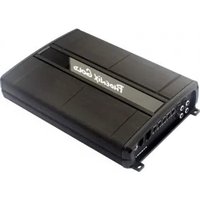
Z500.1 - Receiver PHOENIX GOLD - Free user manual and instructions
Find the device manual for free Z500.1 PHOENIX GOLD in PDF.



User questions about Z500.1 PHOENIX GOLD
0 question about this device. Answer the ones you know or ask your own.
Ask a new question about this device
Download the instructions for your Receiver in PDF format for free! Find your manual Z500.1 - PHOENIX GOLD and take your electronic device back in hand. On this page are published all the documents necessary for the use of your device. Z500.1 by PHOENIX GOLD.
USER MANUAL Z500.1 PHOENIX GOLD
natural_image
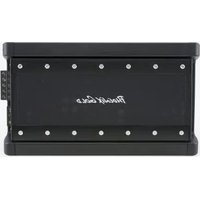
Exterior view of a metallic automotive electronic device with black and silver casing (no visible text or symbols)AMPLIFIER MANUAL
MANUAL DEL AMPLIFICADO R
MANUEL DEL'AMPLIFICATEUR
Models: Z500.1, Z250.2, Z500.4
- Compact Size for Easy Installation
• High and Low Pass Crossovers
• Audiophile BiPolar Output Transistors
• High Level Inputs for easy OEM Integration - Robust Unregulated Power Supply
• Surface Mount Component Technology - Direct Insert Power and Speaker Terminals
• Audio Precision Quality Control Verification
• High Temperature Plexiglass cover - Remote subwoofer level control included (Z500.1 only)
• RMD - Remote Monitoring Display Port
Características:
Amplifier Owner's Manual
OWNER INFORMATION
Owner's Name:
Serial Number: ____
Purchase Location: ____
Purchase Date: ____
Installer:
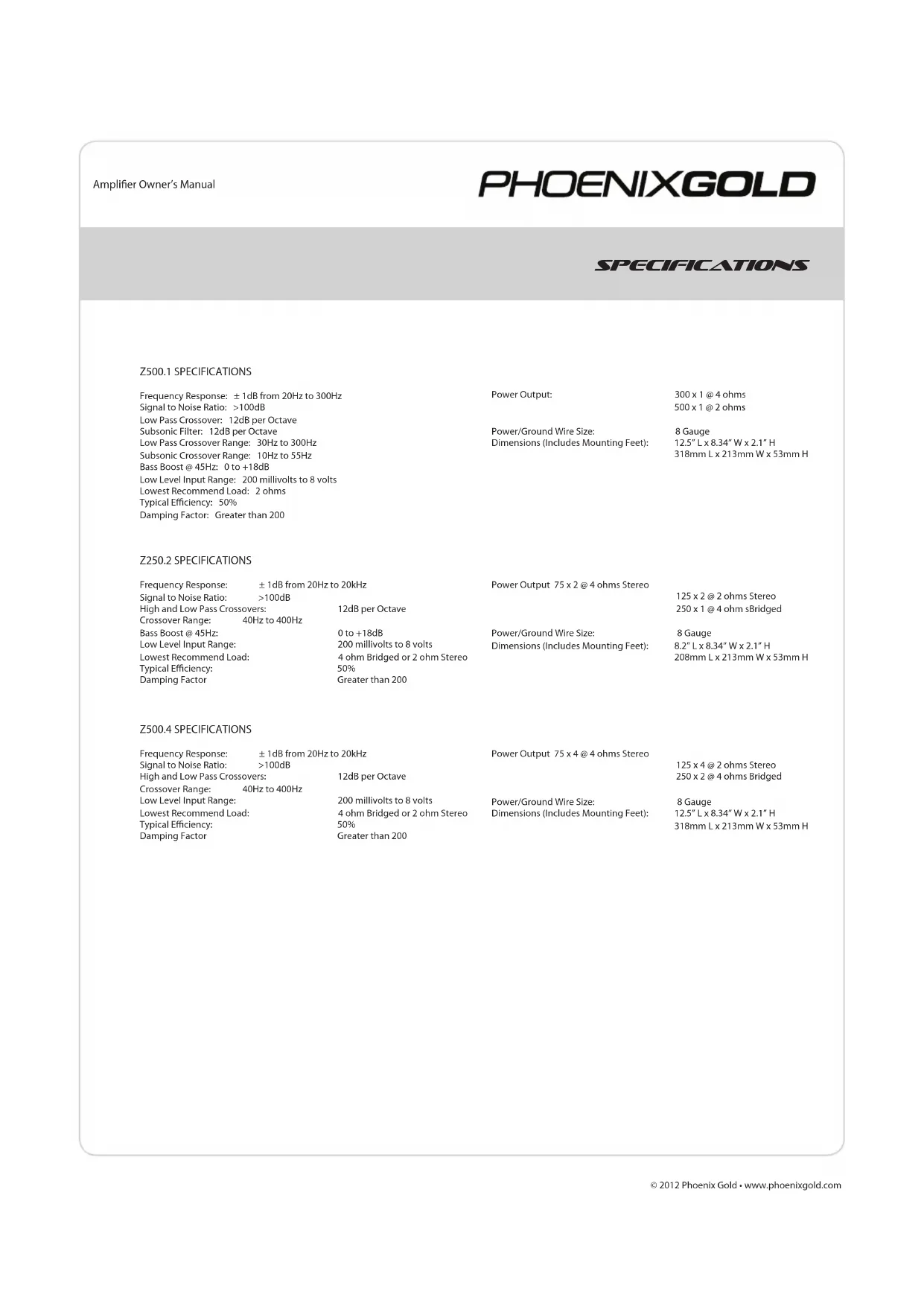
Z500.1 SPECIFICATIONS
| Frequency Response: ±1dB from 20Hz to 300HzSignal to Noise Ratio: >100dBLow Pass Crossover: 12dB per OctaveSubsonic Filter: 12dB per OctaveLow Pass Crossover Range: 30Hz to 300HzSubsonic Crossover Range: 10Hz to 55HzBass Boost @ 45Hz: 0 to +18dBLow Level Input Range: 200 millivolts to 8 voltsLowest Recommend Load: 2 ohmsTypical Efficiency: 50%Damping Factor: Greater than 200 | Power Output: | 300 x 1 @ 4 ohms500 x 1 @ 2 ohms |
| Power/Ground Wire Size: | 8 Gauge12.5" L x 8.34" W x 2.1" H318mm L x 213mm W x 53mm H | |
| Dimensions (Includes Mounting Feet): |
Z250.2 SPECIFICATIONS
| Frequency Response: ±1dB from 20Hz to 20kHz | Power Output 75 x 2 @ 4 ohms Stereo | ||
| Signal to Noise Ratio: >100dB | 125 x 2 @ 2 ohms Stereo | ||
| High and Low Pass Crossovers: | 12dB per Octave | 250 x 1 @ 4 ohm sBridged | |
| Crossover Range: 40Hz to 400Hz | |||
| Bass Boost @ 45Hz: | 0 to +18dB | Power/Ground Wire Size: | 8 Gauge |
| Low Level Input Range: | 200 millivolts to 8 volts | Dimensions (Includes Mounting Feet): | 8.2" L x 8.34" W x 2.1" H |
| Lowest Recommend Load: | 4 ohm Bridged or 2 ohm Stereo | 208mm L x 213mm W x 53mm H | |
| Typical Efficiency: | 50% | ||
| Damping Factor | Greater than 200 | ||
Z500.4 SPECIFICATIONS
| Frequency Response: ± 1dB from 20Hz to 20kHz | Power Output 75 x 4 @ 4 ohms Stereo | ||
| Signal to Noise Ratio: >100dB | 125 x 4 @ 2 ohms Stereo | ||
| High and Low Pass Crossovers: | 12dB per Octave | 250 x 2 @ 4 ohms Bridged | |
| Crossover Range: 40Hz to 400Hz | |||
| Low Level Input Range: | 200 millivolts to 8 volts | Power/Ground Wire Size: | 8 Gauge |
| Lowest Recommend Load: | 4 ohm Bridged or 2 ohm Stereo | Dimensions (Includes Mounting Feet): | 12.5" L x 8.34" W x 2.1" H |
| Typical Efficiency: | 50% | 318mm L x 213mm W x 53mm H | |
| Damping Factor | Greater than 200 | ||
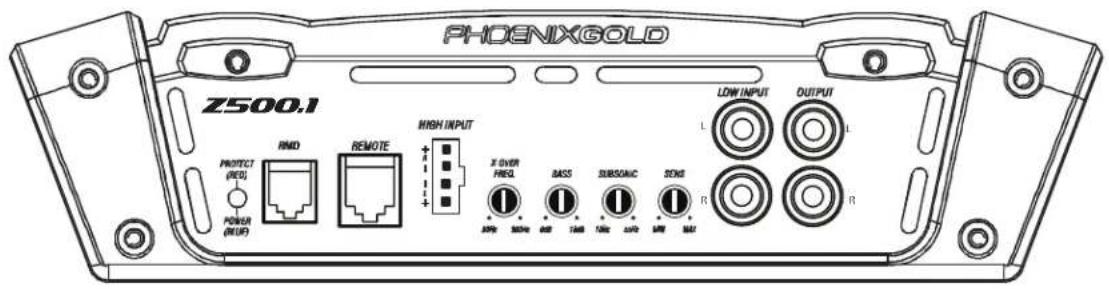
Z500.1
MONOBLOCK POWER AMPLIFIER
INPUT
Connect preamp signal cables from the head unit to these terminals.
CROSSOVER FREQUENCY
Controls the lowpass crossover point for the speaker outputs.
BASS BOOST
Variable bass boost from 0 to +18dB @ 45Hz.
REMOTE BASS LEVEL CONTROL (RBC)
This port is for connecting the remote subwoofer level control. This allows up to 20dB of volume adjustment. This is not a bass boost, it controls the level of the low pass signal.
NOTE: This control is not compatible with the Phoenix Gold LPL44 level control.
SENS
Used to reach maximum amplifier power with a wide variety of headunits.
Controls the highpass crossover point for the speaker outputs to eliminate extreme low frequencies.
OUTPUT
Provides a full range signal for an additional amplifier. There is no signal loss if using this output.
text_image
PHOENIXGOLD Z500.1 RMD REMOTE HIGH INPUT PROTECT (RED) POWER (MUE) X OVER FREQ BASS SUBSUAIC STNG LOW INPUT OUTPUT L R R AHP 300kW 400 100kW 100kW 200kW 500kW MAX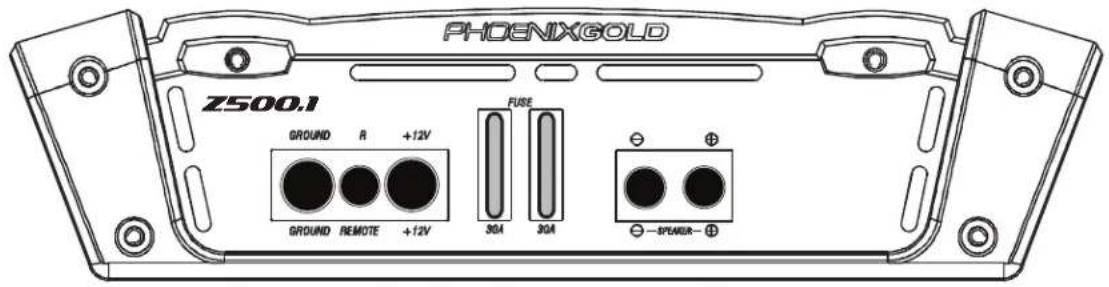
text_image
PHOENIXGOLD Z500.1 GROUND R +12V GROUND REMOTE +12V FUSE 30A 30A -SPWDR-+12V
This must be connected to the fused positive terminal (+12V) of the car's battery. The fuse must be located within 18 inches of the battery.
REMOTE
This must be connected to switched +12V, usually a trigger wire coming from the head unit or ignition.
GROUND
This must be connected to the negative terminal of the car's battery or bolted to a clean, unpainted part of the chassis of the vehicle.
NOTE: Visible through the plexiglass cover, a single blue power LED is located in the lower corner of all Z amplifiers.
REMOTE MONITORING DISPLAY (RMD)
Connect optional RMD Voltage Diplay to this port.
SPEAKER OUTPUTS
Used to connect the amplifier to speakers. Z500.1 minimum impedance is 2 ohms.
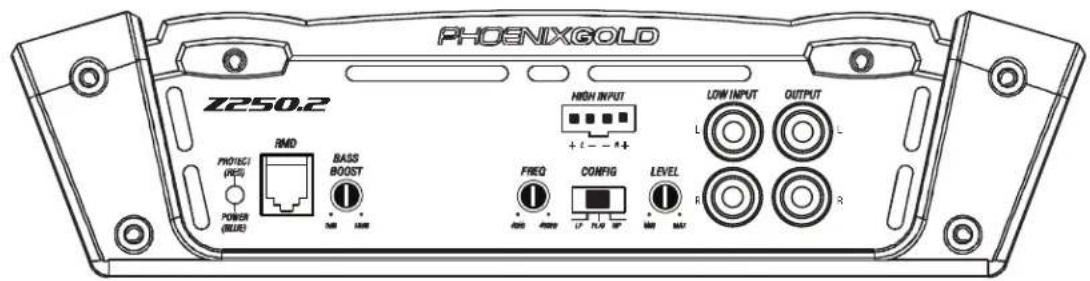
Z250.2 2 CHANNEL POWER AMPLIFIER
INPUT
Connect preamp signal cables from headunit to these input.
CROSSOVER FREQUENCY
Controls the crossover point for the speaker outputs.
OUTPUT
Provides a full range signal for an additional amplifier. There is no signal loss if using this output.
BASS BOOST
Variable bass boost from 0 to +18dB @ 45Hz.
SENS
Used to reach maximum amplifier power with a wide variety of headunits.
CONFIG
FLAT: Crossovers are turned off
HPF: High pass crossover is on
LPF: Low pass crossover is on
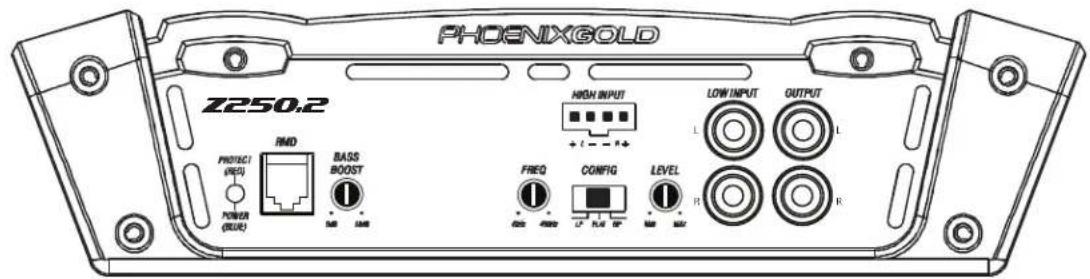
text_image
PHOENIXGOLD Z250.2 PROFISC (RSD) POWER (RUE) RMD BASS BOOST + - + - HIGH INPUT LOW INPUT OUTPUT FREQ CONFIG LEVEL R R L L L L L L L L L L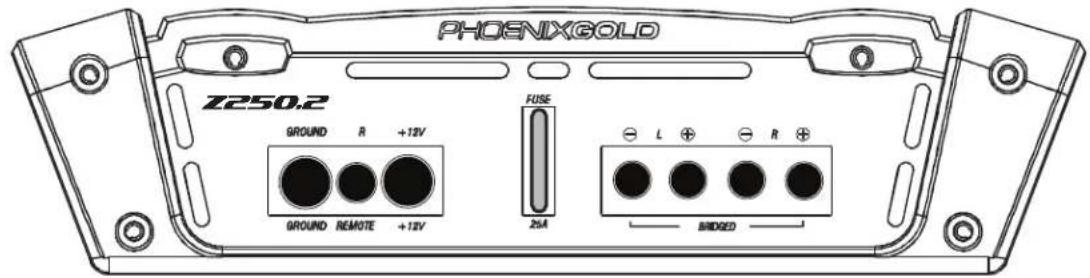
text_image
PHOSNIXGOLD Z250.2 GROUND R +12V GROUND REMOTE +12V FUSE 2mA L ⊕ ⊖ R ⊕ BRIDGED+12V
This must be connected to the fused positive terminal (+12V) of the car's battery. The fuse must be located within 18 inches of the battery.
REMOTE
This must be connected to switched +12V, usually a trigger wire coming from the head unit or ignition.
GROUND
This must be connected to the negative terminal of the car's battery or bolted to a clean, unpainted part of the chassis of the vehicle.
REMOTE MONITORING DISPLAY (RMD)
Connect optional RMD Voltage Diplay to this port.
SPEAKER OUTPUTS
Used to connect the amplifier to speakers. Z250.2 minimum impedance is 4 ohms bridged or 2 ohms stereo. Use Right + and Left - to bridge the channels.
NOTE: Visible through the plexiglass cover, a single blue power LED is located in the lower corner of all Z amplifiers.
Z500.4
4 CHANNEL POWER AMPLIFIER
FRONT AND REAR INPUTS
Connect preamp signal cables from headunit to these inputs. The front AND rear inputs must be used, if only the front input is used then the rear speaker outputs will have no output signal.
CROSSOVER FREQUENCY
Controls the crossover point for the speaker outputs.
SENS
Used to reach maximum amplifier power with a wide variety of headunits.
CONFIG
FLAT: Crossovers are turned off
HPF: High pass crossover is on
LPF: Low pass crossover is on
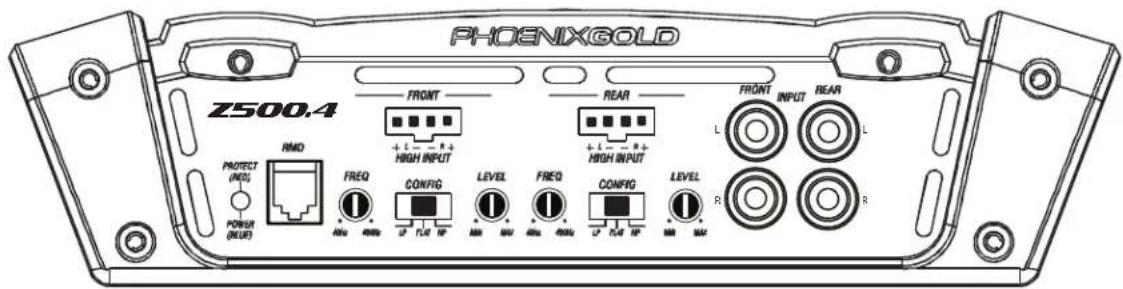
text_image
PHOENIXGOLD Z500.4 RMD PROTECT (RED) POWER (BLUE) FRONT HIGH INPUT FREQ CONFIG LEVEL FREQ CONFIG LEVEL R REAR HIGH INPUT L R FRONT INPUT REAR L R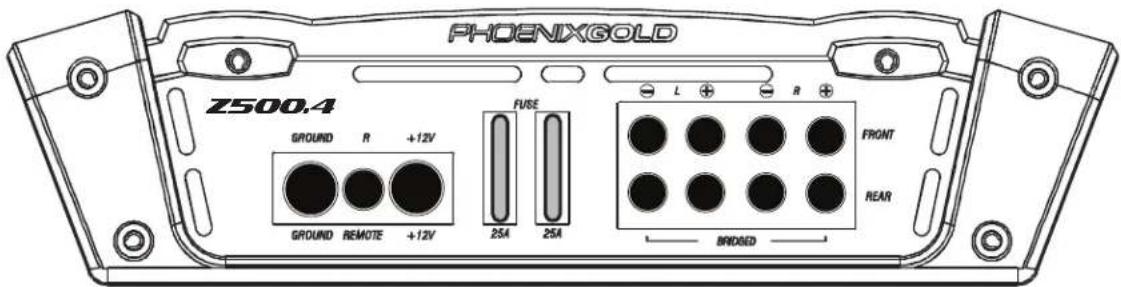
text_image
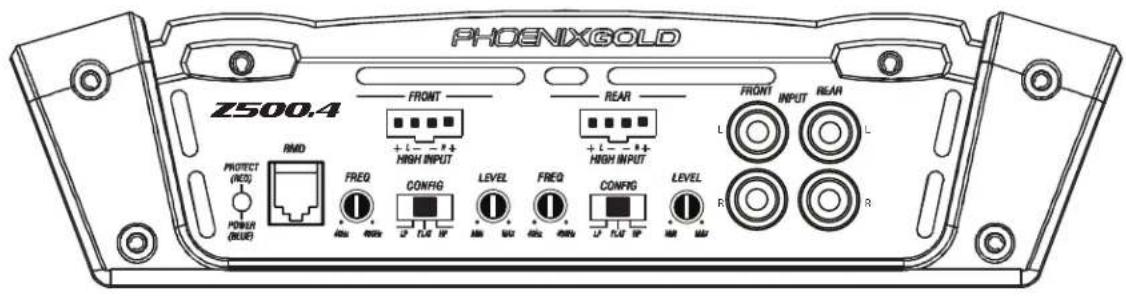
PHOENIXGOLD Z500.4 GROUND R +12V GROUND REMOTE +12V FUSE 25A 25A L R FRONT REAR BRIDGED+12V
This must be connected to the fused positive terminal (+12V) of the car's battery. The fuse must be located within 18 inches of the battery.
REMOTE
This must be connected to switched +12V, usually a trigger wire coming from the head unit or ignition.
GROUND
This must be connected to the negative terminal of the car's battery or bolted to a clean, unpainted part of the chassis of the vehicle.
REMOTE MONITORING DISPLAY (RMD)
Connect optional RMD Voltage Diplay to this port.
SPEAKER OUTPUTS
Used to connect the amplifier to speakers. Z500.4 minimum impedance is 4 ohms bridged or 2 ohms stereo. Use Right + and Left - to bridge the channels.
NOTE: Visible through the plexiglass cover, a single blue power LED is located in the lower corner of all SD amplifiers.
- Install all system fuses.
- Set the amplifier's input sensitivity controls to their minimum positions (full counterclockwise).
- Set all amplifier crossover switches according to your system's design.
- Make preliminary adjustments to the crossover frequency, usually 80Hz is good starting point for high and low pass. It may be necessary to fine tune the crossover frequency later for the best overall sound quality.
- If using a Remote Subwoofer Level Control, set it to maximum (full clockwise).
- Turn the headunit on with the volume set to minimum.
- Visually check the amplifier's has turned on by the power LED.
- Check the condition of all other components to make sure they are powered up.
- Set the headunit's tone controls, balance, and fader to the center (flat) position. Turn off any loudness or other signal processing features.
- Set the volume control of the headunit for maximum undistorted output (on most headunits this will be approximately 7/8 of maximum volume). Use a very clear and dynamic recording.
- Turn up the sensitivity or input level control on the amplifier until the speakers reach maximum undistorted output.
-
Repeat sensitivity level adjustments for all other amplifiers.
-
Reduce the headunit's volume to a comfortable level.
- Listen to various musical selections to check overall system balance. Compare front to rear, midbass to midrange, etc. If one speaker set is too loud compared to another, then its level must be lowered to blend correctly with the other speakers.
Note: For subwoofers controlled by the Remote level control, keep the level setting from step 11 or 12. Use the control to blend subwoofers with the rest of the system. The correct subwoofer volume will change depending on road noise and differences in recordings. - Fine tune crossover frequencies to achieve the smoothest possible blending of each speaker set.
- Adjust the Bass Equalization Controls on the amplifier, headunit or processor upstream if necessary to increase output.
Note: Use these controls sparingly. Every 3dB of boost requires double the power at 45Hz. If your subwoofer system requires a lot of boost to sound good, there may be a problem. Look for out-of-phase woofers, a leaking subwoofer box, or incorrect box size. - With all levels set correctly, the system will reach overall maximum undistorted output at the volume level set in step 10.
TROUBLESHOOTING
No power: Check voltage at the amplifier with a DMM (volt meter), +12V and R (with head unit on) the voltage should register between 11.5V and 14.4V when using the attached ground lead of the amplifier. Check fuse at amplifier and at the battery. Use a meter to verify connection from one end of the fuse to the other, breaks may not always be visible. If the fuse is blown, check the power wire and also the amplifier for a short. If the short is in the amplifier itself, see your Phoenix Gold dealer. If no short is present, replace the fuse.
Power without sound: Turn the amplifier off and check all input and output signal cables and power connections. Check the speakers for shorts with a DMM (volt meter) or by connecting them to another audio source. After making sure everything is correct, turn the amplifier on again.
Power without sound and the PROTECT LED is lit: The red PROTECT LED lights when the amplifier shuts down for either thermal or over-current protection. A high internal amplifier operating temperature will trigger thermal shutdown: after it cools about 5°C, the amplifier will restart. A shorted speaker lead or operation into unusually low impedance loads will trigger over-current shutdown: cycle power at the amplifier R terminal to restore operation. Check for shorted speaker wiring or damaged speakers or crossover systems if over-current shutdown occurs.
No sound from one or more channels: Check for overvoltage on +12V and ground terminals. Check the balance control in the head unit. Check speaker connections. Check signal input connection.
Very low output: Check your head unit's fader control or the amplifier's input sensitivity level. Make sure subsonic frequency control is not set too high and LP frequency control is not set too low at the same time.
Frequent amplifier shutdown with automatic recovery: This indicates chronic amplifier thermal shutdown because of operation at consistently high internal temperatures. High operating temperature can be caused by inadequate ventilation. Make sure you are not running a lower than recommend impedance. Also check for damaged speakers or passive crossover systems. Finally, chronic thermal shutdown may result from otherwise normal operation of the amplifier at elevated output power levels, which can be resolved by providing additional amplifier cooling, installing a higher-power amplifier, or reducing amplifier output level.
"Motor Boating" - the power indicator going off repeatedly when the audio system is on: Check the amplifier's connection to the battery. Check battery voltage. If low, recharge or replace the battery. Check all ground connections.
PHOENIXGOLD
Amplifier Owner's Manual
INSTALLATION NOTES:
Z500.1 ESPECIFICACIONES
8 Gauge 8.2" L x 8.34" W x 2.1" H 208mm L x 213mm W x 53mm H
Z500.4 ESPECIFICACIONES
HPF: El crossover high pass es "on"
LPF: El crossover low pass es "on"
text_image
PHOENIXGOLD Z250.2 PHOENIX GOLD RMD BASS BOOST POWER (BLUE) + - + - HIGH INPUT + - - + + LOW INPUT L OUTPUT FREQ CONFIG LEVEL F R R R R R R R R R R R R R R R R R R R R R R R R R R R R R R R R R R R R R R R R R R R R R R R R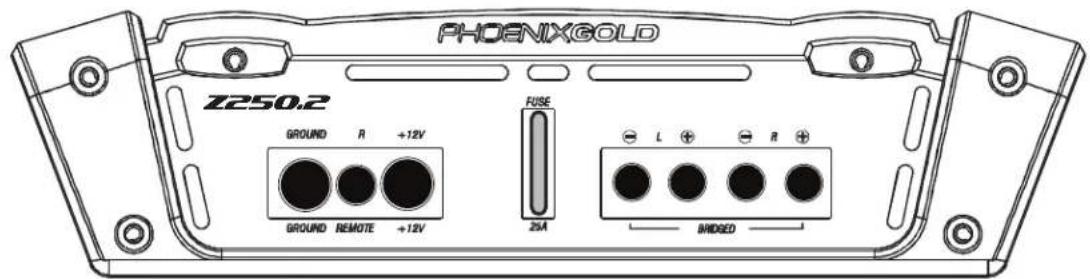
text_image
PHOENIXGOLD Z250.2 GROUND R +12V GROUND REMOTE +12V FUSE 25A L R + BRIDSED+12V
HPF: El crossover high pass es "on"
LPF: El crossover low pass es "on"
text_image
PHOENIXGOLD Z500.4 FRONT REAR FRONT INPUT REAR + L - R + HIGH INPUT + L - R + HIGH INPUT L PROTECT (REQ) POWER (BLUE) RMD FREQ CONFIG LEVEL FREQ CONFIG LEVEL R 4MHz 4MHz 1/2 TLE MP 4MHz 4MHz 1/2 TLE MP R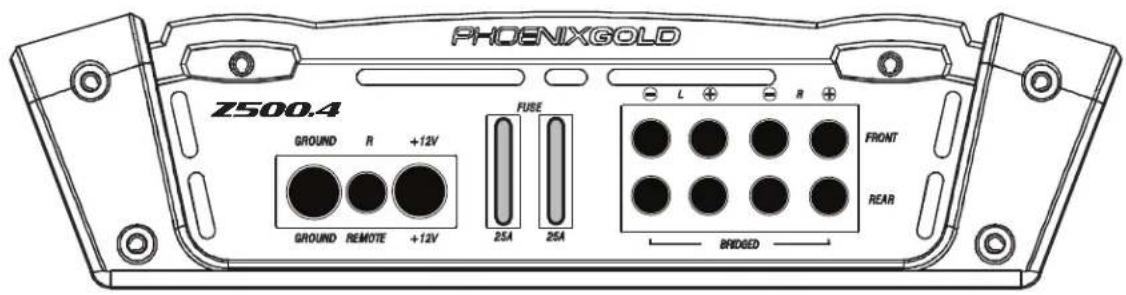
text_image
PHOENIXGOLD Z500.4 GROUND R +12V GROUND REMOTE +12V FUSE 25A 25A L R FRONT REAR BRIDGED+12V
text_image
PHOENIXGOLD Z500.1 PROTECT (INT) POWER (MUE) RMD REMOTE HIGH INPUT X OVER PRESS BASS SUBSONIC STNG LOW INPUT OUTPUT R R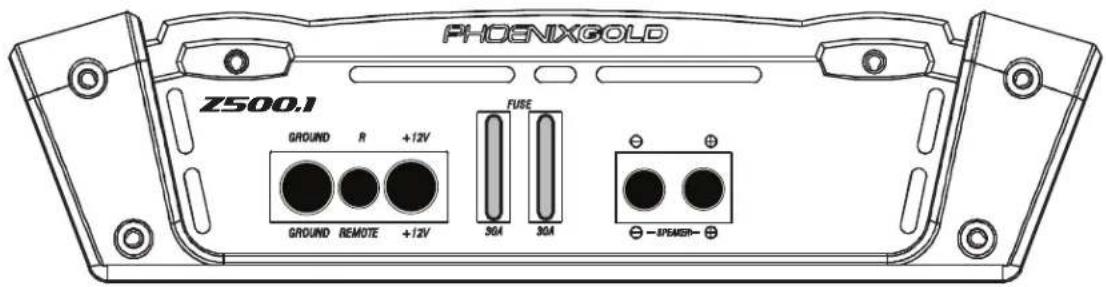
text_image
PHOENIXGOLD Z500.1 GROUND R +12V GROUND REMOTE +12V FUSE 30A 30A — SPEAKER—12V+
text_image
PHOENIXGOLD Z250.2 HIGH INPUT LOW INPUT OUTPUT PROTEC1 (REF) BASS BOOST + - + - FREQ CONFIG LEVEL POWER (BLUE) RND R R R R R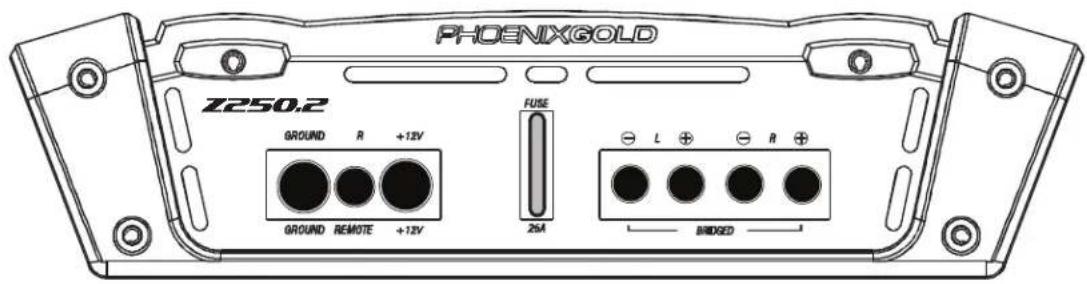
text_image
PHOENIXGOLD Z250.2 GROUND R +12V GROUND REMOTE +12V FUSE 25M L ⊕ ⊖ R ⊕ BRIDGED+12V
Amplifier Owner's Manual
PHOENIXGOLD
PHOENIX GOLD.
Phoenix Gold
A Division of AAMP of America™
13190 56th Court
Clearwater, Florida 33760
P: 888-228-5560
info@phoenixgold.com
www.phoenixgold.com
© 2012 AAMP of Florida, Inc
Designed and Engineered in the USA
LIMITED WARRANTY ON AMPLIFIERS
Phoenix Gold warrants this product to be free of defects in materials and workmanship for a period of one (1) year from the original date of purchase. This warranty is not transferable and applies only to the original purchaser from an authorized Phoenix Gold dealer in the United States of America only. Should service be necessary under this warranty for any reason due to manufacturing defect or malfunction, Phoenix Gold will (at its discretion), repair or replace the defective product with new or remanufactured product at no charge. Damage caused by the following is not covered under warranty: accident, misuse, abuse, product modification or neglect, failure to follow installation instructions, unauthorized repair attempts, misrepresentations by the seller. This warranty does not cover incidental or consequential damages and does not cover the cost of removing or reinstalling the unit(s). Cosmetic damage due to accident or normal wear and tear is not covered under warranty.
INTERNATIONAL WARRANTIES:
Products purchased outside the United States of America are covered only by that country's Authorized Phoenix Gold reseller and not by Phoenix Gold. Consumers needing service or warranty information for these products must contact that country's reseller for information.