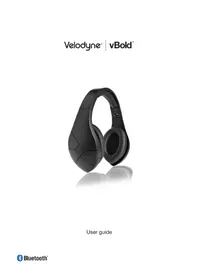
VTrue Studio - Earphones VELODYNE - Free user manual and instructions
Find the device manual for free VTrue Studio VELODYNE in PDF.


| Brand | Velodyne |
| Model | VTrue Studio |
| Type | Studio over-ear circumaural headphone |
| Driver size | 50 mm |
| Frequency response | 10 Hz - 20 kHz |
| Sensitivity | 96 dB/1 kHz/1 mW |
| Impedance | 24 Ω |
| Connector | 3.5mm (1/8 in) Y-cable with inline remote |
| Included adapter | 3.5mm to 6.35mm (1/4 in) |
| Included accessories | Carrying pouch |
| Control functions | Volume control, play/pause, track skip, call management |
| Compatibility | Audio devices with 3.5mm jack (smartphones, tablets, computers) |
| Cleaning | Earpads cleanable with a damp cloth, avoid wetting the speakers |
| Safety | Do not use while driving; avoid high volumes to protect hearing |
| Warning | Exposure to excessive sound pressure can cause hearing loss |
| Recycling | Do not dispose of with household waste; take to an electronics recycling center |
Frequently Asked Questions - VTrue Studio VELODYNE
User questions about VTrue Studio VELODYNE
0 question about this device. Answer the ones you know or ask your own.
Ask a new question about this device
Download the instructions for your Earphones in PDF format for free! Find your manual VTrue Studio - VELODYNE and take your electronic device back in hand. On this page are published all the documents necessary for the use of your device. VTrue Studio by VELODYNE.
USER MANUAL VTrue Studio VELODYNE
natural_image
Exterior view of a modern vinyl record head with brown and silver casing (no visible text or symbols)User guide
Velodyne® | vTrue®
Box Contents
• vTrue over-ear studio headphones
• 3.5 mm (1/8") Y-cable connector
• 3.5 mm (1/8") Y-cable with control module
• 3.5 mm (1/8") to 6.35 mm (1/4") stereo adapter
- Carrying pouch
Specifications
Driver size: 50 mm
Frequency response: 10 Hz - 20 kHz
Sensitivity: 96 dB/1 kHz/1 mW
Impedance: 24 Ω
*Design and specifications are subject to change without notice.
Warnings, safety & care
- To reduce the risk of fire or electric shock, do not expose vTrue headphones to rain or moisture, and do not open or attempt to open the control module, or any part of vTrue headphones.
- Keep out of reach of children. Small parts may be a choking hazard. This product is not intended for use by children under the age of three.
• Excessive sound pressure from earphones and headphones can cause hearing loss. - Consult your physician or audiologist if you have problems hearing, excessive wax build-up or any discomfort after use of vTrue headphones.
- In particularly dry air conditions, mild tingling may be felt on your ears. This is a result of static electricity accumulated in the body and not a malfunction of vTrue headphones. This effect can be minimized by wearing clothes made from natural fibers.
- vTrue headphones are assembled in a facility where they could come in contact with chemicals covered by California's Proposition 65.
• If any dust or ear wax is inside the ear cup, you may experience a degradation of sound quality. - Remove vTrue headphones if they cause any discomfort or pain.
- Do not submerge or expose vTrue headphones to water.
- Protect your vTrue headphones in the carrying pouch when not in use.
Please listen safely
For traffic safety, do not use vTrue headphones while driving or cycling. Do not wear vTrue headphones while operating machinery. Adhere to local laws regarding the use of headphones.
Listening with vTrue headphones at high volumes may affect your hearing, including causing permanent damage. Ringing in your ears or other discomfort can indicate that the volume is too high.
Hearing health is critical to enjoyment and the quality of life. Protect your hearing by listening with your vTrue headphones in a responsible manner that protects your long term hearing health. Velodyne Acoustics, Inc. is not responsible for hearing loss or damage resulting from the use of this product.
| Sound Noise Level (dB) Effect | ||
| Normal breathing 10 Just audible | ||
| Whisper 30 Very quiet | ||
| Normal conversation 50-65 | Comfortable hearing levels are under 60 dB | |
| Vacuum cleaner, hair dryer | 70 Intrusive; interferes with telephone conversation | |
| Average city traffic | 80 | Annoying; interferes with conversation; constant exposure may cause damage |
| Lawnmower, food blender | 85-90 85 dB is the level at which hearing damage (8 hrs) begins | |
| Garbage truck, cement mixer | 100 No more than 15 minutes of unprotected exposure recommended for sounds between 90-100 dB | |
| Stereos (over 100 watts), thunderclap (near) | 110-125 Regular exposure to sound over 100 dB of more than one minute risks permanent hearing loss | |
| Jet engines (near) 140 Threshold of pain begins around 125 dB | ||
*Information obtained from http://www.nidcd.nih.gov/health/education/teachers/pages/common_sounds.aspx
How to connect
To connect your vTrue headphones, plug the straight 3.5 mm (1/8") Y-cable connectors into the ports of their respective ear cups.
Each connector has a red or blue marking on the body of the connector. Match the connectors with the corresponding color under the left and right ear cups. The cable with the red marking is for the right audio channel, while the cable with the blue marking is for the left audio channel.
Plug the right-angle 3.5 mm (1/8") connector into the audio output port on your audio device.
Note: Use the included 6.35 mm (1/4") adapter if your audio equipment uses a 6.35 mm (1/4") output port. Use of this adapter with the control module cable eliminates control function.
Wearing vTrue headphones
Located above the inside of each ear cup are markings for right and left audio channels.
Wear the ear cup marked “Right” over your right ear and the one marked “Left” over your left ear. The control module is located on the cable connecting to the left ear cup.
Always turn down the volume on your audio equipment before wearing vTrue headphones. Once the ear cups are comfortably seated over your years, gradually increase the volume to a moderate sound level.
Adjusting the headband
The headband on the vTrue is adjustable to fit different head sizes.
Hold the headband and adjust by pulling on the right and left ear cups.
The right and left ear cups should be centered over the ears.
Cleaning
Ear cups should be cleaned regularly for sanitary reasons and to prolong the life of your ear cups.
With a lightly dampened cloth, paper towel or disinfectant wipe, thoroughly clean the ear cups.
Use a dry cloth to pat away any remaining moisture.

Do not get the speakers or electronics inside of your headphones wet. Liquids and heavy moisture can cause damage to the electronics inside your headphones. Such accidental damages are not covered under warranty.
Using the playback, volume, & phone functions
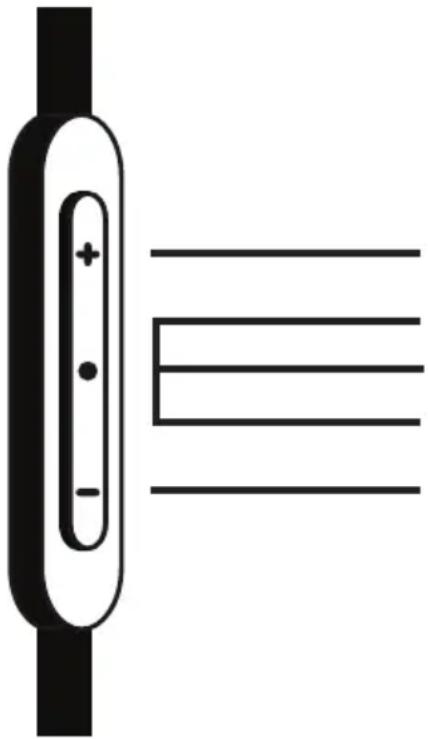
The control module on the vTrue Y-cable has playback, volume, and phone controls so you can flow between listening to music, watching video, and talking on the phone when connected to devices that support these features.
natural_image
Pure electrical circuit lines without any symbolsVolume up
Answer / end call
Track forward / backward
Play / pause
Volume down
Important: Playback, volume, and phone control functionality varies by media device.
| Music & video functions Button press sequence | |
| Increase or decrease volume Press + / - | |
| Switch between pause & play Press & release center | button x 1 |
| Next song or video chapter Press & release center | button x 2 |
| Start of song or video chapter Press & release center | button x 3 |
| Previous song or video chapter Press & release center | button x 3, then x 3 again |
| Scan forward in song or video Press & release center | button x 1, then press & hold center button |
| Scan backward in song or video Quickly press & release center | button x 2, then press & hold center button |
| Phone functions Button press sequence | |
| Answer or end call Press & release center button x 1 | 1 |
| Decline incoming call Press & hold center button for two seconds, then release | 2 |
| Put call on hold & answer new call or switch between calls | Press & release center button x 1 |
| End call & answer incoming call Press & hold center button for two seconds, then release | 3 |
Product recycling
Producing vTrue headphones required the extraction and use of natural resources, and they may contain hazardous substances. Do not dispose of vTrue headphones with your other household waste. Instead, take them to a designated collection point for the recycling of electronic equipment. The separate collection and recycling of your electronic waste equipment at the time of disposal will help to conserve natural resources and ensure that it is recycled in a manner that protects human health and the environment. For information about where you can drop off your waste equipment for recycling, contact your local city government or your household waste disposal service.
Velodyne® | vTrue®
Contenu de la boîte
Using the playback, volume, & phone controls
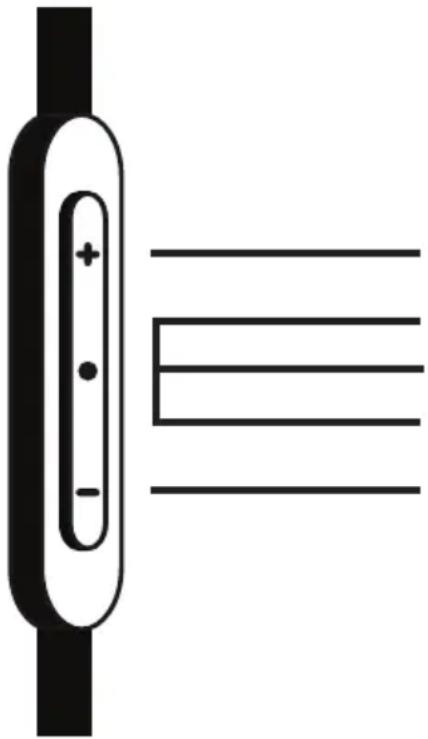
The control module on the vTrue Y-cable has playback, volume, and phone controls so you can flow between listening to music, watching video, and talking on the phone when connected to devices that support these features.
natural_image
Pure electrical circuit lines without any symbolsAugmenter le volume
Register your headphones
velodyne.com/warranty-registration
Follow Velodyne Acoustics, Inc.
velodyne.com
twitter.com/velodyneaudio
facebook.com/velodyne
thevelodyneblueroom.com
Velodyne®
©2013 Velodyne Acoustics, Inc.
345 Digital Drive
Morgan Hill CA 95037