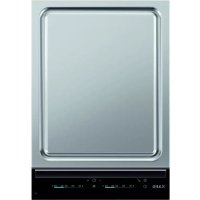
HC452600EB - Baking sheet AEG - Free user manual and instructions
Find the device manual for free HC452600EB AEG in PDF.



| Product type | Teppan Yaki cooking plate (bakplat) |
| Brand | AEG |
| Model | HC452600EB |
| Power supply | 220-240 V, 50-60 Hz |
| Total power | 2800 W (2 zones of 1400 W) |
| Cooking surface | Stainless steel with aluminum layer, hand-polished |
| Number of zones | 2 (front and rear) |
| Controls | Touch controls with selection strip |
| Temperature range | 60 °C to 220 °C |
| Functions | Timer (countdown and progressive), lock, child safety, automatic shut-off, cleaning function, residual heat indication (3 levels), deactivation of audible signals |
| Preheating | Recommended before each use |
| Compatible utensils | Direct cooking on the surface or with pots and pans |
| Maintenance | Cleaning function with ice cubes or cold water; cold cleaning with mild detergent; oil after drying |
| Safety | Child safety device, control strip lock, automatic shut-off, residual heat indicator |
| Spare parts | Available at www.aeg.com/shop (original parts) |
| Warranty | According to the warranty booklet conditions |
Frequently Asked Questions - HC452600EB AEG
User questions about HC452600EB AEG
0 question about this device. Answer the ones you know or ask your own.
Ask a new question about this device
Download the instructions for your Baking sheet in PDF format for free! Find your manual HC452600EB - AEG and take your electronic device back in hand. On this page are published all the documents necessary for the use of your device. HC452600EB by AEG.
USER MANUAL HC452600EB AEG
7. PROBLEEMOPLossing
Induction 2,8 kW Made in Switzerland
Ser.Nr. 2,8 kW
AEG
10. MILIEUBESCHERMING
Thank you for choosing this AEG product. We have created it to give you impeccable performance for many years, with innovative technologies that help make life simpler – features you might not find on ordinary appliances. Please spend a few minutes reading to get the very best from it.
Visit our website for:

Get usage advice, brochures, trouble shooter, service information: www.aeg.com

Register your product for better service: www.aeg.com/productregistration

Buy Accessories, Consumables and Original spare parts for your appliance: www.aeg.com/shop
CUSTOMER CARE AND SERVICE
We recommend the use of original spare parts.
When contacting Service, ensure that you have the following data available.
The information can be found on the rating plate. Model, PNC, Serial Number.

Warning / Caution-Safety information
General information and tips

Environmental information
Subject to change without notice.
1. SAFETY INFORMATION
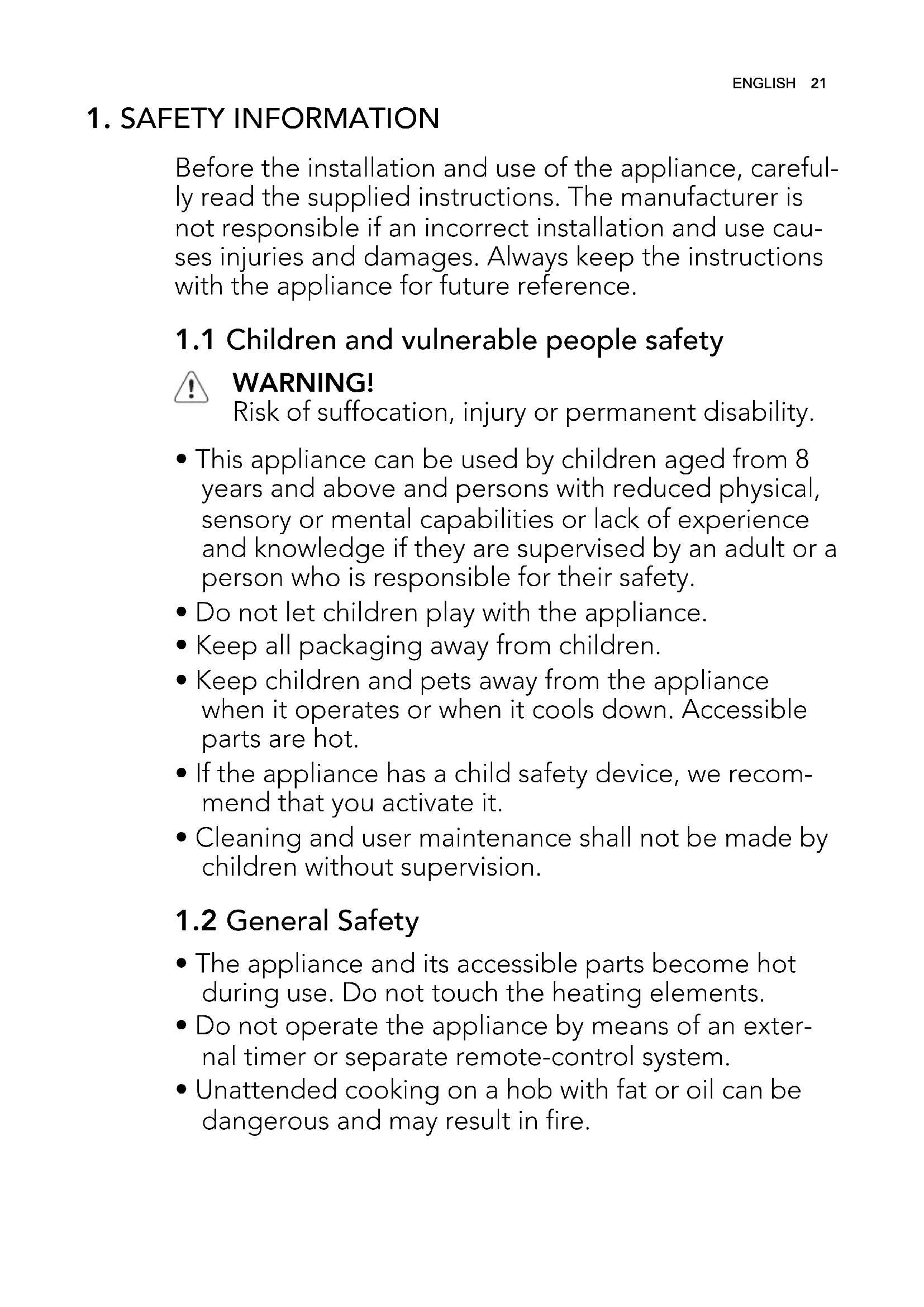
Before the installation and use of the appliance, carefully read the supplied instructions. The manufacturer is not responsible if an incorrect installation and use causes injuries and damages. Always keep the instructions with the appliance for future reference.
1.1 Children and vulnerable people safety

WARNING!
Risk of suffocation, injury or permanent disability.
- This appliance can be used by children aged from 8 years and above and persons with reduced physical, sensory or mental capabilities or lack of experience and knowledge if they are supervised by an adult or a person who is responsible for their safety.
- Do not let children play with the appliance.
- Keep all packaging away from children.
- Keep children and pets away from the appliance when it operates or when it cools down. Accessible parts are hot.
- If the appliance has a child safety device, we recommend that you activate it.
- Cleaning and user maintenance shall not be made by children without supervision.
1.2 General Safety
- The appliance and its accessible parts become hot during use. Do not touch the heating elements.
- Do not operate the appliance by means of an external timer or separate remote-control system.
-
Unattended cooking on a hob with fat or oil can be dangerous and may result in fire.
-
Never try to extinguish a fire with water, but switch off the appliance and then cover flame e.g. with a lid or a fire blanket.
- Do not store items on the cooking surfaces.
- Do not use a steam cleaner to clean the appliance.
- Metallic objects such as knives, forks, spoons and lids should not be placed on the hob surface since they can get hot.
- If the glass ceramic surface is cracked, switch off the appliance to avoid the possibility of electric shock.
- After use, switch off the hob element by its control and do not rely on the pan detector.
2. SAFETY INSTRUCTIONS
2.1 Installation

WARNING!
Only a qualified person must install this appliance.
- Remove all the packaging.
- Do not install or use a damaged appliance.
- Obey the installation instruction supplied with the appliance.
- Keep the minimum distance from the other appliances and units.
Always be careful when you move the appliance because it is heavy. Always wear safety gloves. - Seal the cut surfaces with a sealant to prevent moisture to cause swelling.
- Protect the bottom of the appliance from steam and moisture.
- Do not install the appliance adjacent to a door or under a window. This prevents hot cookware to fall from the appliance when the door or the window is opened.
- If the appliance is installed above drawers make sure that the space, between the bottom of the appliance
and the upper drawer, is sufficient for air circulation.
- Make sure that the ventilation space of 2mm , between the worktop and the front of the below unit, is free. The warranty does not cover damages caused by the lack of an adequate ventilation space.
- The bottom of the appliance can get hot. We recommend to install a noncombustile separation panel under the appliance to prevent access to the bottom.
Electrical connection

WARNING!
Risk of fire and electrical shock.
- All electrical connections must be made by a qualified electrician.
- The appliance must be earthed.
- Before carrying out any operation make sure that the appliance is disconnected from the power supply.
- Use the correct electricity mains cable.
- Do not let the electricity mains cable tangle.
Make sure the mains cable or plug (if applicable) does not touch the hot ap
pliance or hot cookware, when you connect the appliance to the near sockets
- Make sure the appliance is installed correctly. Loose and incorrect electricity mains cable or plug (if applicable) can make the terminal become too hot.
- Make sure that a shock protection is installed.
- Use the strain relief clamp on cable.
- Make sure not to cause damage to the mains plug (if applicable) or to the mains cable. Contact the Service or an electrician to change a damaged mains cable.
- The electrical installation must have an isolation device which lets you disconnect the appliance from the mains at all poles. The isolation device must have a contact opening width of minimum 3 mm.
- Use only correct isolation devices: line protecting cut-outs, fuses (screw type fuses removed from the holder), earth leakage trips and contactors.
2.2 Use

WARNING!
Risk of injury, burns or electric shock.
- Use this appliance in a household environment.
- Do not change the specification of this appliance.
- Do not let the appliance stay unattended during operation.
- Do not operate the appliance with wet hands or when it has contact with water.
- Do not put cutlery or saucepan lids on the cooking zones. They can become hot.
- Set the cooking zone to "off" after each use. Do not rely on the pan detector.
- Do not use the appliance as a work surface or as a storage surface.
-
If the surface of the appliance is cracked, disconnect immediately the appliance from the power supply. This to prevent an electrical shock.
-
Users with a pacemaker must keep a distance of minimum 30cm from the induction cooking zones when the appliance is in operation.
- When you place food into a hot oil, it may splash.

WARNING!
Risk of fire or explosion.
- Fats and oil when heated can release flammable vapours. Keep flames or heated objects away from fats and oils when you cook with them.
- The vapours that very hot oil releases can cause spontaneous combustion.
- Used oil, that can contain food remnants, can cause fire at a lower temperature than oil used for the first time.
- Do not put flammable products or items that are wet with flammable products in, near or on the appliance.

WARNING!
Risk of damage to the appliance.
- Do not keep hot cookware on the control panel.
- Do not let cookware to boil dry.
- Be careful not let objects or cookware fall on the appliance. The surface can be damaged.
- Do not activate the cooking zones with empty cookware or without cookware.
- Do not put aluminium foil on the appliance.
- Cookware made of cast iron, aluminium or with a damaged bottom can cause scratches on the glass ceramic. Always lift these objects up when you have to move them on the cooking surface.
Teppan Yaki Grill
- Noises during the operation of the appliance are normal. They are not an indication of malfunction.
- A frequent use of the appliance can cause unevenness of the surface. This does not have an unwanted effect on the performance of the appliance.
2.3 Care and Cleaning

WARNING!
Risk of damage to the appliance.
- Clean regularly the appliance to prevent the deterioration of the surface material.
- Do not use water spray and steam to clean the appliance.
- Clean the appliance with a moist soft cloth. Only use neutral detergents. Do not use abrasive products, abrasive cleaning pads, solvents or metal objects.
2.4 Disposal

WARNING!
Risk of injury or suffocation.
- Contact your municipal authority for information on how to discard the appliance correctly.
- Disconnect the appliance from the mains supply.
- Cut off the mains cable and discard it.
3.PRODUCT DESCRIPTION
3.1 The most important features of your appliance
- The cooking surface has 2 layers of stainless steel with a layer of aluminium between them. It has a high thermal capacity, which prevents temperatures from quickly decreasing (e.g. when you prepare meat directly from the refrigerator).
Each Teppan Yaki grill surface is unique because they are made by hand and grounded by grinding spec. cialists. Differences in the grinding pattern are normal and do not cause problems in how the appliance operates. Also, the more you use your grill, the more valuable it looks. -
The groove around the edge:
-
Decreases the temperature of the installation surfaces, which lets you install the cooking surface into different types of kitchen worktops.
-
Absorbs some of the expansion of the heated cooking surface through its indentation.
-
Collects small food remnants and liquids which you can easily remove after the operation.
-
The necessary temperature can be kept constant by the thermostat with a readable temperature setting. This prevents overheating of the food and permits low-fat cooking that keeps the nutritional values of the food.
- The food is heated directly on the cooking surface, with or without oil. There is also the option of cooking with pots or pans.
- The grill surface heats to a temperature of 180^ in approximately 4 minutes. The temperature of the grill surface decreases from 180^ to 100^ in approximately 25 minutes, and to 60^ in approximately 60 minutes.
- You must always preheat the cooking surface before an operation.
3.2 General overview
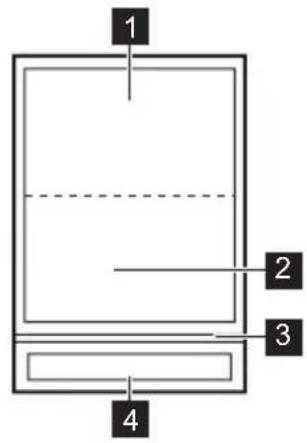
1 Rear grilling zone 1400W
2 Front grilling zone 1400W
3 Glass bar
4 Control panel
3.3 Control panel layout
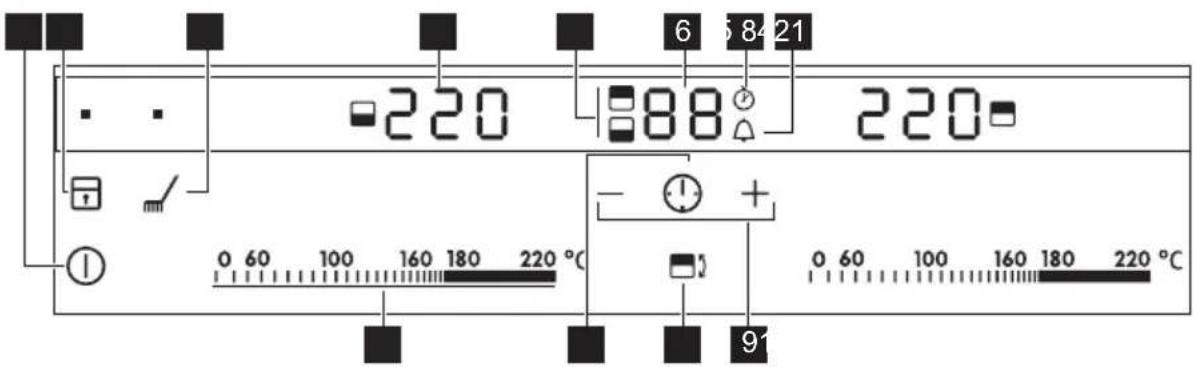
Use the sensor fields to operate the appliance. The displays, indicators and sounds tell which functions operate.
| Sensor field Function | |
| 1 | ① To activate and deactivate the appli- ance. |
| 2 | To lock / unlock the control panel. |
| 3 | To activate and deactivate the cleaning function. |
| 4 | Temperature display To show the temperature. |
| 5 | Timer indicator of cooking zones To show for which of the roasting zones you set the time |
| 6 | Timer display To show the time in minutes. |
| 7 | To show that the Count Up operates (1 to 59 minutes). |
| 8 | To show that the Count Down Timer op- erates (1 to 99 minutes) or shows that Minute Minder operates. |
| 9 | To increase or decrease the time. |
| 10 | To set the roasting zone.. |
| 11 | To set the Timer functions. |
| 12 | Control bar To set the heat temperature. |
3.4 Heat setting displays
| Display Description | |
| 0 | The roasting zone is off. |
| 60 - 220 | The roasting zone operates. |
| + digit | There is a malfunction. |
| 3/7 | 3 step residual heat indicator: continue cooking / keep warm / residual heat. |
| L | The Lock / The Child Safety Device operates. |
| - | The Automatic Switch-Off operates. |
3.5 OptiHeat Control (3 step Residual heat indicator)

WARNING!
\ Risk of burns from
residual heat!
OptiHeat Control indicates the level of the residual heat. The induction cooking zones make the heat necessary for cooking directly in the bottom of the cookware. The glass ceramic is heated by the heat of the cookware.
4. DAILY USE
4.1 On and Off
Touch for 1 second to start or stop the appliance.
4.2 Automatic Switch Off
The function deactivates the appliance automatically if:
- All roasting zones are deactivated.
- You do not set the temperature after you activate the appliance.
- You spill something or put something on the control panel for more than 10 seconds, (a pan, a cloth, etc.). The sound operates some time and the appliance deactivates. Remove the object or clean the control panel.
- You do not deactivate a roasting zone or change the temperature. After 90 minutes comes on and the appli
ance deactivates.Before next use, set the roasting zone to 0
4.3 The heat setting
Touch the control bar at the heat setting. Move your finger along the control bar to change the setting. Do not release before you have a correct heat setting. The display shows the heat setting.
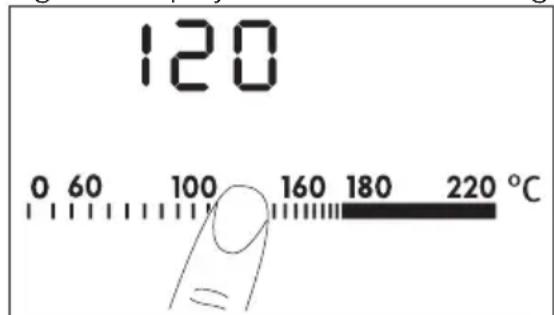
If you set the temperature, the display flashes until the roasting zone reaches
the temperature. Then a signal sounds and the display shows the temperature.
4.4 The Timer
The Count Down Timer.
Use the Count Down Timer to set how long the cooking zone operates for only this one time.
Set the Count Down Timer after the selection of the cooking zone.

The selection of Timer function is possible for cooking zones that are active and the heat setting is set.
To set the cooking zone: touch again and again until the indicator of a necessary cooking zone comes on. When this function is activated, comes on.
- To activate the Count Down Timer: touch + of the timer to set the time ( 00 - 99 minutes). When the indicator of the cooking zone starts to flash slow, the time counts down.
- To see the remaining time: set the cooking zone with . The indicator of the cooking zone starts to flash quickly. The display shows the remaining time.
To change the Count Down Timer:set the cooking zone with touch or
- To deactivate the Count Down Time: set the cooking zone with . Touch - . The remaining time counts back to . The indicator of the cooking zone goes out.
When the timer countdown comes to an end, the sound operates and 00 flashes. The cooking zone deactivates.
To deactivate the sound: touch

The Count up timer
Use the Count up timer to monitor how long the cooking zone operates.
The selection of the cooking zone (if more than 1 cooking zone operates): touch again and again until
the indicator of a necessary cooking zone comes on.
When this function is activated, comes on.
To activate the Count up timer: Touch
The symbol goes out and comes on.
- To see how long the cooking zone operates: set the cooking zone with . The indicator of the cooking zone starts to flash quickly. The display shows the time that the zone operates. The display shows the time of the cooking zone that operates for longer period of time.
- To deactivate the Count up timer: set the cooking zone with and touch + or - to deactivate the timer. the symbol goes out and comes on.

When the two Timer functions operate at the same time, the display shows the Count Up Timer first.
The Minute minder.
You can use the timer as a minute minder while the cooking zones do not operate. Touch ①.
Touch + or - of the timer to set the time. When the time comes to an end, the sound operates and 00 flashes.
To stop the sound: touch
4.5 Lock
You can lock the control panel, but not ①. It prevents an accidental change of the heat setting.
First set the heat setting.
To start this function touch. The symbol comes on for 4 seconds.
The Timer stays on.
To stop this function touch. The heat setting that you set before comes on. When you stop the appliance, you also stop this function.
4.6 The Child Safety Device
This function prevents an accidental operation of the hob.
Starting the Child Safety Device
- Start the hob with ①. Do not set the heat setting.
- Touch for 4 seconds. The symbol comes on.
- Stop the hob with ①
Switching off the Child Safety Device
- Start the hob with ①. Do not set the heat setting. Touch ② for 4 seconds. The symbol ③ comes on.
- Stop the hob with ①.
Overriding the Child Safety Device for one cooking session
- Start the hob with ① . The symbol L comes on.
- Touch for 4 seconds. Set the heat setting in less than 10 seconds. You can operate the hob.
- When you stop the hob with ① , the Child Safety Device operates again.
4.7 OffSound Control (Deactivation and activation of the sounds)
Deactivation of the sounds
Deactivate the appliance.
5. HELPFUL HINTS AND TIPS
5.1 Preparing food with the Teppan Yaki
You prepare the food directly on the roasting surface, with or without oil. You can also use pots or pans, but the cookware does not heat up as quickly as it does on a glass-ceramic hob or a gas hob
You can cook or keep warm side dishes or sauces in pots or pans. Put them directly on the cooking surface.
Touch 1 for 3 seconds. The displays come on and go out. Touch 1 for 3 seconds. b0 comes on, the sound is on. Touch + , becomes on, the sound is off.
When this function operates, you can hear the sounds only when:
- you touch ①
- the Minute Minder comes down
- the Count Down Timer comes down
- you put something on the control panel.
Activation of the sounds
Deactivate the appliance. Touch 1 for 3 seconds. The displays come on and go out. Touch 2 for 3 seconds. b comes on, because the sound is off. Touch + , bomes on. The sound is on.
The manufacturer does not recommend that you boil large quantities of water on the roasting surface (e.g. for spaghetti).

The noises are normal and are not the result of an appliance malfunction.

Do not put cookware in the middle of the cooking surface between the zones, as the unevenness can make them unsteady. Frying on the surface, where the zones touch, can cause in uneven browning (e.g. with pancakes).
5.2 Examples of cooking applications
Using fats and oils
When the temperature is too high, the fat begins to produce smoke. This temperature is called the smoke point.
| Fats/Oils Max. temperature (℃) Smoke point (℃) |
| Butter 130 150 |
| Pork fat 170 200 |
| Beef fat 180 210 |
| Olive oil 180 200 |
| Sunflower oil 200 220 |
| Groundnut oil 200 235 |
| Coconut oil 200 240 |

Always preheat the appliance.
| Food to be cooked Temperature (℃) Time / Tips | ||
| Fish and shellfish 140-160 Preheat the appliance. | ||
| Salmon fillets 160 8 minutes, turn after 4 minutes. | ||
| King prawns (without shell) | 140 6 minutes, turn after 3 minutes. | |
| Shark steaks, approx. 2.5 cm thick | 160 10 minutes, turn after 5 minutes. | |
| Sole, Müllerin Art (fried in butter) | 140 8 minutes, turn after 4 minutes, light side first. | |
| Plaice files | 140 | 6 minutes, turn after 3 minutes. |
| Veal | 140-180 | Preheat the appliance. |
| Veal chop | 180 | 10 minutes, turn after 5 minutes. |
| Veal medallions, 4 cm thick | 160 10 minutes, turn after 5 minutes. | |
| Veal steaks, 3 - 4 cm thick | 160 6 minutes, turn after 3 minutes. | |
| Veal escalopes, natural | 180 | 5 minutes, turn after 2½ minutes. |
| Veal fricasee in cream sauce | 180 6 minutes, turn after 3 minutes. The meat strips must not be stuck to each other. | |
| Beef | 160-180 | Preheat the appliance. |
| Food to be cooked Temperature (℃) Time / Tips | |
| Beef steak blau, very rare 180 2 minutes, turn after 1 minute. | |
| Beef steak blutig, rare 180 6 minutes, turn after 3 minutes. | |
| Beef steak rosa, medium 180 8 minutes, turn after 2 minutes. | |
| Beef steak durch, well done 180 8 minutes, turn after 4 minutes. Without fatty substances, the roasting time increases by approximately 20%. | |
| Hamburger 160 6 - 8 minutes, turn after 3 - 4 minutes. | |
| Châteaubriand 160 then 100 Sauté the meat in oil on all sides (turn only when the meat does not stick to the pan). Finish off on one side for 10 minutes (100 ℃). | |
| Pork 160-180 Preheat the appliance. | |
| Pork medallions 160 8 minutes, turn after 4 minutes (depending on the thickness). | |
| Pork steaks 180 8 minutes, turn after 4 minutes. | |
| Pork escalopes 160 6 minutes, turn after 3 minutes. | |
| Spare ribs 160 8 - 10 minutes, turn several times. | |
| Pork skewer 160 6 - 8 minutes, sauté well on all sides. | |
| Lamb 160-180 Preheat the appliance. | |
| Lamb chops 180 10 minutes, turn after 5 minutes. | |
| Filet of lamb 160 10 minutes, turn after 5 minutes. The filet must be fried on both sides. | |
| Lamb steaks 160 6 - 8 minutes, turn after 3 - 4 minutes. | |
| Poultry 140-160 Preheat the appliance. | |
| Chicken supreme 140 8 - 10 minutes, turn after 4 - 5 minutes. | |
| Turkey breast strips 160 6 minutes, turn several times. | |
| Sausages 160 Preheat the appliance. | |
| Fried egg 140 Preheat the appliance. | |
| Crepes/Omelettes 140-160 Preheat the appliance. | |
| Fruits 140-160 Preheat the appliance. | |
| Vegetables 140-160 10 - 20 minutes, turn several times. | |
| Vegetables 140-160 10 - 15 minutes, under a cooking lid (turn halfway through). | |
| Cooking precooked rice 140-160 10 - 15 minutes, turn several times. | |
| Cooking precooked noodles | 140-160 15 - 20 minutes, turn halfway through. |
6. CARE AND CLEANING
Clean the appliance after each use. Always use cookware with clean bottom.

WARNING!
Sharp objects and abrasive cleaning agents will damage the appliance.
For your safety, do not clean the appliance with steam blasters or high-pressure cleaners.
6.1 Cleaning function
- Touch Each zone is set to 80^ . The display flashes until the temperature is 80^ . The function locks the control panel, but not
- When the temperature is 80^ , an acoustic signal sounds, and the control panel becomes unlocked.
- Put ice cubes one by one on the roasting zone (you can use also cold water). At the same time, use a spatula to remove the remaining roasting pieces and push all pieces into the trough.
- Dry the appliance with a clean cloth.
6.2 Cleaning when the appliance is cold
- Apply a usual cleaning agent to the roasting surface and let it set for 5 minutes.
- Remove the cooking residue with a spatula.
- Clean the appliance with a moist cloth
- Dry the appliance with a clean cloth.
- When the appliance is dry, rub the roasting surface with some cooking oil.

WARNING!
Glass bar
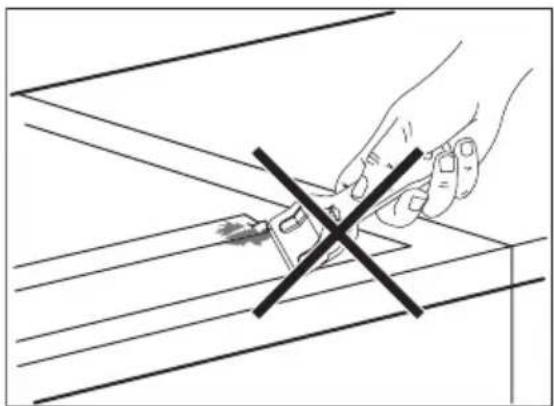
- Do not use the scraper or sharp objects to clean the glass bar and the space between it and glass ceramic. Glass bar is attached to the ceramic plate.
- Do not put the pots on the glass bar.
- Make sure that the pans and pots do not touch the glass bar.
7. TROUBLESHOOTING
| Problem Possible cause and remedy | |
| You cannot activate the appliance or operate it. | You touched 2 or more sensor fields at the same time. Only touch one sensor field. There is water or fat stains on the control panel. Clean the control panel Activate the appliance again and set the heat setting in 7 seconds. The Child Safety Device or the lock operates. See the chapter Daily use. |
| A sound operates when the appliance is deactivated. | You put something on one or more sensor fields. Remove the object from the sensor fields. |
| The residual heat indicator does not come on. | The cooking zone is not hot because it operated only for a short time. If the cooking zone must be hot, speak to the service centre. |
| A sound operates and appliance activates and deactivates again. After 5 seconds one more sound operates. | You put something Remove the object from the sensor field. |
| - comes on | The Automatic Switch Off operates. Deactivate the appliance and activate it again. |
| E and number come on. | There is an error in the appliance. Disconnect the fuse from the electrical system of the house in order to disconnect the appliance from the electrical supply for some time. Connect again. If E comes on again, speak to the service centre. |
| There is no signal when you touch the panel sensor fields. | The signals are deactivated. Activate the signals (see OffSound Control). |
If you tried the above solutions and cannot repair the problem, speak to your dealer or the Customer Care Depart
ment. Give the data from the rating plate, three-digit-letter code for the glass ceramic (it is in the corner of the
cooking surface) and an error message that comes on.
If you operated the appliance incorrectly, the servicing by a customer service technician or dealer will not be free of
charge, even during the warranty period. The instructions about the customer service and conditions of guarantee are in the guarantee booklet.
8. INSTALLATION

WARNING!
Refer to the Safety chapters.

Before the installation
Before the installation of the appliance, record the information below from the rating plate. The rating plate is on the bottom of the appliance casing.
Model
- PNC
- Serial number
8.1 Built-in appliances
- Only use the built-in appliances after you assemble the appliance into cor
rect built-in units and work surfaces that align to the standards.
8.2 Connection cable
- The appliance is supplied with the connection cable.
- Replace the damaged mains cable with a special cable (type H05BB-F Tmax 90^ ; or higher). Speak to your local Service Centre.
If, you use the accessory frame C-FRAME, first read the instruction supplied with the frame before you install the appliance.
8.3 Assembly
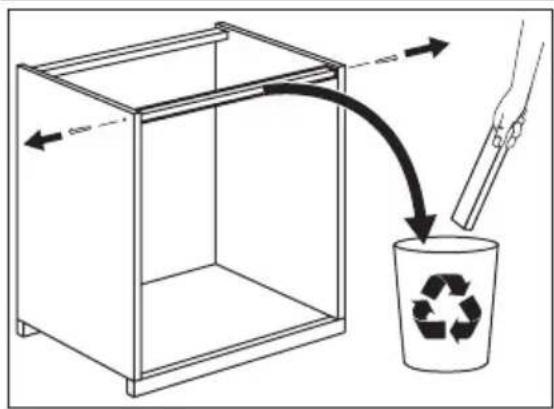
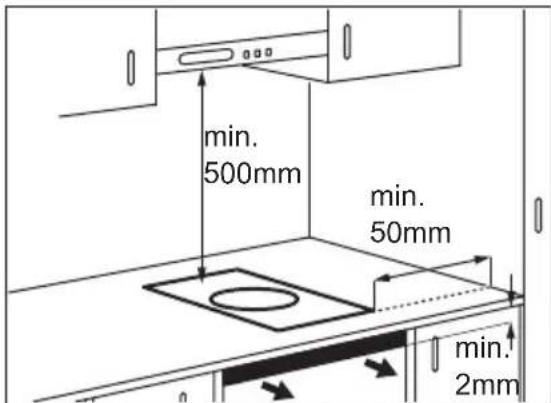
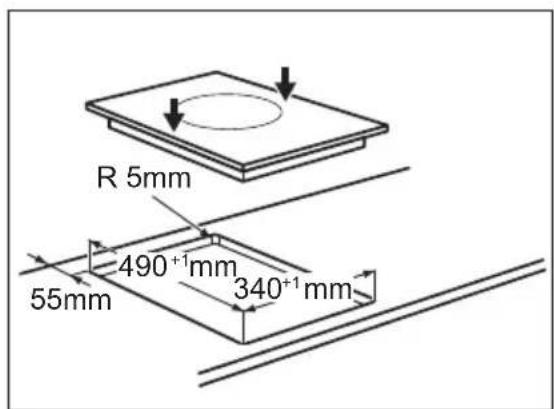
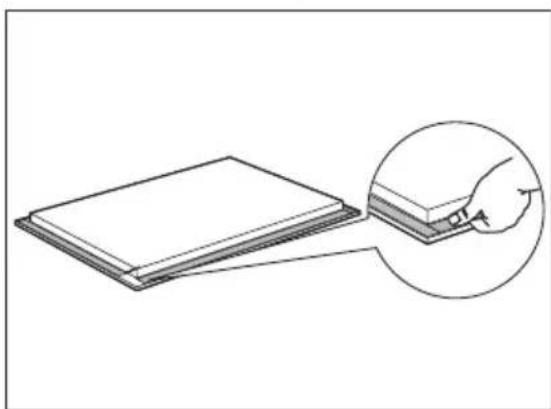
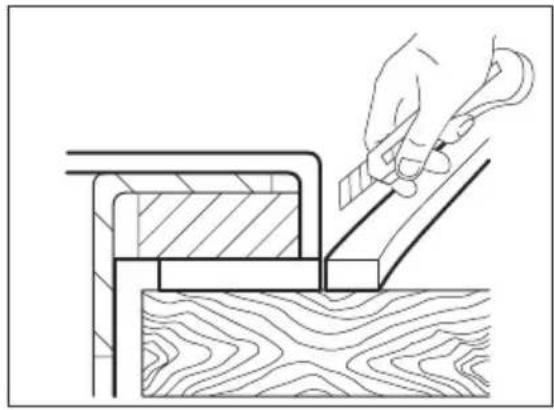
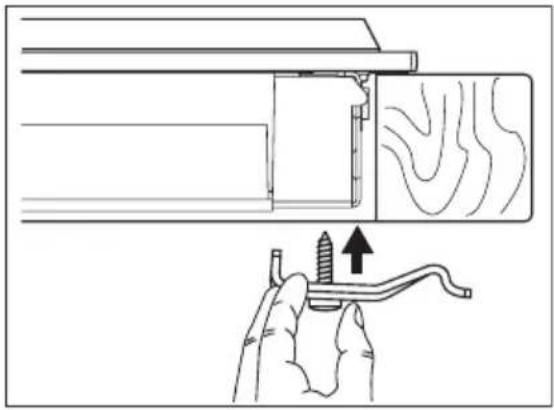
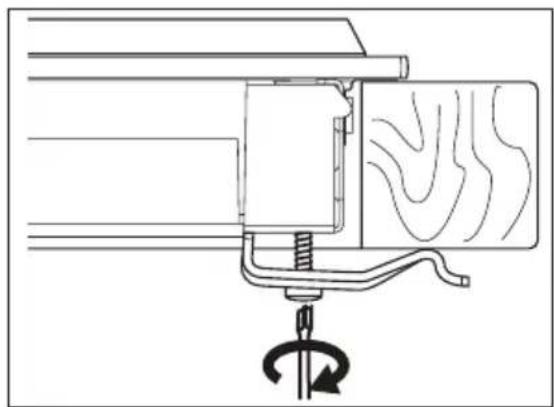
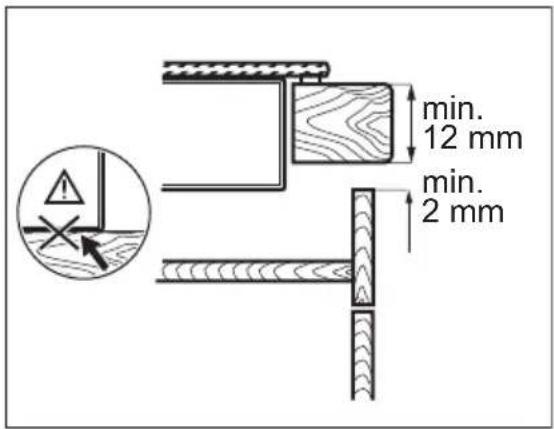
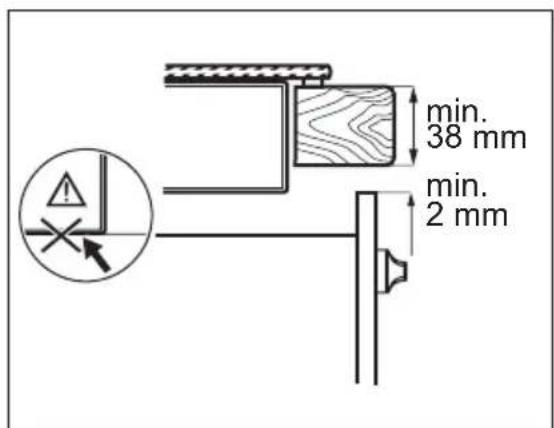
- Seal the gap between the worktop and glass ceramic with silicone.
-
Put some soapy water on the silicone.
-
Pull off the excess silicone with the scraper.
8.4 The installation of more than one appliance
Added parts: connection bar(s), heat resistant silicon, rubber shape, sealing strap.

Only use special a heat - resistant silicon.
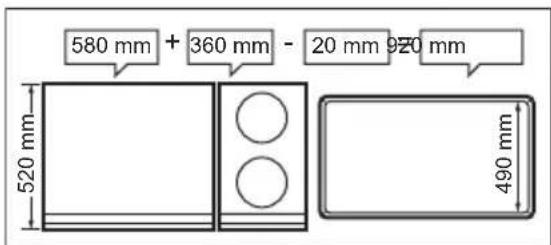
The worktop cut out
Distance from the wall : minimum 50 mm Depth : 490 mm
Width : sum widths of all the appliances to be built-in and subtract 20 mm (see also "Overview of all appliance widths")
The installation of more than one appli
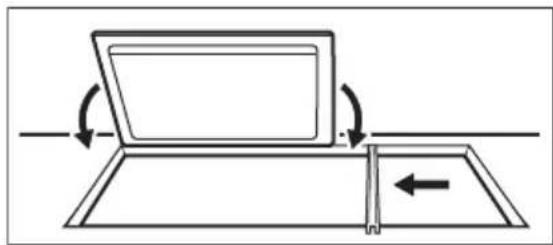
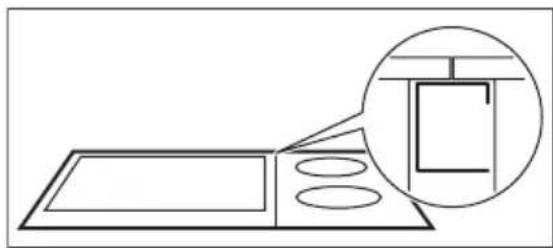
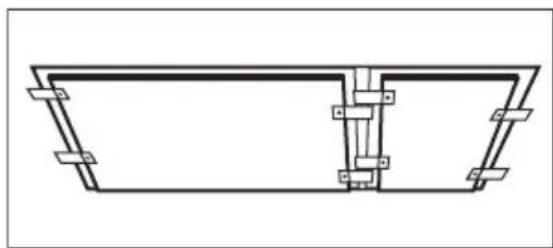
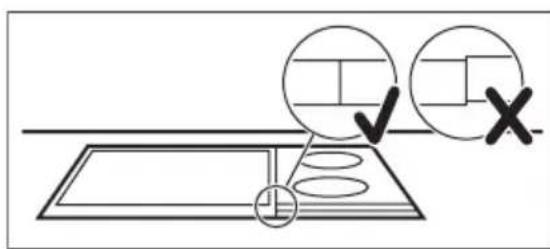
ance
- Put down the dimension of the worktop cut out and saw it out.
- Put the appliances one at time on some soft surface, a blanket for example, with the bottom side up.
- Put the seal stripe around the lower edge of the appliance along the outer edge of the glass ceramic.
- Loosely screw the fixing plates into the appropriate holes in the protective casing.
- Put the first appliance in the worktop cut out. Put the connection bar in the worktop cut out and push up half of the width against the appliance.
- Loosely turn in fixing plates from below on the worktop and on the connection bar.
- Put the subsequent appliance in the worktop cut out. Make sure that the front ends of the appliances are on the same level.
- Tighten the fixing plate / retaining grip screws.
- Seal the gap between the worktop and appliances and between appli- ances with silicone.
- Put some soapy water on the silicon.
- Press the rubber shape with some strength against the glass ceramic and move it slowly along the space.
-
Do not touch the silicon until it becomes hard, it can last about a day.
-
Carefully remove silicon that came out with a shaving blade.
- Clean glass ceramic fully.
9. TECHNICAL INFORMATION
Model HC452600EB Prod.Nr. 941 560 807 00
Typ 55 TEP 00 AU 220 - 240 V 50 - 60 Hz
Induction 2,8 kW Made in Switzerland
Ser.Nr. 2,8 kW
AEG
10. ENVIRONMENT CONCERNS
Recycle the materials with the symbol 品 .Put the packaging in applicable containers to recycle it. Help protect the environment and human health and to recycle waste of electrical and electronic
appliances. Do not dispose appliances marked with the symbol with the household waste. Return the product to your local recycling facility or contact your municipal office.
SOMMAIRE
- CONSIGNES DE SECURITE 38
- INSTRUCTIONS DE SECURITE 39
3.DESCRIPTION DE L'APPAREIL 41 - UTILISATION QUOTIDIENNE 44
- CONSEILS UTILES 46
- ENTRETIEN ET NETTOYAGE 49
- EN CAS D'ANOMALIE DE FONCTIONNEMENT 50
- INSTALLATION 51
9.CARACTERISTIQUES TECHNIQUES 54
POUR DES RÉSULTATS PARFAITS
Induction 2,8 kW Made in Switzerland
Ser.Nr. 2,8 kW
AEG
10. EN MATIÈRE DE PROTECTION DE L'ENVIRONNEMENT
www.aeg.com/productregistration

Induction 2,8 kW Made in Switzerland
Ser.Nr. 2,8 kW
AEG
10. UMWELTTIPPS
- PROBLEEMOPLossing
- MILIEUBESCHERMING
- Visit our website for:
- CUSTOMER CARE AND SERVICE
- SAFETY INFORMATION
- Children and vulnerable people safety
- WARNING!
- General Safety
- SAFETY INSTRUCTIONS
- Installation
- Electrical connection
- Use
- Teppan Yaki Grill
- Care and Cleaning
- Disposal
- 3.PRODUCT DESCRIPTION
- The most important features of your appliance
- General overview
- Control panel layout
- Heat setting displays
- OptiHeat Control (3 step Residual heat indicator)
- DAILY USE
- On and Off
- Automatic Switch Off
- The function deactivates the appliance automatically if:
- The heat setting
- The Timer
- The Count Down Timer.
- Set the Count Down Timer after the selection of the cooking zone.
- The Count up timer
- The Minute minder.
- Lock
- The Child Safety Device
- Starting the Child Safety Device
- Switching off the Child Safety Device
- Overriding the Child Safety Device for one cooking session
- OffSound Control (Deactivation and activation of the sounds)
- HELPFUL HINTS AND TIPS
- Preparing food with the Teppan Yaki
- Activation of the sounds
- Examples of cooking applications
- Using fats and oils
- CARE AND CLEANING
- Cleaning function
- Cleaning when the appliance is cold
- TROUBLESHOOTING
- INSTALLATION
- Built-in appliances
- Connection cable
- Assembly
- The installation of more than one appliance
- The worktop cut out
- TECHNICAL INFORMATION
- ENVIRONMENT CONCERNS
- SOMMAIRE
- POUR DES RÉSULTATS PARFAITS
- EN MATIÈRE DE PROTECTION DE L'ENVIRONNEMENT
- UMWELTTIPPS
Brand : AEG
Model : HC452600EB
Category : Baking sheet