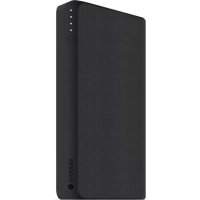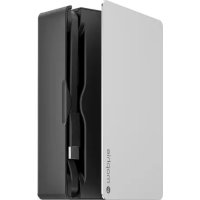
powerstation plus 8X - Power bank Mophie - Free user manual and instructions
Find the device manual for free powerstation plus 8X Mophie in PDF.



User questions about powerstation plus 8X Mophie
0 question about this device. Answer the ones you know or ask your own.
Ask a new question about this device
Download the instructions for your Power bank in PDF format for free! Find your manual powerstation plus 8X - Mophie and take your electronic device back in hand. On this page are published all the documents necessary for the use of your device. powerstation plus 8X by Mophie.
USER MANUAL powerstation plus 8X Mophie
Simplified Chinese 113
Traditional Chinese 121
EN
Welcome
Thank you for purchasing the mophie powerstation plus universal battery. Now you will be able to travel great distances and be the master of your own destiny, no longer bound by the limitations of your device's internal battery or by having to bring the right charging cable.
Package contains
- powerstation plus (2X, 3X, 4X or 8X) universal battery
- USB extension cable (powerstation plus 4X and 8X only)
- Quick-Start Guide
Features
Here's a rundown of why the powerstation plus universal battery is so great:
High-density, high-output universal battery charges at super-fast speeds—up to 2.4 amps!
Built-in hideaway charging cables—the right cables to charge your device and to recharge the workstation plus are always with you.
- Smart charging circuitry automatically selects the proper charging speed for your device, plus built-in short-circuit, overcharge and temperature protection. mophie's got your back.
- Anodized aluminum hinged top and bottom panels
for enhanced durability and a premium look.
- Charge and sync your device using the built-in charging cables (when connected to a computer).
- Additional USB output port (powerstation plus 4X and 8X universal battery) so you can charge two devices at the same time.
- Track battery power at a glance with the integrated four-light LED status indicator. Keep tabs on charging status and current battery life. Know before you go!
- Rechargeable for over 500 full cycles. This universal battery is built to last, so you can do more, longer.
Compatibility
The workstation plus universal battery models are available in Lightning or micro-USB versions. Lightning versions are compatible with the iPad, iPhone and iPod with Lightning connector. Micro-USB versions are compatible with virtually any portable device equipped with a micro-USB connector.
powerstation plus 4X and 8X universal battery models feature an additional USB output port, so you can also charge a second USB device by using the cable included with that device.
Charging your device
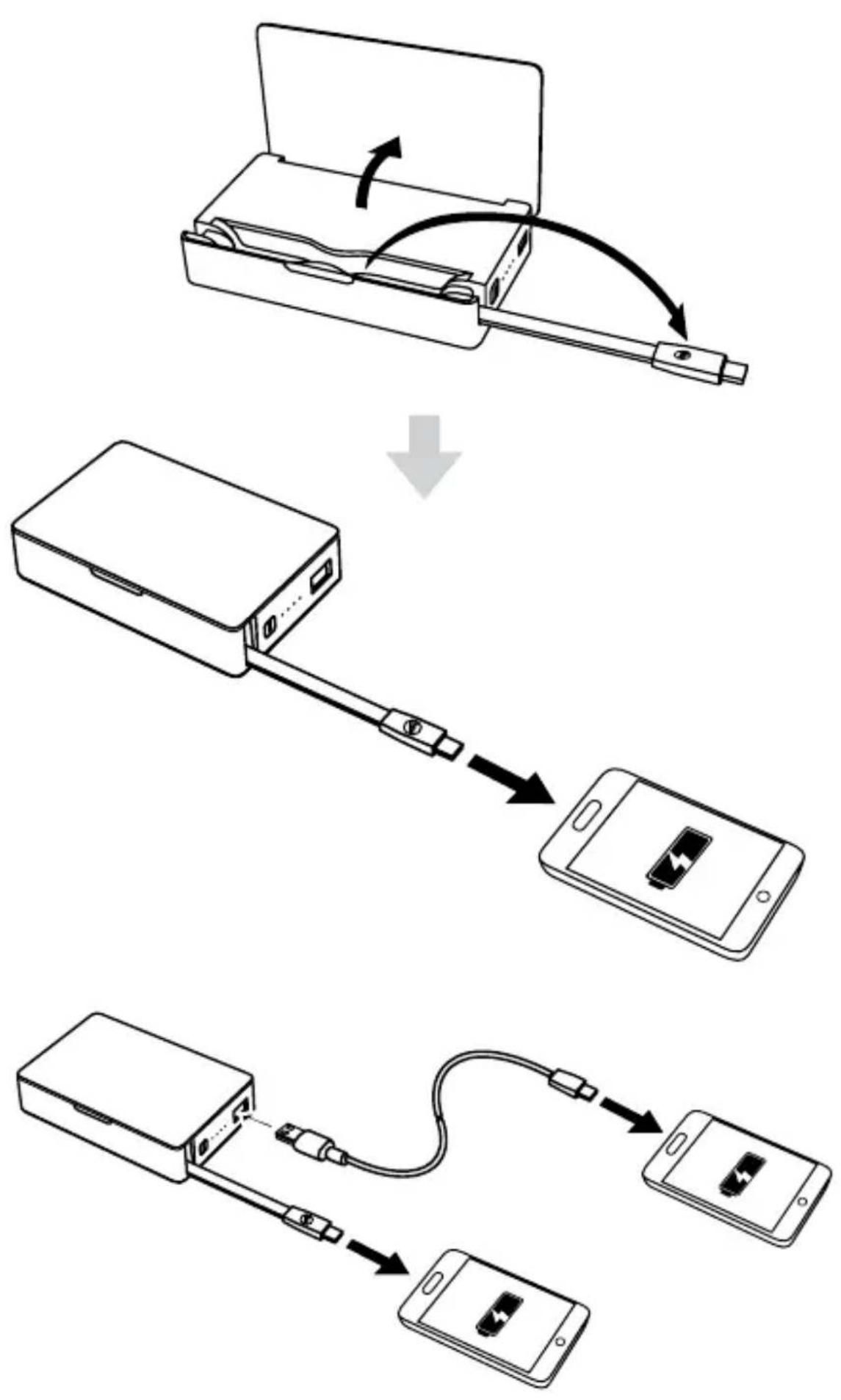
Flip open the hinged aluminum lid to reveal the built-in charging cables. Swing out the Lightning
or micro USB cable and connect it to your device. The powerstation plus universal battery will begin charging your device immediately.
powerstation plus 4X / powerstation plus 8X
powerstation plus 4X and workstation plus 8X universal battery models have an additional USB port that lets you charge a second device. Connect the USB cable included with your device to the workstation plus universal battery's USB port and to your device. You can charge two devices at the same time.
Recharging your powerstation plus universal battery
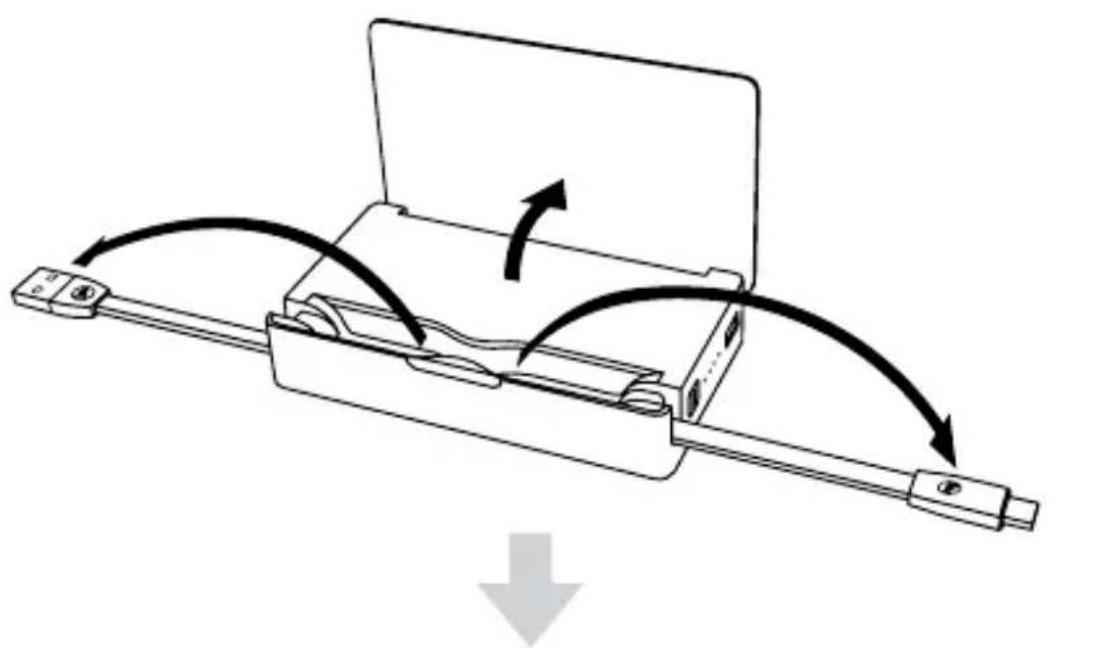
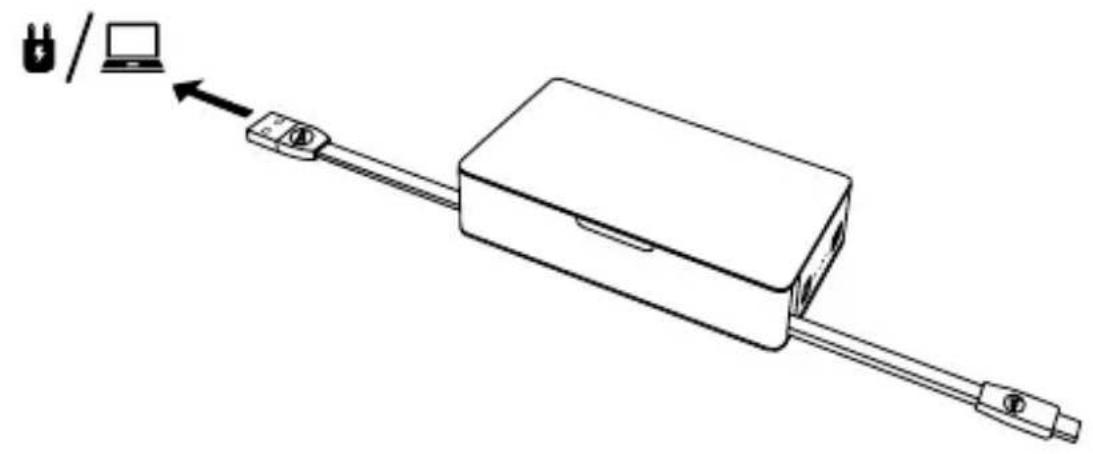
Flip open the aluminum lid to reveal the built-in charging cables. Swing out the USB cable and connect it to your computer or to a USB wall adapter, such as the one that came with your device. If you connect your device to a computer using the powerstation plus universal battery, your device will charge and sync while the powerstation plus universal battery recharges.
The workstation plus universal battery will begin charging immediately and the LEDs located on its side will blink; after 30 seconds the lights will turn off. Before you disconnect workstation plus, press the status indicator button to make sure it is fully charged.
Checking the workstation plus universal battery's charge status
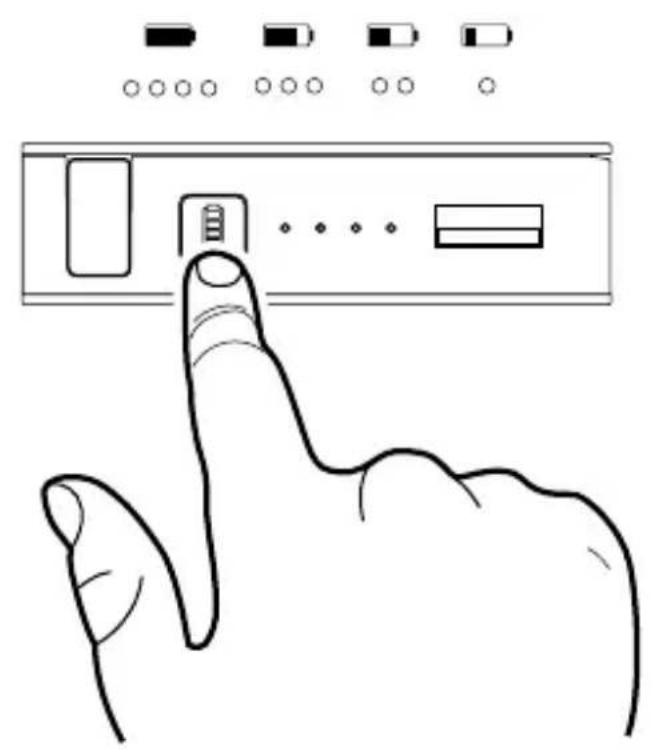
Press the status button on the workstation plus universal battery's side panel and the status LEDs will indicate its charge level. Four LEDs means that it's fully charged, while one LED means that it's almost empty. Know before you go.
Taking care of your workstation plus universal battery
- To avoid damage, keep the built-in cables folded inside the powerstation plus universal battery when you're not using them.
- Keep your workstation plus universal battery dry and away from moisture and corrosive materials.
- Do not clean the workstation plus universal battery with harsh chemicals, soaps or detergents. Just wipe the case with a soft, water-dampened cloth. Wipe the connectors gently with a soft, dry cloth.
- Re-charge your workstation plus universal battery once every three months when not in use. If you plan on putting it away, charge it for one hour first.
Warranty
At mophie, we are dedicated to making the best quality products we can. To back this up, this product is warranted for 1 full year from date of purchase.
This warranty does not affect any statutory rights that you may be entitled to.
Keep a copy of your purchase receipt as proof of purchase. Be sure to register your product at mophie.com. Failure to register your product and/or provide proof of purchase may void the warranty.
Customer Service
Telephone: 1-888-8mophie
International: +1 (269) 743-1340
Web: www.mophie.com/cs
Warning
Read all instructions and warnings prior to using this product. Improper use of this product may result in product damage, excess heat, toxic fumes, fire or explosion, for which damages you ("Purchaser"), and not mophie, LLC ("Manufacturer") are responsible.
The product should be operated only in open-air conditions. It should not be operated in an enclosed, unventilated space such as a carrying bag, pocket or purse. Failure to follow these instructions may cause damage to the workstation plus universal battery by overheating.
Do not store product in a high-temperature environment, including heat caused by intense
sunlight or other forms of heat. Do not place battery in fire or other excessively hot environments.
Be cautious of excessive drops, bumps, abrasions, or other impacts to this battery. If there is any damage to the battery such as dents, punctures, tears, deformities, or corrosion due to any cause, discontinue use. Contact Manufacturer or dispose of it in an appropriate manner at your local battery-recycling center.
Do not disassemble the product or attempt to re-purpose or modify it in any manner.
Do not expose this device to moisture or submerge it in liquid. Keep the device dry at all times.
Do not attempt to charge product using any method, apparatus, or connection other than the device's built-in USB cable. For questions or instructions on the various ways to charge the product refer to the Charging your workstation plus universal battery section of this user guide.
Do not attempt to replace any part of this device.
If this device is intended by Purchaser to be used by a minor, purchasing adult agrees to provide detailed instructions and warnings to any minor prior to use. Failure to do so is sole responsibility of purchaser, who agrees to indemnify Manufacturer for any unintended use/misuse by a minor.
All products have gone through a thorough quality-assurance inspection. If you find that your device is excessively hot, is emitting odor,
is deformed, abraded, cut or is experiencing or demonstrating an abnormal phenomenon, immediately stop all product use and contact Manufacturer.
Before storing your battery for an extended period of time, charge it for one hour.
Never dispose of batteries in the garbage. Disposal of batteries in the garbage is unlawful under state and federal environmental laws and regulations. Always take used batteries to your local battery-recycling center.
This product contains chemicals known to the state of California to cause cancer and birth defects or other reproductive harm.
Legal
This product is meant for use only in conjunction with the appropriate device. Please consult your device packaging to determine whether this product is compatible with your particular device.
Manufacturer is not responsible for any damages to any device incurred through the use of this product.
Manufacturer shall not in any way be liable to you or to any third party for any damages you or any third party may suffer as a result of use, intended or unintended, or misuse of this product in conjunction with any device or accessory other
than the appropriate device for which this product is designed. Manufacturer will not be responsible for any damages you or any third party may suffer as a result of misuse of this product as outlined above. If you are responsible for product use with an unintended device and damages result from such use, you agree to indemnify Manufacturer for any resulting injuries to any third part(ies).
mophie, mophie workstation, workstation, Do more, morphie loves you "more time to rock, talk, surf and send", the "rock/talk/surf/send" icons and the morphie logo are trademarks of morphie, Inc. iPad, iPhone and iPod are trademarks of Apple Inc., registered in the U.S. and other countries. Lightning is a trademark of Apple Inc. The trademark "iPhone" is used with a license from Aiphone K.K. "Made for iPod," "Made for iPhone" and "Made for iPad" means that an electronic accessory has been designed to connect specifically to iPod, iPhone or iPad, respectively, and has been certified by the developer to meet Apple performance standards. Apple is not responsible for the operation of this device or its compliance with safety and regulatory standards. Please note that the use of this accessory with iPod, iPhone or iPad may affect wireless performance. All rights reserved. Patents: morphie.com/patents.
This device complies with part 15 of the FCC Rules and RSS-Gen of IC Rules. Operation is subject to
the following two conditions: (1) This device may not cause harmful interference, and (2) this device must accept any interference received, including interference that may cause undesired operation.
NOTE: This equipment has been tested and found to comply with the limits for a Class B digital device, pursuant to part 15 of the FCC Rules. These limits are designed to provide reasonable protection against harmful interference in a residential installation. This equipment generates uses and can radiate radio frequency energy and, if not installed and used in accordance with the instructions, may cause harmful interference to radio communications. However, there is no guarantee that interference will not occur in a particular installation.
If this equipment does cause harmful interference to radio or television reception, which can be determined by turning the equipment off and on, the user is encouraged to try to correct the interference by one or more of the following measures:
- Reorient or relocate the receiving antenna.
- Increase the separation between the equipment and receiver.
-
Connect the equipment into an outlet on a circuit different from that to which the receiver is connected.
-
Consult the dealer or an experienced technician for help.
CAUTION: To comply with the limits of the Class B digital device, pursuant to Part 15 of the FCC Rules, this device must be used with certified peripherals and shielded cables. All peripherals must be shielded and grounded. Operation with non-certified peripherals or non-shielded cables may result in interference to radio or reception.
MODIFICATION: Any changes or modifications of this device could void the warranty.
FR
Bienvenue
Haxmte Ha KNOpKy npOBepKn COCTOHN,
pacnoIooKeHHyo Ha 6OKOBoi NaHei
yHnBepcaIbHO r aKKymyIaTOPa powerstation plus,
Ha CBeToIONoHOM INHdNKaTOpe OTO6pa3ntcay
yroBeHb 3apJa aKKymyIaTOPa. CBeueHne
YeTbIePcx CBeToIONoOB O3NaUaeT, YTO aKKymyIaTOP
POnHOCTbIO 3apJxKeH, TOrDa KaK CBeueHne OndHO
CBeToIONoDa cInHaJIIN3uPyET O npaKTtueckN POnHO
pa3pIke yCTpoIcTBa. BydbTe yBepenbl B 3apJe
peed Tem KaK OTnpaBVITbcB D dopoRy!
yxo3a yHnBepcaIbHbIM aKKymyTopom powerstation plus
Bo n36eKaHne NOBpeKdEHN BCTpoEHbIX Ka6eIey HnBepcaJbHOro aKKymyIaTopa powerstation plus npn IX HeNCNoJb3OBaHIn DePKeTe 3Tu Ka6eIi CLOXeHHbIMn BHyTpN KopnyCa aKKymyIaTopa.
Cleinte 3a Tem, yTo6bl yHnBepcaIbHbI aKKymyIaTOp powerstation plus octaBaIc cyxIM, n He donyckaIte erO KOHTaKTA C BlaRoI n eKIMMaTePnaIamn.
3aPpeaetcN CNoIb3OBaTb DnA OuNCTKnyHnBepcaIbHOro aKKymyIaTopa powerstation plus arpeccNBhIe XmUyeCKne BeIeCTBa,MbIIO nIMMOIouIe cpeIcTBa. DoCTaTOUHO npOTepeTb ueXOJI
MЯrkои TkaHbIO, CMOueHHoB Odoi. AkkypaTHO npOTpIte pa3beMbI cyXoMЯrkOJ TkaHbIO.
- Придптеловим HeICNoIb3OBAHn 3apJkaite BaW yHnBepcaIbHbI aKKymyIaTOp powerstation plus Odn H pa3 B Tpr Meca. Ipeed dIITeIbHbIM XpaHeHem NOCTaBbTe aKKymyIaTOp Ha 3apJdky Ha Odn H ac.
TapaHTnHbIe ycIOBna
KoMaHnM ophie cTpeMntc npOn3BOdntb npOdyKzIO BbICoyaJwero KaueCTBa. B IOdTBePjDeHne 3TOrO Mbl npEJaRaem nOLHyIO rOIOByIO rapaHTIO Ha daHHoe yCTpOiCTBO (deIcTByET co dNra pOdaJx). DaHHa rapaHTnA He orpaHnUBAe BaSi 3aKOHNbIe npaba.
Coхсан'te konnoу eka Дя подтверждени фakta nokynkn. y6eintecb B TOM, уTO Bby Зaperистрювали пиобпетенhoe n3deлne на Be6-caite mophie.com.В сlyчae осутстья pernstpaци n3deлna Ha Be6-caite n/niln poindTBepждени Фakta ero nOKynkn rapaHTny Mожет 6bITb ри3HaHa HepeCTBNTeIbHoi.
Cnyk6a noDpeKKn noIb3OBaTeJe
TelefoH: 1-888-8mophie
TelefoH dIyMeJdyHaOpOHybIX 3BOHKOB:
+1 (269) 743-1340
Be6-caɪt: www.mophie.com/cs
BHMahne!
Ipeed nCNoB3OBaHnem daHHoro n3dJIeNra IpoUHTTe Bce IHCTpyKcHn N IpeDynpexKdEHNr. HeHaJleJkaUee nCNoB3OBaHnE 3TOrO n3dJIeNRA MOKeT BbI3BaTb BbIXoJ erO n3 CToP, nepeRpeB, TOKcUHbIe IcnapeHnra, noXap nnB3PbIB, 3a yUe6 OTKOpbIX HeCET OTBeTCTBEHHOCTb nOlb3OBaTeJB ("Pokpataelb"), a He KOMpaHnra morphie, LLC ("I3roTOBnteIb").
Данhoe n3deJne npedHa3NayeNo ДЯ NCNoIb3OBaHnЯ TOnbKO Ha OTKpbITOM BO3dUxe. 3aPpe7aetcnpimHeTb erO B 3aKpbITOM npocTpaHCTBe C HeIOCTaTOUHbIM yPOBHeM BeHTnlaqn, HApnPmep B IpeHoCHOM φyTlape, B KaPMaHe nII B cymke. Heco6JIoJeHne DaHHbIX INCTpyKznn MoKeT npINBeCTn K IOBpeJDeHnIO yHNBePcAlbHOrO aKKymyTAToPa powerstation plus BCJeDCTBne erO neperpeBa.
He xpaHnte daHHoe n3dJIne npn BbICOKoI TempeType, B qaCTHOCTN, He doynckaTe erO INHTeHCNBHO HorpeBa POnB03deJCTBnEM COJIHeHOrO CBeta IIN dpyrIX NCTOCHNKOB TePna. He doynckaTe KOHTaKTA C OrHem I dpyrIMN cpeamN C KpaIHe BbICOKoTtempeTypoi.
He donyckaite naeHn c 6oIbwoBbICOTbl, ydaOB, TpeHn I npYnx INHTeHCNBbIX BO3deiCTBn Ha aKKymylaTOp. Ppi o6pa3ObaHn Ha aKKymylaTope KaKx-ln6o NobpeJxHn, HapnpMeR BMrTHN, p060nH, OTBepCTn,
deopmaunn nn Cneob OKncJeHna, BHe 3aBnCIMOCTn OT npuHbI nx IOyBLeHnnpekpatnte nCNoJb3OBaHne aKKymyJrTopa. O6paTntecb K N3rotOBNTeJIIO IIn6o o6ecneYbTe HaJIeKaUyU yTnIN3aUIO daHHoro n3dJIINBA MeCTHOM ZEHTpe yTnIN3aUIN aKKymyJrTOPOB.
He pa36npaIte daHoe n3dene He nbTaITecb OTPeMOHTnPOBaTb IIO MOINΦnIPoBA Tb erO.
He npOBepraTe daHHOeYcTPOCTBO BO3deNCTBnIO BnaI He nOpyKaITe erO B XnIDKoCTN. UcTPOCTBO DOJXHO BceTa 6bITb cyxIM.
He nbItaTecb 3apJkaTb aKKymyIaTOp IIO6bIM cnOCo6OM n C NOMOUsI IO6Oro yCTpoiCTBa nIpa3bema, OTnUHOrO oT pa3bema USB daHoro yCTPOIcTBa. Pn BO3HNKHOBeHn BOIpocOB n DnI POlyeHn INCTpyKzni NO pa3nUHbIM cnOCo6am 3apJdkn DaHHoro aKKymyIaTOPa cm. pa3deN "3apJka YnHBepCaIbHOrO aKKymyIaTOPa powerstation plus" HactoJeRo pyKOBOdCTBa.
He nbItaIteCb BblIOJIHHTb 3aMeHy KaKnx-Jn6O yacteJ daHHoro yCTpOiCTBa.
EcnI Nokyntelb npednojaraet nCNoB3OBaHne 3TOrO yCTpoiCTBa HecOBepweHHoJIeTHnMI, B3PoCSbI, npno6peTaIOUzni aKKymJrTop, corlaaTeCn pepeNcNoB3OBaHnEM aKKymJrTopa HeCOBepweHHoJIeTHnMI DO CBeDEHnI PocJeDnIX POnpO6HbIe INHCTpyKcNi I npedoctepeKeHnI. OTBeTCTBeHHOCtB 3a HeBbINOJIHeHne 3TOrO Tpe6OBaHnI POJIHOCTbIO
IooHTcHa Iokynatela, KOtOpbI corlaaetcra OCB0oDntb N3rOToBnTeLa OT OTBeTCTBeHHocTn 3a JIO6oe HeHaJnxKaUee nn HeBepHoe INCNoJIb3OBaHHeN3dEJIryHeCOBepSeHHOJIeTHImM.
Bce yctpoiCTBa npoIIN TuaTeJIbHbI KOHTpoJIb KaueCTBa. Ecn Bbl O6napxKII, UTO yCTpoiCTBO Ipeepelocb, BbIeJraET KAKOJ-Im60 3aIax, DeΦopMnPoBAJocB, INCTepLIOcB, IMeET cKOLbl, IOBvepraetcay aHOMaJIbHOMy BO3dEiCTBNIU NII dEmOHCTpnpuyET aHOMaJIbHOe NOBeJeHne, HemeJIeHNO ppeKpaTNTe NcPOJIb3OBaHHe yCTpoiCTBa n 6paTNTecb K N3rOTOBtJIIO.
Ipeed nomeeHem BaWero aKKymyTopa Ha XpaHeHne Ha dInTeBHyi cPOK BbINOHNTE erO 3apdky B TeueHne OndHoro yaca.
He BbI6paCbIbaiTe aKKymyJIaTOBMeCTe C 6bITOBbIM MycOpOM.3To npOTnBOpeuNT 3aKOHaM IN npaBnIaM 7tATOB,aTaKKe fedepaJIbHbIM 3aKOHaM IN npaBnIaM NO 3aIHTe OkpyKaHOUeN cpebl. NcNoIb3OBAHHbIe aKKymyJIaTOBpI CJeDyeT cDaBaTb B MeCThBiJ CEHTP yTNIIN3aCIN aKKymyJIaTOPOB.
Данhoe n3delenne copejKNT xIMnueckne BeeCTBa, KOtOpbIe B 7TaTe KaHnOfOpHnA (CUSA) cHTaIOrTcB eUeCTBaAMn, NMeHOzIMN KaHncepoReHHbI ΘΦΦeKT, n npINBOJAsIMN K JLetaJIbHOMy IcxOdy IIn60 OKa3bIBaHOzIMN OTPuCaTeJIbHoe BIIaHHe Ha pePPOdYKTINBHbIe ΦyHKZnOpraHn3Ma.
IOpndnueckaHnΦopMaun
Данhoe ИЗдени пеДиЗанeHo ДЯ ИСпОьЗOBaHЯ TOЛьКО C ONpeДeЛeHHbIM yCTpoIcTBOM. ИЗучITE INHфОрмацию Ha yPaKOBke, yTO6bl ONpeДeЛNTb, COBmecTIMO Лn ДaHhoe ИЗдени C ONpeДeЛeHHbIM yCTpoIcTBOM.
I3rOToBnteJIb He Hecet OTBeTCTBeHHoCTn 3a IOBpeJxdeHne IIO6Oro yCTpOiCTBa B pe3yIbTaTe IcNoJIb3OBaHnJaAHHO rO I3dEJIy.
I3ROTOBInTeH Nn npN KaKnx 06CTOaTbCTBaX He HecET npeed nolb3OBaTeMeM n nepeed TpeTbei CTOpHOJ OTBeTCTBHeHHoCTN 3a yUeep6, KOToPbI NOLb3OBaTeH Nn TpeTbA CTOpOHa MOJI NIOHeCTN B pe3yJIbTaTe NCNoB3OBaHN, B COOTBeTCTBmN Nn He B COOTBeTCTBmN C erO npeDHa3NaueHem, Ln6o HeBepHO NcNoB3OBaHN 3TOrO N3dEJIa COBMecTHOC KAKIM-Nn6o UcTPOiCTBOM Nn nprHaNJeKHOCTbIO KpOME COOTBeTCTByIOUeero UcTPOiCTBa, dJa KOTOPOro IpeDHa3NaueHO 3TO n3dEJIe. I3ROTOBInTeH He HecET OTBeTCTBHeHHoCTN 3a NIOBoYUeep6, KOToPbI NOLb3OBaTeH Nn TpeTbA CTOpOHa MOJI NIOHeCTN B pe3yJIbTaTe HeBepHO NcNoB3OBaHN 3TOrO N3dEJIa, Ka6blO OnPICAHO BblIe.EcNI Bbl nCNoB3yeTe daHHOe I3dEJIneC He npeDHa3NaueHbIM dJa HeRo UcTPOiCTBOM, N B pe3yJIbTaTe TaKOrO nCNoB3OBaHN BO3HnKaOT NOBpeJDeHn, Bbl OCBo6oxJaete N3rotOBtTeJr OT IIO6oBO VpeDa, HaHeceHHoro IIO6oTpeTbei CTOpOHe.
mophie, mophie powerstation, powerstation, Do more, morphie loves you "more time to rock, talk, surf and send", 3начки "rock/talk/surf/send" и логоти'm ophieявляются TOВарныIMN 3наками KOMпани mophie, Inc. iPad, iPhone n iPod являются TOВарныIMN 3наками KOMпани Apple Inc., зaperистриpoванноь в СИА n B дугх сTRAнax. Lightning являются TOВарныIM 3нakOM KOMпани Apple Inc. TopROвий 3нak "iPhone" Используется по Лицензи KOMпани Aiphone K.K. Метки "Made for iPod", "Made for iPhone" и "Made for iPad" ознают, чTO данньй заLEКТронньй akcesccуapnpedнaЗнayен дЯ подклочени К iPod, iPhone nIIn iPad, COOTBEТСВЕнHO, n 6bl serTNoцрован pa3pa6otTuNKOM Ha COOTBEТСВЕ CTaHДapTaM KauecTBa KOMпани Apple. Komпани Apple He HeceT OTBETCTBENHOCTN 3a pa6OTy ДaHNOTO yCTPOnICTBa nIIn erO COOTBEТСВЕ CTaHДapTaM 6e3OpaSCHOCTN i peRyIaTINHBiM HOpMaM. ПprimeuaHne: ИspОльбЗOBанe DeHHORO akcescyapa c iPod, iPhone nIIn iPad может NOВлиЯту NaЧecТВО 6eCпpoвODи CBЯЗ. BCE npaba 3aUssuцeNsI. ПаTeNTbI: mophie.com/patents.
Данhoe устюг STBO COOTBETCTByeТ Tpe6OBaHnM, ИЗLOжЕньIM BЧаСТи 15 ПраВил ФeDEpaЛьНоI KOMnCCnno CBЯЗИ СШA (FCC) nВ OБцnx npaВилax ᵋКсПлуatauпи радиочacTOTHOro o6OpydoBaHnI. Прп рабОт e yстюг STBa DoJIЖнbl C6ЛЮДaTBcЯ ДВa сLEdУHоцx уСロВия: (1) Данhoe устюг STBO He DoJIЖHo CO3ДaВaTb ВpeДнbIXnomex; (2) DAнhoe
yCTpoIcTBO DoJIxHOb BbIepeJXnBaTb IIO6bIe BHeuHne NOMexN, BKIIouaY IOMexN, KOToPbIe MOryt PpINBeCTN K HeIpaBnIbHOJ pa6Ote yCTpoIcTBA.
ПРИМЕЧАНЕ: Данhoe оборудоване рpoшно Испытань И пизнахо COOTBETCTBYUOДМ yCTaHOВЛeHNbIM пpeДeьHbIM 3NaчЕняМ ДЯ сфрOBbIX yCTpoIcTB KlaCCaB,ОписаньIM BчacTи 15 ПраВил FCC. Данные огразниемп рpeДиЗИчЕнbl ДЯ obecпeченя ппeмлeMon 3auntbI OTnomex пri yCTaHOВКe И nCNoIb3OBAHnN 3apJdHOrO yCTpoIcTBAВЖиlbIX nOMeIeHnX.ДaHbI ппбOP bbypa6aTbIbaet, nCNoIb3YeT И n3lPyaET радиочactOTHyI OHeprIIO I prn yCTaHOВКe И eKcPnyaTaцn C hapuSheHneM INHCTpyKczm MOKeT COZdaBaTb ПOMEXN ДЯ радиOCBЯЗn.ОднakoВ OTdJeIbHbIX clyuaxnomexn MOryT Bo3HnKHyTb И пи раВильHOM nCNoIb3OBAHnN 3apJdHOrO yCTpoIcTBA.
Ecnn daHnbI np6op co3daeT nomexn dny npneMa paAno- nnn TeJeBn3NoHHbIX cngHaIOB, yTO MOxHO onpeDenTb nyTeM BKIoUcEHn I BblKlIoUeHnnp6opa, noB3OBaTeJIIO cIeJyET yCTpaHNTb NOMEXN ODNHM n3 nepeuNCleHHbIX HnKe CnOCO6OB:
I3MeHnTbOpneHTaCNIU NII MeCTOnOJoxKeHne npHeMHOaHTeHHbl.
YBeJIuHTb paCCTOJHnE MeJdy npI6Opom I npIeMHNKOM.
mophie, mophie workstation, workstation, Do more, morphie loves you, "more time to rock, talk, surf and
lightning. iPod's Lightning Micro-USB
powerstation排行榜4X及8X版用包T100000000000000000000000000000000000000000000000000000000000000000000000000000000000000000
长
anf 1
典譜樂樂樂樂樂樂樂樂樂樂樂樂樂樂樂樂樂樂樂樂樂樂樂樂樂樂樂樂樂樂樂樂樂樂樂樂樂樂樂樂樂樂樂樂樂樂樂樂樂樂樂樂樂樂樂樂樂樂
誓生的,是的,如他之
more time to rock, talk, surf and send