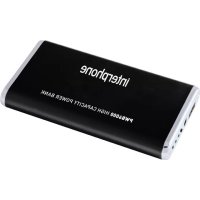
Interphone PWB6000 - Power bank Cellular Line - Free user manual and instructions
Find the device manual for free Interphone PWB6000 Cellular Line in PDF.



| Product type | Portable battery |
| Brand | Cellular Line |
| Model | Interphone PWB6000 (PowerBank6000) |
| Battery capacity | 6000 mAh |
| Battery type | Li-Polymer |
| Input voltage | 5.0 V - 800 mA |
| Output voltage | 5.0 V - 5.5 V - 1000 mA |
| Residual charge indicators | 3 LEDs: 30%, 70%, 100% |
| Dimensions | Compact (unspecified) |
| USB output | 1 x standard USB |
| Main functions | Charging phones, tablets, cameras and other 5V devices |
| Package contents | PowerBank6000, IN/OUT charging cable, 5 adapters (Nokia, Samsung, SonyEricsson, MicroUSB, MiniUSB), rigid case, user manual |
| Auto shut-off | After 20 seconds of inactivity |
| Maintenance | Clean with a damp cloth; recharge every 2 months if unused |
| Safety | Do not expose to water, heat, or shocks; do not disassemble; keep out of reach of children |
| Warranty | In accordance with current legislation; assistance through the retailer |
Frequently Asked Questions - Interphone PWB6000 Cellular Line
User questions about Interphone PWB6000 Cellular Line
0 question about this device. Answer the ones you know or ask your own.
Ask a new question about this device
Download the instructions for your Power bank in PDF format for free! Find your manual Interphone PWB6000 - Cellular Line and take your electronic device back in hand. On this page are published all the documents necessary for the use of your device. Interphone PWB6000 by Cellular Line.
USER MANUAL Interphone PWB6000 Cellular Line
- CHARGE INDICATOR LED CHECKING CHARGE (30% - 70% - 100%)
usb
- USB CONNECTION (USB PORT)
eva case
PROTECTIVE EVA CASE INCLUDED
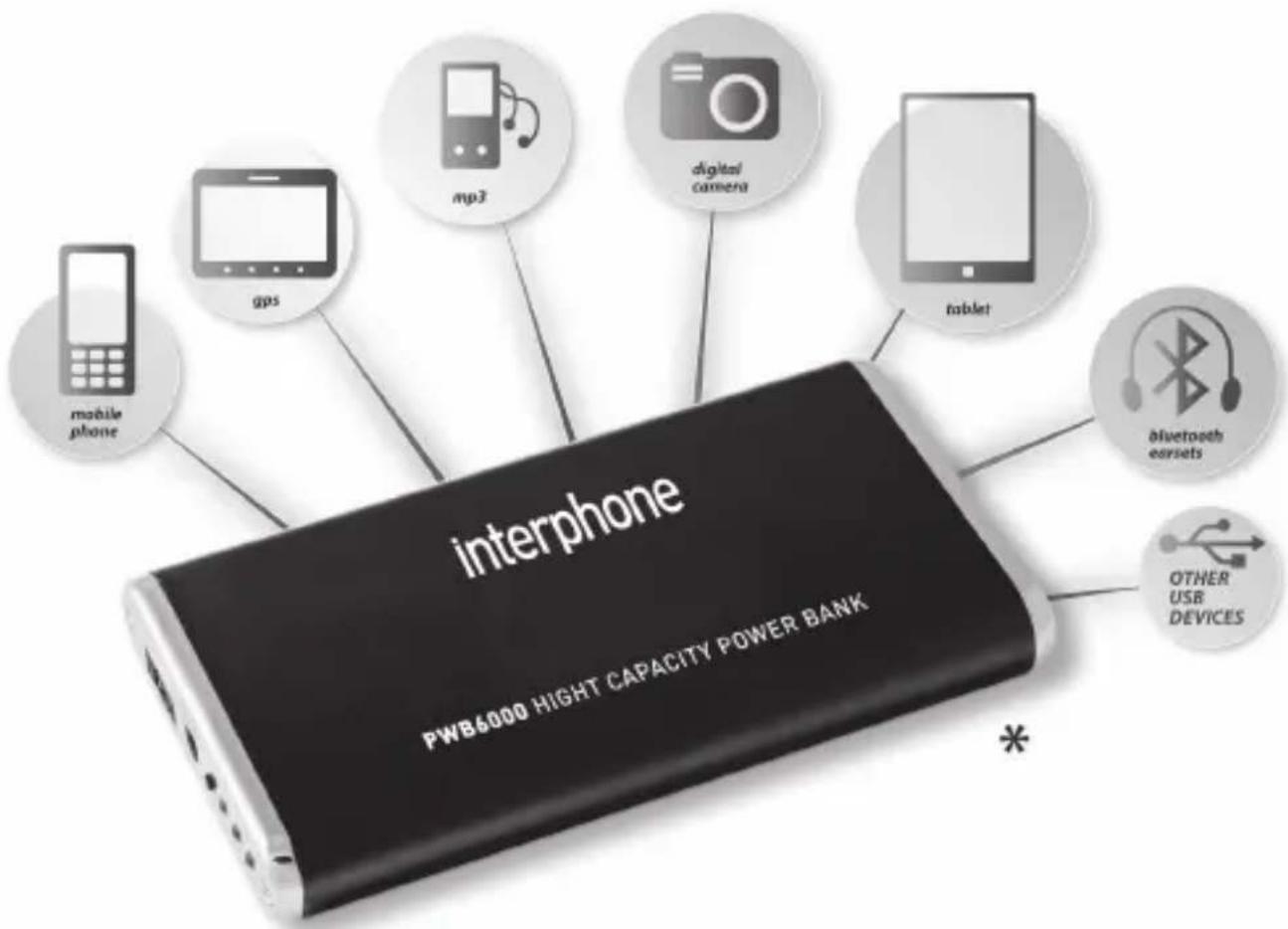
*NOT ALL CABLES INCLUDED

www.inerpbbe.celldating.com
Index languages
IT ISTRUZIONI D'USO POWERBANK6000 1
EN INSTRUCTIONS FOR THE USE OF THE POWERBANK6000 5
ES INSTRUCCIONES DE USO DEL POWERBANK6000 9
FR MODE D'EMPLOI POWERBANK6000 13
DE BEDIENUNGSPANLEITUNG POWERBANK6000 17
CS NAVOD KPOUZITIPowerBANK6000 21
NL GEBRUKSAANWIJZING POWERBANK6000 25
RU INHCTPYKcIIN IO NcPONb3OBAHIO POWERBANK6000 29
PL INSTRUKCJA OBSLUGI POWERBANK6000 33
SV BRUKSANVISNING FÜR POWERBANK6000 37
FI KAYTTOOHJEET POWERBANK6000 41
JP POWERBANK6000一一マニアル 45
ISTRUZIONI D'USO POWERBANK6000
Introduzione
Non usate Powerbank6000 se"This is a good idea for the future of our company, but it's not enough to make money. We need to start our own business and sell it in the market."
Cellular Italia S.p.a. would like to thank you for your appreciation for the Cellular Line's products, we would like to give you some useful information.
The Powebank6000 is a portable energy accumulator which is able to recharge almost any device requiring a 5 to 5,5 Volts charger; this voltage is usually used to recharge 3,6 Volts lithium batteries now present in every cell phone, iPod, iPad, camera, videogame controller, and many others devices.
The Powerbank6000 has a USB output to which you can connect directly the USB cable that often comes with the cell phones or other devices and recharges them using the central unit of the Powerbank6000.
In the Powerbank6000 package you will find a cable with multi-plug adapters so that it can be used with many different cell phones of different brands.
The adapters supplied with the Powerbank6000 are compatible with cell phones by Nokia, Samsung, SonyEricsson, MicroUSB, and MiniUSB; if you can't find the adaptor that you need among the ones provided, you can buy a USB cable separately, and you will be able to use the Powerbank6000 with no problem.
The Powerbank6000 has a compact structure to avoid cumbersome wires everywhere and makes it more manageable, it has a small button to turn it on\off, and check of the residual charge through three leds.
Its compact structure makes it very strong and resistant to accidental shocks and falls.
Description
H. Powerbank6000
I. Led indicators - on\off\recharge\residual capacity
G. On\off button
E. Input for charging Powerbank6000
D. USB output to recharge other devices
Package contents
- N ° 1 . PowerBank6000 (H)
- N ° 1 . Recharge cable IN\OUT (A)
- N° 5. Adaptors for cell phones\devices - Nokia, Samsung, SonyEricsson MicroUSB, MiniUSB (L)
- N0 1. Hard case container
- N°1 . Instruction book
Technical data
High capacity battery pack 6000mAh Li-polymer
DC input : 5.0V - 800mA
DC output : 5.0V-5.5V - 1000mA
Led indicators : 30% - 70% - 100%
PowerBank6000 weight : 200 Gr.
Use
Before using a Powerbank6000 it is necessary to fully recharge it
Powerbank6000 recharge
1.Take the cable supplied in the kit (A)
2.Insert the USB plug (B) into a USB port in your pc, or in a common USB charger
3. Connect plug (C) with the Powerbank6000's output IN (E)
4. The three Led indicators will turn on and will be flashing depending on the residual charge
5. Powerbank6000 will be completely charged when the three Led indictors (30%, 70%, 100%) will be constantly on
6.If you disconnect the cable the 100% charge Led will turn on, this will indicate that the PowerBank6000 is on, if you do not plug or connect anything to the PowerBank6000, the Led and the device itself will turn automatically off after 20 seconds.
Recharging cell phones or generic devices (MP3 player, camera, etc)
1.Make sure that the voltage of the device to be recharged is compatible with the PowerBank6000
2. Simply connect the USB cable supplied with your phone or the device we wish to recharge to the USB plug (D)
3. Connect the other end of the cable to the cell phone or the device we Want to recharge
4. Press the ON/OFF button (G) to turn PowerBank6000 on
5.If you do not have the required USB cable, you can simply use the cable supplied with the kit (A)
6. Pick the right cell phone adaptor compatible with your device (L), and plug it in the socket on the cable (F)
7. Connect the cable like shown in 2
Verifying the recharge levels
- Press the button ON/OFF (G) for about 4 seconds, depending on which Led will flash, you will know the percentage of the residual charge (30%, 60%, 100%)
2.If you unplug the PowerBank6000, it will turn off after 20 seconds
PowerBank6000 maintenance
If the PowerBank6000 is not used for long periods, it is necessary to recharge the battery every two months to avoid damages and keep it efficient. Utilize a little cloth towel to clean the PowerBank6000.
Important:
Do not expose PowerBank6000 to water or other liquids and fluids, do not utilize it in the rain.
Always place the PowerBank6000 in the provided case when not using it, to avoid any object that may slip in the USB socket.
Assistance and warranty
The product is covered by warranty according to existing regulations and laws of the respective countries where it is distributed. If problems arise, you can just contact the dealer or retailer you bought the product from.
Battery
Do not replace/remove/recharge the battery, and recharge other devices in places where there is a risk of explosion.
The batteries can cause damages to objects and/or people, like for example burns, if the USB socket contacts are short-circuited due to contact with liquids or small metal objects like jewelry, keys, coins, etc
Metallic materials can cause a short-circuited and overheat, and the battery might catch on fire,
Be careful and pay particular attention when you handle fully charged batteries, especially when they are put in pockets, bags, purses, or other cases where they might get in contact with metallic objects.
When the battery is depleted, it must be disposed in a completely safe and environmental way, according to environmental rules and laws, to respecting the environment and using appropriate containers.
Do not set the battery on fire, and do not open it for any reason.
Trash generated by electronic/chemical products must not be mixed with common households' trash. This device must be brought to a local recycling center to make sure it will be safely disposed, or thrown in an appropriate battery container.
Precautions
Do not expose the PowerBank6000 to rain, snow or water.
Do not leave the device in the car under the sun
Do not leave this device close to sources of heat
Do not use the PowerBank6000 if it has received a shock, it fell or it is in some way damaged.
Do not disassemble the Powerbank6000, if it is disassembled in the wrong way, there is a risk of electric shock or burns.
Do not modify/try to fix the cable supplied with the kit
Keep the PowerBank6000 out of reach of children
Any unauthorized change in parts to the PowerBank6000 will affect your warranty
INSTRUCCIONES DE USO DEL POWERBANK6000
Introducción
Los materiales metálicosSEOSEOSEOSEOSEOSEOSEOSEOSEOSEOSEOSEOSEOSEOSEOSEOSEOSEOSEOSEOSEOSEOSEOSEOSEOSEOSEOSEOSEOSEOSEOSEOSEOSEOSEOSEOSEOSEOSEOSEOSEOSEOSEOSEOSEOSEOSEOSEOSEOSEOSEOSEOSEOSEOSEOSEOSEOSEOSEOSEOSEOSEOSEOSEOSEOSEOSEOSEOSEOSEOSEOSEOSEOSEOSEOSEOSEOSEOSEOSEOSEOSEOSEOSEOSEOSEOSEOSEOSEOSEOSEOSEOSEOSEOSEOSEOSEOSEOSEOSEO SEO
Poids PowerBank6000:200g
UTILISATION
CBeToIIOIDHbIe INHdNkaTopbl: 30% - 70% - 100%
Bec PowerBank6000: 200 r
NCNIOJIb3OBAHNE
Перд Лобим Исторбаянем Heo6xOДМо РИХOTь 3apdntb PowerBank6000.
3apяДka PowerBank6000
1.Bo3bMnte shHyp, ndyuiB KOMnJIeKeTe (A).
2. BCTaBbTe USB-BnIky (B) B USB-pa3bem PK nIIN B KaKoe-Hn6yDb 3apAHDHe yCTpOInCTBO c USB-pa3bEmOM.
3. BCTaBbTe BnIky (C) B pa3bEm IN (E) yctpoiCTBa PowerBank6000
4. TpN CBeToIONoHbIX INdIKaTopa 3arOpTcN HaCyHT MmraTb, NCXoJaN3 npOeHTHO nOKa3aTeJI OCTaBWeJcN 3apJKn.
5. PowerBank6000 6ydt noJHocTbU 3apJxKeH, KOrda BCE Tprn CBeToIONoHbIX INdikatopa 30% 70% n 100% 6ydt ropeTb, He Mmra.
6. Пп от_COЕДИЕнишура загорпся Инданкатор 100%, поаьвая, чTO PowerBank6000 Вклочен, ecги Нчero He подлочаetся Инданкатор и PowerBank6000 Выклоча tbся abTomatчecки примерно уеет 20 cekyнд.
3apraKa TepeoHa nI np. yctpoiCTB (MP3, otoannapata n T.d.)
- Y6eIntecb, cTo HaprrxHne 3apjXaEMOro yCTpoiCTBa COBmecTmo C PowerBank6000.
- Посто посоeннte USB-кавь, Идушь в Компгктс с телфони Дугим устpoиCTВOM, K Выхонomy USB-pa3bemy (D).
3.Дугов erо koHeu noDCoeDHHte K TeHeoHy nIIpyromy yCTpoiCTby. - Haxmte 6e3 yedepxahan KhoNky ON/OFF (G), yTo6bI BKJIOHTb PowerBank6000.
- Ecn y Bac Het COOTBcTcByoUeO USB-ka6e, BocnoIb3yITeCb shypom, KOTOpBn IaET B KOMPJIeKTe (A).
- Bb6epnte tenefoHHbI aanTep, noXoJnI dna BaWero annapata (L), n BCTaBTe erO B cneuaHbI pa3beM, MeouuNcra Ha shHype (F).
- CoeinnHe Ka6enb, KaK yKa3aHo B nyHKe 2.
KoHTpoJIb npOeHTHO rO nOKa3aTeJIr oCTaBWeJcR 3apIaKN P0wer-Bank6000
- Haxmte u ydepxnBaTe npimepeHO B TeueHne 4 ckyHd KhoNkOy ON-OFF (G), MraUoIuN mHdkaTOp ykaKeT pOceHTbI Noka3aTeIb OCTaBWeJcra 3apAdk (30%,70%,100%).
- Бe3 подклоченя PowerBank6000 ВыклочиТС АВТOMATИЧЕСКИ рпимерноуpeз 20 секун.
YxOДи O6cIyKINBaHne
EcnBbHe nCnoB3yeTe Powerbank6000 B TeueHne dNITeNbHoro nepNoDa, Heo6xOdIMO 3apJXaTb aKkUMyIaTOp XOT8 6bl pa3 B DBA Mecaa BO H36exHaHne BO3MOxHocTn erO NOBpeXdeHn I nn POnDepXaHn erO B pa6ooyem COCTOAHn.
ДяЧИСТКI KOPNYCA MOЖHO ИСNOЛБ3OBaTb MЯrkYIO TKAHb.
BaxHoe 3ameuHne:
Helen3y, yTo6bI Powerbank6000 noDBepraJcB O3deiCTBnIO BODbl nIIpyrnx XndKoCTeN, He cIeDyET IcNoJIb3OBA Tb erO IOd DoXdE M.
Bo n36eKahne TORO, yTO KaKoH-NbUdb MeIKN IpeMTe NonaTe B USB-pa3bEm, cJeDyET BceRda xpaHnTb Powerbank6000 B cyTJpe, nduIeM B KOMJIeKTe C CaMM YcTPOIcTBOM.
Texnomouь rapaHTna
ДанhoeиЗделпOKрыTO rapaHTnei CORlaCHO DeIcTBYIOUIM HOpMaM 3aKOHODaTeJIbCTBa COOTBETCTBYIOUIN CTpaH, rDe OHO pOdaTcra.
B cnyuae BO3HnKHOBeHnI npo6IeM cJeDuYeT oBaaTaBc8 3a NOMOuK npoDaBu, y KOTOpRo 6blIO npNo6peTeHo DaHHoe yCTpoiCTBO.
AkkymyTop
He cIeIyET npOn3BOJNTb 3aMeHy/ CHIMaTb /3apJxKaTb BHyTpEHHN aKKymyJIaTOPHbI 6JOK IJIu dpyrIe COeINHeHHbIe C Hm yCTpoiCTBa BO B3pbIBOONaCHbIX MeCTax.
AkkymyIaTOPbIe 6JOKN MOrYT npuHHTb yUep6 NMyUeCTBy n/nnn JIOdAm, Hapnimep, oXoRn, ecn KOHaKTBtI USB-pa3beMa OKaJyTcra
KOPOTKO3aMKHybIMN NO npuHHe IOnaHaHnJxIDKOCTeIN He6OJIbXMeTaNluecknx PpeDMetOB (IOBeInpHBIX N3deIIn, KIIoue, MOHeT IN T.D.).
MetaJIInueckne npEIMetbl MOryT Bbl3BaTb KOpOTKoe 3aMbIkaHne n OueHb CnIbHO HArpeTbcra, TOrda eCTb BepoAHTHOCTb TORO, YTO aKKymJrTOp 3arOpNTcra.
He noBepraTb BO3dEiCTBnIO DoXJa, Chera NJIIN NorpyjKeHIO B BODy.
He octabTb PowerBank6000 B aBtOMo6nIe noD BO3dEiCTBnEM COJIHeuHbIX IyuEi.
He octabJbTb noB 03deIcTBnEM npMbIX cOnHeuHbIX lyuei nn pIOM C nCTOuHKaMI TeIIa.
He nCnoJb3oBaTb Powerbank6000, ecn OH noDBeprc CInbHomy ydapy, ynai nn 6bl NOBpeKDeH kaKIM-Jn6o o6pa30m.
He pa3bpaTb Powerbank6000, taK kaK ecn OH pa3o6paH HenpaBnIbHo, cyueCTByeT onaCHOCTb nOlyuHnE 3JeKTpUeCKoro ydapa H/nn OXOROB.
HnB Koem Cnyuae He MeHraTe Ka6JIb, NOCTaBnaEmbI B KOMnJIeKTe.
XpaHnte Powerbank6000 B HeDocTynHom dIa DeTeMecTe.
HecaHKUHOHPOBaHHoe OTKpbITne PowerBank6000 Jn6o n3MeHeHne erO chTeM oKeT npBecTI K aHHyIupOBaHHIO rapaHTNI.
INSTRUKCJA OBSLUGI POWERBANK6000
Wprowadzenie
www.cellularline.com/quality
CELLULARITALIA S.P.A.
Distributed by
www.cellularline.com
www.interphone.cellularline.com
www.interphonef4.it


- INDEX LANGUAGES
- ISTRUZIONI D'USO POWERBANK6000
- INTRODUZIONE
- DESCRIPTION
- PACKAGE CONTENTS
- TECHNICAL DATA
- USE
- POWERBANK6000 RECHARGE
- RECHARGING CELL PHONES OR GENERIC DEVICES (MP3 PLAYER, CAMERA, ETC)
- VERIFYING THE RECHARGE LEVELS
- POWERBANK6000 MAINTENANCE
- IMPORTANT
- ASSISTANCE AND WARRANTY
- BATTERY
- PRECAUTIONS
- INSTRUCCIONES DE USO DEL POWERBANK6000
- INTRODUCCIÓN
- UTILISATION
- NCNIOJIB3OBAHNE
- 3APЯДKA POWERBANK6000
- 3APRAKA TEPEOHA NI NP. YCTPOICTB (MP3, OTOANNAPATA N T.D.)
- KOHTPOJIB NPOEHTHO RO NOKA3ATEJIR OCTABWEJCR 3APIAKN P0WER-BANK6000
- YXOДИ O6CIYKINBAHNE
- BAXHOE 3AMEUHNE
- TEXNOMOUЬ RAPAHTNA
- AKKYMYTOP
- INSTRUKCJA OBSLUGI POWERBANK6000
- WPROWADZENIE
Brand : Cellular Line
Model : Interphone PWB6000
Category : Power bank