PAS6100E - Cooker PROGRESS - Free user manual and instructions
Find the device manual for free PAS6100E PROGRESS in PDF.


| Product type | Ceramic hob |
| Brand | Progress |
| Model | PAS6100E |
| Number of cooking zones | 4 |
| Zone power | 2 x 1700 W (large) + 2 x 1200 W (small) |
| Total power | 5800 W |
| Control type | Rotary knobs (9 levels + off) |
| Residual heat indicator | Yes, light indicator |
| Electrical supply | Single-phase or two-phase, 220-240 V ~ 50/60 Hz |
| Power cord | H05BB-F Tmax 90°C |
| Built-in dimensions (W x D) | 560 x 490 mm (standard) |
| Surface type | Ceramic glass |
| Recommended utensils | Flat, thick bottom, stainless steel or enamel |
| Cleaning | Damp cloth and mild detergent; scraper for stubborn residues |
| Child safety | Do not leave children unattended |
| Overheating protection | Residual heat indicator |
| Installation | By a qualified electrician; sealing gasket required |
| Energy class | Not specified |
| Weight | Approximately 8 kg (estimated) |
| Warranty | Standard, subject to manufacturer's conditions |
| After-sales service | Contact the selling store or an approved professional |
Frequently Asked Questions - PAS6100E PROGRESS
User questions about PAS6100E PROGRESS
0 question about this device. Answer the ones you know or ask your own.
Ask a new question about this device
Download the instructions for your Cooker in PDF format for free! Find your manual PAS6100E - PROGRESS and take your electronic device back in hand. On this page are published all the documents necessary for the use of your device. PAS6100E by PROGRESS.
USER MANUAL PAS6100E PROGRESS
natural_image
Diagram of a flat-panel electronic device with a small inset showing a screw inserted into a component (no text or symbols present)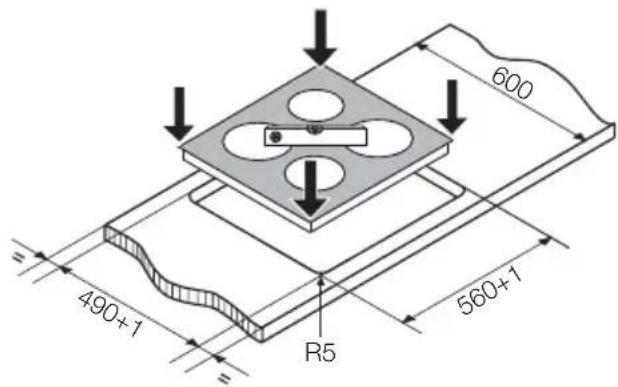
natural_image
Diagram showing a mechanical clamp or bracket assembly with an inset close-up of the component (no text or symbols present)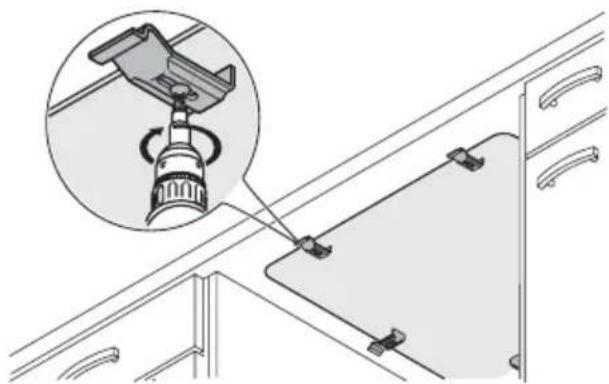
natural_image
Technical diagram showing a mechanical assembly with an inset close-up of a rotating component (no text or symbols present)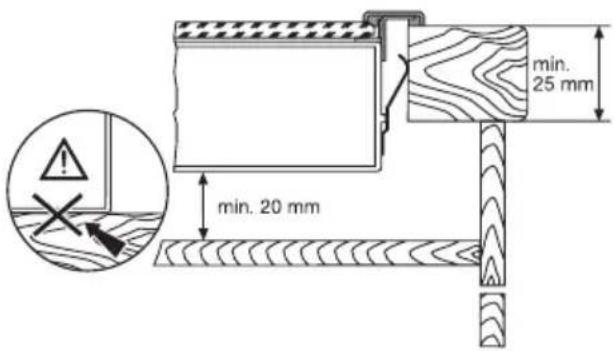
natural_image
Simple line drawing of a container with a bag, arrow, and cable (no text or symbols)Contents
Safety Information 10
Description of the Appliance 11
Operating the Appliance 12
Tips on Cooking and Frying 12
Cleaning and Care 13
What to do if ... 14
Disposal 14
Installation Instructions 15
Service 17

Subject to change without notice
Safety Information

Warning! Please comply with these instructions. If you do not, any damage resulting is not covered by the warranty.
Correct use
- This appliance is not intended for use by children or other persons whose physical, sensory or mental capabilities or lack of experience and knowledge prevents them from using the appliance safely without supervision or instruction by a responsible person to ensure that they can use the appliance safely.
- Do not leave the appliance unattended during operation.
- This appliance should be used only for normal domestic cooking and frying of food.
- The appliance must not be used as a work surface or as a storage surface.
- Additions or modifications to the appliance are not permitted.
- Do not place or store flammable liquids, highly inflammable materials or fusible objects (e.g. plastic film, plastic, aluminium) on or near the appliance.
Children's safety
- Small children must be kept away from the appliance.
- Only let bigger children work on the appliance under supervision.
General safety
- The appliance may only be installed and connected by trained, registered service engineers.
- Built-in appliances may only be used after they have built in to suitable built-in units and work surfaces that meet standards.
- In the event of faults with the appliance or damage to the glass ceramic (cracks, scratches or splits), the appliance must be switched off and disconnected from the
electrical supply, to prevent the possibility of an electric shock.
- Repairs to the appliance must only be carried out by trained registered service engineers.
Safety during use
- Remove stickers and film from the glass ceramic.
- There is the risk of burns from the appliance if used carelessly.
- Cables from electrical appliances must not touch the hot surface of the appliance or hot cookware.
• Overheated fats and oils can ignite very quickly. Warning! Fire hazard! - Switch the cooking zones off after each use.
- Risk of burns! Do not place objects made of metal, such as knives, forks, spoons and saucepan lids on the cooking surface, as they can get hot.
Safety when cleaning
- For cleaning, the appliance must be switched off and cooled down.
- For safety reasons, the cleaning of the appliance with steam jet or high-pressure cleaning equipment is not permitted.
How to avoid damage to the appliance
- The glass ceramic can be damaged by objects falling onto it.
- The edge of the glass ceramic can be damaged by being knocked by the cookware.
- Cookware made of cast iron, cast aluminium or with damaged bottoms can scratch the glass ceramic if pushed across the surface.
- Objects that melt and things that boil over can burn onto the glass ceramic and should be removed straightaway.
- Do not use the cooking zones with empty cookware or without cookware.
- To avoid damaging cookware and glass ceramics, do not allow saucepans or frying pans to boil dry.
Description of the Appliance
Cooking surface layout
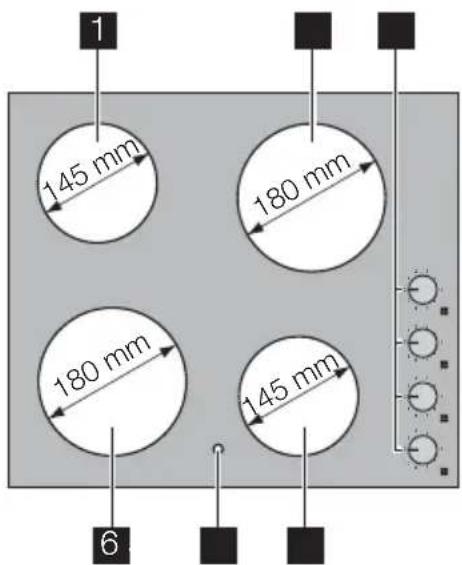
Assignment of control knobs
- Single cooking zone 1200W
- Single cooking zone 1700W
- Hob Cooking Zone Control Knobs
- Single cooking zone 1200W
- Residual heat indicator
- Single cooking zone 1700W
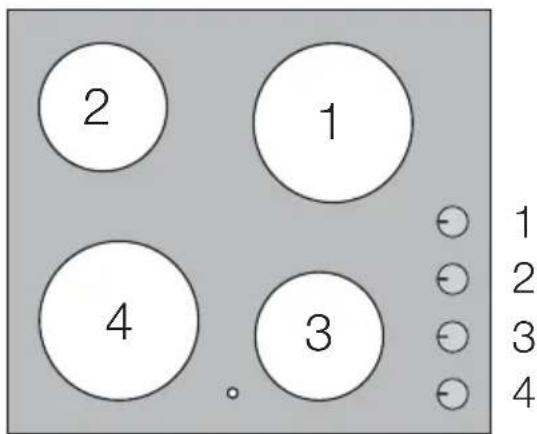
Control Knobs
The cooking power can be set anywhere between level 1 and 9.
1 Lowest power
9 Highest power
0 Off position
Residual heat indicator
The residual heat indicator lights up, as soon as one cooking zone is hot.
Warning! Risk of burns from residual heat. After being switched off, the cooking zones need some time to cool down. Look at the residual heat indicator.

Residual heat can be used for melting and keeping food warm.
Operating the Appliance
Setting the heat setting
When a cooking zone is switched on, it may hum briefly. This is a characteristic
of all ceramic glass cooking zones and does not impair either the function or the life of the appliance.
| Heat setting Ring control knob Knob setting | ||
| To increase Turn clockwise 1 - 9 |  | |
| To reduce Turn anti-clockwise 9 - 1 |  | |
| Switch off 0 | ||
- When boiling water/searing food, select a high heat setting.
-
As soon as steam forms or the fat or oil is hot, set a lower heat setting.
-
To end the cooking process, turn to the Off position.
Tips on Cooking and Frying
Information on acrylamides
According to the latest scientific knowledge, intensive browning of food, especially in products containing starch, can constitute a health risk due to acrylamides. Therefore we recommend cooking at the lowest possible temperatures and not browning foods too much.
Cookware
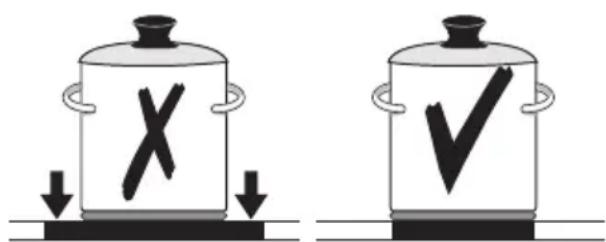
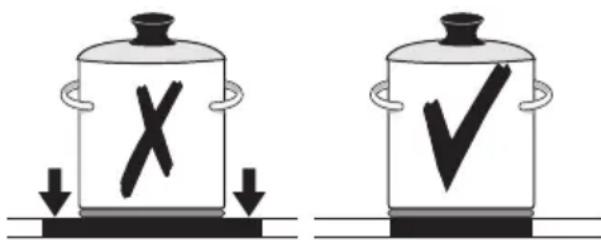
- You can recognise good cookware from the bottoms of the pans. The bottom should be as thick and flat as possible.
- Cookware made of enamelled steel or with aluminium or copper bottoms can leave discolorations on the glass ceramic surface which are difficult or impossible to remove.
Energy saving
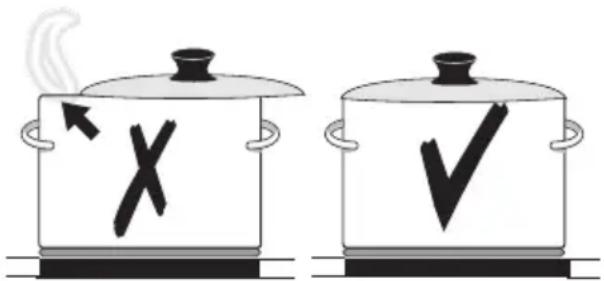
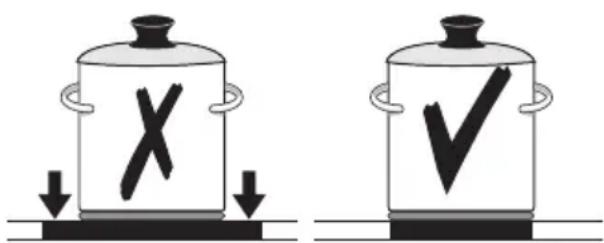
Always place cookware on the cooking zone before it is switched on.
If possible, always place lids on the pans.
Switch cooking zones off before the end of the cooking time, to take advantage of residual heat.
Bottom of pans and cooking zones should be the same size.
Examples of cooking applications
The information given in the following table is for guidance only.
| Heat setting Cooking process | Suitable for Cooking time Tips/Hints | |||
| 0 Off position | ||||
| 1 Keeping food | warm | Keeping cooked foods warm | as required Cover | |
| 1 - 2 Melting Hollandaise | sauce, melting butter, chocolate, gelatine | 5-25 mins. Stir occasionally | ||
| Solidifying Fluffy omelettes, | baked eggs | 10-40 mins. Cook with lid on | ||
| 2-3 Simmering on low heat | Simmering rice and milkbased dishes Heating up ready-cooked meals | 25-50 mins. Add at least twice as much liquid as rice, stir milk dishes part way through cooking | ||
| 3-4 | Steaming Braising | Steaming vegeta-bles, fish braising meat | 20-45 mins. With vegetables add only a little liquid (a few table-spoons) | |
| 4-5 Boiling | Steaming pota- toes | 20-60 mins. Use only a little liquid, e. g.: max. 1⁄4 l water for 750 g potatoes | ||
| Cooking larger | quantities of food, stews and soups | 60-150 mins. | Up to 3 l liquid plus ingredients | |
| 6-7 | Gentle Frying | Frying escalopes, veal cordon bleu, cutlets, rissoles, sausages, liver, roux, eggs, pan-cakes, doughnuts | Steady frying | Turn halfway through cooking |
| 7-8 | Heavy Frying | Hash browns, loin steaks, steaks, Flädle (pancakes for garnishing soup) | 5-15 mins. per pan | Turn halfway through cooking |
| 9 Boiling Searing | Deep frying | Boiling large quantities of water, cooking pasta, searing meat (goulash, pot roast), deep frying chips | ||
Cleaning and Care
Warning! Risk of burns from residual heat.
Warning! Sharp objects and abrasive cleaning materials will damage the appliance. Clean with water and washing up liquid.
Warning! Residues from cleaning agents will damage the appliance. Remove residues with water and washing up liquid.
Cleaning the appliance after each use
- Wipe the appliance with a damp cloth and a little washing up liquid.
- Rub the appliance dry using a clean cloth.
Removing deposits
-
Place a scraper on the glass ceramic surface at an angle.
-
Remove residues by sliding the blade over the surface.
- Wipe the appliance with a damp cloth and a little washing up liquid.
- Rub the appliance dry using a clean cloth.
| RemoveType of dirt immediately when the appliance has cooled down | using | ||
| sugar, food containing sugar | yes --- a scraper * | ||
| plastics, tin foil | yes | --- | a scraper * |
| limescale and water rings | --- yes cleaner for glass ceramic | or stainless steel * | |
| fat splashes | --- | yes | cleaner for glass ceramic or stainless steel * |
| shiny metallic discoloration | --- yes cleaner for glass ceramic | or stainless steel * | |
* Scrapers and cleaners for glass ceramic and stainless steel can be purchased in specialist shops
i Remove stubborn residues with a cleaner for glass ceramic or stainless steel.
i Scratches or dark stains on the glass ceramic that cannot be removed do not however affect the functioning of the appliance.
What to do if ...
| Problem Possible cause Remedy | ||
| The cooking zones are not functioning. | The desired heat setting is not set. | Set the heat setting. |
| The fuse in the house's electrical | wiring (fuse box) has been tripped. | Check the fuse. If the fuses trip a number of times, please call an authorised electrician. |
| The residual heat indicator is not displaying anything | The cooking zone was only on for a short time and is therefore not hot | If the cooking zone is supposed to be hot, call the Customer Service Department. |
If you are unable to remedy the problem by following the above suggestions, please contact your dealer or the Customer Care Department.
Warning! Repairs to the appliance are only to be carried out by qualified service engineers. Considerable danger to the user may result from improper repairs.
If the appliance has been wrongly operated, the visit from the customer service technician or dealer may not take place free of charge, even during the warranty period.
Disposal
The symbol ☒ on the product or on its packaging indicates that this product may
not be treated as household waste. Instead it should be taken to the appropriate collection point for the recycling of electrical
and electronic equipment. By ensuring this product is disposed of correctly, you will help prevent potential negative consequences for the environment and human health, which could otherwise be caused by inappropriate waste handling of this product. For more
detailed information about recycling of this product, please contact your local council, your household waste disposal service or the shop where you purchased the product.
Installation Instructions
Safety instructions

Warning! This must be read!
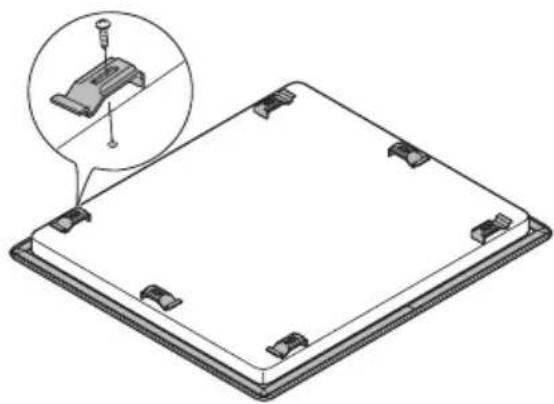
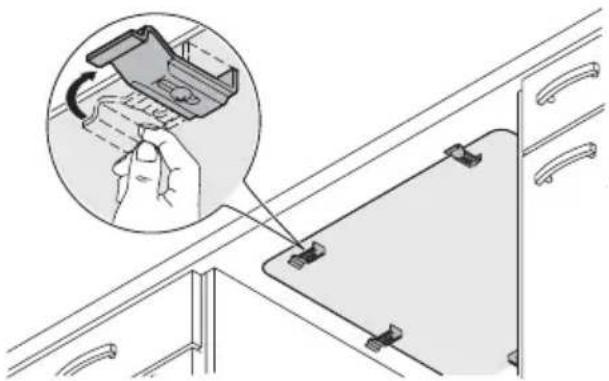
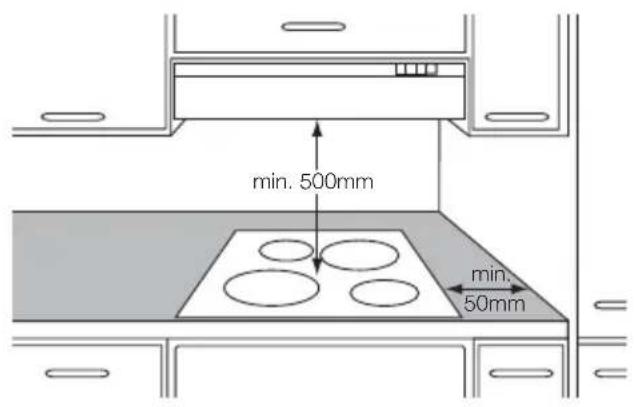
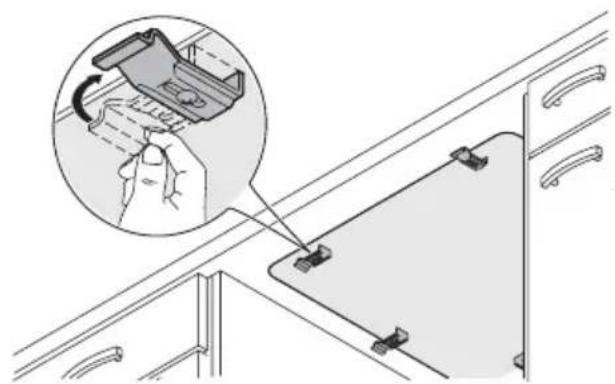
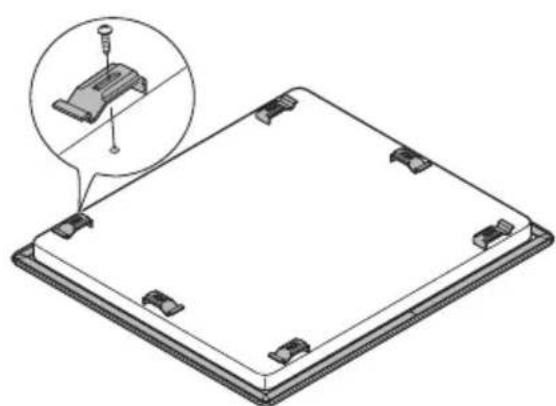
The laws, ordinances, directives and standards in force in the country of use are to be followed (safety regulations, proper recycling in accordance with the regulations, etc.) Installation may only be carried out by a qualified electrician. The minimum distances to other appliances and units are to be observed. Anti-shock protection must be provided by the installation, for example drawers may only be installed with a protective floor directly underneath the appliance. The cut surfaces of the worktop are to be protected against moisture using a suitable sealant. The sealant seals the appliance to the work top with no gap. When building in, protect the underside of the appliance from steam and moisture, e.g. from a dishwasher or oven. Avoid installing the appliance next to doors and under windows. Otherwise hot cookware may be knocked off the rings when doors and windows are opened.

Warning! Risk of injury from electrical current.
- The electrical mains terminal is live.
- Make electrical mains terminal free of voltage.
- Follow connection schematic.
-
Observe electrical safety rules.
-
Ensure anti-shock protection by installing correctly.
- The appliance must be connected to the electrical supply by a qualified electrician.

Warning! Risk of injury from electrical current.
- Loose and inappropriate plug and socket connections can make the terminal overheat.
- Have the clamping connections correctly installed by a qualified electrician.
- Use strain relief clamp on cable.
- In the event of single-phase or two-phase connection, the appropriate mains cable of type H05BB-F Tmax 90°C (or higher) must be used.
- If this appliance's mains cable is damaged, it must be replaced by a special cable (type H05BB-F Tmax 90°C; or higher). The latter is available from the Customer Care Department
A device must be provided in the electrical installation which allows the appliance to be disconnected from the mains at all poles with a contact opening width of at least 3 mm. Suitable isolation devices include line protecting cut-outs, fuses (screw type fuses are to be removed from the holder), earth leakage trips and contractors.
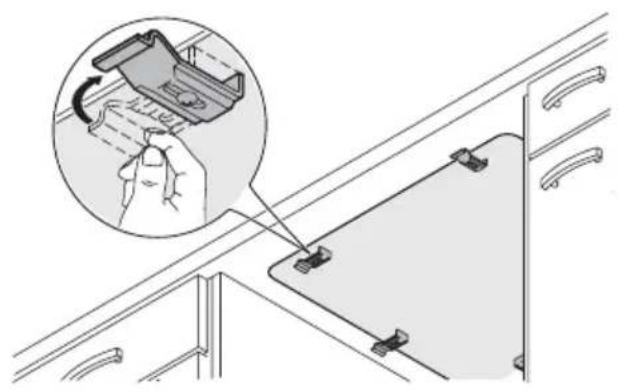
Assembly
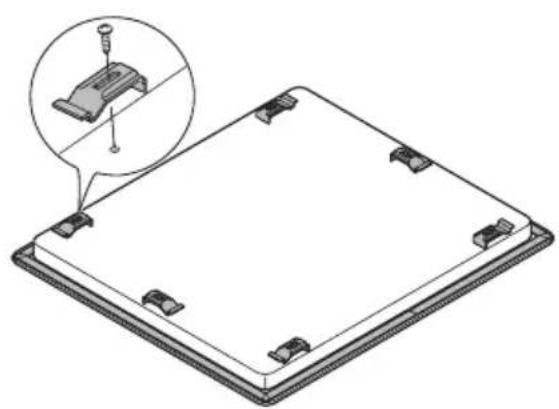
natural_image
Diagram of a flat-panel electronic device with a small inset showing a screwdriver inserted into a component (no text or symbols present)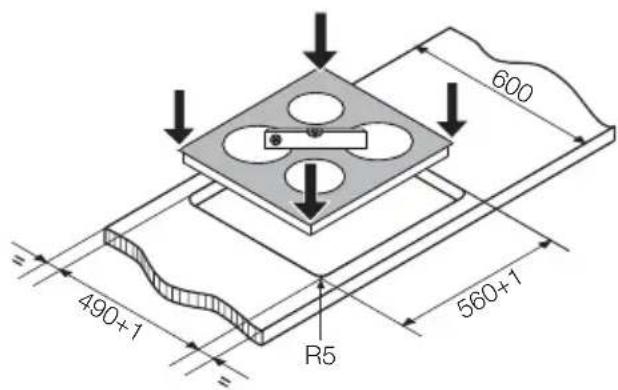
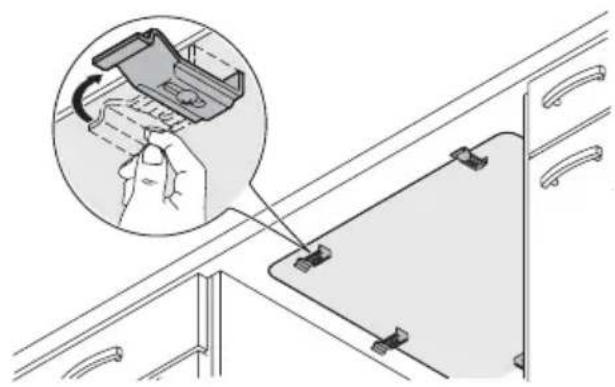
natural_image
Diagram showing a hand holding a small mechanical component with a magnified inset highlighting the assembly (no text or symbols present)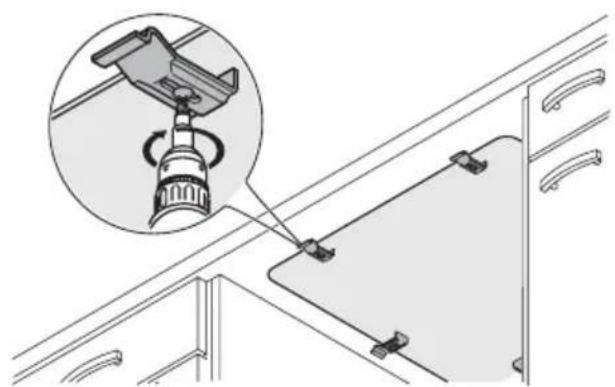
natural_image
Technical diagram showing a mechanical assembly with an inset close-up of a rotating component (no text or symbols present)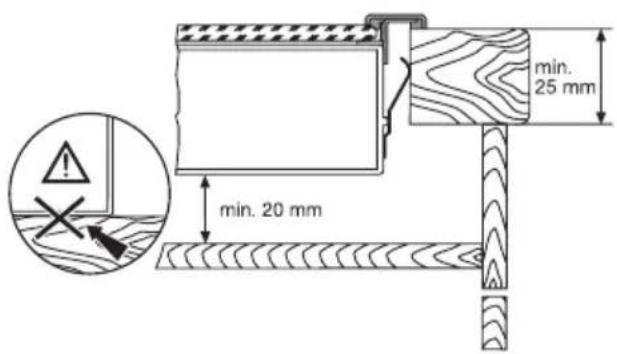
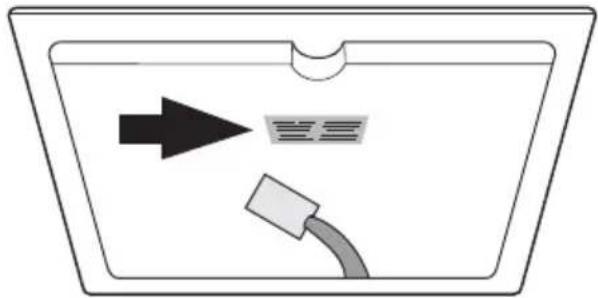
In the event of technical faults, please first check whether you can remedy the problem yourself with the help of the operating instructions (section "What to do if..."). If you were not able to remedy the problem yourself, please contact the Customer Care Department or one of our service partners. In order to be able to assist you quickly, we require the following information:
natural_image
Simple diagram of a container with an arrow pointing to a label and a cable, no text or symbols present.- Model description
- Product number (PNC)
- Serial number
(S No. - see rating plate) - Type of fault
– Any error messages displayed by the appliance
– three digit letter-number combination for glass ceramic
Sommaire
Avertissements importants 18
natural_image
Diagram of a flat-panel electronic device with a small inset showing a screwdriver inserted into a component (no text or symbols present)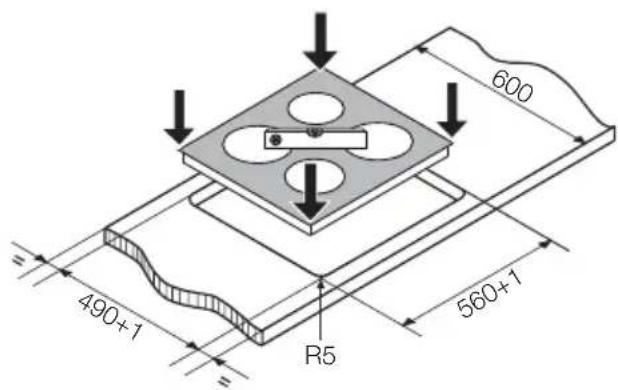
natural_image
Diagram showing a hand holding a clip attached to a cabinet panel, with an inset magnified view of the clip's adjustment (no text or symbols present)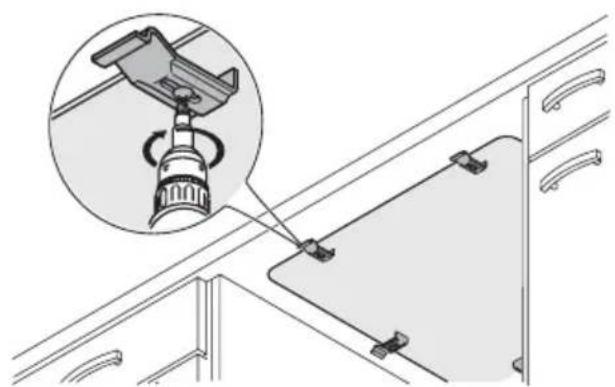
natural_image
Technical diagram showing a mechanical assembly with an inset close-up of a rotating component (no text or symbols present)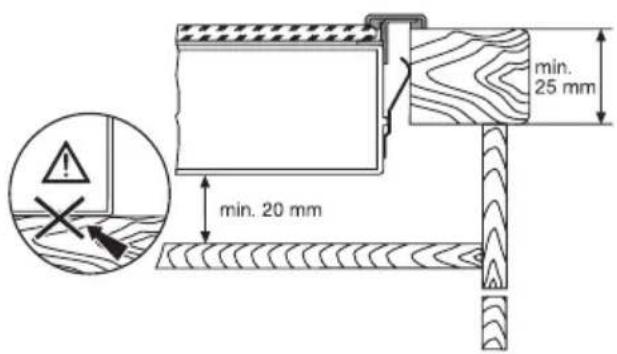
natural_image
Simple diagram of a container with an arrow pointing to a label and a cable, no text or symbols present.Kookgerei

natural_image
Diagram of a flat electronic device with a small inset showing a screw and pin (no text or symbols)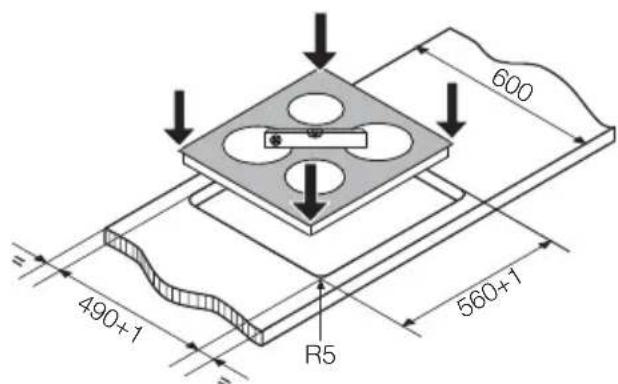
natural_image
Diagram showing a hand holding a small mechanical component with a magnified inset highlighting the assembly (no text or symbols present)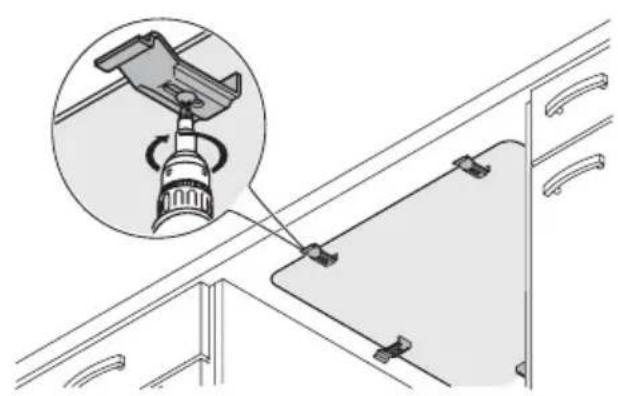
natural_image
Diagram showing a mechanical device mounted on a cabinet, with an inset close-up highlighting the component (no text or symbols present)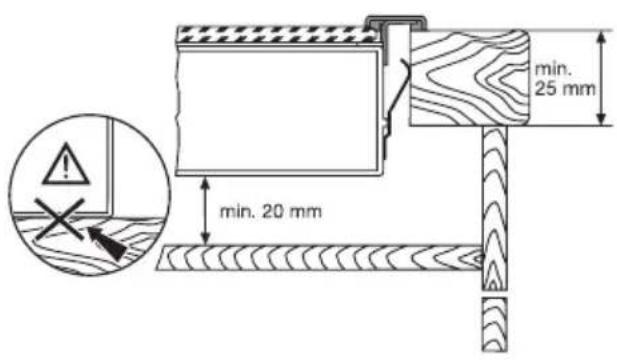
natural_image
Simple line drawing of a container with an arrow pointing to a label and a cable, no text or symbols present.
- Contents
- Safety Information
- Correct use
- Children's safety
- General safety
- Safety during use
- Safety when cleaning
- How to avoid damage to the appliance
- Description of the Appliance
- Cooking surface layout
- Assignment of control knobs
- Control Knobs
- Residual heat indicator
- Operating the Appliance
- Setting the heat setting
- Tips on Cooking and Frying
- Information on acrylamides
- Cookware
- Energy saving
- Examples of cooking applications
- Cleaning and Care
- Cleaning the appliance after each use
- Removing deposits
- If you are unable to remedy the problem by following the above suggestions, please contact your dealer or the Customer Care Department.
- Disposal
- Installation Instructions
- Safety instructions
- Warning! This must be read!
- Warning! Risk of injury from electrical current.
- Sommaire
- Kookgerei
Brand : PROGRESS
Model : PAS6100E
Category : Cooker