
Skydusk - Loudspeaker NGS - Free user manual and instructions
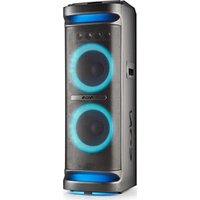
Find the device manual for free Skydusk NGS in PDF.



| Product Type | Bluetooth sound tower with subwoofer |
| Brand | NGS |
| Model | Skydusk |
| Output Power | 30 W |
| Bluetooth Technology | Bluetooth 2.1 + EDR, compatible with A2DP, AVRCP |
| Radio Frequency Band | 2402 MHz - 2408 MHz (ISM band) |
| Frequency Response | 20 Hz - 20 kHz |
| Bluetooth Range | Greater than 10 m |
| Display | LED |
| Playback Supports | Bluetooth, USB, SD card, AUX audio input, FM radio |
| Charging Function | USB output port 5V 2A/1A to charge iPad or smartphone |
| Mobile Device Support | iPad, MID, iPhone, smartphone |
| Power Supply | Mains (power cord) with built-in rechargeable battery |
| Warranty | 2 years (battery: 12 months) |
| Maintenance and Cleaning | Wipe with a dry, soft cloth |
| Safety | Do not expose to moisture or heat sources |
| Spare Parts and Repairability | Not available from the manufacturer |
| Recycling | Do not dispose of with household waste; take to a recycling center |
Frequently Asked Questions - Skydusk NGS
User questions about Skydusk NGS
0 question about this device. Answer the ones you know or ask your own.
Ask a new question about this device
Download the instructions for your Loudspeaker in PDF format for free! Find your manual Skydusk - NGS and take your electronic device back in hand. On this page are published all the documents necessary for the use of your device. Skydusk by NGS.
USER MANUAL Skydusk NGS
natural_image
Pure diagram of a vertical tower with three circular cutouts, no text or symbols presentUSER'S MANUAL
SKYDUSK SKYDAWN
BLUETOOTH TOWER
SPECIFICATIONS
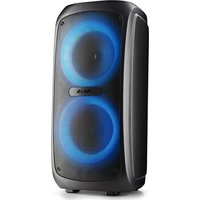
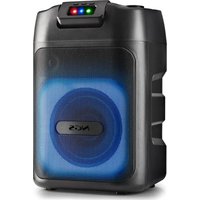
Bluetooth tower speaker with subwoofer
Supports iPhone, iPad and all of music device with Bluetooth
Supports SD card and USB driver playing
Line In function, supports MP3/MP4/PC/mobile phones
LED display
iPad/MID/iPhone/smart phone holder
USB charging port for smart phone and MID or iPad
Vol+/Vol-/Next/Prev/Play/Pause/Mode/Pairing buttons
Output power: SKYDUSK 30 W / SKYDOWN 60 W
Bluetooth 2.1 + EDR (Enhanced Data Rate)
Supports A2DP, AVRCP
Radio frequency: 2402MHz\~2408MHz ISM band
Frequency response: 20Hz\~20kHz
Distance: >10m
Power input: AC 230V
2x USB charging ports 1A / 2A
PRODUCT DIAGRAM
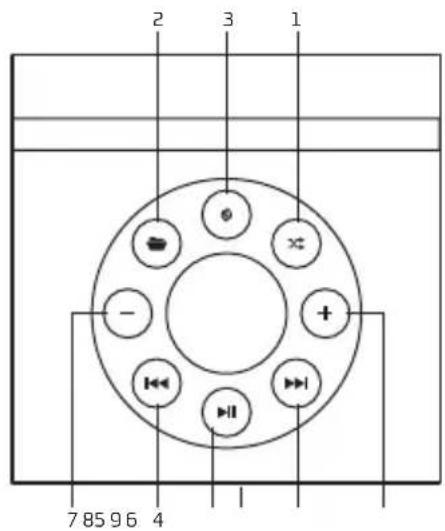
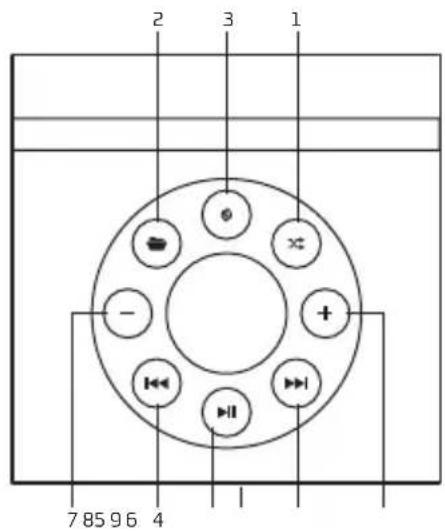
1 Shuffle mode
8 Volume +
2 Folder
9 LED display
3 Mode
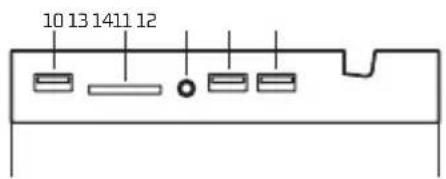
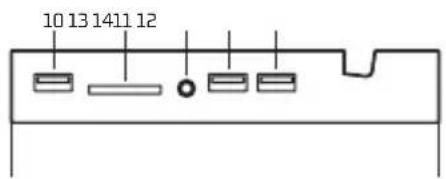
10 USB slot
4 Previous track
11 SD slot
5 Play/pause
12 3.5mm line in jack
6 Next track
13 5V/1A output
7 Volume-
14 5V/2A output
- Connect the power cable to power socket, and press the power switch to the ON position. The tower speaker is power on.
- Press the power switch to OFF position, the tower speaker is power off.
PAIRING YOUR MOBILE BLUETOOTH DEVICE TO THE TOWER SPEAKER
Pairing instructions may differ depending on the device you are using. Please refer to your device's user manual for further information.
Pairing
-
Make sure that your mobile device is within at least 1 meter of the speaker when trying to pair and that the tower speaker is power on and in Bluetooth mode.
-
If the tower speaker have not connect to any mobile device, it will enter pairing mode automatically. If the tower speaker have been connected, pressing and holding the pairing button ▶for 3 seconds till Bluetooth speaker enter pairing mode. The "bt" icon of (9) LED display will flashes rapidly when the tower speaker enter pairing mode.
- Access the Bluetooth settings in your mobile device and select Search/Scan for devices. Your mobile device will begin to search for a Bluetooth signal.
- You will see the name "NGS SKYDUSK / SKYDAWN" appear in the device list. Select it to pair, and if a password or PIN is needed enter the numbers "0000".
- After a successful connection has been made the "bt" icon of (9) LED display will light up.
PLAYING MUSIC
- Make sure that your Bluetooth A2DP (audio/music) mobile device is paired with the tower speaker.
- Begin playing music on your mobile device or simply pressing the (5) play/pause button and you should hear the music play through the tower speaker. If the music is low, increase the volume on the tower speaker first, then adjust your mobile device's volume.
- You can control the playing directly from the tower speaker.
Next track: briefly press the (6) next track button. Previous track: Briefly press the (4) previous track button. Increase volume: Briefly press the (8) volume + button. Decrease volume: Briefly press the (7) volume – button. Play and pause switch: Briefly press the (5) play/pause button.
LINE IN FUNCTION
- Turn on the tower speaker.
- Connect the tower speaker to music player such as MP3/MP4/PC/mobile phone by AUX line.
- The tower speaker will enter AUX mode and play the music of player through AUX. If the tower speaker does not enter AUX mode, press the (3) M button to select the AUX mode.
USER'S MANUAL
USB DRIVER AND SD CARD PLAYING
- Turn on the tower speaker.
- Put the USB driver into (10) USB slot, speaker will play the music in the USB driver. If the tower speaker does not enter USB, press the (3) M button to select the USB mode.
- Put the SD card into (11) SD slot, speaker will play the music in the SD card. If the tower speaker does not enter SD, press the (3) M button to select the SD mode.
CHARGING FUNCTION
Connect the USB charging cable into the (13, 14) USB DC 5V output port, the tower speaker can supply 5V 2A /1A current for iPad or smart phone charging. And the iPad or smart phone can be hold on tower speaker.
FM RADIO
- Press the MODE button to select FM mode.
- Then press and hold the ▶button for 3 seconds to carry out an automatic channel search.
- Once the automatic search is completed, you can switch between the saved stations by pressing the finger button.
- To carry out a manual channel search, press and hold the << or >> button for two seconds.
WARRANTY
Limited warranty. NGS warrants that any hardware products accompanying this documentation shall be free from significant defects in material and workmanship for a period of two (2) years, three (3) years or five (5) years from the date of purchase. NGS's limited warranty is non-transferable and is limited to the original purchaser. This warranty gives you specific legal rights, and you may also have other rights, which vary under local laws.
Battery warranty. The battery is a consumer product, and as such it is under warranty for 12 months.
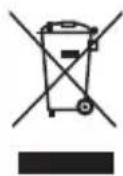
If at any time in the future you should need to dispose of this product please note that:
Waste electrical products should not be disposed of with household waste. Please recycle where facilities exist.
Check with your Local Authority or retailer for recycling advice.
(Waste Electrical and Electronic Equipment Directive)

HEREBY, LURBE GRUP S.A, DECLARES THAT THIS SPEAKER IS IN COMPLIANCE WITH THE ESSENTIAL REQUIREMENTS AND OTHER RELEVANT PROVISIONS OF DIRECTIVE 1999/5/EC.
MANUEL DE L'UTILISATEUR
SKYDUSK SKYDAWN
Alimentation: 230 V CA
2x ports de recharge USB 1A / 2A
PRESENTATION DU PRODUIT
1 Mode aléatoire
8 Volume +
2 Dossier
9 Affichage LED
3 Mode
10 Emplacement USB
4 Piste précédente
11 Emplacement SD
5 Lecture / Pause
12 Entrée de 3.5 mm
6 Piste suivante
13 Sortie 5V / 1A
7 Volume-
14 Sortie 5V/2A
HUDEBNÍVĚŽ BLUETOOTH
TECHNICKÝ POPIS
HAS BEEN TESTED AND FOUND IN CONFORMITY WITH THE FOLLOWING HARMONIZED EUROPEAN STANDARDS:
HA SIDO TESTADO EN CONFORMIDAD CON LAS SIGUIENTES NORMAS STANDARD EUROPEAS ARMONIZADAS:
EN 60065:2002+A1:2006+A11:2008+A2:2010+A12:2011
EN 62311: 2008
EN 301 489-1 V1.9.2: 2011-09
EN 301 489-17V 2.2.1: 2012-09
EN 300 328 V1.8.1: 2012-06
AND THEREFORE COMPLY WITH THE ESSENTIAL REQUIREMENTS AND PROVISIONS OF THE FOLLOWING DIRECTIVES OF THE EUROPEAN PARLIAMENT AND EUROPEAN COUNCIL:
Y, POR LO TANTO, CUMPLE CON LOS REQUERIMIENTOS Y PROVISIONES DE LAS SIGUIENTES DIRECTIVAS DEL PARLAMENTO EUROPEO:
LOW VOLTAGE DIRECTIVE (LVD) 2006/95/EC
R&TTE DIRECTIVE 1999/5/EC
ROHS DIRECTIVE 2011/65/EU
RAÚL MARTÍN
PRODUCT MANAGER

NGS®
TECHNICAL SUPPORT: WWW.NGS.EU/SUPPORT
WWW.NGS.EU
- SKYDUSK SKYDAWN
- SPECIFICATIONS
- Bluetooth tower speaker with subwoofer
- PRODUCT DIAGRAM
- PAIRING YOUR MOBILE BLUETOOTH DEVICE TO THE TOWER SPEAKER
- Pairing
- PLAYING MUSIC
- LINE IN FUNCTION
- USER'S MANUAL
- USB DRIVER AND SD CARD PLAYING
- CHARGING FUNCTION
- FM RADIO
- WARRANTY
- PRESENTATION DU PRODUIT
- TECHNICKÝ POPIS
- NGS®
Brand : NGS
Model : Skydusk
Category : Loudspeaker