BC20 - Baby products ALECTO - Free user manual and instructions
Find the device manual for free BC20 ALECTO in PDF.


| Product type | Digital baby scale |
| Brand | Alecto |
| Model | BC20 |
| Power supply | 4 AA 1.5 V batteries (penlite) |
| Battery life | More than one year |
| Maximum capacity | 20 kg |
| Accuracy | 5 grams |
| Measurement units | Kilograms (kg) or pounds (lb) |
| Memory | Last weight recording |
| Tare function | Yes (zero after placing a towel) |
| Display | LCD screen |
| Approximate dimensions | 32 x 25 x 6 cm |
| Net weight | Approximately 1.2 kg |
| Material | Plastic |
| Operating temperature | 10 °C to 40 °C |
| Relative humidity | < 80 % |
| Cleaning | Damp cloth, no chemicals, do not immerse |
| Warranty | 12 months |
| After-sales service | Alecto : +31 (0)73 6411 355 |
| Certification | CE, directive 1999/5/EC |
| Use | Domestic (non-commercial) |
Frequently Asked Questions - BC20 ALECTO
User questions about BC20 ALECTO
0 question about this device. Answer the ones you know or ask your own.
Ask a new question about this device
Download the instructions for your Baby products in PDF format for free! Find your manual BC20 - ALECTO and take your electronic device back in hand. On this page are published all the documents necessary for the use of your device. BC20 by ALECTO.
USER MANUAL BC20 ALECTO
natural_image
Line drawing of a balance scale with digital display showing 88889 kg (no text or symbols on device body)INTRODUCTIE
WEERGAVE IN Kg OF Lb
natural_image
Symbol of a trash bin with crossed lines indicating no waste or restriction, and a solid black rectangle below (no text or labels)Bewaren / opslaan:
WEERGAVE IN HET DISPLAY
natural_image
Symbol of a trash bin crossed with a diagonal line and a horizontal bar below (no text or labels)SPECIFICATIONS
BON DE GARANTIE
natural_image
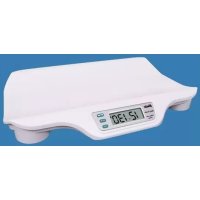
Symbol of a trash bin with crossed lines indicating no waste, and a solid black rectangle below (no text or labels)The Alecto BC-20 baby scale helps you to quickly and save measure the weight of your baby. You might also use the BC-20 to measure the weight of your baby before and after feeding her, determining how many food the baby has taken.
INSTALLATION
Power supply:
The BC-20 is battery powered:
- Turn the scale upside down and put it on a blanket (to prevent damages).
- Open the batterycover and install 4 batteries, 1.5V, size AA or penlite as indicated in the battery compartment. Mind the polarity (+ and -).
- Close the battery compartment. The scale is now ready for use
Only use batteries of the same brand and model.
The use of alkaline batteries is preferred.
Rechargeable batteries are not suitable because of their too low voltage.
Positioning of the scale:
* Place the scale on a flat, firm surface.
* Make sure all four feet of the scale have direct contact to the surface.
* Place the scale securely far from the edge or counter of the surface the scale is standing on.
SAFE USE
* Supervision by adults is always required.
* This product is not a toy and should consequently not be threaded like that.
* Never leave the baby alone with the scale but put the scale away when not in use.
* The scale is a precision instrument, do not drop it, jump on it or drop a heavy object onto it.
* Prevent water penetrating the scale.
MEASURING IN Kg OR Lb
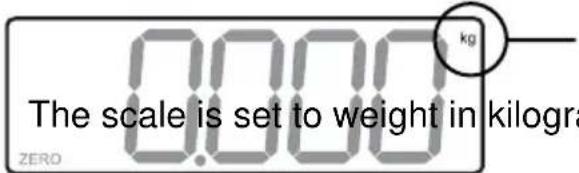
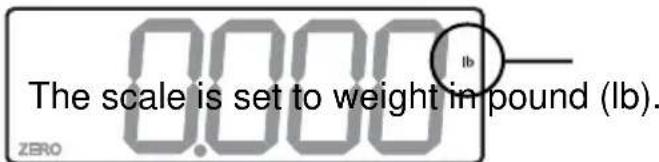
You can set the BC-20 to measure in Kilograms (kg) or in pounds (lb). The selected unit is displayed on the right side in the display.
-
Power-on the scale by pressing button on / off and wait until the display shows and the word [ ZERO ] lights.
-
Press button kg / lb to alter between kg and Lb.
USAGE
Pressing buttons:
To prevent unwanted power-on or power-off, the buttons must be pressed firmly. You will feel a click when a button is pressed correctly.
Power-on:
- Press button on / off. The display flashes for a couple of seconds.
- As soon as the display readout is 0000 and in the down left corner the word [ ZERO ] lights, the scale is ready for use.
Weighing:
- Power-on the scale as described previously.
If a towel is put on the scale and the display show its weight, press the on / off button again to reset the display to 0000. - Put the baby in the centre of the scale.
- As soon as the scale finished measuring, the display readout starts flashing and shows the weight of the baby.
Power-off:
- Press on / off key for 4 seconds to power-off the scale.
To safe batteries, the scale will switch-off automatically after 5 minutes of no use.
Memory:
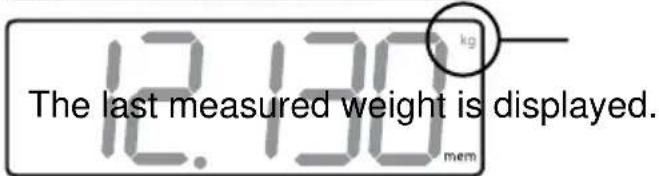
The last measured weight is automatically stored in memory. Use this memory for example to compare the weight of your baby before and after feeding.
- The display must show 0000
- Press button mem.
- The last measured weight is displayed, including the word [mem] in the right down corner of the display.
- Press again to return to the weighing mode.
Pay attention to first read the memory before making a new measurement. Every new measurement is automatically stored in memory, erasing the former stored weight.
GENERAL TIPS AND WARNINGS
Cleaning:
* Switch-off the BC-20 prior to start cleaning.
* For cleaning just use a damp cloth or common disinfection products. Do NOT use any aggressive cleaning fluids.
* Never submerge the scale.
Overload:
* The maximum weighing capacity of the BC-20 is 20Kg. To prevent damaging of the weighing mechanism, never place objects with a height of over 20.5Kg onto the scale.
Power:
* Replace the batteries as soon as the display shows [ Lo ].
* In case the scale is not used for a longer period (for example a couple of months), remove the batteries to prevent damage by leaking batteries.
Environment:
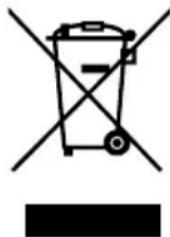
* At the end of the product lifecycle, you should not throw this product into the normal household garbage but bring the product to a collection point for the recycling of electrical and electronic equipments.
* Exhausted batteries may never be disposed of in household waste but must be handed in at your local depot for chemical waste.
natural_image
Symbol of a trash bin crossed with a diagonal line, no text or numbers presentStorage:
In case the scale is not used for a longer period:
* Remove the batteries to prevent damage by leaking batteries.
* Store the scale in an horizontal way; do not place the scale on one of its sides.
* Do not place heavy objects on the scale when storing.
* Store the scale on a dry location with a temperature of in between 10°C and 40 °C.
Service:
* The scale is factory calibrated. There are no adjustments to make or user service parts inside the scale.
* In case of a possible malfunction, we suggest to first replace the batteries. In case this does not help, please consult the Alecto service department on telephone number +31(0)73-6411355.
SPECIFICATIONS
Power supply: 4x 1,5Volt, size AA or penlite
Battery lifetime: ....> 1 year
Maximum load: 20 Kg
Graduation: 5 grams
Work temperature: 10 - 40°C (at <80% environmental humidity)
The BC-20 is not suitable for trade aims.
DISPLAY READOUT
The scale is ready to measure the weight.
(please mind the lighting of the word ZERO, this indicates
the correct zero-setting of the scale)
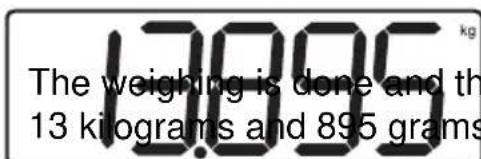
Flashing:
The weighing is done and the weight, in this example
13 kilograms and 895 grams, is displayed on the LCD.
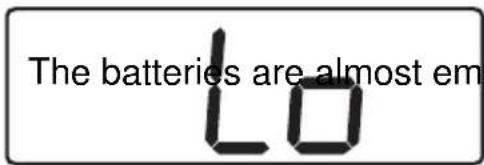
ty and must be replaced.
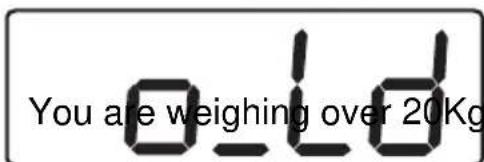
Overload:
DECLARATION OF CONFORMITY
The Alecto BC-20 complies with the essential requirements and provisions as described in the European Directive 1999/5/EC.
The declaration of conformity is available on the website WWW.ALECTO.INFO

WARRANTY
You have a guarantee of 12 MONTHS after the date of purchase of this scale. We guarantee during this period the free repair of defects caused by material- and construction faults. This at the importers discretion. It is only possible to claim to the guarantee when you enclose your purchase ticket with the BC-20.
HOW TO ACT:
If you notice a defect, consult the manual first. If this manual gives you no definite answer, consult your dealer with a clear description of your complaint. He will collect the device together with this guarantee card and the dated purchase ticket and he will take care of a prompt repair, respectively free sending to the importer.
THE GUARANTEE EXPIRES:
When used inexpert, faulty connections, leaking and faulty placed batteries, use of unoriginal parts or accessories, negligence and defects caused by fire, flood, stroke of lightning and natural disasters. With unqualified modifications or repairs by third persons. With incorrect transport without a suitable packing. If the device is not handed in with the correct filled in guarantee card and the purchase ticket.
All further responsibilities, in particular subsequent damages, are excluded.
Service Help

natural_image
Two black icons: a wrench and a person silhouette with a question mark, on white background (no text or symbols)


+31 (0) 73 6411 355