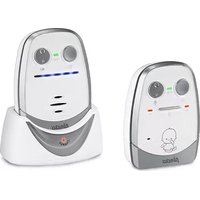
DBX-60 - Baby monitor ALECTO - Free user manual and instructions
Find the device manual for free DBX-60 ALECTO in PDF.


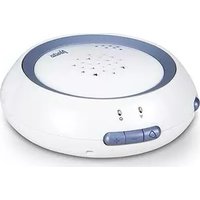
| Product type | Baby monitor with video camera |
| Brand | Alecto |
| Model | DBX-60 |
| Parent unit dimensions | Approximately 120 x 80 x 80 mm |
| Parent unit weight | Approximately 200 g |
| Baby unit dimensions | Approximately 65 x 65 x 90 mm |
| Baby unit weight | Approximately 180 g |
| Parent unit power supply | 5V/1A mains adapter (included) or rechargeable lithium-ion battery |
| Baby unit power supply | 5V/1A mains adapter (included) |
| Battery life (parent unit) | Approximately 10 hours in normal use |
| Range | Up to 300 meters in open field |
| Main functions | Infrared video monitoring, two-way audio, night light, temperature indicator |
| Screen | 2.8 inch color LCD screen |
| Camera resolution | 640 x 480 pixels |
| Night vision | Automatic infrared LED, range up to 5 meters |
| Audio | Built-in microphone and speaker, two-way conversation |
| Ambient temperature | Displays the temperature of the baby's room |
| Care and cleaning | Clean with a soft, dry cloth, do not use abrasive products |
| Security | Secure digital encryption to prevent interception |
| Spare parts and repairability | Mains adapter and rechargeable battery available as replacements |
| Warranty | 2 years |
Frequently Asked Questions - DBX-60 ALECTO
User questions about DBX-60 ALECTO
0 question about this device. Answer the ones you know or ask your own.
Ask a new question about this device
Download the instructions for your Baby monitor in PDF format for free! Find your manual DBX-60 - ALECTO and take your electronic device back in hand. On this page are published all the documents necessary for the use of your device. DBX-60 by ALECTO.
USER MANUAL DBX-60 ALECTO


Keen Ocean Industrial Ltd.
Keen Ocean Industrial Ltd.
POSSIBLES CAUSES ET SOLUTIONS:

5.3 STROMVERSORGUNG:
Netzteile:
7 TECHNISCHE DATEN
Keen Ocean Industrial Ltd.
4.1 ON/OFF SWITCHING 52
4.2 BATTERY CHECK 52
4.3 LINK CHECK....53
4.4 LISTENING 53
4.5 NIGHT LIGHT AND VOX LIGHT....53
4.6 MICROPHONE SENSITIVITY AND TRANSMISSION INDICATION....54
4.7 BELT CLIP....54
5 GENERAL INSTRUCTIONS AND TIPS
5.1 BATTERY CHECK AND BATTERY USE ....55
5.2 USING MULTIPLE BABY INTERCOMS 56
5.3 POWER SUPPLY....56
5.4 MAINTENANCE 56
5.5 ENVIRONMENT....57
6 DECLARATION OF CONFORMITY....57
7 TECHNICAL SPECIFICATIONS....57
8 PROBLEM-SOLVING 58
9 WARRANTY....59
1 INTRODUCTION
1.1 INTENDED USE:
The Alecto DBX-60 is a wireless baby intercom to remotely listen to sounds coming from the baby room.
Attention:
Only use the baby intercom as an additional peace of mind, it can never serve as a replacement for an adult or human (baby) sitter.
This baby intercom has a range of 1000 meters in an open field and up to 150 meters indoors; this range depends on local conditions (concrete walls, other baby intercoms, wireless phones, etc.).
Before every use, always check whether the baby intercom is functioning correctly. In addition to checking the baby intercom's range and connection, it's recommended to check its connection by ear while in use.
The DBX-60 may not be used for anything else besides detecting sounds within your own private surroundings; any person located in the room that's being listened to must be informed about the baby intercom being used.
You are not required to have a license for the use of this baby intercom. The system can be freely applied in any domestic situation. However, an interference-free signal transmission cannot always be guaranteed.
In case the DBX-60 is not being used, please always turn the device off using the power button.
2 OVERVIEWS
2.1 PARENT-UNIT OVERVIEW:


- power button:
- press and hold for 3 seconds to turn the parent-unit on or off
- sound indicators:
• indicate how loud the baby is crying
- also indicate the volume level during setup
- indicate the battery capacity after you briefly press the button
-
built-in speaker
-
power and battery indicator (see also chapter 5.1)
-
volume push-button:

-
belt clip, to carry the parent-unit with you or to hang it up somewhere
-
locking tab, to lock the bat- tery cover
-
recharging contacts
2.2 BABY-UNIT OVERVIEW:


- power button:
- press and hold for 3 seconds to turn the baby-unit on or off
- VOX indicator
- lights up when the night light is set to automatic mode (see also chapter 4.5)
-
built-in night light
-
built-in microphone
-
push-button for the night light:
- 1st push: light level 1, remains lit
• 2nd push: light level 2, remains lit
- 3rd push: light level 3, remains lit
- 4th push: light level 3, automatic: on when the baby is crying, off when the baby is quiet (in this case, also the VOX light (2) will turn on)
• 5th push: night light is off
- TX light:
• turns on when the baby-unit is activated because e.g. crying from the baby
- also flashes to indicate the VOX sensitivity level during setup
- VOX setup push-button:

sensitivity +
sensitivity -
- power and battery indicator (see also chapter 5.1)
- belt clip, to suspend the baby-unit from something
- locking tab, to lock the battery cover
- power adaptor connection
3 INSTALLATION
3.1 PARENT-UNIT:
The parent-unit is powered by the supplied battery pack. This battery pack can be charged using the supplied power adaptor combined with the charger.

-
Unlock the battery cover by depressing the locking tab and remove the battery cover from the parent-unit.
-
Insert the supplied battery pack into the parent-unit and connect the plug with the parent-unit. Pay attention, the plug only fits one way. Never force its connection.

ATTENTION: ONLY INSTALL THE SUPPLIED BATTERY PACK! INSTALLING DIFFERENT MODELS CAN CAUSE DAMAGE OR EVEN EXPLOSION.
-
Place the battery cover back onto the parent-unit and lock it using the locking tab.
-
Connect the power adaptor with the wider plug to the DC6V input at the rear of the charger and plug the power adaptor into a 230 Volts wall socket.

Only connect the supplied adaptor. Connecting any other power adaptor can cause damage to the baby intercom or even fire.
- Place the parent-unit onto the charger, briefly pressing it down to ensure proper contact; the battery indicator on the charger and the POWER indicator on the parent-unit will switch on and the battery pack will start charging. (Attention, the CHARGE indicator on the charger remains lit, even when the battery is fully charged. The POWER indicator on the parent-unit will switch off when the battery is fully charged).
3.2 BABY-UNIT:
The baby-unit is powered by the supplied power adaptor.
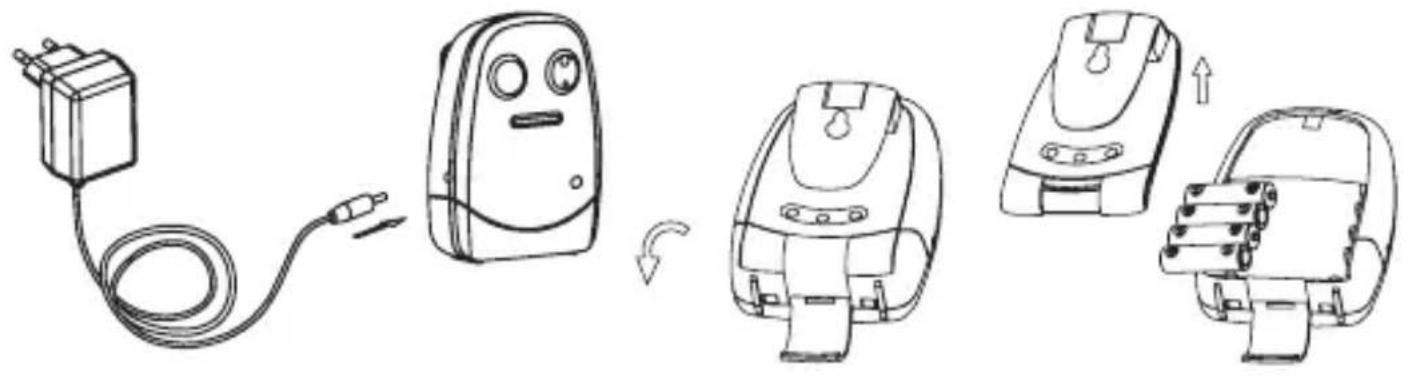

Only connect the supplied adaptor. Connecting any other power adaptor can cause damage to the baby intercom or even fire.
For mobile use, you can install 4 batteries (excl.).
- Unlock the battery cover by depressing the locking tab and remove the battery cover from the baby-unit.
- Install 4x ordinary alkaline batteries, 1.5 V , type AAA according the markings inside the battery compartment.
You may also install rechargeable batteries, but because the baby-unit is not provided with a charger function, you must recharge these batteries using an external battery charger.
- Place the battery cover back onto the baby-unit and lock it using the locking tab.
When connecting the power adapter, you can leave the batteries in place. By inserting the adaptor plug, the batteries will be automatically disconnected.
3.3 PLACEMENT TIPS:
- Do NOT place the baby-unit in bed with the baby, maintain a distance of 1 to 2 meters between the baby and the baby-unit.
• MAKE SURE THE BABY CANNOT TOUCH THE ADAPTOR CABLE. - Do not expose the baby-unit or parent-unit to direct sunlight or humid areas. This baby intercom is not water-proof, penetrating moisture can cause damage to the electronics.
4 USE
Don't forget that this baby intercom is merely an extra piece of mind.
The device can never replace the physical and monitoring presence of a parent or babysitter.
4.1 ON/OFF SWITCHING:
Press and hold the ⏻ button for 3 seconds to turn on the baby-unit or parent-unit.
Press and hold the ⏻ button again for 3 seconds to turn off the baby-unit or parent-unit.
4.2 BATTERY CHECK: (see also paragraph 5.1)
Baby-unit

When the POWER indicator remains lit, the power supply is OK (power adaptor is connected or batteries are full).
This indicator flashes when the battery capacity is low. In this case, please replace or recharge the batteries or connect the power adaptor.
Parent-unit

Immediately upon switching on the device, the sound indicators will indicate the battery capacity for the first 3 seconds:
5 indicators light up: battery capacity is sufficient for 20 to 25 hours of use.
3 or 4 indicators light up: battery capacity is sufficient for 10 to 20 hours of use.
1 or 2 indicators light up: battery capacity is insufficient, you should charge the batteries. While charging the batteries, you can keep on using the parent-unit.
While in use, you can also check the battery capacity of the parent-unit by briefly pressing the button. The sound indicators will then show the battery capacity for several seconds.
4.3 LINK CHECK:
As soon as you switch on the parent-unit, it will start searching for the baby-unit.
If the parent-unit still hasn't located the baby-unit after 30 seconds (because it's still turned off or out of range), the device will sound a warning tone every 10 seconds while the 5 sound indicators will light up. This warning stops as soon as the parent-unit makes a connection with the baby-unit.
You can turn off this warning by briefly pressing the volume button.
4.4 LISTENING:
Reception volume:
You can adjust the volume of the parent-unit using the ⏻ button
○ volume up
- volume down

button
- You can choose from 5 volume levels or turn the sound off
- Upon reaching the maximum or minimum volume, an extra beep tone will sound when you press the ○ or ○ button
- During setup, the sound indicators will show the volume level
Optical sound notification:
The parent-unit is provided with 5 sound indicators. The louder the sound is being picked up from the baby-unit, the more indicators will light up. This way you still have an indication that the baby is crying, even when the sound of the parent-unit is switched off.
The baby-unit is provided with a built-in night light. You can control this night light by repeatedly pressing the 🎨 button.
- 1st press: night light remains lit on light level 1
- 2nd press: night light remains lit on light level 2
- 3rd press: night light remains lit on light level 3
- 4th press: night light turns on/off automatically (on when the baby is crying, off when the baby is quiet; in this setting, also the VOX light is lit);
- 5th press: night light switched off
4.6 MICROPHONE SENSITIVITY AND TRANSMISSION INDICATION:
You can set at which sound level the baby-unit must start transmitting by pressing the Ⓞ button on the baby-unit
○ higher sensitivity
- lower sensitivity
During setup, the TX light will flash to indicate the selected level:
- Flashes 1x: the baby must cry loudly before the baby-unit starts transmitting
...
- Flashes 4x: the baby-unit will start transmitting at any small sound
- Flashes 5x: the baby-unit is sending continuously, transmitting every small sound
While in use, the TX light will switch in when the baby-unit is transmitting sounds to the parent-unit. When you are in the baby room, you can use this light to check at which sound level the baby-unit starts transmitting.
4.7 BELT CLIP:
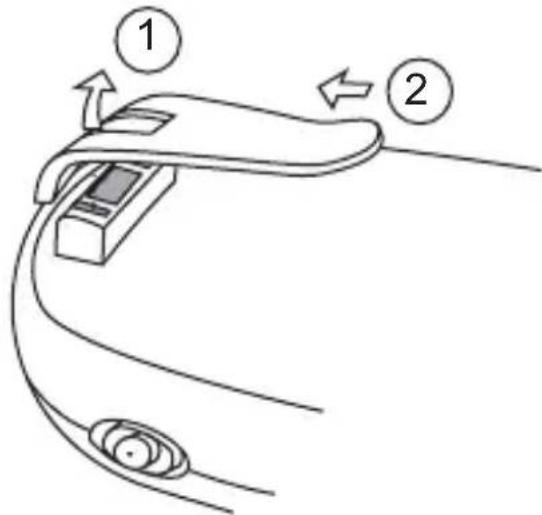
Both the baby-unit and the parent-unit are provided with a belt clip, which you can use to carry the unit by attaching to your clothing or you can suspend the unit somewhere.
If desired, you can detach the belt clip:
-
At the upper part of the belt clip, push the middle piece back.
-
Simultaneously, press the entire belt clip upwards until it releases from the back part.
5 GENERAL INSTRUCTIONS AND TIPS
5.1 BATTERY CHECK AND BATTERY USE (*):

POWER indicator on the parent-unit:
Continuously red: battery is being charged. after approx. 4 hours the battery is fully charged and this indicator will turn off
Flashing red: battery is not installed or defective
Continuously green: parent-unit is switched on when the battery is fully charged, you can use the parent-unit for approx. 20 - 24 hours
Flashing green: this indicator will start flashing in green approx.
10 -15 minutes before the batteries are exhausted while a warning tone will sound every 30 seconds; now immediately place the parent-unit onto the charger to charge the batteries (while recharging, you can keep on using the parent-unit)
See also paragraph 4.2 for a manual battery check..

CHARGE indicator on the charger:
Continuously red: the adaptor is connected and the parent-unit is placed onto the charger: attention: this indicator will turn off when the batteries are fully charged.

POWER indicator on the baby-unit:
Continuously green: batteries are full with the batteries fully charged, you can use the baby-unit for approx. 12 - 16 hours
Flashing green: batteries are weak (from the moment this indicator starts flashing, you can still use the baby-unit for approx. 1 to 2 hours).
*: The times mentioned above are references only and depend on settings and use (a higher volume, the night light being switched, how often and for how long the baby is crying, the quality of the batteries, etc.).
5.2 USING MULTIPLE BABY INTERCOMS:
The technology of the DBX-60 allows for the simultaneous and strings-free use of multiple complete baby intercom sets (baby-unit and parent-unit) next to each other, to monitor multiple baby rooms at the same time; each parent/baby-unit combination is provided with its own unique code, making it impossible to receive DBX-60 signals from other baby intercoms or for other baby intercoms to receive the sound from your baby.
It is not possible to expand your DBX-60 with individual baby-units or parent-units.
5.3 POWER SUPPLY:
Adaptors:
When using adaptors, only use the supplied adaptors. Connecting power adaptors other than the supplied adaptors can cause damage to the electronics of the baby intercom.
Batteries:

In the parent-unit, you may only install a RECHARGEABLE battery pack of the type Lithium-Polymer, voltage 3.7V, power 600mAh.
In the baby-unit, you can install any normal or rechargeable batteries of the type AAA or pencil cell. However, rechargeable batteries must be charged using a separate battery charger.
5.4 MAINTENANCE:
Only clean the baby monitor with a moist cloth; never use chemical cleaners. Before any cleaning, you must disconnect the adapters. Before cleaning, any connected power adaptors must be disconnected.
5.5 ENVIRONMENT:
The packaging of this baby video monitor can be discarded as waste paper.
At the end of the product's life span, it must not be disposed of as normal domestic waste. You must bring it to a collection point for the recycling of electric and electronic equipment.

You must bring exhausted or defective batteries to your local depot for small chemical waste or to dedicated battery collection points. Never discard batteries as normal domestic waste.
6 DECLARATION OF CONFORMITY
The Alecto DBX-60 meets all essential requirements and provisions as described in the European Directive 1999/5/EC.
The declaration of conformity is available on the website WWW.ALECTO.NL

7 TECHNICAL SPECIFICATIONS
Frequency: 863 - 870 MHz
No. of channels: 53 (set automatically)
Baby unit power: power adapte: 6VDC 500mA (inck) + S04-003-0060-00500, Keen Ocean Industrial Ltd.
Parent unit power: power adapte: 6VDC 500mA -(incl.) + S04-003-0060-00500, Keen Ocean Industrial Ltd. battery pack: LiPo, 3.7V 600mAh rechargeable (incl.)
Transmission power: 20 mW max.
Recommended ambient temperature: 0° C tot 50° C
Storage temperature: 0°C tot 60°C
8 PROBLEM-SOLVING
PROBLEM:
POSSIBLE CAUSE AND SOLLUTION:
Warning tones from the parent-unit:
The communication between parent-unit and baby-unit is interrupted. This interruption can be caused by external interference, wait for a while to see if the connection restores itself. If this happens often, the parent-unit and baby-unit may be at their maximum range, try to reduce the distance between the two devices.
Possible additional checks:
- check whether the baby-unit is switched on
- check the power to the baby-unit
- check the distance between parent-unit and baby-unit, reduce if required
No sound from the parent-unit:
The volume is turned off, turn the volume on. The microphone sensitivity is set incorrectly. Refer to paragraph 4.5 and set a more sensitive trigger level (level-4 or level-5).
Beep tone from the parent-unit:
The volume is set too high, creating feedback.
• decrease the volume at the parent-unit
- increase the distance between parent-unit and baby-unit
For additional information, visit: www.aletco.nl
9 WARRANTY
For the Alecto DBX-60 you have a warranty of 24 months from the date of purchase. During this period, we guarantee the free repair of defects caused by material and workmanship errors. All this subjected to the final assessment of the importer.
If you notice any defect, first refer to the user's manual. If the manual provides no definite answer, please contact the supplier of this baby video monitor or contact customer service of Alecto on telephone number 073 6411 355 in the Netherlands 03 238 5666 in Belgium, 018 0503 0085 in Germany or via internet www.alecto.nl
THE WARRANTY BECOMES NULL AND VOID:
In case of improper use, incorrect connections, leaking and/or incorrectly installed batteries, use of unoriginal parts or accessories, negligence and in case of defects caused by moisture, fire, flooding, lightning and natural disasters. In case of unauthorised modifications and/or repairs performed by third parties. In case of incorrect transportation of the device without adequate packaging and when the device is not accompanied by this warranty card and proof of purchase. The warranty does not cover connecting cables, plugs and batteries.
All further liability, especially concerning any consequential damages, is excluded.



- POSSIBLES CAUSES ET SOLUTIONS
- 5.3 STROMVERSORGUNG
- NETZTEILE
- 7 TECHNISCHE DATEN
- 5 GENERAL INSTRUCTIONS AND TIPS
- 6 DECLARATION OF CONFORMITY....57
- 1 INTRODUCTION
- 1.1 INTENDED USE
- ATTENTION
- 2 OVERVIEWS
- 2.1 PARENT-UNIT OVERVIEW
- 2.2 BABY-UNIT OVERVIEW
- 3 INSTALLATION
- 3.1 PARENT-UNIT
- ATTENTION: ONLY INSTALL THE SUPPLIED BATTERY PACK! INSTALLING DIFFERENT MODELS CAN CAUSE DAMAGE OR EVEN EXPLOSION
- 3.2 BABY-UNIT
- 3.3 PLACEMENT TIPS
- 4 USE
- 4.1 ON/OFF SWITCHING
- 4.2 BATTERY CHECK: (SEE ALSO PARAGRAPH 5.1)
- BABY-UNIT
- PARENT-UNIT
- 4.3 LINK CHECK
- 4.4 LISTENING
- RECEPTION VOLUME
- OPTICAL SOUND NOTIFICATION
- 4.6 MICROPHONE SENSITIVITY AND TRANSMISSION INDICATION
- 4.7 BELT CLIP
- 5.1 BATTERY CHECK AND BATTERY USE (*)
- POWER INDICATOR ON THE PARENT-UNIT
- CHARGE INDICATOR ON THE CHARGER
- POWER INDICATOR ON THE BABY-UNIT
- 5.2 USING MULTIPLE BABY INTERCOMS
- 5.3 POWER SUPPLY
- ADAPTORS
- BATTERIES
- 5.4 MAINTENANCE
- 5.5 ENVIRONMENT
- 6 DECLARATION OF CONFORMITY
- 7 TECHNICAL SPECIFICATIONS
- 8 PROBLEM-SOLVING
- PROBLEM
- POSSIBLE CAUSE AND SOLLUTION
- 9 WARRANTY
- THE WARRANTY BECOMES NULL AND VOID
Brand : ALECTO
Model : DBX-60
Category : Baby monitor