MHA043 - Hi-fi system Marquant - Free user manual and instructions
Find the device manual for free MHA043 Marquant in PDF.



| Brand | Marquant |
| Model | MHA043 |
| Product Type | Hi-Fi system |
| Power Supply | AC 230-240 V, 50 Hz |
| Radio Frequency Bands | FM 88-108 MHz, AM 540-1600 kHz |
| Speakers | 4 ohms, 5 W x 2 |
| Output Power | 2 x 2 W RMS @ 10% THD |
| Headphone Impedance | 32 ohms |
| CD Player | Yes, MP3 compatible |
| USB Port | Yes |
| Radio | AM/FM with FM stereo |
| Remote Control | Yes, AAA batteries (not included) |
| Dimensions (approx.) | Not specified in the manual |
| Weight (approx.) | Not specified in the manual |
| Cleaning | Damp cloth, do not use harsh chemicals |
| Safety Instructions | Do not expose to water, do not block ventilation, unplug during thunderstorms |
| Repairability | Call a qualified professional |
Frequently Asked Questions - MHA043 Marquant
User questions about MHA043 Marquant
0 question about this device. Answer the ones you know or ask your own.
Ask a new question about this device
Download the instructions for your Hi-fi system in PDF format for free! Find your manual MHA043 - Marquant and take your electronic device back in hand. On this page are published all the documents necessary for the use of your device. MHA043 by Marquant.
USER MANUAL MHA043 Marquant
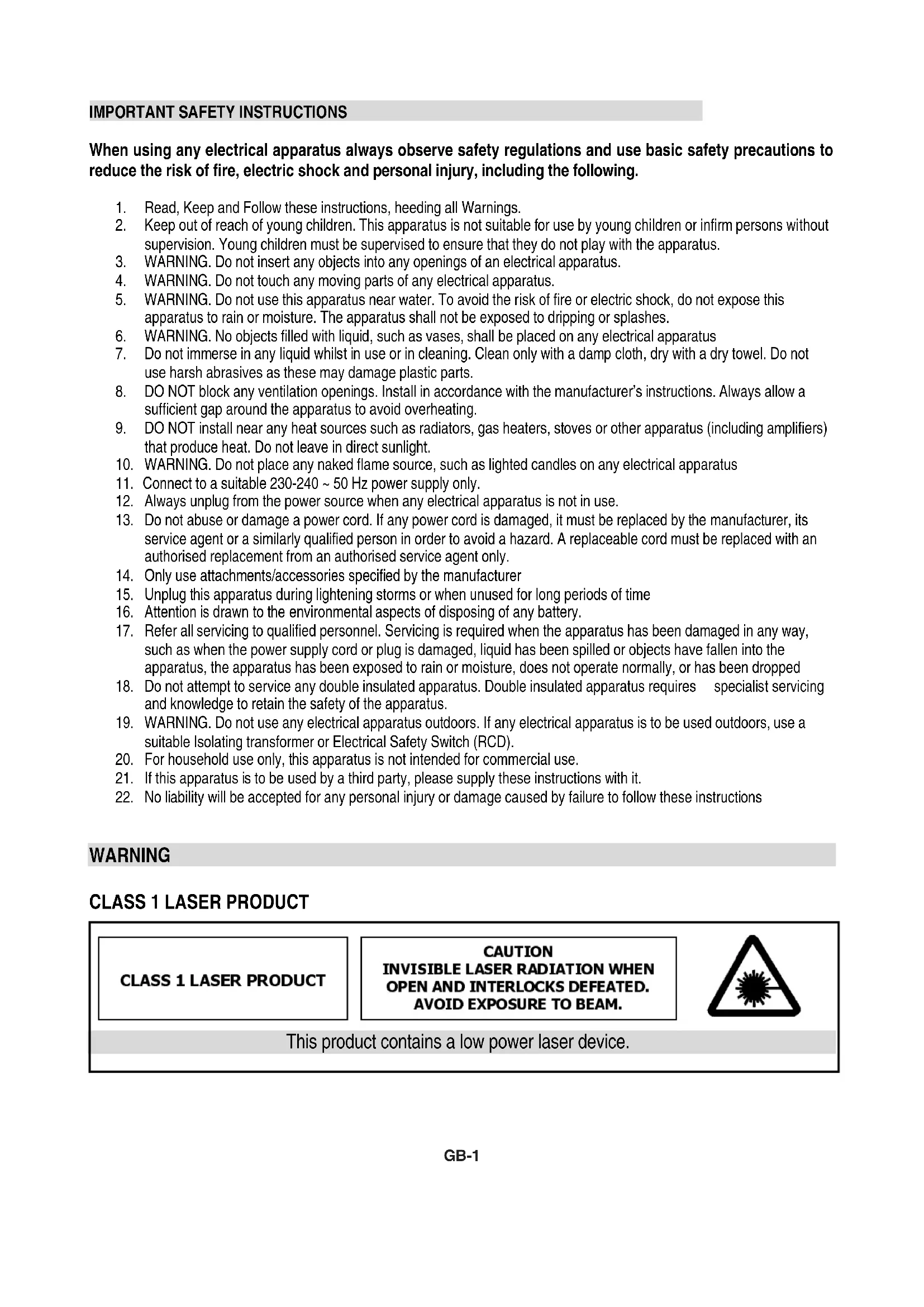
When using any electrical apparatus always observe safety regulations and use basic safety precautions to reduce the risk of fire, electric shock and personal injury, including the following.
- Read, Keep and Follow these instructions, heeding allWarnings.
- Keep out of reach of young children. This apparatus is not suitable for use by young children or infirm persons without supervision. Young children must be supervised to ensure that they do not play with the apparatus.
- WARNING. Do not insert any objects into any openings of an electrical apparatus.
- WARNING. Do not touch any moving parts of any electrical apparatus.
- WARNING. Do not use this apparatus near water. To avoid the risk of fire or electric shock, do not expose this apparatus to rain or moisture. The apparatus shall not be exposed to dripping or splashes.
- WARNING. No objects filled with liquid, such as vases, shall be placed on any electrical apparatus
- Do not immerse in any liquid whilst in use or in cleaning. Clean only with a damp cloth, dry with a dry towel. Do not use harsh abrasives as these may damage plastic parts.
- DO NOT block any ventilation openings. Install in accordance with the manufacturer's instructions. Always allow a sufficient gap around the apparatus to avoid overheating.
- DO NOT install near any heat sources such as radiators, gas heaters, stoves or other apparatus (including amplifiers) that produce heat. Do not leave in direct sunlight.
- WARNING. Do not place any naked flame source, such as lighted candles on any electrical apparatus
- Connect to a suitable 230-240 ~ 50 Hz power supply only.
- Always unplug from the power source when any electrical apparatus is not in use.
- Do not abuse or damage a power cord. If any power cord is damaged, it must be replaced by the manufacturer, its service agent or a similarly qualified person in order to avoid a hazard. A replaceable cord must be replaced with an authorised replacement from an authorised service agent only.
- Only use attachments/accessories specified by the manufacturer
- Unplug this apparatus during lightening storms or when unused for long periods of time
- Attention is drawn to the environmental aspects of disposing of any battery.
- Refer all servicing to qualified personnel. Servicing is required when the apparatus has been damaged in any way, such as when the power supply cord or plug is damaged, liquid has been spilled or objects have fallen into the apparatus, the apparatus has been exposed to rain or moisture, does not operate normally, or has been dropped
- Do not attempt to service any double insulated apparatus. Double insulated apparatus requires specialist servicing and knowledge to retain the safety of the apparatus.
- WARNING. Do not use any electrical apparatus outdoors. If any electrical apparatus is to be used outdoors, use a suitable Isolating transformer or Electrical Safety Switch (RCD).
- For household use only, this apparatus is not intended for commercial use.
- If this apparatus is to be used by a third party, please supply these instructions with it.
- No liability will be accepted for any personal injury or damage caused by failure to follow these instructions
WARNING
CLASS 1 LASER PRODUCT
CLASS 1 LASER PRODUCT
CAUTION INVISIBLE LASER RADIATION WHEN OPEN AND INTERLOCKS DEFEATED. AVOID EXPOSURE TO BEAM.

This product contains a low power laser device.
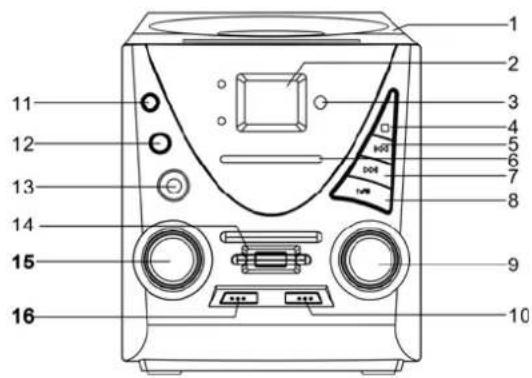
CONTROLS
- CD OPEN/CLOSE DOOR
- CD DISPLAY
- REMOTE SENSOR
- STOP BUTTON
- SKIP-B BUTTON
- FM/AM BAND SCALE
- SKIP+ BUTTON
- PLAY/PAUSE USB MODE BUTTON
- VOLUME + - BUTTON
- FUNCTION SELECTOR
11.PROG.BU TTON - MODE BUTTON
- PHONES JACK
- USB JACK
- TUNING CONTROL
- BAND SELECTOR
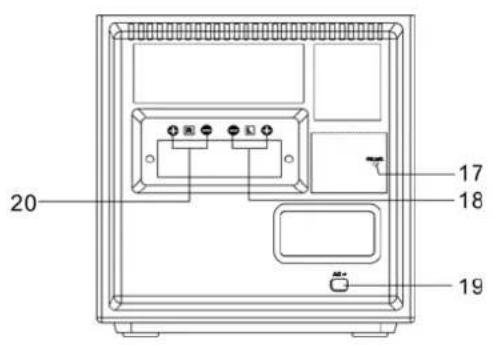
- FM ANTENNA
- SPEAKERS Left
- POWER cord
- SPEAKERS Right
REMOTE CONTROL FUNCTIONS
Preparation before use
- Installing batteries in the remote control unit
- Remove the battery cover from the back of the remote control unit.
- Insert two "AAA \ UN-4" size batteries.
- Insert the batteries with the and terminals matching the indication inside the battery compartment.
- Replace the cover.
Battery replacement
When the remote control operation becomes unstable or t he distance from which the remote control works is shorter, replace the batteries with new ones.
Using the remote control unit
To use the remote unit, point at the REMOTE SENSOR and press the buttons gently and firmly. Remote control operation is possible within approximate 18ft(6m). However, since the remote control range is less when the unit is used at an angle, use directly in front of the REMOTE SENSOR, for maximum distance.
Do not expose the REMOTE SENSOR to strong light (direct sunlight or artificial lighting) and make sure that there are no obstacles between the REMOTE SENSOR and the remote control unit.
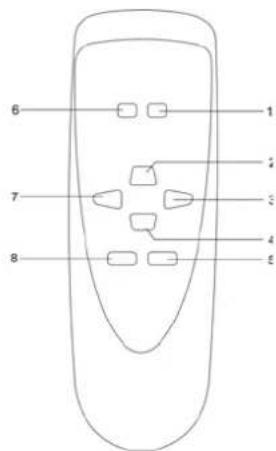
- FOLDER
▶▶按钮 - USB MODE/PLAY/PAUSE button
- SKIP + button
- STOP button
5.PROG button - FOLDER I button
- SKIP - button
- MODE button
CONNECTING SPEAKERS
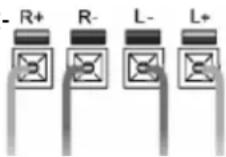
Connect the speakers to the red and black terminals on the back of the unit as shown. Use the R-terminals for the right speaker and L-terminals for the left speaker. Flip down red or black terminal flap; insert the speaker wire and release flap to lock the wire in place.
MAINS CONNECTION
Make sure that all the components and speakers are correctly connected.
Check that the rated voltage of your units matches the voltage of your power supply (230V-240VAC~50Hz)
Plug the AC Plug into the AC outlet.
HEADPHONES
Be sure that your headphones have a 3.5mm stereo plug with an impedance of 8-32 Ohms. When the headphones are connected the speakers will automatically mute.
- Press the power button to switch on the unit.
- S@t the function selector to the RADIO position.
- Select the wave band (AM, FM or FM ST) by using the BAND selector.
Tune in your desired radio station by turning the Tuning knob. - Switch off by setting the function switch to the CD position or pressing the power button
NOTE: for best FM radio reception, extend out the Fm antenna cord. For AM reception, a built in ferrite antenna receives the signals. Adjust the reception quality by turning the entire unit.
When the FM stereo signals are too weak or there is too much background noise it is better to switch the band selector to FM (mono) position.
PLAYING A COMPACT DISC
- Set the function selector to CD.
Press the CD-open button, place a disc in the centre with the label side up and close the CD door gently.
The total number of tracks available will be shown in the display - Pressing the PLAY button after inserting a CD will start the first track playing.
To pause the track, press the PLAY / PAUSE button while the track is playing. To return to normal playback press the PLAY / PAUSE button once more. - To stop the CD playing press the STOP button
SELECTING A DESIRED TRACK IN STOP MODE
Press SKIP / SEARCH Up or Down until the desired track number appears on the LCD display.
Press PLAY / PAUSE to begin playing that selected track. The selected track number will appear on the LCD display.
- You can skip forward to another track by pressing the SKIP Up button. The tracks will skip forward once each time the button SKIP button is pressed.
- Pressing the SKIP Down button while in play mode will return you to the beginning of the track being played. Pressing the button more than once will skip down a track each time it is pressed.
SEARCHING FOR A PASSAGE OF PLAY
While the song is playing, if you press and hold the SKIP Up / Down button you can listen to the track at a high speed forward or backwards to find a particular passage of play. The sound will be played faster than normal but at a reduced volume. Play will return to normal when the SKIP up / down button is released.
PROGRAMMING TRACKS
You can program in up to 20 tracks in any desired order for programmed playback.
- Set the FUNCTION switch to CD
- Press the PROGRAM button
Press the SKIP Up / Down button to select the track number that you wish to program in
Once you have selected the desired track number press the PROGRAM button - Repeat steps 2 & 4 to program in more tracks.
Once you have programmed in all the tracks you want, press the PLAY / PAUSE button to begin playback of the programmed tracks. The playback will begin at the start of the first programmed track
A stored program will be erased when the function switch is moved to the Radio position or the unit is turned off.
REPEAT MODE
To repeat one or all tracks press the REPEAT button before or during playback. Pressing the REPEAT button once will repeat the current track only, pressing it twice will repeat the entire CD, pressing three times will turn the repeat function off.

Playing MP3 disc
- Set the function select to CD/MP3/USB mode
The total number of track available will be shown in the display - Press the play button will start the fist track playing
- To pause the track, press the Play/Pause button while the track is playing to return to normal playback press the Play/Pause button once more
To select the Folder, use the remote control press the Folder |<< and | to select next folder - To stop the CD playing press the stop button
Programming Tracks
- You can program in up to 10 Tracks in any desired order for programmed playback.
- Set the function switch to CD/MP3/USB
Press the program button - Press the skip up/down or Folder | < < and > > | on remote control to select the track number or folder that you wish to program in
- Once you have selected the desired track number press the program button
Repeat steps 2 - 4 to program in more tracks
Once you have programmed in all the tracks you want, press the PLAY/PAUSE button to begin playback of the programmed tracks. The playback will begin at the start of the first prgorammed track.
A stored program will be erased when the function switch is moved to the radio position or the unit is turned off.
USB Function
- Set the function selector to CD/MP3/USB mode
- Press the stop button and hold a few seconds
Then the display will shown the total number of track for the USB. - Press play to start to play the song
TECHNICAL SPECIFICATION
Power supply: AC 230V-240V 50Hz
Receiving Bands: AM, FM (stereo)
Tuning Range: FM 88 - 108 MHz
AM 540-1600 KHz
- Speaker: 4 Ohm 5W x 2
Output Power: 2 x 2W RMS @ 10% THD - Headphone Impedance: 32 Ohm
BELANGRIJKE VEILIGHEIDSINSTRUCTIES
KLASSE 1 LASERPRODUCT
KLASSE 1 LASERPRODUCT
LET OP ONZICHTBARE LASERRADIATIE TijdENS OPENING EN KAPOTTE VERGRENDELING. VERMIJD BLOOTSTELLING AAN STRAAL.

REPEAT MODE HERHAALMODUS
R E P R O D U C I R U N
1ERE CLASSE DE PRODUIT LASER
1ERE CLASSE DE PRODUIT LASER
ATTENTION
RADIATION LASER INVISIBLE QUAND OUVERT ET DEVEROUILLER.
EVITER D'EXPOSER AU FEU.

- WARNING
- CLASS 1 LASER PRODUCT
- CONTROLS
- REMOTE CONTROL FUNCTIONS
- Preparation before use
- Using the remote control unit
- CONNECTING SPEAKERS
- MAINS CONNECTION
- HEADPHONES
- PLAYING A COMPACT DISC
- SELECTING A DESIRED TRACK IN STOP MODE
- SEARCHING FOR A PASSAGE OF PLAY
- PROGRAMMING TRACKS
- REPEAT MODE
- Playing MP3 disc
- USB Function
- TECHNICAL SPECIFICATION
- BELANGRIJKE VEILIGHEIDSINSTRUCTIES
- KLASSE 1 LASERPRODUCT
- REPEAT MODE HERHAALMODUS
- R E P R O D U C I R U N
- 1ERE CLASSE DE PRODUIT LASER
Brand : Marquant
Model : MHA043
Category : Hi-fi system