
GPS Car Kit - Built-in kit MAGELLAN - Free user manual and instructions
Find the device manual for free GPS Car Kit MAGELLAN in PDF.



| Product type | In-dash kit for car GPS |
| Brand | Magellan |
| Model | GPS Car Kit (N269) |
| Compatibility | iPhone and iPod touch (30-pin connector) |
| Power supply | 12 V via cigarette lighter (USB cable included) |
| Connectivity | Bluetooth for pairing and hands-free calls |
| Mounting | Suction cup for windshield or dashboard |
| Device charging | Yes, via the built-in connector |
| Adjustment | Adjustable retaining arm with release button; reversible adjustment block for uniform spacing |
| Safety | Do not obstruct airbag deployment; obey traffic laws |
| Compliance | Directive 1999/5/EC |
| Included accessories | Mount with suction cup, USB power cable |
| Primary use | GPS navigation and hands-free calling via smartphone |
| Installation | Easy, no special tools required |
| Maintenance | Clean the installation area before attaching |
| Weight | Approximately 150 g (estimated) |
| Dimensions | Approximately 10 x 5 x 3 cm (estimated) |
Frequently Asked Questions - GPS Car Kit MAGELLAN
User questions about GPS Car Kit MAGELLAN
0 question about this device. Answer the ones you know or ask your own.
Ask a new question about this device
Download the instructions for your Built-in kit in PDF format for free! Find your manual GPS Car Kit - MAGELLAN and take your electronic device back in hand. On this page are published all the documents necessary for the use of your device. GPS Car Kit by MAGELLAN.
USER MANUAL GPS Car Kit MAGELLAN
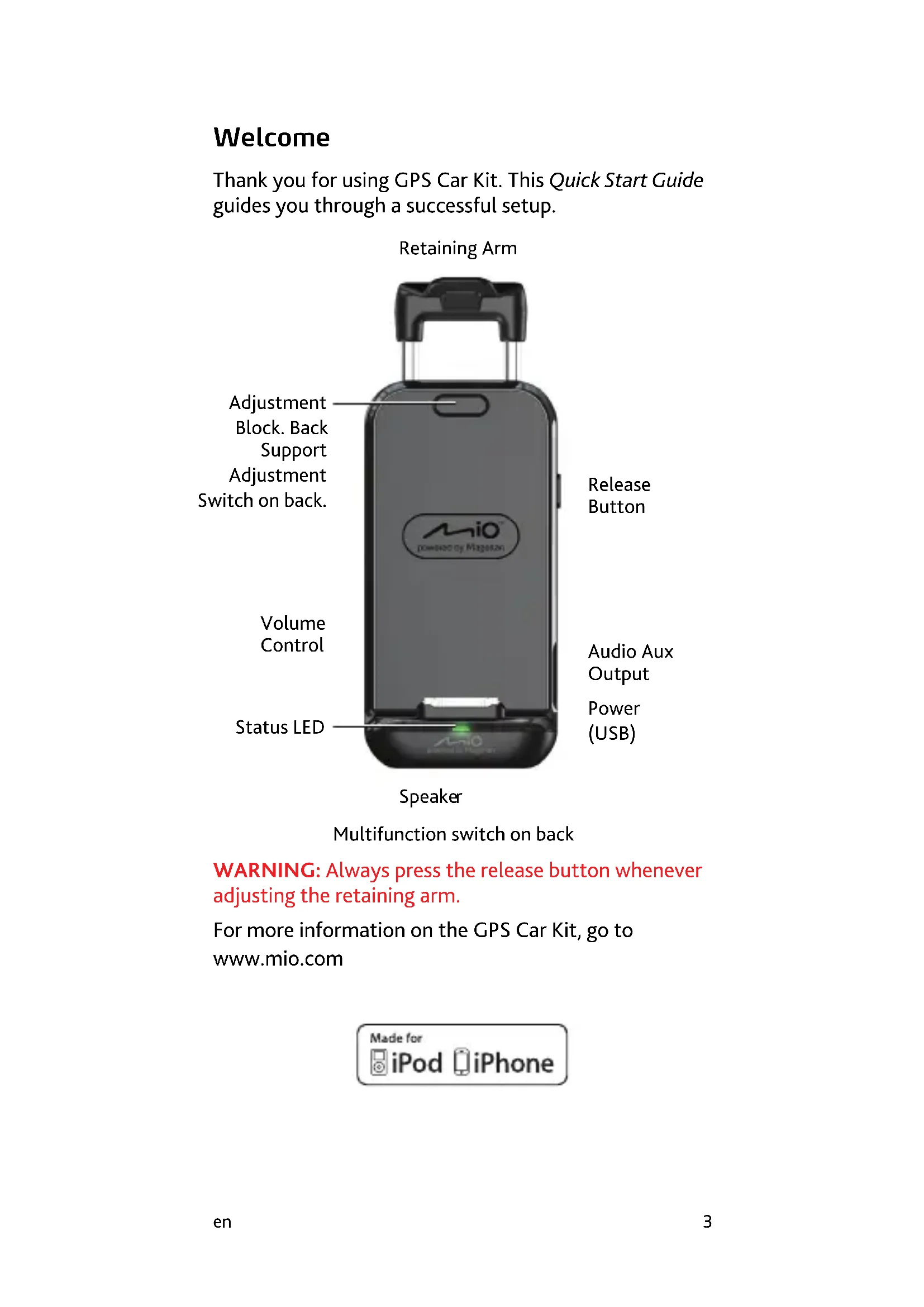
Thank you for using GPS Car Kit. This Quick Start Guide guides you through a successful setup.
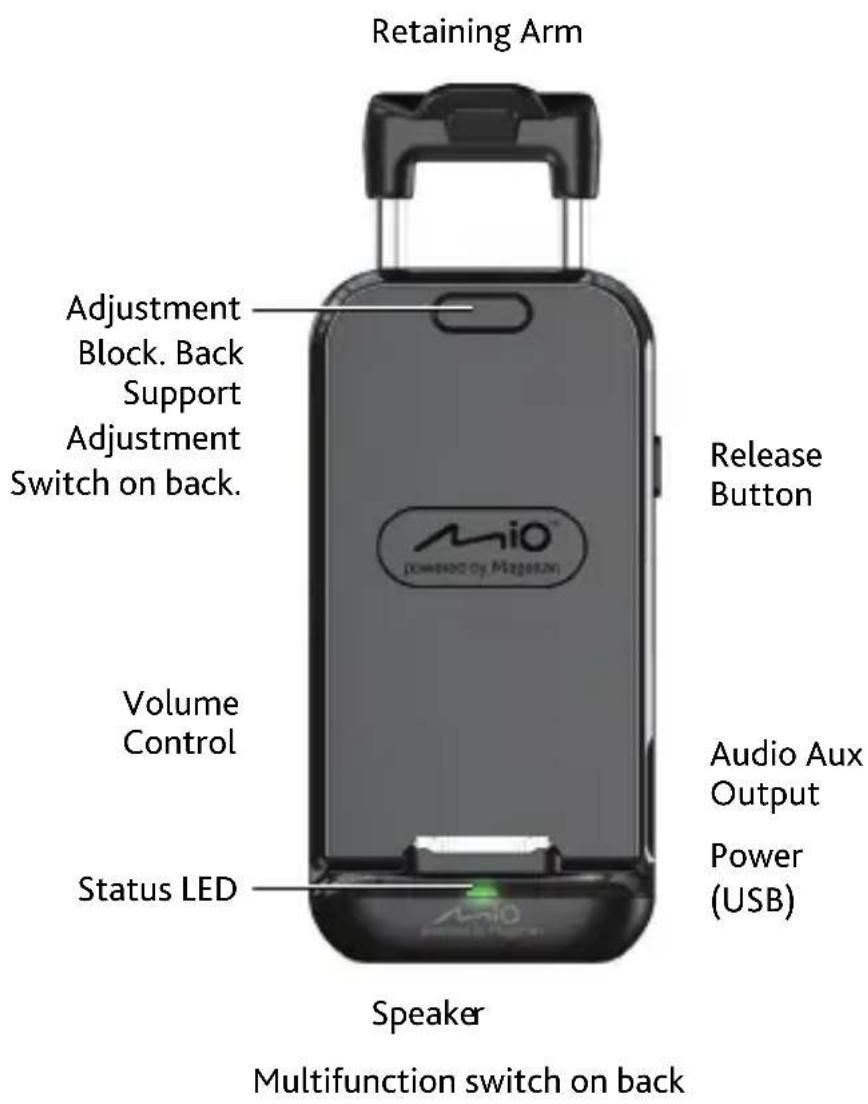
WARNING: Always press the release button whenever adjusting the retaining arm.
For more information on the GPS Car Kit, go to www.mio.com

Installation
Please do not place your iPhone® or iPod touch® into the GPS Car Kit until instructed to do so.
Assembling
Assemble the GPS Car Kit as shown. Do not tighten the retaining ring.
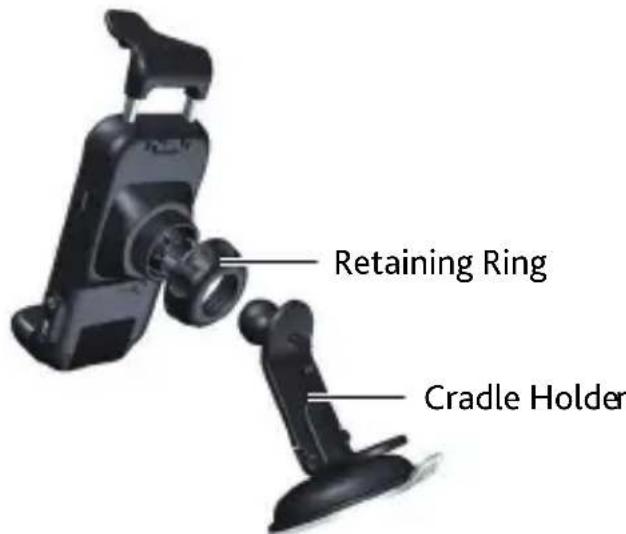
Press the release button and raise the retaining arm all the way to the top.
Inserting your iPhone into the GPS Car Kit
Slide your iPhone or iPod touch into the connector on the bottom of the GPS Car Kit and then gently push your iPhone or iPod touch towards the GPS Car Kit.
Press the release button and push down on the retaining arm to lock your iPhone or iPod touch in place.
Checking for an uneven gap
The gap between the iPhone or iPod touch and the GPS Car Kit should be even. If it is uneven, you can slide the adjustment switch on the back to push out the adjustment block until the gap at the top is the same as the gap at the bottom.
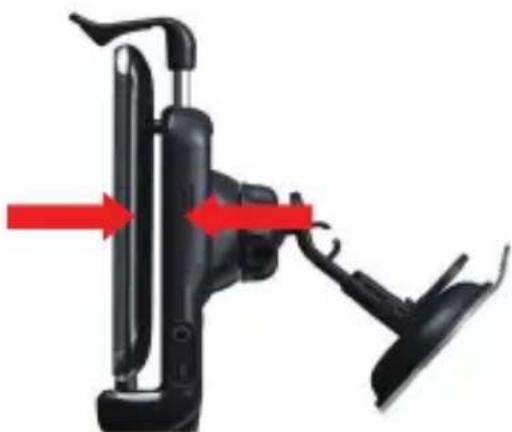
(Please note that if it is still uneven, you will need to remove your device. Then pull out the adjustment block, rotate it 180^ and place it back in the GPS Car Kit. This will increase the thickness of the adjustment block.)
Mounting the GPS Car Kit in your vehicle
Before mounting the GPS Car Kit you should remove your iPhone or iPod touch by lifting the front tab on the retaining arm and rotating your iPhone slightly forward.
When mounting the GPS Car Kit in your vehicle please keep these important guidelines in mind...
- Check local vehicle laws regarding mounting devices on windshields.
- Make sure not to mount the GPS Car Kit where it could be dislodged should your airbags deploy.
- Likewise, make sure that the power cable would not be dislodged should the airbags deploy.
Clean the area where the GPS Car Kit will be placed. Dry the area thoroughly before continuing.
Press the GPS Car Kit base firmly against the windshield or dash surface.
Push the suction cup arm down, locking the GPS Car Kit to the surface.
Applying power
Connect the USB end of the power cable to the GPS Car Kit. Connect the other end of the cable to a vehicle power receptacle.
Reinstall your iPhone into the GPS Car Kit and adjust for proper viewing.
When making viewing adjustments, always hold the assembly by the GPS Car Kit and not your iPhone.
Make any final adjustments for proper viewing and tighten the retaining ring.
Bluetooth® pairing
When the GPS Car Kit is first powered on, Bluetooth is automatically set to discovery mode and ready to pair with a new device.
- Connect the GPS Car Kit to power.
- In the iPhone Settings Menu, turn on BlueTooth.
- Under Devices, select "Mio GPS Car Kit".
- When prompted to pair with the GPS Car Kit, press Yes. If you are prompted for a pass code or device PIN, enter 1234.
- GPS Car Kit will connect with your iPhone.
- Pairing is now complete.
Once paired, the GPS Car Kit will automatically connect with the iPhone when it is in range.
Declaration of Conformity

For regulatory identification purposes, GPS Car Kit is assigned a model number of N269.
Hereby, Mio Technology declares that this N269 is in compliance with the essential requirements and other relevant provisions of Directive 1999/5/EC.
Visit Mio website (www.mio.com) for the full text of the declaration for your device.
All brand and product names are trademarks or registered trademarks of their respective companies.
Velkommen
Brand : MAGELLAN
Model : GPS Car Kit
Category : Built-in kit