SE211 - Sports Watch OREGON SCIENTIFIC - Free user manual and instructions
Find the device manual for free SE211 OREGON SCIENTIFIC in PDF.



| Product Type | Heart rate monitor sports watch |
| Brand | Oregon Scientific |
| Model | SE211 (VIBRA Trainer Fit) |
| Watch power supply | 1 lithium battery 3V CR2032 |
| Chest strap power supply | 1 lithium battery 3V CR2032 |
| Display | LCD with backlight |
| Watch water resistance | 50 meters (do not press buttons underwater) |
| Chest strap water resistance | Splash resistant |
| Transmission | Wireless, digital coding, range ~63 cm |
| Heart rate measurement range | 30 to 240 bpm |
| Adjustable heart rate limits | Min: 30-220 bpm, Max: 80-240 bpm |
| Smart training program | Warm-up (5,10,15 min), exercise (up to 99h59min), recovery (3 min) |
| Stopwatch | Up to 99:59:59, 1/100 sec resolution, 99 lap times (stored) |
| Alarms | 2 adjustable alarms (daily, week, weekend) |
| Heart rate alerts | Audible, visual, vibration (adjustable) |
| Data display | Calories (0-9999 kcal), % fat (0-99%), fitness index, BMI (Pro only) |
| Package contents | 1 watch, 1 chest strap, 1 bike mount, 1 carrying case, 2 CR2032 batteries |
| Maintenance | Clean with soft damp cloth, avoid abrasive products, remove batteries if stored for long periods |
| Safety | Do not disassemble, keep batteries away from children, consult a doctor before intensive training |
| Operating temperature | 5 °C to 40 °C |
| Storage temperature | -20 °C to 70 °C |
Frequently Asked Questions - SE211 OREGON SCIENTIFIC
User questions about SE211 OREGON SCIENTIFIC
0 question about this device. Answer the ones you know or ask your own.
Ask a new question about this device
Download the instructions for your Sports Watch in PDF format for free! Find your manual SE211 - OREGON SCIENTIFIC and take your electronic device back in hand. On this page are published all the documents necessary for the use of your device. SE211 by OREGON SCIENTIFIC.
USER MANUAL SE211 OREGON SCIENTIFIC
VIBRA Trainer Fit / VIBRA Trainer Fit Pro Model: SE211 / SE232 USER MANUAL
TABLE OF CONTENTS
Introduction ...... 3
Key Features .... 4
Watch 4
LCD Display 5
Getting Started 8
Unpacking the Watch 8
Turning On the Watch (First-Time Use Only) 8
Batteries 8
Wearing the Chest Belt and Watch 11
Transmission Signal 12
Signal Search 14
Setting the Keypad Tone / Light Mode 14
Activating the Backlight 15
Activating the Keypad Lock 15
Switching Between Operation Modes 15
Using the Clock 16
Using the Alarm(s) 17
Setting the Alarm(s) 17
Turning the Alarm Sound Off 17
Activating / Deactivating the Alarm 18
Exercise Profile 18
Target Activity 20
Maximum / Lower / Upper Heart Rate Limit 20
Heart Rate Alert 21
User Profile 21
Activity Level 23
About the Fitness / Body Mass Index 23
Fitness Index 23
Body Mass Index (VIBRA Trainer Fit Pro Only) 24
View Fitness / Body Mass Index 25
About the SMART TRAINING PROGRAM 26
Using the SMART TRAINING PROGRAM 26
View Data while SMART TRAINING PROGRAM is Running .. 27
View SMART TRAINING PROGRAM Memory Records ... 28
Recovery Heart Rate (VIBRA Trainer Fit Pro Only) 28
Stopwatch 29
View Data while Stopwatch / Lap is Running 29
View Stopwatch or Lap Memory Records 30
Training Information 31
How the Heart Rate Monitor Helps You 31
Training Tips 31
Care Instructions 32
Aquatic and Outdoor Activities 32
Tips for Keeping Your Watch Fit 33
Specifications 33
Warnings 34
About Oregon Scientific 35
EU-Declaration of Conformity 36
INTRODUCTION
Thank you for selecting the Oregon Scientific™ VIBRA Trainer Fit (SE211) / VIBRA Trainer Fit Pro (SE232) watch as your sports fitness product of choice. This precision device includes the following features:
- Heart rate monitor with cordless transmission between watch and chest belt.
- Digital coding system to reduce environmental interference.
- Heart rate monitoring system when you go above or below your upper and lower heart rate limit.
- V ibration, visual or sound alert for heart rate thresholds during training.
• Memory stores heart rate figures during exercise. - SMART TRAINING PROGRAM enables you to complete exercise cycles effectively.
- Calorie consumption and percent fat burn display during and after exercise.
- Exercise profile - to calculate your personal heart rate limit for training.
- User profile - to calculate your fitness index and body mass index (BMI - VIBRA Trainer Fit Pro only).
- Stopwatch.
- 99 lap memory storage showing average heart rate and maximum heart rate. (VIBRA Trainer Fit Pro only.)
- Dual alarms with a choice of daily, weekday or weekend settings.
- Mounting bracket, chest belt and carrying case included.
• Watch - up to 50 metres water resistant. - Chest belt - splash proof.
IMPORTANT The use of the SE211 or SE232 watch is for sport purposes only and it is not meant to replace any medical advice.
This manual contains important safety and care information, and provides step-by-step instructions for using this product. Read the manual thoroughly, and keep it in a safe place in case you need to later refer to it.
WATCH
SE211 - VIBRA Trainer Fit
SE232 - VIBRA Trainer Fit Pro
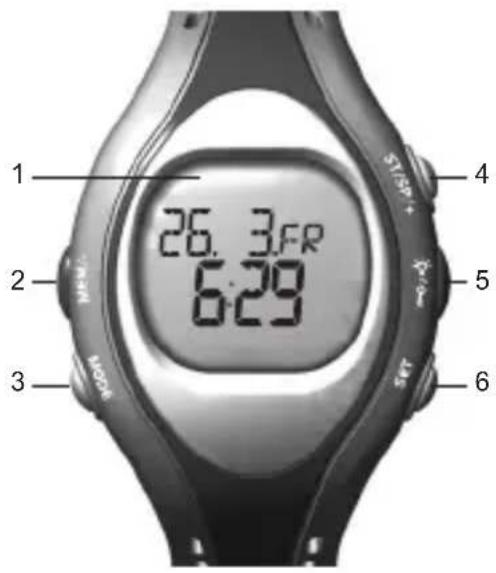
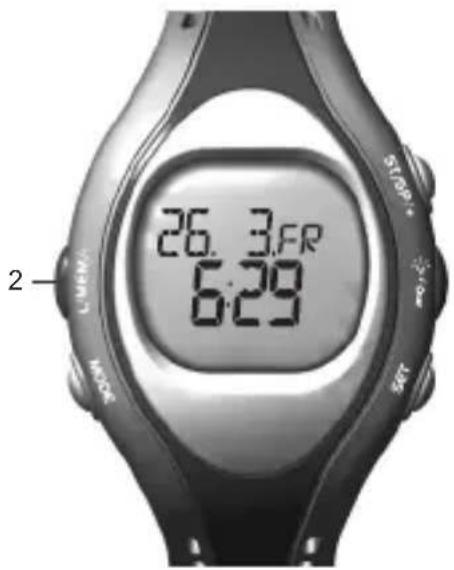
- LCD display.
-
- VIBRA Trainer Fit Pro only - L / MEM / -: Display training records; decrease setting value; mark a lap.
- VIBRA Trainer Fit only - MEM / -: Display training records; decrease setting value.
- MODE: Switch to another display.
- ST / SP / +: Start / stop timer; increase setting value.
- ⚙ / —: Turn on backlight for 3 seconds; lock / unlock the keypad.
- SET: Enter Setting Mode; select another setting option; display different information during training; reset timer / stopwatch.
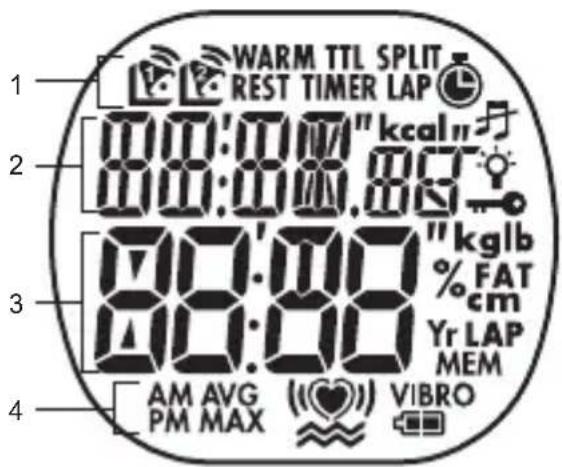
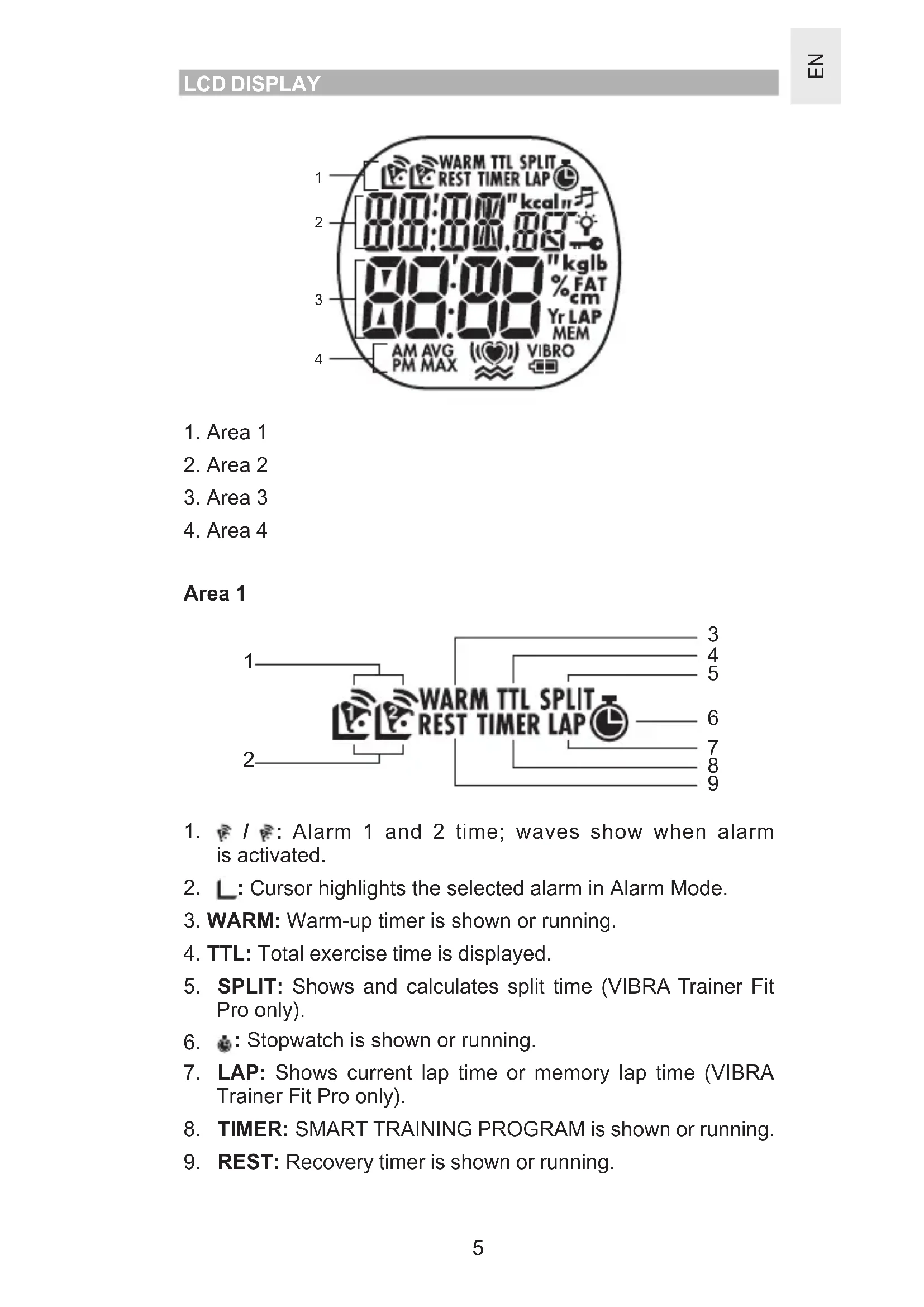
- Area 1
- Area 2
- Area 3
- Area 4
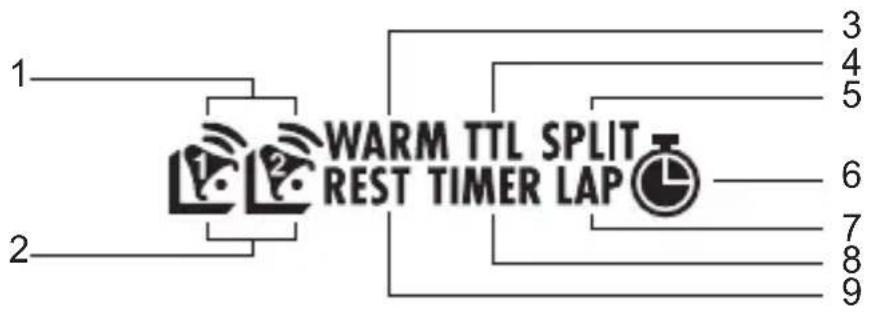
Area 1
flowchart
graph TD
    A["1"] --> B["WARM TTL SPLIT REST TIMER LAP"]
    C["2"] --> B
    D["3"] --> B
    E["4"] --> B
    F["5"] --> B
    G["6"] --> B
    H["7"] --> B
    I["8"] --> B
    J["9"] --> B
- ☐ / ☐: Alarm 1 and 2 time; waves show when alarm is activated.
- L: Cursor highlights the selected alarm in Alarm Mode.
- WARM: Warm-up timer is shown or running.
- TTL: Total exercise time is displayed.
- SPLIT: Shows and calculates split time (VIBRA Trainer Fit Pro only).
- ☐: Stopwatch is shown or running.
- LAP: Shows current lap time or memory lap time (VIBRA Trainer Fit Pro only).
- TIMER: SMART TRAINING PROGRAM is shown or running.
- REST: Recovery timer is shown or running.
Area 2
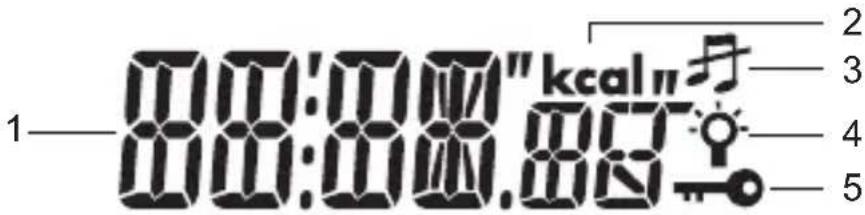
- Date: MM:DD or DD:MM and day of the week; stopwatch time.
- kcal: Calorie unit.
- 丹: Keypad tone is disabled.
- 🔗: Light Mode is enabled.
- ☐: Keypad lock is enabled.
Area 3
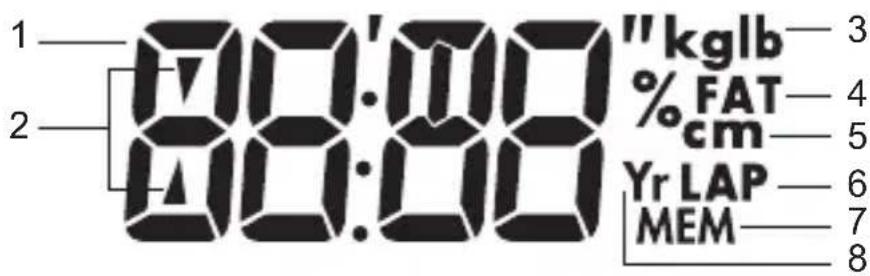
- Time: HH:MM.
- ▲/▼: Flash in Timer / Stopwatch Mode when the heart rate is above or below the upper and lower zone.
- kg / lb: Body weight unit.
- % FAT: Percentage of fat burn.
- cm: Height unit.
- LAP: Take lap; lap number (VIBRA Trainer Fit Pro only).
- MEM: Stopwatch or timer memory is shown.
- Yr: Year of user's birth.
Area 4
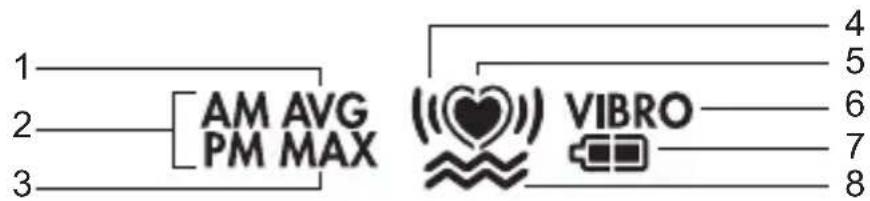
- AVG: Average heart rate is displayed.
- AM / PM: Appears when the 12-hour clock / alarm is being used.
- MAX: Maximum heart rate is displayed (VIBRA Trainer Fit Pro only).
- “”: Heart rate is above or below limit; sound alert is activated.
- ♥: Flashes when receiving heart rate signal.
- VIBRO: Battery is too low for vibrate function.
- Battery status.
- ≈: Heart rate alert is set to vibrate.
UNPACKING THE WATCH
When you unpack your VIBRA Trainer Fit / VIBRA Trainer Fit Pro watch, make sure to keep all the packing materials in a safe place, in case you need to later transport or return the product for servicing.
In this box, you will find:
- Watch
• Heart rate chest belt - Mounting bracket
- Carry case
• 2 x CR2032 lithium batteries - already installed
TURNING ON THE WATCH (FIRST-TIME USE ONLY)
Press any key for 2 seconds to activate the LCD display.
BATTERIES
The VIBRA Trainer Fit / VIBRA Trainer Fit Pro uses two CR2032 lithium batteries, one for the watch and another for the heart rate chest belt. Both are already installed. See the table below for battery warnings.
| LOW BATTERY ICON DESCRIPTION | |
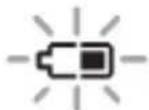 | The battery is too low to run the backlight |
| VIBRO | The battery is too low to run the vibration alert |
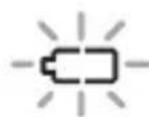 | The watch battery is low; the vibration alert and backlight cannot be used |
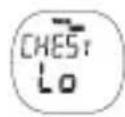 | The chest belt battery is nearly too low to send a signal to the watch |
The batteries typically last one year. We highly recommend that you contact the retailer or our customer service department if you need to replace them.
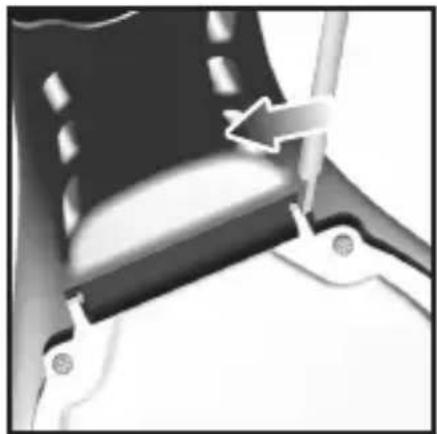
To replace the watch battery:
natural_image
Close-up of a mechanical component with an arrow indicating direction (no visible text or symbols)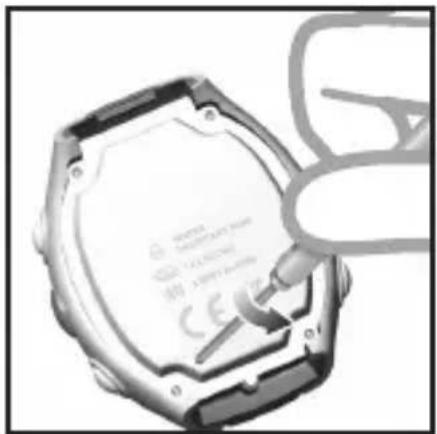
natural_image
Close-up of a hexagonal hard disk with a small electronic component inserted, no visible text or symbols.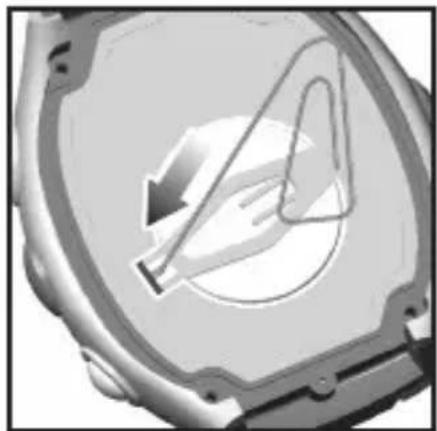
natural_image
Close-up of a mechanical component with a circular center and internal curved lines, no visible text or symbols.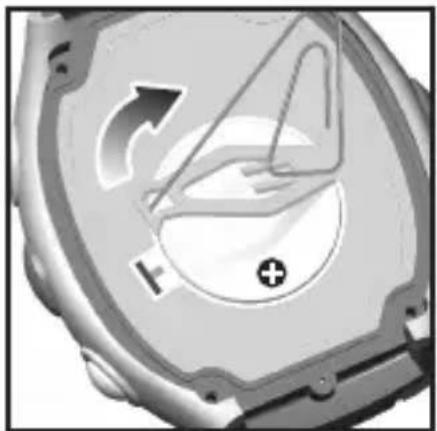
natural_image
Close-up of a mechanical component with directional arrows and a plus symbol (no readable text or labels)- Turn the watch over so that you are looking at the back plate.
- Disconnect the watchstrap as shown above.
- Using a small screwdriver, remove the four screws that hold the back plate into position.
- Remove the back plate and set it aside.
- Using a thin blunt instrument, hook the release catch and lift the clip.
- With your finger, remove the old battery and set it aside.
- Slide the new battery into the battery compartment with the + side upwards.
- Replace the battery clip.
- Replace the back plate and screws.
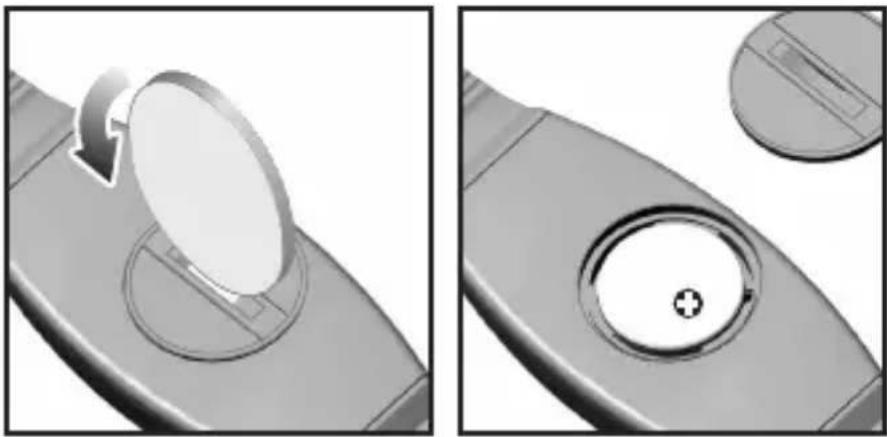
To replace the chest belt battery:
natural_image
Two grayscale images showing a circular component being turned with an arrow, and a circular dial with a plus symbol inside (no text or symbols)-
Locate the battery compartment on the back of the chest belt.
-
Using a coin, as shown above, twist the compartment lid counter-clockwise until it clicks out of place.
-
Set the battery compartment lid aside.
-
With your finger, remove the old battery and set it aside.
-
Insert the new battery with the + side upwards.
-
Replace the battery compartment lid by twisting it clockwise until it is firmly in place.
IMPORTANT
• Non-rechargeable and rechargeable batteries must be disposed of properly. For this purpose, special containers are provided for non-rechargeable and rechargeable battery disposal at communal collection centres.
- Batteries are extremely dangerous when swallowed! Therefore, keep batteries and the article away from infants. If a battery has been swallowed seek immediate medical advice.
- The batteries supplied must not be recharged, reactivated by any other means, dismantled, put into fire or short-circuited.
CHEST BELT
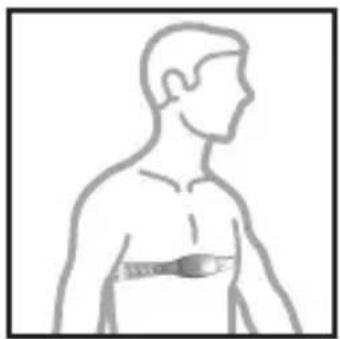
The heart rate chest belt is used to count your heartbeat and transmit the data to the watch. To wear the chest belt:
- Wet the conductive pads on the underside of the chest belt with a few drops of water or a conductive gel to ensure solid contact.
- Strap the heart rate chest belt across your chest. To ensure an accurate heart rate signal, adjust the strap until the belt sits snugly below your pectoral muscles.
natural_image
Side profile line drawing of a human torso with a bandage (no text or symbols)TIPS
• The position of the chest belt affects its performance. Move the chest belt along the strap so that it falls above your heart.
• A void areas with dense chest hair.
- In dry, cold climates, it may take several minutes for the chest belt to function steadily. This is normal and should improve with several minutes of exercise.
NOTE If the watch is kept idle without receiving a heart rate signal for 5 minutes, the Heart Rate Mode will quit and return to Clock Mode.
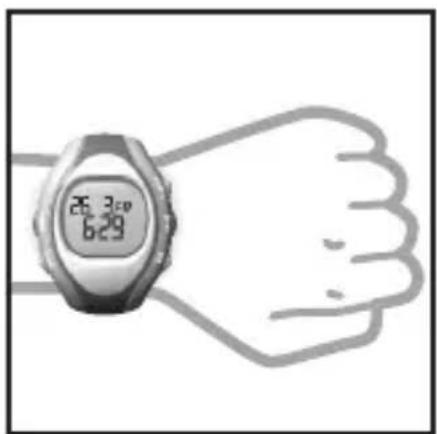
WATCH
You can wear the receiver watch on your wrist or strap it to a bike or exercise machine, as shown below.
natural_image
Illustration of a wristwatch with digital display showing 25.30 and 6:29 (no text or symbols on the watch face)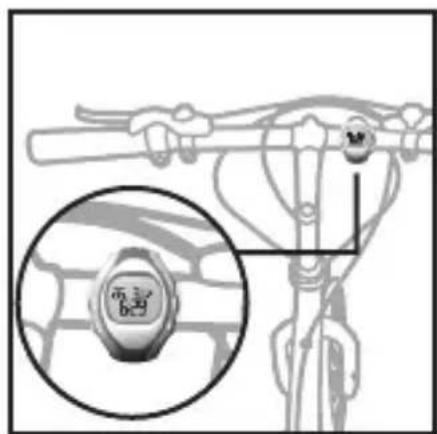
TRANSMISSION SIGNAL
The heart rate chest belt and watch have a maximum transmission range of about 62.5 centimetres (25 inches). They are equipped with the latest digital coding system to reduce signal interference from the environment, as well as analog technology. For more accurate readings use the digital transmission signal. You should only switch to the analog transmission signal if the situation in point 2 occurs (see below). Your watch will advise you which system it is using and the signal status by displaying the following icons:
NOTE Whenever the watch is searching for the chest belt signal (manual or automatic search), make sure that the chest belt is no further than 10 cm (4 inches) from the watch.
| ICON DESCRIPTION | |
| Outside heart is flashing | Searching for a signal |
| Inside heart is flashing A | signal has been found and the digital system is being used |
| Heart is flashing A signal | has been found and the analog system is being used |
| No signal has been found | |
| No signal has been found |
NOTE Toswitch from digital to analog or analog to digital system, press the chest belt button for more than 4 seconds and then force a signal search.
IMPORTANT If the heart icon does not appear on the display or is not flashing because no signal has been found, force a signal search. See "Signal Search" section for how to do this.
In the event that you experience a weak signal or your signal is disrupted by interference in the environment, follow the instructions below to identify and resolve the situation.
-
The signal is weak - the watch heart rate monitor will only show "0":
-
Shorten the distance between the heart rate chest belt and watch.
• Re-adjust the position of the heart rate chest belt. - Check the conductive pads are moist enough to ensure solid contact.
- Check the batteries. If they are low or exhausted, the range may be less.
- Force a signal search (see "Signal Search" section).
- The gym equipment does not seem to work with your chest belt and the digital icon 😊 is displayed:
- Most gym equipment is compatible with the analog system ♥. Press and hold the chest belt button for more than 4 seconds. from digital to analog. Then force a signal search (see "Signal Search" section).
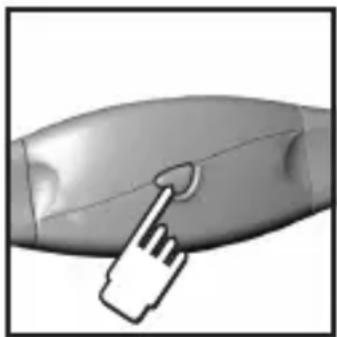
natural_image
Close-up of a handheld device with a finger pointing to the screen (no visible text or symbols)-
Interference from another person's heart rate monitor - their heart rate readings appear on your watch, or the heart rate monitor shows "0":
-
Press the chest belt button to get the watch to receive your chest belt signal. Do not press and hold the chest belt button, as it will change the transmission signal from digital to analog.
-
Take the chest belt off for 12 seconds to automatically change your User ID. (The watch has 4 User ID's. When the watch receives the chest belt signal it will tell you which User ID it has selected. Only products with a digital coding system have User ID capability.)
-
The signal is jammed - the heart rate reading on your watch is flashing:
- There is too much interference in the environment for your heart rate monitor to function. Move to an area where the heart rate reading stops flashing.
WARNING Signal interference in the environment can be due to electromagnetic disturbances. These may occur near high voltage power lines, traffic lights, overhead lines of electric railways, electric bus lines or trams, televisions, car motors, bike computers, some motor driven exercise equipment, cellular phones or when you walk through electric security gates. Under interference, the heart rate reading may become unstable and inaccurate.
To force a signal search:
- Press MODE to navigate to the SMART TRAINING PROGRAM or Stopwatch Mode.
- Press and hold MODE for 2 seconds. The signal-searching icon with the outside flashing will appear to confirm a signal search is taking place. Whenever the watch is searching for the chest belt signal make sure that the chest belt is no further than 10 ~cm (4 inches) from the watch.
The signal search will take approximately 10 seconds. If after 10 seconds the heart icon is not flashing, then your signal search has been unsuccessful and you need to force another signal search.
See the table in the "Transmission Signal" section for more signal status information.
SETTING THE KEYPAD TONE / LIGHT MODE
You can set the watch to have the:
- Keypad "Beep" tone ON or OFF.
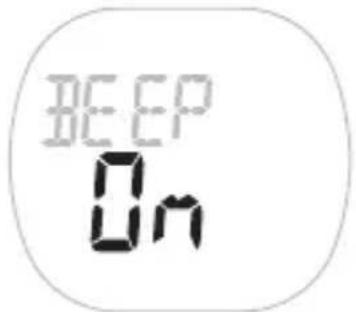
- Light Mode ON or OFF - see "Activating the Backlight" section.
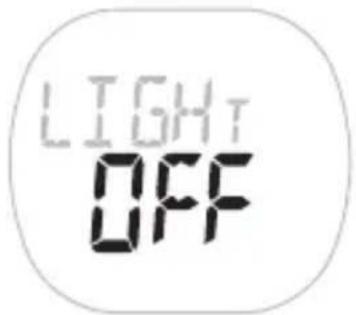
To set these features:
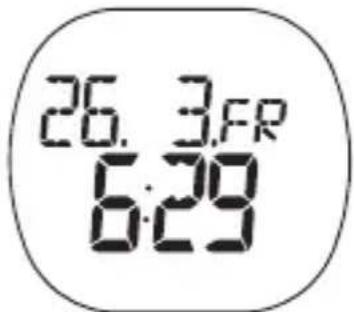
- Press MODE to navigate to the Real-Time Clock Mode.
- Press SET until you reach the feature you wish to change.
- Press ST / SP / + or MEM / - to change the setting.
- Press SET to confirm the setting and move on to the next one.
ACTIVATING THE BACKLIGHT
When the Light Mode is set to OFF:
- Press 🎨 to turn on the backlight for 3 seconds. Press any other key whilst the light is on and it will extend the light time by another 3 seconds.
When the Light Mode is set to ON:
- Press any key to turn ON or extend the backlight for 3 seconds.
To help conserve power the Light Mode ON setting will automatically switch to OFF after 2 hours.
NOTE The backlight does not work when the low battery icon is shown and will return to normal once the batteries are replaced.
ACTIVATING THE KEYPAD LOCK
To turn the keypad lock ON or OFF:
- Press and hold 📞 for 2 seconds. 📞 will appear on the display when the keypad lock is on.
Press MODE to switch between the 5 operation modes:
• Real-Time Clock
- Alarm Clock
- User Profile / Exercise Profile
• T imer - SMART TRAINING PROGRAM
- Stopwatch
The modes are described in the sections that follow.
NOTE You can run the SMART TRAINING PROGRAM or stopwatch in the background as you access other modes. The icon for the mode that is running will flash until you switch back to that mode.
The real-time clock is the default display for the VIBRA Trainer Fit / VIBRA Trainer Fit Pro watch.
To set the real-time clock:
- Press MODE to switch to Real-Time Clock Mode.
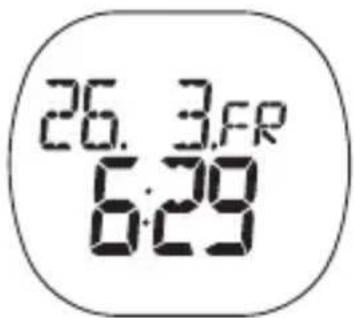
- Press and hold SET until the first setting flashes.
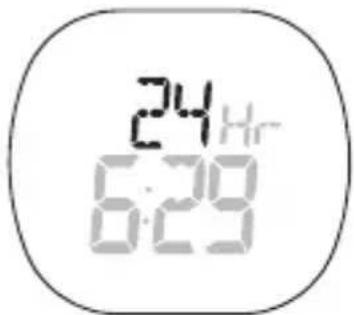
-
Press ST / SP / + or MEM / - to change the setting. Hold to speed through the options. Press SET to confirm the setting and move on to the next one.
-
Repeat step 3 to change other settings for this mode.
The order of the real-time clock settings is:
• 12 / 24 hour clock format
• Hour
- Minute
- Year
- DD:MM or MM:DD date format
- Month
Day
NOTE The clock is programmed with a 50-year auto-calendar, which means you do not need to reset the days of the week and dates each month.
SETTING THE ALARM(S)
Your watch has 2 alarms that can be set to activate daily (Mon-Sun), on a weekday (Mon-Fri), or on a weekend (Sat / Sun).
To set alarm 1 or alarm 2:
- Press MODE to navigate to Alarm Clock Mode.
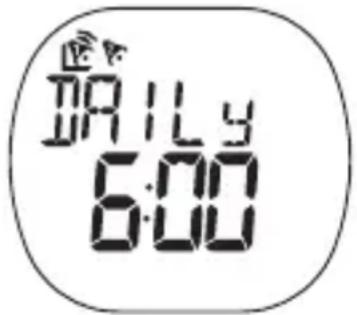
- Press SET to move the cursor to select alarm 1 or alarm 2 and ST / SP / + to activate or deactivate the alarm.
- Press and hold SET to enter the setting mode for the chosen alarm.
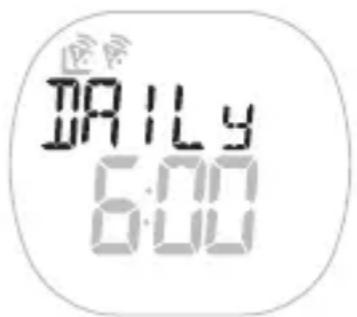
- Press ST / SP / + or MEM / - to change the setting. Hold to speed through the options. Press SET to confirm the setting and move on to the next one.
- Repeat step 4 to change other settings for this mode.
- The alarm will automatically be activated once you have finished setting the alarm time.
The order of the alarm clock settings is:
- Select daily, weekday or weekend alarm
• Hour - Minute
TURNING THE ALARM SOUND OFF
Press any key to turn the alarm sound off. The alarm will automatically reset itself unless you deactivate it.
- Press MODE to navigate to Alarm Clock Mode.
- Press SET to move to the cursor to select alarm 1 or 2.
- Press ST / SP / + or MEM / - to activate 📋 or deactivate 🌐 the alarm.
EXERCISE PROFILE
Tocalculate your minimum and maximum heart rate you need to set the exercise profile.
The VIBRA Trainer Fit watch supports 1 exercise profile, whereas the VIBRA Trainer Fit Pro watch supports 3 different exercise profiles.
Different activities exercise the body in different ways and help you to achieve a variety of fitness goals. To accommodate this the exercise profile can be set to suit different exercise activities. For example, if you are running, your exercise profile settings are likely to differ from those you would use when undertaking a weight training activity.
Also, the time you require to warm-up and complete an exercise will vary. That is why you can change the warm-up and exercise countdown time to suit you.
To set the exercise profile:
- Press MODE to navigate to Exercise Profile Mode.
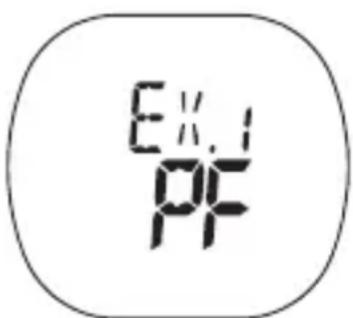
- If this screen appears, press SET to navigate to the Exercise Profile Mode.
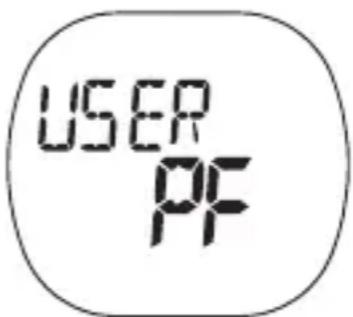
- VIBRA Trainer Fit Pro only - press SET to navigate to 1 of the 3 exercise profiles.
- Press and hold SET until the first setting flashes.
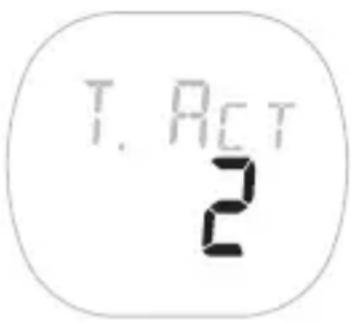
- Press ST / SP / + or MEM / - to change the setting. Hold to speed through the options. Press SET to confirm the setting and move on to the next one.
- Repeat step 5 to change other settings for this mode.
The order of the user profile settings is:
• T target activity - 0 to 2
- Lower limit heart rate
• Upper limit heart rate
- Resume vibration mode (only appears when the battery is low, this warning enables you to resume vibration mode or turn it OFF to save power)
- Heart rate alert
• Exercise timer - hour
• Exercise timer - minute
- W arm-up timer - set to 5, 10, 15 to activate or 0 mins to deactivate timer
- Rest timer - ON / OFF (VIBRA Trainer Fit Pro only)
NOTE Once you have set your exercise profile your lower and upper heart rate limit will be set automatically. However, you can manually change your upper and lower heart rate limit if the automatic setting does not suit you. If you change the target activity level, your upper / lower and maximum heart rate will automatically be updated.
There are 3 target activity levels:
| TARGET ACTIVITY | MHR% | DESCRIPTION | |
| 0 | Health Maintenance | 65-78% | This is the lowest training intensity level. It is good for beginners and those who want to strengthen their cardiovascular systems. |
| 1 | Aerobic Exercise | 65-85% | Increases strength and endurance. It works within the body's oxygen intake capability, burns more calories, and can be maintained for a long period of time. |
| 2 | Anaerobic Exercise | 78-90% | Generates speed and power. It works at or above the body's oxygen intake capability, builds muscle, and cannot be maintained for a long period of time. |
Before you begin any exercise program and to achieve maximum health benefits from your workout, it is important to know your:
• Maximum heart rate (MHR)
- Lower heart rate limit
• Upper heart rate limit
To manually calculate your own heart rate limits, follow the instructions below:
| MHR LOWER | LIMIT | UPPER LIMIT |
| MHR = 220 - age | MHR x lower target activity %.E.g. Target activity is 0Lower Limit = MHR x 65% | MHR x upper target activity %.E.g. Target activity is 0Upper Limit = MHR x 78% |
HEART RATE ALERT
You can set the heart rate alert in the exercise profile to the following settings:
| ICON DESCRIPTION | |
 | Heart rate sound and vibration alert are OFF |
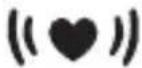 | Heart rate sound alert is ON1 beep means you have gone below your lower zone limit2 beeps means you have gone above your upper zone limit |
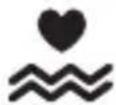 | Heart rate vibration alert is ON |
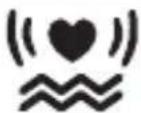 | Heart rate sound and vibration alert are ON |
When the heart rate alert is activated, a flashing down or up arrow will appear on the display to show which heart rate limit you have surpassed.
NOTE Using the vibration feature consumes battery life at a faster rate than the sound alarm.
NOTE If the watch is kept idle without receiving a heart rate signal for 5 minutes, the Heart Rate Mode will quit and return to Clock Mode.
USER PROFILE
To access the full benefits of the VIBRA Trainer Fit / VIBRA Trainer Fit Pro watch, set up your user profile before you exercise. This will automatically generate a fitness index and body mass index (BMI - VIBRA Trainer Fit Pro only). These calculations along with the calorie and fat % burned will help you track your progress over time.
To set the user profile:
- Press MODE to navigate to User Profile Mode.
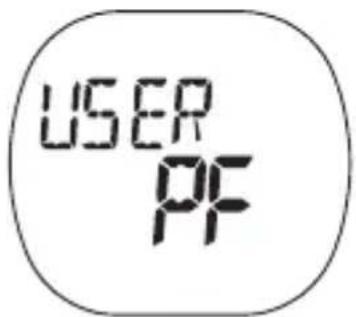
- If this screen appears, press SET to navigate to the User Profile Mode.
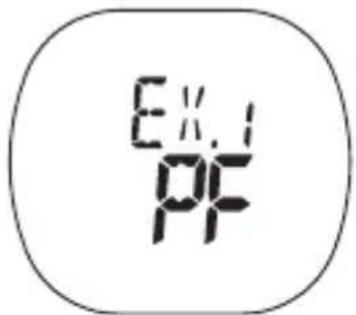
- Press and hold SET until the first setting flashes.
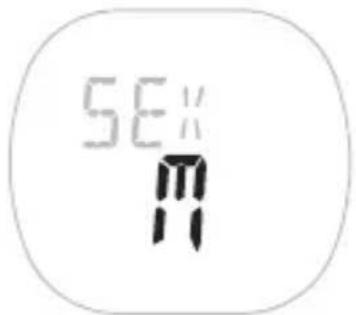
-
Press ST / SP / + or MEM / - to change the setting. Hold to speed through the options. Press SET to confirm the setting and move on to the next one.
-
Repeat step 4 to change other settings for this mode.
The order of the user profile settings is:
- Sex
- Year of birth
- Month of birth
• Day of birth
• W eight unit - lbs or kg - Weight
• Height unit - feet or metres - Height
- Activity level - 0-2
Once you complete your user profile, a fitness index and body mass index is automatically calculated and displayed for you. Refer to the "About the Fitness / Body Mass Index" section for further information.
NOTE You can display and adjust your user profile at any time.
NOTE You must set up your user profile to use the calorie count and fat burn features.
ACTIVITY LEVEL
The activity level is based on your own self-assessment of the amount of exercise you regularly perform.
| ACTIVITY LEVEL | DESCRIPTION |
| 0 | Low - You do not usually participate in programmed recreation sports or exercise. |
| 1 | Medium - You are engaged in modest physical activity (such as golfing, horseback riding, table tennis, callisthenics, bowling, weight lifting or gymnastics) 2-3 times a week, totalling 1 hour per week. |
| 2 High | You actively and regularly participate in heavy physical exercise (such as running, jogging, swimming, cycling, or skipping rope) or engage in vigorous aerobic exercise (such as tennis, basketball or handball). |
ABOUT THE FITNESS / BODY MASS INDEX
FITNESS INDEX
Your VIBRA Trainer Fit and VIBRA Trainer Fit Pro watch will generate a fitness index based on your aerobic fitness. This index is dependent and limited by the body's ability to deliver oxygen to the working muscles in training. It is often measured by maximum oxygen uptake (VO2 Max), which is defined as the highest amount of oxygen that can be utilized when exercising at an increasingly demanding level. The lungs, heart, blood, circulatory system, and working muscles are all factors in determined VO2 Max. The unit of VO2 Max is ml/kg min.
The higher the index, the fitter you are. See the tables below for a rough guide to what your fitness index means:
FITNESS INDEX FOR MAN □ □
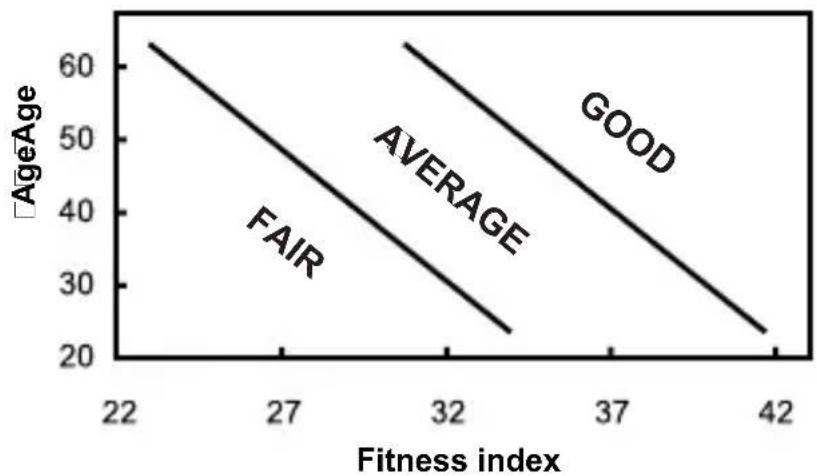
line
| Fitness index | FAIR | AVERAGE | GOOD | | ------------- | ---- | ------- | ---- | | 22 | 60 | | | | 32 | 50 | | | | 42 | 25 | | |Your body mass index is a measurement of the relative percentages of fat and muscle mass in the human body.
| HEALTH INDICATION | BMI RANGE | DESCRIPTION |
Underweight | Less than 20.0 | Your body weight is currently lower than average. Work toward healthy, regular food intake and exercise routine to build up your health to recommended levels. |
Recommended | 20.0 to 25.0 | Your health is at the recommended level. Maintain a balanced diet and exercise to keep your current level of health. |
| HEALTH INDICATION | BMI RANGE | DESCRIPTION |
Overweight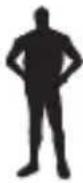 | 25.1 to 29.9 | Your body weight may be above normal. Increase your exercise and work out a diet plan to lower your risk for serious illness. |
Obese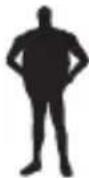 | 30.0 or greater | At this level, you may be at risk for heart disease, high blood pressure, and other illnesses. Consult with your doctor to develop a proper health and fitness plan. |
NOTE BMI should not be used as a guideline for health risks for the following groups:
| GROUP REASON | |
| Children and teenagers BMI ranges are only based on adult heights. | |
| Athletes and body builders | BMI does not differentiate between fat and muscle, thus making it inaccurate for persons with high muscle volumes. |
| Pregnant or nursing women | This group generates naturally high fat reserves as part of the pregnancy. |
| People over the age of 65 | Fat reserves naturally tend to be higher with older persons. |
NOTE The above BMI information is based on an average Caucasian physique.
VIEW FITNESS / BODY MASS INDEX
Press MODE to navigate to the User Profile Mode. Then, press MEM / - to display your fitness and body mass index.
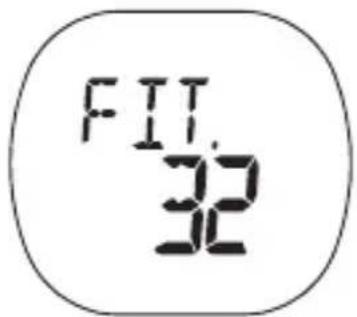
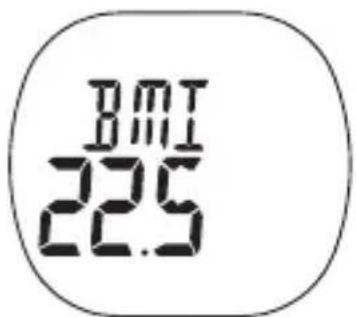
NOTE If you have not completed your user profile, these will not display and "-" will show on the display. Only VIBRA Trainer Fit Pro users will be given a BMI reading.
ABOUT THE SMART TRAINING PROGRAM
The SMART TRAINING PROGRAM enables you to complete exercise cycles effectively. It will guide you through from a 5-minute warm up (default setting), to the end of your exercise program. In addition to monitoring your heart rate and alerting you whenever you fall out of the range for the selected training zone, the Program allows you to check the calories consumed and the percentage of fat burned.
USING THE SMART TRAINING PROGRAM
The SMART TRAINING PROGRAM monitors your exercise performance once you have entered your user profile and exercise profile.
NOTE You cannot use the SMART TRAINING PROGRAM if you are running the stopwatch.
To enter the SMART TRAINING PROGRAM:
- Press MODE to navigate to Timer Mode.
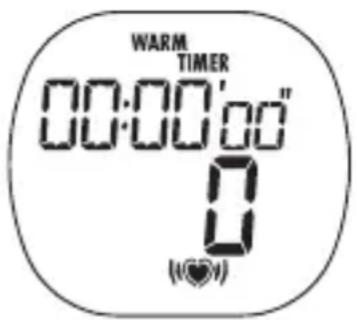
- VIBRA Trainer Fit Pro only - press and hold SET. Press ST / SP / + or MEM / - to select 1 of the 3 exercise profiles. Press SET to confirm and enter the SMART TRAINING PROGRAM.
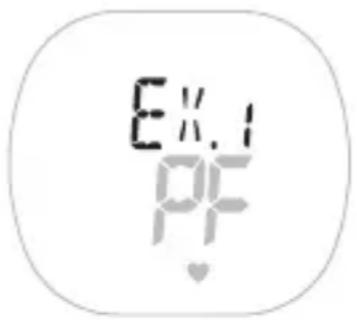
- To start or stop the warm-up, exercise or recovery countdown timer, press ST / SP / +. Once you stop any countdown timer you cannot resume the timer unless you press and hold ST / SP / +. (Please see point 4 below). At the end of each countdown period you will hear a beep.
• 3 beeps = warm-up time completed.
• 1 long beep = exercise time completed.
- 3 beeps in 2 cycles = rest time completed (VIBRA Trainer Fit Pro only).
-
To bypass a timer setting and move onto the next one, press and hold ST / SP / +.
-
To reset the timer, press and hold SET.
The order of the Timer Mode setting is:
- W arm-up time
- The warm-up will not display if it has been set to "0", in the exercise profile.
- Exercise time
- The exercise time is set in the exercise profile.
- Rest time
- VIBRA Trainer Fit Pro only - The rest time is automatically set to 3 mins and cannot be changed. When the timer reaches "0", the recovery heart rate will appear.
VIEW DATA WHILE SMART TRAINING PROGRAM IS RUNNING
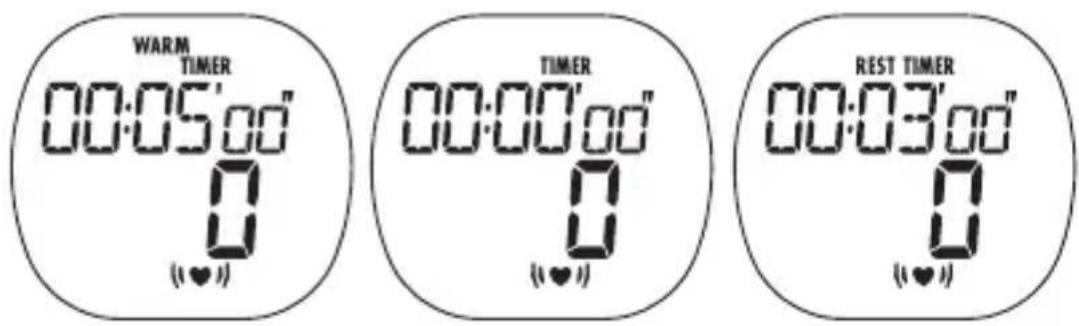
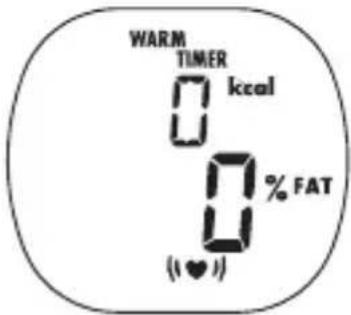
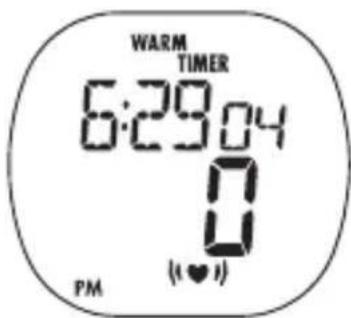
During warm-up, exercise or rest time countdown, press SET to view and toggle between the following screen displays:
- Remaining warm-up / exercise / rest time with current heart rate
• Current calorie and fat burn level
- Clock with current heart rate
VIEW SMART TRAINING PROGRAM MEMORY RECORDS
When the SMART TRAINING PROGRAM has been completed, press MEM / - to view the following records:
• T otal time / maximum heart rate (max. heart rate shows only on VIBRA Trainer Fit Pro)
• Recovery heart rate / average heart rate
• Total calorie and fat burn level
- In zone time: Time spent without exceeding your upper or lower heart rate limit
- Above zone time: Time spent exceeding your upper heart rate limit
• Below zone time: Time spent exceeding your lower heart rate limit
NOTE You cannot use the stopwatch if you are running the SMART TRAINING PROGRAM.
RECOVERY HEART RATE (VIBRA TRAINER FIT PRO ONLY)
Your recovery heart is a good indication of cardiovascular fitness. The faster your heart rate recovers after exercise, the better shape you are in. The watch uses a time-based recovery method, which checks your recovery heart rate 3 minutes after exercise.
Compare your recovery heart rate between exercise sessions to track the effect your exercise is having.
STOPWATCH
The stopwatch watch function is particularly beneficial to use when you are unsure how long your activity will take, or when you want to measure the time it takes to complete a task and your performance over that time. VIBRA Trainer Fit Pro users can also take lap and split time readings when using the stopwatch function.
To get the most out of your stopwatch function complete your user and exercise profile. If you have not completed the user profile you will be unable to use the calorie and fat burn function.
Press MODE to navigate to Stopwatch Mode. You can now perform the following functions:
| TASK INSTRUCTION | |
| Start stopwatch Press ST / | SP / + |
| Pause / resume stopwatch | Press ST / SP / + |
| Reset Press and hold SET | |
| Save lap (VIBRA Trainer Fit Pro only) | Press L / MEM / - while the stopwatch is runningNOTE Up to 99 laps / 99 hrs, 59 mins total can be stored in the memory |
| Select exercise profile for stopwatch (VIBRA Trainer Fit Pro only) | Reset the stopwatch. Press and hold SET |
NOTE The stopwatch begins measurement in min:sec:1/100 sec. After 59 minutes pass, the display will change to hrs:min:sec.
VIEW DATA WHILE STOPWATCH / LAP IS RUNNING
While the stopwatch or lap functions are being used, press SET to view and toggle between the following screen displays:
• T otal time / split time and current heart rate
- Lap time and current heart rate (if enabled)
- Current calorie and fat burn level
- Clock with current heart rate
NOTE Split time and lap time readings only appear on VIBRA Trainer Fit Pro watches.
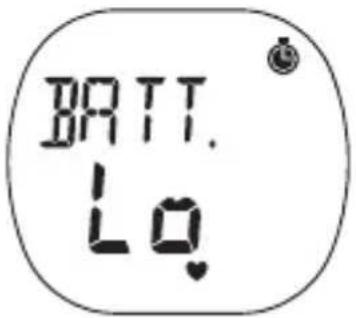
If the battery is low when taking a lap, this screen will appear and no more laps will be saved.
VIEW STOPWATCH OR LAP MEMORY RECORDS
To view stopwatch records:
- The stopwatch must be stopped (press ST / SP / +).
- Press MEM / - to view memory records.
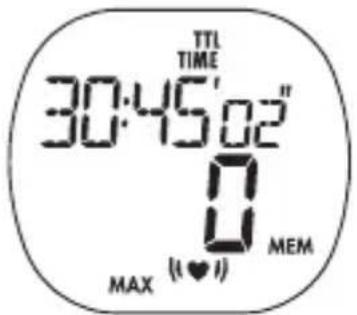
- Press SET to view each record.
The stopwatch records will appear in the following order:
- Total time / maximum heart rate (max. heart rate shows only on VIBRA Trainer Fit Pro)
• T otal time / average heart rate
• Calories / fat burn total - In zone time: Time spent without exceeding your upper or lower heart rate limit
- Above zone time: Time spent exceeding your upper heart rate limit
• Below zone time: Time spent exceeding your lower heart rate limit
To view lap records (VIBRA Trainer Fit Pro only):
- The stopwatch must be stopped (press ST / SP / +).
- Press L / MEM / - to view memory records.
- Press + or - to select lap.
- Press SET to view each lap record.
The lap records will appear in the following order:
- Lap time / lap number
- Lap time / maximum heart rate
- Split time / average heart rate
• Calorie and fat burn total - per lap - In zone time - per lap: Time spent without exceeding your upper or lower heart rate limit
- Above zone time - per lap: Time spent exceeding your upper heart rate limit
- Below zone time - per lap: Time spent exceeding your lower heart rate limit
TRAINING INFORMATION
A heart rate monitor is the most important tool in cardiovascular health and an ideal training partner. It enables you to see and monitor results. This helps you assess your past performance, maximise your work out and adapt your future exercise program to achieve your desired goals in a safer and more effective way.
When you exercise, the chest belt picks up your heartbeat and sends it to the watch. Now you can view your heart rate and start monitoring your performance based on your heart rate readings. As you get fitter, your heart will need to do less work and the speed of your heart rate will decrease. The reason for this is as follows:
- Y our heart pumps blood to your lungs to obtain oxygen. Then, the oxygen rich blood will travel to your muscles. The oxygen is used as fuel and the blood leaves the muscles and returns to the lungs to begin the process again. As you get fit, your heart is able to pump more blood with every beat. As a result, your heart doesn't have to beat as often to get the necessary oxygen to your muscles.
TRAINING TIPS
Togain the maximum benefit from your training program, and to ensure that you exercise safely, please observe the following guidelines:
- Start with a well-defined training goal, such as to lose weight, keep fit, improve health or compete in a sporting event.
-
Select a training activity you enjoy, and vary your training activities to exercise different muscle groups.
-
Start slowly, and then gradually step up your work out as you become fitter. Exercise regularly. To maintain a healthy cardiovascular system, 20-30 minutes three times a week is recommended.
- Always allow at least five minutes before and after exercising for warm-up and cool-down.
- Measure your pulse after training. Then repeat the procedure again after three minutes. If it does not return to its normal resting rate, you may have trained too hard.
• Always check with your doctor before starting a vigorous training program.
CARE INSTRUCTIONS
To ensure you receive the maximum benefit from using this product, please observe the following guidelines:
- Clean the watch and chest belt thoroughly after each training session. Never store the products when wet.
- Use a soft, slightly moistened cloth. Do not use abrasive or corrosive cleaning agents, as these may cause damage.
- A void pressing the keys with wet fingers, under water, or in heavy rain, as this may allow water to gain entry into the electrical circuitry.
- Do not bend or stretch the transmitter part of the chest belt.
- Do not subject the product to excessive force, shock, dust, temperature changes, or humidity. Never expose the product to direct sunlight for extended periods. Such treatment may result in malfunction.
- Do not tamper with the internal components. Doing so will terminate the product warranty and may cause damage. The main unit contains no user-serviceable parts.
- Do not scratch hard objects against the LCD display as this may cause damage.
- Remove the batteries whenever you are planning to store the product for a long period of time.
- When replacing batteries, use new batteries as specified in this user manual.
AQUATIC AND OUTDOOR ACTIVITIES
The watch is water-resistant up to 50 metres. The chest belt is water-resistant up to 10 metres, but should not be worn for underwater activities, as the heart rate transmission cannot occur under water. Refer to the table for proper use guidelines.
 RAIN SPLASHES, ETC RAIN SPLASHES, ETC |  SHOWERING (WARM / COOL WATER ONLY) SHOWERING (WARM / COOL WATER ONLY) | 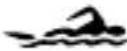 LIGHT SWIMMING / SHALLOW WATER LIGHT SWIMMING / SHALLOW WATER | 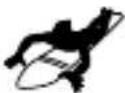 SHALLOW DIVING / SURFING / WATER SPORTS SHALLOW DIVING / SURFING / WATER SPORTS | 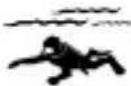 SNORKELING / DEEP WATER DIVING SNORKELING / DEEP WATER DIVING | |
| 50m / 165ft OK | OK OK NO | NO | |||
When using the watch for aquatic or outdoor sports activities, observe the following guidelines:
- Do not press the keys under water or with wet fingers.
- Rinse with water and mild soap after use.
- Do not use in hot water.
TIPS FOR KEEPING YOUR WATCH FIT
Keep your watch water resistant! Avoid chemicals (gasoline, chlorine, perfumes, alcohol, hair sprays, etc.). Rinse after use. Reduce exposure to heat. Have your watch serviced by an approved service centre annually.
SPECIFICATIONS
| TYPE DESCRIPTION | |
| CLOCK | |
| Time format 12 hr / 24 hr | |
| Date format DD / MM or MM / DD | |
| Year format 2001-2050 (auto-calendar) | |
| Alarms Alarms 1 and 2 with daily, weekday or weekend settings | |
| STOPWATCH | |
| Stopwatch 99:59:59 (HH:MM:SS) | |
| Resolution 1/100sec | |
| Lap counter 99 laps share 99:59:59 (HH:MM:SS) (VIBRA Trainer Fit Pro only) | |
| TYPE | DESCRIPTION |
| SMART TRAINING PROGRAM | |
| Warm-up timer Set to 5, 10 | 15, or 0 mins |
| Exercise timer 99:59:00 (HH:MM:SS) | |
| Rest timer 3 mins fixed time (VIBRA Trainer Fit Pro only) | |
| PERFORMANCE TRACKING | |
| Heart rate (HR) alarm Vibrate / sound / visual | |
| HR measuring range 30-240 bpm (beats per minute) | |
| Lower HR settable range 30-220 bpm (beats per minute) | |
| Upper HR settable range 80-240 bpm (beats per minute) | |
| Calories calculation | 0-9,999 kcal |
| % fat burning calculation | 0-99% |
| TRANSMISSION | |
| Range | 62.5 cm (25 inches) - may decrease with low battery |
| WATER RESISTANT | |
| Watch 50 metres (not actuating keys) | |
| Chest belt Splash proof | |
| POWER | |
| Watch 1 x CR2032 3V lithium battery | |
| Chest belt 1 x CR2032 3V lithium battery | |
| OPERATING ENVIRONMENT | |
| Operation temperature | 5°C-40°C (41°F-104°F) |
| Storage temperature | -20°C-70°C (-4°F-158°F) |
WARNINGS
To ensure you use your product correctly and safely, read these warnings and the entire user manual before using the product. The warnings given here provide important safety information and should be observed at all times.
- The product is a precision instrument. Never attempt to take this device apart. Contact the retailer or our customer service department if the product requires servicing.
- Do not touch the exposed electronic circuitry, as there is a danger of electric shock.
• Take precautions when handling all battery types. - Remove the batteries before storing the product for a long period of time.
- Do not use the chest belt in aircrafts or hospitals. The use of radio frequency products can cause malfunctions in the control devices of other equipment.
- Do not subject the product to impact or shock.
- Check all major functions if the device has not been used for a long time. Maintain regular internal testing and cleaning of your device.
- When disposing of this product, do so in accordance with your local waste disposal regulations.
ABOUT OREGON SCIENTIFIC
Visit our website (www.oregonscientific.com) to learn more about Oregon Scientific products such as digital cameras; MP3 players; children's electronic learning products and games; projection clocks; health and fitness gear; weather stations; and digital and conference phones. The website also includes contact information for our customer care department in case you need to reach us, as well as frequently asked questions and customer downloads.
We hope you will find all the information you need on our website, however if you're in the US and would like to contact the Oregon Scientific Customer Care department directly, please visit:
www2.oregonscientific.com/service/default.asp
OR
Call 1-800-853-8883.
For international inquiries, please visit:
www2.oregonscientific.com/about/international.asp
Hereby, Oregon Scientific, declares that this VIBRA Trainer Fit / VIBRA Trainer Fit Pro model SE211 / SE232 is in compliance with EMC directive 89/336/CE. A copy of the signed and dated Declaration of Conformity is available on request via our Oregon Scientific Customer Service.
CE
VIBRA Trainer Fit /
VIBRA Trainer Fit Pro
MODELL: SE211 / SE232
BEDIENUNGSHANDBUCH
INHALTSVERZEICHNIS
Einleitung 3
natural_image
Close-up of a mechanical component with a directional arrow indicating movement (no text or symbols visible)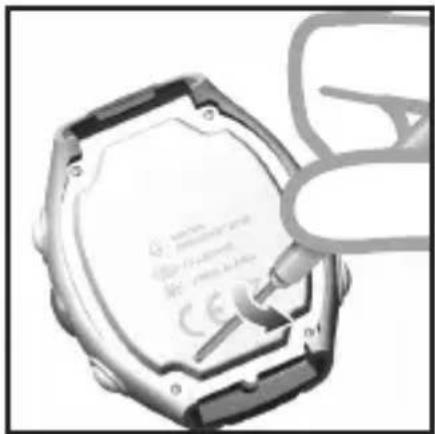
natural_image
Close-up of a hexagonal hard disk with a hand holding a screwdriver (no visible text or symbols)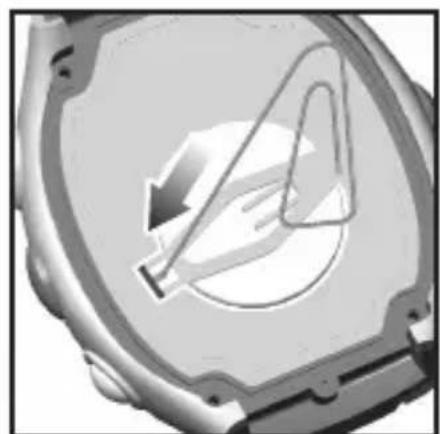
natural_image
Close-up of a mechanical component with a triangular cutout and circular hole (no visible text or symbols)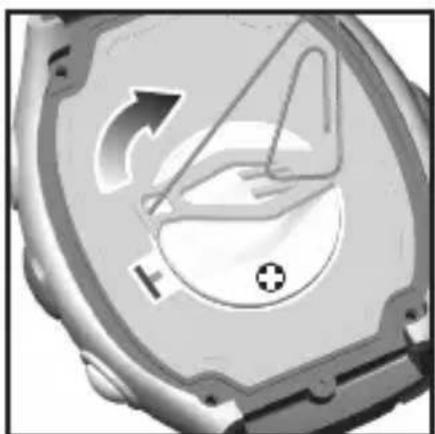
natural_image
Close-up of a mechanical component with directional arrows and a plus symbol, no readable text or symbols present.natural_image
Close-up of a metallic mechanical component with a circular component and arrow indicating rotation (no text or symbols)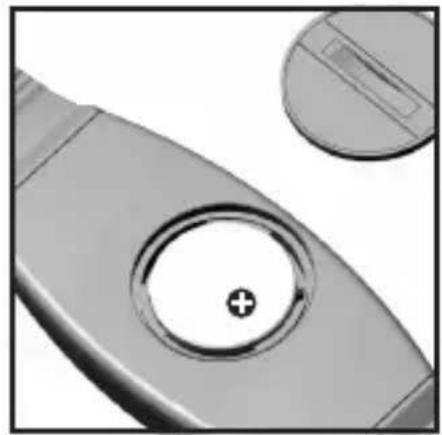
natural_image
Close-up of a metallic mechanical component with a circular hole and a plus symbol, no visible text or symbols.natural_image
Side profile line drawing of a human torso with a belt (no text or symbols)Tipps
natural_image
Illustration of a wristwatch with digital display showing 6:29 (no text or symbols on the watch face)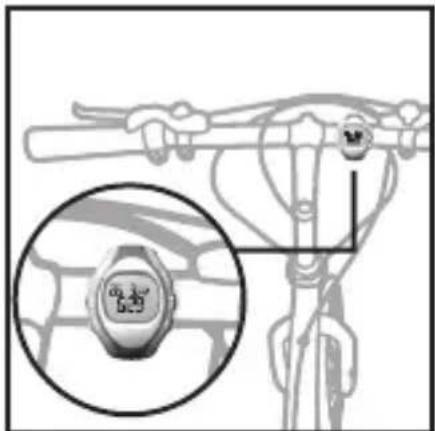
ÜBERTRAGUNGSSIGNAL
natural_image
Close-up of a handheld device with a finger pointing to the button (no text or symbols visible)natural_image
Close-up of a metallic mechanical component with a circular button and arrow indicator (no text or symbols)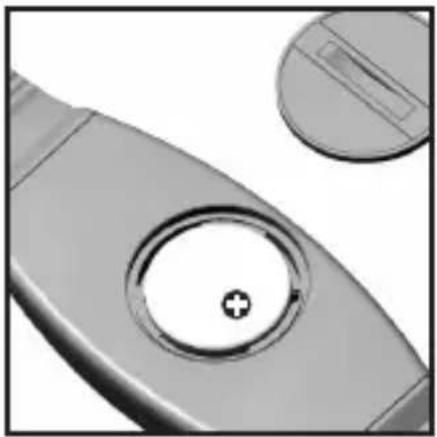
natural_image
Close-up of a metallic mechanical component with a circular hole and a plus symbol, alongside a separate circular inset (no text or symbols)natural_image
Side profile illustration of a human torso with a bandage on the chest (no text or symbols)CONSEJOS
natural_image
Illustration of a hand pressing down on a curved object (no text or symbols)VISUALIZAR EL REGISTRO DE MEMORIA DEL PROGRAMA INTELIGENTE DE ENTRENAMIENTO
- Pulse SET para visualizar cada registro.
natural_image
Close-up of a metallic mechanical component with a circular component and a curved arrow indicating rotation (no text or symbols)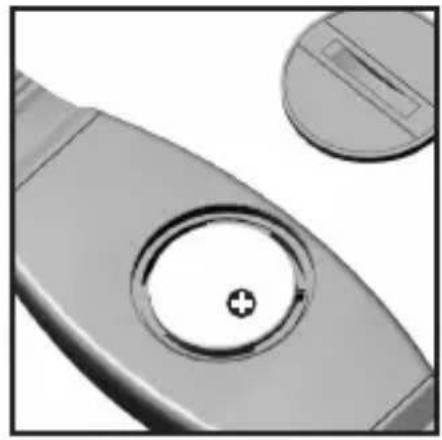
natural_image
Close-up of a mechanical component with a circular hole and a plus symbol, no visible text or symbols.natural_image
Side profile illustration of a human torso and arm with a bandage (no text or symbols)CONSEILS
natural_image
Illustration of a wristwatch with a digital display showing 6:29, accompanied by a stylized hand gesture (no text or symbols on the watch face)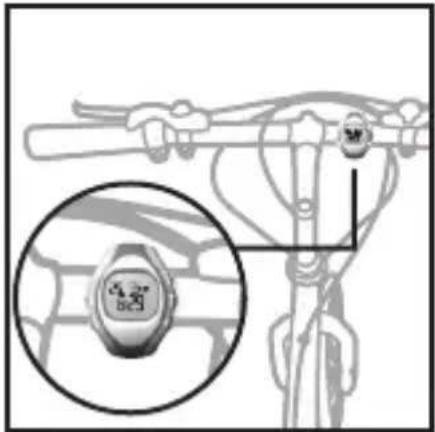
natural_image
Diagram of a bicycle's steering wheel and dashboard, showing a close-up of the wheel (no text or symbols present)SIGNAL DE TRANSMISSION
natural_image
Close-up of a handheld device with a finger pointing at the tip (no visible text or symbols)AFFICHER LES ENREGISTREMENTS DU PROGRAMME D'ENTRAÎNEMENT INTELLIGENT
EUROPE - DÉCLARATION DE CONFORMITÉ
natural_image
Close-up of a mechanical component with an arrow indicating direction (no visible text or symbols)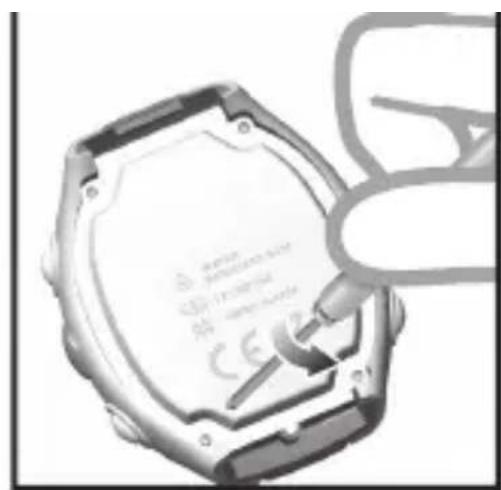
natural_image
Close-up of a mechanical hard disk with a hand holding a screwdriver inserted (no visible text or symbols)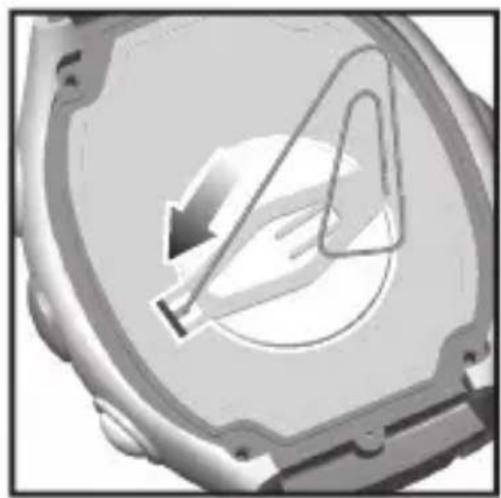
natural_image
Close-up of a mechanical component with a circular hole and internal curved line (no visible text or symbols)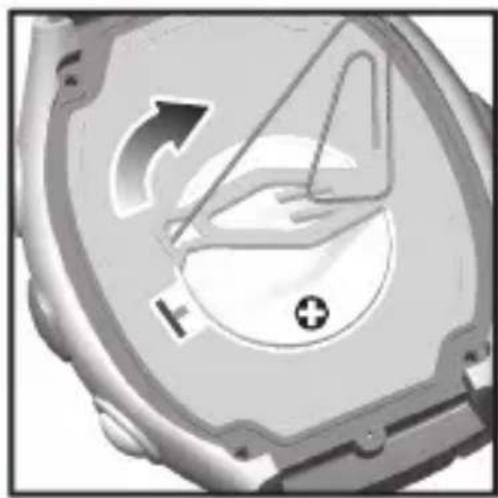
natural_image
Close-up of a mechanical component with directional arrows and a plus symbol (no readable text or labels)natural_image
Two grayscale images showing a circular component being turned into a ring, with one view showing the end of its hole (no text or symbols present)natural_image
Side profile illustration of a human torso and arm (no text or symbols)CONSIGLI
natural_image
Illustration of a handheld device with a finger pointing at it (no text or symbols visible)natural_image
Close-up of a mechanical component with an arrow indicating direction (no visible text or symbols)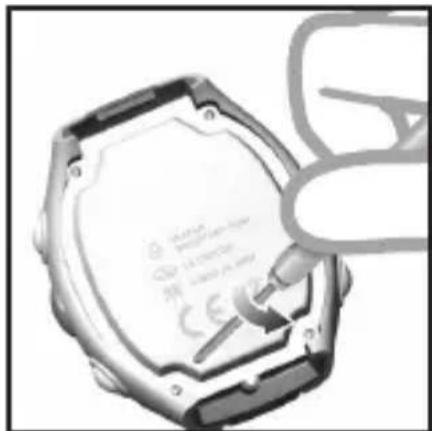
natural_image
Close-up of a hexagonal hard disk with a hand inserting a screwdriver (no visible text or symbols)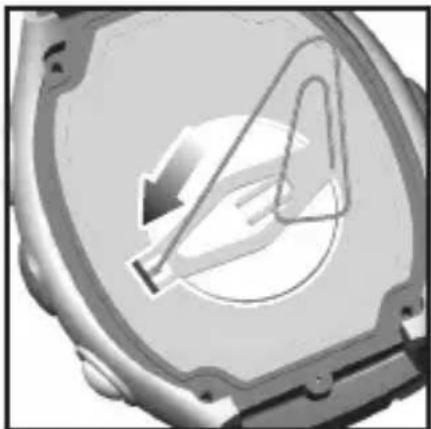
natural_image
Close-up of a mechanical component with a circular opening and internal structure (no visible text or symbols)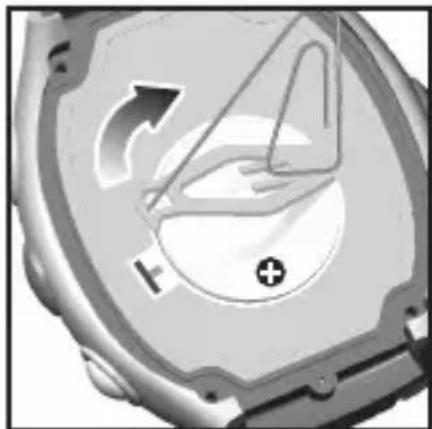
natural_image
Close-up of a mechanical component with directional arrows and a plus symbol (no readable text or labels)natural_image
Two grayscale images showing a circular component being turned into a ring, with one view showing a plus symbol (no text or symbols present)natural_image
Side profile illustration of a human torso with a bandage (no text or symbols)TIPS
natural_image
Illustration of a wristwatch with digital display showing 6:23' and '5:23' (no text or symbols on the watch face)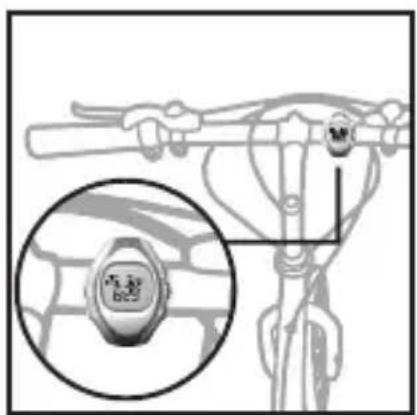
TRANSMISSIESIGNAAL
natural_image
Close-up of a handheld device with a finger pointing at the button (no visible text or symbols)OVERSCHAKELEN NAAR ANDERE WERKINGSMODI
NAKIJKEN VAN DE GEGEVENS IN HET GEHEUGEN VAN HET SMART TRAINING PROGRAMMA
natural_image
Close-up of a metallic mechanical component with a circular cutout and arrow indicating rotation (no text or symbols)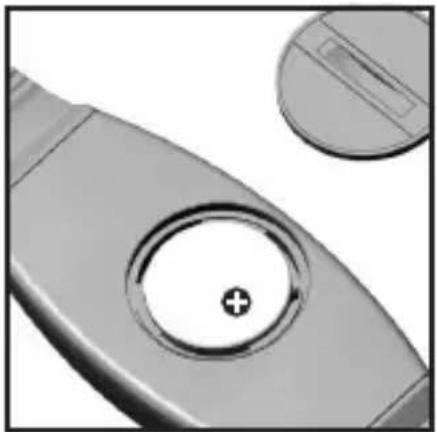
natural_image
Close-up of a metallic mechanical component with a circular hole and a plus symbol, alongside a separate circular inset (no text or symbols)natural_image
Side profile illustration of a human torso and arm with a bandage (no text or symbols)DICAS
natural_image
Illustration of a wristwatch with digital display showing 25.30' and 6:29' (no text or symbols on the watch face)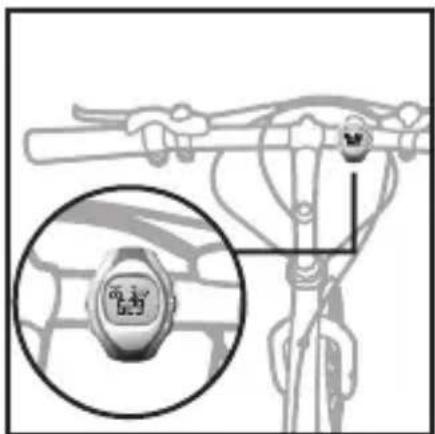
natural_image
Illustration of a hand pointing at a curved object with a circular mark (no text or symbols)INNEHÅLLSFÖRTECKNING
Introduktion 3
Huvudfunktioner 4
Klocka 4
LCD Display 5
Att Komma Igång 8
natural_image
Close-up of a metallic mechanical component with a circular component and arrow indicating rotation (no text or symbols)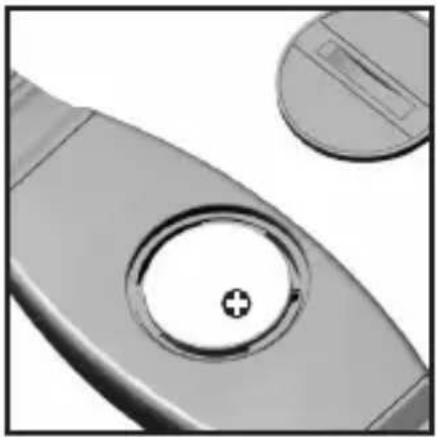
natural_image
Close-up of a metallic mechanical component with a circular hole and a plus symbol, no visible text or symbols.natural_image
Side profile illustration of a human torso and arm with a bandage (no text or symbols)TIPS
natural_image
Illustration of a wristwatch with digital display showing 3:00 and 6:29 (no text or symbols on the watch face)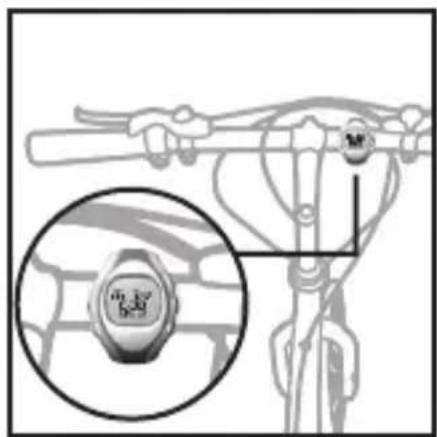
ÖVERFÖRINGSSIGNAL
natural_image
Close-up of a handheld electronic device with a finger pointing at the button (no visible text or symbols)ATT STÄNGA AV ALARMLJUDET
VISA SPARADE VÄRDEN FÖR SMART TRAINING PROGRAM

- VIBRA Trainer Fit / VIBRA Trainer Fit Pro Model: SE211 / SE232 USER MANUAL
- TABLE OF CONTENTS
- About the SMART TRAINING PROGRAM 26
- Stopwatch 29
- Training Information 31
- Care Instructions 32
- Specifications 33
- Warnings 34
- About Oregon Scientific 35
- EU-Declaration of Conformity 36
- INTRODUCTION
- WATCH
- Area 1
- Area 2
- Area 3
- Area 4
- UNPACKING THE WATCH
- TURNING ON THE WATCH (FIRST-TIME USE ONLY)
- BATTERIES
- To replace the watch battery:
- To replace the chest belt battery:
- IMPORTANT
- CHEST BELT
- TIPS
- TRANSMISSION SIGNAL
- SETTING THE KEYPAD TONE / LIGHT MODE
- ACTIVATING THE BACKLIGHT
- ACTIVATING THE KEYPAD LOCK
- SETTING THE ALARM(S)
- TURNING THE ALARM SOUND OFF
- EXERCISE PROFILE
- HEART RATE ALERT
- USER PROFILE
- ACTIVITY LEVEL
- ABOUT THE FITNESS / BODY MASS INDEX
- FITNESS INDEX
- VIEW FITNESS / BODY MASS INDEX
- ABOUT THE SMART TRAINING PROGRAM
- USING THE SMART TRAINING PROGRAM
- VIEW DATA WHILE SMART TRAINING PROGRAM IS RUNNING
- VIEW SMART TRAINING PROGRAM MEMORY RECORDS
- RECOVERY HEART RATE (VIBRA TRAINER FIT PRO ONLY)
- STOPWATCH
- VIEW DATA WHILE STOPWATCH / LAP IS RUNNING
- VIEW STOPWATCH OR LAP MEMORY RECORDS
- TRAINING INFORMATION
- TRAINING TIPS
- CARE INSTRUCTIONS
- AQUATIC AND OUTDOOR ACTIVITIES
- TIPS FOR KEEPING YOUR WATCH FIT
- WARNINGS
- ABOUT OREGON SCIENTIFIC
- VIBRA Trainer Fit /
- VIBRA Trainer Fit Pro
- MODELL: SE211 / SE232
- BEDIENUNGSHANDBUCH
- INHALTSVERZEICHNIS
- Tipps
- ÜBERTRAGUNGSSIGNAL
- CONSEJOS
- VISUALIZAR EL REGISTRO DE MEMORIA DEL PROGRAMA INTELIGENTE DE ENTRENAMIENTO
- CONSEILS
- SIGNAL DE TRANSMISSION
- AFFICHER LES ENREGISTREMENTS DU PROGRAMME D'ENTRAÎNEMENT INTELLIGENT
- EUROPE - DÉCLARATION DE CONFORMITÉ
- CONSIGLI
- TRANSMISSIESIGNAAL
- OVERSCHAKELEN NAAR ANDERE WERKINGSMODI
- NAKIJKEN VAN DE GEGEVENS IN HET GEHEUGEN VAN HET SMART TRAINING PROGRAMMA
- DICAS
- INNEHÅLLSFÖRTECKNING
- ÖVERFÖRINGSSIGNAL
- ATT STÄNGA AV ALARMLJUDET
- VISA SPARADE VÄRDEN FÖR SMART TRAINING PROGRAM
Brand : OREGON SCIENTIFIC
Model : SE211
Category : Sports Watch