LE24F160X2 - TV DURABASE - Free user manual and instructions
Find the device manual for free LE24F160X2 DURABASE in PDF.



User questions about LE24F160X2 DURABASE
0 question about this device. Answer the ones you know or ask your own.
Ask a new question about this device
Download the instructions for your TV in PDF format for free! Find your manual LE24F160X2 - DURABASE and take your electronic device back in hand. On this page are published all the documents necessary for the use of your device. LE24F160X2 by DURABASE.
USER MANUAL LE24F160X2 DURABASE
Notifications & Features & Accessories. 18
Features 18
Control Buttons on the TV 18
Connect Power 19
Remote Control 20
Connections. 21
Media Browser Menu. 22
TV Menu Features and Functions 23
General TV Operation 25
Using the Channel List 25
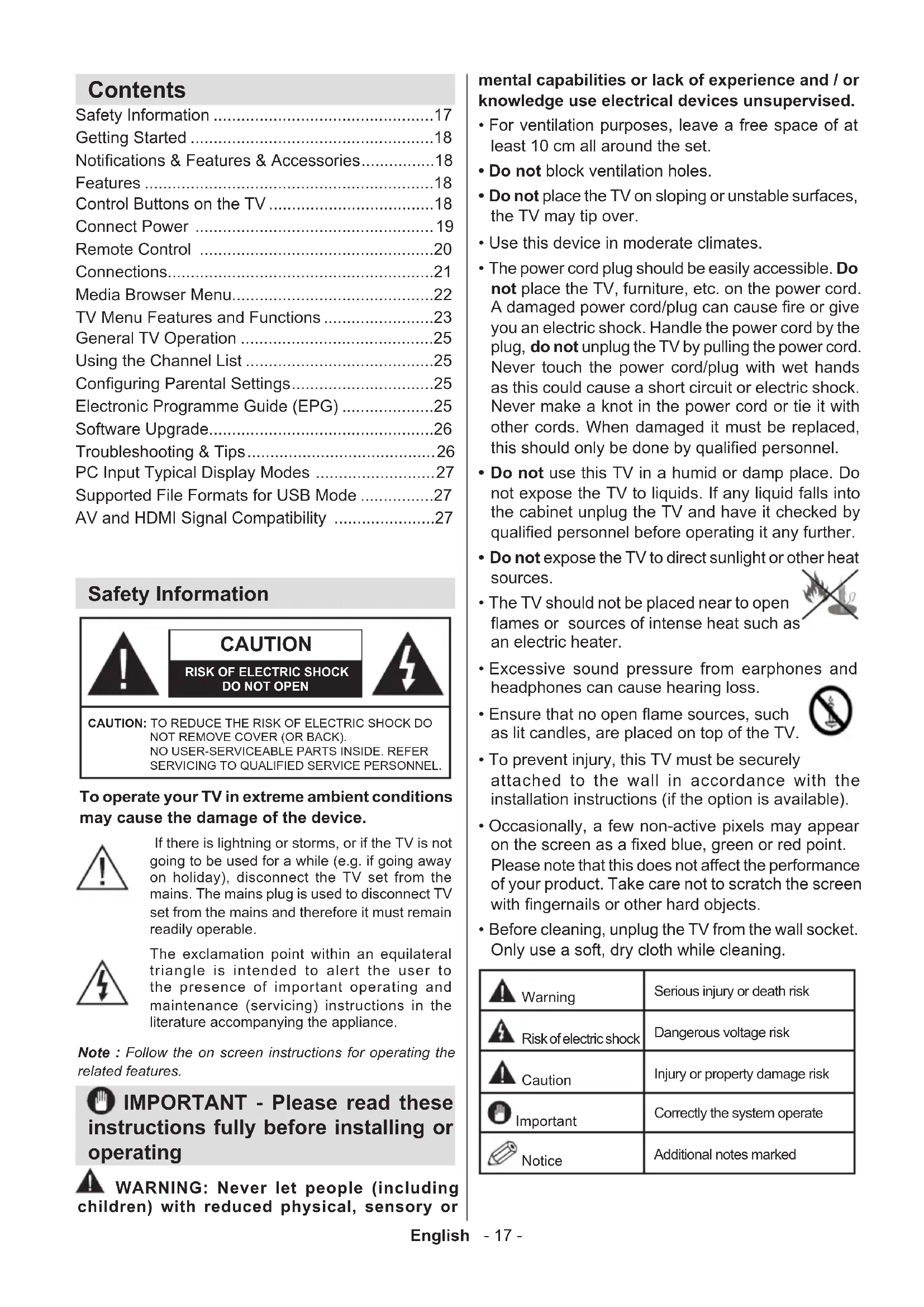
Configuring Parental Settings. 25
Electronic Programme Guide (EPG) 25
Software Upgrade. 26
Troubleshooting & Tips 26
PC Input Typical Display Modes 27
Supported File Formats for USB Mode 27
AV and HDMI Signal Compatibility 27
Safety Information

CAUTION
RISK OF ELECTRIC SHOCK DO NOT OPEN

CAUTION: TO REDUCE THE RISK OF ELECTRIC SHOCK DO NOT REMOVE COVER (OR BACK). NO USER-SERVICEABLE PARTS INSIDE. REFER SERVICING TO QUALIFIED SERVICE PERSONNEL.
To operate your TV in extreme ambient conditions may cause the damage of the device.

If there is lightning or storms, or if the TV is not going to be used for a while (e.g. if going away on holiday), disconnect the TV set from the mains. The mains plug is used to disconnect TV set from the mains and therefore it must remain readily operable.

The exclamation point within an equilateral triangle is intended to alert the user to the presence of important operating and maintenance (servicing) instructions in the literature accompanying the appliance.
Note : Follow the on screen instructions for operating the related features.

IMPORTANT - Please read these instructions fully before installing or operating

WARNING: Never let people (including dren) with reduced physical, sensory or
mental capabilities or lack of experience and / or knowledge use electrical devices unsupervised.
-
For ventilation purposes, leave a free space of at least 10cm all around the set.
-
Do not block ventilation holes.
-
Do not place the TV on sloping or unstable surfaces, the TV may tip over.
-
Use this device in moderate climates.
-
The power cord plug should be easily accessible. Do not place the TV, furniture, etc. on the power cord. A damaged power cord/plug can cause fire or give you an electric shock. Handle the power cord by the plug, do not unplug the TV by pulling the power cord. Never touch the power cord/plug with wet hands as this could cause a short circuit or electric shock. Never make a knot in the power cord or tie it with other cords. When damaged it must be replaced, this should only be done by qualified personnel.
-
Do not use this TV in a humid or damp place. Do not expose the TV to liquids. If any liquid falls into the cabinet unplug the TV and have it checked by qualified personnel before operating it any further.
-
Do not expose the TV to direct sunlight or other heat sources.
The TV should not be placed near to open flames or sources of intense heat such as an electric heater.

-
Excessive sound pressure from earphones and headphones can cause hearing loss.
-
Ensure that no open flame sources, such as lit candles, are placed on top of the TV.

-
To prevent injury, this TV must be securely attached to the wall in accordance with the installation instructions (if the option is available).
-
Occasionally, a few non-active pixels may appear on the screen as a fixed blue, green or red point.
Please note that this does not affect the performance of your product. Take care not to scratch the screen with fingernails or other hard objects.
- Before cleaning, unplug the TV from the wall socket. Only use a soft, dry cloth while cleaning.
| Warning | Serious injury or death risk |
| Risk of electric shock | Dangerous voltage risk |
| Caution | Injury or property damage risk |
| Important | Correctly the system operate |
| Notice | Additional notes marked |
Getting Started
Notifications & Features & Accessories
Environmental Information
This television is designed to consume less energy to help save the environment. To reduce energy consumption, you should take the following steps:
If you set the Power Save Mode as Eco, the TV will switch to energy-saving mode. The Power Save Mode settings can be found in the 'Picture' section of the Main Menu. Note that some picture settings will be unavailable to be changed.
If Picture Off is selected, "Screen will be off in 3 seconds." message will be displayed. Select PROCEED and press OK to continue. The screen will be off immediately.
When the TV is not in use, please switch off or disconnect the TV from the mains plug. This will also reduce energy consumption.
Standby Notifications
- If the TV does not receive any input signal (e.g. from an aerial or HDMI source) for 5 minutes, the TV will go into standby. When you next switch-on, the following message will be displayed: "Standby Cause No Signal" Press OK to continue.
- If the TV has been left on and not been operated for a while, the TV will go into standby. When you next switch-on, the following message will be displayed. "Standby Cause No Operation" Press OK to continue.
Features
Remote controlled colour TV.
Fully integrated digital/cable TV (DVB-T/C)
- HDMI inputs are for connecting a device that has a HDMI socket.
- USB input.
- OSD menu system.
- Scart socket for external devices (such as DVD Players, PVR, video games, etc.)
- Stereo sound system.
- Teletext.
- Headphone connection.
Automatic programming system.
- Manual tuning.
Automatic power down after up to six hours.
- Sleep timer.
Child lock.
Automatic sound mute when no transmission.
- NTSC playback.
AVL (Automatic Volume Limiting).
- PLL (Frequency Search).
- PC input.
- Plug&Play for Windows 98, ME, 2000, XP, Vista, Windows 7.
Game Mode (Optional).
Accessories Included
Remote Control
- Batteries: 2 x AAA
- Instruction Book
- Wall Mount Kit (Optional)
Control Buttons on the TV
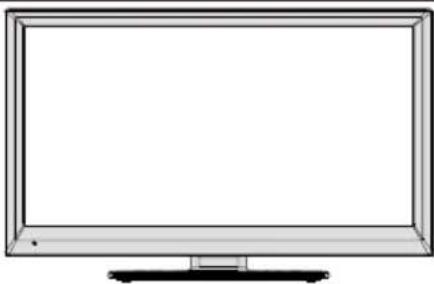
TV Control Switch & Operation
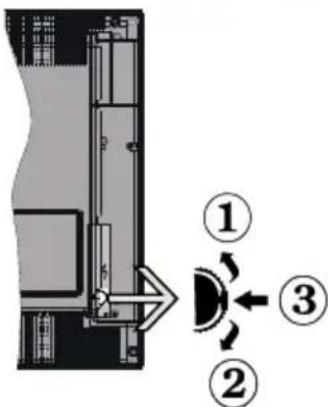
1.Up direction
2. Down direction
3. Programme/Volume / AV / Standby-On selection switch
The Control button allows you to control the Volume/Programme/Source and Standby-On functions of the TV.
To change volume: Increase the volume by pushing the button up. Decrease the volume by pushing the button down.
To change channel: Press the middle of the button, the channel information banner will appear on screen. Scroll through the stored channels by pushing the button up or down
To change source: Press the middle of the button twice, the source list will appear on screen. Scroll
through the available sources by pushing the button up or down.
To turn the TV off: Press the middle of the button down and hold it down for a few seconds, the TV will turn into standby mode.
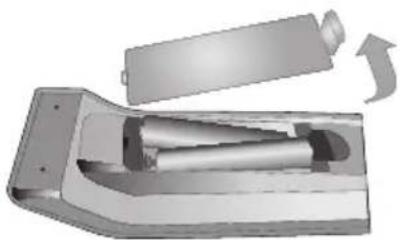
Inserting the Batteries into the Remote
Lift the cover on the back of the remote upward gently. Install two AAA batteries. Make sure to match the + and - ends of the batteries in the battery compartment (observe the correct polarity) Replace the cover.
Connect Power
IMPORTANT: The TV set is designed to operate on 220-240V AC, 50Hz socket. After unpacking, allow the TV set to reach the ambient room temperature before you connect the set to the mains. Plug the power cable to the mains socket outlet.
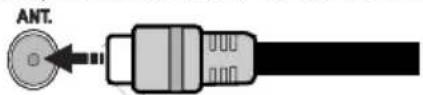
Antenna/Cable Connection
Connect the "aerial" or "cable TV" plug to the AERIAL INPUT (ANT) socket located on the back of the TV.
Notification
Manufactured under license from Dolby Laboratories.
TRADEMARK ACKNOWLEDGMENT
"Dolby" and the double-D symbol are trademarks of Dolby Laboratories.

"HDMI, the HDMI logo and High-Definition Multimedia
Interface are trademarks or registered trademarks of HDMI Licensing LLC."

HDEFINITIONMULTIMODINTERFAC
Information for Users on Disposal of Old Equipment and Batteries
[European Union only]
These symbols indicate that equipment with these symbols should not be disposed of as general household waste. If you want to dispose of the product or battery, please consider the collection systems or facilities for appropriate recycling.
Notice: The sign Pb below the symbol for batteries indicates that this battery contains lead.
![DURABASE LE24F160X2 - [European Union only] - 1](/content/2026/02/382696/images/ffb2887ba05780c563ca4acd2f8842f01c987d67a7963f2c27be517f8273f2e9.jpg)
![DURABASE LE24F160X2 - [European Union only] - 2](/content/2026/02/382696/images/d993eb95ca060b3cf7443c11b374e10f4f39de02d619b05ce0d9d48815d85922.jpg)
Products
Specification
| TV Broadcasting PAL B/G D/K K | |
| Receiving Channels | VHF (BAND I/III) - UHF (BAND U) - HYPERBAND |
| Number of Preset Channels | 1000 |
| Channel Indicator On Screen Display | |
| RF Aerial Input 75 Ohm (unbalanced) | |
| Operating Voltage 220-240V AC, 50Hz. | |
| Audio German+Nicam Stereo | |
| Audio Output Power (WRMS.) (10% THD) | 2 x 2,5 |
| Power Consumption 45 W | |
| Weight 5,00 | |
| TV Dimensions DxLxH (with foot) | 149x 576 x 405 |
| TV Dimensions DxLxH (without foot) | 38 x 576 x 368 |
| Operation temperature and operation humidity: | 5°C up to 45°C, 85% humidity max |
Remote Control
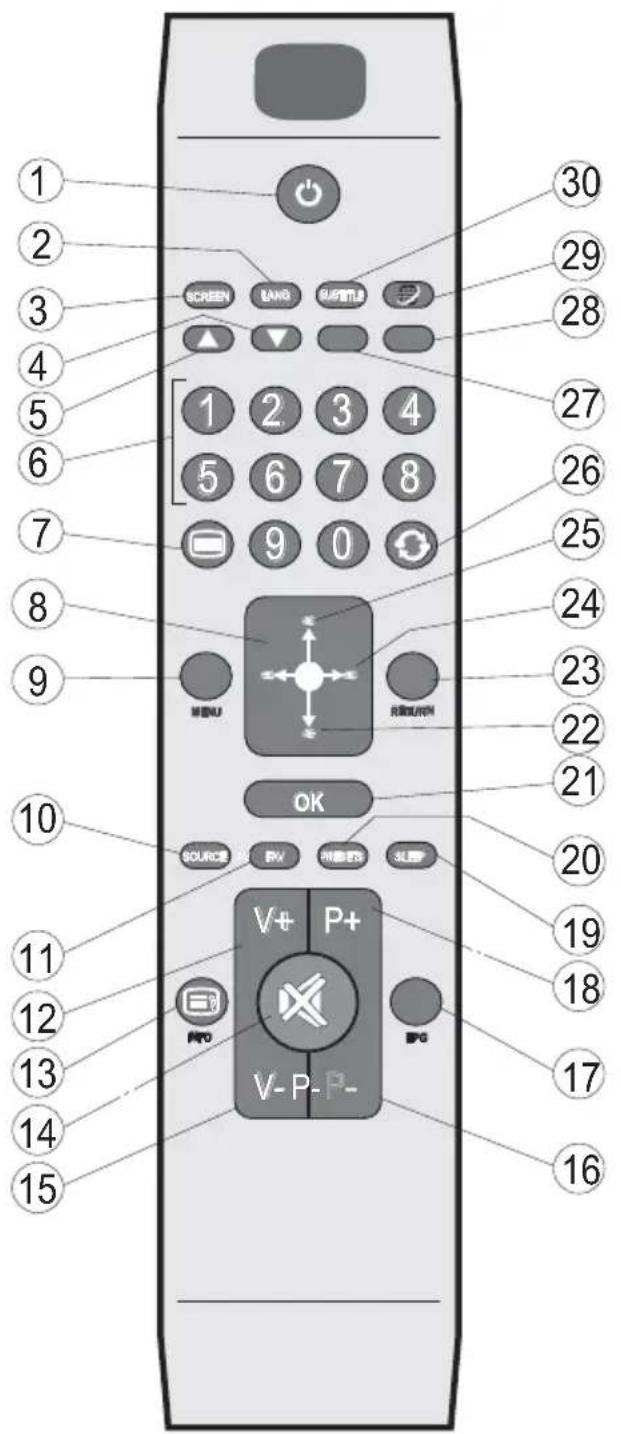
- Standby
- Mono/Stereo - Dual I-II / Current language
- Image size
- Green button
- Red button
- Numeric buttons
- Teletext - Mix
- Cursor left
- Menu on/off
- AV / Source
- Favourite mode selection
- Volume up
- Info / Reveal (in TXT mode)
- Mute
- Volume down
- Programme down / Page up
- Electronic Programme Guide (EPG)
- Programme up / Page down
- Sleep timer
- Picture mode selection
- OK / Select / Hold (in TXT mode) / Channel list
- Cursor down
- Return / Index page (in TXT mode)
- Cursor right / Subpage (in TXT mode)
- Cursor up
- Previous programme
- Yellow button
- Blue button
- No function
- Subtitle on-off / Subtitle (in Media Browser mode)

NOTE: The Remote Control range is approximately 23ft.
Connections
| Connector Type | Cables Device | ||
| Scart Connection (back) | |||
| VGA Connection (back) | |||
| SIDE AV | PC/YPbPr Audio Connection (side) | Side Audio YPbPr or PC Connection Cable (Not supplied) | |
| HDMI Connection (back) | |||
| SPDIFF Connection (back) | |||
| SPDIF | Side AV (Audio/Video) Connection (side) | (Not supplied) | |
| HEADPHONE | Headphone Connection (side) | ||
| YPbPr Video Connection (back) | PC to YPbPr Connection Cable (Not supplied) | ||
| USB Connection (side) | |||
| CI Connection (side) |
NOTE: When connecting a device via the Side AV input, you must use the supplied connection cables to enable connection. See the illustrations above. You can use YPbPr to VGA cable (not supplied) to enable YPbPr signal via VGA input. You cannot use VGA and YPbPr at the same time. To enable PC audio, you will need to use the SIDE AV CONNECTION cable's WHITE & RED inputs. If an external device is connected via the SCART socket, the TV will automatically switch to AV mode. When receiving DTV channels (Mpeg4 H.264) or while in Media Browser mode, output will not be available via the scart socket. When using the wall mounting kit (optional), we recommend that you plug all your cables into the back of the TV before mounting on the wall. Insert or remove the Cl module only when the TV is SWITCHED OFF. You should refer to the module instruction manual for details of the settings.
First Time Installation - USB Connections
Switching On/Off
To Switch the TV On
Connect the power cord to the 220-240V AC, 50Hz
To switch on the TV from standby mode either:
Press the "O" button, + / - or a numeric button on the remote control.
Press the side function switch until the TV comes on from standby.
To Switch the TV Off
Press the " button on the remote control or press the side function switch until the TV switches into standby mode.
To power down the TV completely, unplug the power cord from the mains socket.
Note: When the TV is switched to standby mode, the standby LED can blink to indicate that features such as Standby Search, Over Air Download or Timer is active. The LED can also blink when you switch on the TV from standby mode.
First Time Installation
When turned on for the first time, the language selection screen is displayed. Select the desired language and press OK.
The First Time Installation (FTI) screen will be displayed next. Set your preferences using the navigation buttons and when finished, press OK to continue.
You can activate Store mode option to be available in "Other settings" menu and your TV's features will be illustrated on the top of the screen. A confirmation screen will be displayed. Select YES to proceed.
If Home Mode is selected, Store mode will not be available after the First Time Installation. Press OK button to continue.
Default PIN code can change depending on the selected country.
If you are asked to enter a PIN code for viewing a menu option, use one of the following codes: 4725, 0000 or 1234.
Aerial Installation
If you select AERIAL option from the Search Typescreen, the television will search for digital terrestrial TV broadcasts.
NOTE: You can press MENU button to cancel.
After all the available stations are stored, the Channel List will be displayed on the screen. If you like how the channels are sorted according to the LCN (^*) , please select "Yes" and then press OK.
Press MENU button to quit channel list and watch TV. (^*) LCN is the Logical Channel Number system that organizes available broadcasts in accordance with a recognizable channel sequence (if available).
Cable Installation
If you select CABLE option and press OK button on the remote control. To continue, please select YES and press OK. To cancel operation, select NO and press OK. You can select frequency ranges from this screen.
Enter the frequency range manually by using the numeric button.
Note: Searching duration will change depending on the selected search step.
Media playback via USB Input
You can connect a 2.5" and 3.5" inch (hdd with external power supply) external hard disk drives or USB memory stick to your TV by using the USB inputs of the TV.
IMPORTANT! Back up your files before making any connections to the TV. Manufacturer will not be responsible for any file damage or data loss. Certain types of USB devices (e.g. MP3 Players) or USB hard disk drives/memory sticks may not be compatible with this TV.
While formatting a USB hard disk that has 1TB (Tera Byte) or more file capacity, you can experience problems with the formatting process. Do not repeatedly quickly plug and unplug the drive. This may cause physical damage to the USB player and USB device itself. Do not pull out USB module while playing a file.
Media Browser Menu
You can play photo, music, and movie files stored on a USB disk by connecting it to your TV. Connect a USB disk to one of the USB inputs located on the side of the TV. Pressing the MENU button while in the Media Browser mode will access the Picture, Sound and Settings menu options. Pressing the MENU button again will exit from this screen. You can set your Media Browser preferences by using the Settings Menu.
| Loop/Shuffle Mode Operation | |
| Start playback with ▷ and activate | TV plays next file and loop the list. |
| Start playback with OK and activate | the same file will be played in a loop (repeat). |
| Start playback with OK ▷ and activate | the file will be played in a shuffle. |
TV Menu Features and Functions
| Picture Menu Contents | |
| Mode | You can change the picture mode to suit your preference or requirements. Picture mode can be set to one of these options: Cinema, Game, Dynamic and Natural. |
| Contrast Sets contrast level of the screen. | |
| Brightness | Sets the brightness value for the screen. |
| Sharpness Sets the sharpness value for the objects displayed on the screen. | |
| Colour | Sets the color saturation. |
| Power Save Mode | To set the Power Save Mode as Eco, Picture Off and Disabled. (When the Mode is Dynamic, Power Save mode is automatically set as disabled.) |
| Backlight (Optional) | This setting controls the backlight level. The backlight function will be inactive if the Power Save Mode is set to Eco. The backlight cannot be activated in VGA, Media Browser mode or while the picture mode is set to Game. |
| Noise Reduction | If the broadcast signal is weak and the picture is noisy, use the Noise Reduction setting to reduce the amount of noise. |
| Advanced Settings | |
| Dynamic Contrast | You can change the Dynamic Contrast ratio to desired value. |
| Colour Temp Sets | The color temperature. |
| Picture Zoom | Sets the desired picture size from picture zoom menu. Note: Auto (Only available in Scart mode with SCART PIN8 high voltage/low voltage switching) |
| HDMI True Black(optional) | While watching from HDMI source, this feature will be visible in the Picture Settings menu. You can use this feature to enhance blackness in the picture |
| Film Mode | Films are recorded at a different number of frames per second to normal television programmes. Turn this feature on when you are watching films to see the fast motion scenes clearly. |
| Skin Tone Skin tone | can be changed between -5 and 5. |
| Colour Shift With this | This option you can adjust the color shift to green or to red. |
| RGB Gain | You can configure the colour temperature values using the RGB Gain feature. |
| Reset Resets the picture settings to factory default settings.(Except Game Mode) | |
| Autoposition (in PC mode) | Automatically optimizes the display. Press OK to optimize. |
| H Position (in PC mode) | This item shifts the image horizontally to the right hand side or left hand side of the screen. |
| V Position (in PC mode) | This item shifts the image vertically towards the top or bottom of the screen. |
| Dot Clock (in PC mode) | Dot Clock adjustments correct the interference that appear as vertical banding in dot intensive presentations like spreadsheets or paragraphs or text in smaller fonts. |
| Phase (in PC mode) | Depending on the resolution and scan frequency that you input to the TV set, you may see a hazy or noisy picture on the screen. In such a case you can use this item to get a clear picture by trial and error method. |
| While in VGA (PC) mode, some items in Picture menu will be unavailable. Instead, VGA mode settings will be added to the Picture Settings while in PC mode. | |
TV Menu Features and Functions
| Sound Menu Contents | |
| Volume Adjusts the volume | me level. |
| Equalizer | Selects the equalizer mode. Custom settings can be made only when in user mode. |
| Balance This setting is used for emphasizing left or right speaker balance. | |
| Headphone Sets headphone volume. | |
| Sound Mode You can select a sound mode. (If the selected channel supports). | |
| AVL (Automatic Volume Limiting) | Function sets the sound to obtain fixed output level between programmes. |
| Digital Out Sets digital out audio type. | |
| Settings Menu Contents | |
| Conditional Access Controls conditional access modules when available. | |
| Language | Configs language settings (may change depending on the country selected) Preferred and current settings will be available. Current settings can be changed only if the broadcaster supports. |
| Parental | Enter correct password to change parental settings. You can easily adjust menu lock, maturity lock (may change depending on the country selected) and child lock in this menu. You can also set new pin number. |
| Timers | Sets sleep timer to turn off the TV after a certain time. Sets timers for selected programmes. |
| Date/Time Sets date and time. | |
| Sources Enables or disables selected source options. | |
| Other Settings: Displays other setting options of the TV set: | |
| Menu Timeout Changes timeout duration for menu screens. | |
| Scan Encrypted Channels | When this setting is on, the search process will locate the encrypted channels as well. |
| Blue Background | Activates or deactivates the blue background system when the signal is weak or absent. |
| Software Upgrade To ensure that your TV always has the most up to date firmware. | |
| Application Version Displays application version. | |
| Hard of Hearing Enables any special feature sent from the broadcaster. | |
| Audio Description | Audio description refers to an additional narration track for blind and visually impaired viewers of visual media, including television and movies. You can use this feature, only if the broadcaster supports that additional narration track. Note: Audio description sound feature cannot be available in recording or time shifting mode. |
| Auto TV Off | You can set the timeout value of auto off feature. When the timeout value is reached and the TV has not been operated for a selected time, the TV will go into standby mode. |
| Standby Search (Optional) | If the Standby Search is set to On, when the TV is in standby mode, available broadcasts will be searched. If the TV locates any new or missing broadcasts, a menu screen will be displayed, asking you whether or not to execute these changes. Channel list will be updated and changed after this process. |
| TV Menu Features and Functions | |
| Store Mode | If you are displaying the TV in a store, you can activate this mode. Whilst Store Mode is enabled, some items in the TV menu may not be available. |
| Power Up Mode | This setting configures the power up mode preference. |
| Install and Retune Menu Contents | |
| Automatic Channel Scan (Retune) (If available) | Displays automatic tuning options. Digital Aerial: Searches and stores aerial DVB stations. Digital Cable: Searches and stores cable DVB stations. Analogue: Searches and stores analogue stations. Digital Aerial & Analogue: Searches and stores aerial DVB and analogue stations. Digital Cable & Analogue: Searches and stores cable DVB and analogue stations. |
| Manual Channel Scan | This feature can be used for direct broadcast entry. |
| Network Channel Scan | Searches for the linked channels in the broadcast system. |
| Analogue Fine Tune | You can use this setting for fine tuning analogue channels. This feature is not available if no analogue channels are stored. |
| First Time Installation | Deletes all stored channels and settings, resets TV to factory settings. |
General TV Operation
Using the Channel List
The TV sorts all stored stations in the Channel List. You can edit this channel list, set favourites or set active stations to be listed by using the Channel List options.
Configuring Parental Settings
To prohibit viewing of certain programmes, channels and menus can be locked by using the parental control system.
To display parental lock menu options, the PIN number should be entered. The factory default PIN number is 0000. After coding the correct PIN number, parental settings menu will be displayed.
Menu Lock: Menu lock setting enables or disables the menu access.
Maturity Lock: When set, this option gets the maturity information from the broadcast and if this maturity level is disabled, disables access to the broadcast.
Child Lock: When Child Lock is set, the TV can only be controlled by the remote control. In this case the control panel buttons will not work.
Set PIN: Defines a new PIN number.
Default PIN code can change depending on the selected country.
If you are asked to enter a PIN code for viewing a menu option, use one of the following codes: 4725, 0000 or 1234.
Electronic Programme Guide (EPG)
Some, but not all channels send information about the current and next programmes. Press the EPG button to view the EPG menu.
Red button (Prev Day): Displays the programmes of previous day.
Green button (Next day): Displays the programmes of the next day.
Yellow button (Zoom): Expands programme information.
Blue button (Filter): Views filtering options.
SUBTTL: Press SUBTITLE button to view Select Genre menu. Using this feature, you can search the programme guide database in accordance with the genre. Info available in the programme guide will be searched and results matching your criteria will be listed.
INFO: Displays, in detailed, information on the programme selected.
Numeric buttons (Jump): Jumps to the preferred channel directly via numeric buttons.
OK: Displays programme options.
Text (Search): Displays "Guide Search" menu.
SWAP (Now) : Shows the current programme.
Software Upgrade
Your TV is capable of finding and updating automatically via the Aerial/Cable signal.
Software upgrade search via user interface
Simply navigate on your main menu. Choose Settings and select Other Settings menu. In Other Settings menu navigate on to the Software for Upgrade item and press OK button to check for a new software upgrade.
3 AM search and upgrade mode
While the TV is connected to an aerial signal. If Automatic scanning in the Upgrade Options menu is enabled, the TV wakes up at 03:00 and searches broadcast channels for new software upgrades. If new software is found and downloaded successfully, the next time the TV powers up, it will have the new software version.
Note: If the TV fails to come on after the upgrade unplug the TV for 2 minutes and plug in again.
Troubleshooting & Tips
Tv will not turn on
Make sure the power cord is plugged in securely to wall outlet. The batteries in the remote control may be exhausted. Press the Power button on the TV.
Poor picture
- Have you selected the correct TV system?
- Low signal level can cause picture distortion. Please check antenna access.
- Check if you have entered the correct channel frequency if you have done manual tuning.
- The picture quality may degrade when two devices are connected to the TV at the same time. In such a case, disconnect one of the devices.
No picture
-
No Picture means that your TV is not receiving a transmission. Have you selected the correct button on the remote control? Try once more. Also make sure the correct input source has been selected.
-
Is the antenna connected properly?
- Is the antenna cable damaged?
- Are suitable plugs used to connect the antenna?
If you are in doubt, consult your dealer.
No sound
- Has the TV been set to mute? To cancel mute, press the "×" button, or increase the volume level.
- Sound is coming from only one speaker. Is the balance set to one extreme? See Sound Menu section.
Remote control - does not operate
- The batteries may be exhausted. Replace the batteries.
Input sources - can not be selected
- If you cannot select an input source, it is possible that no device is connected. if not
- Check the AV cables and connections if you have tried to connect a device.
PC Input Typical Display Modes
The following table is an illustration of some of the typical video display modes. Your TV may not support all resolutions. Your TV supports up to 1920x1080.
| Index Resolution | ||
| 1 1024x768 | 60 Hz | |
| 2 1280x768 | 60 Hz | |
| 3 1360x768 | 60 Hz | |
| 4 800x600 | 56 Hz | |
| 5 800x600 | 60 Hz | |
| 6 1024x768 | 66 Hz | |
| 7 1280x1024 | 60 Hz | |
| 8 1280x960 | 60 Hz | |
| 9 1400x1050 | 60 Hz | |
| 10 | 1600x1200 | 60 Hz |
| 11 | 1920x1080 | 60 Hz |
AV and HDMI Signal Compatibility
| Source | Supported Signals | Available | |
| EXT(SCART) | PAL 50/60 O | ||
| NTSC 60 O | |||
| RGB 50 O | |||
| RGB 60 O | |||
| Side AV | PAL 50/60 O | ||
| NTSC 60 O | |||
| PCI/YPbPr | 480I, 480P 60Hz O | ||
| 576I, 576P 50Hz O | |||
| 720P 50Hz,60Hz O | |||
| 1080I 50Hz,60Hz O | |||
| 1080P 50Hz,60Hz O | |||
| HDMI1 | 480I 60Hz O | ||
| 480P 60Hz O | |||
| 576I, 576P 50Hz O | |||
| 720P 50Hz,60Hz O | |||
| 1080I 50Hz,60Hz O | |||
| 1080P | 24Hz, 25Hz30Hz, 50Hz,60Hz | O | |
(X: Not Available, O: Available)
In some cases a signal on the TV may not be displayed properly. The problem may be an inconsistency with standards from the source equipment (DVD, Set-top box, etc.). If you do experience such a problem please contact your dealer and also the manufacturer of the source equipment.
Supported File Formats for USB Mode
| Media F | le Extension | Format | Remarks | |
| Video | Audio | (Maximum resolution/Bit rate etc.) | ||
| Movie | mpg, mpeg | MPEG1, MPEG2 | MPEG1: 768x576 @30PMPEG2:1920x1080 @ 30P | |
| vob | MPEG2 | 1920x1080 @ 30P | ||
| mp4 | MPEG4, Xvid, H.264 | |||
| mkv H.264, MPEG4,VC-1 | ||||
| avi MPEG2, MPEG4, Xvid, H.264 | ||||
| flv | H.264/VP6/Sorenson | H.264/VP6:1920x1080 @ 30PSorenson: 352x288 @30P | ||
| 3gp | MPEG4, H.264 | 1920x1080 @ 30P | ||
| Music | .mp3 | - | MPEG 1 Layer 1/2 (MP3) | 32Kbps ~ 320Kbps(Bit rate)32K, 44.1k, 48k Hz,16K, 22.05K, 24KHz,8K, 11.025K, 12K Hz(Sampling rate) |
| Photo | .jpg .jpeg | Baseline JPEG | - | max WxH = 17000x10000 4147200bytes |
| . | Progressive JPEG | - | max WxH = 4000x4000 3840000bytes | |
| .bmp | - | - | max WxH = 5760x4096 3840000bytes | |
| Subtitle | .sub .srt | - | - | - |
Table des matieres
RISQUE D' ELECTROCUTION NE PAS OUVRIR

ATTENTION: TPOUR EVITER TOUT RISQUE
D' ELECTROCUTION, NE RETIREZ PAS LE
COUVERCLE. (OU LE ARRIÈRE).
L'ENTRETIEN DES PIEÇES INTERNES EST
INTERDIT AUX UTILISATEURS. VÉUILLEZ CONFIER
L'ENTRETIEN A UN PERSONNEL QUALIFIE.
Connexions (Connections)
| A | Product Fiche | ||
| B | Commercial Brand: DURABASE | ||
| C | Product No. 10086066 | ||
| D | Model No. LE24F160X2 | ||
| E | Energy efficiency class A | ||
| F | Visible screen size (diagonal, approx.) (inch/cm) | 24 inches 61 cm | |
| G | On mode average power consumption (Watt) | 25 | |
| H | Annual energy consumption (kWh/annum) | 36 | |
| I | Standby power consumption (Watt) | 0,5 | |
| J | Off mode power consumption (Watt) | 0 | |
| K | Display resolution (px) 1920 | x 1080 | |
| A | B | C | D | E | ||
| English | Product Fiche Commercial Brand Product No. | Model No. | Energy efficiency class | Visible screen size (diagonal, approx.) (inch/cm) | ||
| Deutsch | Produkt-Datenblatt | Markenzeichen | Produkt-Nr. | Modell-Nr. | Energieeffizienzklasse | Sichtbare Bildschirmgroße (diagonal, ca.) (Zoll/cm) |
| Bilirapinskii | Спвачевener Слес с тенистам данни | Тьровka марka | Пробrett № | Modem № | Клас на[eнөрөдөа[eфektшовост | Вividим размер на[eхсан (dагогалan,риби). (Иннca /cm) |
| Čestina | Produktovy list | Značka výrobce | Čislo produktu | Model Č. | Energetická tīfida | Videtelná velikost obrazovk. (улорічka, рíbil). (palci /cm) |
| Dansk | Produktoplysningsskema | Varemaerkle | Produktntr. | Model nr. | Energieeffektivtetsklasse | Syrilig skærmstørrelise (diagonalt,ca.) (HK/cm) |
| Suomi | Tuote fiche | Kaupallinen merki | Tuote nro. | Mallnro. | Virran tehokkuusluokka | Näkyvän kuvaruudun koko (diagonalainen.n.) (tuumaa/cm) |
| Français | Fiche du produit | Marque commerciale | Produit N° | Modèle N° | Classe d'efficacité énergétique | Taille d'écran visible (diagonale,approx. (pouces/cm) |
| Hrvatski | SAŽETAK PROIZVODA | Trgovačka marka | Br. proizvoda | Br. modela | Klasa energetske učinkovitosti | Vidjiva velicina ekrana (diagonal,aprox.)(pulgadas/cm) |
| Nederlands | Productfiche | Commercieel merk. | Productntr. | Modelntr. | Energie efficienty klasse | Zichtbare schermgrootte (diagonal,ca.) (inches/cm) |
| Espanol | Ficha del Produktto | Marca Comercial | N° de Producto | N° de Modelo | Clasificación Energética | Tamañó de pantalla visible (diagonal,aprox.)(pulgadas/cm) |
| Svenska | Produktspecification | Varumärke | Produktntr. | Modelntr. | Energiklass | Syrilig skamstorilek (diagonal,ungefältig) (tum/cm) |
| Italiano | Scheda prodotto | Marchio commerciale | Numero prodotto | Numero modelo | Classe di efficienza energetica | Dimensioni visibili dello schemo (diagonal,circa)(pollici/cm) |
| Polski | KARTA PRODUKTU | Marka produktu | Nr produktu | Nr modelu | Klasa efektwinošci energetycznej | Widoczny obraz ekrani (przektlna,okolo) (cali/cm) |
| Magyar | Termékismertető adatlap | Kereskedelmi márka | Termékszám | Modellszám | Energiahatékonysági osztály | Lathato kétaptomány (diagonális,kb.) (inches/cm) |
| Norsk | Produktinformasjon | Kommersiell merkevare | Produkt nr. | Model nr. | EnergiEffektivitet klasse | Syrilig skjermstørrelse (diagonal,ca.) (tommer/cm) |
| Portugues | Ficha do produits | Marca Comercial | Produto N° | Modolo N° | Classificação eficiência enerética | Tamanho eça visivel (diagonal,aprox.)(polegadas/cm) |
| Română | Fișă produs | Marcă commerciale | Nr. Produs | Nr. Model | Clasa de eficiência energetica | Dimensiunea ecranulii vizibl (diagonal, aprox. ) (inch/cm) |
| Русckий | Справочький писток Тechнiquesданный Изделяя | Toprobay марka | Homep Изделяя | Homep MODEI | Клacks знegrочот的整体 | Вividимь размер[eхсан (no dianarogалу, Okono) (diodimob/cm) |
| Беларczak | Справочький писток Тechнiquesдariaй Изделяя | Toprobay марka | Homep Изделяя | Homep MODEI | Клacks знegrочot的整体 | Вividимь размер[eхсан (no dianarogалу, Okono) (diodimob/cm) |
| Makédoncki | Тechимки podatoци | Корец ninthа марka | Поськовд 6р. | Modelбр. | Клacks на[eheprctka ecfinkacnost | Галемп на的伟大创新 (dianarogалу, okono) (inhnu/cm) |
| украинский | Тechиндani | Korpeuzma марka | Артыкел | Modelb. | Клacksenerproznokhambя | Вividимь розмер[eхсан (diagonala, Prindniello) (tokom) (inca/cm) |
| Srpski | ТehnICKe odike | Komercijalna marka | Prozvod br. | Modelbr. | Klasa energetske efikfasnosti | Velicina vidlivox ekrana (diagonala, tokom) (inca/cm) |
| Slovencina | Produktovy list | Značka výrobcu | Čislo produktu | Model Č. | Energetická trieda | Videtelná věkrost obrazovky (ahlorpriečka, zhruba) (palcov/cm) |
| Slovenscina | Opis izdelka | Komercialna znamka | Št. Izdelka | Št. Modela | Razred energetske učinkovistôt | Vidna velikost zaslona (diagonala, pribl.) (palcev/cm) |
| Ельник | Делл身形юviоц | Еморікό σύμα | Ap. Поріóvtrοц | Ap. Мove�ь | Кал'tугия ενεργιακίς απόδους | Оразу мелегoc ośobovnic (diayuvioc, mp.) (ivorec/cm) |
| Bosanski | ТehnICKi podaci | Komercijalna marka | Produktbr. | Modelbr. | Klasa energetske efikfasnosti | Vidjiva velicina ekrana (diagonala, priblizb.c) (inca/cm) |
| Тürke | Ürün fişi | Ticari Marka | Ürün No. | Model No. | Enerji verimiligi smfi | Görülten ekran bovitut (capraz, yasklc.) (incq/cm) |
| Shqip | Тө chēnat e produktit | Marka tregtare | Nr. i produktit. | Nr. i modelit. | Klasa e eficiencés sē energjisè | Madhësia e ekranit têdukshëm (diagonal,afresisht) (ingc/cm) |
| Lietuviu | Gaminio etikete | Gamintojas | Gaminito Nr. | Modelio Nr. | Energethirn efektywo mo kase | Matomas ekran dydis (jstržainé,approx.) (colli/cm) |
| Latviešu | Produkta aprakssts | Marka | Produkta nr. | Modela nr. | Energofektivitätes klase | Ekraṇa izmīrs (pa diognāli, apmçram) (collas/cm) |
| Eesti | TOOTEKIRJELDUS | Tootja firma | Toote nr. | Mudell nr. | Energiaklass | Vaadatava ekraani suurus (diagonaal, umbes) (tolli/cm) |
| G H J K | |||||||||||||||||
| English | On mode average power consumption (Watt) | Annual energy consumption (kWh/annum) | Standby power consumption (Watt) | Off mode power consumption (Watt) | Display resolution (px) | ||||||||||||
| Deutsch | Durchschnittlicher Stromverbrauch im eingeschalttem Zustand (Watt) | Jährlicher Energieverbrauch (kWh/Jahr) Standby-Stromverbrauch | (Variabel) | Stromverbrauch im ausgeschalten Zustand (Watt) | Display-Auflösung (px) | ||||||||||||
| Блларский | С replenishment SF6 at 100% of the target value (Watt) | Тугшема с��莹剔透的结晶(双层镀膜) | (Variabel) | Sparex® S30000-20000000000000000000000000000000000000000000000000000000000000000000000000000000000000000000000000000 | (1.5000000000000000000000000000000000000000000000000000000000000000000000000000000000000000000000000000 | ||||||||||||
| Čežlina | Prušné spotřežka elektrické energie v zapnutěm režmu (Watt) | Rozni spotřeba energia (kWh/Rozni) | Sporeška elektrické energia v potohovostin režmu (Watt) | Sporeška elektrické energia v potohovostin režmu (Watt) | Rezolution de l'écran (px) | ||||||||||||
| Dansk | Gennensnitzigt stromforbrug i tandt tilstand (Watt) | Arligt energforbrug (kWh/Arligt) | Stromforbrug (standby)(Watt) | Stromforbrug i slukket tilstand (Watt) | Skaermoplesning (px) | ||||||||||||
| Suomi | Päälla-tilan keskimārälänen virankulutus (Wattla) | Vuosittainen sähkönnkulutu (kWh/Vuosittainen) | Vakivirran kalutus (Wattla) | Pois-tilan virankulutus (Wattla) | Näytön erotteluky (piksela) | ||||||||||||
| Français | Consummation energetique moyenne en mode "marche" (Watt) | Consummation energetique annuelle (kWh/annuel) | Consummation d'energie en veille (Watt) | Consummation d'energie en mode "arrêt" (Watt) | Résolution de l'écran (px) | ||||||||||||
| Hrvatski | Prosječna potrošnja el. energije kada je proizvod ukljucen (Wattla) | Godsna potrošnja el. Energija (kWh/Godsnja) | Potrosnja el. energija u modu pripravnesti (Wattla) | Potrosnja el. energija kada je proizvod iskijucen (Wattla) | Rezolucja zaskona (piksela) | ||||||||||||
| Nederlands | Aan-modus gemiddeld stroomverbruik (Watt) | Jaarijks energiesforbruk (kWh/Jaarijks) | Stand-by stroomverbruik (Watt) | Ult-modus stroomverbruik (Watt) | Schemresolutie (px) | ||||||||||||
| Espanol | Consumo electrico medio, en funcionamento (Vatio) | Consumo electrico anual (kWh/anual) | Consumo en mode en espera (Vatio) | Consumo electrico medio apagado (Vatio) | Resoluccion de pantalia (px) | ||||||||||||
| Svenska | Strömkonsumption i PÅ-låge (Watt) | Energikonsument per Å (kWh/Arlig) | Strömkonsumption i vilolåge (Watt) | Strömkonsumption i AV-låge (Watt) | Skärsupplösning (píxlar) | ||||||||||||
| Italano | Consumo di corrente medio da acquesa (Watt) | Consumo annuale di energia (kWh/annuo) | Consumo di corrente in modalità (Watt) | Consumo di corrente da spenta (Watt) | Risoluzione del display (px) | ||||||||||||
| Polski | Średnie zuzycle energii w trybie węczyzyn (Watow) | Rozne zuzycle energii | Średnie zuzycle energii w trybie oczekiwania (Watow) | Zuzycle energii w trybie węczyczonym (Watow) | Rozdzielćzość obrazu (piksela) | ||||||||||||
| Magyar | Energiogasyztás bekapapsolva hagyott üzemmodban (Watt) Évés energatógyasztás | (kWh/Evés) | Eneriogasyztás standby (üzemmodban (Watt) | Eneriogasyztás kikapcsolt üzemmodban (Watt) | Képernyőfbelontás (px) | ||||||||||||
| Norsk | Pámodus gjennomsnittig stromforbruk (Watt) | Arlig stromforbruk (kWh/Arlig) | Hvlemod stromforbruk (Watt) | Av-modus stromforbruk (Watt) | Skjermoppliesning (píxel) | ||||||||||||
| Portugues | Consumo energia em modo medio (Watt) | Consumo annual energy (kWh/anual) | Consumo energia em stand-by (Watt) | Consumo energia em modo alimentación (Watt) | Resoluccion do visor (pxel) | ||||||||||||
| Română | Consum electric mediu in modu pormi (Watt) | Consum annual de energia (kWh/anual) | Consum electric in stare de repaus (Wali) | Consum electric in modu oprt (Wiat) | Rezolucja ecranuluri (píxel) | ||||||||||||
| Pусхий | Crdeni pracod zhepnь в рекime bdkioунец (Batt) | Exeşodni pracod zhepnь (kВчТудогоо) | Pacxod zhepnь в рекime ожidánary (Batt) | Pacxod zhepnь в рекime bdkioунец (Batt) | Papeseише ekрANA (пікөдөд) | ||||||||||||
| баларская | Crdeni pracod zhepnь в рекime bdkioунец (Batt) | Exeşodni pracod zhepnь (kBчТудогоо) | Pacxod zhepnь в рекime ожidánary (Batt) | Pacxod zhepnь в рекime bdkioунец (Batt) | Papeseише ekрANA (пікөдөд) | ||||||||||||
| мадонскп | Посочна посточь крае в bdkунен | Гудшино посточь (kWh/Tud�шп) | Пotroшочь в міртувачь (Вати) | ПOTROSHUVA KORA в міртувачь (Вати) | Рсозулда на ekран (пікөдөд) | ||||||||||||
| ук pairchьskii | Середа сожима поужнисту bpoшому рекimi (Вт) | Сердюнорочь поужнисту (Вати) | Стошима поужнисту b peя KMUBAHNA (Bt) | Стошима поужнисту b WMIMENOMY strani (Вт) | Pozidniha задан'tichtь ekрana (пікөдөд) | ||||||||||||
| Srpski | Prosečna potrošnja kada je ukljuci (Vati) | Godsna potrošnja energia (kWh/Godsnja) | Potrosnja tokom mirovanja (Vati) | Potrosnja kada je iskijuceni (Vati) | Rezolucja displeja (piks.) | ||||||||||||
| Slovenčina | Priemerna potrošbe elektrickaj energija v zapnutom režme (Wattov) | Rozna potrošna energia (kWh/Rozna) | Potrošna elektrickiej energia v pohovostnom režme (Wattov) | Potrošna elektrickiej energia vo vypnutom režme (Wattov) | Rozlise niie displeja (pikt.) | ||||||||||||
| Slovenčina | Poraba eletrICKe energia v povprevnem načini (Wattov) | Letna poraba energia (kWh/Letna) | Poraba energia v stanju pripravlenosti (Wattov) | Poraba energia načini izklopa (Wattov) | Resoluçija załona (piks.) | ||||||||||||
| Elaунц | Mönz katóváwo原则 očileupулц (Watt) | Erla gośdvo原则 očileupулц (kWh/Etray) | Kartováwo原则 póljuatoč noу avovový (Watt) | Kartováwo原则 póljuatoč noу avovový (Watt) | Aváluon očežvůn (ПікELA) | ||||||||||||
| Bosanski | Prosečna potrošnja kada je ukljuci (Watt) | Godsna potrošnja energia (kWh/Godsnja) | Potrosnja tokom mirovanja (Watt) | Potrosnja kada je iskijuceni (Watt) | Rezolucja ekraṇa (piks.) | ||||||||||||
| nau | (Ок) dučnoce naučnoce dučnoce naučnoce dučnoce dučnoce dučnoce dučnoce dučnoce dučnoce dučnoce dučnoce dučnoce dučnoce dučnoce dučnoce dučnoce dučnoce dučnoce dučnoce dučnoce dučnoce dučnoce dučnoce dučnoce dučnoce dučnoce dučnoce dučnoce Dučnoce dučnoce dučnoce dučnoce dučnoce dučnoce dučnoce dučnoce dučnoce dučnoce dučnoce dučnoce dučnoce dučnoce dučnoce dučnoce dučnoce dučnoce dučnoce dučnoce dučnoce dučnoce dučnoce dučnoce dučnoceDučnoce dučnoce dučnoce dučnoce dučnoce dučnoce dučnoce dučnoce dučnoce dučnoce dučnoce dučnoce dučnoce dučnoce dučnoce dučnoce dučnoce dučnoce dučnoce dučnoce dučnoce dučnoce dučnoce dučnoce dučnoce DUCL | (Ок) dučnoce dučnoce dučnoce dučnoce dučnoce dučnoce dučnoce dučnoce dučnoce dučnoce dučnoce dučnoce dučnoce dučnoce dučnoce dučnoce dučnoce dučnoce dučnoce dučnoce dučnoce dučnoce dučnoce dučnoce dučnoze dučnoce dučnoce dučnoce dučnoce dučnoce dučnoce dučnoce dučnoce dučnoce dučnoce dučnoce dučnoce dučnoce dučnoce dučnoce dučnoce dučnoce dučnoce dučnoce dučnoce dučnoce dučnoce dučnoce dučnoce dučnoces dučnoce dučnoce dučnoce dučnoce dučnoce dučnoce dučnoce dučnoce dučnoce dučnoce dučnoce dučnoce dučnoce dučnoce dučnoce dučnoce dučnoce dučnoce dučnoce dučnoce dučnoce dučnoce dučnoce dučnoce dučnocef dučnoce dučnoce dučnoce dučnoce dučnoce dučnoce dučnoce dučnoce dučnoce dučnoce dučnoce dučnoce dučnoce dučnoce dučnoce dučnoce dučnoce dučnoce dučnoce dučnoce dučnoce dučnoce dučnoce dučnoce dučnoceb dučnoce dučnoce dučnoce dučnoce dučnoce dučnoce dučnoce dučnoce dučnoce dučnoce dučnoce dučnoce dučnoce dučnoce dučnoce dučnoce dučnoce dučnoce dučnoce dučnoce dučnoce dučnoce dučnoce dučnoce dučnocea dučnoce dučnoce dučnoce dučnoce dučnoce dučnoce dučnoce dučnoce dučnoce dučnoce dučnoce dučnoce dučnoce dučnoce dučnoce dučnoce dučnoce dučnoce dučnoce dučnoce dučnoce dučnoce dučnoce dučnoce dučnocie dučnoce dučnoce dučnoce dučnoce dučnoce dučnoce dučnoce dučnoce dučnoce dučnoce dučnoce dučnoce dučnoce dučnoce dučnoce dučnoce dučnoce dučnoce dučnoce dučnoce dučnoce dučnoce dučnoce dučnoce dučnozie dučnoce dučnozie dučnoce dučnozie dučnozie dučnozie dučnozie dučnozie dučnozie dučnozie dučnozie dučnozie dučnozie dučnozie dučnozie dučnozie dučnozie dučnozie dučnozie dučnozie dučnozie dučnozie dučnozie dučnozie dučnozie dučnozie dučnozie dučnozie dučnoiez dučnozie dučnozie dučnozie dučnozie dučnozie dučnozie dučnozie dučnozie dučnozie dučnozie dučnozie dučnozie dučnozie dučnozie dučnozie dučnozie dučnozie dučnozie dučnozie dučnozie dučnozie dučnozie dučnozie dučnozie dučnoiev (Watt) | (Ок) dučnoce dučnoce dučnoce dučnoce dučnoce dučnoce dučnoce dučnoce dučnoce dučnoce dučnoce dučnoce dučnoce dučnoce dučnoce dučnoce dučnoce dučnoce dučnoce dučnoce dučnoce dučnoce dučnoce dučnec dučnec dučnec dučnec dučnec dučnec dučnec dučnec dučnec dučnec dučnec dučnec dučnec dučnec dučnec dučnec dučnec dučnec dučnec dučnec dučnec dučnec dučnec dučnec dučnec dučnéc dučnec dučnec dučnec dučnec dučnec dučnec dučnec dučnec dučnec dučnec dučnec dučnec dučnec dučnec dučnec dučnec dučnec dučnec dučnec dučnec dučnec dučnec dučnec dučnec dučnac dučnac dučnac dučnac dučnac dučnac dučnac dučnac dučnac dučnac dučnac dučnac dučnac dučnac dučnac dučnac dučnac dučnac dučnac dučnac dučnac dučnac dučnac dučnac dučnac dučn. (Ок) dučnoce dučnac dučnac dučnac dučnac dučnac dučnac dučnac dučnac dučnac dučnac dučnac dučnac dučnac dučnac dučnac dučnac dučnac dučnac dučnac dučnac dučnac dučnac dučnac dučnac dučnace dučnac dučnac dučnac dučnac dučnac dučnac dučnac dučn. (Ок) dučnoce dučnac dučnac dučnac dučnac dučnac dučnac dučnac dučnac dučnac dučnac dučnac dučnac dučnac dučnac dučn. (Ок) dučnoce dučnac dučnac dučnac dučnac dučnac dučnac dučnac dučn. (Ок) dučnoce dučnac dučnac dučnac dučnac dučnac dučn. (Ок) dučnoce dučnac dučnac dučnac dučn. (Ок) dučnoce dučnac dučn. (Ок) dučnoce dučn. (Ок) dučnoce dučn. (Ок) dučnoce dučn. (Ок) dučnoce dučn. (Ок) dučnoce dučn. (Ок) dučnoce dučn. (Ок) dučnoce dučn. (Ок) dučnoce dučn. (Ок) dučnoce dučn (Ок) dučnoce dučn. (Ок) dučnoce dučn. (Ок) dučnoce dučn. (Ок) dučnoce dučn. (Ок) dučnoce dučn. (Ок) dučnoce dučn. (Ок) dučnoce dučn. (Ок) dučnoce dučn. (Ок) (Ок) (Ок) (Ок) (Ок) (Ок) (Ок) (Ок) (Ок) (Ок) (Ок) (Ок) (Ок) (Ок) (Ок) (Ок) (Ок) (Ок) (Ок) (Ок) (Ок) (Ок) (Ок) (Ок) (Ок) (Ок) (Ок) (Ок) (Ок) (Ок) (Ок) (Ок) (Ок) (Ок) (Ок) (Ок) (Ок) (Ок) (Ок) (Ок) (Ок) (Ок) (Ок) (Ок) (Ок) (Ок) (Ок) (Ок) (Ок) (Ок) (Ок)\n\n | Eesti | Keskmine energikuluk tõörörelim (Vati) | Aastane energikuluk (kWh/aastane) | Eneriakuluk ooterezimi (Watt) | Eneriakuluk vãiläullitud at olekuni (Watt) | Ekraani resolutio (pikt.) (Мыз) (Мыз) (Мыз) (Мыз) (Мыз) (Мыз) (Мыз) (Мыз) (Мыз) (Мыз) (Мыз) (Мыз) (Мыз) (Мыз) (Мыз) (Мыз) (Мыз) (Мыз) (Мыз) (Мыз) (Мыз)\n\n | Júliusz | (Лustу) (Лustу) (Лustу) (Лustу) (Лustу) (Лustу) (Лustу) (Лustу) (Лustу) (Лustу) (Лustу) (Лustу) (Лustу) (Лustу) (Лustу) (Лustу) (Лustу) (Лustу) (Лustу) (Лustу) (Лustу)\n\n | Türkege | Açık moddaki ortalama Gütcıleti (Watt) | Yilik erji tükeletimi (kWh/yilmik) | Bekleme durunda erjeri tükeletimi (Watt) | Kapali moddaki Güç tükeletimi (Watt) | Ekrzoz uziliny (pikt.) (Мыз) (Мыз) (Мыз) (Мыз) (Мыз) (Мыз) (Мыз) (Мыз) (Мыз) (Мыз) (Мыз) (Мыз) (Мыз) (Мыз) (Мыз) (Мыз) (Мыз) (Мыз) (Мыз) (Batt) |
| Shqip | Konsumer mesatar i energia sé i ndezur (Watt) | Konsumer jeteri energisié (kWh/jeteri) | Konsumi i energia sé i négalishméri (Watt) | Konsumi i energia sé i égalishméri (Watt) | Rezolucja i ekrant (pikt.) (Мыз) (Мыз) (Мыз) (Мыз) (Мыз) (Мыз) (Мыз) (Мыз) (Мыз) (Мыз) (Мыз) (Мыз) (Мыз) (Мыз) (Мыз) (Мыз) (Мыз) (Мыз) (Мыз) (Duita) | ||||||||||||
| Lietuvü | Vidutines energijos sanaudos (Watt) | Mertins energijos sanaudos (kWh/Metnes) | Enerjios sanaudos budéjimo režime (Vatai) | Enerjios sanaudos budéjimo režime (Vatai) | Enerjios sanaudos budéjimo režime (Vatai) | ||||||||||||
| Latvišu | Eneriogasnoj porytskoi (Watt) | Gada enerjai sanaudos (kWh/Gadaeneri) | (Eneriogas noj sanaudos (kWh/Gadaeneri) | (Eneriogas noj sanaudos (kWh/Gadaeneri) | (Eneriogas noj sanaudos (kWh/Gadaeneri) | ||||||||||||
Herstellergarantie
CH