ASL70C - Tumble drier Ariston Thermo - Free user manual and instructions
Find the device manual for free ASL70C Ariston Thermo in PDF.



| Product type | Condenser dryer |
| Brand | Ariston Thermo |
| Model | ASL70C |
| Maximum load capacity | 7 kg (cotton), 3 kg (synthetics) |
| Available programs | Cotton, Synthetics, Timed drying (20 to 160 min), Easy ironing, Cool-down phase |
| Options | Alarm, Delayed start (3, 6, 9, 12 h), Anti-crease start/end, High temperature |
| Drying system | Condensation |
| Water tank | Yes, to be emptied after each cycle |
| Lint filter | Yes, to be cleaned after each cycle |
| Condenser | Monthly cleaning recommended |
| Door reversibility | Yes, instructions provided |
| Anti-crease function | Yes (beginning and end of program) |
| Power supply | 220-240 V, 50 Hz (standard) |
| Safety | Automatic stop if tank full, mandatory cool-down phase, child protection (door closed) |
| Maintenance | Clean filter after each cycle, empty water tank, clean condenser monthly, clean sensor |
| Spare parts | Original parts available through authorized after-sales service |
| After-sales service | Contact the authorized center with model and serial number |
Frequently Asked Questions - ASL70C Ariston Thermo
User questions about ASL70C Ariston Thermo
0 question about this device. Answer the ones you know or ask your own.
Ask a new question about this device
Download the instructions for your Tumble drier in PDF format for free! Find your manual ASL70C - Ariston Thermo and take your electronic device back in hand. On this page are published all the documents necessary for the use of your device. ASL70C by Ariston Thermo.
USER MANUAL ASL70C Ariston Thermo
Where to put your dryer
Ventilation
Water drain
Electrical connection
Before you start using your dryer
Dryer description, 4
To open the door
The features
Control panel
Start and programmes, 5-6
Choosing a programme
Table of programmes
The controls
Laundry, 7-8
Sorting your laundry
Wash care labels
Special clothing items
Drying times
Warnings and Suggestions, 9
General safety
Disposal
Saving energy and respecting the environment
Maintenance and Care, 10
Switching off the electricity
Cleaning the filter after each cycle
Empty the water container after each cycle
Check the drum after each cycle
Cleaning the condenser unit
Cleaning the dryer
Troubleshooting, 11
Service, 12
Spare parts

! Keep this instruction booklet on hand in order to refer to it when necessary. Take it with you when you move, and should you sell this appliance or pass it on to another party, make sure that this booklet is supplied along with the dryer so that the new owner may be informed about warnings and suggestions on how the dryer works.
! Read these instructions carefully; the following pages contain important information on installation and suggestions on how the appliance works.
Door Reversal Instructions
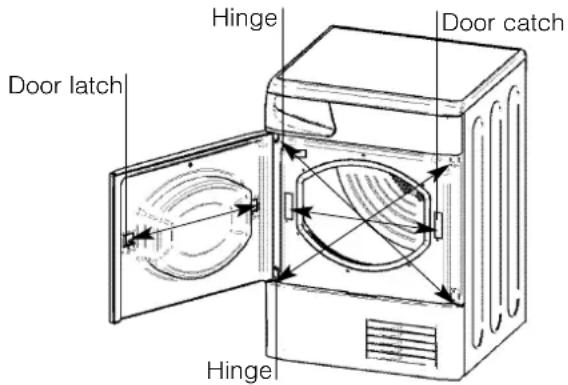
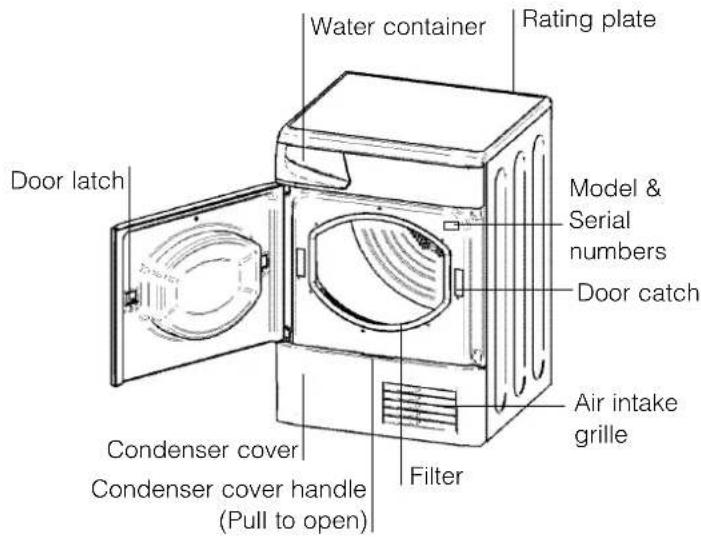
The door of your dryer is reversible and can easily be changed. Exchange diagonally hinge brackets and blanking screws. Exchange door latch and catch with their opposite blanking plates (see diagram above).
Where to put your dryer
- Place your dryer at a distance from gas ranges, stoves, heaters, or cook tops because flames can damage the appliance.
- If you are going to install the appliance under a work counter, be sure to leave a 10mm space between the top and any other objects on or above the machine and a 15mm space between the sides and lateral furnishings or walls. This is to ensure proper air circulation. Make sure that the back vents are not obstructed.
Ventilation
When the dryer is in use, there has to be adequate ventilation. Make sure you put your dryer in an environment that is not damp and has proper air circulation throughout. Airflow around the dryer is essential to condense the water produced during the washing, the dryer will not operate efficiently in an enclosed space or cupboard.
! If using the dryer in a small or cold room some condensation could be experienced.
Water drain
If your dryer is installed next to a drain the water can be plumbed into this drain. This does away with the need to empty the water container. Simply remove the top hose from its top fitting at the rear of the dryer and plumb the hose provided to the drain.
Electrical connections
Make sure of the following before you insert the plug into the the electrical socket:
• The socket must be grounded.
- The socket must be able to sustain the machines maximum power, which is indicated on the rating label (see Dryer Description).
- Power voltage must be within the values indicated on the rating label (see Dryer Description).
- The socket must be compatible with the dryers plug. Should this not be the case, replace the plug or the socket.
! The dryer must not be installed outdoors, even if the space is sheltered. It can be very dangerous if it is exposed to rain or storms.
! Once installed, the dryers electrical wire and plug must be within easy reach.
! Do not use extension cords.
! The power cord must not be bent or squashed.
! The power cord supplied should be checked periodically and replaced by a cord specially prepared for this dryer and fitted only be authorised technicians (see Service). New or longer power cords are supplied at an extra charge by authorised dealers.
! The manufacturer denies any responsibility should any of these rules not be followed.
! If in doubt about any of the above consult a qualified electrician.
Before you start using your dryer
Once you have installed your dryer and before you use it, clean the inside of the drum to remove any dust that could have accumulated during transport.
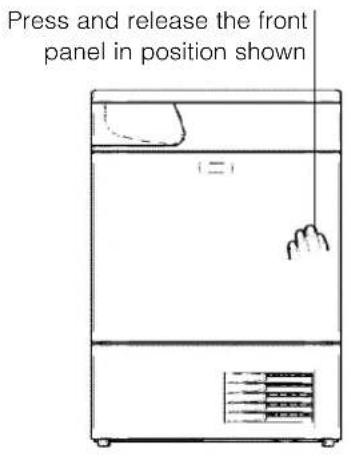
To open the door The features
Control panel
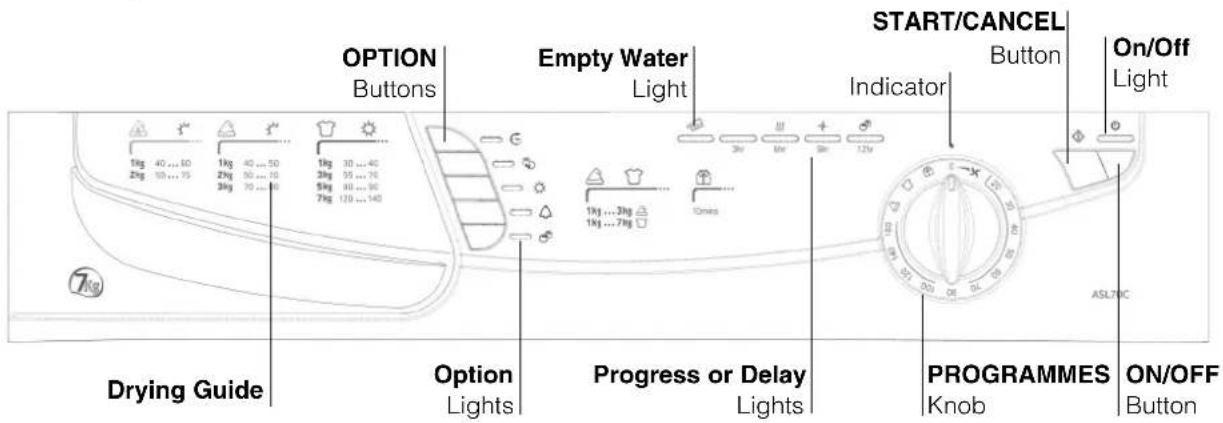
The START/CANCEL button ◆ starts a selected programme. When you press this button there will be one beep and the progress lights will flash to confirm the action. If you have not set a programme, the buzzer will beep four times. When a programme is running, holding this button cancels the programme and stops the dryer (see Start and Programmes).
The OPTION buttons select available options for your selected programme (see Start and Programmes).
The Option lights indicate that the option has been selected by the button to the left of the appropriate light.
The Drying Guide allows you to consult a user friendly table of fabric types and load capacities.
The Empty Water indicator light 📋 signals that the water container should be emptied. When it is flashing it indicates that the container is full. The light will take a few seconds to go out after
replacing the empty water container, the dryer must be running for this to happen (see The Controls).
The On/Off indicator light ⏻ signals that your dryer is in use or ready to select a programme. If this light flashes it indicates there is a fault (see Troubleshooting).
The ON/OFF button ⏻ : If the dryer is running and this button is pressed, the dryer stops. Press again, the dryer restarts.
The Progress or Delay lights show you the status of the programme, or the delay time when they flash. During a delayed start the lights flash to show the delay selected. When (not flashing) they show each stage of the programme by the corresponding light turning on (see Start and Programmes).
The PROGRAMMES knob sets the programme: rotate it until the indicator is pointing to the programme you want to select (see Start and Programmes).
GB
Choosing a programme
- Plug the dryer into the electrical socket.
- Sort your laundry according to fabric type (see Laundry).
- Open the door and make sure the filter is clean and in place and the water container is empty and in place (see Maintenance).
- Load the machine and make sure items are not in the way of the door seal. Close the door.
- If the On/Off light is not lit: Press the ON/OFF button ⏻.
- Choose a programme by checking the Programmes Guide (see Programmes) as well as the indications for each type of fabric (see Laundry).
- Select a programme by rotating the PROGRAMMES knob.
- Set a delay time and other options if necessary.
-
If you wish to select the buzzer sound, at the end of the programme, press the ALARM Option button.
-
Press the START button to begin. During the drying programme, you can check on your laundry and take out items that are dry while others continue drying. When you close the door again, press the START button in order to resume drying.
- During the last few minutes of Drying Programmes, before the programme is completed, the final COOL TUMBLE phase is entered (fabrics are cooled), this phase should always be allowed to complete.
- When the programme is complete. The buzzer will sound if Alarm option was selected.
Open the door, take the laundry out, clean the filter and replace it. Empty the water container and replace it (see Maintenance).
If the Post Creasecare option has been selected and you do not remove the laundry immediately, the dryer will tumble occasionally for 10 hours or until you open the door. - Unplug the dryer.
Easy Iron Programme
'Easy Iron' is a short 10 minute programme (8 minutes of heat followed by a 2 minute cool tumble period) which fluffs the fibres of clothing that have been left in the same position/location for an extended period of time. The cycle relaxes the fibres and makes them easier to iron and fold.
! 'Easy Iron' is not a drying programme and should not be used for wet articles of clothing.
For best results:
- Do not load more than the maximum capacity.
These numbers refer to the dry weight:
Fabric Maximum load
Cotton and Cotton mixtures 2.5kg
Synthetics 2kg
Denim 2kg
- Unload the dryer immediately after the end of the programme, hang, fold or iron the articles and put them away in the closet. Should this not be possible repeat the programme.
The 'Easy Iron' effect varies from one fabric to the next. It works well on traditional fabrics like Cotton or Cotton mix, and less well on acrylic fibres and on materials such as Tencel®.
Programmes
! If the On/Off light is not lit; Press the ON/OFF button ⏻ and then select programme.
| Programme | What it does... How to set it... | Note: | |
| Easy Iron | Brief programme (approximately 10 minutes) that softens fibres of clothing that is ready for ironing. | 1. Position the PROGRAMMES knob on 📋.2. Select any options if required.3. Press the START button. | ! This is not a drying programme (see previous page).Options available:Alarm |
| Cottons Cupboard dry | Dries your clothes on High Heat setting, ready for putting away. | 1. Position the PROGRAMMES knob on 📋.2. Select any options if required.3. Press the START button. | Options available:Alarm, Delayed Start, Pre-Creasecare, Post Creasecare. |
| Synthetics Cupboard dry | Dries your clothes on Low Heat setting, ready for putting away. | 1. Position the PROGRAMMES knob on 📋.2. Select any options if required.3. Press the START button. | Options available:Alarm, Delayed Start, Pre-Creasecare, Post Creasecare. |
| Timed Drying(160, 140, 120, 100, 80, 70, 60, 50, 40, 30 or 20 minutes) | Dries wet clothing that you wish to dry on Low Heat or small loads (less than 1kg).Can be used with High Heat option if you prefer to use a timed programme. | 1. Position the PROGRAMMES knob on the desired time: 160, 140, 120, 100, 80, 70, 60, 50, 40, 30 or 20.2. Select any options if required.3. Press the START button. | Options available:Alarm, High Heat, Delayed Start, Pre-Creasecare, Post Creasecare.Consult ‘suggested drying times’ (see Laundry).The last 10 minutes of these programmes is the Cool Tumble phase, see below. |
| Cool Tumble | Brief programme (approximately 10 minutes) that cools fibres of clothing. | 1. Position the PROGRAMMES knob on 📋.2. Select any options if required.3. Press the START button. | Options available:Alarm |
The Controls
• PROGRAMMES knob
! Warning, if after pressing the start button, the programmes knob position has changed, the new position will NOT change the programme selected
! Position 0, turning the knob to position 0 resets and cancels a programme.
• OPTION buttons / lights
These buttons are used to customise the selected programme to your requirements. A programme must have been selected on the programmes knob before an option can be selected. Not all options are available for all programmes (see Start and Programmes). If an option is not available and you press the button, the buzzer will beep four times. If the option is available there will be one beep and the option light next to the button lights to confirm the selection.
Progress ( ) Drying, Cool Tumble, Post
Creasecare) / Delay (3hr, 6hr, 9hr, 12hr) Lights
When the light next to the delay button is on, these lights flash to indicate the delay time is selected. During other programmes they indicate the progress of the dryer, each one comes on as the corresponding phase starts.
Time Delay
The start of some programmes (see Start and Programmes) can be delayed for up to 12 hours in 3hr steps. Ensure the water bottle is emptied before setting a delayed start.
When a delayed start is in progress the light next to the delay button will be on and the selected delay period light will flash (after the start button has been pressed). To set a delayed start, press the Time Delay button, and the light next to the button will come on together with the 3hr delay light. Pressing the button again will advance the delay setting to 6hr, the 3hr light goes out and the 6hr light is on. Each time you press the button the delay setting advances 3 hours, as indicated by the corresponding light. If the 12hr light is on, pressing the button again will cancel the delay.
You can also cancel the delay by turning the programmes knob to 0, wait for the buzzer to beep and then turn back to your selected programme.
Pre Creasecare
When a delayed start has been selected the clothes are tumbled occasionally during the delayed period to help prevent creases developing.
High Heat
When available this button selects high heat. Press this button and a high heat setting is selected and the light alongside the button comes on. Timed programmes have a default of low heat, if the light alongside the button is on then pressing the button selects a low heat setting and the light goes out.
Alarm
Available on all programmes and allows the buzzer to give a signal at the end of the drying cycle, to remind you that the clothes are ready to be removed.
Press the button and the light will show that the option is selected.
Post Creasecare

The clothes are occasionally tumbled after the end of the drying and cool tumble cycles, to help prevent creases developing should you not be available to remove the load immediately the programme is complete.
Empty Water Light / Container

(If you have plumbed your dryer to a drain this light can be ignored, as there is no need to empty the water container).
When this light is on (not flashing) it reminds you to empty the water container.
If the water container fills during a programme, the heater turns off and the dryer does a period of Cool Tumble then the light flashes and the buzzer sounds. After this it stops and all 3 progress lights and the 3hr delay light come on and the empty water light flashes. You must empty the water container and restart the dryer or the clothes will not dry. After re-starting the dryer, the light will take a few seconds to go out.
To avoid this always empty the water container each time you use the dryer (see Maintenance).
- Door Opening
Opening the door during a programme will stop the dryer and have the following effects:
- All 3 progress lights and the 3hr delay light come on.
- During a delay phase the delay will continue to count down. The start button must be pressed to resume the delay programme.
One of the delay lights will flash to show the current delay setting.
- The start button must be pressed to resume the programme. The progress lights will change to show the current status.
- During the cool tumble or post creasecare phase of a drying programme and anytime during an Airing or Cool Tumble programme, the programme will finish. Pressing the start button will re-start a new programme at the beginning.
- Changing the programmes knob will select a new programme, after you press the start button. You can use this to select the Cool Tumble programme to cool the clothes, if you find them dry enough.
- Note
If you have a power cut, switch off the power or remove the plug, press the START button and the programme will resume.
Sorting your laundry
- Check symbols on clothing labels to make sure that the articles can be tumble dried.
- Sort laundry by fabric type.
• Empty pockets and check buttons. - Close zippers and hooks and tie loose belts and strings.
- Wring out each item in order to eliminate as much excess water as possible.
! Do not load dripping wet clothes into the dryer.
Maximum load size
Do not load more than maximum capacity.
These numbers refer to dry weight:
Natural fibres: 7kg max (15lb)
Synthetic fibres: 3kg max (6.6lb)
! DO NOT overload the dryer as this could result in reduced drying performance.
Typical load
| Clothes | |
| Blouse Cotton 150g 5ozOther 100g 3oz | |
| Dress Cotton 500g 1lb 2ozOther 350g 12oz | |
| Jeans 700g 1lb 6oz | |
| 10 nappies 1000g 2lb 3oz | |
| Shirt Cotton 300g 10ozOther 200g 7oz | |
| T-Shirt 125g 4oz | |
| Household Items | |
| Duvet cover Cotton 1500g 3lb 5oz(Double) Other 1000g 2lb3oz | |
| Large Tablecloth 700g 1lb 6oz | |
| Small Tablecloth 250g 9oz | |
| Tea Towel 100g 3oz | |
| Bath Towel 700g 1lb 6oz | |
| Hand Towel 350g 12oz | |
| Double Sheet 500g 1lb 2oz | |
| Single Sheet 350g 12oz |
At the end of a drying cycle, cottons could still be damp if you grouped cottons and synthetics together. If this happens simply give them an additional short period of drying.
Wash Care Labels
Look at the labels on your garments, especially when tumble drying for the first time. The following symbols are the most common:

May be tumble dried

Do not tumble dry

Tumble dry at high heat setting

Tumble dry at low heat setting
Items not suitable for tumble drying
- Articles that containing rubber or rubber-like materials or plastic film (pillows, cushions, or PVC rainwear), any other flammable articles or objects that contain flammable substances (towels soiled with hair spray).
• Glass fibres (certain types of draperies) - Items which have been dry cleaned
- Items with the ITCL Code ☒ (see Special clothing items). These can be cleaned with special at-home dry cleaning products. Follow instructions carefully.
- Large bulky items (quilts, sleeping bags, pillows, cushions, large bedspreads etc). These expand when drying and would prevent airflow through the dryer.
GB
Special clothing items
Blankets and Bedspreads: acrylic items (Acilan, Courtelle, Orion, Dralon) must be dried with special care on LOW heat setting. Avoid drying for a long period of time.
Pleated or creased garments: read the manufacturer's drying instructions on the garment.
Starched articles: do not dry these with non-starched items. Make sure that as much of the starch solution is removed from the load as possible before placing it in the dryer. Do not over-dry: the starch will become powdery and leave your clothing limp, which defeats the purpose of starch.
Drying times
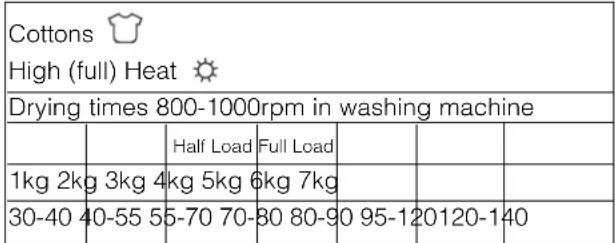
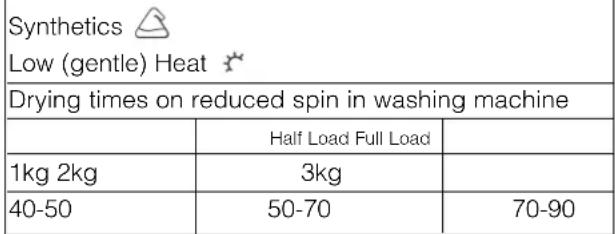
The table below presents APPROXIMATE drying times in minutes. Weights refer to dry garments:
 |
 |
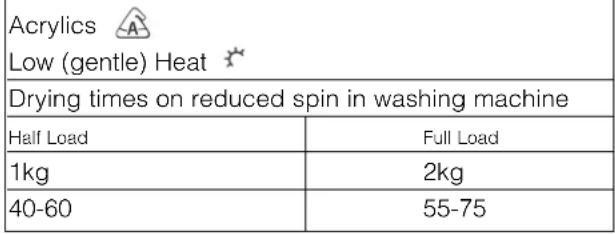 |
Times are approximate and can vary depending upon:
- Amount of water retained in clothes after spin cycle: towels and delicates retain a lot of water.
- Fabrics: items that are the same type of fabric but different textures and thicknesses may not have the same drying time.
- Quantity of laundry: single items or small loads may take longer to dry.
- Dryness: If you are going to iron some of your clothes, they can be taken out while still a bit damp. Others can be left longer if you need them to be completely dry.
- Heat setting.
- Room temperature: if the room where the dryer is located is cold, it will take longer for the dryer to dry your clothes.
- Bulk: some bulky items can be tumble dried with care. We suggest that you remove these items several times, shake them out, and return them to the dryer until finished.
! Do not over-dry your clothes.
All fabrics contain a little natural moisture, which keeps them soft and fluffy.
! The appliance has been designed and built according to international safety standards. These warnings are given for safety reasons and must be read carefully.
CE This appliance conforms to the following EEC Directives:
- 72/23/EEC and 93/68/EEC (Low Voltage Equipment)
- 89/336/EEC, 92/31/EEC and 93/68/EEC (Electromagnetic Compatibility)
General safety
- This tumble dryer has been designed for home, and not professional use.
- This dryer must be used by adults, and the instructions in this booklet should be followed carefully.
- Do not touch the appliance while barefoot or with wet hands or feet.
- Unplug the machine by pulling on the plug, not the cord.
- Children must not be in proximity of the dryer when in use. After using the dryer, turn it off and unplug it. Keep the door closed to make sure that children do not use it as a toy.
- The appliance must be installed correctly and have proper ventilation. The air intake at the front of the dryer and rear vent behind the dryer should never be obstructed (see Installation).
- Never use the dryer on carpeting where the pile height would prevent air from entering the dryer from the base.
- Check to see if the dryer is empty before loading it.
- The back of the dryer could become very hot. Never touch it while in use.
- Do not use the dryer unless the filter, water container and condenser are securely in place (see Maintenance).
- Do not use fabric softeners or dryer sheets in the dryer.
- Do not overload the dryer (see Laundry for maximum loads).
- Do not load items that are dripping wet.
- Tumble dry items only if they have been washed with detergent and water, rinsed and been through the spin cycle. It is a fire hazard to dry items that HAVE NOT been washed with water.
- Carefully check all instructions on clothing labels (see Laundry).
-
Do not dry garments that have been treated with chemical products.
-
Never dry articles that are contaminated with flammable substances (petrol, oil, paint, hair spray, creams, cooking fat or oils).
- Do not tumble dry rubber, foam rubber, plastic, plastic foam, nappy pants or liners, polythene or paper.
- Do not tumble dry large, very bulky items.
- Do not tumble dry acrylic fibres at high temperatures.
- Complete each programme with its Cool Tumble Phase.
- Do not turn off the dryer when there are still warm items inside.
- Clean the filter after each use (see Maintenance).
- Empty the water container after each use (see Maintenance).
- Clean the condenser unit after regular intervals (see Maintenance).
- Do not allow lint to collect around the dryer.
- Never climb on top of the dryer. It could result in damage.
- Always follow electrical standards and requirements (see Installation).
- Always buy original spare parts and accessories (see Service).
Disposal
- Disposing of the packaging material: follow local regulations, so the packaging can be recycled.
- Disposal of your old dryer: cut the power cord and remove the door before disposing of an old dryer.
Saving energy and respecting the environment
- Wring out items to eliminate excess water before tumble drying (if you use a washing machine first, select a high spin cycle). Doing this will save time and energy during drying.
- Always dry full loads - you save energy: single items or small loads take longer to dry.
- Clean the filter after each use to contain energy consumption costs (see Maintenance).
GB
Switching off the electricity
! Unplug your dryer when not using it, when cleaning it and during all maintenance operations.
Clean the filter after each cycle
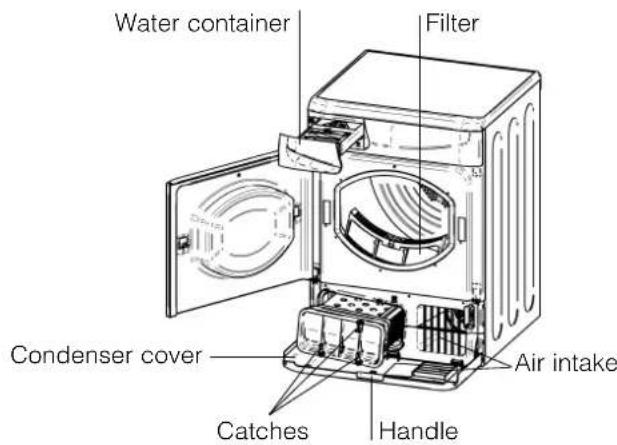
The filter is an important part of your dryer: it accumulates lint and fluff that is formed while drying. When finished drying, clean the filter by rinsing it under running water or with your vacuum cleaner. Should the filter become clogged up, the airflow inside the dryer will be seriously compromised: drying times lengthen and you will consume more energy. It may also damage your dryer.
The filter is found in front of the dryer trim (see diagram).
Removing the filter:
- Pull the plastic grip of the filter upwards (see diagram).
- Clean the filter and replace it correctly.
Ensure the filter is fully located flush into the tumble dryer trim.
! Do not use the dryer without replacing the filter.
Empty the water container after each cycle
Pull the container out of the dryer and empty it into a sink or other suitable drain. Replace the water container securely.
Always check and empty the container before you start a new drying programme.
Check the drum after each cycle
Turn the drum manually in order to remove small items (handkerchiefs) that could have been left behind.
Cleaning the condenser unit
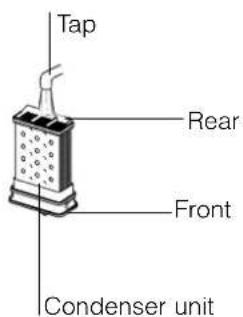
Periodically (every month) remove the condenser unit and clean any build up of fluff from between the plates by rinsing it under the tap with cold water. This should be done with cold water from the rear of the condenser.
Removing the condenser:
- Unplug the dryer and open the door.
- Pull open the condenser cover (see diagram). Release the three catches by turning 90° counterclockwise then pull on the grip and remove from the dryer.
- Clean the surface of the seals and replace, making sure that the catches have been secured.
Cleaning the dryer
- External parts in metal or plastic and rubber parts can be cleaned with a damp cloth.
- Periodically clean the surface of the stainless steel sensor inside the drum with vinegar to remove water contaminates. Apply carefully with a cloth, this will maintain the drying performance of the dryer. The sensor is located on the plastic vane inside the drum towards the front of the dryer. Rotate the drum if necessary to locate it.
- Periodically (every 6 months) vacuum the front air intake grille and vents at the rear of the dryer, to remove any build up of fluff, lint or dust. Also to remove accumulation of fluff from the front of the condenser and filter areas, clean occasionally with a vacuum cleaner.
! Do not use solvents or abrasives.
! Your dryer uses special bearing components which do not need lubrication.
! Have your dryer checked regularly by authorised technicians to ensure electrical and mechanical safety (see Service).
One day your dryer seems not to be working. Before you call your Service Centre (see Service), go through the following troubleshooting suggestions:
Problem:
The tumble dryer won't start.
Possible causes / Solution:
- The plug is not plugged into the socket, or not making contact.
• There has been a power failure. - The fuse has blown. Try to plug another appliance into the socket.
- You are using an extension cord? Try to plug the dryer's power cord directly into the socket.
• The door is not closed securely? - The PROGRAMMES knob has not been set properly (see Start and Programmes).
- The START button has not been pressed (see Start and Programmes).
Drying cycle will not begin.
| • You have set a delayed time (see Start and Programmes). |
Its taking a long time to dry.
• The filter has not been cleaned (see Maintenance).
- The temperature setting is not ideal for the type of fabric you are drying (see Start and Programmes, and see Laundry).
- The water container needs emptying? The empty water light is flashing? (see Maintenance).
- The condenser needs cleaning? (see Maintenance).
- The correct drying time has not been selected for the load (see Laundry).
- The air intake grille or rear vents are obstructed (see Installation, and see Maintenance).
• The items were too wet (see Laundry).
• The dryer was overloaded (see Laundry).
Empty water light is flashing but the dryer has only been running for a short period.
| - The water container was probably not emptied at the start of the programme. Do not wait for the empty water signal, always check and empty the container before starting a new drying programme (see Maintenance). |
Empty water light is on and the water container is not full.
| - This is normal, the light flashes when the container is full. If the light is on but not flashing it is just a reminder to empty the container (see Start and Programmes). |
The ON/OFF light flashes to indicate a fault.
| Note down the other lights that are on and contact the Service Centre (see Service). |
Programme finishes and clothes are damper than expected.
| ! For safety the dryer has a maximum programme time of 3 hours. If an automatic programme has not sensed the required final moisture in this time the dryer will complete the programme and stop. Check the above points and run the programme again, if the results are still damp, contact the Service Centre (see Service). |
GB
Before calling the Service Centre:
- Use the troubleshooting guide to see if you can solve the problem yourself (see Troubleshooting).
- If not, turn off the dryer and call the Service Centre closest to you.
What to tell the Service Centre:
• name, address and post code.
- telephone number.
• the type of problem.
• the date of purchase.
• the appliance model (Mod.).
• the serial number (S/N).
This information can be found on the data label inside the door of the machine.
Spare Parts
This dryer is a complex machine. Repairing it yourself or having a non-authorised person try to repair it could cause harm to one or more persons, could damage the machine and could invalidate the spare parts warranty.
Call an authorised technician if you experience problems while using the machine.
The spare parts have been designed exclusively for this appliance and not for other uses.

English, 1

Italiano, 13

Français, 25

Deutsch, 37

Español, 49

Português, 61

Nederlands, 73
ASL70C
Indice
Installazione, 14
natural_image
Line drawing of a refrigerator with a hand pointing to the side panel (no text or symbols)
natural_image
Line drawing of a front-loading refrigerator with a hand pointing to the side panel (no text or symbols)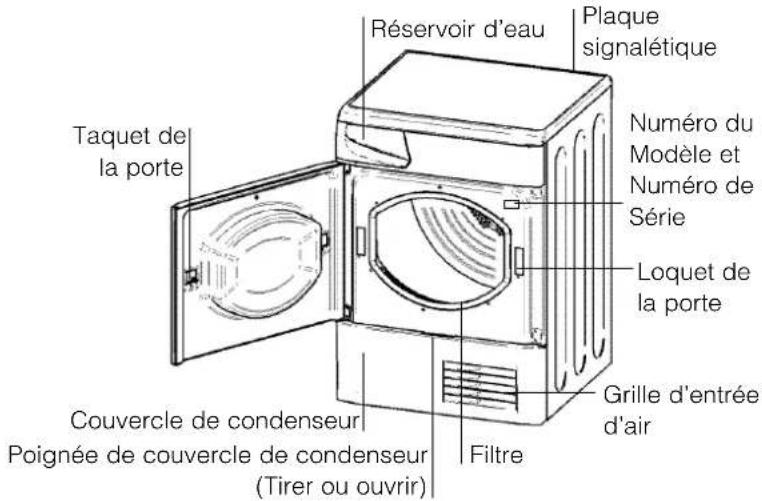
Textile Charge maximum
natural_image
Line drawing of a front-loading refrigerator with a handle and ventilation grille (no text or symbols)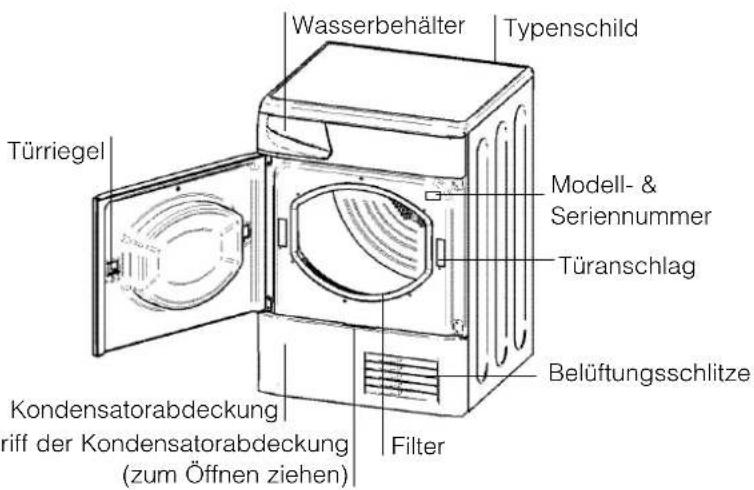
- 89/336/EEC, 92/31/EEC e 93/68/EEC
natural_image
Line drawing of a two-tier refrigerator with ventilation grilles and a handle (no text or symbols)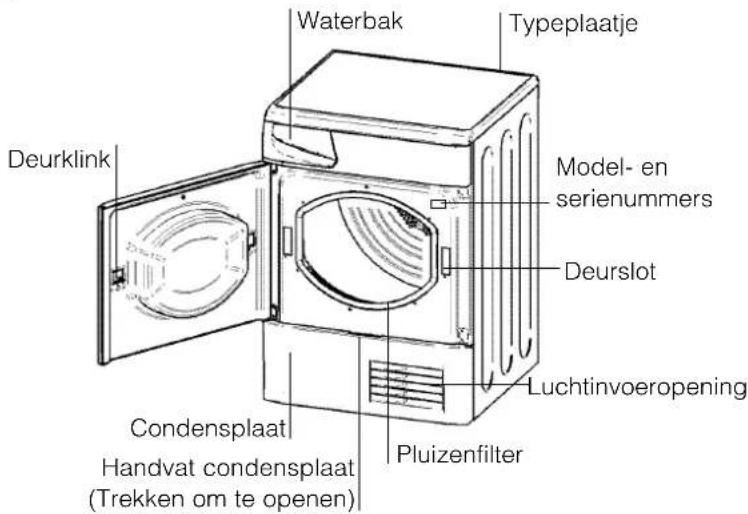
- Dryer description, 4
- Start and programmes, 5-6
- Laundry, 7-8
- Warnings and Suggestions, 9
- Maintenance and Care, 10
- Troubleshooting, 11
- Service, 12
- Where to put your dryer
- Ventilation
- Water drain
- Electrical connections
- Before you start using your dryer
- GB
- Choosing a programme
- Easy Iron Programme
- Fabric Maximum load
- Programmes
- The Controls
- • PROGRAMMES knob
- • OPTION buttons / lights
- Progress ( ) Drying, Cool Tumble, Post
- Creasecare) / Delay (3hr, 6hr, 9hr, 12hr) Lights
- Time Delay
- Pre Creasecare
- High Heat
- Alarm
- Post Creasecare
- Empty Water Light / Container
- - Door Opening
- - Note
- Sorting your laundry
- Maximum load size
- Wash Care Labels
- Items not suitable for tumble drying
- Special clothing items
- Drying times
- General safety
- Disposal
- Saving energy and respecting the environment
- Switching off the electricity
- Clean the filter after each cycle
- Empty the water container after each cycle
- Check the drum after each cycle
- Cleaning the condenser unit
- Cleaning the dryer
- Before calling the Service Centre:
- What to tell the Service Centre:
- Spare Parts
- Indice
- Installazione, 14
- Textile Charge maximum
Brand : Ariston Thermo
Model : ASL70C
Category : Tumble drier