Complete LP - Hi-fi system ION - Free user manual and instructions
Find the device manual for free Complete LP ION in PDF.



| Product Type | Hi-fi system with turntable, CD player, cassette, AM/FM radio, Bluetooth and USB |
| Brand | ION |
| Model | Complete LP |
| Dimensions (W x D x H) | 29.8 cm x 50.1 cm x 23.4 cm |
| Weight | 7.8 kg |
| Power Supply | 12 W (consumption ≤ 19 W); 120 V / 230 V / 240 V depending on region |
| Platter Speed | 33 ⅓, 45 and 78 rpm |
| Cartridge and Stylus | Ceramic cartridge CZ-800-10 |
| Speaker Output Power | 8 W (peak) |
| Bluetooth | Version 4.0, range up to 10 m |
| Supported Audio Formats | Audio CD, CD-R, CD-RW, MP3, cassette, USB |
| Radio | AM and FM with presets |
| Inputs | Line (3.5 mm jack), USB |
| Outputs | Line (RCA), headphone (3.5 mm jack) |
| Recording Functions | USB recording from vinyl, CD, cassette, Bluetooth and auxiliary input |
| Autostop | Yes, switchable |
| Safety and Maintenance | Maintain a 15 cm space at the back for ventilation; do not place on thick carpet; clean with a soft, dry cloth; avoid chemical products |
| Spare Parts and Repairability | Replaceable stylus (ref. CZ-800-10); 45 rpm adapter included |
Frequently Asked Questions - Complete LP ION
User questions about Complete LP ION
0 question about this device. Answer the ones you know or ask your own.
Ask a new question about this device
Download the instructions for your Hi-fi system in PDF format for free! Find your manual Complete LP - ION and take your electronic device back in hand. On this page are published all the documents necessary for the use of your device. Complete LP by ION.
USER MANUAL Complete LP ION
Snelstartgids Netherlands (37-43)
Quickstart Guide (English)
Box Contents
Complete LP
Felt Slipmat
45 RPM Adapter
Quickstart Guide
Safety & Warranty Manual
Support
For the latest information about this product (system requirements, compatibility information, etc.) and product registration, visit ionaudio.com.
- A minimum distance of 6 inches must be maintained to provide sufficient ventilation of the rear bass ports.
Do not stand it on a thick pile carpet, or install it in a place with poor air flow. - Place the unit on a flat even surface, away from vibrating sources.
Quick Setup
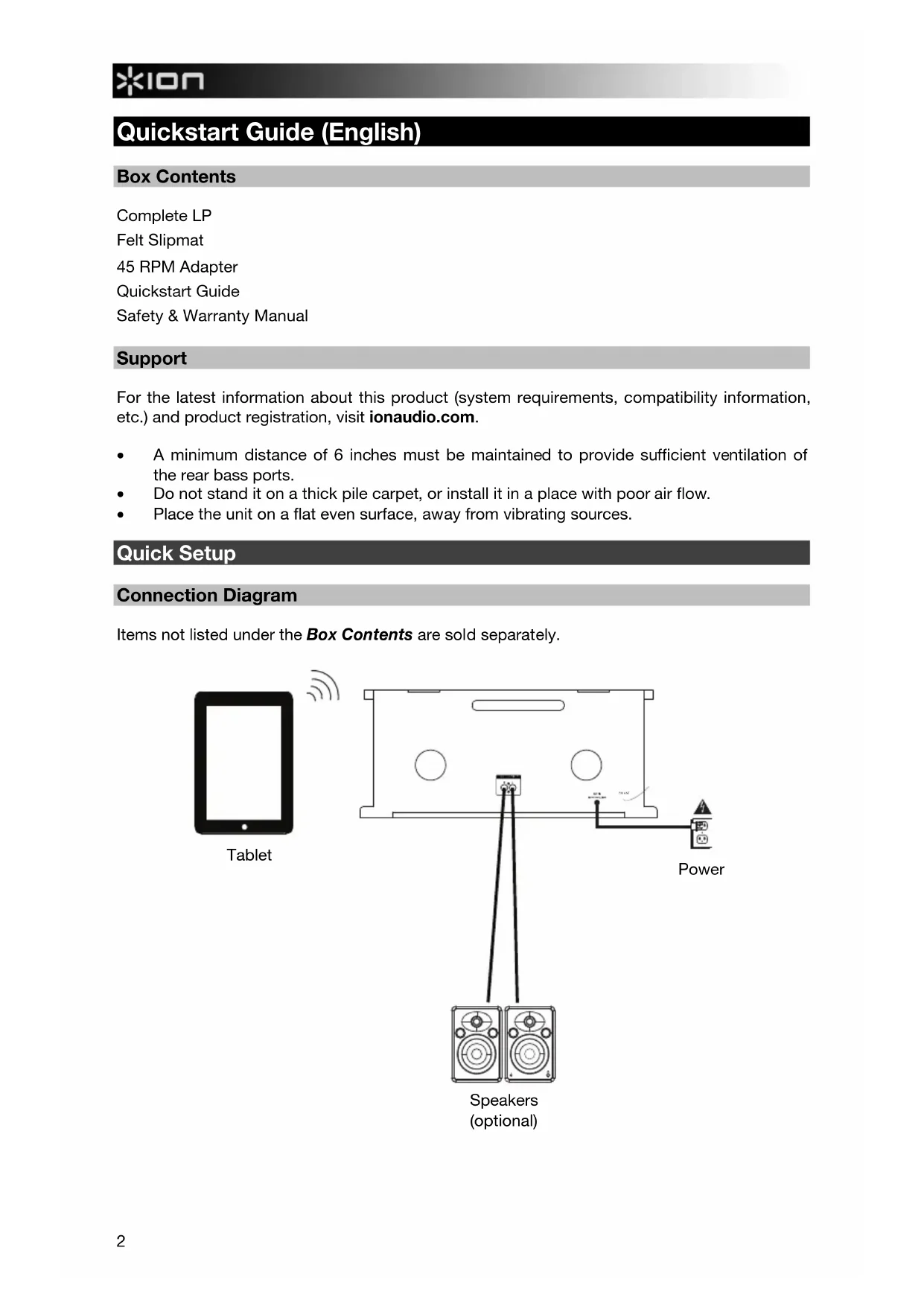
Connection Diagram
Items not listed under the Box Contents are sold separately.
Features
Front Panel
-
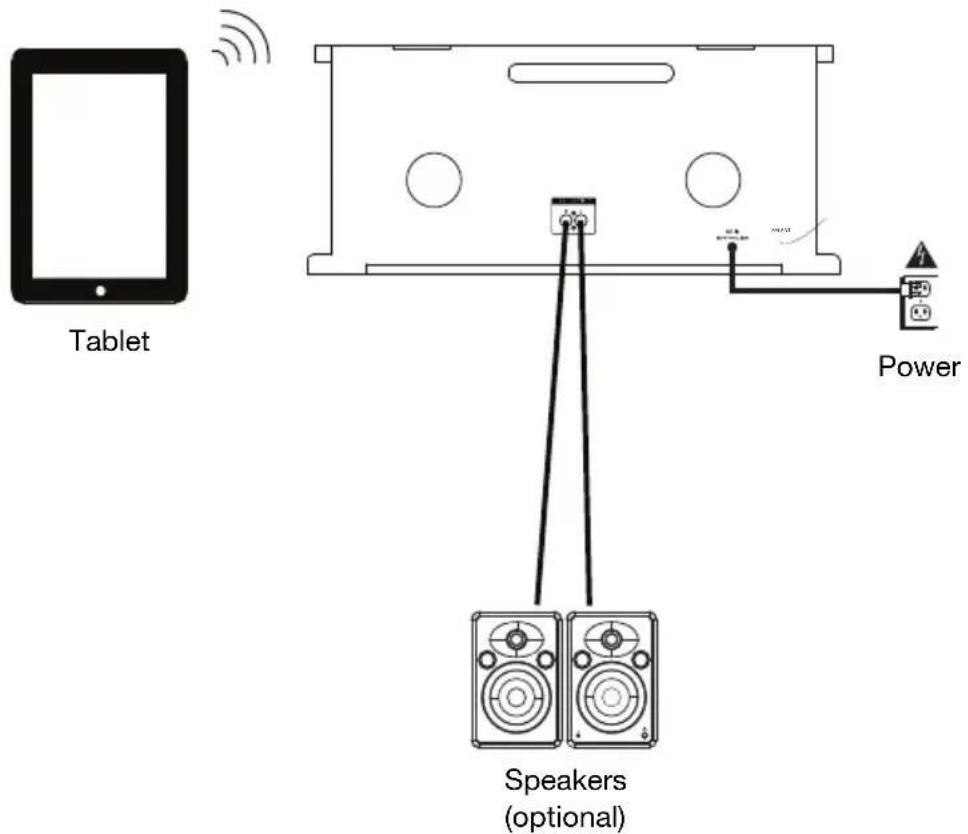
CD/USB: Toggles the source from CD to USB.
-
AM/FM: Press and release to switch between the AM and FM radio bands when Tuner has been selected as the mode.
-
Repeat: Repeats a single track or the whole disc of a CD.
-
Random: Plays a random track on a CD.
-
USB Rec: Press to go to USB recording mode if a USB flash drive is connected.
-
Standby/On (EU/UK units only): On EU/UK models, the Standby button powers the unit on/off.
-
Standby LED (EU/EK units only): Indicates you are in Standby mode. Complete LP will go to sleep and illuminate this LED after 60 minutes of inactivity, unless music is playing via Bluetooth or the radio.
-
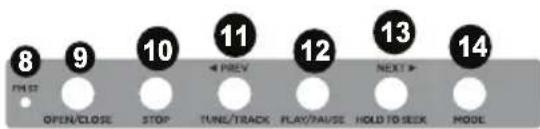
FM ST: This illuminates when station is being received in stereo.
-
Open/Close: Opens/closes the CD tray.
-
Stop: Press to end the recording to the USB flash drive.
-
Prev / Tune/Track / Seek: Press to go to the previous USB file, radio station, or CD track. Hold to "seek" backwards (jump to the strongest radio station signal).
-
Play/Pause: Starts or pauses playback of a CD, USB file, or Bluetooth track. When in Tuner mode, press for 2 seconds to "scan" through the radio stations. When in Bluetooth mode, hold Play/Pause for 2 seconds to disconnect a currently paired Bluetooth device.
-
Next / Tune/Track / Seek: Press to go to the next USB file, radio station, or CD track. Hold to "seek" (jump to the next strongest radio station signal).
-
Mode: Switches from BT/AUX/TUNER/CD/TAPE/USB/PHONO modes.
-
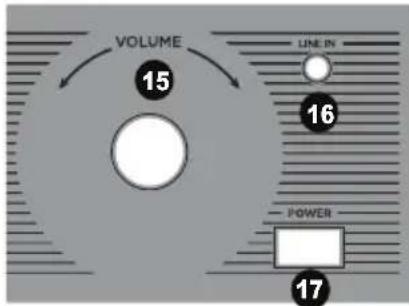
Volume: Adjusts the sound level for the internal speakers as well as the headphone output.
-
Line In: Connect the output from a line-level device to this input, such as from a smartphone, media player, tablet, etc.
-
Power: Press to power the unit on/off.
Note (EU/UK units only): To fully power on Complete LP, also press Standby.
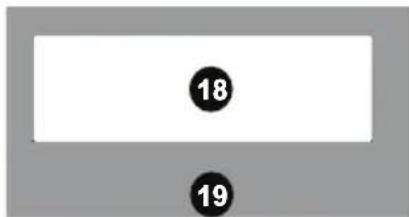
- Display: Shows the current mode, track number, track time, and radio station.
Note: The display and surrounding buttons include a plastic protector on it. Remove these for optimal viewing.
-
CD Tray: Press the Open/Close button to eject the tray and place a CD here. This unit is designed to play commercially available CDs, properly burned and finalized CD-Rs, CD-RW's, and MP3 CDs. Due to variances on the specification of certain CD burners and CDs, we recommend burning CDs at the minimum speed possible for the best playback performance.
-
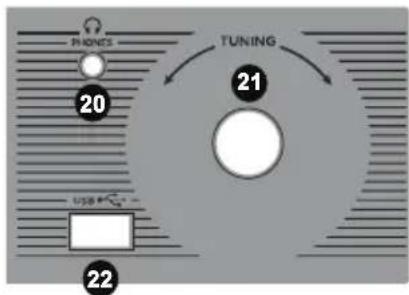
Headphone Output: When headphones are connected, the internal speaker is muted.
-
Tuning: Adjust this to go to another radio station.
-
USB: Playback tracks from your USB flash drive or record to the USB flash drive.

Rear Panel
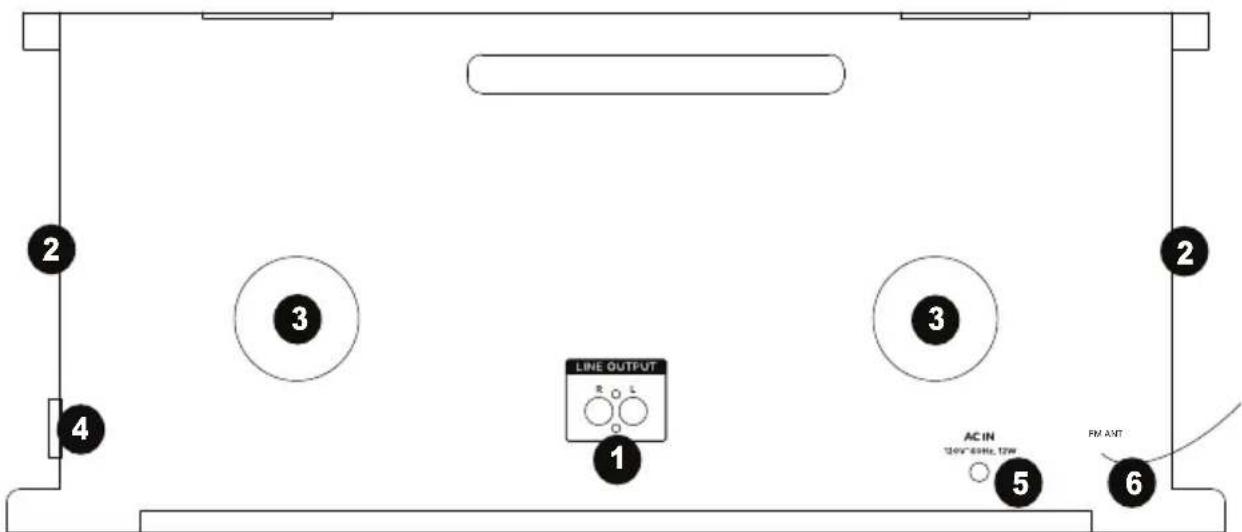
- Line Output: Connect external speakers to this output.
- Speakers: These internal speakers output the music.
- Bass Ports: These provide extended bass for the music. Position these away from walls or other obstructions for best sound quality.
- Tapedeck: Insert a cassette tape here.
- Power Input: The integrated power cable is connected here.
- FM Antenna: Adjust this wire for better FM radio reception. For AM reception, rotate the unit until the best reception is found.
Recording
Note: It is not possible to record from the AM/FM radio.
When in BT/TAPE/PHONO/AUX mode:
- Connect your USB flash drive to Complete LP.
- Press USB REC.
- Press USB REC to begin recording.
- Once the display shows "REC", USB flashes in the top left corner of the display, recording will begin.
- Press STOP to end recording and it will save the audio file to your USB flash drive.
When in CD/MP3 mode:
- Connect your USB flash drive to Complete LP.
- Press USB REC.
- Press NEXT/PREV to toggle between these options:
REC ONE (record one track)
- REC DIR (record all songs from the current folder)
REC ALL (record all the songs)
- Press USB REC to begin recording. Once the display shows "READING", USB will flash on the screen and begin recording.
- Press STOP to end recording and it will save the audio file to your USB flash drive.
Playback
Bluetooth Mode
- Turn on your Bluetooth device.
- Press the Mode button until BT AUX is seen on the display. It will automatically go into pairing mode to search for Bluetooth devices.
- Navigate to your Bluetooth device's setup screen, find "Complete LP", and connect.
Note: If your Bluetooth device prompts for a pairing code, enter "0000".
Tape Player Mode
- Press the Mode button until TAPE is seen on the display.
- Insert the tape with the thicker side of the tape facing to the right of tape tray.
- Push the Eject/Fast Forward button 1/2 way down to toggle between fast forward and play mode.
- Push the Eject/Fast Forward button completely down to eject the tape.
Note: Remove your 1/8" (3.5 mm) cable from the Line In before going to Tuner mode in order to hear the station.
Vinyl Mode
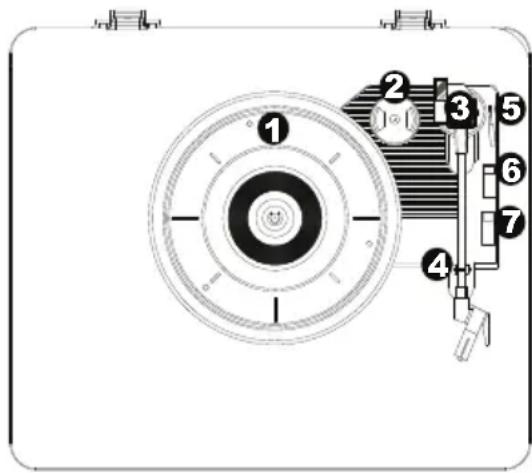
- Platter - Place your record here.
- 45 RPM Adapter Holder - Holds the included 45 RPM adapter. When not using the adapter, please place it in this holder.
- Tonearm - The fixed tonearm can be raised and lowered by hand, or by pressing the raise / lower lever.
- Arm Clip - This specially designed arm clip secures the tonearm while at rest or when not in use. The arm clip has been designed to remain in the up position while unlocked.
- Raise / Lower Lever - Raises and lowers the tonearm.
- 33/45/78 Switch - This switch controls the speed of the turntable platter.
Note: For best results when playing 78 RPM vinyl records, use a 78 stylus (sold separately). Only use a 78 stylus with 78 RPM vinyl records.
- Autostop switch - This switch turns autostop on or off. When autostop is on, the platter will start spinning when the tonearm is placed over the record and stop spinning when the record has reached the end. (When Autostop is off, the platter will always spin regardless of the position of the tonearm.)
Note: If your vinyl record stops before it reaches the end of the music, turn Autostop to the off position for this particular record. This is generally recommended for 45 RPM records.
IMPORTANT: Place the included felt slipmat on the platter; then place your record on the felt slipmat to carefully hold your records.
IMPORTANT: Remove the plastic cartridge cover (needle cover) before operating the turntable.
*WARNING: The RCA outputs are LINE level. Please only connect these to LINE level inputs. You may damage your receiver if you plug in a LINE level device into a PHONO level input.
Playing your records:
- Press the Mode button until PHONO is seen on the display.
- Set the Speed Control switch to the desired speed (33 1/3, 45, 78 rpm).
- Place the record on the platter and adjust the tonearm on the record to begin playback.
- Adjust the Volume knob on Complete LP.
Note: Remove your 1/8" (3.5 mm) cable from the Line In before going to Tuner mode in order to hear the station.
Aux Mode
- Connect your device to the Line In using a stereo 1/8" (3.5mm) cable.
- Press the Mode button until BT AUX is seen on the display.
- Adjust the volume from your output device.
CD Mode
- Press the Open/Close button to insert a MP3, CD-R, or CD-RW into the CD tray.
- Press the Mode button until CD is seen in the display.
- Press PREV/NEXT to select a different track.
- Press PLAY/PAUSE to play or pause a track.
Note: Remove your 1/8" (3.5 mm) cable from the Line In before going to Tuner mode in order to hear the station.
USB Mode
- Connect a USB flash drive to the unit.
- Press the CD/USB button until USB is seen on the display. It will automatically start playback of the songs on the USB flash drive.
- Press PREV/NEXT to select a different track.
- Press PLAY/PAUSE to play or pause a track.
Note: Remove your 1/8" (3.5 mm) cable from the Line In before going to Tuner mode in order to hear the station.
Tuner Mode
- Press AM/FM to toggle between the AM and FM bands.
- Adjust the TUNE knob to select the channel you want.
- Hold either the PREV or NEXT button to go to the strongest radio station signal.
Note: Remove your 1/8" (3.5 mm) cable from the Line In before going to Tuner mode in order to hear the station.
To save a radio station as a preset:
- Press the OPEN/CLOSE button.
- Change the preset slot by pressing the PREV or NEXT button while the preset slot number is still flashing.
- Press OPEN/CLOSE to confirm your save.
- Toggle between saved presets using the PREV or NEXT button when in Tuner mode.
Troubleshooting
I am playing a record but do not hearing any audio:
If you are playing music from vinyl:
o Make sure that Complete LP is powered on and that the needle is on the record.
- If headphones are connected to Complete LP, disconnect the headphones in order to hear sound from the internal speakers.
My record is not playing at the correct speed; its pitch is too high or too low:
Ensure the 33 / 45 / 78 switch is set to the correct speed for your record.
I am connected to a Bluetooth speaker but do not hear any audio.
Turn Complete LP off and then on again, and then try pairing it again.
- Use the volume knob on Complete LP to turn up the Bluetooth output level.
If headphones are connected to Complete LP, disconnect the headphones in order to hear sound from the internal speakers.
I am not hearing the radio station.
○ Remove your 1/8" (3.5 mm) cable from the Line In before going to Tuner mode in order to hear the radio station.
Technical Specifications
| Speaker Output Power | 8W (peak) |
| Supported Bluetooth Profile | 4.0 |
| Bluetooth Range | 30 feet (10 meters) or better |
| Power | 12W |
| Cartridge Type | ceramic |
| Cartridge and Stylus CZ-800-10 | |
| Voltage | 120V, 60 Hz (US) 230V, 50 Hz (EU) 240V, 50 Hz (UK) |
| Power Consumption | ≤ 19W |
| Dimensions (width x depth x height) | 11.75" x 19.75" x 9.2" 29.8 cm x 50.1 cm x 23.4 cm |
| Weight | 17.2 lbs. 7.8 kg |
| Radio Frequency Range US: | EUROPE: JAPAN: AM 520 - 1710 kHz AM 522 - 1629 kHz AM 520 - 1710 FM 87.5 - 107.9 MHz FM 87.5 - 108 MHz FM 75.5 - 90.5 |
Specifications are subject to change without notice.
- Bluetooth range is affected by walls, obstructions, and movement. For optimal performance, place the product in the center of the room so it is unobstructed by walls, furniture, etc.
Trademarks and Licenses
ION Audio is a trademark of ION Audio, LLC, registered in the U.S. and other countries.
The Bluetooth word mark and logos are owned by the Bluetooth SIG, Inc. and any use of such marks by ION Audio is under license.
All other product or company names are trademarks or registered trademarks of their respective owners.
Assistance technique
Specifications techniques
Wanner in BT/CASSETTE/PHONO/AUX stand:

- Quickstart Guide (English)
- Box Contents
- Support
- Quick Setup
- Connection Diagram
- Features
- Front Panel
- Rear Panel
- Recording
- When in BT/TAPE/PHONO/AUX mode:
- When in CD/MP3 mode:
- Playback
- Bluetooth Mode
- Tape Player Mode
- Vinyl Mode
- Playing your records:
- Aux Mode
- CD Mode
- USB Mode
- Tuner Mode
- To save a radio station as a preset:
- Troubleshooting
- I am playing a record but do not hearing any audio:
- My record is not playing at the correct speed; its pitch is too high or too low:
- I am connected to a Bluetooth speaker but do not hear any audio.
- I am not hearing the radio station.
- Trademarks and Licenses
- Assistance technique
- Wanner in BT/CASSETTE/PHONO/AUX stand:
Brand : ION
Model : Complete LP
Category : Hi-fi system