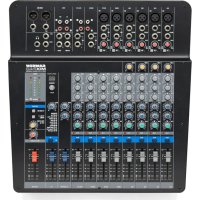
MixPad MXP144FX - Mixer SAMSON - Free user manual and instructions
Find the device manual for free MixPad MXP144FX SAMSON in PDF.


| Product Type | 12-channel analog mixing console with built-in digital effects processor (model MXP144FX) |
| Dimensions (W x D x H) | 391 mm x 370 mm x 100 mm |
| Weight | 3.8 kg |
| Power Supply | 100–240 V ~ 50/60 Hz, < 48 W |
| Fuse | T1.6 A AL 250 V |
| Phantom Power | 48 V (switchable) |
| Number of Channels | 4 mono (mic/line) + 4 stereo (2 with XLR mic and line inputs, 2 with RCA and line inputs) |
| Microphone Preamps | 6 MDR (Maximum Dynamic Range) Class A mic preamps |
| Per-Channel EQ | 3-band (high, mid, low) with ±15 dB |
| Built-in Compressors | 4 one-knob compressors (channels 1-4) |
| High-Pass Filter | Low-cut filter at 80 Hz, 12 dB/octave (mic channels) |
| Digital Effects (model MXP144FX) | 100 presets (reverbs, delays, chorus, flanger, etc.) in 24-bit |
| USB Connectivity (model MXP144FX) | USB 2.0 Type A port for stereo recording and playback |
| Main Outputs | Balanced XLR and 6.35 mm jack (Main Mix), Mix 2 output, headphone output |
| Auxiliary Outputs | MON send (monitoring), FX send (effects) |
| Additional Inputs | Tape input (RCA), stereo return on 6.35 mm jack |
| Level Indicators | Peak LED per channel and main output level LED |
| Cleaning and Maintenance | Unplug before cleaning; use dry cloth only. Do not use liquid products. |
| Safety | Do not open the enclosure. No user-serviceable parts. Refer all servicing to qualified personnel. |
| Spare Parts and Repairability | No user-available spare parts. For repairs, contact Samson technical support or an authorized dealer. |
| Warranty | Refer to local distributor or warranty card included with the device. |
Frequently Asked Questions - MixPad MXP144FX SAMSON
User questions about MixPad MXP144FX SAMSON
0 question about this device. Answer the ones you know or ask your own.
Ask a new question about this device
Download the instructions for your Mixer in PDF format for free! Find your manual MixPad MXP144FX - SAMSON and take your electronic device back in hand. On this page are published all the documents necessary for the use of your device. MixPad MXP144FX by SAMSON.
USER MANUAL MixPad MXP144FX SAMSON
- MXP144 and MXP144FX can be used in following electromagnetic environment: residential, commercial and light industrial, urban outdoors.
- For MXP144 and MXP144FX, the peak inrush current is 4.90 A
FCC Notice
This device complies with part 15 of the FCC Rules. Operation is subject to the following two conditions: (1) this device may not cause harmful interference, and (2) this device must accept any interference received, including interference that may cause undesired operation.
Changes or modifications not expressly approved by the party responsible for compliance could void the user's authority to operate the equipment.
NOTE: This equipment has been tested and found to comply with the limits for a Class B digital device, pursuant to Part 15 of the FCC Rules. These limits are designed to provide reasonable protection against harmful interference in a residential installation. This equipment generates, uses and can radiate radio frequency energy and, if not installed and used in accordance with the instructions, may cause harmful interference to radio communications. However, there is no guarantee that interference will not occur in a particular installation. If this equipment does cause harmful interference to radio or television reception, which can be determined by turning the equipment off and on, the user is encouraged to try to correct the interference by one or more of the following measures:
- Reorient or relocate the receiving antenna.
- Increase the separation between the equipment and receiver.
- Connect the equipment into an outlet on a circuit different from that to which the receiver is connected.
- Consult the dealer or an experienced radio/TV technician for help.
Copyright 2014
v2
Samson Technologies Corp.
45 Gilpin Avenue
Hauppauge, New York 11788-8816
Phone: 1-800-3-SAMSON (1-800-372-6766)
Fax: 631-784-2201
www.samsontech.com
Important Safety Information

ATTENTION RISQUE DE CHOC ÉLECTRONIQUE -NE PAS OUVRIR
WARNING: TO REDUCE THE RISK OF ELECTRIC SHOCK, DO NOT REMOVE COVER (OR BACK) AS THERE ARE NO USER-SERVICEABLE PARTS INSIDE. REFER SERVICING TO QUALIFIED SERVICE PERSONNEL.

This lightning flash with arrowhead symbol within an equilateral triangle is intended to alert the user to the presence of non-insulated "dangerous voltage" within the product's enclosure that may be of sufficient magnitude to constitute a risk of electric shock.

The exclamation point within an equilateral triangle is intended to alert the user to the presence of important operating and maintenance instructions in the literature accompanying the appliance.

If you want to dispose this product, do not mix it with general household waste. There is a separate collection system for used electronic products in accordance with legislation that requires proper treatment, recovery and recycling.
Private household in the 28 member states of the EU, in Switzerland and Norway may return their used electronic products free of charge to designated collection facilities or to a retailer (if you purchase a similar new one).
For Countries not mentioned above, please contact your local authorities for a correct method of disposal.
By doing so you will ensure that your disposed product undergoes the necessary treatment, recovery and recycling and thus prevent potential negative effects on the environment and human health.
Important Safety Information
- Read these instructions.
- Keep these instructions.
- Heed all warnings.
- Follow all instructions.
- Do not use this apparatus near water.
- Clean only with dry cloth.
- Do not block any ventilation openings. Install in accordance with the manufacturer's instructions.
- Do not install near any heat sources such as radiators, heat registers, stoves, or other apparatus (including amplifiers) that produce heat.
- Do not defeat the safety purpose of the polarized or grounding type plug. A polarized plug has two blades with one wider than the other. A grounding type plug has two blades and a third grounding prong. The wide blade or the third prong are provided for your safety. If the provided plug does not fit into your outlet, consult an electrician for replacement of the obsolete outlet.
- Protect the power cord from being walked on or pinched particularly at the plugs, convenience receptacles, and at the point where they exit from the apparatus.
- Only use attachments/accessories specified by the manufacturer.
- Use only with the cart, stand, tripod, bracket, or table specified by the manufacturer, or sold with the
apparatus. When a cart is used, use caution when moving the cart/apparatus combination to avoid injury from tip-over.

- Unplug the apparatus during lightening storms or when unused for long periods of time.
- Refer all servicing to qualified personnel. Service is required when the apparatus has been damaged in any way, such as power supply cord or plug is damaged, liquid has been spilled or objects have fallen into the apparatus has been exposed to rain or moisture, does not operate normally, or has been dropped.
- This appliance shall not be exposed to dripping or splashing water and that no object filled with liquid such as vases shall be placed on the apparatus.
- Caution-to prevent electrical shock, match wide blade plug wide slot fully insert.
- Please keep a good ventilation environment around the entire unit.
- To prevent injury, this apparatus must be securely attached to the stand in accordance with the installation instructions.
- CAUTION: Danger of explosion if battery is incorrectly replaced. Replace only with the same or equivalent type.
Table of Contents
Introduction 6
Basic Operation 7
Adding Digital Effects (MXP144FX Only) 8
USB Connectivity (MXP144FX Only). 9
Features 10
Top Panel Controls 11
Mono Input Channel Section. 11
Stereo Input Channel Section 13
Stereo Return Section 14
Digital Effects Section (MXP144FX only) 15
Master Section 16
Rear Panel Connections 18
Wiring Guide 19
Specifications 20
Digital Effects Program List (MXP144FX Only) 22
Block Diagram 23
Introduction
Congratulations on your purchase of the Samson MixPad MXP144 or MXP144FX mixer! The MXP144 and MXP144FX are 12-channel mixers, with four mic/line channels with low-noise, microphone preamps, two stereo channels with XLR mic inputs and 1/4 line input channels, and two stereo line input channels with RCA and 1/4 inputs. The input channels feature a 3-band equalizer and 60mm faders. The microphone inputs have gain controls, and high-pass filters. The first four channels have compression controls to increase the level of the inputs which is helpful to control clipping or overload.
To add depth to mix, the MXP144FX has 100 24-bit digital studio quality effects, which include Delays, Chorus, Flanging, and lush Reverbs. It's easy to dial up your favorite effects preset with the large seven-segment LED display. The MXP144FX also feature an on-board USB digital interface allowing you to record and playback digital audio from a computer running most recording software. The flexible routing option lets you assign the USB return signal to the main stereo mix, or to the headphones and mix 2 bus.
Clean, clear sound reproduction with accurate equalization and flexible signal routing in a rugged enclosure, ensure reliable high quality sound from performance to performance. Optimized for recording, live sound reinforcement and commercial installations, the MXP144 and MXP144FX are ideal mixer solutions, offering big sound in a compact package.
In these pages, you'll find a detailed description of the features of the MixPad mixers, as well as a description of its front and rear panels, step-by-step instructions for its setup and use, and full specifications. If you purchased the mixer in the United States, you will find a warranty card enclosed, please fill it out and mail it in so that you can receive online technical support and so we can send you updated information about these and other Samson products in the future.
We recommend you record your serial number in the space provided below for future reference.
Serial number:
Date of purchase:
With proper care and maintenance, your MixPad mixer will operate trouble-free for many years. Should your speaker ever require servicing, a Return Authorization (RA) number must be obtained before shipping your unit to Samson. Without this number, the unit will not be accepted. Please call Samson at 1-800-3SAMSON (1-800-372-6766) for an RA number prior to shipping your unit. Please retain the original packing materials and, if possible, return the unit in its original carton. If your mixer was purchased outside of the United States, contact your local distributor for warranty details and service information.
Basic Operation
The following section explains the basic setup and operation of the MixPad MXP144 and MXP144FX.
- Before connecting any microphones or instruments, make sure that the power of all your systems components including the MixPad mixer is turned off. Make sure that the MAIN MIX and MIX 2/PHONES controls are turned all the way down.
- Connect the cables from your microphones and instruments to the mixer. Microphones should be connected to the XLR inputs of channels 1-4. Line level devices can be plugged into the mono 1/4 input channels (1-4) or the stereo input channels (5-12). Acoustic instruments and electric guitars and basses need to be connected to a direct box or preamp before plugging into the mixer.
- Switch on the power of any peripheral devices, and then power up the MixPad mixer.
NOTE: It is important to remember the Golden Rule of audio... "LAST ON, FIRST OFF." Translated, this means that when turning on your system, you should always turn your power amplifiers or powered monitors on LAST, and when turning your system off, turn your power amps off FIRST. This helps avoid any loud pops caused by rush current at power up, or down, which can sometimes damage loudspeakers. - Turn on your power amp or powered monitors and raise the level control to the manufacturers recommended operating level.
- Set the input gain of each input channel so that the PEAK indicators only light occasionally during the loudest input each channel will see.
- Set the MAIN MIX fader to the "0" position.
- While speaking into the microphones (at performance level) or playing an instrument, slowly raise the input channel volume faders until the desired level is reached.
- If you wish to adjust the tone of each channel, adjust the equalizer controls as desired. You may have to re-adjust the channel volume.
Adding Digital Effects (MXP144FX Only)
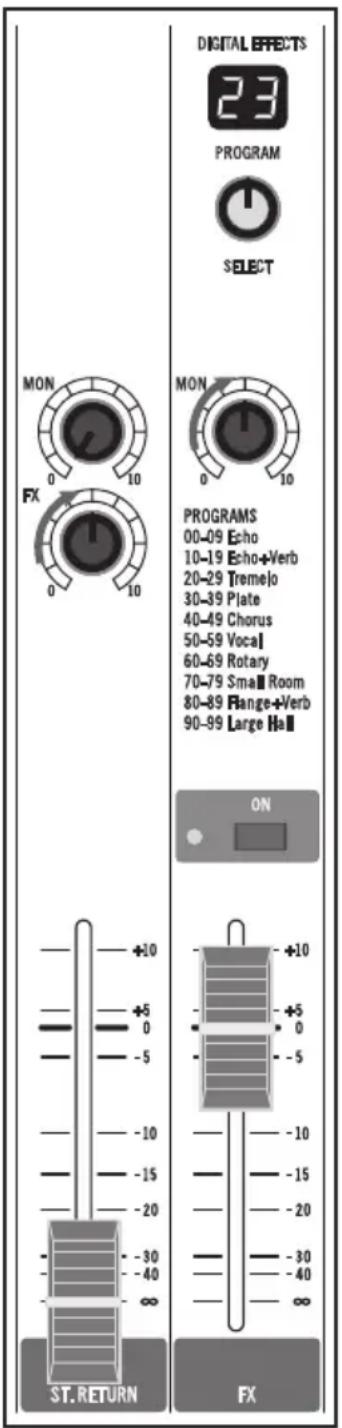
The MXP144FX features built-in, high quality, 24-bit Multi Effect Processors, offering 100 studio grade effects presets. The DIGITAL EFFECTS section features clean Delays, lush Reverbs and multi-effects like Delay + Reverb. The following details the operation of the internal DSP effects in the DIGITAL EFFECTS section.
- Connect a mic or instrument to the desired channel, adjust the level and equalizer to your liking and make sure the MAIN MIX fader level is set so you can hear it in your speakers.
- Press the effects ON button to activate the digital effects channel strip.
- Select the desired effects program using the SELECT control knob located in the middle of the channel strip. Rotate the SELECT switch to one of the 100 effects and press to confirm the selection.
- Rotate the master FX send clockwise and set the effects to FX fader to the O (unity) position. Note: If sending multiple channels to the internal effects, and the Digital Effects peak indicator is flashing red, turn the master FX down.
- Use the FX control on the input channel to adjust the level of signal to sent to the effects. Note: The signal feeding the FX control is sent after the channel Fader, so the channel Fader has an effect on that level, meaning the FX level tracks up and down with the channel Fader.
- To send the Digital Effects to the monitors, for example - to add reverb to vocals in the state monitors, raise the MON control in the Digital Effects channel strip.
USB Connectivity (MXP144FX Only)
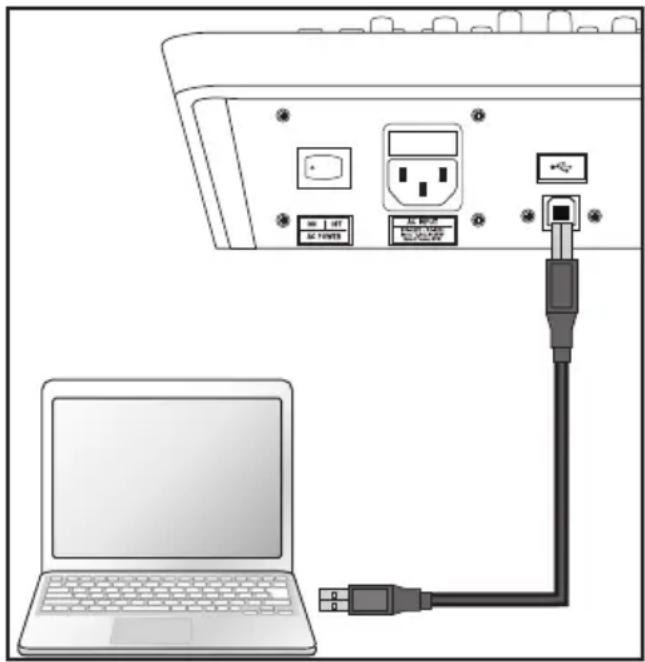
The MXP144FX has a built-in stereo USB audio interface allowing you to record and playback from a computer using virtually any digital recording software. Setting up your mixer with a computer is a simple procedure that takes just a few minutes. The following section describes how to connect and setup the MXP144FX with a computer.
- Connect the MXP144FX to the computer using a standard USB cable (not included).
- In your audio software, set the input and output device to the MXP144FX.
- The audio sent from the MXP144FX to the computer follows the Main Mix bus.
- For playback, you can return the USB stereo signal directly into the main left and right mix bus so that the playback from the PC sums with the MAIN mix on the console.
To hear the USB playback in the MAIN MIX press the TAPE/USB TO MAIN MIX switch.
- The TAPE/USB TO MIX 2 + PHONES switch is used to assign the USB return to the Mix 2 and headphones bus. This allows you to mix the playback in studio monitors or isolate the playback to a mix zone.
Features
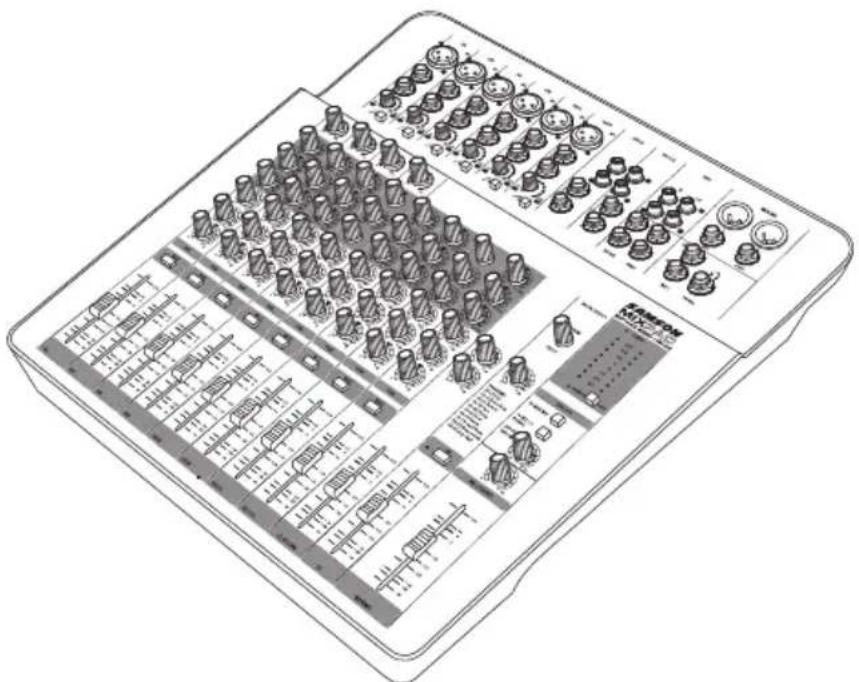
The Samson MixPad mixers are comprehensive, all-in-one solution for live sound, recording, fixed installation and post production applications. Here are some of their main features:
- Ultra-low noise, high headroom analog mixer
- Six Class A MDR (Maximum Dynamic Range) mic preamps
Four stereo channels with RCA and 1/4 inputs
Three-band active channel EQ
High-quality, 60mm precision faders
100 24-bit, low-noise digital effects (MXP144FX Only) - High-integrity, bi-directional USB interface (MXP144FX Only)
- Four single-knob, studio-quality compressors
- Pre-fader Aux Send for monitor mix
Post-fader Aux Send for external effects - All mic channels equipped with input Gain and high pass filters
- 48-volt Phantom Power for condenser microphones
- Multiple outputs: Main Mix, Mix 2, Phones and Tape
- XLR and 1/4" Main Mix outputs
- USB (MXP144FX) and Tape inputs assignable to Main Mix or Mix 2/Phones outputs
Top Panel Controls
Mono Input Channel Section
The following section details four mono input channels.
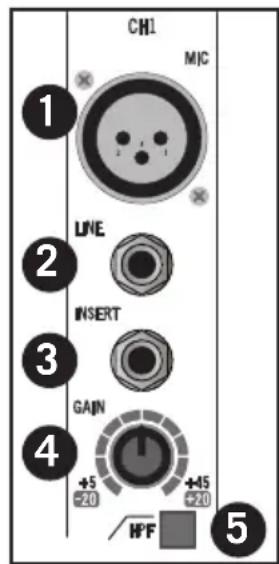
- MIC Inputs - Use these balanced XLR inputs to connect low Impedance microphones and low level signals from direct boxes. The MIC inputs feature +48V phantom power, allowing you to use condenser microphones. XLR Connector pin-out - Pin 1: Ground, Pin 2: Hot (+), Pin 3: Cold (-)
- Line Level Input - Use these balanced TRS 1/4 inputs to connect synthesizers, drum machines, effects processors or any line-level signal. You can connect balanced and unbalanced devices to these inputs. TRS phone jacks Connector pin-out - Sleeve: Ground, Tip: Hot (+), Ring: Cold (-)
- INSERT (Send and Return) Jack - The 1/4 TRS (Tip, Ring, Sleeve) INSERT jack is for connecting outboard effects processors directly on the channel input. The signal is sent on the tip (the Send) and returns on the ring (the Return) of the connector.
- GAIN Control - Variable GAIN control with a range of +5 to +45dB on the MIC input and -20 to +20dB on the LINE input.
- HPF Switch - The high pass filter rolls off the low frequencies from the XLR MIC inputs from 80Hz and below at the rate of 12dB per octave. The high pass filter allows you to remove the lower frequencies that you don't want the microphone to pick up. In live sound applications, the high pass filter is useful for removing stage rumble.
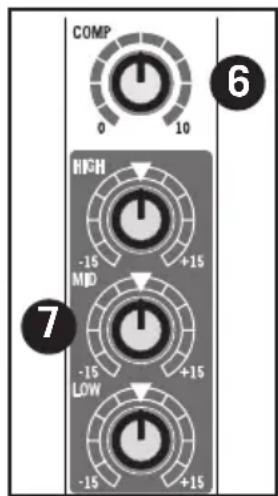
- COMP Control - The COMP knob adjusts the level of compression applied to the channel. As the COMP knob is turned clockwise, the compression ratio is raised and the output gain is adjusted accordingly. The dynamic range of the channel is narrowed, where softer signals will be magnified and loud signals will be subdued to sit better in the mix. Too much compression can create a pumping effect, eliminate all dynamic range, and lead to feedback.
- Equalizer (HIGH, MID, and LOW) - This three-band equalizer allows you to contour a channel's high, mid, and low frequency bands. When the control is set to the 12 o'clock (detent) position, there is no effect on the signal. Turning the controls fully clockwise will raise the level of the frequency band +15 dB, while turning the controls fully counterclockwise will lower the level of the frequency band -15 dB.
Top Panel Controls
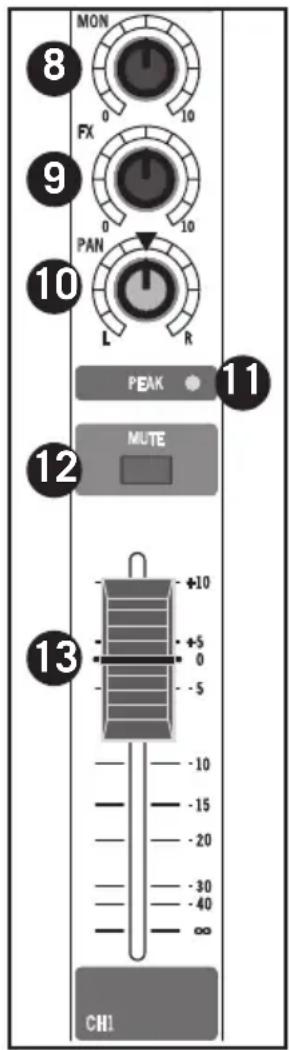
- MON Auxiliary Control - Controls the amount of that channel's signal that is sent to the MON Output. The signal feeding MON is sent before, or pre, the channel fader, so the channel fader has no effect on the MON level. The MON is usually used to create a separate mix for a floor monitor system.
- FX Auxiliary Control - FX Auxiliary Control - The channel's FX knob controls the amount of signal that is sent to the effects bus. The signal of the FX bus in the MXP144FX is routed to the Digital Effects section for on-board signal processing. The FX signal can also be sent to an external effect device connected to the FX SEND jack located on the front panel jack field.
- PAN Control - The PAN control is used to place or position the mono signal into the stereo main left and right mix bus. You can create a stereo image by panning some input signals to the left and others to the right.
- PEAK Indicator - This LED indicator will flash red when the channel input signal peaks. To reduce distortion, turn the GAIN control counterclockwise until the clip indicator does not light during normal use.
- MUTE Switch - The MUTE switch allows you to turn the channel on or off.
- Volume Fader - The Volume Fader control adjusts the level of each mono input channel.
Top Panel Controls
Stereo Input Channel Section
The following section details four stereo input channels.
- MIC Inputs (CH5/6 & CH7/8) - Use these balanced XLR inputs to connect low Impedance microphones and low level signals from direct boxes. The MIC inputs feature +48V phantom power, allowing you to use condenser microphones.
XLR Connector pin-out - Pin 1: Ground, Pin 2: Hot (+), Pin 3: Cold (-)
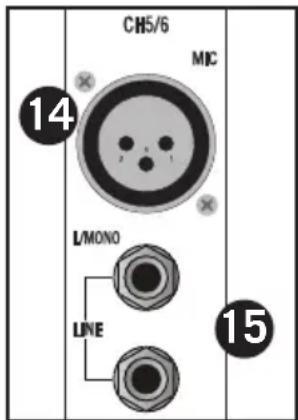
- Stereo 1/4 Input Jacks - Use the 1/4 jacks for connecting
stereo line level sources. For stereo inputs use the LINE L to connect the left channel and the LINE R to connect the right channel. Use the LEFT input when connecting a mono input signal to the Stereo Input channels. You can connect outputs from high impedance microphones, synthesizers and drum machines to these inputs. The LINE inputs have a nominal operating level of -40dBV through - 10dBV. TRS phone jacks Connector pin-out - Sleeve: Ground, Tip: Hot (+), Ring: Cold (-)
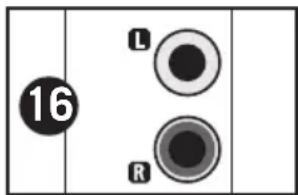
- Stereo RCA Input Jacks (CH9/10 & 11/12) - The stereo channel's RCA connectors accept signals from stereo line devices. The RCA line level inputs have a nominal operating level of -40dBV through -10dBV.
- Equalizer (HIGH, MID, and LOW) - This three-band
equalizer allows you to contour a channel's high, mid, and low frequency bands. When the control is set to the 12 o'clock (detent) position, there is no effect on the signal. Turning the controls fully clockwise will raise the level of the frequency band +15 dB, while turning the controls fully counterclockwise will lower the level of the frequency band -15 dB.
- MON Auxiliary Control - Controls the amount of that
channel's signal that is sent to the MON Output. The signal feeding MON is sent before, or pre, the channel fader, so the channel fader has no effect on the MON level. The MON is usually used to create a separate mix for a floor monitor system.
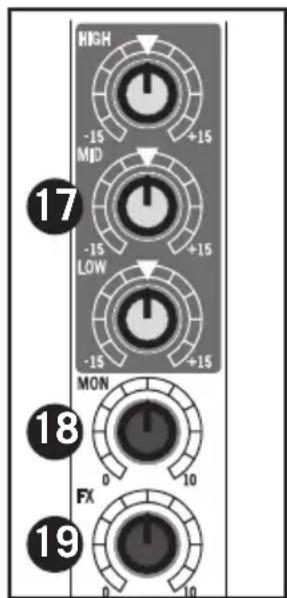
- FX Auxiliary Control - The channel's FX knob controls the amount of signal that is sent to the effects bus. The signal of the FX bus in the MXP144FX is routed to the Digital Effects section for on-board signal processing. The FX signal can also be sent to an external effect device connected to the FX SEND jack located on the front panel jack field.
Top Panel Controls
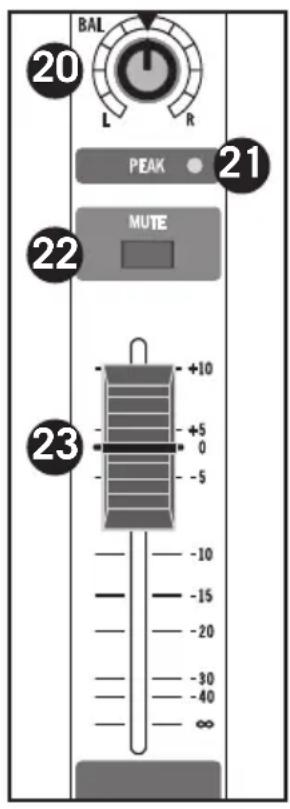
- BAL Control - This control is used to place, or position, the stereo signal into the main left and right stereo mix field. You can create a stereo image by panning some input signals to the left and others to the right.
- PEAK Indicator - This LED indicator will flash RED when the channel input signal peaks. To reduce distortion, turn the LEVEL control counterclockwise or lower the volume of the input device until the clip indicator does not light during normal use.
- MUTE Switch - The MUTE switch allows you to turn the channel on or off.
- Volume Fader - The Volume Fader control adjusts the level of each stereo input channel.
Stereo Return Section
The following section describes the features control of the Stereo Return section.
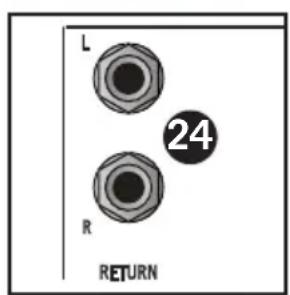
- Stereo 1/4 Input Jacks - These 1/4 jacks are for connecting stereo line level sources like those from the outputs of effects processors. The LINE inputs have a nominal operating level of -40dBV through - 10dBV. TRS phone jacks Connector pin-out - Sleeve: Ground, Tip: Hot (+), Ring: Cold (-)
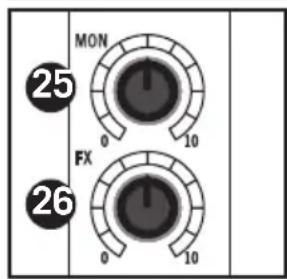
- MON Master Send - The MON signals from mono and stereo input channels, along with the Digital Effects return, are mixed together and sent to the MON Output. Use the MON level control to set the amount of signal being sent to MON SEND jack.
- FX Master Send - The FX signals from mono and stereo input channels, are mixed together and sent to the internal Digital Effects and the FX Output. Use the FX level control to set the amount of signal being sent to the internal Digital Effects and the FX SEND jack.
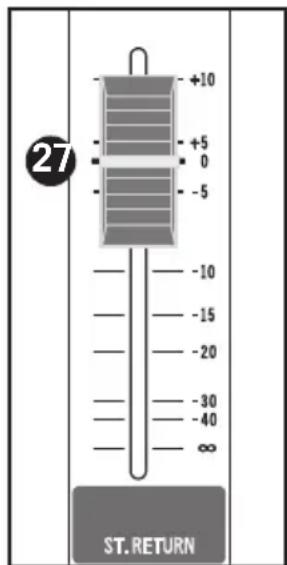
- Volume Fader - The Volume Fader control adjusts the level of Stereo Return.
Top Panel Controls
Digital Effects Section (MXP144FX only)
The following section describes the features control of the on-board 24-bit digital Multi-effects section.
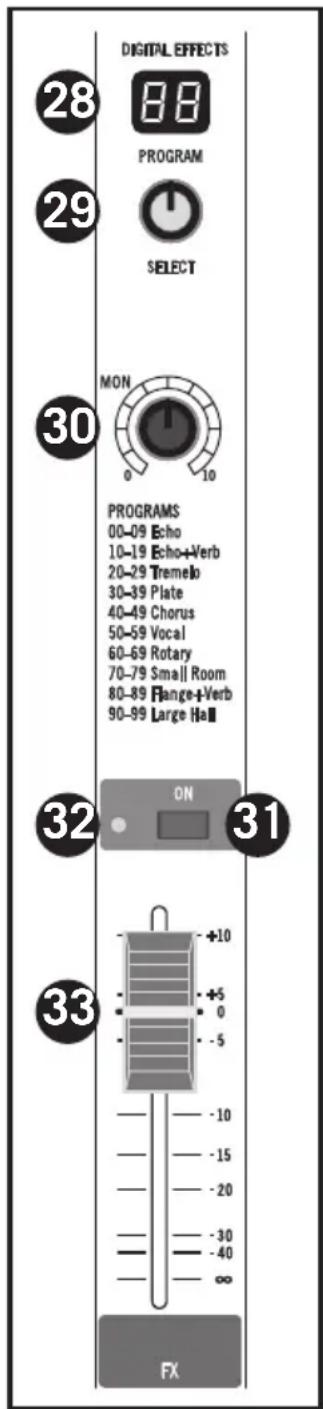
- PROGRAM Effects Display - The mixer's multi-effects processors feature a dual digit, seven-segment numerical display for showing the effects PROGRAM number from 00 - 99.
- SELECT Control Knob - The SELECT control knob is a continuously variable encoder to call up one of the 100 built-in digital effects presets. Rotate the SELECT knob to scroll through the preset programs and press to load the selected effect.
- To MON Control - This control is used to adjust the level of the effects from the built-in Digital Effects that's being sent to the MON bus. This allows you to add the effects to the signal in your monitor speakers.
- Effects ON Switch - The effects ON switch is used to turn the internal digital effect on and off. The effects are by-passed when the switch is in the out position.
- On/Peak Indicator - This LED indicator lights green when the Digital Effects is turned on. The indicator lights red when the input signal to the internal Digital Effects is overloaded.
- FX Fader - The FX fader is used to adjust the level of the effects from the built-in digital effect that is sent to the MAIN MIX bus. This allows you to hear the DSP effects in your main speakers.
Top Panel Controls
Master Section
This following section details the master section of the mixer.
-
TAPE IN (RCA jacks) - Stereo line level input, on RCA connectors, for connecting the output of devices such as MP3, CD, computer sound-card, or any other line level device.
-
TAPE OUT (RCA jacks) - The signal present at this connector is the MAIN bus signal before it has passed through the MASTER level control and graphic equalizer. The nominal output level is -10dBV and the impedance is 100 Ohms.
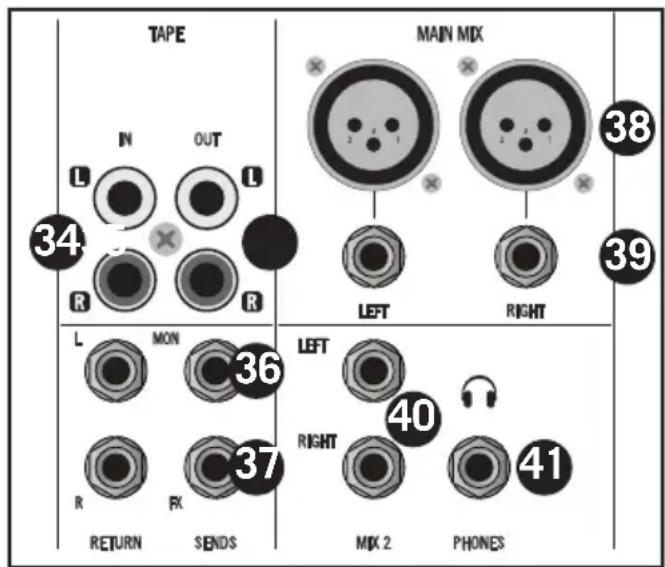
- MON SEND - The signal present at the MON SEND output is sent from the MON bus, which is fed from the MON send on the input channels.
- FX SEND - The signal present at the FX SEND output is sent from the FX bus, which is fed from the FX send on the input channels.
- MAIN MIX XLR Outputs - The stereo MAIN MIX is sent to the LEFT and RIGHT MAIN MIX XLR connectors. The signal level at these MAIN MIX connectors follows the MAIN MIX volume fader. In a live sound application, you can drive a speaker system using the MAIN MIX outputs connected to a power amplifier or powered speakers.
XLR Connector pin-out - Pin 1: Ground, Pin 2: Hot (+), Pin 3: Cold (-) - MAIN MIX 1/4 Outputs - The MAIN MIX 1/4 jacks can be connected to a power amplifier, powered speaker system, or inputs of a digital recorder. The signal at the MAIN OUT jacks follows the MAIN volume fader.
- MIX 2 - These line level MIX 2 outputs can be used to drive a second speaker system or connect to a stereo device such as computer sound card, MP3, or recorder. The signal at the MIX 2 jacks follows the MIX 2 level control knob allowing you to set a different level at the outputs.
- PHONES Output - Connect standard 1/4 TRS stereo headphones, 60 to 600 Ohms. The PHONES output level is controlled by the MIX 2/PHONES control.
Top Panel Controls
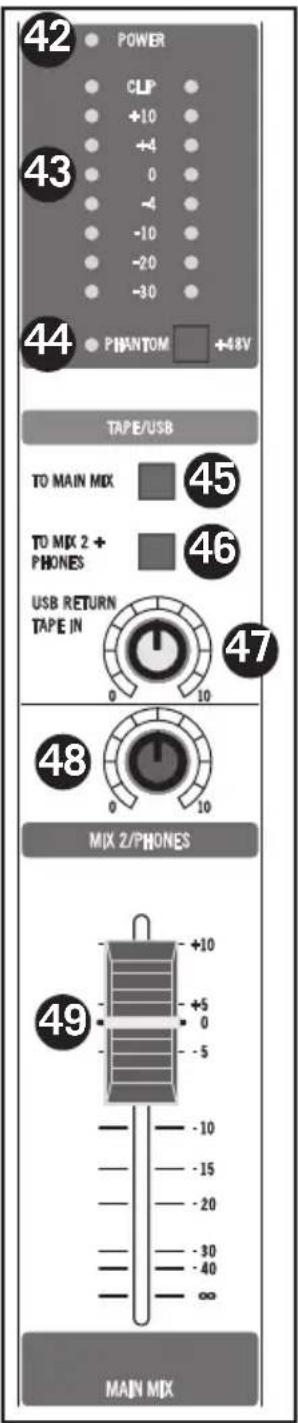
- POWER Indicator - The POWER LED lights up to indicate that the main POWER switch (located on the rear panel) is on.
- Output Level Meter - The output level meter allows you to monitor the level of the signal, which is being sent to the MAIN MIX jacks.
NOTE: To avoid distortion, adjust the MAIN MIX level control so that the O indicator LED lights occasionally.
- PHANTOM Power Switch and Indicator - The mixer features an on-board, 48-Volt Phantom power supply to operate condenser microphones. When the switch is engaged, the LED will illuminate indicating that phantom power is now available at the microphone preamps.
IMPORTANT NOTE: To avoid a loud pop, be sure to turn down the master level controls before plugging and unplugging the mic cables when the phantom power is active. Be sure the MAIN level fader is turned all the way down before activating the Phantom Power to prevent pops from entering any external device connected to the mixer. Also, be sure the Phantom Power is OFF when connecting or disconnecting microphones.
-
TAPE & USB (MXP144FX only) TO MIX 2 + PHONES - This switch is used to assign the TAPE and USB (MXP144FX only) inputs to the MIX 2 and PHONES outputs.
-
TAPE & USB (MXP144FX only) TO MAIN MIX - This switch is used to assign the TAPE and USB (MXP144FX only) inputs to the MAN MIX output.
-
USB RETURN (MXP144FX only) and TAPE IN
Control - This level control is used to adjust the volume of the signal returning from a computer via the USB input (MXP144FX only) and audio connected to the TAPE IN RCA jacks.
- MIX2/PHONES Control - The mixer has a second set of output connectors carrying a duplicate of the MAIN MIX signal for the purpose of feeding another speaker zone or recorder. The MIX 2/PHONES control knob is used to set the volume of the MIX 2 output and the overall level of the Headphone output.
- MAIN MIX Fader - The MAIN MIX Level fader adjusts the level of main left and right stereo mix sent to the MAIN MIX outputs.
Rear Panel Connections
This following section details the rear panel connections.
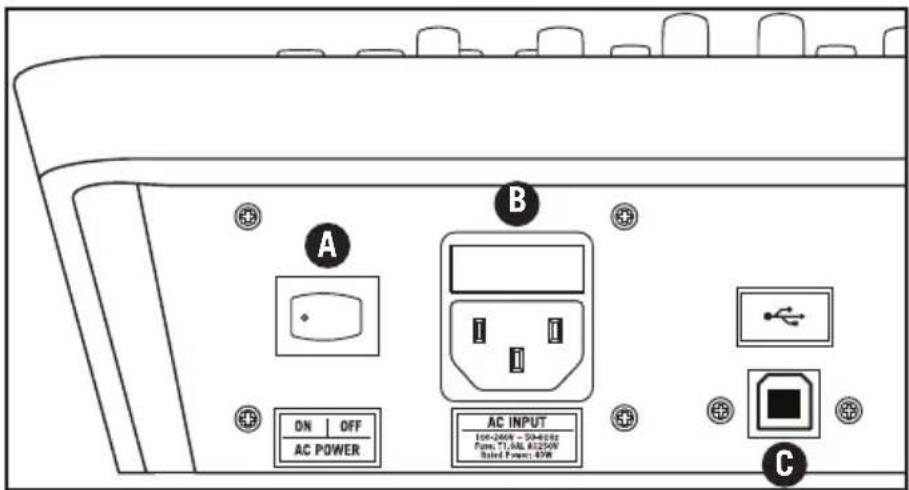
A. AC Inlet - Connect the supplied power cable here.
B. POWER - Switches on the MXP144 and MXP144FX main power.
C. USB Port (MXP144FX Only) - Connect the MixPad mixer to a computer using standard USB cable here.
Wiring Guide
There are several ways to interface the MXP mixer to support a variety of applications. Follow the cable diagrams below for connecting your mixer.
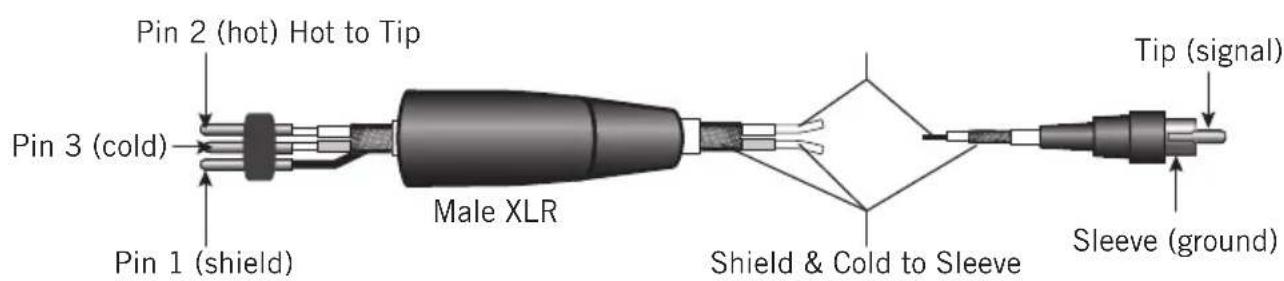
RCA
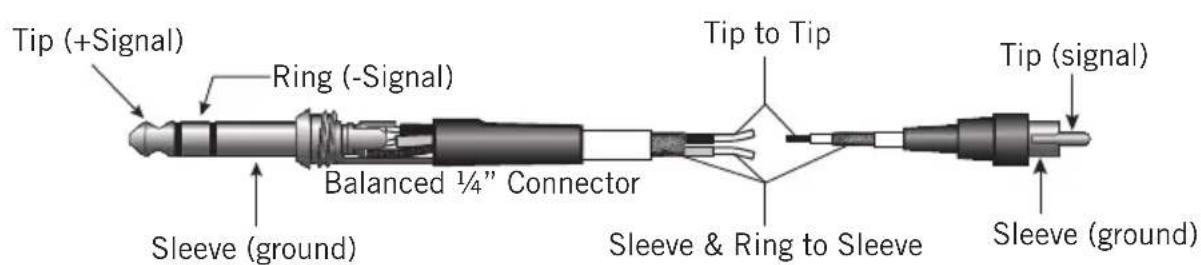
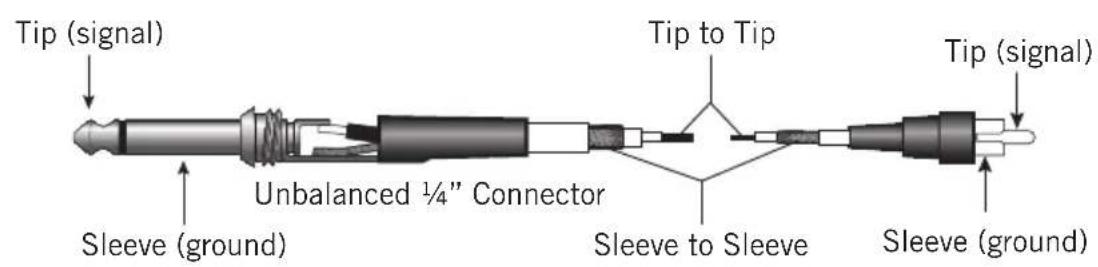
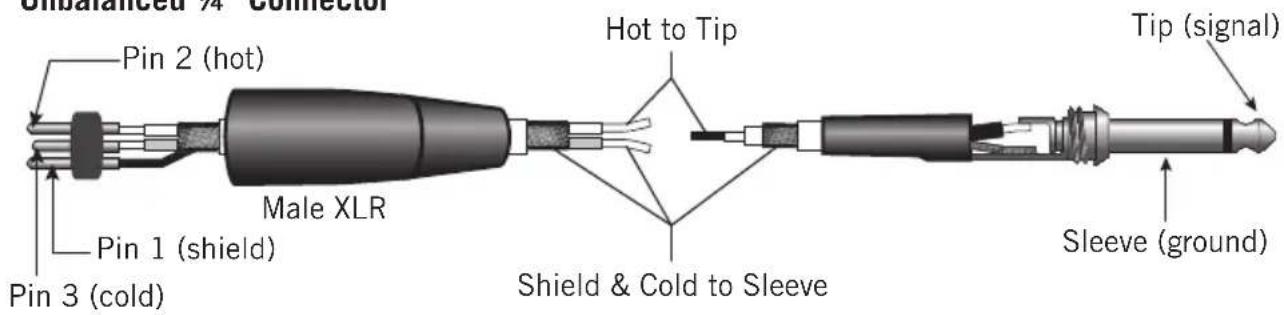
Unbalanced 1/4 Connector
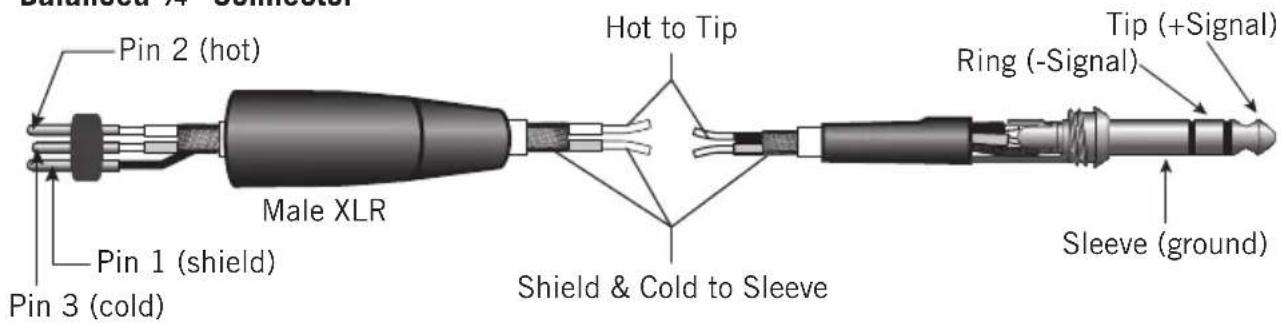
Balanced 1/4 Connector
Specifications
Frequency Response (Trim @ Min, unity gain ± 3 dB)
Mic to Main 20Hz~30KHz
Line to Main 20Hz~30KHz
Aux Return to Main 20Hz~30KHz
Line to Aux Send 20Hz~30KHz
T.H.D. (Trim @ Min, +4dBu output, unity gain, 1 kHz w/30 kHz LPF)
Mic/Line to Main (Mono Ch) <0.03%
Line to Main (Stereo Ch) <0.03%
Line to Aux Send < 0.03%
Equivalent Input Noise ("A" filter on, input shorted)
Mic (Trim @ Min, Fader set "0") < -90dB 20HZ~30KHZ A-weighted
Line (Trim @ Min, Fader set "0") < -90dB 20HZ~30KHZ A-weighted
Maximum Voltage Gain
Mic to Main (bal) 70dB
Line to Main (bal) (Mono Ch) 43dB
Line/Tape to Main (Stereo Ch) 33dB
Aux Return to Main 25db
Mic to Aux Send 75dB
Line to Aux Send (Stereo Ch) 30dB
Residual Noise (30 kHz LPF, all control Min)
Main (All fader min) -100dBu A-weighted
Aux Send (All fader min) -105dBu A-weighted
Crosstalk (@ 1 kHz w/ 30 kHz LPF)
Ch vs. Ch ( Trim @ min,Fader set 0) >75dB A-weighted
Input vs. Output >60dB A-weighted
PEAK Indicators
Mic (Mono Ch) +16dBu
Line (Stereo Ch) +16dBu
Headphone output (600 ohm load) +20dBu
Maximum Input Level (1 kHz, ± 3dB)
Mic Input (Mono Ch) +16dBu
Line Input (Mono Ch) +40dBu
Input Channel Equalizer (± 3dB)
High ±15 dBu
Mid ±15 dBu
Low ±15 dBu
Specifications
Phantom Power 48V±3V
Power RequirementAC100~240V50~60Hz
Fuse T1.6A AL250V
Power Consumption <48W
Dimensions (W x D x H) 15.3" x 14.5" x 3.9"
391 mm x 370 mm x 100 mm
Weight 8.3lb / 3.8kg
USB Bus Power USB2.0 +5V DC 0.5A max
USB A-TYPE FEMALE
Internal DSP Effects 100 presets
Digital Effects Program List (MXP144FX Only)
| Number Effect | Parameter | |
| 00-09 Echo | Delay Time: 145~205ms | |
| 10-19 Echo | + Verb Delay Time: 208~650msDecay Time: 1.7~2.1s | |
| 20-29 Tremolo Rate: 0.6~5Hz | ||
| 30-39 Plate | Decay Time: 0.9~3.6s | |
| 40-49 Chorus Rate: 0.92~1.72Hz | ||
| 50-59 Vocal | Reverb Decay Time: 0.8~0.9sPre-Delay: 0~45ms | |
| 60-69 Rotary Modulation Depth: 20~80% | ||
| 70-79 Smal | Room | Decay Time: 0.7~2.1sPre-Delay: 20~45ms |
| 80-89 | Flanger + Verb Decay Time: 1.5~2.9sRate: 0.8~2.52Hz | |
| 90-99 | Large Hall | Pre-Delay: 23~55ms |
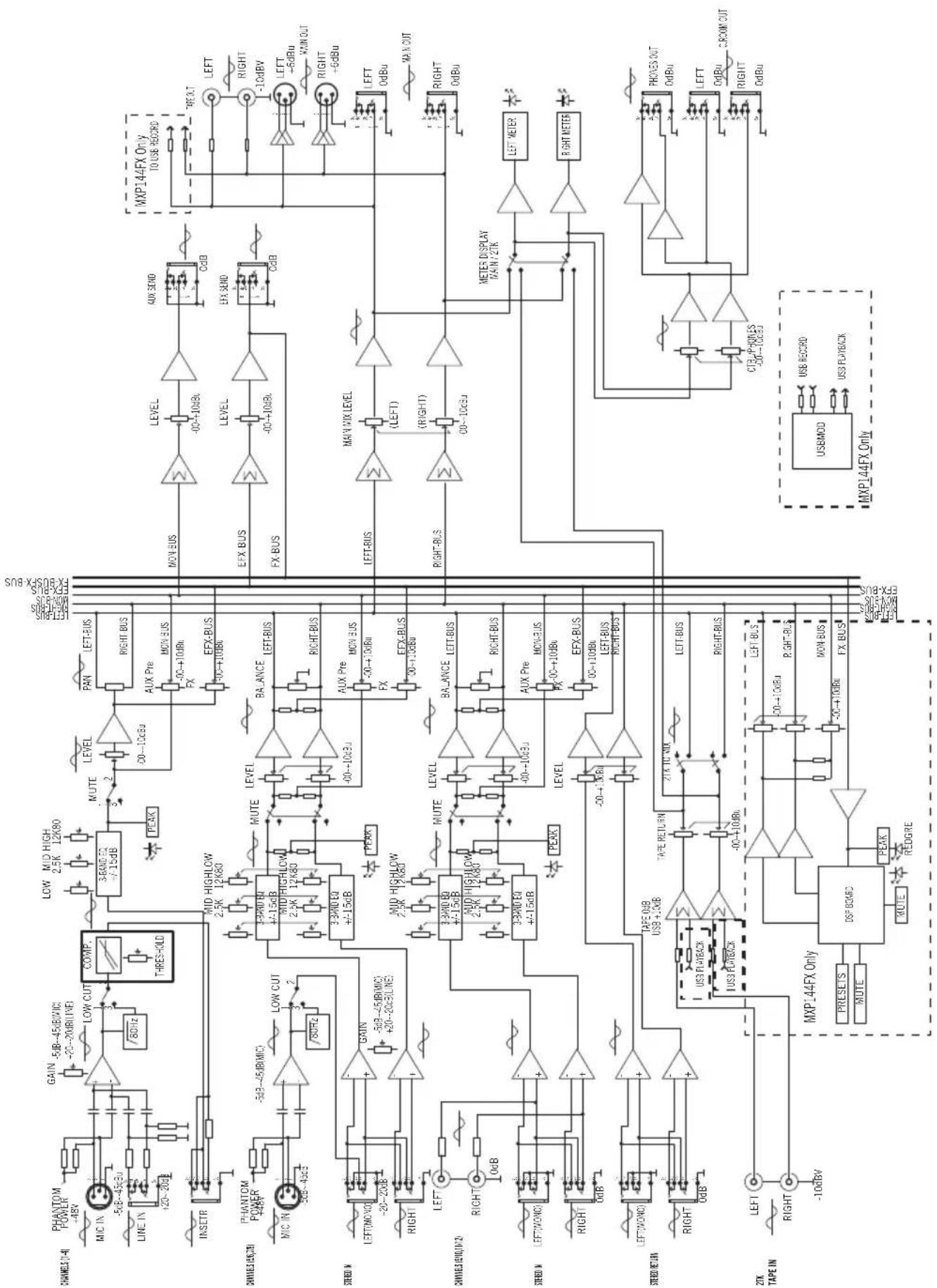
Block Diagram
Avis de la Federal Communications Commission (FCC)
Line an Main 20Hz~30KHz
Aux Return an Main 20Hz~30KHz
Line an Aux Send 20Hz~30KHz
Mic/Line an Main (Mono Kan) <0.03%
Line an Main (Stereo Kan) <0.03%
Line an Aux Send < 0.03%
Mic an Main (Bal) 70dB
Line an Main (Mal) (Mono Kan) 43dB
Line/Tape an Main (Stereo Kan) 33dB
Aux Return an Main 25db
Mic an Aux Send 75dB
Line an Aux Send (Stereo Kan) 30dB
Crosstalk (@ 1 kHz w/ 30 kHz LPF)
Micro a Principal 20Hz~30KHz
Linea a Principal 20Hz~30KHz
Returno Aux a Principal 20Hz~30KHz
T.H.D. (Trim @ Min, saliva +4dBu, ganancia unitaria, 1 kHz w/30 kHz LPF)
Micro a Principal (bal) 70dB
Linea a Principal (bal)
(Canal Mono) 43dB
Linea/Cinta a Principal
(Mic to Main (bal)) 70 dB
(Aux Return to Main) 25 dB
Da mic a mandata aus.
(Mic to Aux Send) 75 dB
Crosstalk (FPB 1 kHz / 30 kHz)
Canale - Canale

- FCC NOTICE
- IMPORTANT SAFETY INFORMATION
- TABLE OF CONTENTS
- INTRODUCTION
- BASIC OPERATION
- ADDING DIGITAL EFFECTS (MXP144FX ONLY)
- USB CONNECTIVITY (MXP144FX ONLY)
- FEATURES
- TOP PANEL CONTROLS
- MONO INPUT CHANNEL SECTION
- STEREO INPUT CHANNEL SECTION
- STEREO RETURN SECTION
- DIGITAL EFFECTS SECTION (MXP144FX ONLY)
- MASTER SECTION
- REAR PANEL CONNECTIONS
- WIRING GUIDE
- SPECIFICATIONS
- BLOCK DIAGRAM
- AVIS DE LA FEDERAL COMMUNICATIONS COMMISSION (FCC)
- CROSSTALK (FPB 1 KHZ / 30 KHZ)
Brand : SAMSON
Model : MixPad MXP144FX
Category : Mixer