
42" Touchscreenpc series - Monitor Faytech - Free user manual and instructions
Find the device manual for free 42" Touchscreenpc series Faytech in PDF.


User questions about 42" Touchscreenpc series Faytech
0 question about this device. Answer the ones you know or ask your own.
Ask a new question about this device
Download the instructions for your Monitor in PDF format for free! Find your manual 42" Touchscreenpc series - Faytech and take your electronic device back in hand. On this page are published all the documents necessary for the use of your device. 42" Touchscreenpc series by Faytech.
USER MANUAL 42" Touchscreenpc series Faytech
faytech 32"-55" TOUCHSCREEN-PC series
Anschlüsse 32-55" Touch PC
Advanced -> North Bridge LVDS Config Select
LVDS Panel Config Select = [1920x1080]
- EDID Panel Option = [Enabled]
Support-E-Mail: support@faytech.de
To the buyer of this product:
Thank you for purchasing our faytech touch-screen PC. You purchased a powerful system that is suitable for conference rooms, trade shows, convention centers and many more applications. It is distinguished from standard PC systems through silent operation and an increased stability, especially through the robust aluminum housing. Not to mention the high quality and attractive design (the housing is made out of refined aluminum).
To avoid mistakes and for the optimal use of the touch screen computers, please read this manual in detail before first use.
Warranty:
faytech touch PCs are produced following the most modern production and test processes. Carefully selected components and accurate production ensure reliable operation and long life. faytech warrants to the original purchaser that each faytech touch PC delivered shall be free from defects in material or workmanship at time of shipment, and that each such module delivered will meet the published specifications for a period of 24 months as measured from the date of original shipment. faytech's obligation under the Warranty contained herein is limited to the repair or replacement of any faytech touch PC that does not meet the specifications, provided that said product is returned to faytech, transportation charges pre-paid, and provided that upon faytech's examination, the product, when tested within the specified ratings and in accordance with good engineering practice, does not meet the specifications as defined. THIS WARRANTY IS IN LIEU OF ALL OTHER WARRANTYES, EXPRESSED OR IMPLIED, INCLUDING WITHOUT LIMITATION THE WARRANTY OF MERCHANTABILITY AND THE WARRANTY OF FITNESS FOR A PARTICULAR PURPOSE.
All claims under warranty must be made promptly after occurrence of circumstances giving rise thereto and must be received within the applicable warranty period by faytech or its authorized representative. Such claims should include the Product type and serial numbers and a full description of the circumstances giving rise to the claim. Before any Products are returned for repair and/or adjustment, written authorization from faytech or is authorized representative for the return and instructions as to how and where these products should be shipped must be obtained. Any Product returned to faytech for examination shall be sent prepaid via the means of transportation indicated as acceptable by faytech. faytech reserves the right to reject any warranty claim not promptly reported and any warranty claim on any item that has been altered or has been shipped by no acceptable means of transportation. When any Product is returned for examination and inspection, or for any other reason, Customer will be responsible for all damage resulting from improper packing or handling and for loss in transit, notwithstanding any defect or nonconformity in the Product. In all cases faytech has sole responsibility for determining the cause and nature of failure, and faytech's determination with regard thereto shall be final. If it is found that faytech's Product has been
returned without cause and is still serviceable, Customer will be notified and the Product returned at Customer's expense. In addition, a charge for testing and examination may, in faytech's sole discretion, be made on Products so returned.
SELLER'S LIABILITY FOR DAMAGES SHALL NOT EXCEED THE PAYMENT, IF ANY, RECEIVED BY SELLER FOR THE UNIT OF PRODUCT OR SERVICE FURNISHED OR TO BE FURNISHED AS THE CASE MAY BE THIS IS THE SUBJECT OF CLAIM OR DISPUTE. IN NO EVENT SHALL SELLER BE LIABLE FOR INCIDENTAL, CONSEQUENTIAL OR SPECIAL DAMAGES. LIABILITY TO THIRD PARTIES, FOR BODILY INJURY INCLUDING DEATH, RESULTING FROM SELLER'S PERFORMANCE
Support or sustain life and whose failure to perform when properly used in accordance with instructions for use provided in the labeling can be reasonably expected to result in a significant injury to the user. A "Critical Component" is any component in a life support device or system whose failure to perform can be reasonably expected to cause the failure of the life support device or system or to affect its safety or effectiveness.
If your device does have a defect within the warranty period, please contact faytech directly. The warranty period is 24 Months from the date of purchase under the following conditions:
- All warranties are void if the unit has been opened or disassembled without faytech's prior approval.
- Damage caused by improper handling or operation, by incorrect installation or storage, through improper connection, as well as due to force majeure or other external influences are not covered by the warranty.
- For warranty claim, we reserve the right to replace the defective components or to exchange the device.
Exchange components or devices become the property of faytech. - Claims for damages are excluded in so far as they are not based on intent or gross negligence of the manufacturer.
- After expiration of the warranty period, warranty claims can no longer be pursued.
- Any warranty claim must be accompanied by proof of purchase (receipt or invoice).
Electrical Safety Tips:
The device should only be opened by technical service personnel. Improper opening can result in loss of warranty. Please separate the touch PC from the power supply before opening.
Operating Safety:
- Please check before first use if all the external adapter and cables are properly connected.
- The PC must not have in any case loose objects, especially any exposed, conductive objects. Otherwise there is a risk of a short circuit and the permanent damage to the touch PC.
- Dust, moisture and temperature jumps drastically shorten the life of the touch screen PC. Please avoid, if possible, these external negative factors.
- Although the touch PC is provided with an anti-vibration mechanism please do not drop the PC and try to avoid strong and jarring movements.
- Please clean your faytech touch PC not chemical supplies but use a dry cloth for cleaning.
Ongoing changes:
Faytech produces its display in China with German know-how and quality management. Your feedback is the most valuable information for the improvement of our products. Continuous production and product improvement is our primary goal. For this reason, there may be improvements in our product which are not yet included in this user's guide. Differences between your product and this user's guide are generally related to specification changes and product improvements. If you have any questions or suggestions, please contact our support team or visit our website at www.faytech.com.
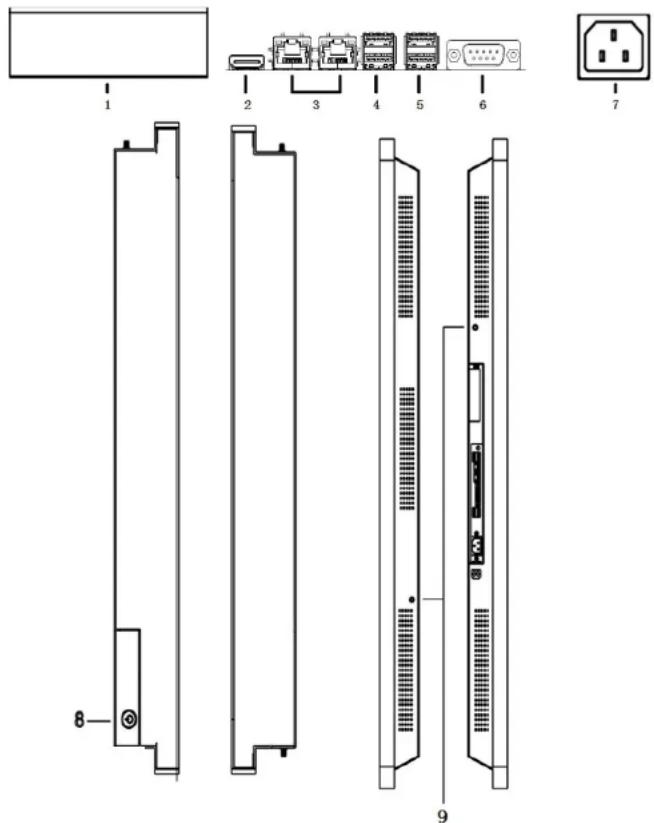
Connectors 32"-55" Touch-PC
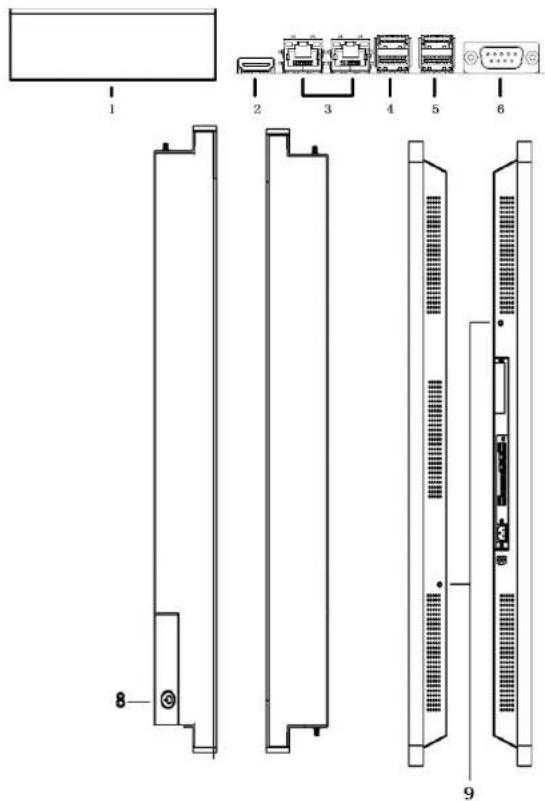
1 SSD Shelf for 2.5" SSD/harddisk, 9mm in height
2 HDMI 1.3
3 2x 10/100/1000 MBits Lan Connector
42xUSB2.0
52xUSB2.0
6 serial RS232/422/485, 5/12V switchable in BIOS
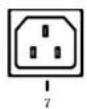
7 Power Supply 100-240V ACDC IN
8 On-/ Off Button
9 2x W-LAN Antenna connectors
Commission and Installation
faytech offers you a well-engineered, high-quality PC hardware. For the software installation, use and maintenance the respective user is responsible.
On the bundle driver CD are Windows and Linux drivers for our faytech Touch PCs included. Feel free to check www.faytech.com to see whether there are updated drivers.
If you purchased the system with a SSD an operation system is already installed. Please check with your sales partner which version. A current Ubuntu image is always available with which you can become familiar with the hardware and the use of the touch-panel.
The touch software manual is also downloadable on our website in the Category "Service". For Win7/Win8 no driver installation is needed to use the touch.
To start, connect your faytech-touch PC simply with the power supply cable and press the On/Off Button.
If you have bought a faytech touch PC without hard disk, please follow the following instructions.
- The installation of an external Device is really simple. Just open the SSD Shelf to insert a fitting 2.5" SSD/harddisk with 9m in height.
BIOS-settings
In the following, the most important BIOS settings are explained. Please note that the BIOS is a special BIOS for PC's with built-in display solutions.
Accordingly, it can occur after adjustments to the BIOS that you see no image on your monitor. For this reason, only experienced users should make changes to the BIOS. If the system is wrongly adjusted, proceed as described in the following: press (even if you see no image) on a connected keyboard the Delete key until you are sure you are in the BIOS. Then press F5 Enter F10 Enter. The system will reboot and you should have on internal monitor again a picture.
The major graphic settings to use the touch PCs internal built in monitor: Advanced -> North Bridge LVDS Config Select
LVDS Panel Config Select = [1920x1080]
EDID Panel Option = [Enabled]
Site
CP
Pre-installation Linux-Software (Optional)
When an actual Ubuntu has been preinstalled in the Touch-PC with SSD the User Name is "user" and the password is "user123".
If you want to change the password, please open a terminal. Type "sudo su", then press "Enter". The password is "user123". Please chose "passwd user" and give your new password.
Optional features
Since the faytech touch PC series is widely used in industry applications, we offer a number of extensions that you can order from our distribution partners.
See a selection below:
- Customizable cables
- Customizable connections (external I/O-ports)
Transflective & High Brightness (up to 1000 NITS)
Ignition Control
IP65 & IP68, vandalism secure
Aluminum Case - Flat Front Case Design
Webcam, Scanner, Printer, RFID
i3/i5 CPU
Advanced RAM and SSD - Individual Buttons for steering PC-functions
In project business, further adjustments are possible to meet your requirements.
Troubleshooting
1. No picture
- First, check whether the power supply is properly connected and working (red LED on the On/Off-button).
- When you install new video card drivers, the BIOS is under certain circumstances adjusted and there is no boot screen to see. Wait a minute or two until Windows/your OS is loaded.
-
Connect an external keyboard via USB and check whether the Num Lock LED illuminates (press Num Lock on the keyboard). When it's on, there is usually only misaligned BIOS. Turn off the PC, reboot and then press DELETE so often until you are sure that you are in the BIOS. Set the graphics options in the BIOS following Chapter BIOS settings, if necessary with the help of an external monitor.
-
Leads none of the above suggestions to success, please contact our direct manufacturer service under the below shown contact information.
2. Touch function is not exact
Please download from our website www.faytech.com the actual manual for the use of the touch-function. Please do a recalibration to improve the exactness of the touch panel.
faytech touch PC specification
| PC-Part | |
| CPU | Intel® Atom™ processor N2600 (optional N260C) |
| Front Side Bus | 800/1066MHz |
| Chipset (North/South Bridge) | Intel® NM10 |
| Memory: | 1x2GB/byte DDR4 SCDimm |
| BIOS: | 64Mb Flash ROM, UEFI AMI BIOS, PinP, DIM 2.0, Wm 2.0, SM BIOS, ACPI 3.05 |
| Watchdog Timer (1-255 steps by software program): | ● |
| Wake On LAN/PCE: | ● (WCL, PXE) |
| Hard Drive: | see sales offer |
| Graphic: | AMD HD7410M with 512M memory |
| Audio-Chip | Realtek B87 8-channel high definition audio codec, Audio Amplifier EUA 2012A |
| 5.1 Channel High Definition Audio Codec: | ● |
| Network: | 2 x Realtek PCIe Gb LAN 8111F |
| External Connectors: | 1x HDMI port |
| 1x COM port (RS232/485, 5V/12V) | |
| 2x GB/T LAN (RU45) ports | |
| 4x USB 2.0 ports | |
| 2x W LAN-Antenna connectors | |
| Power On/Off | |
| Internal I/O Connectors: | 1 x VGA pin header |
| 1 x 12V DC power connector (2-pin) | |
| 2 x SATA 3Gb/s connectors | |
| 1 x 4-pin SATA power connector | |
| 1 x PS2 keyboard/mouse connector (6-pin) | |
| 1 x USB 2.0 header supports additional 2 USB 2.0 ports, 1x used for Touch | |
| 3 x RS232 COM connectors (1x used for external) | |
| 1 x LVDS connector | |
| 1 x 5-pin LCD power connector | |
| 1 x 4-pin (2x2V) audio amplifier connector (used for loudspeaker) | |
| 1 x Line-Out / Mic in audio pin header (AAFP) | |
| 1 x SIPDF output pin header | |
| 1 x 8-bit Digital I/O interface (4-in/4-od) | |
| 1 x Chassis Fan connector | |
| Expansion Slots: | 2 x Mini Card slots with PCIe and USB interface (1 x Full Height with SM card interface, 1 x Half Height (W-LAN-card integrated)) |
| 1x PCIeX1 Straddle connector | |
| COM1 switchable between RS232/RS485, 5V/12V via BIOS-setting: | ● |
| driver: | WinXP, Win7, Win8, Linux, 32Bit/84Bit |
| input voltage: | 100-240V |
| operation temperature: | 0° bis +60° |
| Panel and Touch Panel specification | |
| Touch Panel | Dual-Touch Infranto Panel |
| Touch Connection | USB-Touch Konnektor (PC internal corrected) |
| Touch Panel driver | Windows, Linux, Mac |
| Touch life (contacts) | >50 000 000 |
| Response time Touch Panel (ms) | <12 |
| Surface hardness | 7H |
| Input force (g) | 20~150 |
| fixation | VESA-400 on the back |
| aspect ratio | 16:9 |
| brightness | 360 |
| contrast | 1400:1 |
| Visual Angle horizontal vertical (°) | 178:178 |
| physical resolution | 1920x1080 |
| data 32" | |
| case (cm) L x W x H. | 612 x 50.5 x 7.4 |
| Screen diagonal (Inch/cm) | 3156/80.13 |
| Display (cm) | 72.7 x 42.9 x 2.3 |
| Gross weight (inclusive cartonage, kg) | 24.00 |
| outer carton dimension (single packed) cm | 96 x 66 x 23 |
| Net weight (kg) | 17 |
| faytech article / name: | FT 322X7410M / 32* Touchscreen PC |
| data 42" | |
| case (cm) L x W x H | 105 x 64.2 x 8 |
| Screen diagonal (Inch/cm) | 42:106.68 |
| Display (cm) | 96.04 x 96.04 |
| Gross weight (inclusive cartonage, kg) | 48.00 |
| outer carton dimension (single packed) cm | 120 x 80 x 23 |
| Net weight (kg) | 26 |
| faytech article / name: | FT 422X7410M 42* Touchscreen PC |
| data 55" | |
| case (cm) L x W x H. | 153.6 x 80.9 x 7.9 |
| Screen diagonal (Inch/cm) | 55:139.7 |
| Display (cm) | 125.6 x 72.8 |
| Gross weight (inclusive cartonage, kg) | 57.00 |
| outer carton dimension (single packed) cm | 150 x 98 x 24 |
| Net weight (kg) | 42 |
| faytech article / name: | FT 522X7410M 52* Touchscreen PC |
Contact, RMA service (in English): Support Number: +1 720 251 4158 Support-E-Mail: support@faytech.com Home page: www.faytech.com
China Headquarter:
Bldg.C, Hongmen Tech. Zone, Jihua Rd., Bantian, Shenzhen, China 518129
Support Hotline: +86 755 89580612
Support-E-Mail: sales@faytech.com
RMA-service: If you think your faytech product has a defect please always contact us directly. Our trained after sales service specialists can help you resolve your problems. Please check the manual and our frequently asked questions before contacting us - you will usually find an answer to your question.
If there is a defect you can open a RMA-case (Return Merchandise Authorization) under www.rma.faytech.com. Please be informed that today we just offer this service to European customers. Outside Europe please contact us at support@faytech.com. Please attach in the contact e-mail your invoice and what problems you are experiencing. In reply, you will receive an e-mail/fax with your RMA number and additional information. For accessories like cables, adaptors or power supplies which are not working, we can usually send you a replacement before receiving the damaged goods. Make sure that shipping has been paid before sending goods back to us. We do not accept postage due packages at our service centers. Anything received with postage due will be returned to you without any testing or resolution. Within the first 30 days after you buy a new faytech product, we will refund your shipping costs for returned products. For the rest of the warranty period, we will pay the shipping costs for any repaired or replaced items that we ship back to you.
For support outside of China, we work with local representatives / local service partners together who may work on our behalf in our name. On request, more information can be obtained at the above contact information.
François
Commission et installation
Advanced -> North Bridge LVDS Config Select
LVDS Panel Config Select = [1920x1080]
EDID Panel Option = [Enabled]