
DVP933 - Portable DVD Player LENCO - Free user manual and instructions
Find the device manual for free DVP933 LENCO in PDF.

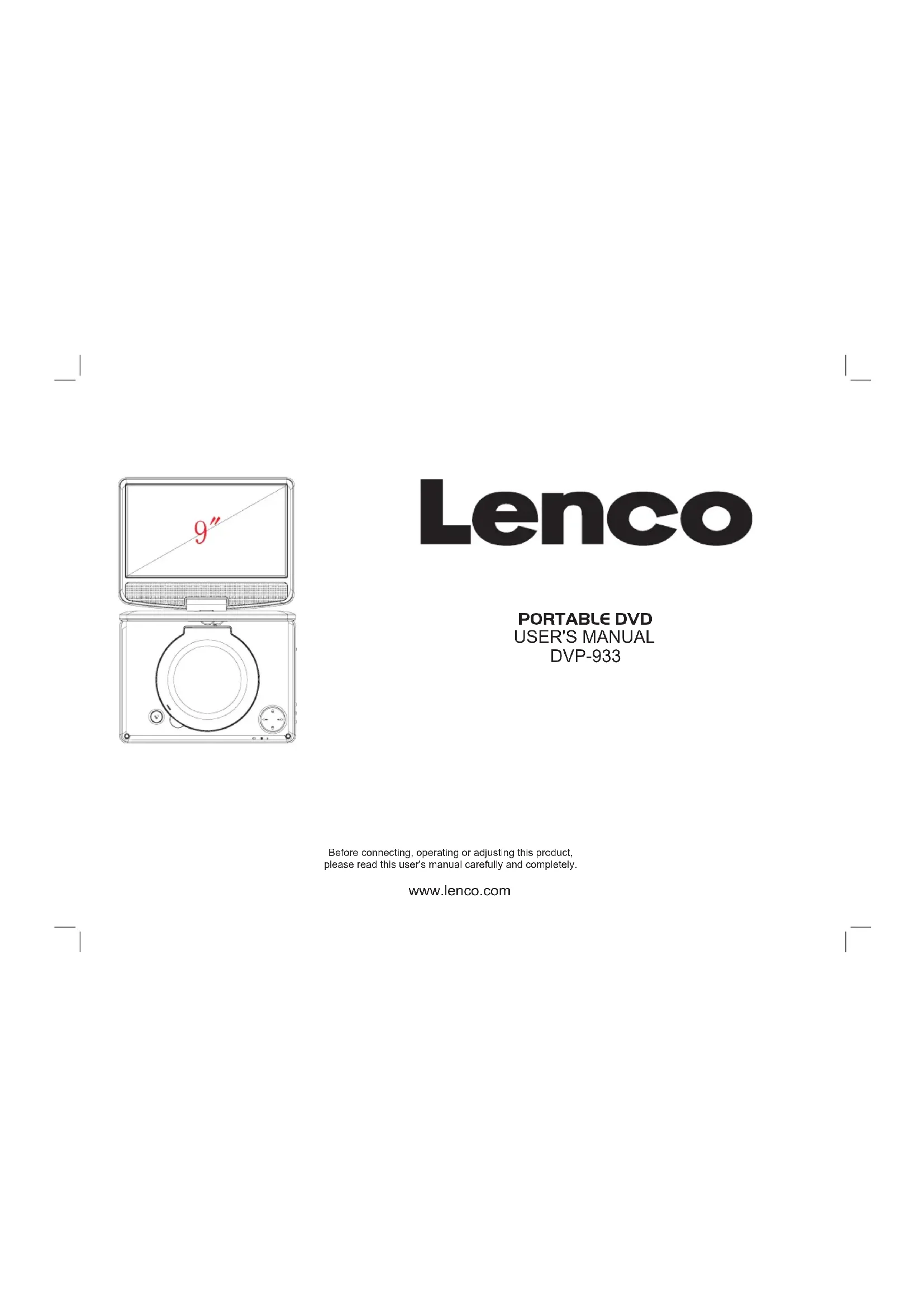


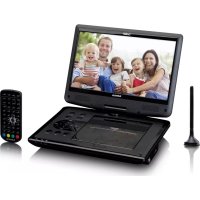
| Product type | Portable DVD player |
| Brand | Lenco |
| Model | DVP933 |
| Power supply | AC 100-240V, 50/60 Hz (power adapter) and rechargeable lithium battery 7.4V |
| Power consumption | < 10 W |
| Video system | NTSC / PAL |
| Video output | 1 Vp-p (75 Ω) |
| Audio output | 1.2 Vrms (1 kHz, 0 dB) |
| Supported formats | DVD, VCD, CD, MP3 |
| Main functions | Play, pause, stop, fast forward/rewind (5 speeds), repeat (chapter/title/disc/track/folder), zoom (2x-4x), program, subtitles, angle, audio selection, menu, auto standby |
| Display | Built-in LCD type |
| Ports | AV output, headphone jack, USB port |
| Remote control | Yes, with full functions |
| Battery | Rechargeable lithium, standard charging time 3-4 hours |
| Power adapter | Included (model SEF0900100E1BA / PEF0900100VE) |
| Safety | Semiconductor laser 650 nm, class 1; do not open the case; avoid exposure to water and heat |
| Maintenance and cleaning | Use a soft dry cloth. Do not use chemical products. Disconnect before cleaning. |
| Spare parts and repairability | Power adapter and battery available. Repairs by an authorized center only, otherwise warranty void. |
| Warranty | According to European legislation. Contact the retailer. |
| General information | Serial number on the back of the unit. Weight and dimensions not provided. |
Frequently Asked Questions - DVP933 LENCO
User questions about DVP933 LENCO
0 question about this device. Answer the ones you know or ask your own.
Ask a new question about this device
Download the instructions for your Portable DVD Player in PDF format for free! Find your manual DVP933 - LENCO and take your electronic device back in hand. On this page are published all the documents necessary for the use of your device. DVP933 by LENCO.
USER MANUAL DVP933 LENCO
Before connecting, operating or adjusting this product, please read this user's manual carefully and completely.
www.lenco.com
Important Safety Instructions
Warning: To reduce the risk of electric shock, do not remove the cover or back. There are no user-serviceable parts inside. Refer servicing to qualified personnel.
Warning: To prevent fire or electric shock hazard, do not expose the unit to rain or moisture.
Do not expose the Adaptor and portable DVD to water (dripping or splashing) and no objects filled with liquids, such as vases, should be placed on the unit.
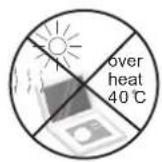
Keep the portable DVD away from direct sunlight and heat source such as radiators or stoves.
Do not block the ventilation openings. Slots and openings on the unit are provided for ventilation. The openings should never be blocked by placing your portable DVD on a cushion, sofa or other similar surface.
Do not place the portable DVD on unstable cart, stand, tripod, bracket or table. The unit may fall, resulting in possible damage or injury.
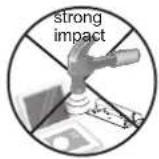
Never place heavy or sharp objects on the LCD panel or frame.
Only use the AC adapter included with portable DVD. Using any other adapter will void your warranty.
The plug of AC adaptor is used as the disconnect device, the disconnect device shall remain readily operable.
Unplug the power from the outlet when the unit is not in use.
Attention should be drawn to the environmental aspects of battery disposal.
CAUTION: Danger of explosion if battery is incorrectly replaced. Replace only with the same or equivalent type.
WARNING: The battery (battery or batteries or battery pack) shall not be exposed to excessive heat such as sunshine, fire or the like.

WARNING: Prolonged exposure to loud sounds from personal music players may lead to temporary or permanent hearing loss.
WARNING: Only use attachments/accessories specified provided by the manufacturer, the portable DVD is supplied by AC adapter, the AC adapter is used as disconnect device, the disconnect device shall remain readily operable.
Caution: Danger of explosion if battery is incorrectly replaced, replaced only with the same or equivalent type (Lithium battery)
Power supply adaptor(For EU only) Manufacturer: Shenzhen Mass Power Electronics Limited Model number: SEF0900100E1BA /PEF0900100VE Use only the power supply listed in the user instructions
This marking indicates that this product should not be disposed with other household wastes throughout the EU. To prevent possible harm to the environment or human health from uncontrolled waste disposal, recycle it responsibly to promote the sustainable reuse of material resources. To return your used device, please use the return and collection systems or contact the retailer where the product was purchased. They can take this product for environmental safe recycling.

Safety Precautions
WARNING
RISK OF ELECTRIC SHOCK DO NOT OPEN
Warning: This digital video disc player employs a laser system. Use of controls, adjustments, or the performance of procedures other than those specified herein may result in hazardous radiation Exposure.
Warning: To prevent direct exposure to laser beam, do not open the enclosure. Visible laser radiation when open.
Warning: Never stare directly into the laser beam.
Caution: Do not install this product in a confined space such as a book case or similar unit.
Warning: when the unit using by child, parents must make sure to let the child understand all contents in Instruction book how battery using to guarantee using battery correctly all the time.
Warning: when find battery overheat, swell or dour, please stop using battery and contact service centre for getting replacement.
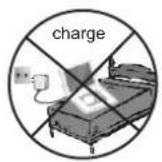
Warning: do not charging battery on the place of insufficient ventilation such as: mattress, sofa, cushion, soft mat.....
Warning: we will not take any responsibility if user incorrectly use battery, not following our warning instruction label on the battery case.
Warning: more than 250mm USB extension cord is prohibited to use for USB port
Notes on Copyrights:
It is forbidden by law to copy, broadcast, show,broadcast via cable, play in public, or rent copyrighted material without permission.
This product features the copy protection function developed by Macrovision.Copy protection signals are recorded on some discs. When recording and playing the pictures of these discs picture noise will appear.This product incorporates copyright protection technology that is protected by method claims of certain U.S. Patents and other intellectual property rights owned by Macrovision Corporation and other rights owners.Use of this copyright protection technology must be authorized by Macrovision Corporation, and is intended for home and other limited viewing uses only unless otherwise authorized by macrovision Corporation. Reverse engineering or disassembly is prohibited.
SERIAL NUMBER:
You can find the serial number on the back of the unit. This number is unique to this unit and not available to others. You should record requested information here and retain this guide as a permanent record of your purchase.
Model No.
Serial No.
Date of Purchase

Identification of Controls Main Unit
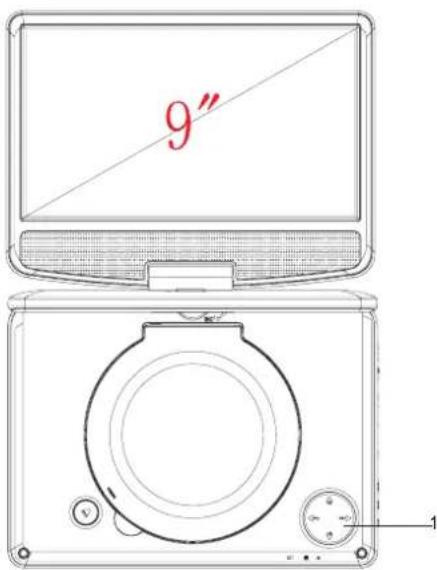
- /▲ Up / Prev
▼/ ▶▶ Down / Next
◄ VOL - Left / VOL-
▶/ VOL+ Right / VOL+
Remarks:
Short press ▲/▼/◄/► is Up/Down/Left/Right;
Long press ▲ /▼ is Prev/Next
Long press◄/► is VOL-/VOL+
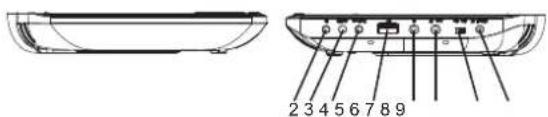
- PLAY/PAUSE;RETURN
Long press RETURN/After navigation, short press as ENTER.
-
SETUP
-
SOURCE
-
USB
-
Earphone Socket
-
AV OUT
-
ON/OFF
-
DC IN 9-12V
Identification of Controls
Remote control unit
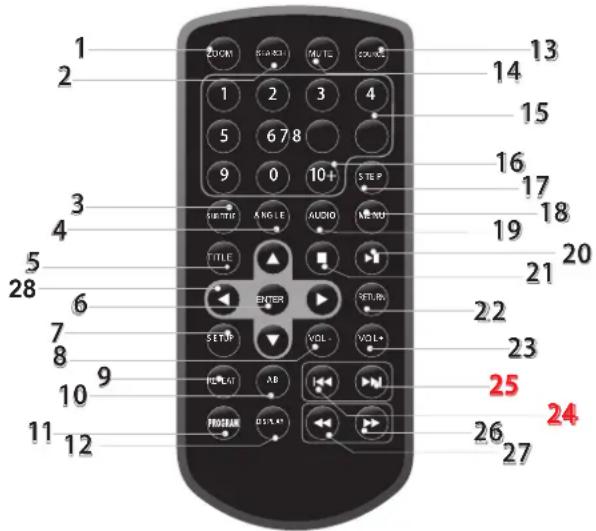
1. ZOOM
Each press of the ZOOM button changes the TV screen in the following sequence:2X size 3X size 4X size 1/2 1/3 1/4.
2. SEARCH
Goto time point, title or chapter you want in DVD Mode.
3. SUBTITLE
Press SUBTITLE repeatedly during playback to hear a different subtitle languages.
4. ANGLE
Press ANGLE will change the view angle, on DVDs that support this feature.
5. TITLE
Return to DVD title menu.
6. ENTER
Confirms menu selection.
7. SETUP
Accesses or removes setup menu.
8. VOL -
Adjust VOLUME.
9. REPEAT
Press REPEAT during playback to select a desired repeat mode.
DVD: you can play a chapter/title/all on a disc.
VCDC D: you can play a track/all on a disc.
MP 3 WMA: you can select Repeat one/Repeat folder/ALL play mode on a disc.
10.A B
To repeat a segment: press AB once to set the starting point for repeat segment, press it again to set an end point, and the player will repeat the segment from the start to the end point.
11.PROGRAM
DVD VCD CD MP3: The program function enables you to store your favourite tracks from the disc. Press PROGRAM button, then PROGRAM MENU will appear on screen, now you can use the number or direction keys input the titles, chapters(DVD/VCD) or select tracks number (CD MP3) and select PLAY option to resume normal playback, press PROGRAM and select CLEAR option on the program menu.
JPEG: You can press PROGRAM repeatedly to select the slide show mode, the are 16 types slide show.
12. DISPLAY
To display the playtime and status information.
13. SOURCE
DVD/USB.
Identification of Controls
Remote control unit
14. MUTE
Disable Audio output.
15. 0-9 NUMBER BUTTON
Selects numbered items in a menu.
16.10+ BUTTON
In order to select a track 10 or greater, first press 10+, For example; select track 12, first press 10+, and then press number 2 button.
17.STEP
Press STEP once to pause playback, Form this station, press STEP to advance one video frame.
18. MENU
Accesses menu on a DVD disc, PBC on/off switch for VCD.
19. AUDIO
DVD: Press AUDIO repeatedly during playback to hear a different audio language or audio track, if available.
VC D: Press AUDIO repeatedly during playback to hear a different audio channel (Stereo, Left, or Right).
20. PLAY/PAUSE
Press PLAY/PAUSE once to pause playback, pressing PLAY/PAUSE second time will resume the playback.
21. STOP
When this button is pressed once, the unit records the stopped point, from where playback will resume if ENTER is pressed after wards. But if STOP button is pressed again instead of ENTER button, there will be no resume function.
22. RETURN
Return to upper page.
23. VOL +
Adjust VOLUME.
24. Reverse Skip
Go to previous chapter/ track to the beginn ing.
25. Forward Skip
Go to next chapter/ track.
26. ▶▶ BUTTON
Press ▶▶BUTTON allow skipping ahead at 5-level speed(X2->X4->X8->X20), press ENTER button return to normal playback.
27. ◀BUTTON
Press ◀ BUTTON allow skipping back at 5-level speed(X2->X4->X8->X20), press ENTER button return to normal playback.
28. ▶▼ NAVIGATION buttons
Press to navigate through the options within the menus.
SETUP Menu Setting
System Setup Page
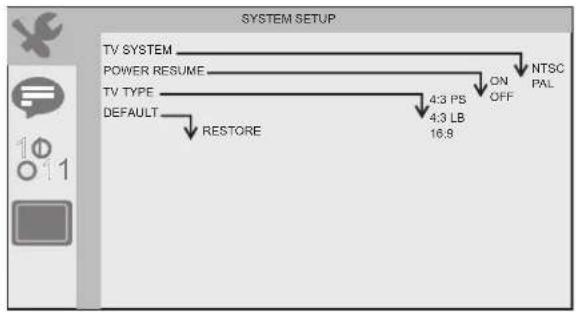
Press SETUP button to get the setup menu. Use direction buttons ▲▼◀▶ to select the preferred item. After finishing settings, press SETUP again to normal display.
System Setup
flowchart
graph TD
    A["TV SYSTEM"] --> B["POWER RESUME"]
    B --> C["TV TYPE"]
    C --> D["DEFAULT"]
    D --> E["RESTORE"]
    C --> F["4:3 PS 4:3 LB 16:9"]
    F --> G["ON OFF"]
    G --> H["NTSC PAL"]
TV System
Selecting the color system that corresponds to your TV when AV output. This DVD Player is compatible with both NTSC and PAL. PAL - Select this if the connected TV is PAL system. It will change the video signal of a NTSC disc and output in PAL format. NTSC - Select this if the connected TV is NTSC system. It will change the video signal of a PAL disc and output in NTSC format.
Power Resume
This function is used to turn the last memory on or off.
TV Type
Selects the aspect ratio of the playback picture.
4:3 PS: if you have a normal TV and want both sides of the picture to be trimmed or formatted to fit your TV screen.
4:3 LB: if you have a normal TV. In this case, a wide picture with black bands on the upper and lower portions of the TV screen will be displayed.
16:9: wide screen display.
Default
Restore the factory setting of setup menu.
Language Setup Page
Language setup
flowchart
graph TD
    A["OSD LANGUAGE"] --> B["AUDIO LANG"]
    B --> C["SUBTITLE LANG"]
    C --> D["MENU LANGUAGE"]
    D --> E["ENGLISH GERMAN SPANISH FRANCH PORTUGUESE ITALIAN"]
    E --> F["ENGLISH GERMAN SPANISH FRANCH PORTUGUESE ITALIAN OFF"]
    F --> G["ENGLISH GERMAN SPANISH FRANCH PORTUGUESE ITALIAN"]
    G --> H["ENGLISH GERMAN SPANISH FRANCH PORTUGUESE ITALIAN"]
    H --> I["ENGLISH GERMAN SPANISH FRANCH PORTUGUESE ITALIAN"]
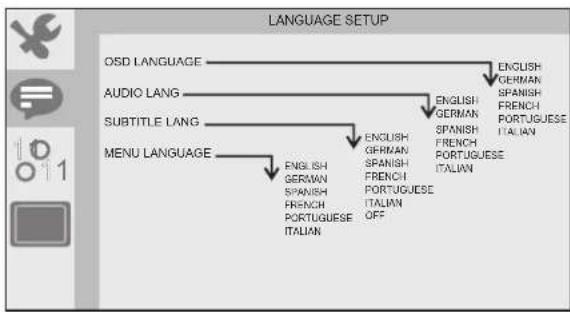
You can select OSD language, and select audio/subtitle/menu language of DVD discs if available. Also you can select font type for mpeg4 subtitle.
SETUP Menu Setting
Audio Setup Page
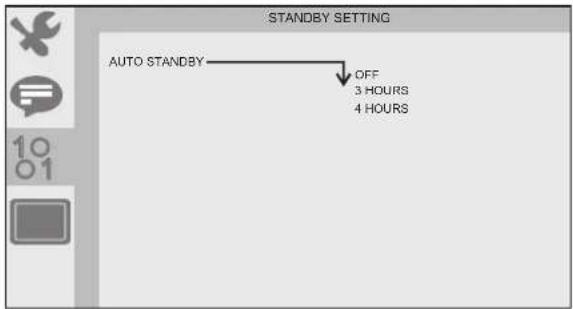
The function is use to select standby setting: OFF, 3 HOURS,
4 HOURS
OFF: No standby
3 HOURS: No remote control and panelkey operation within three hours into standby
4 HOURS: No remote control and panelkey operation within four hours into standby
At Auto standby, need to push power on/off button to OFF and ON to activate power on again.
Video Setup Page
flowchart
graph TD
    A["BRIGHTNESS"] --> B["6"]
    C["CONTRAST"] --> D["5"]
    E["HUE"] --> F["4"]
    G["SATURATION"] --> H["2"]
    I["SHARPNESS"] --> J["0"]
    K["12"] --> L["10"]
    M["+6"] --> N["+4"]
    O["+2"] --> P["+2"]
    Q["0"] --> R["-2"]
    S["-4"] --> T["-6"]
    U["12"] --> V["10"]
    W["8"] --> X["8"]
    Y["6"] --> Z["6"]
    AA["4"] --> AB["4"]
    AC["2"] --> AD["2"]
    AE["0"] --> AF["0"]
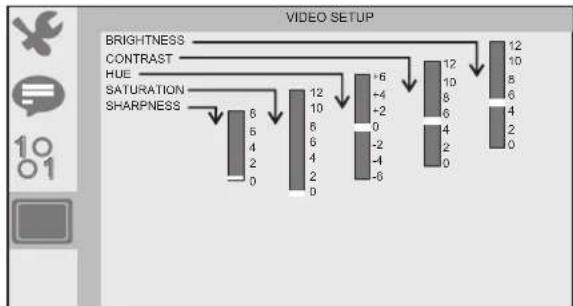
You can change the video setting: brightness, contrast, hue, saturation.
Parameters and specifications Electronical parameters
| Item | Standard requirement | |
| Power requirements | : AC 100-240 V, 50/60 Hz | |
| Power consumption | :<10W | |
| Operating humidity | : 5 % to 90 % | |
| Output | VIDEO OUT | :1 Vp-p (75Ω) |
| AUDIO OUT | :1.2 Vrms (1 KHz, 0 dB) | |
System
| Laser | :Semiconductor laser, wavelength 650 nm |
| Signal system | :NTSC / PAL |
| Frequency response | :20Hz to 20 kHz(1dB) |
| Signal-to-noise ratio | :More than 80 dB (ANALOG OUT connectors only) |
| Dynamic range | :More than 85 dB (DVD/CD) |
Note: Design and specifications are subject to change prior notice.
Battery Parameters
Battery Specifications:
Output: 7.4V
Charge / Discharge Time:
Standard charge time: 3h \~ 4h
Storage and work circumstances:
| 1. Storage circumstances | Temperature | Humidity |
| 6 months | -20°C ~ +45°C | 65±20% |
| 1 week | -20°C ~ +65°C | 65±20% |
| 2.Work circumstances | Temperature | Humidity |
| Standard charge | 0°C ~ +45°C | 65±20% |
| Standard discharge | -20°C ~ +65°C | 65±20% |
Battery Charging
Connect the DVD player to the supplied power adaptor, the LED indicator will be RED when the battery is charging and will turn into green when the battery is full charged.
Service and support
For information: www.lenco.com
Lenco offers service and warranty in accordance to European law, which means that in case of repairs (both during and after the warranty period) you should contact your local dealer.
Important note: It is not possible to send products that need repairs to Lenco directly.
Important note: If this unit is opened or accessed by a non-official service center in any way, the warranty expires.
This device is not suitable for professional use. In case of professional use, all warranty obligations of the manufacturer will be voided.
ENGLISH

WARNING: Prolonged exposure to loud sounds from personal music players may lead to temporary or permanent hearing loss.

Products with the CE marking comply with the EMC Directive (2004/108/EC) and the Low Voltage Directive (2006/95/EC) issued by the Commission of the European Community. The declaration of conformity may be consulted at https://lencosupport.zendesk.com/forums/22413161-CE-Documents

This symbol indicates that the relevant electrical product or battery should not be disposed of as general household waste in Europe. To ensure the correct waste treatment of the product and battery, please dispose them in accordance to any applicable local laws of requirement for disposal of electrical equipment or batteries. In so doing, you will help to conserve natural resources and improve standards of environmental protection in treatment and disposal of electrical waste (Waste Electrical and Electronic Equipment Directive).®All rights reserved
Lenco
Specifications accu;
Uitvoer: 7.4V
▶/ VOL+ VOL+ Derecha/VOL+
Observaciones:

- Important Safety Instructions
- Safety Precautions
- WARNING
- Notes on Copyrights:
- SERIAL NUMBER:
- Identification of Controls Main Unit
- Identification of Controls
- ZOOM
- SEARCH
- SUBTITLE
- ANGLE
- TITLE
- ENTER
- SETUP
- VOL -
- REPEAT
- 10.A B
- 11.PROGRAM
- DISPLAY
- SOURCE
- Remote control unit
- MUTE
- 0-9 NUMBER BUTTON
- 16.10+ BUTTON
- 17.STEP
- MENU
- AUDIO
- PLAY/PAUSE
- STOP
- RETURN
- VOL +
- Reverse Skip
- Forward Skip
- ▶▶ BUTTON
- ◀BUTTON
- ▶▼ NAVIGATION buttons
- SETUP Menu Setting
- System Setup Page
- TV System
- Power Resume
- TV Type
- Default
- Language Setup Page
- Parameters and specifications Electronical parameters
- System
- Battery Parameters
- Service and support
- ENGLISH
- Lenco
Brand : LENCO
Model : DVP933
Category : Portable DVD Player