ManualGo.com
GW525 - Mobile Phone LG - Free user manual and instructions
Find the device manual for free GW525 LG in PDF.



Download the instructions for your Mobile Phone in PDF format for free! Find your manual GW525 - LG and take your electronic device back in hand. On this page are published all the documents necessary for the use of your device. GW525 by LG.
USER MANUAL GW525 LG
selecteert u Naar camera.
Applicable Standards Details R&TTE Directive 1999/5/EC EN 301 489-01 V1.6.1, EN 301 489-07 V1.3.1 EN 301 489-17 V1.2.1, EN 301 489-19 V1.2.1, EN 301 489-24 V1.3.1 EN 301 511 V9.0.2 EN 301 908-1 V3.2.1 EN 301 908-2 V3.2.1, EN 300 328 V1.7.1 EN 50360:2001/EN62209-1:2006 EN 60950-1 : 2001 Supplementary Information The conformity to above standards is veri ed by the following Noti ed Body(BABT) BABT, Balfour House, Church eld Road, Walton-on-Thames, Surrey, KT12 2TD, United Kingdom Noti ed Body Identi cation Number : 0168 Declaration I hereby declare under our sole responsibility that the product mentioned above to which this declaration relates complies with the above mentioned standards and Directives European Standard Center LG Electronics Logistics and Services B.V. Veluwezoom 15, 1327 AE Almere, The Netherlands Tel : +31 - 36- 547 – 8940, Fax : +31 – 36 – 547 - 8794 e-mail : jacob @ lge.com Name Issued Date Seung Hyoun, Ji / Director
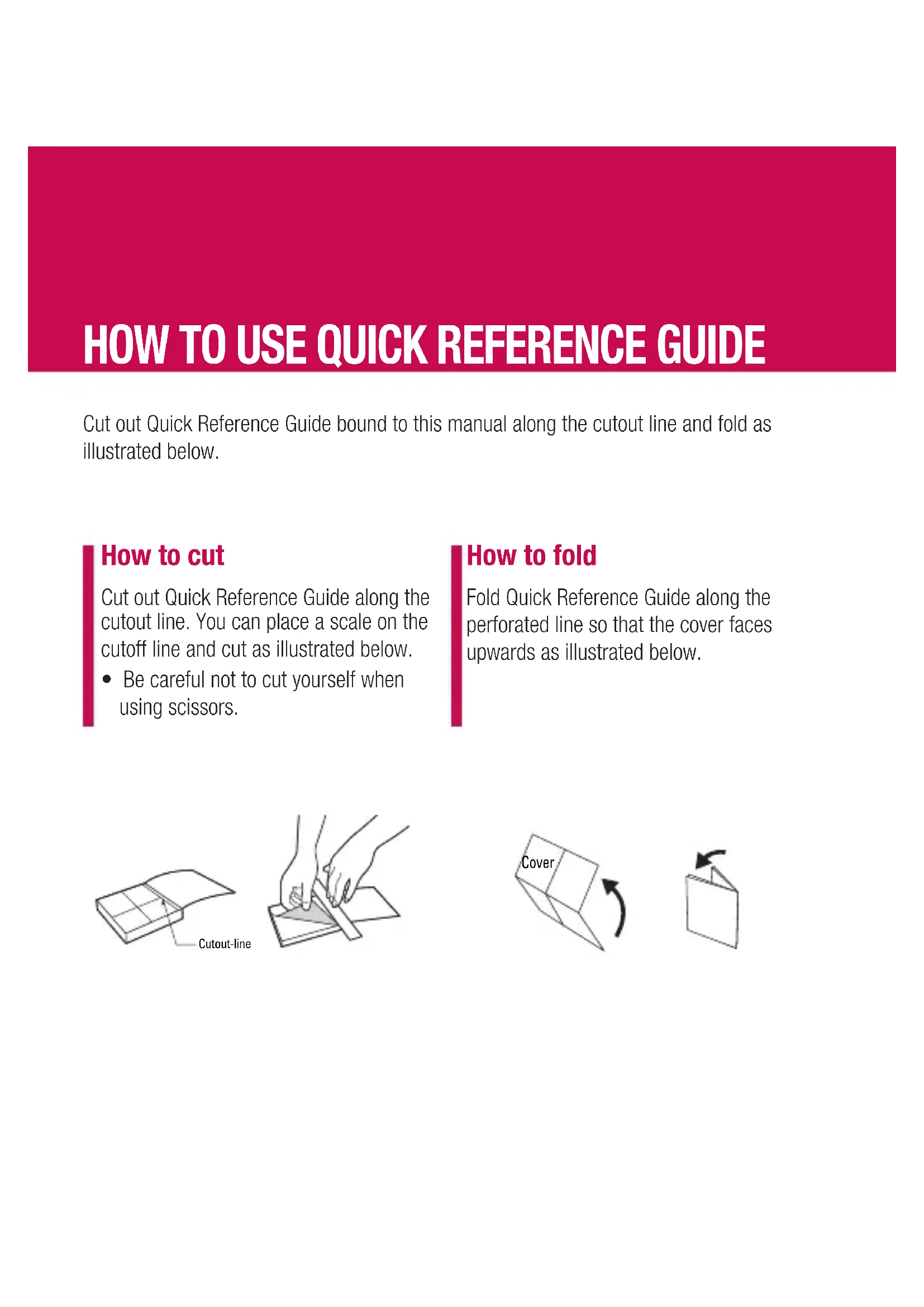
- Be careful not to cut yourself when using scissors. Cutout-line How to fold Fold Quick Reference Guide along the perforated line so that the cover faces upwards as illustrated below. CoverQUICK REFERENCE GUIDE
GT505 For more details, please refer to the User Guide. Parts of the phone
4. Micro SD memory card
Your standby screen The touch reactive LCD gives an interactive and ultra convenient experience. You’ll be more than pleased! From the standby screen, you can access menu options, make a quick call and as well as many other things. The main menu
1. Touch in the standby screen to open a Top menu.
2. You can access further menus: Communicate,
Entertainment, Utilities and Settings.
3. Just touch the icon that you want to open.
MP3 player Your LG GT505 has a built-in MP3 player so you can play all your favourite music. ► All tracks: Contains all of the songs you have on your phone. ► Playlists: Contains any playlists you have created as well as On the go, Recent songs and Favourite songs. ► Artists/Albums/Genres: Browse through your music collection by artist, album or genre. ► Shuffl e tracks: Play your tracks in a random order. Playing a song
1. Select All songs and then chose the song you want
to skip to the next song.
to skip to the previous song.5. Select Minimize on the option menu to hide the MP3 player screen so that you can continue using your phone as normal while music is playing.
to stop the music and return to the MP3 player menu. Camera Using the camera module built in your phone, you can take pictures or record videos. Additionally, you can send photos to other people and select photos as wallpaper. Tip: When using the camera, power consumption increases. If icon appears on the wallpaper, indicating low battery, recharge the battery before use.
1. On the standby screen hold the camera key down on
the right side of the handset. The camera’s viewfi nder will appear on screen.
2. Holding the phone horizontally, point the lens towards
the subject of the photo.
3. Press the camera key on the right side of the handset
all of the way down to take a photo. Video camera
1. On the standby screen hold the camera key down on
the right side of the handset. The camera’s viewfi nder will appear on screen.
2. On the Camera preview mode touch the video camera
icon . The video camera’s viewfi nder will appear on screen.
3. Point the camera lens towards the subject of the video.
4. Press the camera key on the right side of the handset
5. REC will appear in the bottom left corner of the
viewfi nder and a timer will show the length of your video.
6. To pause the video touch
and resume by selecting
on screen or press the capture button a second time to stop recording. FM radio You can search radio stations and enjoy listening to the radio. Tip: To improve the radio reception, extend the headset cord which functions as the FM radio antenna.
1. Choose FM radio then select the channel number of the
station you would like to listen to.
2. After selecting radio channels, you can listen to other
channel by selecting ◄►.
3. You can access the following option menus by touching
Options. ► Auto scan: If you choose Auto scan then select Yes, each time a station is found, your GT505 will ask if you want to save it. Select Yes if you want to store the channel and No if you don’t. Any stations you choose to save will automatically be allocated to a channel number in your phone. ► Reset: If you choose Reset then select Yes, current channel will be reset. ► Listen via speaker: Select this to listen to the radio through the built-in speaker. To turn off the speaker, select Listen via headset. Voice recorder Use your voice recorder to record voice memos or other sounds. Recording your voice memo
to pause the recording.
4. Choose to end the recording.
5. Select ► to listen to the recording.
Note: You can listen to all of the voice recordings you have saved by selecting Options and Go to my sounds.