
Phone Station Plus - Speaker ION - Free user manual and instructions
Find the device manual for free Phone Station Plus ION in PDF.



| Product Type | Speaker with telephone functions |
| Brand | ION |
| Model | Phone Station Plus |
| Power Supply | 9V DC, 1.5A power adapter (included) |
| Wireless Connectivity | Bluetooth for audio streaming and hands-free calls |
| Auxiliary Input | 3.5mm (1/8 in) jack for playback from MP3 player or other audio source |
| USB Port | For charging a phone (USB cable not included) |
| Telephone Functions | Dialing via numeric keypad, answer call, end call, built-in speakerphone |
| Display | Digital time display, AM/PM indicators, Bluetooth, volume, and source |
| Controls | Volume, play/pause, next/previous track, stop, clear, unpair, talk, end, dimmer/time set |
| Time Setting | Via the Dimmer/Time Set button, adjust hours and minutes |
| Dimensions (approx.) | Approximately 25 cm x 15 cm x 10 cm (estimated) |
| Weight (approx.) | Approximately 1.2 kg (estimated) |
| Care and Cleaning | Wipe with a soft, dry cloth. Do not use abrasive products. |
| Safety | Read the safety instructions booklet before use. Do not expose to moisture. |
| Spare Parts and Repairability | Contact ION customer service for any parts or repairs (not specified). |
Frequently Asked Questions - Phone Station Plus ION
User questions about Phone Station Plus ION
0 question about this device. Answer the ones you know or ask your own.
Ask a new question about this device
Download the instructions for your Speaker in PDF format for free! Find your manual Phone Station Plus - ION and take your electronic device back in hand. On this page are published all the documents necessary for the use of your device. Phone Station Plus by ION.
USER MANUAL Phone Station Plus ION
Make sure that the items listed below are included in the box:
- PHONE STATION PLUS
Power Adapter
Quickstart Guide - Safety Instructions & Warranty Information Booklet
READ SAFETY INSTRUCTION BOOKLET BEFORE USING THE PRODUCT
FRONT PANEL
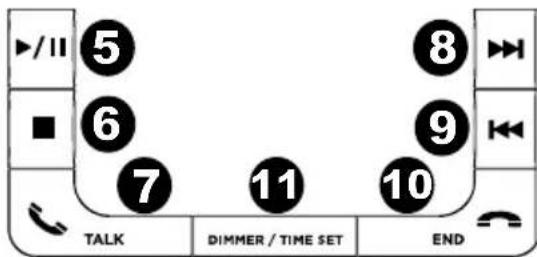
- Clear - Press this button to erase commands that have been entered using the numeric keys.
- Numeric keys - Press these keys to dial a phone number.
- Source/Power - Press this button repeatedly to switch the audio source from Aux to Bluetooth®. Hold this button down to power PHONE STATION PLUS on/off.
- Unpair - Press this button to unpair your Bluetooth device from PHONE STATION PLUS (i.e., if you want to hear a call directly through your phone).
- Play/Pause - Press this button once to start music playback from a paired Bluetooth device. Press this button again to pause music playback from a paired Bluetooth device.
- Stop - Press this button to stop music playback from a paired Bluetooth device, which will prevent starting the song again from the last position. Note: On iOS devices, the Stop button functions as a Pause button.
- Talk - Press this button to dial a phone number or answer an incoming call.
- Next Track - Scroll up through audio tracks from a paired Bluetooth device.
- Last Track - Scroll down through audio tracks from a paired Bluetooth device.
- End - Press this button to end a call.
- Dimmer/Time Set - Press this button repeatedly to scroll through the dimmer modes to lower the display brightness. Hold this button down to set the time. (See the Setting the Time section for more information)
- Volume - Adjust this control to increase/decrease the volume from the speaker or music source.
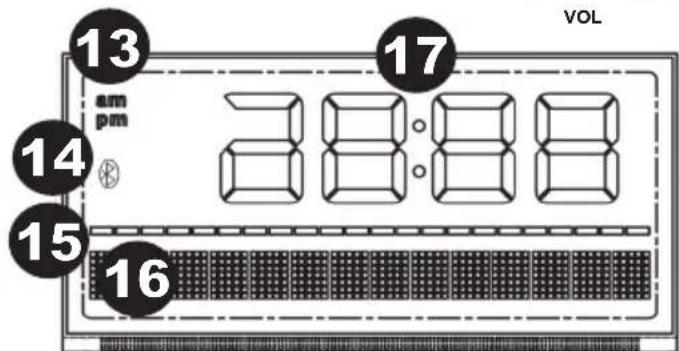
- AM/PM Indicator
- Bluetooth Pairing Indicator
- Volume Bar Indicator
- Numeric Indicator
- Time Indicator

CLEAR





The Bluetooth word mark and logos are registered trademarks owned by Bluetooth SIG, Inc. and any use of such marks by ION Audio is under license. Other trademarks and trade names are those of their respective owners.
REAR PANEL
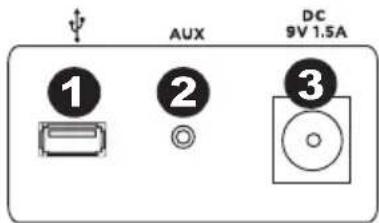
- USB port - Connect your phone's USB cable here to charge it. You can route your charging cable through the bottom pass-through port for added convenience.
- Line In jack - Connect your phone's audio output to this input jack using an 1/8" audio cable.
- Power jack - Use the included power adapter (9V DC, 1.5A, center pin-positive) to connect PHONE STATION PLUS to a power source.
BLUETOOTH PAIRING AND CONNECTION
Bluetooth pairing occurs when two Bluetooth devices agree to communicate with each other, enabling them to link and exchange data.
Pairing with iPhone®:
Note: OS 4.0 or higher is required.
- Power on PHONE STATION PLUS.
- On your iPhone, go to Settings > General > Bluetooth. Slide the Bluetooth slider to "On." PHONE STATION PLUS will attempt to pair with nearby Bluetooth devices.
- On the iPhone's screen, "ION PHONE STATION PLUS" will appear as a Bluetooth device. Tap it to select it.
- If your iPhone prompts for a passcode or PIN, enter the number zero ("0") four times.
- Adjust the Volume dial on PHONE STATION PLUS.
Pairing with other devices:
- Power on PHONE STATION PLUS.
- Go to your phone's Bluetooth settings menu to turn on Bluetooth.
- PHONE STATION PLUS will then attempt to pair with nearby Bluetooth devices.
- Enable your phone to scan for Bluetooth devices.
- The PHONE STATION PLUS should appear as "ION PHONE STATION PLUS" allowing you to select it to pair and connect with PHONE STATION PLUS.
- If you are prompted for a passcode or PIN when pairing with PHONE STATION PLUS, enter the number zero ("0") four times.
- If your phone fails to pair correctly, simply power PHONE STATION PLUS ON/OFF and attempt to pair again.
- Adjust the Volume dial on the PHONE STATION PLUS.
BLUETOOTH UNPAIRING
To unpair your Bluetooth device (i.e., if you want to hear a call directly through your phone), press the Unpair button on PHONE STATION PLUS once. To prevent PHONE STATION PLUS from pairing to another Bluetooth device in the area, press the Unpair button one more time. Otherwise, PHONE STATION PLUS will search for other Bluetooth devices.
To pair your Bluetooth device with PHONE STATION PLUS again, repeat the steps in the BLUETOOTH PAIRING AND CONNECTION INSTRUCTIONS.
MAKING CALLS WITH A PAIRED BLUETOOTH PHONE
Before you answer/make a call with PHONE STATION PLUS, you need to pair and link your Bluetooth-enabled phone to PHONE STATION PLUS. Please refer to the BLUETOOTH PAIRING AND CONNECTION INSTRUCTIONS.
Making a Call:
- Enter a phone number using the numeric keypad. Press the Clear button to cancel the last digit that you entered or press and hold the Clear button to erase all digits.
- Press the Talk button to dial the phone number.
- Adjust the speaker volume using the volume dial.
- To end a call, press the End button.
Answering a Call:
- To answer a call, press the Talk Button. Now you can use the product as a speaker phone.
- Speak into the mic (located to the right of the keypad) and adjust the call volume using the Volume dial.
- To end the call, press the End button.
LISTENING TO MUSIC FROM A BLUETOOTH DEVICE
You will need to pair your Bluetooth device with PHONE STATION PLUS before you can play/Stream Bluetooth music.
Playing Bluetooth Music:
- Turn on PHONE STATION PLUS and press the Source/Power button until "bt" (Bluetooth) appears in the lower part of the display.
- Press the Play button on PHONE STATION PLUS to play music from your Bluetooth-enabled device. The display will show "Bluetooth". Depending on the Bluetooth device you are using, you may need to manually open a media player on your device.
- Adjust the Volume dial on PHONE STATION PLUS. You may need to also adjust your device's volume. NOTE: The Source setting on PHONE STATION PLUS must stay in Bluetooth mode in order to play music from a Bluetooth-enabled device.
You can use an MP3 player or other portable audio device through the product via the Line In jack.
- Connect a standard 1/8" audio cable from your music device's headphone or line out jack to the Line In jack on PHONE STATION PLUS.
- Turn on PHONE STATION PLUS and press the Source/Power button until "Au" (Aux) appears in the lower part of display.
- Turn on your music device and play your music source.
- Use the Volume dial to adjust the music volume. You may need to also adjust the volume from your music device.
NOTE: The Source setting on PHONE STATION PLUS must stay in Aux mode in order to play music from a device connected to the Line In jack.
SETTING THE TIME
- Press and hold down the Dimmer/Time Set button. The Hour digit will flash on the display. Use the NEXT TRACK/LAST TRACK buttons to set the hour. Make sure the AM/PM indicator is correctly set.
- Press the Dimmer/Time Set button again. The Minutes digit will flash on the display. Use the NEXT TRACK/LAST TRACK button to set the minutes.
- Press the Dimmer/Time Set button once more to confirm the setting.
TECHNICAL SPECIFICATIONS
POWER ADAPTER: 9V DC, 1.5A, center pin-positive
BLUETOOTH PROTOCOL: A2DP
DIMENSIONS (H x W x D): 6.75" x 10.1" x 5.1"; (171.45 mm x 256.54 mm x 129.54 mm)
WEIGHT: 1.9 lbs (0.86 kg)
GUIA DE INICIO RAPIDO (ESPANOL)
CONTENIDO DE LA CAJA
- READ SAFETY INSTRUCTION BOOKLET BEFORE USING THE PRODUCT
- FRONT PANEL
- REAR PANEL
- BLUETOOTH PAIRING AND CONNECTION
- Pairing with iPhone®:
- Pairing with other devices:
- BLUETOOTH UNPAIRING
- MAKING CALLS WITH A PAIRED BLUETOOTH PHONE
- Making a Call:
- Answering a Call:
- LISTENING TO MUSIC FROM A BLUETOOTH DEVICE
- Playing Bluetooth Music:
- SETTING THE TIME
- TECHNICAL SPECIFICATIONS
- GUIA DE INICIO RAPIDO (ESPANOL)
- CONTENIDO DE LA CAJA
Brand : ION
Model : Phone Station Plus
Category : Speaker