IX1000.5 - Car stereo KICKER - Free user manual and instructions
Find the device manual for free IX1000.5 KICKER in PDF.


| Product Type | 5-Channel Amplifier |
| Brand | KICKER |
| Model | IX1000.5 |
| RMS Power (4 channels, 4 Ω) | 65 W x 4 |
| RMS Power (4 channels, 2 Ω) | 125 W x 4 |
| RMS Power (2 channels, 4 Ω bridged) | 250 W x 2 |
| RMS Power (subwoofer, 4 Ω) | 250 W x 1 |
| RMS Power (subwoofer, 2 Ω) | 500 W x 1 |
| Dimensions (W x H x D) | 288 x 55 x 160 mm (approx.) |
| Frequency Response | 20 Hz - 20 kHz (±1 dB) |
| Signal-to-Noise Ratio | >90 dB (at rated power) |
| Input Sensitivity (low level) | 125 mV - 5 V |
| Input Sensitivity (high level) | 250 mV - 10 V |
| High-Pass Filter | 50-200 Hz, 12 dB/octave (selectable OFF) |
| Low-Pass Filter (subwoofer) | 50-200 Hz, 24 dB/octave |
| Subsonic Filter | 24 dB/octave, fixed at 25 Hz |
| Bass Boost | 0-18 dB at 40 Hz |
| Maximum Efficiency | >80% |
| Recommended External Fuse | 1 x 100 A |
| Recommended Wire Gauge | 4 AWG |
| Supply Voltage | 10-16 V DC |
| Power-On Modes | +12V, DC Offset, Audio |
Frequently Asked Questions - IX1000.5 KICKER
User questions about IX1000.5 KICKER
0 question about this device. Answer the ones you know or ask your own.
Ask a new question about this device
Download the instructions for your Car stereo in PDF format for free! Find your manual IX1000.5 - KICKER and take your electronic device back in hand. On this page are published all the documents necessary for the use of your device. IX1000.5 by KICKER.
USER MANUAL IX1000.5 KICKER
AMP1 & AMP2 channels driven
@ 14.4V, 40 stereo, ≤ 1% THD+N 65W x 4
@ 14.4V, 2Ω stereo, ≤ 1% THD+N 125W x 4
@ 14.4V, 4Ω mono, ≤ 1% THD+N 250W x 2
RMS Power:
SUBWOOFER channel driven
@ 14.4V, 4Ω mono, ≤ 1% THD+N 250W x 1
@ 14.4V, 2Ω mono, ≤ 1% THD+N 500W x 1
Length 11-3/8" (288mm)
Height 2-3/16" (55mm)
Width 7-7/8" (200mm)
Frequency Response ± 1dB 20Hz-20kHz
Signal-to-Noise Ratio >90dB A-weighted, re: rated power
Input Sensitivity Low Level: 125mV-5V
High Level: 250mV - 10 V
Selectable Electronic Crossover Variable HI or OFF (bypass) | 50-200Hz, 12dB/octave
Variable low-pass | 50-200Hz, 24dB/octave (SUB)
Bass Boost Variable 0-18dB @ 40Hz
Subsonic Filter 24dB/octave, fixed at 25Hz
Maximum Efficiency (2) > 80%
INSTALLATION
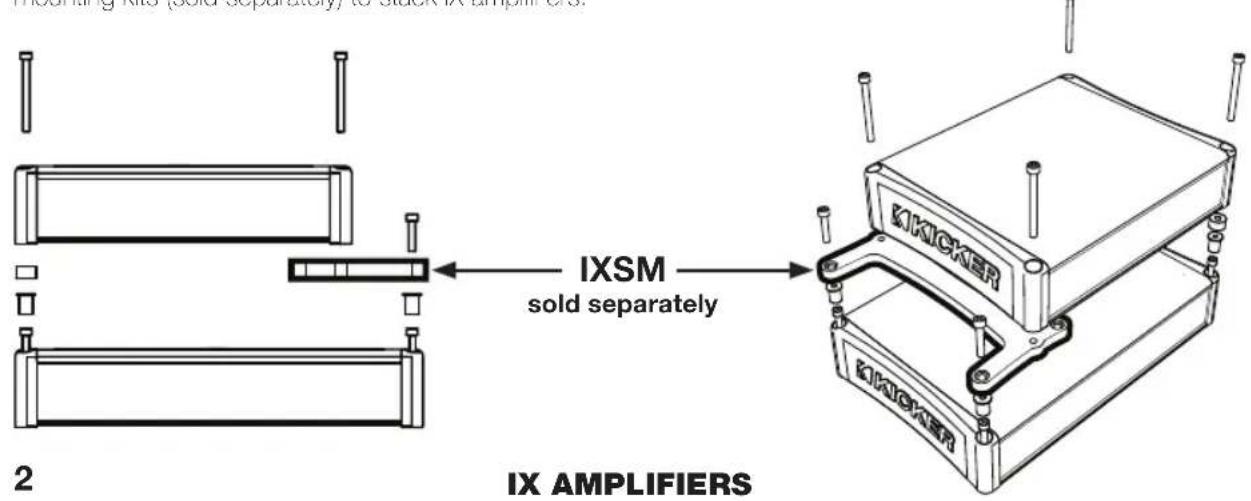
Mounting: Choose a structurally sound location to mount your KICKER amplifier. Make sure there are no items behind the area where the screws will be driven. Choose a location that allows at least 4^ (10cm) of open ventilation for the amplifier. If possible, mount the amplifier in the climate-controlled passenger compartment. Drill four holes using a 7/64" (3mm) bit and use the supplied #8 screws to mount the amplifier. Use the IXSM or IXSK mounting kits (sold separately) to stack IX amplifiers.
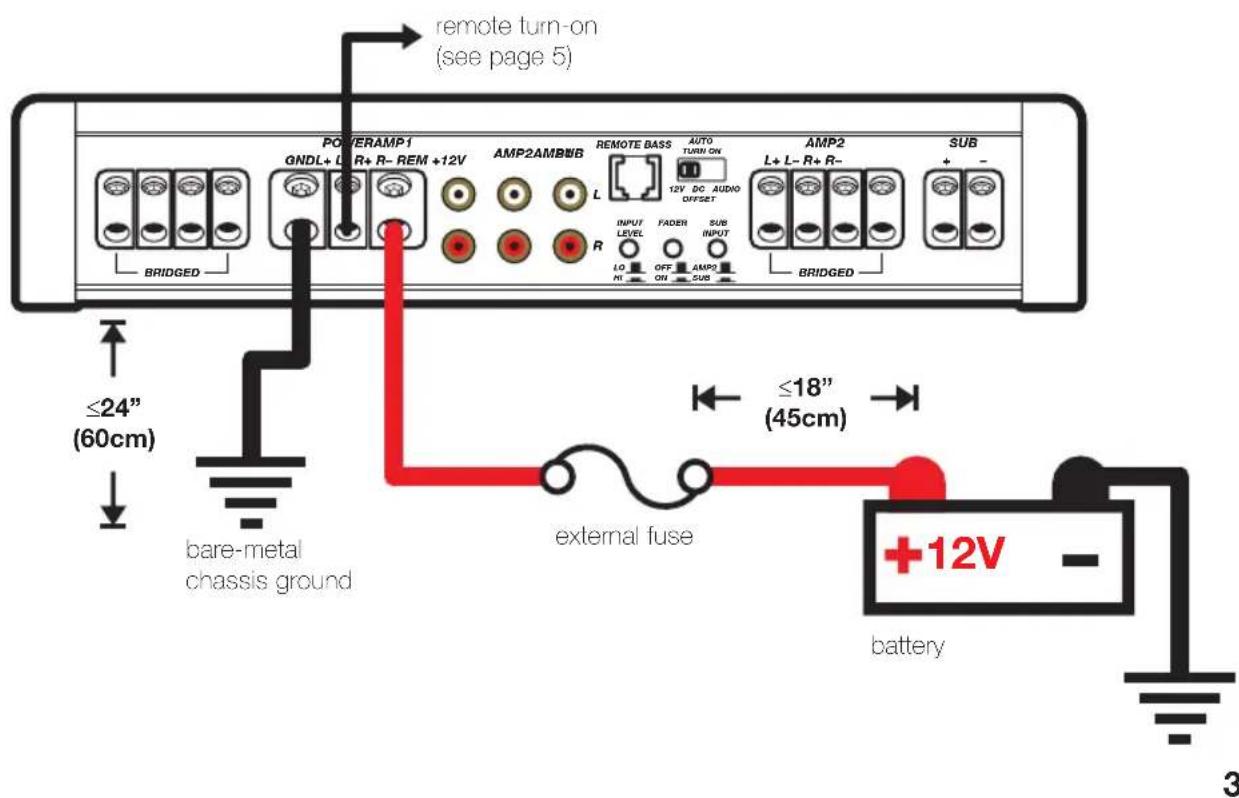
Wiring: Disconnect the vehicle's battery to avoid an electrical short. Then, connect the ground wire to the amplifier. Make the ground wire short, 24^ (60cm) or less, and connect it to a paint-and-corrosion-free, solid, metal area of the vehicle's chassis. Adding an additional ground wire of this same gauge (or larger) between the battery's negative post and the vehicle chassis is recommended.
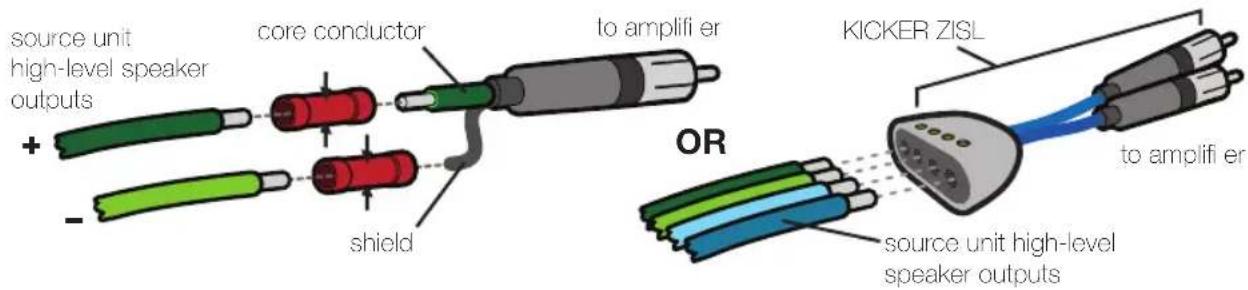
The IX amplifier has dual input sensitivity differential RCA inputs which will receive either high or low level signals from your car stereo's source unit. A high-level signal can be run from the source unit's speaker outputs to the stereo RCA input on the end panel of the amplifier using the KICKER ZISL as shown below (make sure you set the IX amplifier's input level switch to "HI"). Alternatively, the signal can be delivered to the amplifier using the low-level RCA outputs on the source unit. Set the input level switch on the end panel of the amplifier to "LO". Keep the audio signal cable away from factory wiring harnesses and other power wiring. If you need to cross this wiring, cross it at a 90 degree angle.
Install a fuse within 18" (45cm) of the battery and in-line with the power cable connected to your amplifier. Install a second fuse within 18" (45cm) of the amplifier. If you ever need to remove the amplifier from the vehicle after it has been installed, the ground wire should be the last wire disconnected from the amplifier--just the opposite as when you installed it.
Model External Fuse (sold separate)
Power/Ground Wire KICKER Wiring Kit
IX1000.5 1 x 100 Ampere 4 Gauge PK4, CK4, ZCK4
FOUR CHANNEL OPERATION with SUBWOOFER
minimum impedance of 2 ohms per channel (AMP1, AMP2, and SUB channels)
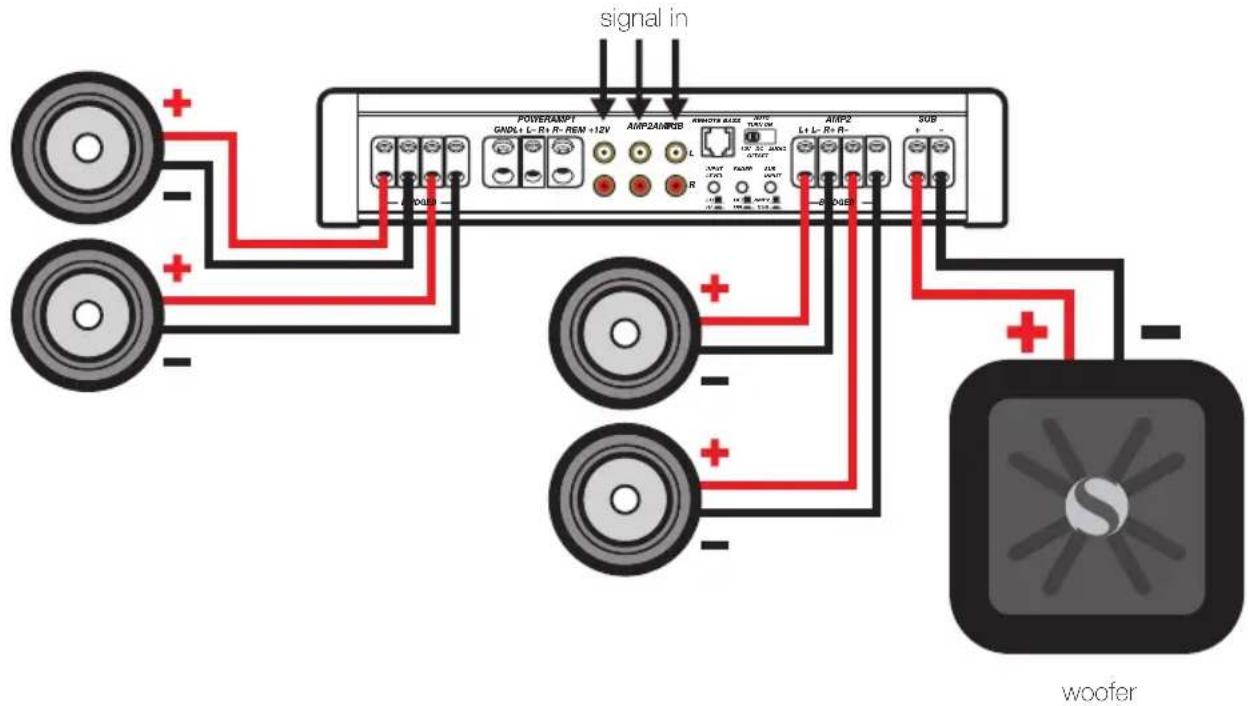
NOTE: minimum impedance of 4 ohms per channel when AMP1 or AMP2 speaker outputs are bridged.


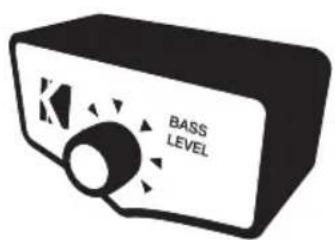
ZXRC REMOTE BASS INSTALLATION
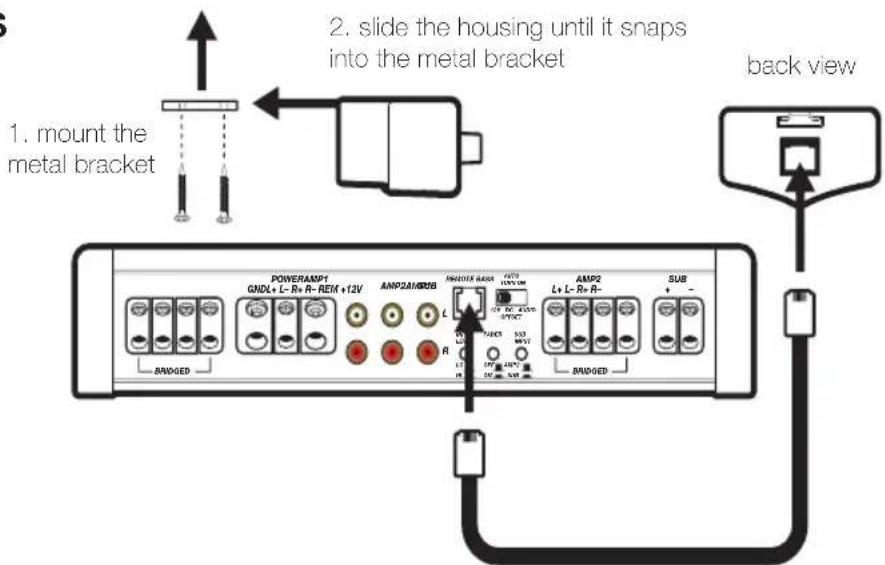
4-conductor phone cable
4
IX AMPLIFIERS
OPERATION
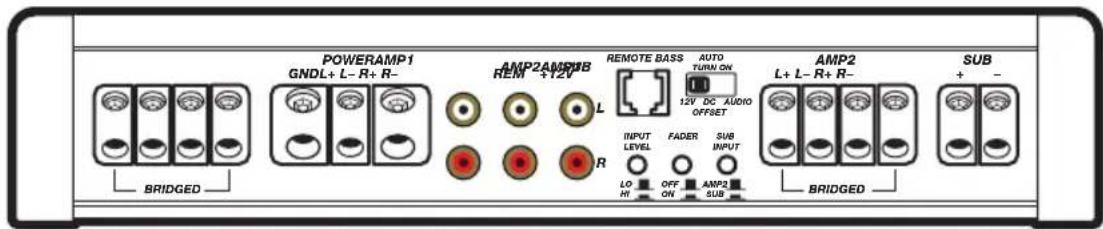
Automatic Turn-On Selection: The IX series offers three different automatic turn-on modes that can be selected on the end panel; +12V, DC Offset, and Audio. Using either the DC Offset or Audio mode causes the REM terminal to have +12V out for tuning on additional amplifiers.
Remote Turn-On: Set the switch to +12V to use the remote turn-on lead from your source unit. Run 18 gauge wire from the Remote Turn-On Lead on your source unit to the terminal labeled REM between the amplifier's positive and negative power terminals. This is the preferred automatic turn-on method.
DC Offset Turn-On: If Remote Turn-On is not an option, the next best setting is DC Offset. The DC Offset mode detects a 6V DC offset from the HI-Level speaker outputs when the source unit has been turned on
- Signal Sense Turn-On: The Audio setting is the final alternative for Automatic turn-on. This is a Signal Sense turn-on method that detects the incoming audio signal from your source unit and automatically turns on the amplifier. This turn-on method will not work properly if the input gain control is not set appropriately.
Input Level: The RCA inputs on KICKER IX amplifiers are capable of receiving either Hi or Low-level signals from your source unit. If the only output available from your source unit is a Hi-Level signal, simply press in the Input Level switch on the amplifier. Refer to the wiring section of this manual for additional instructions.
Fader Switch: Depress the fader switch if you are running two sets of inputs (front and rear for example) to the amplifier. Leave the fader switch OFF if you want to drive all channels from the AMP1 input.
Sub Input: If there is a dedicated output on your source unit for a subwoofer, connect it to the RCA inputs labeled "SUB", and set the SUB INPUT switch to the "SUB" position (depressed). If your source unit does not have a dedicated subwoofer output, set the SUB INPUT switch to the "AMP2" position (unpressed), and make sure your audio source is connected to the "AMP2" RCA inputs.
Remote Bass-ZXRC: When using the remote bass level control, you have the ability to control the output level of the sub channel remotely. To mount the ZXRC remote bass level control, simply screw the metal bracket to the chosen location, then slide the housing onto the bracket until it snaps into place. Run the cable from the controller to the "Remote Bass" jack on the amplifier chassis.
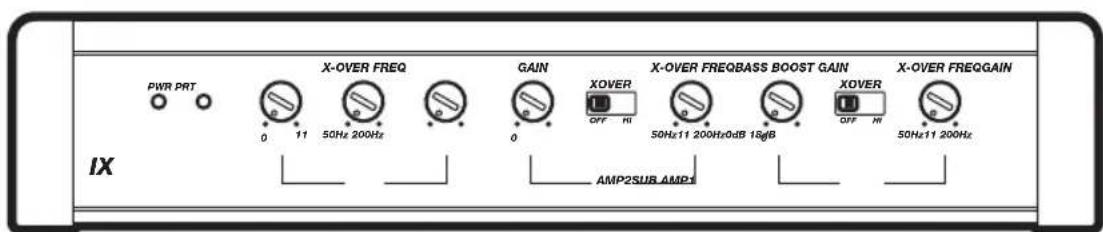
Input Gain Control: The input gain control is not a volume control. It matches the output of the source unit to the input level of the amplifier. Turn the source unit up to about 3/4 volume (if the source unit goes to 30, turn it to 25). Next, slowly turn (clockwise) the gain on the amplifier up until you can hear audible distortion, then turn it down a little.
Crossover Switch: Use the XOVER switch on the end panel of the amplifier to set the internal crossover to OFF, or HI. When the switch is set to OFF, a full bandwidth signal will be amplified. Set the switch to HI if you want the amplifier's internal crossover to serve as a high-pass filter. Never change the crossover "OFF/HI" switch setting with the audio system on!
Crossover Control: The variable crossover on the front of the amplifier allows you to adjust the crossover frequency from 50-200Hz. The setting for this control is subjective; 80Hz is a good place to start.
Bass Boost Control: The variable bass boost control on the front of the amplifier is designed to give you increased output, 0-18dB, at 40Hz. The setting for this control is subjective. If you turn it up, you must readjust the input gain control to avoid clipping the amplifier.
TROUBLESHOOTING
If your amplifier does not appear to be working, check the obvious things first such as blown fuses, poor or incorrect wiring connections, incorrect setting of crossover switch and gain controls, etc. There is an illuminated blue badge on top of the amplifier denoting the power state of the amp in addition to the Protection LED on the end panel of your KICKER IX series amplifier. When the blue badge is lit, this indicates the amplifier is turned on and the amplifier is functioning properly.
BLUE Badge Light off, no output? With a Volt Ohm Meter (VOM) check the following: 1 +12 volt power terminal (should read +12V to +16V) 2 Remote turn-on terminal (should read +12V to +16V) 3 Check for reversed power and ground connections. 4 Ground terminal, for proper conductivity. 5 Check for blown fuses.
BLUE Badge Light on, no output? Check the following: 1RCA connections 2Test speaker outputs with a "known" good speaker. 3Substitute source unit with a "known" good source unit. 4Check for a signal in the RCA cable feeding the amplifier with the VOM meter set to measure "AC" voltage. 5Check polarity of the amplifier inputs if using a bridged configuration.
Protection LED flashing with loud music? The red LED indicates low battery voltage. Check all the connections in your vehicle's charging system. It may be necessary to replace or charge your vehicle's battery or replace your vehicle's alternator.
Protection LED on, no output? ① Amplifier is very hot = thermal protection is engaged. Test for proper impedance at the speaker terminals with a VOM meter (see the diagrams in this manual for minimum recommended impedance and multiple speaker wiring suggestions). Also check for adequate airflow around the amplifier. ② Amplifier shuts down only while vehicle is running = voltage protection circuitry is engaged. Voltage to the amplifier is not within the 10-16 volt operating range. Have the vehicle's charging and electrical system inspected. ③ Amplifier will only play at low volume levels = short circuit protection is engaged. Check for speaker wires shorted to each other or to the vehicle chassis. Check for damaged speakers or speaker(s) operating below the minimum recommended impedance.
No output from one channel? 1 Check the balance control on source unit 2 Check the RCA (or speaker input) and speaker output connections for the channel 3 Swap the RCA (or speaker input) cable from left to right. If the problem changes sides then you have a bad RCA (or speaker input) cable or source unit problem. 4 Swap the speaker output wire from left to right. If the problem changes sides then you have a bad speaker cable, passive crossover network and/or speaker.
Alternator noise-whining sound with engine's RPM? Check for damaged RCA (or speaker input) cable Check the routing of RCA (or speaker input) cable Check the source unit for proper grounding Check the gain settings and turn them down if they are set too high.
Poor stereo image or reduced bass response? Check system phasing by turning the balance control from left to right. If there is more bass output when turned to either side, then check your speaker wiring, passive crossover networks and speaker terminals for proper positive and negative connections. Reverse a speaker connection from positive to negative on the stereo/subwoofer channel(s); if the bass improves, the speaker was out of phase.
No Fader? When using both sets of low-level (RCA) or high-level (speaker wire) inputs, the fader button must be pushed in.
Ground Noise? KICKER amplifiers are engineered to be fully compatible with all manufacturers' head units. Some head units may require additional grounding to prevent noise from entering the audio signal. If you are experiencing this problem with your head unit, in most cases running a ground wire from the RCA outputs on the head unit to the chassis will remedy this issue.
6
IX AMPLIFIERS
Please Note: Modern high performance speakers have a lower DC Resistance than what used to be available. The KICKER Coaxial and Component speakers are rated at four ohms (some DC Resistances may be as low as 3 ohms) and work with any amplifier designed to operate at a four ohm load. If you want to use two KICKER Coaxial or Component speakers on a single channel of your amplifier, wire the speakers in series. This will improve the sound quality, lower the total harmonic distortion and lessen the thermal load at the amplifier. This may prevent an amplifier from shutting down due to over-current protection circuitry.
CAUTION: When jump starting the vehicle, be sure that connections made with jumper cables are correct. Improper connections can result in blown amplifiers fuses as well as the failure of other critical systems in the vehicle.
If you have more questions about the installation or operation of your new KICKER product, see the Authorized KICKER Dealer where you made your purchase. For more advice on installation, click on the SUPPORT tab on the KICKER homepage, www.kicker.com. Choose the TECHNICAL SUPPORT tab, choose the subject you are interested in, and then download or view the corresponding information. Please E-mail support@kicker.com or call Technical Services (405) 624-8583 for unanswered or specific questions.
KICKER will now provide a three-year warranty with all IX-Series Amplifi er purchases paired with a qualifying KICKER Installation Kit* .
This extends the standard warranty by an additional year. Amplifi er and Kit must be purchased from an Authorized KICKER Dealer.
KICKER amplifier success is currently at an unheard-of rate, making the extended warranty program even more beneficial to you.
Using poor-quality, under-spec wiring kits will impede IX amplifier performance.
A superior-quality KICKER installation Kit is guaranteed to extend the life of IX amplifiers.
The new extended warranty applies only to KICKER amplifiers and accessories sold to consumers by Authorized KICKER Dealers in the United States of America or its possessions. It also only applies to the original purchaser of KICKER amplifiers and accessories. One warranty extension per amplifier is allowed regardless of the number of amplifier installation kits purchased. This program does not apply to "B"-stock product or factory-refurbished product.
This offer is for a limited time, so see your local Authorized KICKER Dealer soon for details.
1% THD, CEA-2006 (Watts)
Signal to Noise Ratio -80dB | -70dB CEA-2006 (ref: 1W, A-weighted)
Distribuidor autorizzato de KICKER:
Fecha de compra:
Numero de série del amplifi cador:
RENDIMIENTO
RMS Potencia:
Ancho 7-7/8" (200mm)
1% THD, CEA-2006 (W)
Breite 7-7/8" (200mm)
Frequenzgang ± 1dB 20Hz-20kHz
Largeur 7-7/8" (200mm)
KICKER warrants this product to be free from defects in material and workmanship under normal use for a period of THREE (3) MONTHS from date of original purchase with receipt. When purchased from an Authorized KICKER Dealer it is warranted for TWO (2) YEARS from date of original purchase with receipt. In all cases you must have the original receipt. Should service be necessary under this warranty for any reason due to manufacturing defect or malfunction during the warranty period, KICKER will repair or replace (at its discretion) the defective merchandise with equivalent merchandise at no charge. Warranty replacements may have cosmetic scratches and blemishes. Discontinued products may be replaced with more current equivalent products. This warranty is valid only for the original purchaser and is not extended to owners of the product subsequent to the original purchaser. Any applicable implied warranties are limited in duration to a period of the express warranty as provided herein beginning with the date of the original purchase at retail, and no warranties, whether express or implied, shall apply to this product thereafter. Some states do not allow limitations on implied warranties; therefore, these exclusions may not apply to you. This warranty gives you specific legal rights; however you may have other rights that vary from state to state.
WHAT TO DO IF YOU NEED WARRANTY OR SERVICE:
Defective merchandise should be returned to your local Authorized Stillwater Designs (KICKER) Dealer for warranty service. Assistance in locating an Authorized Dealer can be found at www.kicker.com or by contacting Stillwater Designs directly. You can confirm that a dealer is authorized by asking to see a current authorized dealer window decal.
If it becomes necessary for you to return defective merchandise directly to Stillwater Designs (KICKER), call the KICKER Customer Service Department at (405) 624-8510 for a Return Merchandise Authorization (RMA) number. Package only the defective items in a package that will prevent shipping damage, and return to:
Stillwater Designs, 3100 North Husband St, Stillwater, OK 74075
The RMA number must be clearly marked on the outside of the package. Please return only defective components. The return of functioning items increases your return freight charges. Non-defective items will be returned freightcollect to you. For example, if a subwoofer is defective, only return the defective subwoofer, not the entire enclosure. Include a copy of the original receipt with the purchase date clearly visible, and a "proof-of-purchase" statement listing the Customer's name, Dealer's name and invoice number, and product purchased. Warranty expiration on items without proof-of-purchase will be determined from the type of sale and manufacturing date code. Freight must be prepaid; items sent freight-collect, or COD, will be refused.
WHAT IS NOT COVERED?
This warranty is valid only if the product is used for the purpose for which it was designed. It does not cover:
o Damage due to improper installation
Subsequent damage to other components
o Damage caused by exposure to moisture, excessive heat, chemical cleaners, and/or UV radiation
o Damage through negligence, misuse, accident or abuse. Repeated returns for the same damage may be considered abuse
o Any cost or expense related to the removal or reinstallation of product
o Speakers damaged due to amplifiers clipping or distortion
o Items previously repaired or modified by any unauthorized repair facility
o Return shipping on non-defective items
o Products with tampered or missing barcode labels
o Products returned without a Return Merchandise Authorization (RMA) number
o Freight Damage
o The cost of shipping product to KICKER
o Service performed by anyone other than KICKER

stillwaterdesigns
HOW LONG WILL IT TAKE?
KICKER strives to maintain a goal of 48-hour service for all electronics (amplifiers, crossovers, equalizers, etc.) returns. Delays may be incurred if lack of replacement inventory or parts is encountered. Failure to follow these steps may void your warranty. Any questions can be directed to the KICKER Customer Service Department at (405) 624-8510. Contact your International KICKER dealer or distributor concerning specific procedures for your country's warranty policies.
Note: All specifications and performance figures are subject to change. Please visit www.kicker.com for the most current information.
P.O.Box 459 • Stillwater, Oklahoma 74076 • USA • (405) 624-8510
11X.5-F-20101105
INTERNATIONAL WARRANTY
Contact your International KICKER dealer or distributor concerning specific procedures for your country's warranty policies.
WARNING: KICKER products are capable of producing sound levels that can permanently damage your hearing! Tuming up a system to a level that has audible distortion is more damaging to your ears than listening to an undistorted system at the same volume level. The threshold of pain is always an indicator that the sound level is too loud and may permanently damage your hearing. Please use common sense when controlling volume.
GARANTÍA INTERNACIONAL Version Español

- RMS Power:
- INSTALLATION
- Model External Fuse (sold separate)
- Power/Ground Wire KICKER Wiring Kit
- FOUR CHANNEL OPERATION with SUBWOOFER
- IX AMPLIFIERS
- OPERATION
- TROUBLESHOOTING
- KICKER will now provide a three-year warranty with all IX-Series Amplifi er purchases paired with a qualifying KICKER Installation Kit* .
- RENDIMIENTO
- RMS Potencia:
- WHAT TO DO IF YOU NEED WARRANTY OR SERVICE:
- WHAT IS NOT COVERED?
- stillwaterdesigns
- HOW LONG WILL IT TAKE?
- INTERNATIONAL WARRANTY
- GARANTÍA INTERNACIONAL Version Español
Brand : KICKER
Model : IX1000.5
Category : Car stereo