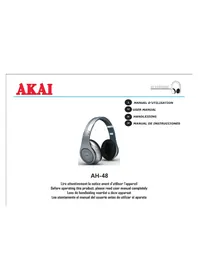
AH48 - Earphones AKAI - Free user manual and instructions
Find the device manual for free AH48 AKAI in PDF.



| Product type | Foldable Bluetooth stereo headset |
| Brand and model | AKAI AH48 |
| Open dimensions | L 193 mm x W 75 mm x H 184 mm |
| Net weight | 266 g |
| Battery life | 4 to 5 hours at maximum volume |
| Battery | Lithium 300 mAh |
| Power supply | DC 5V, 500 mA via power adapter or USB port |
| Speakers | 2 x 2 inches |
| Impedance | 32 Ω |
| Sensitivity | 118 dB ±5 dB / 1 KHz |
| Frequency response | 20 Hz - 20 KHz |
| Connectivity | Bluetooth (A2DP), 3.5 mm line input, micro USB port, MicroSD card reader |
| Main functions | Bluetooth stereo, MP3 mode (MicroSD player), noise reduction, 8-mode equalizer, call handling, foldable design |
| Controls | Bluetooth multifunction button, mode button, previous/next and volume buttons |
| Included accessories | 1 headset, 1 USB cable, 1 audio cable (3.5 mm, 1.5 m), 1 charger, 1 instruction manual |
| Care and cleaning | Wipe with a dry, soft cloth. Do not use solvents or detergents. |
| Safety | Do not use at high volume to protect hearing. Turn off in sensitive areas (hospital, airplane). Keep out of reach of children. |
| Repairability | Reset possible via Reset button. Spare parts not listed. For repair, contact customer service. |
Frequently Asked Questions - AH48 AKAI
User questions about AH48 AKAI
0 question about this device. Answer the ones you know or ask your own.
Ask a new question about this device
Download the instructions for your Earphones in PDF format for free! Find your manual AH48 - AKAI and take your electronic device back in hand. On this page are published all the documents necessary for the use of your device. AH48 by AKAI.
USER MANUAL AH48 AKAI
1 MANUEL D'UTILISATION
14 USER MANUAL
26 HANDLEIDING
38 MANUAL DE INSTRUCCIONES
AH-48
Lire attentivement la notice avant d'utiliser l'appareil Before operating this product, please read user manual completely Lees de handleiding voordat udezze apparaat Lea atentamente elmanual del usuario antes deutilizar el aparato
AKAI
Avant de commencer
Thank you for purchasing the AKAI AH-48 headphones with BLUETOOTH STERO A2DP & media player. This is your assurance of quality, performance and value. Our engineers have included many useful and convenient features in this product.
Please be sure to read this instruction Manual completely to make sure you are getting the maximum benefit from each feature.
This product was manufactured using the highest quality components and standards of workmanship. It was tested by inspectors and found to be in perfect working order before it left our factory. If, after reading this manual, you experience any problems with the operation of this product, please refer to the instructions for obtaining services at the end of this Manual.
For future reference, record the serial number in the space provided.
Model No:AKAI AH-48
Serial Number:
IMPORTANT SAFETY INSTRUCTIONS
- Please read these instructions carefully & completely before using the headphones. According to your local law, please remain focused to ensure safety if you use the Bluetooth headphones when driving.
- Do not use the headphones s in situations in which the impaired perception of noise from the environment could lead to accident such as in traffic or during manual labor.
- Don't let children to play the device. (Small parts may cause shocking hazard).
- In order not to disturb the smooth functioning of electronic devices in places such as a hospital or gas station, please turn off your Bluetooth headset.
- In case you travel, using your Bluetooth headphones is forbidden during the takeoff and the landing of the aircraft.
- If the device is not used for a long time, prior to use it, please charge the headphones before.
- Disassemble and modify the earphone yourself is not allowed, treat it rudely will damage the inner circuit and precise structure.
Establish a safe sound level
Over time your hearing will adapt to continuous loud sounds and will give the impression that the volume has in fact been reduced. What seems normal to you may in fact be harmful. To guard against this before your hearing adapts, set the volume to a low level.
Slowly increase the level until you can hear comfortably and clearly and without distortion. Damage to your hearing is accumulative and is irreversible. Any ringing or discomfort in the ears indicates that the volume is too loud. Once you have established a comfortable listening level, do not increase the sound level.
AKAI
MAINTENANCE
Please keep the headphones dry and don't place them near rain, humidity and other liquid. This will corrode the headphones. If there are wet, please use them when there are totally dry.
- If the cabinet becomes dusty do not wash the headphones with any solvents and cleaning detergent etc. To clean the outside surface of the headphones, use only a dry and soft cloth.
- Never use abrasive cloth; this will damage the finish of your unit.
-
Please don't use the headphones in dusty and dirty place; it may damage the removable parts and electronic components.
-
Don't place the headphones in high temp place, high temperature will shorten the device usage lifetime.
PREPARATION FOR USE
UNPACKING AND SET UP
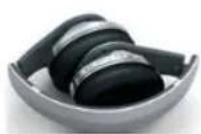
1 FOLDABLE HEADPHONE
1 USB CABLE
1 AUDIO CABLE
1 CHARGER
1USERMANUAL
- Carefully remove all the components from the carton and remove all packing materials from the components. Make sure noting is accidentally discarded with the packing materials.
- Save the carton and the packing materials, if possible, in the unlikely event that the unit ever needs to be returned for service. Using the original carton and packing material is the only proper way to protect the unit from shipping damage.
DESCRIPTION OF UNIT AND CONTROLS
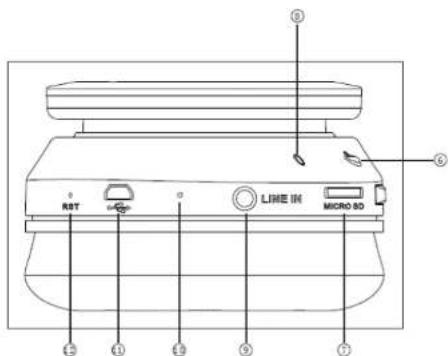
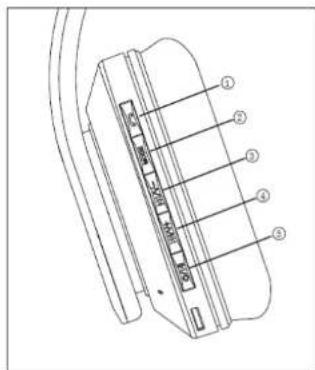
- BLUETOOTH multifunction button
- MODE switch button
- Previous/Volume -
- Next/Volume +
- Play-Pause/Power on-off
-
MICROPHONE (it is activated in CALL mode)
-
RESET
-
MicroSD card slot (TF)
- Indicator LED
- Line in
- NOISE REDUCTION *
-
Micro USB PORT /CHARGER PORT
-
Your headphone AH-48 features a noise reduction built-in. It is activated in Bluetooth mode and improves appreciably the sound quality during your listening.
Button functions:
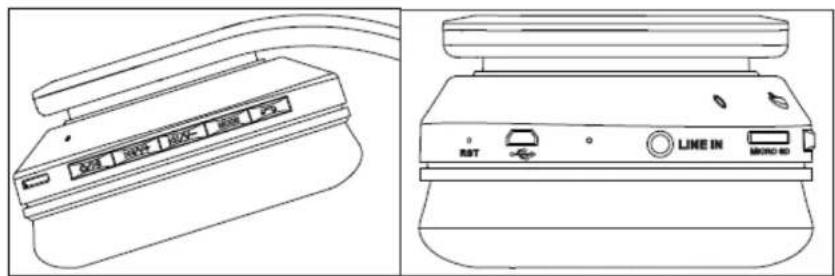
/ : short press to Play/Pause, hold this button to switch off.
/ V + " : short press to play next file, hold it to increase the volume.
- : short press to play previous program, hold it to decrease the volume.
" : hold this button to switch among MP3 mode and Bluetooth mode.
"MODE" Bluetooth multi-function button: short press to pick up or hang up the telephone calling, long press this button (+2 sec) to radial the last phone number.
AKAI
1) To switch on your headphones, press and hold button about 5 seconds, it will enter into Bluetooth mode by default, and the indicator LED will light in blue.
2) To switch off your headphones press and hold button about 3 seconds; the Red LED indicator flashes several times. If the headphones are nearly discharged, the red LED indicator flashes quickly then turn off.
Operation instructions for Bluetooth play mode
Match your Bluetooth Headset
Note: Prior to use Bluetooth headphones to take a call, it should be paired with your mobile phone firstly. ("Match" means establish connection between Bluetooth devices, and your mobile phone stores the headphones unique ID at the same time. Headphones will connect to mobile phone automatically once matched.)
- Put the headphones and mobile phone together (not more than 1 meter in between). When headphones are in power off state, hold Play/Pause button until the blue led flashes, then you can match them.
- Select "Brand-450" on device list, confirm it according to your mobile phone operation.
- Input pass code "0000" and confirm it to connect to headset. Headphones will enter into stand-by status when finished the match. Blue
indicator led flashes. 4. Now you can use Bluetooth headphones to dial number, pick up or hang up mobile phone calling.
Note: for some mobile phone models, when it power on again after power off. Bluetooth headphones will match to mobile phone automatically.
Note: for some mobile phone models, when it power on again after power off, Bluetooth headphones will match to mobile phone automatically.
Pick or hang up a call with Bluetooth headset
When you have a call, you can pick up the call by pressing the Bluetooth button.
- Press Bluetooth button to hang up. If the person you're talking to has already hung up, there is no need to press Bluetooth button to hang up.
- To radial automatically the last number called press and hold Bluetooth button about 2 sec.
- If there is incoming call when music is playing, the music of Micro SD card (TF) will pause and enter into stand-by status. Music resumes once you hang up.
Play/Pause Playback
Once your Bluetooth headphones & your mobile are paired, when music is playing, short press button to pause playback, short press this button again to resume playback.
Volume - button
Under MP3 mode or Bluetooth mode, please short press the KIV button to play automatically the previous track. Press and hold KIV button to decrease the volume.
Volume+
Under MP3 mode or Bluetooth mode, short press button to play automatically the next track. Press and hold the button to increase the volume.
Match and stand by
When you switch on your headphones, it will pair automatically with your mobile you matched last time & enter into standby status once successfully matched.
Operation instruction for MP3 Mode
Insert a Micro card SD (TF) in its slot designed for
- It will play Music automatically if the headphones are not in Bluetooth status. Orange LED will flash slowly.
Short press "O/II", to pause the playback, and press it again to resume playback. - If the headphones are in Bluetooth status, press and hold "MODE" button (about 2 seconds) to switch to MP3 mode, music will play automatically.
Volume
Under Mp3 mode, short press to play automatically the previous track.
Press and hold / button to decrease the volume, the orange LED indicator will flash rapidly.
Volume+
Under MP3 Mode, short press / V+ device will play next music automatically.
Press and hold / V+ button to increase the volume. The LED indicator will flash rapidly in orange.
EQUALIZER FUNCTION
Under MP3 Mode, short press "MODE" button to change sound effect among 8 kinds of EQ options. This function is only available when you play music from MicroSD card (TF). (Natural/Rock/Popular/Classic/Soft/Jazz/XBS Bass/ SRS WOW)
Insert the audio cable into the audio port on headphones, you can listen music from PC and chat on line.
Note: If the Headphones are in another mode when you connect the audio cable, it will exit from the then current mode & switch off after the red led indicator flashes several seconds. You should pull off the audio cable and switch it on again to enter other mode.
Prior to use the headphones the first time, please fully charge the headphones.
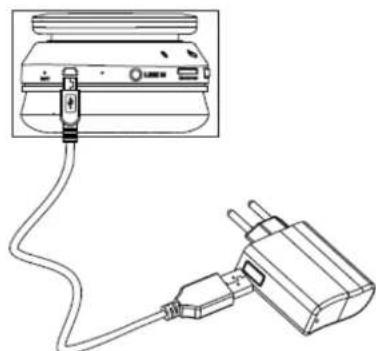
3) Please connect to an AC outlet the power adapter with USB built-in to USB cable. Then connect the other end of your cable (MICRO USB part) to micro USB port on the headphones.
4) When charging, Red LED indicator will flash, and it will continuously light till headphones are fully charged.
Note: The device can be charged by USB cable we when it is connected to computer.
When the battery is fully charged, it will operate during 4 to 5 hours with the maximum volume.
RESET
If your headphones do not operate normally, press the RESET button with a fine tip to reset the integrated electronic circuit.
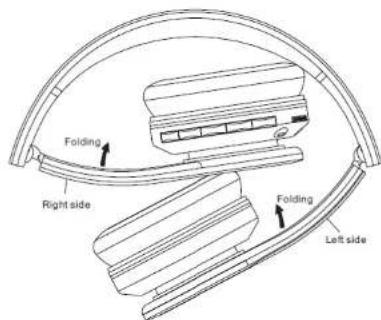
FOLDING HEADPHONES
For an easy storage & transport of your headphones, fold carefully the right and left sides as explained in below diagram
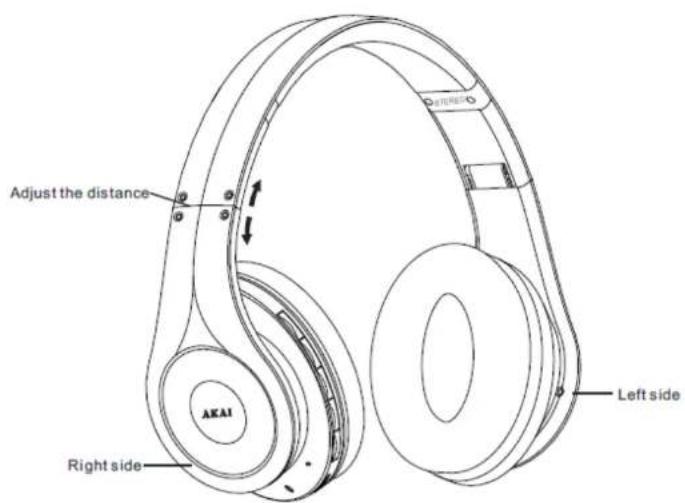
ADJUSTABLE HEADPHONES
Your headphones must fit your head perfectly for a comfortable and faithful music playback.
To put on the headphones, observe the markings L & R inside the headphones to identify the left and right earpiece.
Adjust WITH CAUTION the headphones headband so that the ear cushions completely enclose your ears and the headphones rest perfectly on your head.
TROUBLESHOOTINGGUIDE
| Problems | Solutions |
| If the headphones can't pair with mobile phone | 1) Please ensure that your headphones have matched with mobile phone, and the Bluetooth function in mobile phone had been opened. 2) Please check the distance between headphones and your mobile phone, whether it's beyond 10m, and whether there is wall or other electronic devices blockers etc. |
| If your headphones can't play music normally | 1) Please connect to PC and check the micro SD card (TF card) whether there music stored into it. 2) Please check the music format which stored into the micro SD card (TF card). 3) Please check the power capacity. |
| During calling, there is noise or voice disjointly | 1) Please make sure the distance between your mobile phone and your headphones in valid communicating range (below 10m) 2) To get best timbre during headphones calling, we suggest put your mobile phone on right side to ensure best communication effect. |
TECHNICAL SPECIFICATIONS
| Model Number | AH-48 |
| Power consumption | DC 5V,500MA |
| Speaker Side | 2"×2 |
| Impedance | 32Ω |
| Sensitivity | 118db±5db / 1 KHz |
| Frequency Response | 20 Hz - 20 KHz |
| Connections | MICRO USB portMicro SD cardLine in |
| Battery | Lithium 300 mAh |
| Net Weight | 266g |
| Dimensions of the product opened | L x W x H 193 x 75 x 184mm |
| Accessories | 1 USB CABLE1 AUDIO CABLE (3.5 mm; 1.5 m)1 USER MANUAL1 CHARGER1 FOLDABLE MP3 HEADPHONES |
IMPORTANT: Due to continual revision and improvement on our products design, specifications are subject to change without further notice.
END OF LIFE DISPOSAL
Warning! This logo set on the product means that the recycling of this apparatus comes within the framework of the Directive 2002/96/CE of January 27, 2003 concerning the Waste of Electrical and Electronic Equipment (WEEE).
This symbol means that used electrical and electronic products should not be mixed with general household waste. There is a separate collection system for these products.
If you want to dispose of this equipment, please do not use the ordinary dust bin!
The presence of dangerous substances in the electrical and electronic equipments can have potential consequences on the environment and human health in the cycle of reprocessing this product.
Therefore, at the end of its lifetime, this product shall not be disposed with other non-recycled waste. Used electrical and electronic equipment must be treated separately and in accordance with legislation that requires proper treatment, recovery and recycling of used electrical and electronic equipment.
Local authorities and resellers have set special procedures for the purpose of collecting and recycling this product (please contact your local authority for further details). You have the obligation to use the selective waste collection systems put in place by your local authority.
If your used electrical or electronic equipment has batteries or accumulators, please dispose of these separately beforehand according to local requirements.
- By disposing of this product correctly you will help ensure that the waste undergoes the necessary treatment, recovery and recycling and thus prevent potential negative effects on the environment and human health which could otherwise arise due to inappropriate waste handling.
This unit complies with European Council Directive 2006 / 95 CE (Electromagnetic Compatibility & Low Voltage Directives)