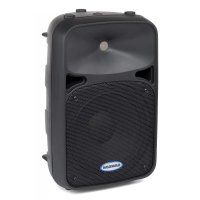
Auro D210 - Loudspeaker SAMSON - Free user manual and instructions
Find the device manual for free Auro D210 SAMSON in PDF.



| Product type | Active 2-way PA speaker |
| Brand | Samson |
| Model | Auro D210 |
| Total power | 200 W (150 W woofer + 50 W tweeter) |
| Woofer | 25 cm (10-inch) long excursion woofer |
| Tweeter | 25 mm compression tweeter |
| Frequency response | 60 Hz - 20 kHz (-3 dB) |
| Maximum SPL | 113 dB SPL @ 1 m |
| Coverage angle | 90° horizontal, 60° vertical |
| Inputs | XLR female and 6.35 mm balanced jack (mic/line) |
| Output | XLR male (Line out) for daisy-chaining |
| EQ | Bass ±15 dB @ 80 Hz, Treble ±15 dB @ 12 kHz (Baxandall type) |
| Limiter | Dual multi-band optical limiter |
| Active crossover | Linkwitz-Riley 24 dB/oct, crossover at 2.1 kHz |
| Power supply | 100-240 V AC, 50/60 Hz, max consumption 300 W |
| Fuse | 100-115 V : T5AL/250V ; 220-240 V : T2,5AL/250V |
| Dimensions (W x D x H) | 292 x 244 x 464 mm |
| Weight | 8.5 kg |
| Baffle material | Ultra-durable, scratch and impact resistant polypropylene |
| Grille | High-strength steel |
| Pole mount | Standard 35 mm |
| Application | Front-of-house or stage monitor (45° angle as monitor) |
| Included accessories | Power cord |
| Care and cleaning | Clean with a damp cloth only |
| Safety | Do not expose to moisture, do not open, refer servicing to qualified personnel |
Frequently Asked Questions - Auro D210 SAMSON
User questions about Auro D210 SAMSON
0 question about this device. Answer the ones you know or ask your own.
Ask a new question about this device
Download the instructions for your Loudspeaker in PDF format for free! Find your manual Auro D210 - SAMSON and take your electronic device back in hand. On this page are published all the documents necessary for the use of your device. Auro D210 by SAMSON.
USER MANUAL Auro D210 SAMSON
200 Watt 2-Way Powered Loudspeakers
Safety Instructions/Consignes de sécurité/Sicherheitsvorkehrungen
WARNING
DO NOT EXPOSE THIS EQUIPMENT
TO RAIN OR MOISTURE
AVIS
RISQUE DE CHOC ELECTRONIQUE
NE PAS OUVRIR
CAUTION
FOR CONTINUED PROTECTION AGAINST RISK
OF FIRE, REPLACE ONLY WITH SAME TYPE FUSE
ATTENTION
UTILISER UN FUSIBLE DE
RECHANGE DE MÉME TYPE

CAUTION
RISK OF ELECTRIC SHOCK
DO NOT OPEN

WARNING: To reduce the risk of fire or electric shock, do not expose this unit to rain or moisture. To reduce the hazard of electrical shock, do not remove cover or back. No user serviceable parts inside. Please refer all servicing to qualified personnel. The lightning flash with an arrowhead symbol within an equilateral triangle, is intended to alert the user to the presence of uninsulated "dangerous voltage" within the products enclosure that may be of sufficient magnitude to constitute a risk of electric shock to persons. The exclamation point within an equilateral triangle is intended to alert the user to the presence of important operating and maintenance (servicing) instructions in the literature accompanying the product.
Important Safety Instructions
- Please read all instructions before operating the unit.
- Keep these instructions for future reference.
- Please heed all safety warnings.
- Follow manufacturers instructions.
- Do not use this unit near water or moisture.
- Clean only with a damp cloth.
- Do not block any of the ventilation openings. Install in accordance with the manufacturers instructions.
- Do not install near any heat sources such as radiators, heat registers, stoves, or other apparatus (including amplifiers) that produce heat.
- Do not defeat the safety purpose of the polarized or grounding-type plug. A polarized plug has two blades with one wider than the other. A grounding type plug has two blades and a third grounding prong. The wide blade or third prong is provided for your safety. When the provided plug does not fit your outlet, consult an electrician for replacement of the obsolete outlet.
- Protect the power cord from being walked on and pinched particularly at plugs, convenience receptacles and at the point at which they exit from the unit.
- Unplug this unit during lightning storms or when unused for long periods of time.
- Refer all servicing to qualified personnel. Servicing is required when the unit has been damaged in any way, such as power supply cord or plug damage, or if liquid has been spilled or objects have fallen into the unit, the unit has been exposed to rain or moisture, does not operate normally, or has been dropped.
If you want to dispose this product, do not mix it with general household waste. There is a separate collection system for used electronic products in accordance with legislation that requires proper treatment, recovery and recycling.
Private household in the 25 member states of the EU, in Switzerland and Norway may return their used electronic products free of charge to designated collection facilities or to a retailer (if you purchase a similar new one).
For Countries not mentioned above, please contact your local authorities for a correct method of disposal.
By doing so you will ensure that your disposed product undergoes the necessary treatment, recovery and recycling and thus prevent potential negative effects on the environment and human health.
Copyright 2011 - Samson Technologies Corp.
Samson Technologies Corp.
45 Gilpin Avenue
Hauppauge, New York 11788-8816
Phone: 1-800-3-SAMSON (1-800-372-6766)
Fax:631-784-2201
www.samsontech.com
V1.2
THIS DEVICE COMPLIES WITH PART 15 OF THE FCC RULES CLASS B. OPERATION IS SUBJECT TO THE FOLLOWING TWO CONDITIONS: (1) THIS DEVICE MUST NOT CAUSE HARMFUL INTERFERENCE, AND (2) THIS DEVICE MUST ACCEPT ANY INTERFERENCE RECEIVED INCLUDING INTERFERENCE THAT MAY CAUSE UNDESIRED OPERATION. SUITABLE FOR HOME OR OFFICE USE.
Table of Contents
Introduction. 5
Auro D208/D210 Features 6
Quick Start. 7
Rear Panel Layout 8
Connecting a Microphone. 9
Connecting a Stereo Signal Source 10
Linking Two Speakers Per Side 11
Positioning the Auro D208/D210 12
Connections. 13
Specifications. 14
Dimensions 15
Introduction
Thank you for purchasing the Samson Auro professional, powered loudspeaker. The Auro D208 and D210 are compact and powerful speaker cabinets featuring 200 watts of bi-amped onboard power. The Auro D208 and D210, respectively, feature 8'' and 10'' heavy-duty, long-excursion woofers, as well as 1'' high frequency drivers on 1'' throat wide dispersion horns. The speaker cabinets provide both XLR and 1/4'' phone jacks that handle microphone or line level inputs. The XLR Line Output allows you to "daisy-chain" multiple Auro cabinets together to create larger sound reinforcement systems.
For added speaker protection, the Auro D208 and D210 feature dual optical limiters that keep your speaker sounding perfect at any level, and the integrated two-band equalizer allows you to sculpt the mix to your desired sound. The cabinet's shape has been designed to be configured for either front-of-house use, or for operation as a wedge-style monitor. In addition, the Auro D208 and D210 can be easily stand mounted using the integral 13/8'' pole mount receptacle.
Each Auro PA system's durable enclosure is made of high-impact polypropylene with a scuff-resistant textured finish, and include a heavy-grade steel grill, offering excellent protection against wear and tear for truly portable audio. The Auro active monitors are ideal for live music, DJ, lecture, and installed sound applications, or anywhere serious power and superior sound quality are desired.
In these pages, you'll find a detailed itemization of the features of the Auro PA stracystem, as well as a description of its front and rear panels, step-by-step instructions for its setup and use, and full specifications. You'll also find a warranty card enclosed—please don't forget to fill it out and mail it in so that you can receive online technical support, and so that we can send you updated information about this and other Samson products in the future. Also, be sure to check out our website (www.samsontech.com) for complete information about our full product line.
With proper care and adequate air circulation, your Auro cabinet will operate trouble free for many years. We recommend you record your serial number in the space provided below for future reference.
Serial number:
Date of purchase:
Should your unit ever require servicing, a Return Authorization (RA) number must be obtained before shipping your unit to Samson. Without this number, the unit will not be accepted. Please call Samson at 1-800-3SAMSON (1-800-372-6766) for an RA number prior to shipping your unit. Please retain the original packing materials and, if possible, return the unit in the original carton and packing materials. If you purchased your Samson product outside the United States, please contact your local distributor for warranty and service information.
Auro D208/D210 Features
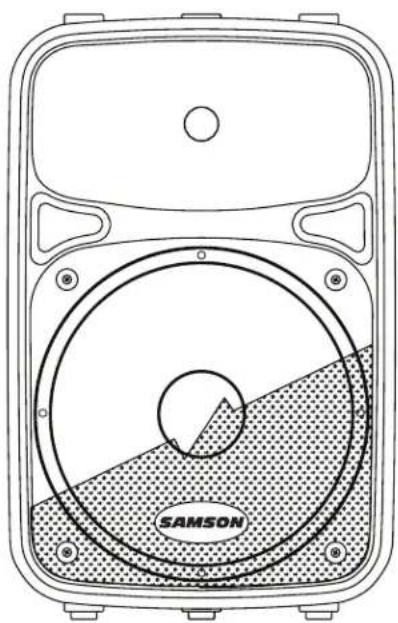
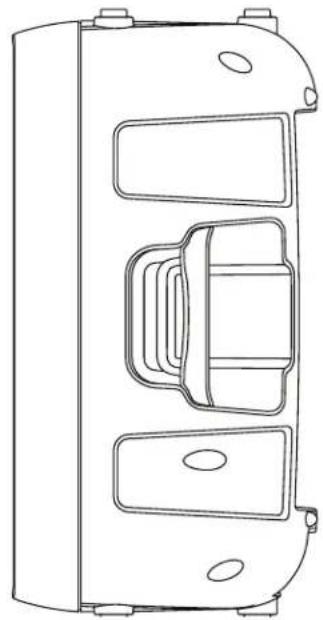
Here is a look at some the features of the Auro powered loudspeakers:
200 watt, two-way active loudspeakers for live sound applications
150W LF + 50W HF power amplifiers (peak)
- Ultra-wide, flat frequency response
- Custom-designed, heavy-duty, 8''/10'' long throw low frequency drivers provide enhanced bass response
1" high frequency driver with 1" throat for smooth high-end reproduction
Balanced Mic/Line input with Volume control and Peak LED
Two-band LF and HF shelving equalizer
XLR Line Output connectors to "daisy-chain" multiple Auro cabinets
Multi-band dynamics processing with audibly transparent limiting
- Internal 24 dB/octave time aligned electronic crossover
- 35^ monitor angle for the D208 and 45^ degree monitor angle for the D210
- Standard 1 3/8-inch (35mm) speaker stand receptacle
- Versatile, portable design with integrated side handles
- Tuned, ported bass reflex design for extended low end
Rugged, lightweight polypropylene cabinet construction
Quick Start
The following steps will help you set up your Auro D208/D210 loudspeakers.
Setup
- Turn the Level control on the rear panel fully counterclockwise.
- Set the Bass and Treble EQ controls to the 12 o'clock position.
- Turn the Power switch OFF.
Connections
- Connect either a line-level signal from your mixer (or other source) or a microphone to the Input jack on the Auro D208/D210 rear panel.
- Connect the supplied power cable to the IEC socket on the back of the loudspeaker. Plug the power cable into an AC outlet.
- Note: Always make sure that the AC outlet is configured with the correct voltage as indicated on the rear panel of the Auro loudspeaker.
Operation
- Switch the Auro's Power switch to the ON position.
- Run an audio signal from your mixer, or talk into the microphone.
- Slowly raise the Auro's Level control until you have reached the desired level.
- If the volume from the speakers gets really loud, or you see the Peak indicator blinking frequently, turn down the Level control on the Auro D208/D210 a little until the Peak indicator does not light, or only lights occasionally with signal peaks.
Rear Panel Layout
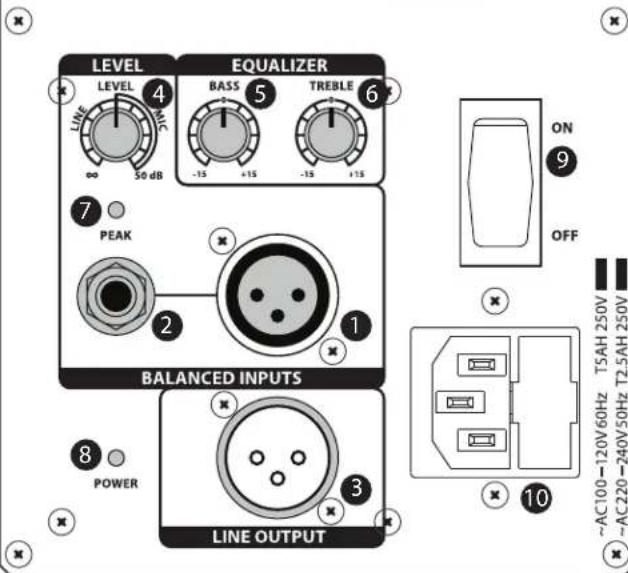
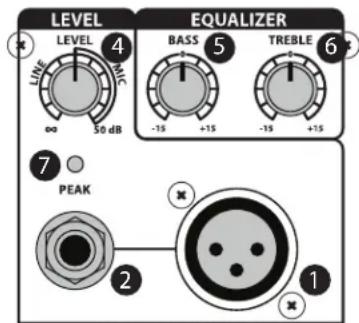
1. XLR Input Connector
This female XLR connector accepts either a balanced microphone or line level signal.
2. 1 / 4'' Input Connector
Use this 1/4'' input for connecting balanced microphone or balanced and unbalanced line level inputs.
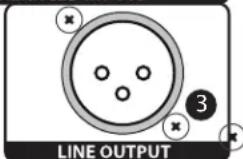
3. Line Output
Male XLR connector used to link multiple Auro cabinets.
4. Level Control
This control adjusts the overall signal level at the input of the power amplifiers. For attenuating a line level signal, turn the control from fully counter-clockwise until 12 o'clock. For a mic level signal turn the Level control past 12 o'clock.
5. Bass EQ Control
This controls the low band of the loudspeaker equalizer, +/- 15 dB at 80 Hz.
6. Treble EQ Control
This controls the high band of the loudspeaker equalizer, +/- 15 dB at 12 kHz.
7. Peak Indicator
This RED LED lights when the amp is near the clipping point. If the Peak indicator lights frequently, turn down the Level control on the Auro loudspeaker or turn down the signal at the source, until the indicator does not light anymore, or lights occasionally with signal peaks.
8. Power Indicator
This LED lights GREEN when amp is active.
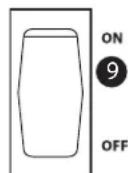
9. Power Switch
Switches on the Auro's main power.
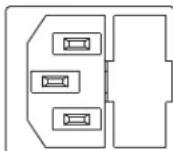
10. AC Power Inlet
Connect the supplied standard IEC AC power cable here.
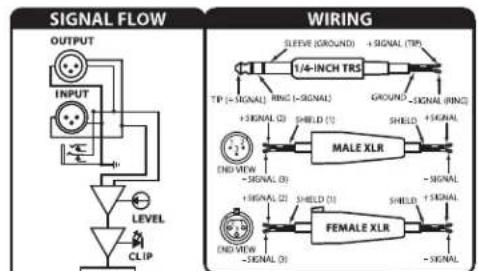
200 WATT POWERED SPEAKER CABINET
CROSSOVER
DESIGNED AND ENGINEERED IN THE UNITED STATES BY SAMSON TECHNOLOGIES
Connecting a Microphone
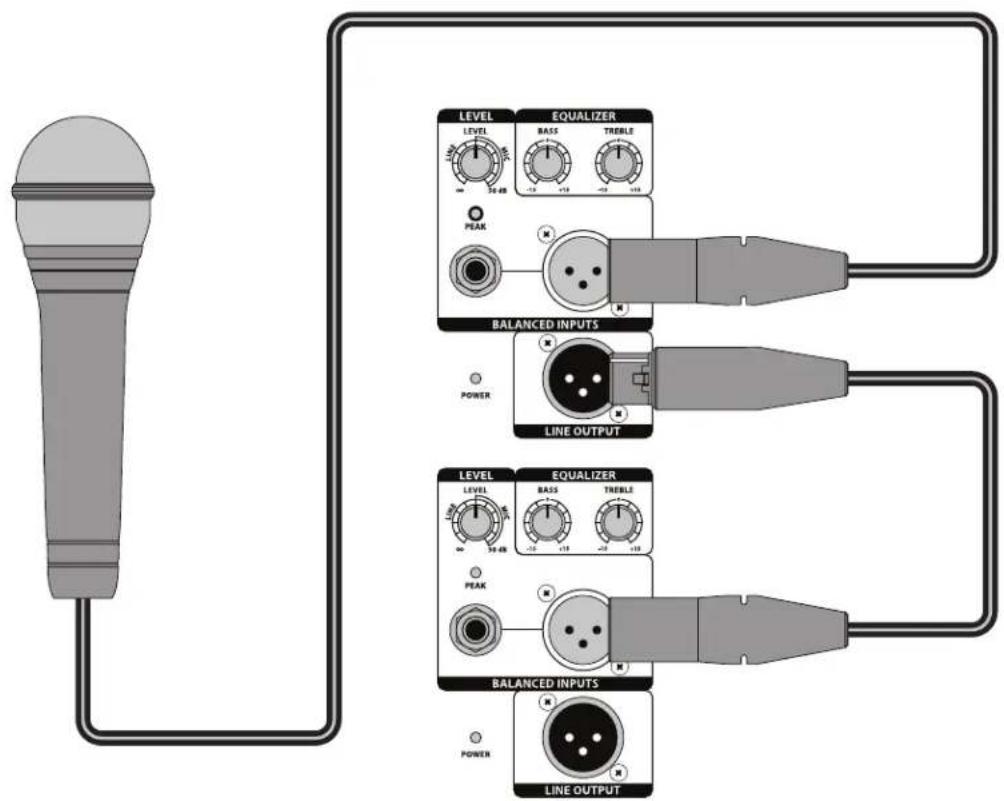
Using a Microphone
- Be sure that the Auro D208/D210 Power switch is set to the off position.
- Turn the LEVEL control fully counterclockwise to the off position.
- Connect the power cable to an AC socket.
Using a standard XLR cable, plug a microphone into the Auro's XLR INPUT. - Switch the Power switch to the ON position.
While speaking or singing into the microphone, slowly raise the LEVEL control until you have reached the desired level. - For larger sound reinforcement you can run several monitors using the Line Output to daisy-chain one Auro to another.
Connecting a Stereo Signal Source
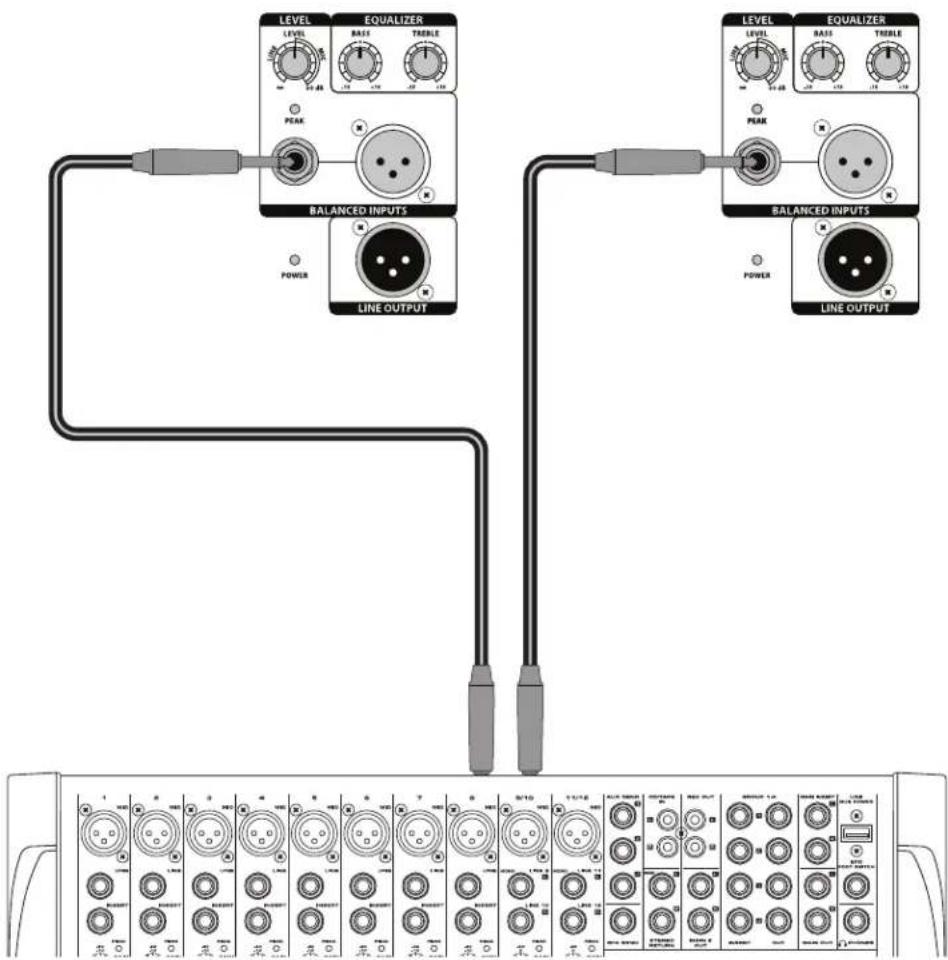
Using a Stereo Line Level Signal
- Be sure that the Auro D208/D210 Power switch is set to the off position.
- Turn the LEVEL control fully counterclockwise to the off position.
- Connect the power cable to an AC socket.
- Using standard XLR or 1/4'' cables, connect the line level signals from a mixer or keyboard into the Auro Inputs.
- Switch the Power switch to the ON position.
Now, run an audio signal from your mixer (like music from a CD) while slowly raising the Auro's Level control until you have reached the desired level.
Linking Two Speakers Per Side
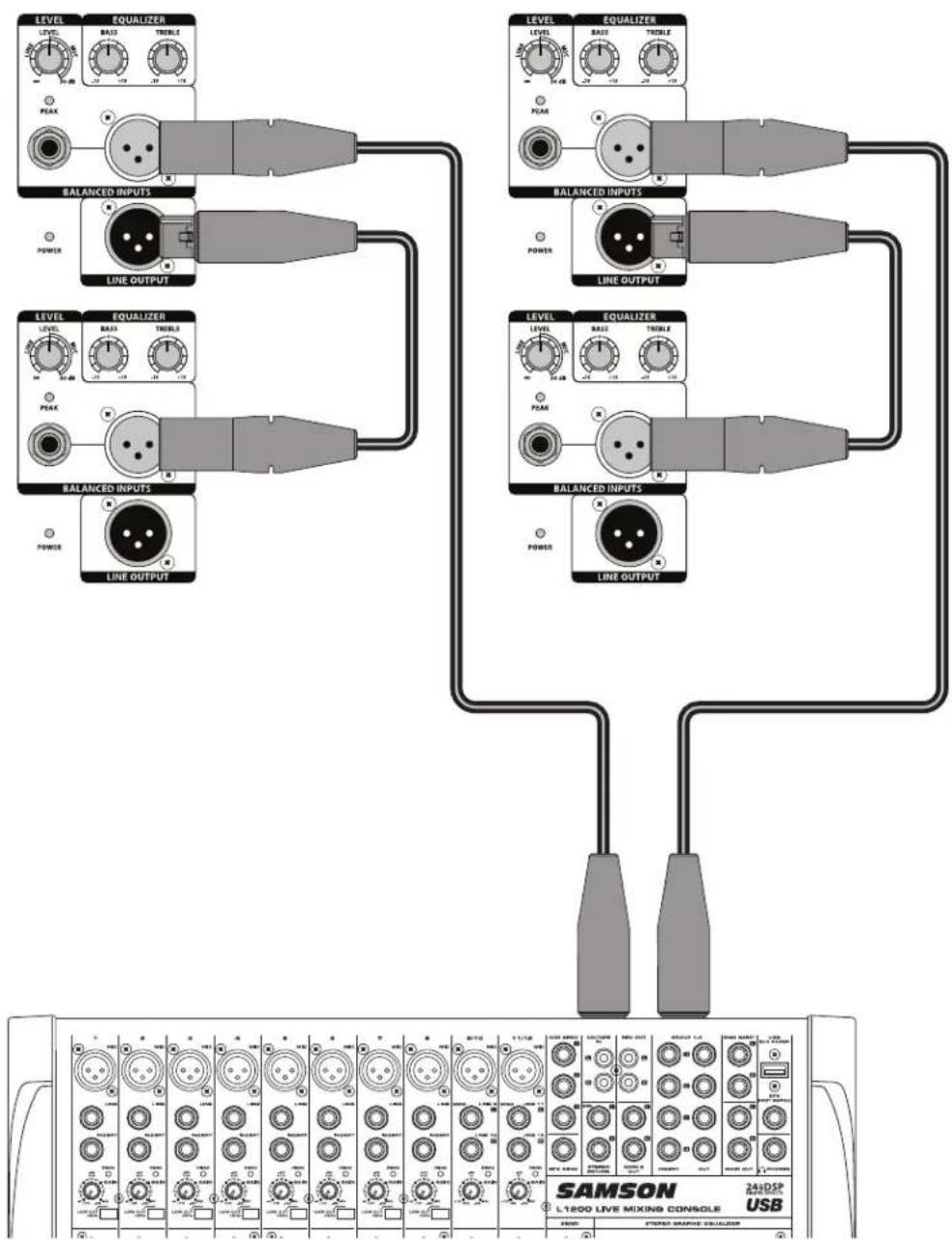
Linking two Auro cabinets per side:
- Turn the LEVEL control fully counterclockwise to the off position.
- Connect the left and right line-level outputs from a mixer to the inputs of two Auro loudspeakers.
- Feed the Line Outputs to another pair of Auro loudspeaker inputs.
Now, run an audio signal from your mixer (like music from a CD) while slowly raising the Auro's Level control until you have reached the desired level.
Positioning the Auro D208/D210
Speaker Placement
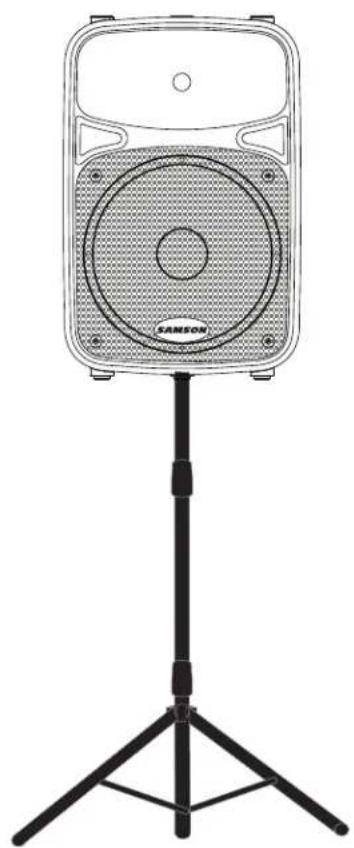
Whenever possible, it is a good idea to raise the speakers above the heads of the listening audience. The Auro enclosures feature standard 13/8'' pole mount receptacles, which are compatible with speaker stands from a variety of manufacturers. In a smaller setting like a school cafeteria, library, or a mall kiosk, you can also use the Auro loudspeaker in one of the tilt back monitor positions, which will improve the projection of the speakers and may eliminate the need for speaker stands.
Note: When using a speaker pole mount, be sure the pole is capable of supporting the weight of the Auro loudspeaker.
Note: Always have another person to assist when mounting the Auro speaker onto a speaker stand, or when adjusting the stand while the speaker is mounted on the stand.
Using the Auro D208/D210 as a Floor Monitor
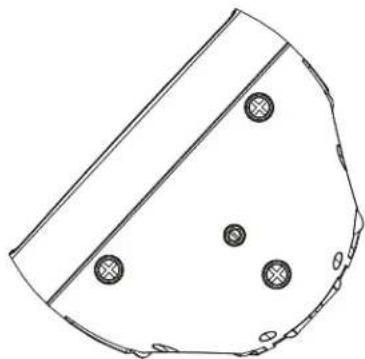
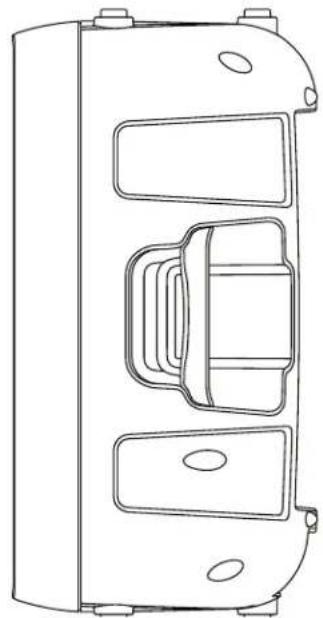
The Auro D208/D210 is an ideal solution for stage monitoring and thanks to its unique design, can be placed on its side to be used as a wedge monitor. The Auro D208 features a 35^ monitor position, and the Auro D210 features a 45^ monitor position.
Connections
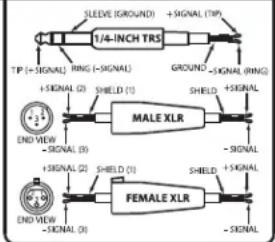
The Auro D208/D210 features balanced inputs and outputs, so connecting balanced and unbalanced signals is acceptable. Whenever possible, use balanced connections to other equipment to suppress interference.
Unbalanced 1/4'' Connector
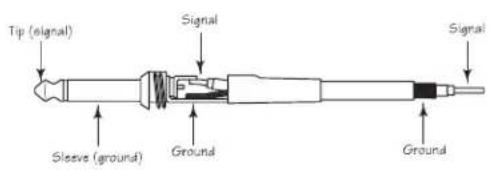
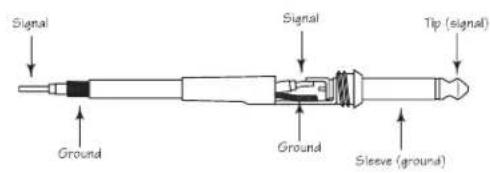
Balanced TRS 1/4" Connector
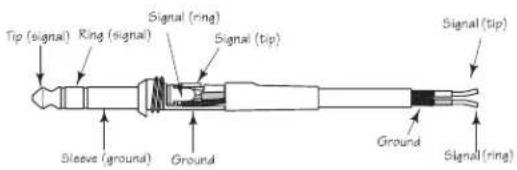
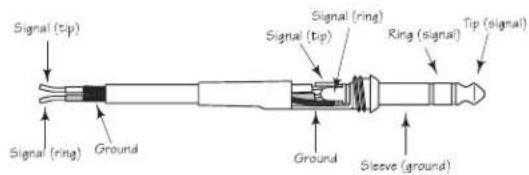
XLR to XLR Balanced
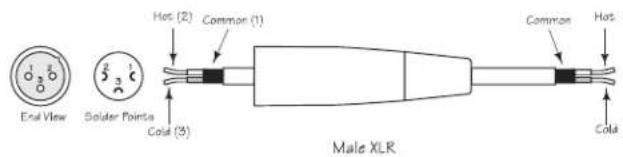
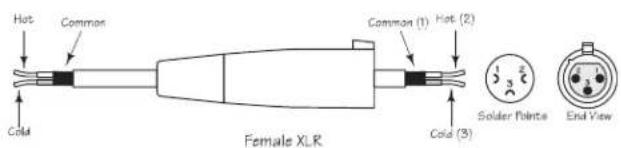
Unbalanced 1/4'' Connector to RCA
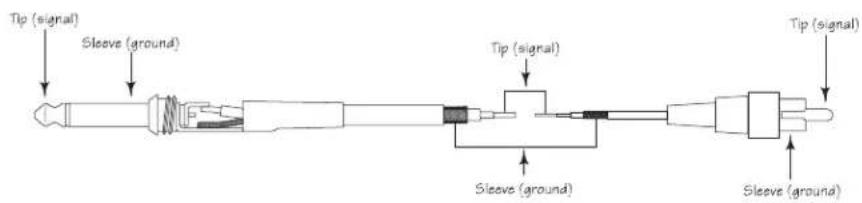
XLR to Balanced 1/4-Inch

Specifications
| D208 D210 | |||
| Output Power | |||
| Low Frequency | RMS Power 135 | W @ 8 ohms | |
| Peak Power 160 | W @ 8 ohms | ||
| THD < 1 % | |||
| High Frequency | RMS Power 20 | W @ 8 ohms | |
| Peak Power 40 | W @ 8 ohms | ||
| THD < 1 % | |||
| Transducers | |||
| Low Frequency 8" bass transducer 10" | bass transducer | ||
| High Frequency 1" (25 mm) high frequency driver | |||
| Acoustic Performance | |||
| Frequency Response (-3 dB) 64 Hz to 20 kHz 60 Hz to 20 kHz | |||
| Maximum Sound Pressure Level 113 dB SPL @ 1 m 113 d SPL @ 1 m | |||
| Limiter | Optical | ||
| Horizontal Coverage Angle | 90° | ||
| Vertical Coverage Angle | 60° | ||
| Electronic Crossover | |||
| Crossover Type | 24 dB/oct Linkwitz-Riley | ||
| Crossover Frequency | 2.1 kHz | ||
| Input/Output | |||
| Inputs | Balanced XLR & 1/4" Mic/Line Connectors | ||
| Output | Balanced XLR Line Output | ||
| Equalization | |||
| High | ±15 dB @ 12 kHz, shelving | ||
| Low | ±15 dB @ 80 Hz, shelving | ||
| Power Supply | |||
| Power Consumption | 300 W max. | ||
| AC Connector | 3-pin IEC 250 VAC, 20 A male | ||
| Fuse | 100 - 115 VAC T5AL / 250 V | ||
| 220 - 240 VAC T2.5AL / 250 V | |||
| Dimensions and Weight | |||
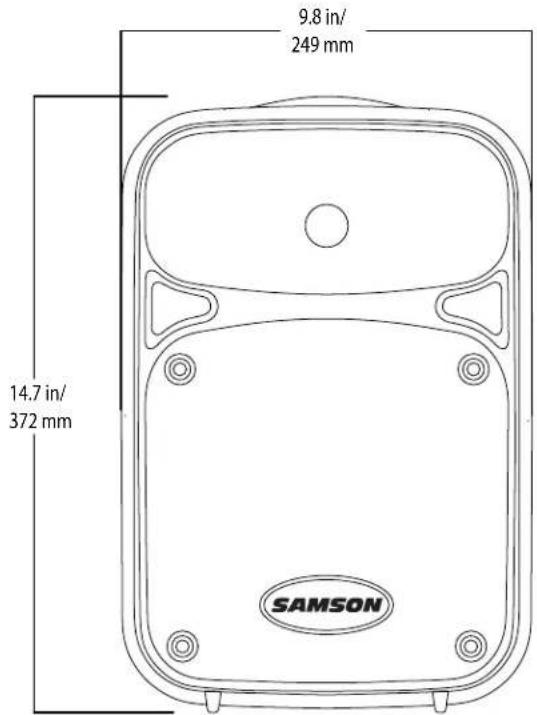
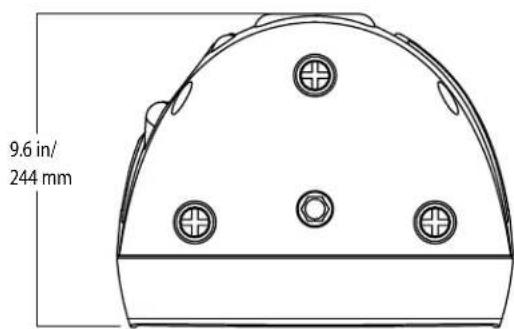
| Dimensions | in | 9.8"L x 8.0"W x 14.7"H | 11.5"L x 9.6"W x 18.3"H |
| mm | 249 mm L x 205 mm W x 372 mm H | 292 mm L x 244 mm W x 464 mm H | |
| Weight | lbs | 14.7 18.8 | |
| kg | 6.66 8.52 | ||
| Mounting | |||
| Mounting Method | Integral 1 3/8" Pole Mount Receptacle | ||
| Fly Point | 1 | ||
Specifications are subject to change without notice.
Dimensions
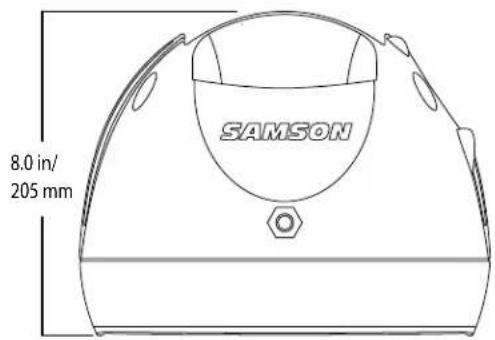
D208
D210
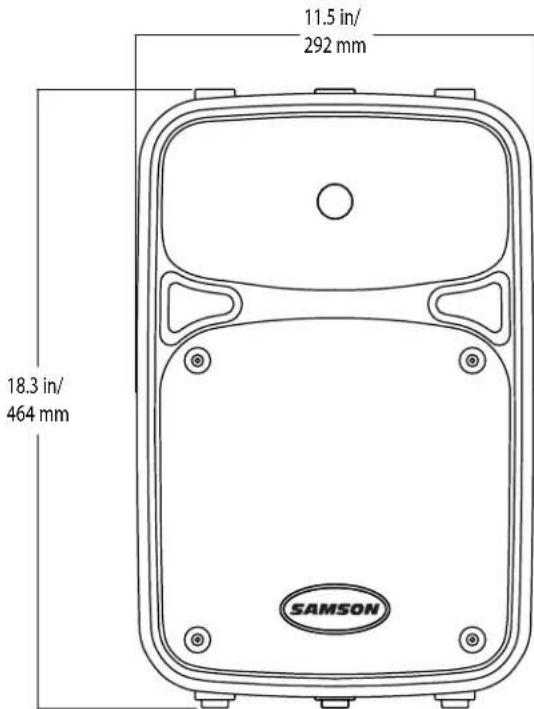
Table des matieres
Place I'Auro sous/hors tension.
10. Embase secteur
Auro D208/D210 Features
200 WATT POWERED SPEAKER CABINET
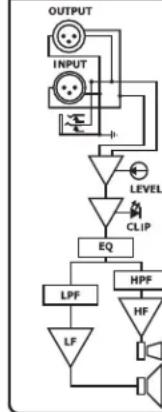
SIGNAL FLOW
WIRING
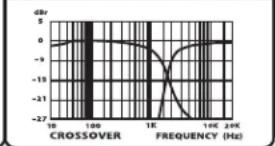
CROSSOVER


DESIGNED AND ENGINEERED IN THE UNITED STATES BY SAMSON TECHNOLOGIES
BALANCED INPUTS
10
10AC100 120V60Hz T5AH 250V U1 10AC220 240V50Hz T2.5AH 250V U1

XLR a XLR balanceado

Conector de 6,3 mm no balanceado a RCA
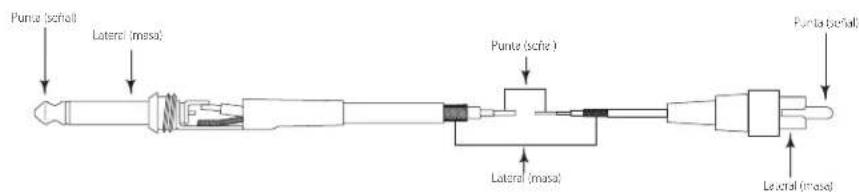
XLR a 6,3 mm balanceado


- Safety Instructions/Consignes de sécurité/Sicherheitsvorkehrungen
- WARNING
- AVIS
- CAUTION
- ATTENTION
- Important Safety Instructions
- Table of Contents
- Introduction
- Auro D208/D210 Features
- Quick Start
- Setup
- Connections
- Operation
- Rear Panel Layout
- XLR Input Connector
- 1 / 4'' Input Connector
- Line Output
- Level Control
- Bass EQ Control
- Treble EQ Control
- Peak Indicator
- Power Indicator
- Power Switch
- AC Power Inlet
- Connecting a Microphone
- Using a Microphone
- Connecting a Stereo Signal Source
- Linking Two Speakers Per Side
- Positioning the Auro D208/D210
- Speaker Placement
- Using the Auro D208/D210 as a Floor Monitor
- Dimensions
- Table des matieres
- Embase secteur
Brand : SAMSON
Model : Auro D210
Category : Loudspeaker